healthtech
5 TopicsWork IQ now generally available in Dragon Copilot
This blog is co-authored by Hadas Bitran, Partner GM, Health AI, Microsoft Health & Life Sciences Earlier this year, we introduced the private preview of Microsoft 365 information in Dragon Copilot. Today, we are excited to announce the general availability of Work IQ in Dragon Copilot. During a consultation, relevant work information may be distributed across email, Teams chats, SharePoint, and OneDrive. Clinicians may need to look across these sources to find information relevant to the consultation. With Work IQ, clinicians can find relevant Microsoft 365 information directly in Dragon Copilot Chat and review references to the original sources. Bringing Microsoft 365 into the consultation In the example below, a clinician asks Dragon Copilot to find the email in their inbox about the Descartes-08 CAR-T AURORA trial for generalized myasthenia gravis, summarize the study's inclusion and key exclusion criteria for clinician review, and draft a note inviting the patient to learn more. Work IQ retrieves the relevant email, and Dragon Copilot Chat returns the criteria as a structured summary along with a draft patient note for the clinician to review and edit. The reference at the end of the response links back to the source email, so the clinician can verify the information before using it. izing clinical trial criteria from an email and drafting a patient note, with a reference to the source email In a second example, a clinician asks Dragon Copilot who is on call today for cardiology. Work IQ searches the clinician's Teams information, finds the weekly on-call schedule and combines them. Dragon Copilot Chat answers that Dr. Sasa Matic is covering today for Dr. Liisi Pyysalo, notes that the update supersedes the original schedule, and lists the source Teams messages under References so the clinician can verify the answer. Built around existing Microsoft access controls Healthcare organizations need clear control over access to sensitive work information. Work IQ uses existing Microsoft 365 identity, privacy, and compliance controls, rather than creating a separate way to access that information. Administrators can enable Work IQ in the Dragon Admin Center and complete the required Microsoft 365 consent as part of the setup experience. Once Work IQ is available to end-users, clinicians can choose whether to enable it in Dragon Copilot Chat. The setup experience asks the clinician to provide the required consent before Work IQ can access Microsoft 365 information for their requests. Work IQ acts on behalf of the signed-in user and uses their existing Microsoft 365 permissions when retrieving information. Enabling Work IQ does not change existing access to emails, chats, or files. Getting started Work IQ in Dragon Copilot uses Copilot Credits for usage-based billing. To make it available, administrators need to enable the integration and set up billing for the users who will use it. Check access: Confirm that the intended users have Microsoft 365 accounts and Dragon Copilot access. Enable Work IQ: Turn on the integration in Dragon Admin Center and complete the required admin consent. Set up Copilot Credits: Choose a supported billing method and make sure the intended users are covered by a spending policy for Work IQ. Clinicians can then choose to connect their Microsoft 365 information in Dragon Copilot. Start using Work IQ Ready to bring Microsoft 365 work information into Dragon Copilot? Ask your Dragon Copilot administrator to enable Work IQ for your organization and get started! Disclaimer Microsoft products and services (1) are not designed, intended, or made available as a medical device, and (2) are not designed or intended to be a substitute for professional medical advice, diagnosis, treatment, or judgment and should not be used to replace or as a substitute for professional medical advice, diagnosis, treatment, or judgment. Customers/partners are responsible for ensuring solutions comply with applicable laws and regulations.Enhancing Healthcare AI with Model Context Protocol and Semantic Kernel
AI in healthcare isn’t just about chatbots or summarizing clinical notes anymore. We’re entering an era where AI must act—connecting to enterprise systems, pulling live data, and executing workflows—all while respecting the complex and high-stakes environment of healthcare. That’s where Microsoft’s Model Context Protocol (MCP) and the Semantic Kernel SDK come in. The full article is here: https://pauljswider.substack.com/p/enhancing-healthcare-ai-with-model Not trying to spam. I was receiving errors when I attempted to copy here. Feedback is appreciated.528Views0likes0Comments*Updated on 1/06/2021* Quick Start: Setting Up Your COVID-19 Healthcare Bot
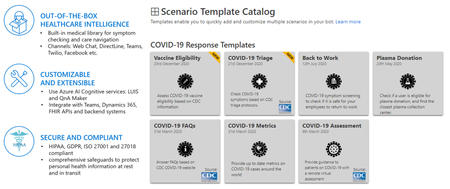
The Healthcare Bot Service is an AI-powered, extensible, secure and compliant healthcare experience. Microsoft now has a specific template pre-built for COVID-19. It takes inbound requests, asks about the patient’s symptoms, and assists in getting people access to trusted and relevant healthcare services and information based on the CDC recommendation.32KViews6likes21Comments