guides
3 Topics🆕 Microsoft Q&A Platform Update
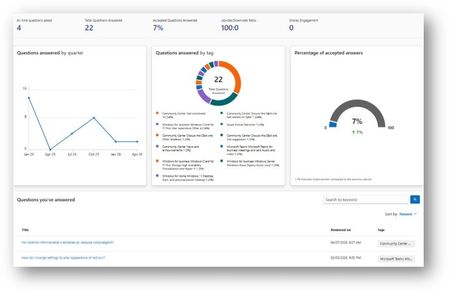
We’re excited to introduce a new capability on Microsoft Q&A that provides contributors with greater visibility into their activity and impact. 📊 Contributor Analytics Dashboard The Contributor Analytics Dashboard is now available on Microsoft Q&A within Microsoft Learn, offering a self-serve experience to track contributions and engagement. This new experience was built to improve transparency and make it easier for contributors to understand the value of their participation across the platform. 🔎 How to access Click your Learn profile avatar Select Analytics 📈 What you can track The dashboard surfaces key metrics to help you measure your impact: Number of answers provided Acceptance rate Views and votes Activity trends over time Content engagement signals These insights allow contributors to better understand performance and track progress over time. ✅ Who can use it The dashboard is currently available to contributors who have answered at least one question on Microsoft Q&A. 💡 Why this matters This update brings: Increased visibility into your contributions A centralized view of your activity (no more manual tracking) Better understanding of your impact across the community Stronger recognition and motivation for continued contributions 🔄 What’s next The experience will continue to evolve, with additional enhancements planned based on contributor feedback. 🙌 For Product Champions This dashboard is especially valuable as you: Track your growth within the program Measure impact for recognition and rewards Monitor your contribution consistency across product tracks As our program grows, transparency like this helps ensure that quantity transforms into quality and that your contributions are clearly recognized.Writing High‑Quality Answers on Microsoft Q&A
Overview High‑quality answers are the foundation of Microsoft Q&A. They help resolve issues faster, support learners at every level, and play a key role in recognition within the Product Champions Program. This article highlights practical, proven practices that help contributors write answers that are clear, useful, and more likely to be accepted—so your expertise has real impact across the community. What Makes a High‑Quality Answer? Great answers do more than respond—they guide. Strong answers on Microsoft Q&A are: ✅ Clear and Focused Directly address the question being asked Explain the solution in straightforward, easy‑to‑follow language Stay focused on the issue without speculation or unrelated details ✅ Actionable Include clear steps, examples, or configuration guidance Explain why a solution works when context adds value Reference official Microsoft documentation when helpful ✅ Accurate Align with the product, scenario, and context of the question Stay within scope and avoid assumptions beyond what’s provided Answer vs. Comment: Knowing the Difference Choosing the right response type keeps Q&A threads clean and effective. Answer — Use when you’re providing a solution or clear resolution Comment — Use when you need clarification, logs, or additional details This helps accepted answers stand out and makes threads easier to follow. How to Structure an Effective Answer Well‑structured answers are easier to read—and more likely to be accepted. Aim to include: A brief explanation of the issue Clear, step‑by‑step guidance Optional links or next steps for deeper learning Simple structure goes a long way. Tags and Product Alignment Microsoft Q&A uses a structured tagging system to connect questions with the right experts. Your answer should always align with the product and scenario defined by the selected tag to ensure accuracy and relevance. Why This Matters for Product Champions Consistently high‑quality answers: Are more likely to be accepted Help contributors progress through Champion levels Increase visibility, credibility, and community impact Every strong answer helps learners—and strengthens the Q&A ecosystem. Additional Learning To continue building your skills as a contributor, explore the official Microsoft Q&A Contributor Guide, which covers best practices, standards, and additional tips for success.End of Year Guide for Educators and IT Admins
It's that time of the year for northern hemisphere schools! Time to plan your end of year activities, close out the current school year and ensure you are set-up for success in the new school year or for summer school. Checkout our new End of Year Guide for some quick tips on getting back into the swing of things!11KViews5likes6Comments