github actions ci
2 Topics
CI/CD for On-Premises SQL Server using GitHub Actions
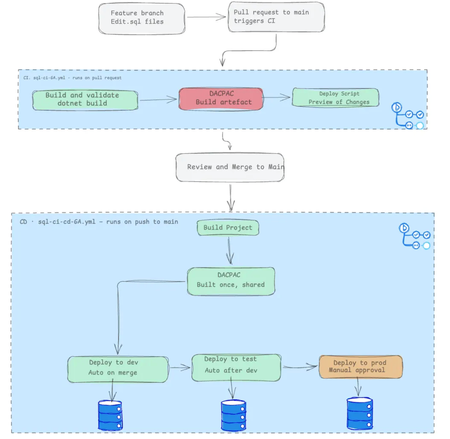
Unlike cloud-managed databases, implementing CI/CD for on-premises SQL Server is notoriously tricky, and there are few tutorials that provide an end-to-end guide. I recently built a complete three-environment pipeline (dev → test → prod) using GitHub Actions, DACPACs, and self-hosted runners, and I've documented the entire journey. The Core Challenge: Manual deployments are error-prone. Wrong connection strings, stale artifacts, skipped validation, or deploying to the wrong environment. Every step is a failure point. The Solution: A declarative SQL database project model where every table, view, and stored procedure lives in version-controlled .sql files. The tooling calculates what's changed and generates a DACPAC—a compiled schema artifact that's built once and deployed identically across all environments. The Pipeline: CI (Pull Request): Build validates syntax and references and generates a deployment script for human review so you have an understanding of what has changed. CD (Merge to Main): Build the DACPAC once, then deploy automatically through dev and test, with a manual approval gate protecting the production environment. The article walks through every step from manual deployment to a fully automated pipeline so you understand not just the what, but the why. Read the full story here8Views0likes0CommentsBuild and Deploy a Microsoft Foundry Hosted Agent: A Hands-On Workshop
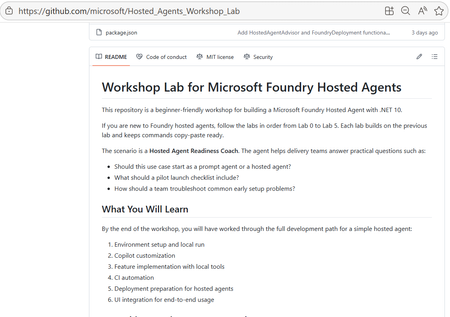
Agents are easy to demo, hard to ship. Most teams can put together a convincing prototype quickly. The harder part starts afterwards: shaping deterministic tools, validating behaviour with tests, building a CI path, packaging for deployment, and proving the experience through a user-facing interface. That is where many promising projects slow down. This workshop helps you close that gap without unnecessary friction. You get a guided path from local run to deployment handoff, then complete the journey with a working chat UI that calls your deployed hosted agent through the project endpoint. What You Will Build This is a hands-on, end-to-end learning experience for building and deploying AI agents with Microsoft Foundry. The lab provides a guided and practical journey through hosted-agent development, including deterministic tool design, prompt-guided workflows, CI validation, deployment preparation, and UI integration. It’s designed to reduce setup friction with a ready-to-run experience. It is a prompt-based development lab using Copilot guidance and MCP-assisted workflow options during deployment. It’s a .NET 10 workshop that includes local development, Copilot-assisted coding, CI, secure deployment to Azure, and a working chat UI. A local hosted agent that responds on the responses contract Deterministic tool improvements in core logic with xUnit coverage A GitHub Actions CI workflow for restore, build, test, and container validation An Azure-ready deployment path using azd, ACR image publishing, and Foundry manifest apply A Blazor chat UI that calls openai/v1/responses with agent_reference A repeatable implementation shape that teams can adapt to real projects Who This Lab Is For AI developers and software engineers who prefer learning by building Motivated beginners who want a guided, step-by-step path Experienced developers who want a practical hosted-agent reference implementation Architects evaluating deployment shape, validation strategy, and operational readiness Technical decision-makers who need to see how demos become deployable systems Why Hosted Agents Hosted agents run your code in a managed environment. That matters because it reduces the amount of infrastructure plumbing you need to manage directly, while giving you a clearer path to secure, observable, team-friendly deployments. Prompt-only demos are still useful. They are quick, excellent for ideation, and often the right place to start. Hosted agents complement that approach when you need custom code, tool-backed logic, and a deployment process that can be repeated by a team. Think of this lab as the bridge: you keep the speed of prompt-based iteration, then layer in the real-world patterns needed to run reliably. What You Will Learn 1) Orchestration You will practise workflow-oriented reasoning through implementation-shape recommendations and multi-step readiness scenarios. The lab introduces orchestration concepts at a practical level, rather than as a dedicated orchestration framework deep dive. 2) Tool Integration You will connect deterministic tools and understand how tool calls fit into predictable execution paths. This is a core focus of the workshop and is backed by tests in the solution. 3) Retrieval Patterns (What This Lab Covers Today) This workshop does not include a full RAG implementation with embeddings and vector search. Instead, it focuses on deterministic local tools and hosted-agent response flow, giving you a strong foundation before adding retrieval infrastructure in a follow-on phase. 4) Observability You will see light observability foundations through OpenTelemetry usage in the host and practical verification during local and deployed checks. This is introductory coverage intended to support debugging and confidence building. 5) Responsible AI You will apply production-minded safety basics, including secure secret handling and review hygiene. A full Responsible AI policy and evaluation framework is not the primary goal of this workshop, but the workflow does encourage safe habits from the start. 6) Secure Deployment Path You will move from local implementation to Azure deployment with a secure, practical workflow: azd provisioning, ACR publishing, manifest deployment, hosted-agent start, status checks, and endpoint validation. The Learning Journey The overall flow is simple and memorable: clone, open, run, iterate, deploy, observe. clone -> open -> run -> iterate -> deploy -> observe You are not expected to memorize every command. The lab is structured to help you learn through small, meaningful wins that build confidence. Your First 15 Minutes: Quick Wins Open the repo and understand the lab structure in a few minutes Set project endpoint and model deployment environment variables Run the host locally and validate the responses endpoint Inspect the deterministic tools in WorkshopLab.Core Run tests and see how behaviour changes are verified Review the deployment path so local work maps to Azure steps Understand how the UI validates end-to-end behaviour after deployment Leave the first session with a working baseline and a clear next step That first checkpoint is important. Once you see a working loop on your own machine, the rest of the workshop becomes much easier to finish. Using Copilot and MCP in the Workflow This lab emphasises prompt-based development patterns that help you move faster while still learning the underlying architecture. You are not only writing code, you are learning to describe intent clearly, inspect generated output, and iterate with discipline. Copilot supports implementation and review in the coding labs. MCP appears as a practical deployment option for hosted-agent lifecycle actions, provided your tools are authenticated to the correct tenant and project context. Together, this creates a development rhythm that is especially useful for learning: Define intent with clear prompts Generate or adjust implementation details Validate behaviour through tests and UI checks Deploy and observe outcomes in Azure Refine based on evidence, not guesswork That same rhythm transfers well to real projects. Even if your production environment differs, the patterns from this workshop are adaptable. Production-Minded Tips As you complete the lab, keep a production mindset from day one: Reliability: keep deterministic logic small, testable, and explicit Security: Treat secrets, identity, and access boundaries as first-class concerns Observability: use telemetry and status checks to speed up debugging Governance: keep deployment steps explicit so teams can review and repeat them You do not need to solve everything in one pass. The goal is to build habits that make your agent projects safer and easier to evolve. Start Today: If you have been waiting for the right time to move from “interesting demo” to “practical implementation”, this is the moment. The workshop is structured for self-study, and the steps are designed to keep your momentum high. Start here: https://github.com/microsoft/Hosted_Agents_Workshop_Lab Want deeper documentation while you go? These official guides are great companions: Hosted agent quickstart Hosted agent deployment guide When you finish, share what you built. Post a screenshot or short write-up in a GitHub issue/discussion, on social, or in comments with one lesson learned. Your example can help the next developer get unstuck faster. Copy/Paste Progress Checklist [ ] Clone the workshop repo [ ] Complete local setup and run the agent [ ] Make one prompt-based behaviour change [ ] Validate with tests and chat UI [ ] Run CI checks [ ] Provision and deploy via Azure and Foundry workflow [ ] Review observability signals and refine [ ] Share what I built + one takeaway Common Questions How long does it take? Most developers can complete a meaningful pass in a few focused sessions of 60-75 mins. You can get the first local success quickly, then continue through deployment and refinement at your own pace. Do I need an Azure subscription? Yes, for provisioning and deployment steps. You can still begin local development and testing before completing all Azure activities. Is it beginner-friendly? Yes. The labs are written for beginners, run in sequence, and include expected outcomes for each stage. Can I adapt it beyond .NET? Yes. The implementation in this workshop is .NET 10, but the architecture and development patterns can be adapted to other stacks. What if I am evaluating for a team? This lab is a strong team evaluation asset because it demonstrates end-to-end flow: local dev, integration patterns, CI, secure deployment, and operational visibility. Closing This workshop gives you more than theory. It gives you a practical path from first local run to deployed hosted agent, backed by tests, CI, and a user-facing UI validation loop. If you want a build-first route into Microsoft Foundry hosted-agent development, this is an excellent place to start. Begin now: https://github.com/microsoft/Hosted_Agents_Workshop_Lab707Views0likes0Comments