genai
3 TopicsBuilding Production-Ready AI Agents with Microsoft Foundry
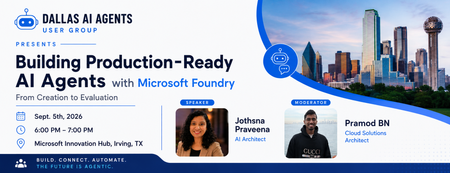
Excited to host the first event of the Dallas AI Agents User Group! 🚀 Building Production-Ready AI Agents with Microsoft Foundry Join us for a practical session exploring how to build, test, and evaluate production-ready AI agents using Microsoft Foundry. 🎤 Speaker: Jothsna Praveena — AI Architect 🎙️ Moderator: Pramod BN — Cloud Solutions Architect 📅 September 5, 2026 | 6:00–7:00 PM 📍 Microsoft Innovation Hub, Irving, TX Address: Building LC1, 7000 State Hwy 161, Irving, TX 75039 Register Here: https://luma.com/4kd3pukt Looking forward to an evening of learning, meaningful conversations, and community building around AI agents! #AgenticAI #AIAgents #MicrosoftFoundry #ArtificialIntelligence #DallasAI #MicrosoftAI #AICommunity308Views0likes0Comments
🧠 What is Retrieval-Augmented Generation (RAG)?
Have you ever wondered how AI tools answer questions using your company's documents instead of making things up? That's where Retrieval-Augmented Generation (RAG) comes in. Instead of relying only on what the AI learned during training, RAG first searches trusted sources—such as PDFs, SharePoint libraries, knowledge bases, or internal documentation—and then uses that information to generate a response. Why organizations use RAG ✅ Reduces hallucinations ✅ Uses the latest company knowledge ✅ Keeps responses grounded in trusted data ✅ Improves enterprise AI accuracy Common Microsoft stack Azure AI Search Azure OpenAI Microsoft Copilot SharePoint Microsoft Fabric RAG is one of the key building blocks behind modern enterprise AI assistants. 💬 Discussion: Have you implemented a RAG solution in your organization, or are you planning one?177Views0likes1Comment🚀 Prompt Tuesday | Write Prompts Like a Pro
🚀 Prompt Tuesday | PT-001 | Create Professional Meeting Minutes with Microsoft Copilot Have you ever asked AI: "Summarize this meeting." The result is often too generic. Instead, assign the AI a role and define exactly what you need. ❌ Basic Prompt Summarize this meeting. ✅ Better Prompt You are an Executive Assistant responsible for documenting meetings. Review the meeting transcript below and generate professional meeting minutes. Include: • Meeting objective • Key discussion points • Decisions made • Action items • Owner for each action item • Due dates (if mentioned) • Risks or blockers • Open questions • Executive summary (5 bullet points) Format the output using clear headings and tables where appropriate. Meeting Transcript: <Paste transcript here> 💡 Why This Prompt Works This prompt gives the AI: Role → Executive Assistant Task → Generate structured meeting minutes Output Format → Headings and tables Expected Sections → Decisions, actions, risks, and summaries The result is a document that's ready to share with your team, with minimal editing. 🤖 Microsoft Copilot Tip If you're using Microsoft 365 Copilot in Teams or Word, don't stop at "Summarize this meeting." Try prompts like: Summarize this meeting for senior leadership. Highlight strategic decisions, unresolved issues, assigned action items, and any risks that require executive attention. Present the output in a concise table followed by a one-paragraph executive summary. Adding the intended audience helps Copilot tailor the response appropriately. 💬 Discussion Question What's the one prompt you use most often with Microsoft Copilot or another AI assistant? Share it in the comments—you might inspire someone else's next productivity189Views3likes0Comments