genai
68 TopicsCreating Autonomous Teams Agents Using OpenClaw, MCP, and Azure Container Apps
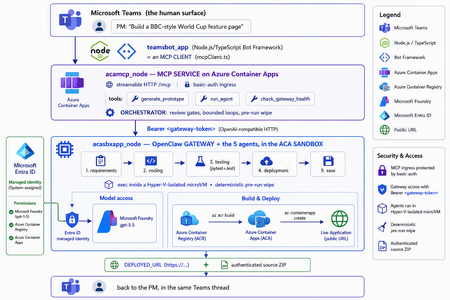
The one shift that changes everything For two years, "AI coding" meant autocomplete. A suggestion appears in your editor, you hit tab, you move on. The agent only existed while you were actively typing. That is no longer the only model. A new category of tools runs asynchronously and autonomously: you message the agent from a chat window — Teams, Slack, Telegram — describe what you want, and walk away. The agent plans, writes code, runs tests, deploys, and hands you back a result. Some of them never sleep: they hold a persistent memory, load their own skills, and act on a schedule without being prompted. This is the world of OpenClaw, Hermes Agent, and the other long-running autonomous agents that exploded across developer culture in 2026. OpenClaw alone crossed 377,000 GitHub stars and millions of active users, becoming — for a while — the most-starred project on GitHub. You install it with one line, connect a channel, and start delegating from your phone. The workflow moves from pair programming to delegation and review. The interactive copilot asks, "What should I write next?" The autonomous agent asks, "What do you need done?" And that reframing is exactly why three questions now keep architects awake: Is it safe? You are handing a self-driving process the ability to run shell commands, touch files, and call APIs. One community report memorably described these agents as a teammate in your group chat who happens to have root access to your codebase. That is not a compliment — it is a threat model. Can it fit into real multi-agent work? A single agent is a demo. Production is a fleet — specialists that hand off to each other with gates in between. Is it flexible and controllable? Autonomy is thrilling right up until the agent packages last week's stale files into this week's deliverable, or loops forever on a failing test. This post answers all three — not with hand-waving, but with a working reference implementation you can clone today: CustomCodingAgentApp in the Multi-AI-Agents-Cloud-Native repo, an "Agentic Prototype Factory" that turns a plain-language idea into a tested, live-on-Azure prototype without leaving the chat window. A product manager types "Build a BBC-style World Cup feature page" in Microsoft Teams. Minutes later they get back a running HTTPS URL and a downloadable source ZIP. Under the hood, five specialized OpenClaw agents powered by Microsoft Foundry gpt-5.5 collaborate in a shared sandbox, run real pytest/Jest suites, and ship the result to Azure Container Apps — all orchestrated behind a Model Context Protocol (MCP) service so any MCP client (GitHub Copilot, Claude, the Teams bot) can drive it. We'll build up to that architecture in the order you should learn it. Part 1 — Long-running autonomous agents, and their two hard problems What actually makes them different A traditional chatbot is text in, text out. It waits for you. An autonomous agent inverts that: Property Traditional chatbot Long-running autonomous agent Execution Responds to a prompt Acts proactively (a "heartbeat" wakes it on a schedule) Scope Words Files, shell, browser, APIs — the real machine Memory This session only Persistent across sessions Interface A web box Any chat channel + the terminal Autonomy None Plans and takes multi-step action on its own Architecturally, OpenClaw is not a library you import — it's a runtime. A single long-running process (the Gateway) bridges your messaging channels to an LLM backend, keeps sessions alive, queues work in ordered lanes, and drives the classic agent loop: call the model → execute the tool calls it asks for → feed results back → repeat until done. There is no rigid step-planner; the model itself steers. That is what makes it feel magical — and what makes it hard to contain. That containment problem has two faces. Hard problem #1 — Security The same properties that make an autonomous agent useful make it dangerous. Full system access + proactive execution + a 32,000-server tool ecosystem is a large, self-driving attack surface. OpenClaw's own short history is the cautionary tale: a critical one-click remote-code-execution CVE early in its life, hundreds of malicious community "skills" discovered on its marketplace, and tens of thousands of gateways found exposed on the open internet. None of this means "don't use autonomous agents." It means: never run one with ambient credentials on a machine you care about. The agent belongs in a box with a hard wall around it. Hard problem #2 — Persistence and continuity Real agent work is long. Refactoring a codebase, researching across dozens of pages, building-testing-deploying an app — these take minutes to hours, far past a single request/response. So the runtime needs durable sessions, a place to keep state, and a workspace that survives across steps. But a persistent workspace that is reused creates its own hazard: state leakage. Files from yesterday's task can contaminate — or get shipped inside — today's result. Continuity and cleanliness pull in opposite directions, and you have to engineer the tension out. One agent is a demo; production is a fleet A single monolithic agent asked to "gather requirements, write the code, test it, deploy it, and package it" will do all four mediocrely and blur the boundaries between them. The production pattern is orchestrator-worker: specialized agents, each with one job, handing off to the next through explicit gates. OpenClaw supports exactly this — it can spawn sub-agents and even dispatch external coding harnesses, acting as a meta-orchestrator rather than a single model. The open question is never whether to go multi-agent; it's where the seams and the guardrails go. The answer to "is it safe?": put the agent in a microVM If the agent needs root to be useful, then give it root — inside a disposable microVM, not on your host. In 2026 there are several credible ways to do this: Kata Containers on AKS — each pod gets its own lightweight VM boundary and guest kernel. Hyperlight Wasm — per-call, snapshot-restored Wasm microVMs for running LLM-generated code. Azure Container Apps dynamic sessions — prewarmed, Hyper-V-isolated sandboxes that start in milliseconds, scale to thousands, and are purpose-built for "secure execution of custom code" and "running LLM-generated scripts." That last one — the ACA sandbox — is the sweet spot for a chat-driven agent factory: strong isolation without you operating a Kubernetes cluster, and an exec API to run commands inside the box. It's what the reference implementation uses. Part 2 — Putting OpenClaw into the ACA sandbox Here is where the repo stops being a diagram and becomes running code. The Agentic Prototype Factory decomposes the "idea → live app" job into five specialized OpenClaw agents that run in sequence, all inside the sandbox: requirements → coding → testing → deployment → save Each is addressable as its own model target on the OpenClaw gateway's OpenAI-compatible API: model value Routes to openclaw / openclaw/default Default agent openclaw/requirements-agent Requirement Agent openclaw/coding-agent Coding Agent openclaw/testing-agent Testing Agent openclaw/deployment-agent Deployment Agent openclaw/save-agent Save & download Agent Control, not vibes: review gates with feedback loops Autonomy without gates is how you get an agent that confidently deploys a broken app. The orchestrator wires the five agents into a graph with hard, bounded gates: Every knob is explicit and lives in server.py: _MAX_TEST_ROUNDS = 3, _MAX_DEPLOY_REVIEW = 2, _DEPLOY_POLL_ATTEMPTS = 12, _DEPLOY_POLL_DELAY_S = 20. The Testing Agent must end each turn with a literal TESTS_PASSED / TESTS_FAILED verdict; the orchestrator won't declare success until it HTTP-checks the deployed URL and inspects the response body — because a ResourceNotFound can happily return an HTTP 200. That is what "flexible and controllable" looks like in practice: the LLM drives creatively inside a deterministic state machine. The deterministic pre-run wipe (solving state leakage) Because the sandbox is reused across runs (fast, cheap), the orchestrator does something disciplined before every run: it wipes all lingering agent workspaces. Stale files from a previous task can never leak into — or be packaged as — the new result. This is the engineered answer to Hard Problem #2. Working with the sandbox's limits, not against them The ACA sandbox exec API is hard-capped at ~120 seconds — shorter than a cold az acr build plus az containerapp create. A naive agent would time out and report failure. The clever bit: those commands finish server-side on Azure even after the client exec disconnects. So deployment is split in two: deploy-build <dir> <app> — installs the deploy helpers, writes a tight .dockerignore, and kicks off the ACR build tagged <app>:latest. If the client drops at ~120s, the image still lands in ACR. deploy-finish <app> — idempotent, polled up to 12×. It reports STILL_BUILDING until the image exists, then fires a --no-wait containerapp create, and finally returns DEPLOYED_URL=https://<fqdn>. This is the single most important lesson of the whole sample: an autonomous agent doesn't need a longer timeout — it needs to understand the durability semantics of the platform it runs on. Part 3 — MCP, and why its security is the whole ballgame The five-agent workflow is powerful, but it would be a silo if the only way to reach it were a bespoke API. Instead, the repo wraps the entire orchestration as a Model Context Protocol (MCP) service (acamcp_node) exposed over streamable HTTP at /mcp, with a tiny, legible tool surface: MCP tool What it does generate_prototype Run the full five-agent workflow end to end run_agent Invoke a single named agent check_gateway_health Liveness / readiness of the OpenClaw gateway The payoff is enormous: any MCP client can now drive the factory — GitHub Copilot, Claude, or the Teams bot we're about to meet. One protocol, many front-ends. But MCP is not just an integration convenience — it's a control plane, and every MCP tool is a privileged capability. In an ecosystem with 32,000+ community servers, "just add an MCP server" is a supply-chain decision. A tool call is code execution by another name. So the security posture has to be deliberate. Here is how the reference implementation hardens it — and the principles are portable to any MCP deployment: Auth in front of the protocol. The MCP ingress sits behind basic auth (MCP_BASIC_AUTH_PASSWORD); the gateway itself requires the gateway token as a bearer credential (Authorization: Bearer <token>). No anonymous tool calls. A tiny, named allowlist — not a blank check. The gateway routes only to six explicit model targets. There is no "run arbitrary agent" escape hatch; the routing table is the allowlist. No secrets in the workload. There are no model API keys anywhere in the running containers — model access is brokered entirely through Entra ID managed identities. The gateway token is stored as a Kubernetes secret and never baked into an image. Private by default. The gateway's OpenAI-compatible endpoint is operator-level access — it stays on private ingress, with TLS and authentication added before anything is ever exposed publicly. Least privilege at the identity layer. The gateway is granted exactly the Foundry roles it needs (Cognitive Services User / Cognitive Services OpenAI User) on the Foundry resource — nothing more. The takeaway for MCP is the same as for the agent itself: treat the protocol as a doorway, and put a guard on the door. Authentication, an explicit allowlist, private ingress, and brokered identity turn MCP from an open blast radius into a governed control plane. Part 4 — The complete solution: Teams + MCP on ACA + OpenClaw on the ACA sandbox Now assemble the three deployable components into one loop: The request lifecycle, end to end A PM sends one sentence in Teams. The teamsbot_app bot — acting as an MCP client via mcpClient.ts — opens an MCP handshake and calls generate_prototype. The MCP service on ACA (acamcp_node) runs the orchestrator: pre-run wipe, then requirements → coding → testing. The OpenClaw gateway in the ACA sandbox (acasbxapp_node) executes each agent, talking to Foundry gpt-5.5 through a managed identity — no keys in the box. Real pytest + Jest suites run inside the sandbox. Fail → loop back (bounded). Pass → deploy. Deployment uses the build + poll split to survive the ~120s exec cap; the app lands in Azure Container Apps and is health-checked body-aware at its live URL. The Save Agent produces an authenticated ZIP download URL. The bot streams each agent's progress back into the Teams thread and returns the running HTTPS URL + source ZIP — optionally auto-opening the project in VS Code Insiders. How the architecture answers the three questions The question How this solution answers it Is it safe? The autonomous agent runs in a Hyper-V-isolated ACA sandbox, not on anyone's laptop. No model keys in the workload — Entra ID managed identity brokers Foundry. MCP behind basic auth; gateway behind a bearer token on private ingress; token as a secret, never in an image. A deterministic pre-run wipe removes cross-run leakage. Does it fit multi-agent work? It is a multi-agent system — five specialist OpenClaw agents with A2A hand-offs and review gates — and because it's exposed via MCP, any client (Copilot, Claude, Teams) can orchestrate it. Is it flexible and controllable? Creativity lives inside a deterministic state machine: explicit TESTS_PASSED/FAILED verdicts, bounded retry loops (_MAX_TEST_ROUNDS, _MAX_DEPLOY_REVIEW), body-aware health checks, and a human approving in the Teams thread. Deploy it yourself The repo ships scripts for all three tiers (the gateway uses the platform's managed identity to reach Foundry — no key handling, no image rebuild): # 1) OpenClaw gateway + the 5 agents (acasbxapp_node) cd acasbxapp_node cp .env.example .env # gateway token, Foundry endpoint, sandbox ids ./scripts/build-openclaw-image.sh # build + push the OpenClaw image to ACR ./scripts/deploy-aks-gateway.sh # grant Foundry roles + deploy # 2) MCP service (acamcp_node) cd ../acamcp_node cp .env.example .env # ACR + cluster; gateway token read from ../acasbxapp_node/.env ./scripts/build-images.sh # build + push the MCP image ./scripts/deploy-aks.sh # secret + manifests to the openclaw namespace ./scripts/smoke-check.sh # verify the MCP handshake # 3) Teams bot (teamsbot_app) — Node.js/TypeScript MCP client cd ../teamsbot_app # configure + run per the folder README, then sideload the Teams app package The reference implementation targets Azure (ACA + AKS) — the OpenClaw gateway and MCP service run as containers, and the code-execution sandbox uses the ACA dynamic-sessions exec API. Keep the gateway on private ingress and add TLS before any public exposure. Final thought Strip away the World Cup demo and a reusable pattern remains — a blueprint for running any long-running autonomous agent in the enterprise: A message-driven agent (OpenClaw / Hermes) + a microVM sandbox (Azure Container Apps dynamic sessions) + an MCP control plane with auth + enterprise identity (Entra ID managed identity) + a human surface (Microsoft Teams). The autonomy that made these agents go viral is the same autonomy that makes security teams nervous. You don't resolve that tension by slowing the agent down — you resolve it by giving it a box with a hard wall, a control plane with a guard on the door, an identity instead of a secret, and a human in the loop. Do that, and "your PM types a sentence, Azure ships an app" stops being a scary demo and becomes something you can actually put in production. Clone it, break it, harden it further: kinfey/Multi-AI-Agents-Cloud-Native → code/CustomCodingAgentApp The chat window is the new terminal. Let's make it a safe one.360Views2likes0CommentsAgents League: The Esports-Inspired Hackathon Where AI Agents Battle for Glory
Ready to put your AI skills to the ultimate test? Agents League is here, a dynamic, esports-inspired developer challenge that brings the thrill of live competition to the world of agentic AI. Whether you're a seasoned AI developer or just getting started, this is your chance to build, compete, and win. What is Agents League? Agents League is a week-long hackathon running as part of AI Skills Fest (June 4–14, 2026). Unlike traditional hackathons, Agents League combines live AI coding battles, asynchronous project submissions, and a thriving Discord community all competing for a total prize pool of $55,000 USD. This isn't just about building it's about showcasing what's possible with agentic AI in a format that's fast, competitive, and globally accessible. Three Challenge Tracks Pick One or Compete in All 1. Creative Apps Build innovative applications using GitHub Copilot for AI-assisted development. Show off your creativity and demonstrate how AI can accelerate app creation from concept to code. 2. Reasoning Agents Create intelligent agents using Microsoft Foundry that solve complex problems through multi-step reasoning. This track is all about building agents that can think, plan, and execute. 3. Enterprise Agents Build business-ready knowledge agents integrated with Microsoft 365 Copilot, authored in Copilot Studio. Perfect for developers focused on real-world enterprise solutions. Live Microsoft Reactor Events—Don't Miss the Battles! The heart of Agents League beats through live Microsoft Reactor events. Watch experts go head-to-head in live coding battles, learn cutting-edge techniques, and get inspired for your own submissions: Event What You'll Learn Creative Apps Battle See GitHub Copilot in action as experts build innovative apps live Reasoning Agents Battle Watch multi-step reasoning agents come to life with Microsoft Foundry Enterprise Agents Battle Learn to build M365-integrated agents with Copilot Studio 👉 View the full event series Key Dates Registration Deadline: June 12, 2026, 12:00 PM PT Hacking Period: June 4–14, 2026 Submission Deadline: June 14, 2026, 11:59 PM PT What You Get Live coding battles with expert demonstrations Curated technical experiences and on-demand content Learning resources on Microsoft Learn and AI Skills Navigator Community support through Discord GitHub-based submissions for transparent, collaborative judging Why Participate? Agents League isn't just another hackathon. It's designed as a streamlined, competitive format that: ✅ Fits into your schedule with focused, time-boxed challenges ✅ Provides real-world product innovation experience ✅ Offers global accessibility—participate from anywhere ✅ Demonstrates the latest capabilities of agentic AI, including new IQ tools ✅ Connects you with a passionate developer community Ready to Enter the Arena? Register Now for Agents League Before you register: Review the Hackathon Rules and Regulations for prize categories and judging criteria Join the Microsoft Reactor event series for live battles and learning Check out the Microsoft Event Code of Conduct Join the Conversation Have questions? Want to connect with fellow competitors? Join the Agents League community on Discord and start strategizing with developers from around the world. Whether you're building creative apps, reasoning agents, or enterprise solutions—the arena awaits. May the best agent win! 🏆 Agents League hackathon is open to the public and offered at no cost. Government employees should check with their employers to ensure participation is permitted in accordance with applicable policies. Related Links: Agents League Hackathon Registration Microsoft Reactor Series AI Skills FestMastering Query Fields in Azure AI Document Intelligence with C#
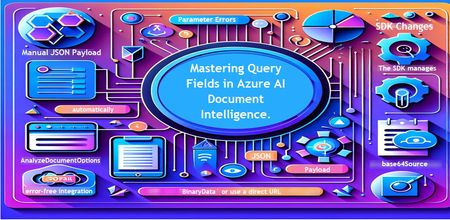
Introduction Azure AI Document Intelligence simplifies document data extraction, with features like query fields enabling targeted data retrieval. However, using these features with the C# SDK can be tricky. This guide highlights a real-world issue, provides a corrected implementation, and shares best practices for efficient usage. Use case scenario During the cause of Azure AI Document Intelligence software engineering code tasks or review, many developers encountered an error while trying to extract fields like "FullName," "CompanyName," and "JobTitle" using `AnalyzeDocumentAsync`: The error might be similar to Inner Error: The parameter urlSource or base64Source is required. This is a challenge referred to as parameter errors and SDK changes. Most problematic code are looks like below in C#: BinaryData data = BinaryData.FromBytes(Content); var queryFields = new List<string> { "FullName", "CompanyName", "JobTitle" }; var operation = await client.AnalyzeDocumentAsync( WaitUntil.Completed, modelId, data, "1-2", queryFields: queryFields, features: new List<DocumentAnalysisFeature> { DocumentAnalysisFeature.QueryFields } ); One of the reasons this failed was that the developer was using `Azure.AI.DocumentIntelligence v1.0.0`, where `base64Source` and `urlSource` must be handled internally. Because the older examples using `AnalyzeDocumentContent` no longer apply and leading to errors. Practical Solution Using AnalyzeDocumentOptions. Alternative Method using manual JSON Payload. Using AnalyzeDocumentOptions The correct method involves using AnalyzeDocumentOptions, which streamlines the request construction using the below steps: Prepare the document content: BinaryData data = BinaryData.FromBytes(Content); Create AnalyzeDocumentOptions: var analyzeOptions = new AnalyzeDocumentOptions(modelId, data) { Pages = "1-2", Features = { DocumentAnalysisFeature.QueryFields }, QueryFields = { "FullName", "CompanyName", "JobTitle" } }; - `modelId`: Your trained model’s ID. - `Pages`: Specify pages to analyze (e.g., "1-2"). - `Features`: Enable `QueryFields`. - `QueryFields`: Define which fields to extract. Run the analysis: Operation<AnalyzeResult> operation = await client.AnalyzeDocumentAsync( WaitUntil.Completed, analyzeOptions ); AnalyzeResult result = operation.Value; The reason this works: The SDK manages `base64Source` automatically. This approach matches the latest SDK standards. It results in cleaner, more maintainable code. Alternative method using manual JSON payload For advanced use cases where more control over the request is needed, you can manually create the JSON payload. For an example: var queriesPayload = new { queryFields = new[] { new { key = "FullName" }, new { key = "CompanyName" }, new { key = "JobTitle" } } }; string jsonPayload = JsonSerializer.Serialize(queriesPayload); BinaryData requestData = BinaryData.FromString(jsonPayload); var operation = await client.AnalyzeDocumentAsync( WaitUntil.Completed, modelId, requestData, "1-2", features: new List<DocumentAnalysisFeature> { DocumentAnalysisFeature.QueryFields } ); When to use the above: Custom request formats Non-standard data source integration Key points to remember Breaking changes exist between preview versions and v1.0.0 by checking the SDK version. Prefer `AnalyzeDocumentOptions` for simpler, error-free integration by using built-In classes. Ensure your content is wrapped in `BinaryData` or use a direct URL for correct document input: Conclusion Using AnalyzeDocumentOptions provides a cleaner and more reliable way to work with query fields in Azure AI Document Intelligence using C#. By aligning with the latest SDK approach, developers can simplify implementation, reduce common errors, and improve code maintainability. Keeping up with SDK enhancements and recommended practices ensures more accurate and efficient document data extraction. As Azure AI capabilities continue to evolve, adopting modern integration patterns will help you build scalable and future-ready document processing solutions with greater confidence. Reference Official AnalyzeDocumentAsync Documentation. Official Azure SDK documentation. Azure Document Intelligence C# SDK support add-on query field.493Views0likes0CommentsBuilding an On-Device Voice Assistant with Microsoft Foundry Local
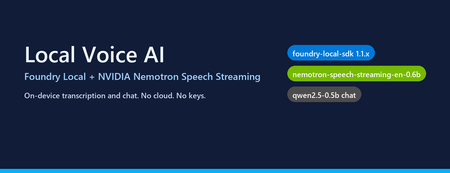
Why on-device voice still matters Most "voice AI" tutorials assume your audio leaves the machine. You ship a WAV to Whisper-API, your transcript to GPT-4, and a synthesized response back over the wire. That works — but it also means three round trips, three per-token bills, and three places your user's voice gets logged. The new wave of small, hardware-optimised models changes the trade-off. NVIDIA's Nemotron Speech Streaming En 0.6B is a 600M-parameter streaming ASR model published into the Microsoft Foundry Local catalog. Paired with a small chat model like qwen2.5-0.5b or phi-4-mini , you can run the entire capture → transcribe → reason → respond loop in-process on a developer laptop, with no API keys and no network egress. This post walks through how the fl-nemotron sample does it, the SDK pitfalls we hit on the way, and the design decisions that made the pipeline reliable. What we're building A browser-hosted assistant served by FastAPI at http://127.0.0.1:8000 . The page captures microphone audio, posts it to /api/transcribe , then streams the chat reply back over Server-Sent Events from /api/chat . All inference runs locally through two Foundry Local models loaded into the same process. The shape of the pipeline: Microphone (browser MediaRecorder) │ WebM/Opus blob ▼ Client-side WAV encoder (16 kHz, mono, PCM-16) │ multipart/form-data ▼ FastAPI /api/transcribe │ ▼ Nemotron Speech Streaming En 0.6B (Foundry Local audio client) │ transcript text ▼ Chat LLM e.g. qwen2.5-0.5b (Foundry Local chat client) │ streamed tokens ▼ FastAPI /api/chat → SSE → browser bubble The version that bit us: foundry-local-sdk >= 1.1.0 Before any code, the single most important fact about this project: The Nemotron Speech Streaming model only appears in the Foundry Local 1.1.x catalog. Older SDKs (0.5.x / 0.6.x) cannot resolve the alias nemotron-speech-streaming-en-0.6b and fail with model not found . The module name also changed in 1.1.0 — it is now foundry_local_sdk (with the underscore- sdk suffix), not foundry_local . The pip wheel for foundry-local-core is bundled, so there is no separate MSI / winget install to worry about. Pin it explicitly: pip install --upgrade "foundry-local-sdk>=1.1.0,<2" And verify before anything else: python -c "import importlib.metadata as m; print('sdk', m.version('foundry-local-sdk'))" # expect: sdk 1.1.0 Loading both models from one manager The 1.1.x SDK exposes a single FoundryLocalManager that owns the runtime. Each loaded model gives you back a per-model OpenAI-compatible client — get_chat_client() for text models and get_audio_client() for ASR. There is no need to bring your own openai Python package; the SDK ships its own thin client. The wrapper used in the repo ( src/foundry_client.py ) does this: from foundry_local_sdk import Configuration, FoundryLocalManager FoundryLocalManager.initialize(Configuration(app_name="fl-nemotron")) manager = FoundryLocalManager.instance chat_model = manager.load_model("qwen2.5-0.5b") stt_model = manager.load_model("nemotron-speech-streaming-en-0.6b") chat_client = chat_model.get_chat_client() audio_client = stt_model.get_audio_client() Both models are downloaded on first use into the Foundry Local cache and stay resident for the lifetime of the process. On a laptop with 16 GB RAM, the combined working set sits comfortably under 4 GB. The transcription surprise The first naive approach was the obvious one: with open(wav_path, "rb") as f: result = audio_client.transcribe(file=f, model="nemotron-speech-streaming-en-0.6b") That call fails on Nemotron. The bundled ONNX Runtime GenAI in foundry-local-core does not register the nemotron_speech multi-modal model type that the standard AudioClient.transcribe() path tries to instantiate. The error surfaces as a cryptic model-type registration failure deep inside the native runtime. The fix is to use the streaming session API instead — a different native entry point ( core_interop.start_audio_stream ) that the streaming model does support. The repo isolates this in src/_nemotron_live.py : def transcribe_wav_live(audio_client, wav_path, *, language="en"): with wave.open(str(wav_path), "rb") as w: sample_rate = w.getframerate() channels = w.getnchannels() sample_width = w.getsampwidth() pcm = w.readframes(w.getnframes()) session = audio_client.create_live_transcription_session() session.settings.sample_rate = sample_rate session.settings.channels = channels session.settings.bits_per_sample = sample_width * 8 session.settings.language = language session.start() # Feed PCM in ~100 ms chunks from a worker thread, then stop. bytes_per_sec = sample_rate * channels * sample_width chunk_bytes = max(bytes_per_sec // 10, 1024) def _pusher(): try: for offset in range(0, len(pcm), chunk_bytes): session.append(pcm[offset:offset + chunk_bytes]) finally: session.stop() threading.Thread(target=_pusher, daemon=True).start() parts = [] for resp in session.get_stream(): for cp in getattr(resp, "content", []) or []: text = getattr(cp, "text", "") or getattr(cp, "transcript", "") or "" if text: parts.append(text) return " ".join(p.strip() for p in parts if p.strip()).strip() Two things to notice: Push from a thread, read from the main coroutine. session.append() is a blocking write into the native stream and session.get_stream() is a blocking generator. Run one in a worker thread so the other can drain in parallel — otherwise you deadlock the session. Chunk to ~100 ms. Smaller chunks (e.g. 10 ms) spend more time crossing the FFI boundary than transcribing; larger chunks (e.g. 1 s) hold back partial results and hurt perceived latency. Always session.stop() . Without it the generator never terminates and the request hangs. The other transcription surprise: browsers don't send WAV Inside the browser, MediaRecorder defaults to audio/webm; codecs=opus . That's great for size but bad for our STT model, which expects a 16-bit mono PCM WAV at a known sample rate. Decoding WebM/Opus server-side would require ffmpeg as a runtime dependency — which is exactly the kind of friction this project exists to remove. The cleaner solution is to encode WAV on the client. AudioContext.decodeAudioData already understands WebM/Opus, so the page can decode the recording, resample to 16 kHz, mix to mono, and emit a PCM-16 WAV blob in 30 lines of JavaScript: // Inside src/static/index.html async function webmToWav(blob) { const ctx = new (window.AudioContext || window.webkitAudioContext)({ sampleRate: 16000 }); const buf = await ctx.decodeAudioData(await blob.arrayBuffer()); // Mix to mono const ch = buf.numberOfChannels; const mono = new Float32Array(buf.length); for (let c = 0; c < ch; c++) { const data = buf.getChannelData(c); for (let i = 0; i < data.length; i++) mono[i] += data[i] / ch; } return encodeWav(mono, 16000); } function encodeWav(samples, sampleRate) { const buffer = new ArrayBuffer(44 + samples.length * 2); const view = new DataView(buffer); // RIFF header writeStr(view, 0, "RIFF"); view.setUint32(4, 36 + samples.length * 2, true); writeStr(view, 8, "WAVE"); // fmt chunk writeStr(view, 12, "fmt "); view.setUint32(16, 16, true); // PCM chunk size view.setUint16(20, 1, true); // PCM format view.setUint16(22, 1, true); // mono view.setUint32(24, sampleRate, true); view.setUint32(28, sampleRate * 2, true); // byte rate view.setUint16(32, 2, true); // block align view.setUint16(34, 16, true); // bits per sample // data chunk writeStr(view, 36, "data"); view.setUint32(40, samples.length * 2, true); // PCM-16 samples let o = 44; for (let i = 0; i < samples.length; i++, o += 2) { const s = Math.max(-1, Math.min(1, samples[i])); view.setInt16(o, s < 0 ? s * 0x8000 : s * 0x7FFF, true); } return new Blob([view], { type: "audio/wav" }); } Now the server's /api/transcribe endpoint just writes the bytes to a temp file and hands them to transcribe_wav_live() — no audio decoding libraries on the Python side. Wiring it into FastAPI The server ( src/app.py ) is deliberately small. The notable detail is that the same process holds both Foundry Local model handles for its entire lifetime, so there is no warm-up cost per request: @app.post("/api/transcribe") async def transcribe(audio: UploadFile = File(...)): data = await audio.read() with tempfile.NamedTemporaryFile(suffix=".wav", delete=False) as f: f.write(data); path = f.name text = _ai_client.transcribe(path) return {"text": text} @app.post("/api/chat") async def chat(req: ChatRequest): if req.stream: return StreamingResponse( _sse(_ai_client.stream_completion(req.messages)), media_type="text/event-stream", ) return {"text": _ai_client.chat_completion(req.messages)} Streaming uses Server-Sent Events because they are trivially supported in both fetch() and the FastAPI runtime, and they don't require a WebSocket upgrade through any proxy a developer might have in front of localhost . What it looks like The repo includes screenshots of the running UI: a welcome screen with both models loaded, a streamed haiku reply, an inline code block with copy-to-clipboard, and the recording state for the microphone. Performance, honestly This is a small-model, CPU-friendly stack. On an Arm64 Surface running the x64 SDK under emulation: First model load (cold cache): tens of seconds — downloads ~600 MB for Nemotron and ~400 MB for qwen2.5-0.5b . Subsequent loads (warm cache): a few seconds per model. End-to-end transcription of a 5-second utterance: well under a second after warm-up. First chat token from qwen2.5-0.5b : typically 200–500 ms; full short reply within 1–2 s. On x64 silicon with a recent CPU the numbers improve substantially, and the SDK will pick the best execution provider it finds (CPU / DirectML / CUDA) for each model. Trade-offs to know about Model quality. qwen2.5-0.5b is a 500M-parameter model. It is fast and small enough to ship on a laptop, but it is not GPT-4. Swap in phi-4-mini or mistral-nemo-12b-instruct if you have the RAM and want better reasoning — the wrapper accepts any chat alias in the Foundry Local catalog. STT is English-only here. The current Nemotron streaming model in the catalog is ...-en-0.6b . Multilingual variants are likely to follow. Browser microphone needs a real browser. Headless / automated browsers (Playwright, Puppeteer) deny getUserMedia by default. Open the page in Edge / Chrome / Firefox to grant the permission and capture audio for real. No agent framework yet. This sample is deliberately a single-turn loop over a chat client — there is no tool calling, planning, or multi-agent orchestration. Adding the Microsoft Agent Framework on top would be a natural next step for richer behaviour. Responsible AI considerations Running locally removes the cloud-egress class of privacy concerns, but it does not remove responsibility: Disclose recording. The browser prompts for mic permission; your UI should make it obvious when capture is active. The sample shows a red ⏹ button and a "Recording…" banner for that reason. Don't log raw audio. The sample writes audio to a per-request NamedTemporaryFile and deletes it after transcription. Treat the WAV as sensitive data even when it never leaves the device. Small models hallucinate. A 0.5B chat model is great for snappy local replies, but unsuitable for high-stakes answers. Pair it with retrieval, ground it on your own data, or escalate to a larger model when accuracy matters. Try it Clone github.com/leestott/fl-nemotron. ./setup.ps1 (or ./setup.sh ) to create a virtualenv and install the pinned SDK. python scripts/prefetch.py nemotron-speech-streaming-en-0.6b qwen2.5-0.5b to download both models. .venv\Scripts\uvicorn.exe app:app --app-dir src --port 8000 Open http://127.0.0.1:8000 in a real browser and click the 🎤 button. Where to go next Foundry Local documentation — official docs for the runtime, catalog, and SDK. microsoft/Foundry-Local — upstream samples and issue tracker. NVIDIA Nemotron model family — background on the speech and language models being published into the catalog. leestott/fl-nemotron — the full source for this post. Key takeaways Pin foundry-local-sdk >= 1.1.0 . Earlier SDKs cannot see the Nemotron Speech Streaming model. Use the LiveAudioTranscriptionSession API for Nemotron, not AudioClient.transcribe() . Encode WAV in the browser. It eliminates a heavy server-side ffmpeg dependency for a few lines of JS. Push audio chunks on a worker thread and drain the response generator on the main one to avoid deadlocks. A small Foundry Local chat model plus Nemotron STT gives you a credible local voice loop in a single Python process — no cloud, no keys, no data egress.How to Visualize Your Azure AI Workloads Usage for Observability
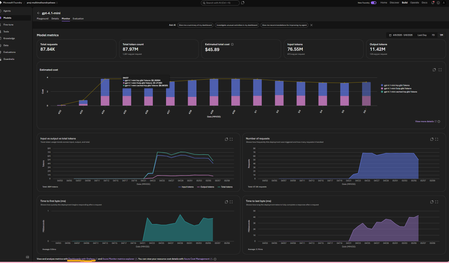
This article assumes you already have an Azure Foundry project and resource deployed in Microsoft Foundry. The options referenced here are documented in detail in the linked articles; this post serves as a consolidated step by step guide bringing them all together and explaining where each option is most useful. A Summary: Need Best Option Quick day-over-day visual, minimal setup Grafana Dashboard (Option 3) Custom growth % calculations App Insights + KQL in Log Analytics (Option 4) Shareable, interactive report Azure Workbooks (Option 5) Per-user/per-agent granularity APIM + App Insights (Option 6) Quick one-off chart, export to Excel Microsoft Foundry Monitor tab or App Insights Metrics Explorer (Option 1 and 2) Option 1. Within the Microsoft Foundry Portal (Quickest, No Setup) If you have models deployed in Microsoft Foundry and would like to monitor its usage, go to the New Foundry Portal → Build → Models → Monitor tab. View metrics such as: Estimated cost Total token usage Input vs. output tokens Number of requests This is the simplest way to monitor both model and agent usage. For PAYG plans: You can also view your total allocated quota (and figure out which Tier you are on) using the Quota Management Screen (New Foundry Portal → Operate → Quota tab). This screen shows how much your total allocated quota is, per model in a given subscription + region + Deployment Type (Global, Data Zones or Regional). For eg., in the image below, for gpt-4o, I am allocated 7M total TPM in my subscription. I am only using 150K TPM of the allocated 7M TPM amount. Which means, my requests will get throttled if I exceed the 150K TPM limit. To avoid throttling, I would need to increase my shared allocation limit. NOTE: you are charged for usage, so if you allow more capacity, you use more, so you pay more. Option 2: Azure Monitor Metrics Explorer This is already built into the Azure Portal and gives you time-series charts out of the box. Go to Azure Portal → your Azure OpenAI / Foundry resource → Monitoring → Metrics Select a metric like AzureOpenAIRequests or TokenTransaction Set Aggregation to Sum (total) or Max and Time granularity to 1 day Split by ModelDeploymentName to see per-model trends Adjust the time range (e.g., last 30 days) — you'll see day-over-day bars/lines Tip: You can pin these charts to an Azure Dashboard for a persistent view, or click Share → Download to Excel to get the raw data for your own analysis. Option 3: Azure Managed Grafana (Best Pre-Built Dashboard) This is the best option for a polished, real-time, day-over-day dashboard with no custom code. There's a pre-built AI Foundry dashboard ready to import. [grafana.com], [Create a M...ed Grafana] How to set it up: Create an Azure Managed Grafana workspace (if you don't have one) In Grafana, go to Dashboards → New → Import → enter dashboard ID 24039 (for Foundry) Select your Azure Monitor data source and point it to your Foundry resource Tip: You can also import this directly from the Azure Portal: Monitor → Dashboards with Grafana → AI Foundry. That's it — the dashboard gives you (per model deployment): Token trends over time (inference, prompt, completion — day over day) Request trends over time (AzureOpenAIRequests as a time series) Latency trends (bonus) NOTE: Default time range is 7 days — adjust to 30/60/90 days for growth trends Option 4: Application Insights + KQL Queries (Most Flexible, Custom Reports) If you want fully custom day-over-day growth calculations (e.g., % change day-to-day), this is the way. [azurefeeds.com] Setup: Ensure your Foundry project is connected to an Application Insights resource (Foundry → Settings → Connected Resources). Open up App Insights resource → Logs → New Query or choose a sample query. In the images below, we simply ran 'requests' and set the time range to 24 hours. There is also a Kusto Query Language (KQL) mode or Simple mode on the right-hand side: Simple mode will let you run out of the box samples. KQL mode will open up a query window for you to enter custom queries. Below are the results in grid view. Same view but showing a chart: Export options: Another way to get the above graphs are via Log Analytics. Simply enable Diagnostic Settings on your Azure OpenAI resource → send to a Log Analytics workspace. Open Log Analytics → Logs and try our your sample queries. Sample KQL for day-over-day token usage (adjust to your needs): AzureMetrics | where MetricName in ("TokenTransaction", "ProcessedPromptTokens", "GeneratedTokens") | where TimeGenerated > ago(30d) | summarize DailyTokens = sum(Total) by bin(TimeGenerated, 1d), MetricName | order by TimeGenerated asc | render timechart Result: Sample KQL for day-over-day growth % (adjust to your needs): AzureMetrics | where MetricName == "TokenTransaction" | where TimeGenerated > ago(30d) | summarize DailyTokens = sum(Total) by Day = bin(TimeGenerated, 1d) | sort by Day asc | extend PrevDay = prev(DailyTokens) | extend GrowthPct = round((DailyTokens - PrevDay) / PrevDay * 100, 2) | project Day, DailyTokens, GrowthPct Option 5: Azure Monitor Workbooks (Custom Dashboards, Shareable) Workbooks let you build interactive, parameterized dashboards that combine metrics and KQL logs. What's more, you can select resources from multiple subscriptions and visualize them all in one place using Workbooks! Go to Azure Portal → Monitor → Workbooks → New Add a Metrics query panel → select your Log Analytics or App Insights or Foundry resource -> Enter the same query you used in Option 4. Do a test run and view the graphs (this can be viewed as charts or a list (grid view)): 4. Save and share with your team. Option 6: APIM + Application Insights (Granular Per-Caller/Per-Agent Tracking) 1. If your app routes requests through Azure API Management, you can use the azure-openai-emit-token-metric policy to send per-request token metrics to Application Insights with custom dimensions (User ID, Subscription ID, Agent, etc.). [Azure API...osoft Docs] This is ideal for scenarios like: "Which agent consumed the most tokens last week?" "What's the token usage per API consumer/team?" NOTE: Microsoft Foundry resources do not track usage by users. So, fronting your Foundry resource with an APIM could be a way to track users provided you pass the username/id in the request context. How you implement this is upto your app design. Ref: AI-Gateway/labs/token-metrics-emitting/token-metrics-emitting.ipynb at main · Azure-Samples/AI-Gateway · GitHub Bonus: Check out all other APIM + AI related policies here: AI-Gateway/labs/semantic-caching at main · Azure-Samples/AI-Gateway AI-Gateway/labs/token-rate-limiting at main · Azure-Samples/AI-Gateway AI-Gateway/labs/token-metrics-emitting/token-metrics-emitting.ipynb at main · Azure-Samples/AI-Gateway · GitHub
Introducing PII Shield: A Privacy Proxy for Every LLM Call
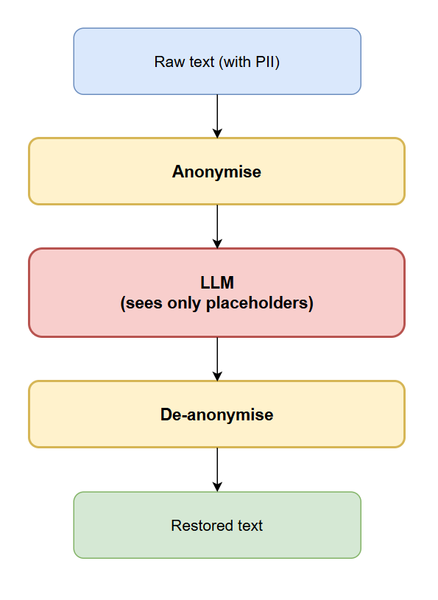
Why do we need a utility like PII Shield? Let’s start with an uncomfortable truth: modern AI systems are swimming in sensitive data - often without us fully realizing the risks we’re taking. The data is sensitive. Names, emails, phone numbers, credit cards, IBANs, SSNs, Aadhaar, PAN, Driving Licenses, UPI IDs, addresses - all of them frequently appear in user prompts, RAG documents, and tool inputs. Prompts leaving trust boundary: Even when the model lives in your own subscription - Azure OpenAI, a Foundry deployment, a self-hosted OSS model - the prompt still travels through SDKs, gateways, observability stacks etc. Before it gets to LLM, the inference layer often logs, evaluates, or fine-tunes against what it sees. Any of those hops could be a potential exposure of raw PII if not handled well. Changing regulatory asks: EU AI Act, India's DPDP Act, CCPA, HIPAA, PCI-DSS and a dozen sectoral rules now explicitly cover AI-driven processing. “Not knowing that your data may get stored elsewhere” is not an option anymore. The ad-hoc fixes don't scale. Most teams start with a regex or two. Then they add another team, another use case, another language, another ID format — and the regex file becomes a tar pit nobody wants to touch. The damage from getting this wrong is asymmetric. When controls hold and decisions are sound, nothing remarkable happens. The AI feature launches, threats are contained, and the system does what it was designed to do. But when security assumptions fail, the consequences compound fast. A single misstep can trigger public disclosures, regulatory scrutiny, financial penalties and more. That imbalance is why security can’t be treated as a finishing step. We need a single, well-tested, observable layer that sits between every AI application in the organisation and every model it talks to - and makes sure raw PII never crosses that boundary. Introducing PII Shield "PII Shield" is an intelligent anonymization layer that sits between your AI application and the LLM. It detects PII, applies a configurable privacy action per entity type, and - when you want it to - reverses the anonymization after the LLM has done its work. At a glance: REST API: /anonymize, /deanonymize and /apps - built with FastAPI. PII detection via Microsoft Presidio, with a pluggable NLP backend (spaCy, ONNX, Stanza, HuggingFace Transformers). Custom recognisers for India specific identifiers: Aadhaar, PAN, Driving Licence (all 36 states), PIN code, UPI ID, Indian phone numbers — plus 100+ Presidio defaults. Per-entity strategies: replace, hash (SHA-256), encrypt (PQC ML-KEM-768 + AES-256-GCM) or fake Multi-tenant: register applications via POST /apps, configure strategies per app, route via the X-App-Id header. Reversible by design: the "Anonymise → LLM → De-anonymise" sandwich pattern means the LLM only sees anonymized values (e.g. {{PERSON_1}} and {{EMAIL_ADDRESS_2}} etc.), never the real values. Library mode: pip install pii_shield and use the engine directly for batch jobs, no FastAPI required. Observability built in - Open Telemetry traces/metrics/logs, dual-backend (OTLP for local Grafana LGTM, Azure Monitor for production), pre-built Grafana dashboards Before we go deep into how this works, let's understand a few key concepts that this utility is centered around. Entities and recognisers An entity is a single, contiguous piece of PII that PII Shield treats as one unit of redaction - for example PERSON, EMAIL_ADDRESS, PHONE_NUMBER, CREDIT_CARD, IBAN_CODE, LOCATION, IN_AADHAAR, IN_PAN, IN_DRIVING_LICENSE, IN_UPI_ID. Each entity has: a type (the label above) that determines which placeholder format and which anonymisation strategy applies. a span in the original text - start and end character offsets - so the anonymiser can replace exactly the right slice without disturbing the surrounding text. a confidence score (0.0–1.0) reported by whichever recogniser found it, which the downstream code uses to drop low-quality hits or break ties between overlapping matches. a stable identity within the request - two occurrences of "Rahul Sharma" are the same entity instance, so they collapse to a single {{PERSON_1}} placeholder rather than {{PERSON_1}} and {{PERSON_2}}. That property is what makes coreference survive the round-trip through the LLM. A recogniser is the component that actually finds entities of a given type in text. PII Shield uses three recognizers, and they typically run together: NLP recognisers rely on the language model loaded by the Presidio Analyzer (spaCy / ONNX / Stanza / Transformers). They're the right tool for entities that have no fixed shape such as PERSON, LOCATION, ORGANIZATION, NRP where context and grammar matter more than format. E.g. "Rahul met Priya in Bengaluru" can't be detected with regex; the model must understand that those tokens are people and a place. Pattern recognisers (extension of the PatternRecognizer Class) are small Python classes that combine three things: one or more regex patterns (e.g. the 12-digit Aadhaar layout, the AAAAA9999A PAN structure, a state-prefixed Driving Licence number); a list of context keywords that boost confidence when they appear nearby (aadhaar, uidai, licence, dl, pan, card, dob); and a base confidence score plus an optional validator function for IDs with a checksum (Aadhaar's Verhoeff digit, PAN's structural rules, IBAN's mod-97). The regex says "this could be an Aadhaar"; the context boost says "and the word 'aadhaar' is three tokens to the left, so I'm now very sure" and the validator says "the checksum agrees, accept it." That layering is what keeps false positives in check on noisy CRM notes and chat transcripts. Hybrid / deny-list recognisers sit on top, for things like an internal project codename list or a customer-id format that's specific to your business. When the Analyzer runs, every recogniser scores the same span independently; overlapping hits are reconciled (highest-confidence wins, longer spans absorb shorter ones), and a final list of (entity type, start, end, score) tuples is what the anonymiser sees. Adding a new recognizer is easy with the YAML configuration approach. Refer to the below document for details how-to-add-a-recognizer The Sandwich Pattern We call it a sandwich pattern because two thin layers of PII Shield wrap around the LLM call: a) the top slice (anonymise) replaces every detected entity with a stable, opaque placeholder before the prompt ever leaves your trust boundary, b) the bottom slice (de-anonymise) puts the original values back when the response returns. The LLM in the middle is just the filling - it reasons over {{PERSON_1}} and {{EMAIL_ADDRESS_2}} instead of "Rahul Sharma" and "rahul@example.com", and it has no idea that anything was ever swapped. This is what makes the pattern so easy to retrofit: your application keeps its existing prompts, the LLM keeps its existing API, and the only "PII Shield" component that knows the real values is the very short-lived mapping. Coreference still works end-to-end because {{PERSON_1}} is the same person everywhere in the prompt - and, almost always, everywhere in the response too. Encrypted entities use ML-KEM-768 + AES-256-GCM by default — a NIST-standardised post-quantum KEM. High level design The diagram below depicts key components of “PII Shield”. User / Client App: The end user (or a downstream service) who initiates the request that eventually reaches an AI workload. They are unaware of the redaction layer; from their perspective the AI app responds with full, restored PII. AI Application (Agent / RAG / Chat): The customer's GenAI workload (chatbot, agentic flow, RAG pipeline). It owns the business logic but does not call the LLM directly with raw user data. Instead, it routes every prompt through PII Shield first and only forwards the anonymized result. This keeps the AI app free of redaction logic and lets the same shield be reused across multiple workloads. PII Shield (FastAPI): The central, stateless service. Every request flows through this single boundary, which makes it the natural place to enforce policy, rate-limit, audit, and instrument. Internally it is composed of several cooperating layers: REST API - the public surface: POST /anonymize_unique (detect + redact in one call, returning a session ID), POST /deanonymize (restore using that session ID), plus /apps and /apps/{id}/config for tenant onboarding and per-app strategy configuration. Health, metrics, and OpenAPI docs are exposed alongside. Presidio Engine: the detection-and-redaction core, built on Microsoft Presidio and split into two stages - Analyze: runs the configured NLP backend (spaCy for fastest CPU inference, ONNX for quantized speed, Stanza for higher recall, or Hugging Face Transformers for state-of-the-art models like IndicNER) and PII Shield's own custom recognizers (Aadhaar, PAN, IFSC, UPI, IN_BANK_ACCOUNT, IN_PHONE, IN_PIN_CODE, CKYC, PRAN, APAAR, GeoCoordinate, NaturalDate, etc.). Each detected span carries a confidence score and is disambiguated using context-keyword boosting. Anonymizer (Operators): applies the per-entity strategy chosen by the app config: replace (placeholder tokens like {{IN_AADHAAR_1}} for the LLM-sandwich pattern), hash (irreversible SHA-256, for analytics on hashed values), encrypt (reversible AES-GCM or post-quantum Kyber for compliance-sensitive flows), or fake (format-preserving synthetic values from Faker for safe demo / synthetic-test datasets). State Stores: there are two logical stores, both backed by Redis but with different lifetimes and access patterns: Session Mapping Store: short-lived UUID→entity-map records that power the sandwich pattern (anonymize → call LLM → de-anonymize the response back to original values). The default TTL is intentionally short (seconds-to-minutes) so plaintext mappings don't linger. App Registry: long-lived per-app configuration: entity-type strategies, allow-lists, entity-type-allow-lists, encryption-key references, and a curated allow-list of fictional brand names. This is what makes the platform multi-tenant with per-tenant policy. Telemetry: Uses OpenTelemetry SDK, and auto-instruments every stage of the pipeline: span per request, metrics for entity-type counts/anonymization latency/cache hit rate, and structured logs with trace correlation. The same OTLP stream can be split between Azure Monitor and a self-hosted Grafana stack. LLM (Azure OpenAI / OSS): The downstream model. PII Shield's contract guarantees it only ever receives anonymized text; raw PII never crosses the trust boundary into the model provider's tenancy. This satisfies most data-residency, DPDP, and GDPR concerns by construction rather than by audit after the fact. Azure Monitor / OTLP → Grafana: This is where OpenTelemetry data lands. Operators get pre-built Grafana dashboards (request volume by entity type, p95/p99 latency per stage, per-app usage, error breakdowns) so production issues — a misbehaving recognizer, a slow NLP backend, a noisy app — are diagnosed from a single pane. Playground & Admin UI: Two Streamlit front-ends come bundled with the platform. The Playground lets developers paste arbitrary text, switch NLP backends, and instantly see what gets detected and how it is redacted — invaluable for tuning recognizers and demos. The Admin UI lets operators register applications, set per-entity strategies, manage allow-lists, and view live entity stats. Both call the same REST API, so anything the UI does is reproducible from a script or CI pipeline. Request flow at a glance - A user types a message into the AI application — say, a chatbot that helps customers with banking queries. Before the application sends anything to the language model, it hands the raw text over to PII Shield through the /anonymize_unique endpoint. PII Shield runs the text through its detection pipeline, swaps every piece of personal information for a stable placeholder token, and returns two things to the AI app: the redacted text and a short-lived session ID. The application then calls the LLM with this safe, placeholder-laden prompt — the model never sees a real Aadhaar number, account number, or phone number. Once the LLM responds, the AI app posts that response back to PII Shield's /deanonymize endpoint along with the same session ID it received earlier. PII Shield looks up the session, restores every placeholder in the LLM's reply with the original value, and hands the fully restored text back to the application, which delivers it to the user. From the user's perspective the conversation feels completely natural — they see their own details, in their own words, exactly as they'd expect. Behind the scenes, the session mapping that made the round-trip possible is automatically dropped from Redis the moment its TTL expires, so plaintext PII never lingers in the system longer than it has to. In parallel, every stage of this flow emits OpenTelemetry traces, metrics, and logs to the observability stack, giving operators a clear, real-time view of what was detected, how long each step took, and how the system is behaving in production. The entire set-up could be deployed on premises as well as on any of the clouds by replacing components with corresponding cloud offerings. Below is an example in Azure - Container apps is used to host the REST services, Azure Cache for Redis is for the state store, Application Insights, Log Ananlutics and Azure Managed Grafana are used for telemetry. Please refer to the codebase here for the implementation and deployment scripts (local & Azure). code repository pii-shield How does it work? The sandwich pattern explained earlier has three phrases: Anonymize LLM Processing De-anonymize Anonymize When the app sends POST /anonymize with "Call Rahul Sharma at rahul@example.com about Aadhaar 2345 6789 0123.", PII Shield does five things in order: Resolve config. If an X-App-Id header is present, the app's per-entity strategy map is loaded from Redis (with a short in-process cache to keep the hot path fast). If absent, global defaults apply. Detect. The Presidio Analyzer runs the configured NLP backend (spaCy / ONNX / Transformers) plus all built-in and custom pattern recognisers. The output is a list of spans — (entity_type, start, end, score, text) tuples — possibly overlapping, possibly with low-confidence noise. Post-analyse. Adjacent locations and PIN codes get merged into a single ADDRESS, overlapping detections are deduped (longest wins, ties broken by score), context keywords boost confidence, and entries below threshold are dropped. This is the difference between "raw Presidio output" and "something safe to anonymise". Assign unique placeholders. For each distinct PII value, a numbered placeholder is minted: {{PERSON_1}}, {{PERSON_2}}, … The numbering is per entity type, per request, and ordering is stable — the same person mentioned three times in the input gets the same {{PERSON_1}} everywhere. This is what lets the LLM reason about coreference correctly. Apply operators. For each entity, the per-app strategy decides what to write into the output: replace → the placeholder above (reversible; mapping kept). hash → {ENTITY}_<sha256-prefix>> (one-way; not added to entity_mapping — there's nothing to restore). encrypt → {{{ENTITY}_ENC_<base64-ciphertext>}} using ML-KEM-768 + AES-256-GCM (reversible without keeping a mapping; the ciphertext is self-contained). fake → a synthetic value from the locale-aware faker (irreversible; useful for demos and synthetic test data). The reversible mapping {placeholder → original} is then saved to the session store (in-memory dict keyed by a fresh UUID by default; swappable for Redis or a database). The response carries the id, the anonymized_text, and entity_mapping for inspection: { "id": "a1b2c3d4-...", "anonymized_text": "Call {{PERSON_1}} at {{EMAIL_ADDRESS_1}} about Aadhaar {{IN_AADHAAR_1}}.", "entity_mapping": { "{{PERSON_1}}": "Rahul Sharma", "{{EMAIL_ADDRESS_1}}": "rahul@example.com", "{{IN_AADHAAR_1}}": "2345 6789 0123" } } LLM Processing The app sends the anonymised text to the LLM exactly as it would have sent the original. The model treats {{PERSON_1}}, {{IN_AADHAAR_1}}, etc. as opaque proper nouns and reasons over them naturally. Because each distinct value got a stable, unique placeholder, the model doesn't lose coreference: "Tell {{PERSON_1}} that their Aadhaar {{IN_AADHAAR_1}} has been verified" still makes perfect sense. The response usually preserves the placeholders verbatim — sometimes the LLM rewrites half the sentence, but as long as the placeholders are still in there somewhere, de-anonymisation will work. De-anonymize The app calls POST /deanonymize with the session id and the LLM's response. PII Shield does three things: Fetch the mapping for that id from the session store (single dict lookup; sub-microsecond). Replace placeholders in the text — longest placeholder first. This matters: a naïve replacement could let {{PERSON_1}} clobber the inner part of {{PERSON_10}}. Sorting by length descending is a small detail with big consequences. Decrypt encrypted entities in-place. Encrypted entities don't appear in the session mapping (the ciphertext is the placeholder), so they're handled separately: any {{ENTITY_ENC_…}} token in the text is base64-decoded and decrypted with the configured backend (PQC by default; Fernet auto-detected for backwards compatibility). Importantly, the input text to /deanonymize does not have to match what /anonymize produced. The LLM may have rewritten everything around the placeholders - added text, translated, summarised - and PII Shield will still cleanly restore the PII wherever the placeholders appear. Only the placeholders trigger replacement; everything else passes through untouched. The library mode The application can also be used as a library if you do not want to deploy it as a service for batch use cases. Here is an example: from pii_shield import PiiShieldEngine engine = PiiShieldEngine() # load NLP model once, reuse result = engine.anonymize("Rahul's Aadhaar is 2345 6789 0123") # "<PERSON_1>'s Aadhaar is <IN_AADHAAR_1>" restored = engine.deanonymize(result.anonymized_text, result.entity_mapping) The BatchProcessor currently handles CSVs and DataFrames with thread/process parallelism - useful for ad-hoc file processing and batch offline pipelines. What's next PII Shield is the foundation. Where it really starts to pay off is when you wire it into the rest of your AI stack so that no developer can accidentally bypass it. There are two more blogs in the series: PII Shield as middleware in Microsoft Agent Framework Agents are versatile. They invoke tools, fan out to sub-agents, cache intermediate context, and call LLMs from places you didn't expect. The next post will show how to plug PII Shield in as a middleware in Microsoft Agent Framework — automatically anonymising every prompt going out to a model and de-anonymising every response coming back, transparently to the agent author. No more "did we remember to scrub this one?". PII Shield + Azure API Management (APIM) For organisations standardising on APIM as their LLM gateway, the natural place for PII Shield is inside the policy pipeline. The follow-up post will cover integrating PII Shield with APIM so that every request to an LLM backend — regardless of which app or team made it — is intercepted, anonymised, forwarded, and de-anonymised on the way back. One policy, organisation-wide privacy.
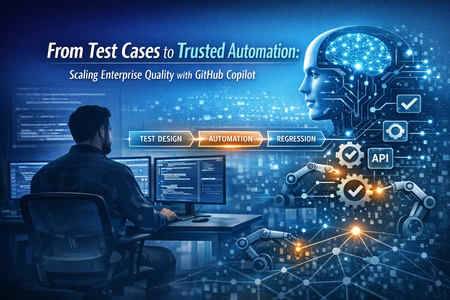
From Test Cases to Trusted Automation: Scaling Enterprise Quality with GitHub Copilot
Automation First, But Trust Is Earned Enterprise QA teams today are automation‑led by default. Regression suites run daily, API tests validate integrations, and UI automation protects critical workflows. Yet, many teams still struggle with: Automation suites that lag behind changing requirements Brittle regression tests producing false failures High effort spent on maintaining, refactoring, and rewriting tests Limited time for testers to think deeply about risk and coverage Automation creates speed—but trust is built only when automation stays relevant, maintainable, and aligned to business intent. That is where AI‑assisted workflows started to play a role—not to replace automation engineers, but to remove friction from automation execution and evolution. GitHub Copilot as an Automation Accelerator GitHub Copilot proved most effective when used as a support system for automation teams, not a replacement for expertise. Faster Automation Creation Without Losing Intent Automation engineers often spend significant time writing boilerplate code—test scaffolding, assertions, setup, and repetitive patterns. Copilot helped accelerate this phase by: Generating consistent test skeletons Assisting with repetitive automation logic Suggesting assertions aligned to test intent This allowed engineers to focus on what needed to be validated, not how fast they could type it. Improving Maintainability of Automation Suites At enterprise scale, the true cost of automation is maintenance. Copilot helped reduce this burden by: Accelerating refactoring of existing test code Making automation scripts more readable and standardized Supporting quicker updates when requirements changed As a result, regression suites stayed healthier and more reliable—directly improving release confidence. Strengthening Regression Confidence Automation is valuable only when it can be trusted during regression cycles. By reducing effort spent on maintaining and updating tests, Copilot indirectly strengthened regression stability, ensuring automation remained aligned with evolving functionality. Importantly, every AI suggestion was reviewed, validated, and owned by humans. Automation logic remained intentional, deterministic, and compliant with enterprise standards. Automation at Scale: Where Quality Is Really Won or Lost As automation grows across releases and teams, quality risks move upstream. The questions stop being: Do we have automation? And become: Can we trust what automation is telling us? This is where quality engineering truly matters. By using Copilot to lower the mechanical overhead of automation, QA engineers could invest more time in: Identifying risk‑based test coverage gaps Improving negative and edge‑case scenarios Ensuring UI, API, and integration automation complemented each other Designing automation that reflected real business flows Automation stopped being a maintenance burden and became a strategic quality asset. The Real Mindset Shift for QA Teams The biggest impact was not technical—it was cultural. Instead of spending the majority of time creating and fixing automation scripts, QA engineers could shift their focus toward: Test design strategy Regression optimization Failure analysis and pattern recognition Cross‑team conversations on quality risks AI didn’t reduce QA effort. It redirected effort to higher‑value quality ownership. This is what modern QA leadership looks like—not writing more tests, but ensuring the right tests exist, run reliably, and protect customer trust. Responsible AI Was Non‑Negotiable In an enterprise context, automation quality is inseparable from governance and responsibility. Clear guardrails were essential: No blind acceptance of AI‑generated automation Human review for every test case and assertion Awareness of security, data sensitivity, and compliance Using Copilot as an assistant—not an authority This ensured automation quality improved without compromising trust or control. Final Thoughts: Automation Builds Speed, Trust Builds Confidence Automation enables scale. Test design ensures coverage. Trust is built when both evolve together. GitHub Copilot did not replace automation skills on our enterprise project—it amplified them. By removing friction from test creation and maintenance, it allowed automation to scale responsibly and enabled QA teams to focus on what truly matters: confidence in every release. The future of quality engineering is not manual vs automation. It is automation‑led, AI‑assisted, and human‑governed quality. That is how trust is built at enterprise scale. Microsoft Learn – References on Automation & Quality Engineering The following Microsoft Learn resources provide authoritative guidance on automation‑led quality engineering, test strategy, and building trust at enterprise scale. Architecture strategies for testing - Microsoft Azure Well-Architected Framework | Microsoft Learn Architecture strategies for designing a reliability testing strategy - Microsoft Azure Well-Architected Framework | Microsoft Learn What is Azure Test Plans? Manual, exploratory, and automated test tools. - Azure Test Plans | Microsoft Learn Azure/AZVerify Your Azure diagram, your Bicep templates, and your live environment are three separate sources of truth. They can drift apart. AzVerify gives GitHub Copilot the skills to connect them.From Test Cases to Trust: Elevating Enterprise Quality with GitHub Copilot
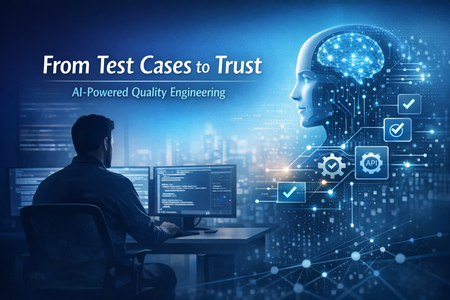
The Traditional QA Bottleneck In complex enterprise systems, QA teams often face familiar challenges: Time‑consuming test case creation from evolving requirements Repetitive automation scripting and refactoring Heavy regression cycles under tight release timelines Limited bandwidth for deeper risk analysis and exploratory testing None of these issues are caused by lack of skill—they’re symptoms of scale and complexity. This is where GitHub Copilot entered our workflow—not as a “magic button,” but as a thinking partner. Where GitHub Copilot Actually Helped Used responsibly, Copilot added value in very specific QA scenarios: Faster Test Design from Requirements Transforming business or technical requirements into structured test scenarios is intellectually demanding but time-intensive. Copilot helped accelerate: Initial test scenario drafting Gherkin-style acceptance criteria Coverage identification for edge and negative cases The result wasn’t “auto-generated tests,” but faster starting points, reviewed and refined by humans. Accelerating Automation Without Losing Control Whether working with UI automation or API tests, a significant portion of effort goes into boilerplate code, assertions, and structuring. Copilot assisted with: Suggesting test skeletons Refactoring repetitive code Improving readability and consistency This freed engineers to focus on test intent, not syntax. Supporting Debugging and Maintenance Automation maintenance is often underestimated. Copilot helped: Identify potential fixes during test failures Suggest improvements during refactoring Reduce turnaround time during regression cycles Again, nothing was auto‑merged. Human review remained non‑negotiable. The Most Important Shift: QA Mindset The real impact of Copilot wasn’t just efficiency—it changed how QA engineers spent their time. Instead of: Writing repetitive scripts Manually expanding similar test cases The team could focus more on: Risk‑based testing Failure pattern analysis Cross‑team quality discussions Improving test strategy and coverage depth In short, AI didn’t remove QA effort—it redirected it to higher‑value work. Responsible AI Was Not Optional In an enterprise setup, responsible AI usage matters. Key principles we followed: No blind acceptance of AI suggestions Strict human validation of all test logic Awareness of data sensitivity and compliance boundaries Treating Copilot as an assistant, not an authority This balance ensured quality and trust were never compromised in the pursuit of speed. What This Means for QA Teams From this experience, one thing became clear: AI won’t replace QA engineers. But QA engineers who use AI effectively will redefine quality. GitHub Copilot helped shift QA from execution to enablement—from writing tests faster to thinking about quality better. For enterprise teams, this is a powerful evolution. Final Thoughts Quality engineering is no longer just about finding defects—it’s about enabling confidence in delivery. Tools like GitHub Copilot, when used responsibly, can become catalysts in that transformation. The future of QA isn’t manual vs automation. It’s human judgment amplified by AI assistance. And that’s where real quality lives. References Create and manage manual test cases - Azure Test Plans | Microsoft Learn What is Azure Test Plans? Manual, exploratory, and automated test tools. - Azure Test Plans | Microsoft Learn Create and manage test plans - Azure Test Plans | Microsoft LearnFrom Terminal to Autonomous Coding: Mastering GitHub Copilot CLI ACP Server
Introduction The rise of AI-powered development is no longer just about autocomplete—it’s about autonomous agents that can think, act, and collaborate. At the center of this transformation is the Agent Client Protocol (ACP) and its integration with GitHub Copilot CLI. If you’ve ever wanted to: Integrate Copilot into your own tools Build custom AI-driven developer workflows Orchestrate coding agents in CI/CD Then understanding the GitHub Copilot CLI ACP Server is a game-changer. This article will take you from zero to advanced, covering concepts, architecture, setup, and real-world use cases. What Is Agent Client Protocol (ACP)? The Agent Client Protocol (ACP) is an open standard designed to connect clients (like IDEs or tools) with AI agents in a consistent and interoperable way. Why ACP Exists Before ACP: Every IDE needed custom integration for each AI agent Every agent needed custom APIs per editor ACP solves this by introducing a universal communication layer. Key Idea “Any editor can talk to any agent.” Core Capabilities ACP enables: Standardized messaging between client and agent Streaming responses Tool execution with permissions Session lifecycle management Multi-agent coordination This makes ACP a foundation layer for the agentic developer ecosystem. What Is GitHub Copilot CLI ACP Server? GitHub Copilot CLI can run as an ACP-compatible server, exposing its AI capabilities programmatically. 👉 In simple terms: It turns Copilot into a backend AI agent service that any tool can connect to. According to GitHub Docs: Copilot CLI can run in ACP mode using a flag It supports standardized communication via ACP It enables integration with IDEs, pipelines, and custom tools Architecture: How ACP + Copilot CLI Works Components Component Role Client Sends prompts, receives responses ACP Protocol Standard communication layer Copilot CLI AI agent executing tasks System Files, repos, tools Getting Started (Beginner Level) Install GitHub Copilot CLI Ensure: Copilot subscription is active CLI installed and authenticated Start ACP Server Default (stdio mode – recommended) TCP Mode (for remote systems) stdio: Best for IDE integration TCP: Best for distributed systems Connect Using ACP Client (Example) Using TypeScript SDK: You: Start Copilot as a process Create streams Initialize connection Send prompt Receive streaming response ACP uses: NDJSON streams over stdin/stdout Event-driven communication ACP Workflow Explained A typical flow looks like this: Step-by-step lifecycle Initialize connection Create session Send prompt Agent processes task Streaming updates returned Optional tool execution (with permissions) Session ends ACP supports: Text + multimodal inputs Incremental responses Cancellation and control Real-World Use Cases IDE Integration (Custom Editors) Build your own AI-powered editor: Connect via ACP Send code context Receive suggestions CI/CD Automation Imagine: Use ACP to: Auto-fix bugs Generate tests Refactor code Multi-Agent Systems ACP enables: Copilot + other agents working together Task delegation Workflow orchestration Custom Developer Tools Examples: AI code review dashboards Internal dev assistants ChatOps integrations Advanced Concepts Session Management ACP allows: Isolated sessions Custom working directories Context persistence Streaming Responses Instead of waiting: Receive responses in chunks Build real-time UIs Permission Handling ACP includes: Tool execution approvals Security boundaries Controlled automation Extensibility ACP supports: Multiple SDKs (TypeScript, Python, Rust, Kotlin) Custom clients Future protocol evolution ACP vs Traditional Integration Feature Traditional APIs ACP Integration Custom per tool Standardized Streaming Limited Native Multi-agent Hard Built-in Extensibility Low High Interoperability Poor Excellent Why ACP + Copilot CLI Is a Big Deal This combination unlocks: ✅ Platform-level AI integration No more vendor lock-in per editor ✅ True agentic workflows Agents don’t just suggest—they act ✅ Ecosystem growth Any tool can plug into Copilot Challenges & Considerations ACP is still in public preview Requires understanding of: Streams Async communication Debugging agent workflows can be complex Future of Developer Experience ACP represents a shift toward: “AI-native development platforms” Future possibilities: Fully autonomous CI/CD pipelines Cross-agent collaboration Self-healing codebases Final Thoughts The GitHub Copilot CLI ACP Server is not just a feature—it’s a foundation for the next generation of software development. If you are: A developer → build smarter tools A tech lead → design AI-driven workflows A CTO aspirant → understand this deeply Then ACP is something you must master early. Quick Summary ACP = Standard protocol for AI agents Copilot CLI = Can run as ACP server Enables = IDEs, CI/CD, multi-agent systems Key power = interoperability + automation
The Future of Agentic AI: Inside Microsoft Agent Framework 1.0
Agentic AI is rapidly moving beyond demos and chatbots toward long‑running, autonomous systems that reason, call tools, collaborate with other agents, and operate reliably in production. On April 3, 2026, Microsoft marked a major milestone with the General Availability (GA) release of Microsoft Agent Framework 1.0, a production‑ready, open‑source framework for building agents and multi‑agent workflows in.NET and Python. [techcommun...rosoft.com] In this post, we’ll deep‑dive into: What Microsoft Agent Framework actually is Its core architecture and design principles What’s new in version 1.0 How it differs from other agent frameworks When and how to use it—with real code examples What Is Microsoft Agent Framework? According to the official announcement, Microsoft Agent Framework is an open‑source SDK and runtime for building AI agents and multi‑agent workflows with strong enterprise foundations. Agent Framework provides two primary capability categories: 1. Agents Agents are long‑lived runtime components that: Use LLMs to interpret inputs Call tools and MCP servers Maintain session state Generate responses They are not just prompt wrappers, but stateful execution units. 2. Workflows Workflows are graph‑based orchestration engines that: Connect agents and functions Enforce execution order Support checkpointing and human‑in‑the‑loop scenarios This leads to a clean separation of responsibilities: Concern Handled By Reasoning & interpretation Agent Execution policy & control flow Workflow This separation is a foundational design decision. High‑Level Architecture From the official overview, Agent Framework is composed of several core building blocks: Model clients (chat completions & responses) Agent sessions (state & conversation management) Context providers (memory and retrieval) Middleware pipeline (interception, filtering, telemetry) MCP clients (tool discovery and invocation) Workflow engine (graph‑based orchestration) Conceptual Flow 🌟 What’s New in Version 1.0 Version 1.0 marks the transition from "Release Candidate" to "General Availability" (GA). Production-Ready Stability: Unlike the earlier experimental packages, 1.0 offers stable APIs, versioned releases, and a commitment to long-term support (LTS). A2A Protocol (Agent-to-Agent): A new structured messaging protocol that allows agents to communicate across different runtimes. For example, an agent built in Python can seamlessly coordinate with an agent running in a .NET environment. MCP (Model Context Protocol) Support: Full integration with the Model Context Protocol, enabling agents to dynamically discover and invoke external tools and data sources without manual integration code. Multi-Agent Orchestration Patterns: Stable implementations of complex patterns, including: Sequential: Linear handoffs between specialized agents. Group Chat: Collaborative reasoning where agents discuss and solve problems. Magentic-One: A sophisticated pattern for task-oriented reasoning and planning. Middleware Pipeline: The new middleware architecture lets you inject logic into the agent's execution loop without modifying the core prompts. This is essential for Responsible AI (RAI), allowing you to add content safety filters, logging, and compliance checks globally. DevUI Debugger: A browser-based local debugger that provides a real-time visual representation of agent message flows, tool calls, and state changes. Code Examples Creating a Simple Agent (C#) From Microsoft Learn : using Azure.AI.Projects; using Azure.Identity; using Microsoft.Agents.AI; AIAgent agent = new AIProjectClient( new Uri("https://your-foundry-service.services.ai.azure.com/api/projects/your-project"), new AzureCliCredential()) .AsAIAgent( model: "gpt-5.4-mini", instructions: "You are a friendly assistant. Keep your answers brief."); Console.WriteLine(await agent.RunAsync("What is the largest city in France?")); This shows: Provider‑agnostic model access Session‑aware agent execution Minimal setup for production agents Creating a Simple Agent (Python) from agent_framework.foundry import FoundryChatClient from azure.identity import AzureCliCredential client = FoundryChatClient( project_endpoint="https://your-foundry-service.services.ai.azure.com/api/projects/your-project", model="gpt-5.4-mini", credential=AzureCliCredential(), ) agent = client.as_agent( name="HelloAgent", instructions="You are a friendly assistant. Keep your answers brief.", ) result = await agent.run("What is the largest city in France?") print(result) The same agent abstraction applies across languages. When to Use Agents vs Workflows Microsoft provides clear guidance: Use an Agent when… Use a Workflow when… Task is open‑ended Steps are well‑defined Autonomous tool use is needed Execution order matters Single decision point Multiple agents/functions collaborate Key principle: If you can solve the task with deterministic code, do that instead of using an AI agent. 🔄 How It Differs from Other Frameworks Microsoft Agent Framework 1.0 distinguishes itself by focusing on "Enterprise Readiness" and "Interoperability." Feature Microsoft Agent Framework 1.0 Semantic Kernel / AutoGen LangChain / CrewAI Philosophy Unified, production-ready SDK. Research-focused or tool-specific. High-level, developer-friendly abstractions. Integration Deeply integrated with Microsoft Foundry and Azure. Varied; often requires more glue code. Generally cloud-agnostic. Interoperability Native A2A and MCP for cross-framework tasks. Limited to internal ecosystem. Uses proprietary connectors. Runtime Identical API parity for .NET and Python. Primarily Python-first (SK has C#). Primarily Python. Control Graph-based deterministic workflows. More non-deterministic/experimental. Mixture of role-based and agentic. 🛠️ Key Technical Components Agent Harness: The execution layer that provides agents with controlled access to the shell, file system, and messaging loops. Agent Skills: A portable, file-based or code-defined format for packaging domain expertise. Implementation Tip: If you are coming from Semantic Kernel, Microsoft provides migration assistants that analyze your existing code and generate step-by-step plans to upgrade to the new Agent Framework 1.0 standards. Microsoft Agent Framework Version 1.0 | Microsoft Agent Framework Agent Framework documentation 🎯 Summary Microsoft Agent Framework 1.0 is the "grown-up" version of AI orchestration. By standardizing the way agents talk to each other (A2A), discover tools (MCP), and process information (Middleware), Microsoft has provided a clear path for taking AI experiments into production. For more detailed guides, check out the official Microsoft Agent Framework DocumentationMicrosoft Agent Framework - .NET AI Community Standup