gen ai
2 TopicsUshering in the Next Era of Cloud-Native AI Capabilities for Radiology
Introducing Dragon Copilot, your AI companion for PowerScribe One For radiologists, the reporting workflow of the future is here. At RSNA 2025, in Chicago, we’re showcasing Dragon Copilot, a cloud-native companion for PowerScribe One. Currently in preview, Dragon Copilot builds on the trusted capabilities of PowerScribe One to accelerate innovation and modernize reporting workflows while unlocking extensibility for radiology teams and partners. Why we built it: Technical drivers for a new era With growing demand for imaging services coupled with a workforce shortage, healthcare professionals face increased workloads and burnout while patients experience greater wait times. With our breadth of healthcare industry experience combined with our AI expertise and development at Microsoft, we immediately understood how we could help address these challenges. For radiologists, we sought to plugin into existing reporting workflows with rapid innovation, scalable AI, and open extensibility. How we built it: Modern architecture and extensibility By delivering Dragon Copilot as cloud-native solution built on Azure, we can enable new services globally. We apply the full capabilities of Azure for compute, storage, and security for high availability and compliance. Our modular architecture enables fast delivery of new features with APIs at the core to allow seamless integration, extensibility, and partner innovation. To imbue the workflow with AI through our platform, we harness the latest generative, multimodal, and agentic AI (both internal and through our partners) to support clinical reporting, workflow automation, and decision support. Key architectural highlights: AI services: Integrated large language models (LLMs) and vision-language models (VLMs) for multimodal data processing. API-first design: RESTful APIs expose core functions (draft report content generation, prior summarization, quality checks and chat) enabling partners and developers to build extensions and custom workflows. Extensibility framework: Open platform for 1st- and 3rd-party extensions, supporting everything from custom AI models to workflow agents. Inside the innovation Dragon Copilot alongside PowerScribe provides a unified AI experience. Radiologists can take advantage of the latest AI advancements without disruption to their workflows. They do not need another widget taking up room on their desktop. Instead, they need AI that fits seamlessly into existing workflows connecting their data to the cloud. Our cloud-first approach brings increased reliability, stability, and performance to a radiologists’ workflow. I’m thrilled to highlight the key capabilities of this dynamic duo: PowerScribe One with Dragon Copilot. Prior report summary: Automatically summarizes relevant prior reports, surfacing key findings, and context for the current study. AI-generated draft reports and quality checks: The most transformative aspect of Dragon Copilot is its open, extensible architecture for AI integration. We don’t limit radiology teams to a single set of AI tools. We enable seamless plug-ins for AI apps & agents from both Microsoft and our growing ecosystem of 3rd-parties. We provide a single surface for all your AI needs. This approach will enable radiology departments to discover, acquire, & deploy new AI-powered extensions. We’re enthusiastic about embarking on this journey with partners. We're also excited about collaborations with developers and academic innovators to bring their own AI models and services directly into the Dragon Copilot experience. Integrated chat experience with credible knowledge sources and medical safeguards: This chat interface connects radiologists to credible, clinically validated sources from Radiopedia and Radiology Assistant. It enables agentic orchestration and safeguards provided by Azure's Healthcare Agent Services for PHI and clinical accuracy. In the future, we expect to have a variety of other sources for radiology customers to choose from as well as the ability for organizations to add their own approved policies and protocols. This chat is designed to route questions to the right agent, provide evidence for claims, and filter responses for clinical validity. Over time, it will include extensions with custom agents powered by Copilot Studio. Help us shape what’s next As we continue to evolve Dragon Copilot alongside PowerScribe One, we invite innovators, developer partners, and academics to join us in shaping the future of radiology workflow. Dragon Copilot is more than a product; it’s a solution for rapid, responsible innovation in radiology. By combining cloud-native architecture, advanced AI capabilities, and open extensibility, we’re enabling radiology teams to work smarter, faster, and with greater confidence. Ready to see it in action? Visit us at RSNA 2025 (November 30–December 4), booth #1311 South Hall. Or contact our team to join the journey.
Building Agentic Solutions with Autogen 0.4
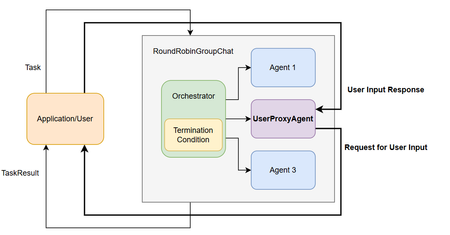
Multi Agent Systems are a consequence of an organized interaction between diverse agents to achieve a goal. Similar to human collaborations, Agentic solutions are expected to collaborate effectively in accordance with the goal to be accomplished. A crucial aspect is adopting the appropriate design pattern depending on the task on hand. Let us look at the design of Agentic Solutions is stages. Stage 1: Determine all the required Agents and define the required tools which can be leveraged by the Agents. The tools may have access requirements which has to be handled with appropriate security constraints. In Autogen, this is supported through multiple patterns which address different requirements. At its core, Autogen provides the ability to leverage LLMs, human inputs, tools or a combination. Autogen 0.4 in particular has provided an high-level API through AgentChat with preset Agents allowing for variations in agent responses. Some of the preset Agents include 1) AssistantAgent is a built-in agent which can use a language model and tools. It can also handle multimodal messages and instructions of the Agents function. 2) UserProxyAgent: An agent that takes user input returns it as responses. 3) CodeExecutorAgent: An agent that can execute code. 4) OpenAIAssistantAgent: An agent that is backed by an OpenAI Assistant, with ability to use custom tools. 5) MultimodalWebSurfer: A multi-modal agent that can search the web and visit web pages for information. 6) FileSurfer: An agent that can search and browse local files for information. 7) VideoSurfer: An agent that can watch videos for information. A Custom Agents can be used when the preset Agents do not address the need. Stage 2: Identify the optimal interaction between the team of agents. This can include a human in the loop proxy agent which serves as an interface for human inputs. Autogen supports multiple interaction patterns 1) GroupChat is a high-level design pattern for interleaved interactions. In Auotgen 0.4, GroupChat got further abstracted with RoundRobinGroupChat or SelectorGroupChat . This means you can choose to go with abstracted options of RoundRobinGroupChat, SelectorGroupChat or customize it to your need with the base GroupChat in the core. RoundRobinGroupChat team configuration where all agents share the same context respond in a round-robin fashion. Broadcasts response to all agents, provides a consistent context. Human In the Loop - UserProxyAgent SelectorGroupChat team where participants take turns broadcasting messages to all other members. A generative model selects the next speaker based on the shared context, enabling dynamic, context-aware collaboration. selector_func argument with a custom selector function to override the default model-based selection. GroupChat in core 2) Sequential Agents Stage 3: Determine the memory and message passing between the Agents Memory can be the context for the Agent which could be the conversation history, RAG which is pulled from a ListMemory or a Custom Memory Store like a Vector DB. Messaging between Agents uses ChatMessage. This message type allows both text and multimodal communication and includes specific types such as TextMessage or MultiModalMessage. Stage 4: Articulate the Termination condition The following Termination options are available in Autogen 0.4 MaxMessageTermination: Stops after a specified number of messages have been produced, including both agent and task messages. TextMentionTermination: Stops when specific text or string is mentioned in a message (e.g., “TERMINATE”). TokenUsageTermination: Stops when a certain number of prompt or completion tokens are used. This requires the agents to report token usage in their messages. TimeoutTermination: Stops after a specified duration in seconds. HandoffTermination: Stops when a handoff to a specific target is requested. Handoff messages can be used to build patterns such as Swarm. This is useful when you want to pause the run and allow application or user to provide input when an agent hands off to them. SourceMatchTermination: Stops after a specific agent responds. ExternalTermination: Enables programmatic control of termination from outside the run. This is useful for UI integration (e.g., “Stop” buttons in chat interfaces). StopMessageTermination: Stops when a StopMessage is produced by an agent. TextMessageTermination: Stops when a TextMessage is produced by an agent. FunctionCallTermination: Stops when a ToolCallExecutionEvent containing a FunctionExecutionResult with a matching name is produced by an agent. Stage 5: Optionally manage the state This is useful in web application where stateless endpoints respond to requests and need to load the state of the application from persistent storage. The state can be saved by using the save_state() call in the AssistantAgent. assistant_agent.save_state() Finally, Logging and Serializing is also available for debugging and sharing. A well-designed Agentic Solution is crucial to be both optimal and effective in accomplishing the assigned goal. References Autogen - https://microsoft.github.io/autogen/stable/index.html1.7KViews3likes2Comments