foundry
17 TopicsNasdaq builds thoughtfully designed AI for board governance with PostgreSQL on Azure
Authored by: Charles Federssen, Partner Director of Product Management for PostgreSQL at Microsoft and Mohsin Shafqat, Senior Manager, Software Engineering at Nasdaq When people think of Nasdaq, they usually think of markets, trading floors, and financial data moving at extraordinary speed. But behind the scenes, Nasdaq also plays an equally critical role in how boards of directors govern, deliberate, and make decisions. Nasdaq Boardvantage® is the company’s governance platform, used by more than 4,400 organizations worldwide—including nearly half of the Fortune 100. It’s where directors review board books, collaborate in an environment designed with robust security, and prepare for meetings that often involve some of the most sensitive information a company has. In recent years, Nasdaq set out to modernize Nasdaq Boardvantage with AI, without compromising security and reliability. That journey was featured in a Microsoft Ignite session, “Nasdaq Boardvantage: AI-Driven Governance on PostgreSQL and Foundry.” It offers a practical look at how Azure Database for PostgreSQL can support AI-driven applications where precision, isolation, and data control are non-negotiable. Introducing AI where trust is everything Board governance isn’t a typical productivity workload. Board packets can run 400 to 600 pages, meeting minutes are legal records, and any AI-generated insight must be confined to a customer’s own data. “Our customers trust us with some of their most strategic, sensitive data,” said Mohsin Shafqat, Senior Manager of Software Development at Nasdaq. That trust meant tackling several core challenges upfront, including: How do you minimize AI hallucinations in a governance context? How do you guarantee tenant isolation at scale? How do you keep data regional across a global customer base? A cloud foundation built for governance Before adding intelligence, Nasdaq decided to re-architect Nasdaq Boardvantage on Microsoft Azure, using Azure Kubernetes Service (AKS) to run containerized, multi-tenant workloads with strong isolation boundaries. Microsoft Foundry provides the managed foundation for deploying, governing, and operating AI models across this architecture, adding consistency, security, and control as intelligence is introduced. At the data layer, Azure Database for PostgreSQL and Azure Database for MySQL became the backbone for governance data. PostgreSQL, in particular, plays a central role in managing structured governance information alongside vector embeddings that support AI-driven features. Together, these services give Nasdaq the performance, security, and operational control required for a highly regulated, multi-tenant environment, while still moving quickly. Key architectural choices included: Tenant isolation by design, with separate databases and storage Regional deployments to align with data residency requirements High availability and managed operations, so teams could focus on product innovation instead of infrastructure maintenance PostgreSQL and pgvector: Powering context-aware AI With that foundation in place, Nasdaq was ready to carefully introduce AI. One of the first AI capabilities was intelligent document summarization. Board materials that once took hours to review could now be condensed into concise, contextually accurate summaries. Under the hood, this required more than just calling an LLM. Nasdaq uses pgvector, natively supported in Azure Database for PostgreSQL, to store and query embeddings generated from board documents. This allows the platform to perform hybrid searches that combine traditional SQL queries with vector similarity to retrieve the most relevant context before sending anything to a language model. Instead of treating AI as a black box, the team built a pipeline where: Documents are processed with Azure Document Intelligence to preserve structure and meaning Content is chunked and embedded Embeddings are stored in PostgreSQL with pgvector Vector similarity searches retrieve precise context for each AI task Because this runs inside PostgreSQL, the same database benefits from Azure’s built-in high availability, security controls, and operational tooling – delivering tangible results, including a 25% reduction in overall board preparation time and internal testing shows 91–97% accuracy for AI-generated summaries and meeting minutes. From summaries to an AI Board Assistant With summarization working in production, Nasdaq expanded further. The team is now building an AI-powered Board Assistant that will help directors prepare for upcoming meetings by surfacing trends, risks, and insights from prior discussions. This introduces a new level of scale. Years of board data across thousands of customers translate into millions of embeddings. PostgreSQL continues to anchor this architecture, storing vectors for semantic retrieval while MySQL supports complementary non-vector workloads. Across Nasdaq Boardvantage, users are advised to always review AI outputs, and no customer data is shared or used to train external models. “We designed AI for governance, not the other way around,” Shafqat said. More importantly, customers trust the system because security, isolation, and data control were engineered in from day one. Looking ahead Nasdaq’s work shows how Azure Database for PostgreSQL can support AI workloads that demand both intelligence and integrity. With PostgreSQL at the core, Nasdaq has built a governance platform that scales globally, respects regulatory boundaries, and introduces AI in a way that feels dependable and not experimental. What started as a modernization of Nasdaq Boardvantage is now influencing how Nasdaq approaches AI across the enterprise. To dive deeper into the architecture and hear directly from the engineers behind it, watch the Ignite session and check out these resources: Watch the Ignite breakout session for a technical walkthrough of how Nasdaq Boardvantage is built, including PostgreSQL on Azure, pgvector, and Microsoft Foundry in production. Read the case study to see how Nasdaq introduced AI into board governance and what changed for directors, administrators, and decision-making. Watch the Ignite broadcast for a candid discussion on Azure Database for PostgreSQL, Azure HorizonDB, and what it takes to scale AI-driven governance.Agentic Code Fixing with GitHub Copilot SDK and Foundry Local
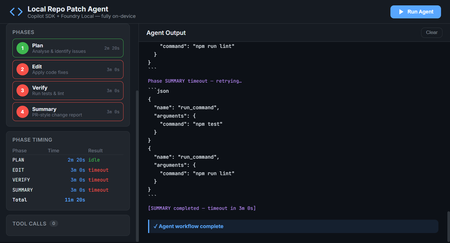
Introduction AI-powered coding assistants have transformed how developers write and review code. But most of these tools require sending your source code to cloud services, a non-starter for teams working with proprietary codebases, air-gapped environments, or strict compliance requirements. What if you could have an intelligent coding agent that finds bugs, fixes them, runs your tests, and produces PR-ready summaries, all without a single byte leaving your machine? The Local Repo Patch Agent demonstrates exactly this. By combining the GitHub Copilot SDK for agent orchestration with Foundry Local for on-device inference, this project creates a fully autonomous coding workflow that operates entirely on your hardware. The agent scans your repository, identifies bugs and code smells, applies fixes, verifies them through your test suite, and generates a comprehensive summary of all changes, completely offline and secure. This article explores the architecture behind this integration, walks through the key implementation patterns, and shows you how to run the agent yourself. Whether you're building internal developer tools, exploring agentic workflows, or simply curious about what's possible when you combine GitHub's SDK with local AI, this project provides a production-ready foundation to build upon. Why Local AI Matters for Code Analysis Cloud-based AI coding tools have proven their value—GitHub Copilot has fundamentally changed how millions of developers work. But certain scenarios demand local-first approaches where code never leaves the organisation's network. Consider these real-world constraints that teams face daily: Regulatory compliance: Financial services, healthcare, and government projects often prohibit sending source code to external services, even for analysis Intellectual property protection: Proprietary algorithms and trade secrets can't risk exposure through cloud API calls Air-gapped environments: Secure facilities and classified projects have no internet connectivity whatsoever Latency requirements: Real-time code analysis in IDEs benefits from zero network roundtrip Cost control: High-volume code analysis without per-token API charges The Local Repo Patch Agent addresses all these scenarios. By running the AI model on-device through Foundry Local and using the GitHub Copilot SDK for orchestration, you get the intelligence of agentic coding workflows with complete data sovereignty. The architecture proves that "local-first" doesn't mean "capability-limited." The Technology Stack Two core technologies make this architecture possible, working together through a clever integration called BYOK (Bring Your Own Key). Understanding how they complement each other reveals the elegance of the design. GitHub Copilot SDK The GitHub Copilot SDK provides the agent runtime, the scaffolding that handles planning, tool invocation, streaming responses, and the orchestration loop that makes agentic behaviour possible. Rather than managing raw LLM API calls, developers define tools (functions the agent can call) and system prompts, and the SDK handles everything else. Key capabilities the SDK brings to this project: Session management: Maintains conversation context across multiple agent interactions Tool orchestration: Automatically invokes defined tools when the model requests them Streaming support: Real-time response streaming for responsive user interfaces Provider abstraction: Works with any OpenAI-compatible API through the BYOK configuration Foundry Local Foundry Local brings Azure AI Foundry's model catalog to your local machine. It automatically selects the best available hardware acceleration—GPU, NPU, or CP, and exposes models through an OpenAI-compatible API on localhost. Models run entirely on-device with no telemetry or data transmission. For this project, Foundry Local provides: On-device inference: All AI processing happens locally, ensuring complete data privacy Dynamic port allocation: The SDK auto-detects the Foundry Local endpoint, eliminating configuration hassle Model flexibility: Swap between models like qwen2.5-coder-1.5b , phi-3-mini , or larger variants based on your hardware OpenAI API compatibility: Standard API format means the GitHub Copilot SDK works without modification The BYOK Integration The entire connection between the GitHub Copilot SDK and Foundry Local happens through a single configuration object. This BYOK (Bring Your Own Key) pattern tells the SDK to route all inference requests to your local model instead of cloud services: const session = await client.createSession({ model: modelId, provider: { type: "openai", // Foundry Local speaks OpenAI's API format baseUrl: proxyBaseUrl, // Streaming proxy → Foundry Local apiKey: manager.apiKey, wireApi: "completions", // Chat Completions API }, streaming: true, tools: [ /* your defined tools */ ], }); This configuration is the key insight: with one config object, you've redirected an entire agent framework to run on local hardware. No code changes to the SDK, no special adapters—just standard OpenAI-compatible API communication. Architecture Overview The Local Repo Patch Agent implements a layered architecture where each component has a clear responsibility. Understanding this flow helps when extending or debugging the system. ┌─────────────────────────────────────────────────────────┐ │ Your Terminal / Web UI │ │ npm run demo / npm run ui │ └──────────────┬──────────────────────────────────────────┘ │ ┌──────────────▼──────────────────────────────────────────┐ │ src/agent.ts (this project) │ │ │ │ ┌────────────────────────────┐ ┌──────────────────┐ │ │ │ GitHub Copilot SDK │ │ Agent Tools │ │ │ │ (CopilotClient) │ │ list_files │ │ │ │ BYOK → Foundry │ │ read_file │ │ │ └────────┬───────────────────┘ │ write_file │ │ │ │ │ run_command │ │ └────────────┼───────────────────────┴──────────────────┘ │ │ │ │ JSON-RPC │ ┌────────────▼─────────────────────────────────────────────┐ │ GitHub Copilot CLI (server mode) │ │ Agent orchestration layer │ └────────────┬─────────────────────────────────────────────┘ │ POST /v1/chat/completions (BYOK) ┌────────────▼─────────────────────────────────────────────┐ │ Foundry Local (on-device inference) │ │ Model: qwen2.5-coder-1.5b via ONNX Runtime │ │ Endpoint: auto-detected (dynamic port) │ └───────────────────────────────────────────────────────────┘ The data flow works as follows: your terminal or web browser sends a request to the agent application. The agent uses the GitHub Copilot SDK to manage the conversation, which communicates with the Copilot CLI running in server mode. The CLI, configured with BYOK, sends inference requests to Foundry Local running on localhost. Responses flow back up the same path, with tool invocations happening in the agent.ts layer. The Four-Phase Workflow The agent operates through a structured four-phase loop, each phase building on the previous one's output. This decomposition transforms what would be an overwhelming single prompt into manageable, verifiable steps. Phase 1: PLAN The planning phase scans the repository and produces a numbered fix plan. The agent reads every source and test file, identifies potential issues, and outputs specific tasks to address: // Phase 1 system prompt excerpt const planPrompt = ` You are a code analysis agent. Scan the repository and identify: 1. Bugs that cause test failures 2. Code smells and duplication 3. Style inconsistencies Output a numbered list of fixes, ordered by priority. Each item should specify: file path, line numbers, issue type, and proposed fix. `; The tools available during this phase are list_files and read_file —the agent explores the codebase without modifying anything. This read-only constraint prevents accidental changes before the plan is established. Phase 2: EDIT With a plan in hand, the edit phase applies each fix by rewriting affected files. The agent receives the plan from Phase 1 and systematically addresses each item: // Phase 2 adds the write_file tool const editTools = [ { name: "write_file", description: "Write content to a file, creating or overwriting it", parameters: { type: "object", properties: { path: { type: "string", description: "File path relative to repo root" }, content: { type: "string", description: "Complete file contents" } }, required: ["path", "content"] } } ]; The write_file tool is sandboxed to the demo-repo directory, path traversal attempts are blocked, preventing the agent from modifying files outside the designated workspace. Phase 3: VERIFY After making changes, the verification phase runs the project's test suite to confirm fixes work correctly. If tests fail, the agent attempts to diagnose and repair the issue: // Phase 3 adds run_command with an allowlist const allowedCommands = ["npm test", "npm run lint", "npm run build"]; const runCommandTool = { name: "run_command", description: "Execute a shell command (npm test, npm run lint, npm run build only)", execute: async (command: string) => { if (!allowedCommands.includes(command)) { throw new Error(`Command not allowed: ${command}`); } // Execute and return stdout/stderr } }; The command allowlist is a critical security measure. The agent can only run explicitly permitted commands—no arbitrary shell execution, no data exfiltration, no system modification. Phase 4: SUMMARY The final phase produces a PR-style Markdown report documenting all changes. This summary includes what was changed, why each change was necessary, test results, and recommended follow-up actions: ## Summary of Changes ### Bug Fix: calculateInterest() in account.js - **Issue**: Division instead of multiplication caused incorrect interest calculations - **Fix**: Changed `principal / annualRate` to `principal * (annualRate / 100)` - **Tests**: 3 previously failing tests now pass ### Refactor: Duplicate formatCurrency() removed - **Issue**: Identical function existed in account.js and transaction.js - **Fix**: Both files now import from utils.js - **Impact**: Reduced code duplication, single source of truth ### Test Results - **Before**: 6/9 passing - **After**: 9/9 passing This structured output makes code review straightforward, reviewers can quickly understand what changed and why without digging through diffs. The Demo Repository: Intentional Bugs The project includes a demo-repo directory containing a small banking utility library with intentional problems for the agent to find and fix. This provides a controlled environment to demonstrate the agent's capabilities. Bug 1: Calculation Error in calculateInterest() The account.js file contains a calculation bug that causes test failures: // BUG: should be principal * (annualRate / 100) function calculateInterest(principal, annualRate) { return principal / annualRate; // Division instead of multiplication! } This bug causes 3 of 9 tests to fail. The agent identifies it during the PLAN phase by correlating test failures with the implementation, then fixes it during EDIT. Bug 2: Code Duplication The formatCurrency() function is copy-pasted in both account.js and transaction.js, even though a canonical version exists in utils.js. This duplication creates maintenance burden and potential inconsistency: // In account.js (duplicated) function formatCurrency(amount) { return '$' + amount.toFixed(2); } // In transaction.js (also duplicated) function formatCurrency(amount) { return '$' + amount.toFixed(2); } // In utils.js (canonical, but unused) export function formatCurrency(amount) { return '$' + amount.toFixed(2); } The agent identifies this duplication during planning and refactors both files to import from utils.js, eliminating redundancy. Handling Foundry Local Streaming Quirks One technical challenge the project solves is Foundry Local's behaviour with streaming requests. As of version 0.5, Foundry Local can hang on stream: true requests. The project includes a streaming proxy that works around this limitation transparently. The Streaming Proxy The streaming-proxy.ts file implements a lightweight HTTP proxy that converts streaming requests to non-streaming, then re-encodes the single response as SSE (Server-Sent Events) chunks—the format the OpenAI SDK expects: // streaming-proxy.ts simplified logic async function handleRequest(req: Request): Promise { const body = await req.json(); // If it's a streaming chat completion, convert to non-streaming if (body.stream === true && req.url.includes('/chat/completions')) { body.stream = false; const response = await fetch(foundryEndpoint, { method: 'POST', body: JSON.stringify(body), headers: { 'Content-Type': 'application/json' } }); const data = await response.json(); // Re-encode as SSE stream for the SDK return createSSEResponse(data); } // Non-streaming and non-chat requests pass through unchanged return fetch(foundryEndpoint, req); } This proxy runs on port 8765 by default and sits between the GitHub Copilot SDK and Foundry Local. The SDK thinks it's talking to a streaming-capable endpoint, while the actual inference happens non-streaming. The conversion is transparent, no changes needed to SDK configuration. Text-Based Tool Call Detection Small on-device models like qwen2.5-coder-1.5b sometimes output tool calls as JSON text rather than using OpenAI-style function calling. The SDK won't fire tool.execution_start events for these text-based calls, so the agent includes a regex-based detector: // Pattern to detect tool calls in model output const toolCallPattern = /\{[\s\S]*"name":\s*"(list_files|read_file|write_file|run_command)"[\s\S]*\}/; function detectToolCall(text: string): ToolCall | null { const match = text.match(toolCallPattern); if (match) { try { return JSON.parse(match[0]); } catch { return null; } } return null; } This fallback ensures tool calls are captured regardless of whether the model uses native function calling or text output, keeping the dashboard's tool call counter and CLI log accurate. Security Considerations Running an AI agent that can read and write files and execute commands requires careful security design. The Local Repo Patch Agent implements multiple layers of protection: 100% local execution: No code, prompts, or responses leave your machine—complete data sovereignty Command allowlist: The agent can only run npm test , npm run lint , and npm run build —no arbitrary shell commands Path sandboxing: File tools are locked to the demo-repo/ directory; path traversal attempts like ../../../etc/passwd are rejected File size limits: The read_file tool rejects files over 256 KB, preventing memory exhaustion attacks Recursion limits: Directory listing caps at 20 levels deep, preventing infinite traversal These constraints demonstrate responsible AI agent design. The agent has enough capability to do useful work but not enough to cause harm. When extending this project for your own use cases, maintain similar principles, grant minimum necessary permissions, validate all inputs, and fail closed on unexpected conditions. Running the Agent Getting the Local Repo Patch Agent running on your machine takes about five minutes. The project includes setup scripts that handle prerequisites automatically. Prerequisites Before running the setup, ensure you have: Node.js 18 or higher: Download from nodejs.org (LTS version recommended) Foundry Local: Install via winget install Microsoft.FoundryLocal (Windows) or brew install foundrylocal (macOS) GitHub Copilot CLI: Follow the GitHub Copilot CLI install guide Verify your installations: node --version # Should print v18.x.x or higher foundry --version copilot --version One-Command Setup The easiest path uses the provided setup scripts that install dependencies, start Foundry Local, and download the AI model: # Clone the repository git clone https://github.com/leestott/copilotsdk_foundrylocal.git cd copilotsdk_foundrylocal # Windows (PowerShell) .\setup.ps1 # macOS / Linux chmod +x setup.sh ./setup.sh When setup completes, you'll see: ━━━ Setup complete! ━━━ You're ready to go. Run one of these commands: npm run demo CLI agent (terminal output) npm run ui Web dashboard (http://localhost:3000) Manual Setup If you prefer step-by-step control: # Install npm packages npm install cd demo-repo && npm install --ignore-scripts && cd .. # Start Foundry Local and download the model foundry service start foundry model run qwen2.5-coder-1.5b # Copy environment configuration cp .env.example .env # Run the agent npm run demo The first model download takes a few minutes depending on your connection. After that, the model runs from cache with no internet required. Using the Web Dashboard For a visual experience with real-time streaming, launch the web UI: npm run ui Open http://localhost:3000 in your browser. The dashboard provides: Phase progress sidebar: Visual indication of which phase is running, completed, or errored Live streaming output: Model responses appear in real-time via WebSocket Tool call log: Every tool invocation logged with phase context Phase timing table: Performance metrics showing how long each phase took Environment info: Current model, endpoint, and repository path at a glance Configuration Options The agent supports several environment variables for customisation. Edit the .env file or set them directly: Variable Default Description FOUNDRY_LOCAL_ENDPOINT auto-detected Override the Foundry Local API endpoint FOUNDRY_LOCAL_API_KEY auto-detected Override the API key FOUNDRY_MODEL qwen2.5-coder-1.5b Which model to use from the Foundry Local catalog FOUNDRY_TIMEOUT_MS 180000 (3 min) How long each agent phase can run before timing out FOUNDRY_NO_PROXY — Set to 1 to disable the streaming proxy PORT 3000 Port for the web dashboard Using Different Models To try a different model from the Foundry Local catalog: # Use phi-3-mini instead FOUNDRY_MODEL=phi-3-mini npm run demo # Use a larger model for higher quality (requires more RAM/VRAM) FOUNDRY_MODEL=qwen2.5-7b npm run demo Adjusting for Slower Hardware If you're running on CPU-only or limited hardware, increase the timeout to give the model more time per phase: # 5 minutes per phase instead of 3 FOUNDRY_TIMEOUT_MS=300000 npm run demo Troubleshooting Common Issues When things don't work as expected, these solutions address the most common problems: Problem Solution foundry: command not found Install Foundry Local—see Prerequisites section copilot: command not found Install GitHub Copilot CLI—see Prerequisites section Agent times out on every phase Increase FOUNDRY_TIMEOUT_MS (e.g., 300000 for 5 min). CPU-only machines are slower. Port 3000 already in use Set PORT=3001 npm run ui Model download is slow First download can take 5-10 min. Subsequent runs use the cache. Cannot find module errors Run npm install again, then cd demo-repo && npm install --ignore-scripts Tests still fail after agent runs The agent edits files in demo-repo/. Reset with git checkout demo-repo/ and run again. PowerShell blocks setup.ps1 Run Set-ExecutionPolicy -Scope Process Bypass first, then .\setup.ps1 Diagnostic Test Scripts The src/tests/ folder contains standalone scripts for debugging SDK and Foundry Local integration issues. These are invaluable when things go wrong: # Debug-level SDK event logging npx tsx src/tests/test-debug.ts # Test non-streaming inference (bypasses streaming proxy) npx tsx src/tests/test-nostream.ts # Raw fetch to Foundry Local (bypasses SDK entirely) npx tsx src/tests/test-stream-direct.ts # Start the traffic-inspection proxy npx tsx src/tests/test-proxy.ts These scripts isolate different layers of the stack, helping identify whether issues lie in Foundry Local, the streaming proxy, the SDK, or your application code. Key Takeaways BYOK enables local-first AI: A single configuration object redirects the entire GitHub Copilot SDK to use on-device inference through Foundry Local Phased workflows improve reliability: Breaking complex tasks into PLAN → EDIT → VERIFY → SUMMARY phases makes agent behaviour predictable and debuggable Security requires intentional design: Allowlists, sandboxing, and size limits constrain agent capabilities to safe operations Local models have quirks: The streaming proxy and text-based tool detection demonstrate how to work around on-device model limitations Real-time feedback matters: The web dashboard with WebSocket streaming makes agent progress visible and builds trust in the system The architecture is extensible: Add new tools, change models, or modify phases to adapt the agent to your specific needs Conclusion and Next Steps The Local Repo Patch Agent proves that sophisticated agentic coding workflows don't require cloud infrastructure. By combining the GitHub Copilot SDK's orchestration capabilities with Foundry Local's on-device inference, you get intelligent code analysis that respects data sovereignty completely. The patterns demonstrated here, BYOK integration, phased execution, security sandboxing, and streaming workarounds, transfer directly to production systems. Consider extending this foundation with: Custom tool sets: Add database queries, API calls to internal services, or integration with your CI/CD pipeline Multiple repository support: Scan and fix issues across an entire codebase or monorepo Different model sizes: Use smaller models for quick scans, larger ones for complex refactoring Human-in-the-loop approval: Add review steps before applying fixes to production code Integration with Git workflows: Automatically create branches and PRs from agent-generated fixes Clone the repository, run through the demo, and start building your own local-first AI coding tools. The future of developer AI isn't just cloud—it's intelligent systems that run wherever your code lives. Resources Local Repo Patch Agent Repository – Full source code with setup scripts and documentation Foundry Local – Official site for on-device AI inference Foundry Local GitHub Repository – Installation instructions and CLI reference Foundry Local Get Started Guide – Official Microsoft Learn documentation Foundry Local SDK Reference – Python and JavaScript SDK documentation GitHub Copilot SDK – Official SDK repository GitHub Copilot SDK BYOK Documentation – Bring Your Own Key integration guide GitHub Copilot SDK Getting Started – SDK setup and first agent tutorial Microsoft Sample: Copilot SDK + Foundry Local – Official integration sample from Microsoft607Views0likes0Comments
Missing equivalent for Python MemorySearchTool and AgentMemorySettings in C# SDK
Hi Team, I am currently working with the Azure AI Foundry Agent Service (preview). I’ve been reviewing the documentation for managed long-term memory, specifically the "Automatic User Memory" features demonstrated in the Python SDK here: https://learn.microsoft.com/en-us/azure/ai-foundry/agents/how-to/memory-usage?view=foundry&tabs=python. In Python, it is very straightforward to attach a MemorySearchTool to an agent and use AgentMemorySettings(scope="user_123") during a run. This allows the service to automatically extract, consolidate, and retrieve memories without manual intervention. However, in the https://github.com/Azure/azure-sdk-for-net/tree/main/sdk/ai/Azure.AI.Projects#memory-store-operations, I only see the low-level MemoryStoreClient which appears to require manual CRUD operations on memory items. My Questions: Is there an equivalent high-level AgentMemorySearchTool or similar abstraction in the current C# NuGet package (Azure.AI.Projects) that handles automatic extraction and retrieval? If not currently available, is this feature on the immediate roadmap for the .NET SDK? Are there any samples showing how to achieve "automatic" memory (where the Agent extracts facts itself) using the C# SDK without having to build a custom orchestration layer or call REST APIs directly? Any guidance on the timeline for feature parity between the Python and .NET SDKs regarding Agent Memory would be greatly appreciated. SDK Version: Azure.AI.Projects 1.2.0-beta.549Views0likes1Comment
Is there a way to connect 2 Ai foundry to the same cosmos containers?
I defined Azure AI Foundry Connection for Azure Cosmos DB and BYO Thread Storage in Azure AI Agent Service by using these instructions: Integration with Azure AI Agent Service - Azure Cosmos DB for NoSQL | Microsoft Learn I see that it created 3 containers under the cosmos I provided: <guid>-agent-entity-store v-system-thread-message-store <guid>-thread-message-store Now I created another AI foundry and added a connection for the same AI foundry, and it created 3 different containers under the same DB. Is there a way that they'll use the same exact containers? I want to use multiple AI foundries, and they will use the same Cosmos containers to manage the data.47Views0likes0Comments
cosmos_vnet_blocked error with BYO standard agent setup
Hi! We've tried deploying the standard agent setup using terraform as described in the https://learn.microsoft.com/en-us/azure/ai-foundry/agents/how-to/virtual-networks?view=foundry-classic and using the terraform sample available https://github.com/azure-ai-foundry/foundry-samples/tree/main/infrastructure/infrastructure-setup-terraform/15a-private-network-standard-agent-setup/code as a basis to give the necessary support in our codebase. However we keep getting the following error: cosmos_vnet_blocked: Access to Cosmos DB is blocked due to VNET configuration. Please check your network settings and make sure CosmosDB is public network enabled, if this is a public standard agent setup. Has anyone experienced this error?455Views8likes7CommentsUnable to delete Foundry Agent identity Entra app in Azure
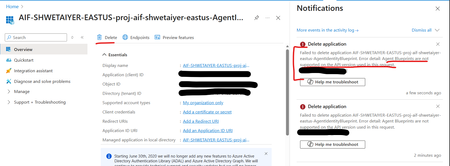
I'm trying to delete an Entra app in Azure created by Foundry Agent identity blueprint as its currently unused and is causing EntraID hygiene alerts. However getting an error mentioning that delete is not supported. Is there any other way to delete an unused Entra app for an agent identity blueprint? Error detail: Agent Blueprints are not supported on the API version used in this request.147Views0likes2CommentsUnable to publish Foundry agent to M365 copilot or Teams
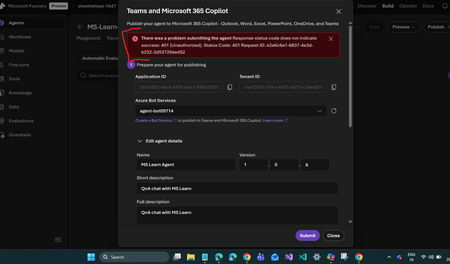
I’m encountering an issue while publishing an agent in Microsoft Foundry to M365 Copilot or Teams. After creating the agent and Foundry resource, the process automatically created a Bot Service resource. However, I noticed that this resource has the same ID as the Application ID shown in the configuration. Is this expected behavior? If not, how should I resolve it? I followed the steps in the official documentation: https://learn.microsoft.com/en-us/azure/ai-foundry/agents/how-to/publish-copilot?view=foundry Despite this, I keep getting the following error: There was a problem submitting the agent. Response status code does not indicate success: 401 (Unauthorized). Status Code: 401 Any guidance on what might be causing this and how to fix it would be greatly appreciated.Solved582Views0likes3CommentsGet to know the core Foundry solutions
Foundry includes specialized services for vision, language, documents, and search, plus Microsoft Foundry for orchestration and governance. Here’s what each does and why it matters: Azure Vision With Azure Vision, you can detect common objects in images, generate captions, descriptions, and tags based on image contents, and read text in images. Example: Automate visual inspections or extract text from scanned documents. Azure Language Azure Language helps organizations understand and work with text at scale. It can identify key information, gauge sentiment, and create summaries from large volumes of content. It also supports building conversational experiences and question-answering tools, making it easier to deliver fast, accurate responses to customers and employees. Example: Understand customer feedback or translate text into multiple languages. Azure Document IntelligenceWith Azure Document Intelligence, you can use pre-built or custom models to extract fields from complex documents such as invoices, receipts, and forms. Example: Automate invoice processing or contract review. Azure SearchAzure Search helps you find the right information quickly by turning your content into a searchable index. It uses AI to understand and organize data, making it easier to retrieve relevant insights. This capability is often used to connect enterprise data with generative AI, ensuring responses are accurate and grounded in trusted information. Example: Help employees retrieve policies or product details without digging through files. Microsoft FoundryActs as the orchestration and governance layer for generative AI and AI agents. It provides tools for model selection, safety, observability, and lifecycle management. Example: Coordinate workflows that combine multiple AI capabilities with compliance and monitoring. Business leaders often ask: Which Foundry tool should I use? The answer depends on your workflow. For example: Are you trying to automate document-heavy processes like invoice handling or contract review? Do you need to improve customer engagement with multilingual support or sentiment analysis? Or are you looking to orchestrate generative AI across multiple processes for marketing or operations? Connecting these needs to the right Foundry solution ensures you invest in technology that delivers measurable results.Function Calling with Small Language Models
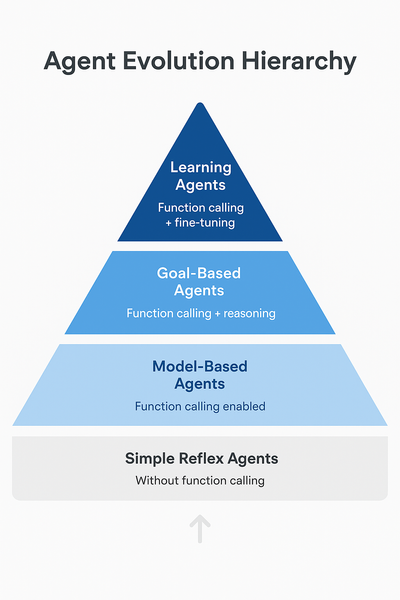
In our previous article on running Phi-4 locally, we built a web-enhanced assistant that could search the internet and provide informed answers. Here's what that implementation looked like: def web_enhanced_query(question): # 1. ALWAYS search (hardcoded decision) search_results = search_web(question) # 2. Inject results into prompt prompt = f"""Here are recent search results: {search_results} Question: {question} Using only the information above, give a clear answer.""" # 3. Model just summarizes what it reads return ask_phi4(endpoint, model_id, prompt) Today, we're upgrading to true function calling. With this, we have ability to transform small language models from passive text generators into intelligent agents that can: Decide when to use external tools Reason which tool bests fit each task Execute real-world actions thrugh apis Function calling represents a significant evolution in AI capabilities. Let's understand where this positions our small language models: Agent Classification Framework Simple Reflex Agents (Basic) React to immediate input with predefined rules Example: Thermostat, basic chatbot Without function calling, models operate here Model-Based Agents (Intermediate) Maintain internal state and context Example: Robot vacuum with room mapping Function calling enables this level Goal-Based Agents (Advanced) Plan multi-step sequences to achieve objectives Example: Route planner, task scheduler Function calling + reasoning enables this Learning Agents (Expert) Adapt and improve over time Example: Recommendation systems Future: Function calling + fine-tuning As usual with these articles, let's get ready to get our hands dirty! Project Setup Let's set up our environment for building function-calling assistants. Prerequisites First, ensure you have Foundry Local installed and a model running. We'll use Qwen 2.5-7B for this tutorial as it has excellent function calling support. Important: Not all small language models support function calling equally. Qwen 2.5 was specifically trained for this capability and provides a reliable experience through Foundry Local. # 1. Check Foundry Local is installed foundry --version # 2. Start the Foundry Local service foundry service start # 3. Download and run Qwen 2.5-7B foundry model run qwen2.5-7b Python Environment Setup # 1. Create Python virtual environment python -m venv venv source venv/bin/activate # Windows: venv\Scripts\activate # 2. Install dependencies pip install openai requests python-dotenv # 3. Get a free OpenWeatherMap API key # Sign up at: https://openweathermap.org/api ``` Create `.env` file: ``` OPENWEATHER_API_KEY=your_api_key_here ``` Building a Weather-Aware Assistant So in this scenario, a user wants to plan outdoor activities but needs weather context. Without function calling, You will get something like this: User: "Should I schedule my team lunch outside at 2pm in Birmingham?" Model: "That depends on weather conditions. Please check the forecast for rain and temperature." However, with fucntion-calling you get an answer that is able to look up the weather and reply with the needed context. We will do that now. Understanding Foundry Local's Function Calling Implementation Before we start coding, there's an important implementation detail to understand. Foundry Local uses a non-standard function calling format. Instead of returning function calls in the standard OpenAI tool_calls field, Qwen models return the function call as JSON text in the response content. For example, when you ask about weather, instead of: # Standard OpenAI format message.tool_calls = [ {"name": "get_weather", "arguments": {"location": "Birmingham"}} ] You get: # Foundry Local format message.content = '{"name": "get_weather", "arguments": {"location": "Birmingham"}}' This means we need to parse the JSON from the content ourselves. Don't worry—this is straightforward, and I'll show you exactly how to handle it! Step 1: Define the Weather Tool Create weather_assistant.py: import os from openai import OpenAI import requests import json import re from dotenv import load_dotenv load_dotenv() # Initialize Foundry Local client client = OpenAI( base_url="http://127.0.0.1:59752/v1/", api_key="not-needed" ) # Define weather tool tools = [ { "type": "function", "function": { "name": "get_weather", "description": "Get current weather information for a location", "parameters": { "type": "object", "properties": { "location": { "type": "string", "description": "The city or location name" }, "units": { "type": "string", "description": "Temperature units", "enum": ["celsius", "fahrenheit"], "default": "celsius" } }, "required": ["location"] } } } ] A tool is necessary because it provides the model with a structured specification of what external functions are available and how to use them. The tool definition contains the function name, description, parameters schema, and information returned. Step 2: Implement the Weather Function def get_weather(location: str, units: str = "celsius") -> dict: """Fetch weather data from OpenWeatherMap API""" api_key = os.getenv("OPENWEATHER_API_KEY") url = "http://api.openweathermap.org/data/2.5/weather" params = { "q": location, "appid": api_key, "units": "metric" if units == "celsius" else "imperial" } response = requests.get(url, params=params, timeout=5) response.raise_for_status() data = response.json() temp_unit = "°C" if units == "celsius" else "°F" return { "location": data["name"], "temperature": f"{round(data['main']['temp'])}{temp_unit}", "feels_like": f"{round(data['main']['feels_like'])}{temp_unit}", "conditions": data["weather"][0]["description"], "humidity": f"{data['main']['humidity']}%", "wind_speed": f"{round(data['wind']['speed'] * 3.6)} km/h" } The model calls this function to get the weather data. it contacts OpenWeatherMap API, gets real weather data and returns it as a python dictionary Step 3: Parse Function Calls from Content This is the crucial step where we handle Foundry Local's non-standard format: def parse_function_call(content: str): """Extract function call JSON from model response""" if not content: return None json_pattern = r'\{"name":\s*"get_weather",\s*"arguments":\s*\{[^}]+\}\}' match = re.search(json_pattern, content) if match: try: return json.loads(match.group()) except json.JSONDecodeError: pass try: parsed = json.loads(content.strip()) if isinstance(parsed, dict) and "name" in parsed: return parsed except json.JSONDecodeError: pass return None Step 4: Main Chat Function with Function Calling and lastly, calling the model. Notice the tools and tool_choice parameter. Tools tells the model it is allowed to output a tool_call requesting that the function be executed. While tool_choice instructs the model how to decide whether to call a tool. def chat(user_message: str) -> str: """Process user message with function calling support""" messages = [ {"role": "user", "content": user_message} ] response = client.chat.completions.create( model="qwen2.5-7b-instruct-generic-cpu:4", messages=messages, tools=tools, tool_choice="auto", temperature=0.3, max_tokens=500 ) message = response.choices[0].message if message.content: function_call = parse_function_call(message.content) if function_call and function_call.get("name") == "get_weather": print(f"\n[Function Call] {function_call.get('name')}({function_call.get('arguments')})") args = function_call.get("arguments", {}) weather_data = get_weather(**args) print(f"[Result] {weather_data}\n") final_prompt = f"""User asked: "{user_message}" Weather data: {json.dumps(weather_data, indent=2)} Provide a natural response based on this weather information.""" final_response = client.chat.completions.create( model="qwen2.5-7b-instruct-generic-cpu:4", messages=[{"role": "user", "content": final_prompt}], max_tokens=200, temperature=0.7 ) return final_response.choices[0].message.content return message.content Step 5: Run the script Now put all the above together and run the script def main(): """Interactive weather assistant""" print("\nWeather Assistant") print("=" * 50) print("Ask about weather or general questions.") print("Type 'exit' to quit\n") while True: user_input = input("You: ").strip() if user_input.lower() in ['exit', 'quit']: print("\nGoodbye!") break if user_input: response = chat(user_input) print(f"Assistant: {response}\n") if __name__ == "__main__": if not os.getenv("OPENWEATHER_API_KEY"): print("Error: OPENWEATHER_API_KEY not set") print("Set it with: export OPENWEATHER_API_KEY='your_key_here'") exit(1) main() Note: Make sure Qwen 2.5 is running in Foundry Local in a new terminal Now let's talk about Model Context Protocol! Our weather assistant works beautifully with a single function, but what happens when you need dozens of tools? Database queries, file operations, calendar integration, email—each would require similar setup code. This is where Model Context Protocol (MCP) comes in. MCP is an open standard that provides pre-built, standardized servers for common tools. Instead of writing custom integration code for every capability, you can connect to MCP servers that handle the complexity for you. With MCP, You only need one command to enable weather, database, and file access npx @modelcontextprotocol/server-weather npx @modelcontextprotocol/server-sqlite npx @modelcontextprotocol/server-filesystem Your model automatically discovers and uses these tools without custom integration code. Learn more: Model Context Protocol Documentation EdgeAI Course - Module 03: MCP Integration Key Takeaways Function calling transforms models into agents - From passive text generators to active problem-solvers Qwen 2.5 has excellent function calling support - Specifically trained for reliable tool use Foundry Local uses non-standard format - Parse JSON from content instead of tool_calls field Start simple, then scale with MCP - Build one tool to understand the pattern, then leverage standards Documentation Running Phi-4 Locally with Foundry Local Phi-4: Small Language Models That Pack a Punch Microsoft Foundry Local GitHub EdgeAI for Beginners Course OpenWeatherMap API Documentation Model Context Protocol Qwen 2.5 Documentation Thank you for reading! I hope this article helps you build more capable AI agents with small language models. Function calling opens up incredible possibilities—from simple weather assistants to complex multi-tool workflows. Start with one tool, understand the pattern, and scale from there.641Views1like0CommentsBuild Smarter with Azure HorizonDB
By: Maxim Lukiyanov, PhD, Principal PM Manager; Abe Omorogbe, Senior Product Manager; Shreya R. Aithal, Product Manager II; Swarathmika Kakivaya, Product Manager II Today, at Microsoft Ignite, we are announcing a new PostgreSQL database service - Azure HorizonDB. You can read the announcement here, and in this blog you can learn more about HorizonDB’s AI features and development tools. Azure HorizonDB is designed for the full spectrum of modern database needs - from quickly building new AI applications, to scaling enterprise workloads to unprecedented levels of performance and availability, to managing your databases efficiently and securely. To help with building new AI applications we are introducing 3 features: DiskANN Advanced Filtering, built-in AI model management, and integration with Microsoft Foundry. To help with database management we are introducing a set of new capabilities in PostgreSQL extension for Visual Studio Code, as well as announcing General Availability of the extension. Let’s dive into AI features first. DiskANN Advanced Filtering We are excited to announce a new enhancement in the Microsoft’s state of the art vector indexing algorithm DiskANN – DiskANN Advanced Filtering. Advanced Filtering addresses a common problem in vector search – combining vector search with filtering. In real-world applications where queries often include constraints like price ranges, ratings, or categories, traditional vector search approaches, such as pgvector’s HNSW, rely on multiple step retrieval and post-filtering, which can make search extremely slow. DiskANN Advanced Filtering solves this by combining filter and search into one operation - while the graph of vectors is traversed during the vector search, each vector is also checked for filter predicate match, ensuring that only the correct vectors are retrieved. Under the hood, it works in a 3-step process: first creating a bitmap of relevant rows using indexes on attributes such as price or rating, then performing a filter-aware graph traversal against the bitmap, and finally, validating and ordering the results for accuracy. This integrated approach delivers dramatically faster and more efficient filtered vector searches. Initial benchmarks show that enabling Advanced Filtering on DiskANN reduces query latency by up to 3x, depending on filter selectivity. AI Model Management Another exciting feature of HorizonDB is AI Model Management. This feature automates Microsoft Foundry model provisioning during database deployment and instantly activates database semantic operators. This eliminates tens of setup and configuration steps and simplifies the development of new AI apps and agents. AI Model Management elevates the experience of using semantic operators within PostgreSQL. When activated, it provisions key models for embedding, semantic ranking and generation via Foundry, installs and configures the azure_ai extension to enable the operators, establishes secure connections, integrates model management, monitoring and cost management within HorizonDB. What would otherwise require significant manual effort and context-switching between Foundry and PostgreSQL for configuration, management, and monitoring is now possible with just a few clicks, all without leaving the PostgreSQL environment. You can also continue to bring your own Foundry models, with a simplified and enhanced process for registering your custom model endpoints in the azure_ai extension. Microsoft Foundry Integration Microsoft Foundry offers a comprehensive technology stack for building AI apps and agents. But building modern agents capable of reasoning, acting, and collaborating is impossible without connection to data. To facilitate that connection, we are excited to announce a new PostgreSQL connector in Microsoft Foundry. The connector is designed using a new standard in data connectivity – Model Context Protocol (MCP). It enables Foundry agents to interact with HorizonDB securely and intelligently, using natural language instead of SQL, and leveraging Microsoft Entra ID to ensure secure connection. In addition to HorizonDB this connector also supports Azure Database for PostgreSQL (ADP). This integration allows Foundry agents to perform tasks like: Exploring database schemas Retrieving records and insights Performing analytical queries Executing vector similarity searches for semantic search use cases All through natural language, without compromising enterprise security or compliance. To get started with Foundry Integration, follow these setup steps to deploy your own HorizonDB (requires participation in Private Preview) or ADP and connect it to Foundry in just a few steps. PostgreSQL extension for VS Code is Generally Available We’re excited to announce that the PostgreSQL extension for Visual Studio Code is now Generally Available. This extension garnered significant popularity within the PostgreSQL community since it’s preview in May’25 reaching more than 200K installs. It is the easiest way to connect to a PostgreSQL database from your favorite editor, manage your databases, and take advantage of built-in AI capabilities without ever leaving VS Code. The extension works with any PostgreSQL whether it's on-premises or in the cloud, and also supports unique features of Azure HorizonDB and Azure Database for PostgreSQL (ADP). One of the key new capabilities is Metrics Intelligence, which uses Copilot and real-time telemetry of HorizonDB or ADP to help you diagnose and fix performance issues in seconds. Instead of digging through logs and query plans, you can open the Performance Dashboard, see a CPU spike, and ask Copilot to investigate. The extension sends a rich prompt that tells Copilot to analyze live metrics, identify the root cause, and propose an actionable fix. For example, Copilot might find a full table scan on a large table, recommend a composite index on the filter columns, create that index, and confirm the query plan now uses it. The result is dramatic: you can investigate and resolve the CPU spike in seconds, with no manual scripting or guesswork, and with no prior PostgreSQL expertise required. The extension also makes it easier to work with graph data. HorizonDB and ADP support open-source graph extension Apache AGE. This turns these services into fully managed graph databases. You can run graph queries against HorizonDB and immediately visualize the results as an interactive graph inside VS Code. This helps you understand relationships in your data faster, whether you’re exploring customer journeys, network topologies, or knowledge graphs - all without switching tools. In Conclusion Azure HorizonDB brings together everything teams need to build, run, and manage modern, AI-powered applications on PostgreSQL. With DiskANN Advanced Filtering, you can deliver low-latency, filtered vector search at scale. With built-in AI Model Management and Microsoft Foundry integration, you can provision models, wire up semantic operators, and connect agents to your data with far fewer steps and far less complexity. And with the PostgreSQL extension for Visual Studio Code, you get an intuitive, AI-assisted experience for performance tuning and graph visualization, right inside the tools you already use. HorizonDB is now available in private preview. If you’re interested in building AI apps and agents on a fully managed, PostgreSQL-compatible service with built-in AI and rich developer tooling, sign-up for Private Preview: https://aka.ms/PreviewHorizonDB.1.5KViews4likes0Comments