foundry tools
18 TopicsChoosing a real-time voice architecture on Microsoft Foundry: three enterprise patterns
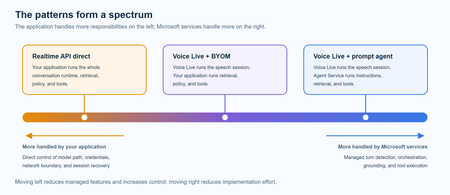
A practical comparison of three real-time voice architectures on Microsoft Foundry, including implementation tradeoffs and four enterprise release gates for residency, networking, retrieval authorization, and tool credentials.754Views1like0CommentsPost-Stream Refinement is now generally available in Microsoft Foundry
When we introduced Post-Stream Refinement in public preview earlier this year, it closed the oldest trade-off in real-time speech: you could finally keep instant streaming results and get a highly accurate final transcript, with no penalty to first-token latency. A second recognition pass runs in parallel with streaming and replaces each final segment with a more accurate version once the utterance completes. Today, Post-Stream Refinement reaches general availability for Azure AI Speech in Microsoft Foundry, backed by a production SLA. Just as important, it now ships with the capabilities production transcription actually depends on: diarization to preserve who said what, phrase lists for your product names and domain vocabulary, and a much wider footprint of 19 locales across 22 Azure regions. Everything you already know about Post-Stream Refinement still applies. The real-time contract is unchanged, your partial results stream exactly as before, and you enable refinement by setting a single property on your existing SpeechConfig. What changes at GA is that the refined transcript is now production-grade and speaker-aware. 📖 Read the Documentation What's new at general availability If you have already used Post-Stream Refinement in preview, here is exactly what changes at GA, and what stays the same. The streaming path and SDK contract are untouched; the refinement pass is now production-ready and gains speaker and vocabulary features. How Post-Stream Refinement works Real-time and final results serve different needs. Partial results must appear quickly so captions, voice interfaces, and agent turn-taking stay responsive. Final results need enough context to support storage, search, summarization, and business workflows. Post-Stream Refinement runs both at once: a fast streaming pass and a deeper refinement pass over the same audio, in parallel. Because the two passes share one input stream, enabling refinement does not require a second transcription job or a separate client pipeline. Your existing recognition events and partial-result handling stay exactly as they are. Speaker attribution with diarization New at GA, diarization is supported on the Post-Stream Refinement path, so the refined final transcript keeps its speaker labels. That makes the release a strong fit for meetings, contact centers, interviews, and any workflow where the transcript needs to identify who spoke, not just what was said. The refinement pass improves the wording, including proper nouns and named entities, while every utterance stays attributed to the right speaker. Phrase lists for your vocabulary Phrase lists let the recognizer prioritize the names and terms that matter to your application: product catalogs, medical and technical vocabulary, organization names, and acronyms that general speech models might not recognize consistently. At GA you can pair phrase lists with refinement so the second pass has both broad audio context and your domain vocabulary to draw on, which is where the largest accuracy gains on named entities show up. Quality impact In internal testing and partner evaluations across supported locales, Post-Stream Refinement reduced final-transcript word error rate by double-digit relative percentages compared with standard real-time transcription, with the largest gains on the hardest content: long utterances, proper nouns, and domain-specific speech. Pairing phrase lists with refinement improves named-entity accuracy further. Partial-result latency is unchanged; only the final transcript is refined. The refined final result may add a small amount of latency to the final segment because refinement happens after the segment audio is received. Partial results are unaffected. Supported languages and regions General availability supports 19 locales. You declare one locale per session, so the service is tuned to the language you expect. Alongside the Tier-1 languages, GA adds Indic locales, including Bengali, Marathi, Punjabi, and Telugu. Post-Stream Refinement is generally available in 22 Azure regions across the Americas, Europe, and Asia Pacific. Proven at Microsoft scale The technology behind Post-Stream Refinement already powers meeting transcription and Microsoft 365 Copilot experiences in Microsoft Teams, serving millions of users across meetings, webinars, and live events every day. General availability brings the same quality bar to every Azure AI Speech customer through a supported SDK integration, not a research prototype. Preview customers across industries, including automotive, consumer electronics, and aviation, reported positive gains in transcription quality, with the clearest improvements on the hardest content: proper nouns, long-form speech, and domain-specific audio. Several are now moving those workloads into production on the GA release. Get started Enabling Post-Stream Refinement is a small configuration change on your existing SpeechConfig. You will need: Speech SDK 1.50 or later. Earlier versions do not support the refinement path. A Speech resource in one of the supported regions listed above. The session locale you expect, set on the recognizer. Set the post-processing option to PostRefinement. The example below also shows the optional phrase list for your domain vocabulary. import azure.cognitiveservices.speech as speechsdk speech_config = speechsdk.SpeechConfig( subscription="YourSpeechKey", region="YourSpeechRegion") # Declare one locale for the session speech_config.speech_recognition_language = "en-US" # 1) Refine the final transcript (Post-Stream Refinement) speech_config.set_property( speechsdk.PropertyId.SpeechServiceResponse_PostProcessingOption, "PostRefinement") audio_config = speechsdk.AudioConfig(use_default_microphone=True) recognizer = speechsdk.SpeechRecognizer( speech_config=speech_config, audio_config=audio_config) # 2) (Optional) Phrase list for names, acronyms, and domain terms phrase_list = speechsdk.PhraseListGrammar.from_recognizer(recognizer) for term in ["Contoso", "Fabrikam", "Foundry", "OAuth"]: phrase_list.addPhrase(term) Your existing recognition events and partial-result handling remain unchanged. For speaker attribution, enable diarization through the established real-time diarization path; refinement applies to the final transcript while speaker labels are preserved. Choose the right release for your workload Post-Stream Refinement now has two paths. They are the same product family with a different feature boundary, so match the path to what your customer needs. Monolingual PSR — generally available Multilingual PSR — public preview Language selection One locale declared per session Automatic detection and code-switching in a single stream (open-range, no locale declared) Supported locales 19 locales, including Indic bn / mr / pa / te 25 languages / 29 locales, auto-detected Azure regions 22 Azure regions across the Americas, Europe, and Asia Pacific 6 Azure regions Phrase lists & diarization Supported Only diarization is supported Working across languages? If a single stream needs to handle multiple languages or code-switching without a declared locale, use Multilingual Post-Stream Refinement, now in public preview. For a known session locale with phrase lists and diarization, monolingual GA is the right path. Try Post-Stream Refinement Today Turn on higher-accuracy, language-aware transcription in your Azure AI Speech applications with a single configuration change. 📖 Read the Documentation We would love your feedback. Try Post-Stream Refinement in your applications and tell us how it improves your transcription quality.747Views0likes0CommentsFor the first time, real-time transcription goes multilingual
When we introduced Post-Stream Refinement earlier this year, it closed the oldest gap in real-time speech: you could finally get instant streaming results and a highly accurate final transcript, with no latency penalty. But it kept one hard requirement — you had to tell the service, up front, which single language to expect. Real-world speech does not work that way. People code-switch mid-sentence, product and brand names cross languages, and a global app serves users who simply speak differently from one session to the next. Today we remove that requirement. Multilingual Post-Stream Refinement enters public preview for Azure AI Speech in Microsoft Foundry, and for the first time ever a single real-time stream can transcribe multiple languages in one session — the spoken language is detected automatically, no locale is declared in advance, and the final transcript is refined for accuracy. Everything you already know about Post-Stream Refinement still applies; what changes is that the refinement pass itself is now multilingual. 📖 Read the Documentation What's New in This Release If you have already used Post-Stream Refinement, here is exactly what changes with the multilingual preview — and what stays the same: Quality Impact In internal testing and partner evaluations across Tier-1 locales, multilingual Post-Stream Refinement reduced word error rate (WER) by approximately 10% relative on average, with double-digit relative reductions on the hardest cases — long utterances, proper nouns, and multilingual or code-switched speech. Partial-result latency is unchanged; only the final transcript is refined. Gains are relative reductions versus the standard real-time model and vary by language, acoustic conditions, and content type. The refined final result may add a small amount of latency to the final segment; partial results are unaffected. Supported Languages and Regions The public preview supports 15 Tier-1 locales. Because language is detected automatically, a single stream can contain any mix of them: Available in these Azure regions: Real-World Impact Preview customers across industries — including travel, consumer electronics, automotive, aviation, and media — have reported positive gains in transcription quality. Customers testing multilingual and domain-specific audio have observed the clearest improvements on the hardest content: proper nouns, code-switching, and long-form speech. Several are actively validating the feature on their own audio ahead of general availability. Get Started Enabling multilingual Post-Stream Refinement is a small configuration change on your existing SpeechConfig. You will need: Speech SDK 1.50 or later. Earlier versions do not support the multilingual path. A Speech resource in one of the supported regions listed above. Auto-detect language configuration (open range) so the service identifies the language from the audio — no candidate list required. Set the post-processing option to PostRefinement and pass an open-range AutoDetectSourceLanguageConfig when you create the recognizer. Here is a complete, copy-paste Python example, including the optional end-of-utterance detection line: import azure.cognitiveservices.speech as speechsdk speech_config = speechsdk.SpeechConfig( subscription="YourSpeechKey", region="YourSpeechRegion") # 1) Refine the final transcript (Post-Stream Refinement) speech_config.set_property( speechsdk.PropertyId.SpeechServiceResponse_PostProcessingOption, "PostRefinement") # 2) Multilingual auto-detect - no candidate language list needed auto_detect_config = speechsdk.languageconfig.AutoDetectSourceLanguageConfig() audio_config = speechsdk.AudioConfig(use_default_microphone=True) recognizer = speechsdk.SpeechRecognizer( speech_config=speech_config, auto_detect_source_language_config=auto_detect_config, audio_config=audio_config) 💡 Tip: Refinement matters most for applications that store or process the final transcript — meeting notes, call analytics, compliance archives, AI summarization. If you only use partial results for a live display and discard them, your real-time UX (already fast) is unchanged, while any final transcript you keep improves. Try Multilingual Post-Stream Refinement Today Turn on higher-accuracy, language-aware transcription in your Azure AI Speech applications with a single configuration change. Available now in public preview in Microsoft Foundry. 📖 Read the Documentation We would love your feedback. Try Post-Stream Refinement in your applications and tell us how it improves your transcription quality.718Views0likes0Comments
Three tiers of Agentic AI - and when to use none of them
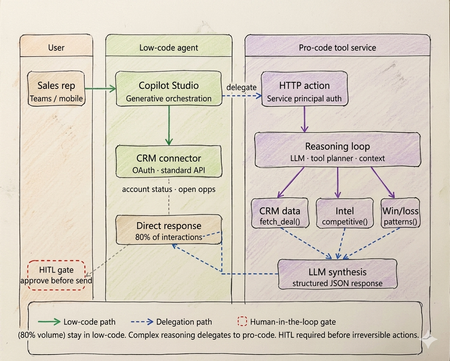
Every enterprise has an AI agent. Almost none of them work in production. Walk into any enterprise technology review right now and you will find the same thing. Pilots running. Demos recorded. Steering committees impressed. And somewhere in the background, a quiet acknowledgment that the thing does not actually work at scale yet. OutSystems surveyed nearly 1,900 global IT leaders and found that 96% of organizations are already running AI agents in some capacity. Yet only one in nine has those agents operating in production at scale. The experiments are everywhere. The production systems are not. That gap is not a capability problem. The infrastructure has matured. Tool calling is standard across all major models. Frameworks like LangGraph, CrewAI, and Microsoft Agent Framework abstract orchestration logic. Model Context Protocol standardizes how agents access external tools and data sources. Google's Agent-to-Agent protocol now under Linux Foundation governance with over 50 enterprise technology partners including Salesforce, SAP, ServiceNow, and Workday standardizes how agents coordinate with each other. The protocols are in place. The frameworks are production ready. The gap is a selection and governance problem. Teams are building agents on problems that do not need them. Choosing the wrong tier for the ones that do. And treating governance as a compliance checkbox to add after launch, rather than an architectural input to design in from the start. The same OutSystems research found that 94% of organizations are concerned that AI sprawl is increasing complexity, technical debt, and security risk and only 12% have a centralized approach to managing it. Teams are deploying agents the way shadow IT spread through enterprises a decade ago: fast, fragmented, and without a shared definition of what production-ready actually means. I've built agentic systems across enterprise clients in logistics, retail, and B2B services. The failures I keep seeing are not technology failures. They are architecture and judgment failures problems that existed before the first line of code was written, in the conversation where nobody asked the prior question. This article is the framework I use before any platform conversation starts. What has genuinely shifted in the agentic landscape Three changes are shaping how enterprise agent architecture should be designed today and they are not incremental improvements on what existed before. The first is the move from single agents to multi-agent systems. Databricks' State of AI Agents report drawing on data from over 20,000 organizations, including more than 60% of the Fortune 500 found that multi-agent workflows on their platform grew 327% in just four months. This is not experimentation. It is production architecture shifting. A single agent handling everything routing, retrieval, reasoning, execution is being replaced by specialized agents coordinating through defined interfaces. A financial organization, for example, might run separate agents for intent classification, document retrieval, and compliance checking each narrow in scope, each connected to the next through a standardized protocol rather than tightly coupled code. The second is protocol standardization. MCP handles vertical connectivity how agents access tools, data sources, and APIs through a typed manifest and standardized invocation pattern. A2A handles horizontal connectivity how agents discover peer agents, delegate subtasks, and coordinate workflows. Production systems today use both. The practical consequence is that multi-agent architectures can be composed and governed as a platform rather than managed as a collection of one-off integrations. The third is governance as the differentiating factor between teams that ship and teams that stall. Databricks found that companies using AI governance tools get over 12 times more AI projects into production compared to those without. The teams running production agents are not running more sophisticated models. They built evaluation pipelines, audit trails, and human oversight gates before scaling not after the first incident. Tier 1 - Low-code agents: fast delivery with a defined ceiling The low-code tier is more capable than it was eighteen months ago. Copilot Studio, Salesforce Agentforce, and equivalent platforms now support richer connector libraries, better generative orchestration, and more flexible topic models. The ceiling is higher than it was. It is still a ceiling. The core pattern remains: a visual topic model drives a platform-managed LLM that classifies intent and routes to named execution branches. Connectors abstract credential management and API surface. A business team — analyst, citizen developer, IT operations — can build, deploy, and iterate without engineering involvement on every change. For bounded conversational problems, this is the fastest path from requirement to production. The production reality is documented clearly. Gartner data found that only 5% of Copilot Studio pilots moved to larger-scale deployment. A European telecom with dedicated IT resources and a full Microsoft enterprise agreement spent six months and did not deliver a single production agent. The visual builder works. The path from prototype to production, production-grade integrations, error handling, compliance logging, exception routing is where most enterprises get stuck, because it requires Power Platform expertise that most business teams do not have. The platform ceiling shows up predictably at four points. Async processing anything beyond a synchronous connector call, including approval chains, document pipelines, or batch operations cannot be handled natively. Full payload audit logs platform logs give conversation transcripts and connector summaries, not structured records of every API call and its parameters. Production volume concurrency limits and message throughput budgets bind faster than planning assumptions suggest. Root cause analysis in production you cannot inspect the LLM's confidence score or the alternatives it considered, which makes diagnosing misbehavior significantly harder than it should be. The correct diagnostic: can this use case be owned end-to-end by a business team, covered by standard connectors, with no latency SLA below three seconds and no payload-level compliance requirement? Yes, low code is the correct tier. Not a compromise. If no on any point, continue. If low-code is the right call for your use case: Copilot Studio quickstart Tier 2 - Pro-code agents: the architecture the current landscape demands The defining pattern in production pro-code architecture today is multi-agent. Specialized agents per domain, coordinating through MCP for tool access and A2A for peer-to-peer delegation, with a governance layer spanning the entire system. What this looks like in practice: a financial organization handling incoming compliance queries runs separate agents for intent classification, document retrieval, and the compliance check itself. None of these agents tries to do all three jobs. Each has a narrow responsibility, a defined input/output contract typed against a JSON Schema, and a clear handoff boundary. The 327% growth in multi-agent workflows reflects production teams discovering that the failure modes of monolithic agents topic collision, context overflow, degraded classification as scope expands are solved by specialization, not by making a single agent more capable. The discipline that makes multi-agent systems reliable is identical to what makes single-agent systems reliable, just enforced across more boundaries: the LLM layer reasons and coordinates; deterministic tool functions enforce. In a compliance pipeline, no LLM decides whether a document satisfies a regulatory requirement. That evaluation runs in a deterministic tool with a versioned rule set, testable outputs, and an immutable audit log. The LLM orchestrates the sequence. The tool produces the compliance record. Mixing these letting an LLM evaluate whether a rule pass collapses the audit trail and introduces probabilistic outputs on questions that have regulatory answers. MCP is the tool interface standard today. An MCP server exposes a typed manifest any compliant agent runtime can discover at startup. Tools are versioned, independently deployable, and reusable across agents without bespoke integration code. A2A extends this horizontally: agents advertise capability cards, discover peers, and delegate subtasks through a standardised protocol. The practical consequence is that multi-agent systems built on both protocols can be composed and governed as a platform rather than managed as a collection of one-off integrations. Observability is the architectural element that separates teams shipping production agents from teams perpetually in pilot. Build evaluation pipelines, distributed traces across all agent boundaries, and human review gates before scaling. The teams that add these after the first production incident spend months retrofitting what should have been designed in. If pro-code is the right call for your use case: Foundry Agent Service The hybrid pattern: still where production deployments land The shift to multi-agent architecture does not change the hybrid pattern it deepens it. Low-code at the conversational surface, pro-code multi-agent systems behind it, with a governance layer spanning both. On a logistics client engagement, the brief was a sales assistant for account managers shipment status, account health, and competitive context inside Teams. The business team wanted everything in Copilot Studio. Engineering wanted a custom agent runtime. Both were wrong. What we built: Copilot Studio handled all high-frequency, low-complexity queries shipment tracking, account status, open cases through Power Platform connectors. Zero custom code. That covered roughly 78% of actual interaction volume. Requests requiring multi-source reasoning competitive positioning on a specific lane, churn risk across an account portfolio, contract renewal analysis delegated via authenticated HTTP action to a pro-code multi-agent service on Azure. A retrieval agent pulled deal history and market intelligence through MCP-exposed tools. A synthesis agent composed the recommendation with confidence scoring. Structured JSON back to the low-code layer, rendered as an adaptive card in Teams. The HITL gate was non-negotiable and designed before deployment, not added after the first incident. No output reached a customer without a manager approval step. The agent drafts. A human sends. This boundary low-code for conversational volume, pro-code for reasoning depth maps directly to what the research shows separates teams that ship from teams that stall. The organizations running agents in production drew the line correctly between what the platform can own and what engineering needs to own. Then they built governance into both sides before scaling. The four gates - the prior question that still gets skipped Run every candidate use case through these four checks before the platform conversation begins. None of the recent infrastructure improvements change what they are checking, because none of them change the fundamental cost structure of agentic reasoning. Gate 1 - is the logic fully deterministic? If every valid output for every valid input can be enumerated in unit tests, the problem does not need an LLM. A rules engine executes in microseconds at zero inference cost and cannot produce a plausible-but-wrong answer. NeuBird AI's production ops agents which have resolved over a million alerts and saved enterprises over $2 million in engineering hours work because alert triage logic that can be expressed as rules runs in deterministic code, and the LLM only handles cases where pattern-matching is insufficient. That boundary is not incidental to the system's reliability. It is the reason for it. Gate 2 - is zero hallucination tolerance required? With over 80% of databases now being built by AI agents per Databricks' State of AI Agents report the surface area for hallucination-induced data errors has grown significantly. In domains where a wrong answer is a compliance event financial calculation, medical logic, regulatory determinations irreducible LLM output uncertainty is disqualifying regardless of model version or prompt engineering effort. Exit to deterministic code or classical ML with bounded output spaces. Gate 3 - is a sub-100ms latency SLA required? LLM inference is faster than it was eighteen months ago. It is not fast enough for payment transaction processing, real-time fraud scoring, or live inventory management. A three-agent system with MCP tool calls has a P50 latency measured in seconds. These problems need purpose-built transactional architecture. Gate 4 - is regulatory explainability required? A2A enables complex agent coordination and delegation. It does not make LLM reasoning reproducible in a regulatory sense. Temperature above zero means the same input produces different outputs across invocations. Regulators in financial services, healthcare, and consumer credit require deterministic, auditable decision rationale. Exit to deterministic workflow with structured audit logging at every Five production failure modes - one of them new The four original anti-patterns are still showing up in production. A fifth has been added by scale. Routing data retrieval through a reasoning loop. A direct API call returns account status in under 10ms. Routing the same request through an LLM reasoning step adds hundreds of milliseconds, consumes tokens on every call, and introduces output parsing on data that is already structured. The agent calls a structured tool. The tool calls the API. The agent never acts as the integration layer. Encoding business rules in prompts. Rules expressed in prompt text drift as models update. They produce probabilistic output across invocations and fail in ways that are difficult to reproduce and diagnose. A rule that must evaluate correctly every time belongs in a deterministic tool function unit-tested, version-controlled, independently deployable via MCP. No approval gate on CRUD operations. CRUD operations without a human approval step will eventually misfire on the input that testing did not cover. The gate needs to be designed before deployment, not added after the first incident involving a financial posting, a customer-facing communication, or a data deletion. Monolithic agent for all domains. A single agent accumulating every domain leads predictably to topic collision, context overflow, and maintenance that becomes impossible as scope expands. Specialized agents per domain, coordinating through A2A, is the architecture that scales. Ungoverned agent sprawl. This is the new one and currently the most prevalent. OutSystems found 94% of organizations concerned about it, with only 12% having a centralized response. Teams building agents independently across fragmented stacks, without shared governance, evaluation standards, or audit infrastructure, produce exactly the same organizational debt that shadow IT created but with higher stakes, because these systems make autonomous decisions rather than just storing and retrieving data. The fix is treating governance as an architectural input before deployment, not a compliance requirement after something breaks. The infrastructure is ready. The judgment is not. The tier decision sequence has not changed. Does the problem need natural language understanding or dynamic generation? No — deterministic system, stop. Can a business team own it through standard connectors with no sub-3-second latency SLA and no payload-level compliance requirement? Yes — low-code. Does it need custom orchestration, multi-agent coordination, or audit-grade observability? Yes — pro-code with MCP and A2A. Does it need both a conversational surface and deep backend reasoning? Hybrid, with a governance layer spanning both. What has changed is that governance is no longer optional infrastructure to add when you have time. The data is unambiguous. Companies with governance tools get over 12 times more AI projects into production than those without. Evaluation pipelines, distributed tracing across agent boundaries, human oversight gates, and centralised agent lifecycle management are not overhead. They are what converts experiments into production systems. The teams still stuck in pilot are not stuck because the technology failed them. They are stuck because they skipped this layer. The protocols are standardised. The frameworks are mature. The infrastructure exists. None of that is what is holding most enterprise agent programmes back. What is holding them back is a selection problem disguised as a technology problem — teams building agents before asking whether agents are warranted, choosing platforms before running the four gates, and treating governance as a checkpoint rather than an architectural input. I have built agents that should have been workflow engines. Not because the technology was wrong, but because nobody stopped early enough to ask whether it was necessary. The four gates in this article exist because I learned those lessons at clients' expense, not mine. The most useful thing I can offer any team starting an agentic AI project is not a framework selection guide. It is permission to say no — and a clear basis for saying it. Take the four gates framework to your next architecture review. If you have already shipped agents to production, I would like to hear what worked and what did not - comment below What to do next Three concrete steps depending on where you are right now. If you have pilots that have not reached production: Run them through the four gates in this article before the next sprint. Gate 1 alone will eliminate a meaningful percentage of them. The ones that survive all four are your real candidates for production investment. Download the attached file for gated checklist and take it into your next architecture review. If you are starting a new agent project: Do not open a platform before you have answered the gate questions. Once you have confirmed an agent is warranted and identified the tier, start here: Copilot Studio guided setup for low-code scenarios, or Foundry Agent Service for pro-code patterns with MCP and multi-agent coordination built in. Build governance infrastructure - evaluation pipeline, distributed tracing, HITL gates - before you scale, not after. If you have already shipped agents to production: Share what worked and what did not in the Azure AI Tech Community — tag posts with #AgentArchitecture. The most useful signal for teams still in pilot is hearing from practitioners who have been through production, not vendors describing what production should look like. References OutSystems — State of AI Development Report - https://www.outsystems.com/1/state-ai-development-report Databricks — State of AI Agents Report - https://www.databricks.com/resources/ebook/state-of-ai-agents Gartner — 2025 Microsoft 365 and Copilot Survey - https://www.gartner.com/en/documents/6548002 (Paywalled primary source — publicly reported via techpartner.news: https://www.techpartner.news/news/gartner-microsoft-copilot-hype-offset-by-roi-and-readiness-realities-618118) Anthropic — Model Context Protocol (MCP) - https://modelcontextprotocol.io Google Cloud — Agent-to-Agent Protocol (A2A) . https://developers.googleblog.com/en/a2a-a-new-era-of-agent-interoperability NeuBird AI — Production Operations Deployment Announcement NeuBird AI Closes $19.3M Funding Round to Scale Agentic AI Across Enterprise Production Operations ReAct: Synergizing Reasoning and Acting in Language Models — Yao et al. https://arxiv.org/abs/2210.03629 Enterprise Integration Patterns — Gregor Hohpe & Bobby Woolf, Addison-Wesley https://www.enterpriseintegrationpatterns.com5.6KViews4likes1Comment
Troubleshooting Microsoft Foundry Accessing On‑Premises APIs Over Private Networking
Audience: Azure solution architects, network engineers, and AI practitioners deploying Microsoft Foundry in enterprise, network‑isolated environments. Scenario: Foundry Agent Service must call an on‑premises (or privately hosted) API over VPN or ExpressRoute using on‑premises corporate DNS. Connectivity works from a virtual machine (VM) in the virtual network (VNet), but fails when the same call is made from a Foundry agent. This post consolidates common field patterns observed across customer engagements and maps them directly to official Microsoft guidance. It highlights a frequently missed prerequisite for private connectivity: Project and Agent Capability Hosts. The Repeating Enterprise Pattern The architecture is familiar: Microsoft Foundry account and project Customer‑managed VNet with VPN or ExpressRoute to on‑premises Corporate (on‑premises) DNS used for API name resolution A VM in the VNet can successfully resolve and call the on‑prem API Foundry agents are configured to call the same API (often via an OpenAPI tool) Despite this, the agent fails with one or more of the following: DNS resolution failures Connection timeouts HTTP 401 or 403 responses Unexpected backend or proxy URLs appearing in logs The consistent question is: Why does this work from a VM in the VNet but not from the Foundry agents? Key Principle: Foundry Agents Do Not Automatically Run in Your VNet This is the most important mental model to reset. Creating a private endpoint for a Foundry Agent Service does not place agent runtime traffic into your VNet. Private endpoints are inbound constructs. Outbound connectivity from an agent only flows through your VNet when specific requirements are met. The most critical of those requirements is a Capability Host. What Is a Capability Host? A Capability Host defines where Foundry capabilities are allowed to execute. In private networking scenarios, the capability host: Binds a Foundry project or agent to a customer‑managed subnet Enables platform‑managed container injection into that subnet Ensures outbound traffic follows VNet routing, security controls, and DNS configuration Capability Host Scope Project Capability Host Associated at the project level Applies to all agents in the project Defines the customer subnet the project is allowed to use Agent Capability Host Associated at the individual agent level Can explicitly bind or override subnet placement Useful when agents require different isolation boundaries Key field insight: If no capability host is associated, the agent runtime is not injected into the VNet—even if VPN, ExpressRoute, private endpoints, and on‑prem DNS are correctly configured. Capability Host Lifecycle (Conceptual) 1 Microsoft Foundry Account ↓ Project ↓ Capability Host ↓ Delegated Agent Subnet (VNet) ↓ Agent Runtime (Container Injection) Without the capability host step, the chain breaks and the agent executes outside the customer network boundary. Why On‑Premises DNS Appears Correct—but Still Fails DNS is where most investigations stall. Teams typically confirm: On‑premises DNS resolves the API hostname VNet DNS settings forward queries to on‑prem DNS A VM in the subnet resolves and reaches the API Yet the agent still fails. The reason is simple: The VM is unquestionably inside the VNet The agent may not be Without a capability host, the agent runtime does not inherit: VNet DNS server settings Corporate DNS forwarding rules On‑premises name resolution paths As a result, DNS fails even though the DNS design itself is correct. Secondary Symptom: HTTP 401 Errors After subnet injection and DNS are corrected, some customers encounter HTTP 401 responses. This typically means: The API is now reachable The request is successfully routed through the private path Authentication or authorization is failing At this stage, troubleshooting moves from networking to identity: Validate the credential or token configured in the Foundry connection Confirm expected headers, audience, or auth flow Account for managed proxy hops in the request path A 401 at this point is progress—it confirms private connectivity is working. Permissions and Required Services for Capability Hosts Creating capability hosts requires both the correct Azure role-based access control (RBAC) permissions and the presence of specific dependent services. These prerequisites are frequently overlooked and can silently block capability host creation or leave hosts in a failed provisioning state. Required Permissions (RBAC) Microsoft documentation explicitly calls out the following minimum permissions: Contributor role on the Microsoft Foundry account to create capability hosts. User Access Administrator or Owner role on the subscription or resource group to grant the Foundry project’s managed identity access to dependent Azure resources when using standard agent setup. Without these roles, capability host creation may fail, or the host may be created without access to required downstream services. For details, see Role-based access control (RBAC) for Microsoft Foundry. Required Azure Services and Connections For standard and network-secured agent setups, capability hosts reference customer-owned Azure resources. The following services must exist and be connected to the Foundry project before creating the capability host: Azure Storage – for file uploads and artifacts Azure AI Search – for vector stores and retrieval Azure Cosmos DB – for thread and conversation storage Azure AI Services / Azure OpenAI – for model execution These services must be deployed in supported regions and, for private networking scenarios, in the same region as the virtual network. Capability hosts reference these resources through project connections, not raw resource IDs . Networking-Specific Requirements When using private networking: The agent subnet must already exist and be delegated appropriately. The capability host must reference the correct customer subnet at creation time. Required private endpoints and DNS resolution must be in place for dependent services. If networking or connections change, capability hosts cannot be updated in-place and must be deleted and recreated with the corrected configuration . Practical Fix Patterns 1. Create and Associate a Project Capability Host Bind the project to the intended delegated agent subnet Verify the customerSubnet reference Redeploy the agent after association This aligns directly with the Standard Setup with Private Networking model documented by Microsoft. 2. Validate Agent Placement and Network Inheritance Confirm the agent is associated with the expected capability host Verify the capability host references the correct subnet Ensure network and DNS settings are applied at the subnet level The agent inherits routing and DNS behavior only after successful subnet injection. 3. Validate DNS From the Agent Subnet Confirm VNet DNS settings point to on‑prem DNS Test name resolution from a VM in the same subnet Once injected, the agent uses the same DNS behavior as other resources in that subnet. 4. Use a Supported Foundry Experience Be aware of documented constraints: End‑to‑end network isolation is not supported in the newer Foundry portal experience Network‑isolated agent scenarios require the classic Foundry experience, SDK, or CLI Hosted agents do not support full isolation Mismatch here can make a correct network design appear broken. A Simple Checklist When a Foundry agent cannot reach an on‑prem API: Is a **Project Capability **Host associated? Is the capability host bound to the correct subnet? Is on‑prem DNS reachable from that subnet? Is a supported Foundry experience in use? If reachable, is authentication configured correctly? If items 1 and 2 are not satisfied, all other troubleshooting is premature. Closing Most private networking issues with Microsoft Foundry are not caused by VPNs or DNS infrastructure. They result from an incomplete understanding of **where the agent ****runtime ****actually **executes. Capability Hosts are the control point. When they are correctly configured, Foundry agents behave exactly as described in Microsoft guidance: they inherit VNet routing, DNS, and security controls and can securely access on‑premises systems over private connectivity. No capability host = no VNet injection = no on‑prem connectivity. References The following Microsoft‑published resources were referenced and aligned with throughout this article: Network‑secured agent setup (GitHub) – Reference implementation demonstrating a network‑secured Foundry Agent Service deployment with a customer‑managed virtual network, delegated agent subnet, and private connectivity patterns. This notebook illustrates how agent runtimes inherit network behavior only after subnet injection ralacher/network-secured-agent Set up private networking for Foundry Agent Service - Microsoft Foundry | Microsoft Learns .964Views2likes0CommentsBuilding Production-Ready, Secure, Observable, AI Agents with Real-Time Voice with Microsoft Foundry
We're excited to announce the general availability of Foundry Agent Service, Observability in Foundry Control Plane, and the Microsoft Foundry portal — plus Voice Live integration with Agent Service in public preview — giving teams a production-ready platform to build, deploy, and operate intelligent AI agents with enterprise-grade security and observability.10KViews2likes0CommentsGenerally Available: Evaluations, Monitoring, and Tracing in Microsoft Foundry
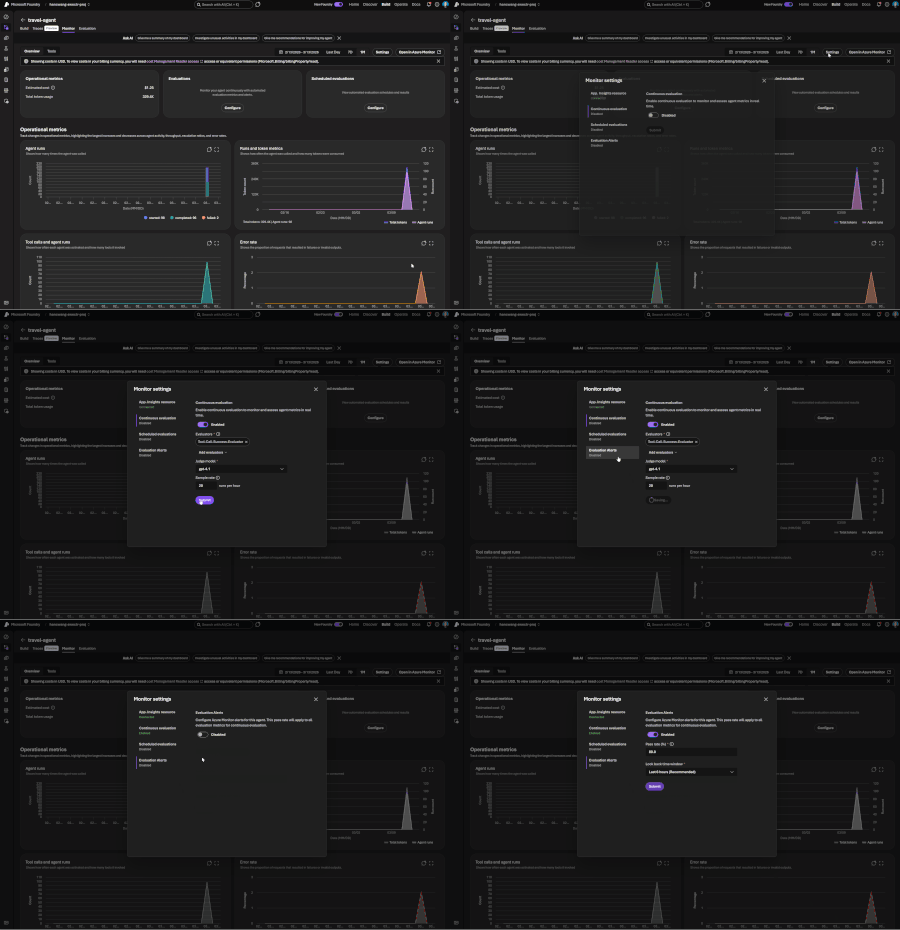
If you've shipped an AI agent to production, you've likely run into the same uncomfortable realization: the hard part isn't getting the agent to work - it's keeping it working. Models get updated, prompts get tweaked, retrieval pipelines drift, and user traffic surfaces edge cases that never appeared in your eval suite. Quality isn't something you establish once. It's something you have to continuously measure. Today, we're making that continuous measurement a first-class operational capability. Evaluations, Monitoring, and Tracing in Microsoft Foundry are now generally available through Foundry Control Plane. These aren't standalone tools bolted onto the side of the platform - they're deeply integrated with Azure Monitor, which means AI agent observability now lives in the same operational plane as the rest of your infrastructure. The Problem With Point-in-Time Evaluation Most evaluation workflows are designed around a pre-deployment gate. You build a test dataset, run your evals, review the scores, and ship. That approach has real value - but it has a hard ceiling. In production, agent behavior is a function of many things that change independently of your code: Foundation model updates ship continuously and can shift output style, reasoning patterns, and edge case handling in ways that don't always surface on your benchmark set. Prompt changes can have nonlinear effects downstream, especially in multi-step agentic flows. Retrieval pipeline drift changes what context your agent actually sees at inference time. A document index fresh last month may have stale or subtly different content today. Real-world traffic distribution is never exactly what you sampled for your test set. Production surfaces long-tail inputs that feel obvious in hindsight but were invisible during development. The implication is straightforward: evaluation has to be continuous, not episodic. You need quality signals at development time, at every CI/CD commit, and continuously against live production traffic - all using the same evaluator definitions so results are comparable across environments. That's the core design principle behind Foundry Observability. Continuous Evaluation Across the Full AI Lifecycle Built-In Evaluators Foundry's built-in evaluators cover the most critical quality and safety dimensions for production agent systems: Coherence and Relevance measure whether responses are internally consistent and on-topic relative to the input. These are table-stakes signals for any conversational or task-completion agent. Groundedness is particularly important for RAG-based architectures. It measures whether the model's output is actually supported by the retrieved context - as opposed to plausible-sounding content the model generated from its parametric memory. Groundedness failures are a leading indicator of hallucination risk in production, and they're often invisible to human reviewers at scale. Retrieval Quality evaluates the retrieval step independently from generation. Groundedness failures can originate in two places: the model may be ignoring good context, or the retrieval pipeline may not be surfacing relevant context in the first place. Splitting these signals makes it much easier to pinpoint root cause. Safety and Policy Alignment evaluates whether outputs meet your deployment's policy requirements - content safety, topic restrictions, response format compliance, and similar constraints. These evaluators are designed to run at every stage of the AI lifecycle: Local development - run evals inline as you iterate on prompts, retrieval config, or orchestration logic CI/CD pipelines - gate every commit against your quality baselines; catch regressions before they reach production Production traffic monitoring - continuously evaluate sampled live traffic and surface trends over time Because the evaluators are identical across all three contexts, a score in CI means the same thing as a score in production monitoring. See the Practical Guide to Evaluations and the Built-in Evaluators Reference for a deeper walkthrough. Custom Evaluators - Encoding Your Own Definition of Quality Built-in evaluators cover common signals well, but production agents often need to satisfy criteria specific to a domain, regulatory environment, or internal standard. Foundry supports two types of custom evaluators (currently in public preview): LLM-as-a-Judge evaluators let you configure a prompt and grading rubric, then use a language model to apply that rubric to your agent's outputs. This is the right approach for quality dimensions that require reasoning or contextual judgment - whether a response appropriately acknowledges uncertainty, whether a customer-facing message matches your brand tone, or whether a clinical summary meets documentation standards. You write a judge prompt with a scoring scale (e.g., 1–5 with criteria for each level) that evaluates a given {input} / {response} pair. Foundry runs this at scale and aggregates scores into your dashboards alongside built-in results. Code-based evaluators are Python functions that implement any evaluation logic you can express programmatically - regex matching, schema validation, business rule checks, compliance assertions, or calls to external systems. If your organization has documented policies about what a valid agent response looks like, you can encode those policies directly into your evaluation pipeline. Custom and built-in evaluators compose naturally - running against the same traffic, producing results in the same schema, feeding into the same dashboards and alert rules. Monitoring and Alerting - AI Quality as an Operational Signal All observability data produced by Foundry - evaluation results, traces, latency, token usage, and quality metrics - is published directly to Azure Monitor. This is where the integration pays off for teams already on Azure. What this enables that siloed AI monitoring tools can't: Cross-stack correlation. When your groundedness score drops, is it a model update, a retrieval pipeline issue, or an infrastructure problem affecting latency? With AI quality signals and infrastructure telemetry in the same Azure Monitor Application Insights workspace, you can answer that in minutes rather than hours of manual correlation across disconnected systems. Unified alerting. Configure Azure Monitor alert rules on any evaluation metric - trigger a PagerDuty incident when groundedness drops below threshold, send a Teams notification when safety violations spike, or create automated runbook responses when retrieval quality degrades. These are the same alert mechanisms your SRE team already uses. Enterprise governance by default. Azure Monitor's RBAC, retention policies, diagnostic settings, and audit logging apply automatically to all AI observability data. You inherit the governance framework your organization has already built and approved. Grafana and existing dashboards. If your team uses Azure Managed Grafana, evaluation metrics can flow into existing dashboards alongside your other operational metrics - a single pane of glass for application health, infrastructure performance, and AI agent quality. The Agent Monitoring Dashboard in the Foundry portal provides an AI-native view out of the box - evaluation metric trends, safety threshold status, quality score distributions, and latency breakdowns. Everything in that dashboard is backed by Azure Monitor data, so SRE teams can always drill deeper. End-to-End Tracing: From Quality Signal to Root Cause A groundedness score tells you something is wrong. A trace tells you exactly where the failure occurred and what the agent actually did. Foundry provides OpenTelemetry-based distributed tracing that follows each request through your entire agent system: model calls, tool invocations, retrieval steps, orchestration logic, and cross-agent handoffs. Traces capture the full execution path - inputs, outputs, latency at each step, tool call parameters and responses, and token usage. The key design decision: evaluation results are linked directly to traces. When you see a low groundedness score in your monitoring dashboard, you navigate directly to the specific trace that produced it - no manual timestamp correlation, no separate trace ID lookup. The connection is made automatically. Foundry auto-collects traces across the frameworks your agents are likely already built on: Microsoft Agent Framework Semantic Kernel LangChain and LangGraph OpenAI Agents SDK For custom or less common orchestration frameworks, the Azure Monitor OpenTelemetry Distro provides an instrumentation path. Microsoft is also contributing upstream to the OpenTelemetry project - working with Cisco Outshift, we've contributed semantic conventions for multi-agent trace correlation, standardizing how agent identity, task context, and cross-agent handoffs are represented in OTel spans. Note: Tracing is currently in public preview, with GA shipping by end of March. Prompt Optimizer (Public Preview) One persistent friction point in agent development is the iteration loop between writing prompts and measuring their effect. You make a change, run your evals, look at the delta, try to infer what about the change mattered, and repeat. Prompt Optimizer tightens this loop. It analyzes your existing prompt and applies structured prompt engineering techniques - clarifying ambiguous instructions, improving formatting for model comprehension, restructuring few-shot examples, making implicit constraints explicit - with paragraph-level explanations for every change it makes. The transparency is deliberate. Rather than producing a black-box "optimized" prompt, it shows you exactly what it changed and why. You can add constraints, trigger another optimization pass, and iterate until satisfied. When you're done, apply it with one click. The value compounds alongside continuous evaluation: run your eval suite against the current prompt, optimize, run evals again, see the measured improvement. That feedback loop - optimize, measure, optimize - is the closest thing to a systematic approach to prompt engineering that currently exists. What Makes our Approach to Observability Different There are other evaluation and observability tools in the AI ecosystem. The differentiation in Foundry's approach comes down to specific architectural choices: Unified lifecycle coverage, not just pre-deployment testing. Most existing evaluation tools are designed for offline, pre-deployment use. Foundry's evaluators run in the same form at development time, in CI/CD, and against live production traffic. Your quality metrics are actually comparable across the lifecycle - you can tell whether production quality matches what you saw in testing, rather than operating two separate measurement systems that can't be compared. No separate observability silo. Publishing all observability data to Azure Monitor means you don't operate a separate system for AI quality alongside your existing infrastructure monitoring. AI incidents route through your existing on-call rotations. AI quality data is subject to the same retention and compliance controls as the rest of your telemetry. Framework-agnostic tracing. Auto-instrumentation across Semantic Kernel, LangChain, LangGraph, and the OpenAI Agents SDK means you're not locked into a specific orchestration framework. The OpenTelemetry foundation means trace data is portable to any compatible backend, protecting your investment as the tooling landscape evolves. Composable evaluators. Built-in and custom evaluators run in the same pipeline, against the same traffic, producing results in the same schema, feeding into the same dashboards and alert rules. You don't choose between generic coverage and domain-specific precision - you get both. Evaluation linked to traces. Most systems treat evaluation and tracing as separate concerns. Foundry treats them as two views of the same event - closing the loop between detecting a quality problem and diagnosing it. Getting Started If you're building agents on Microsoft Foundry, or using Semantic Kernel, LangChain, LangGraph, or the OpenAI Agents SDK and want to add production observability, the entry point is Foundry Control Plane. Try it You'll need a Foundry project with an agent and an Azure OpenAI deployment. Enable observability by navigating to Foundry Control Plane and connecting your Azure Monitor workspace. Then walk through the Practical Guide to Evaluations, explore the Built-in Evaluators Reference, and set up end-to-end tracing for your agents.5.1KViews1like0CommentsMicrosoft Foundry: An End-to-End Platform for Building, Governing, and Scaling AI
Microsoft Foundry: What It Is and How to Get Started As organizations accelerate their adoption of AI, one challenge consistently emerges: how to move from experimentation to production at scale in a secure, responsible, and efficient way. Microsoft Foundry exists to address exactly that challenge. What Is Microsoft Foundry? Microsoft Foundry is an end-to-end platform experience that brings together Microsoft’s AI development, deployment, and governance capabilities into a unified environment. It enables developers, data scientists, and enterprises to build, customize, deploy, and operate AI solutions, including generative AI, using Microsoft and partner models, tools, and services. Rather than being a single product, Foundry is a curated and integrated experience that spans model access, tooling, orchestration, evaluation, and enterprise-grade controls. Why Microsoft Foundry Exists AI innovation is moving fast, but enterprise adoption requires more than just access to models. Customers need: A consistent way to work with multiple models, including Microsoft, OpenAI, and open-source models Built-in security, compliance, and responsible AI capabilities Tooling that supports the full AI lifecycle, not just prototyping Seamless integration with existing data platforms, applications, and cloud operations Microsoft Foundry was created to reduce friction between experimentation and real-world deployment while aligning AI development with enterprise standards, governance, and scale. What’s Included in Microsoft Foundry? Microsoft Foundry brings together several key capabilities: 1. Model Choice and Flexibility Access to leading foundation models, including Azure OpenAI models and selected open-source models Ability to evaluate and select models based on performance, cost, and use case 2. AI Development and Orchestration Tools Prompt engineering, fine-tuning, and grounding with enterprise data Tools for building copilots, chat experiences, and AI-powered applications Orchestration across tools, APIs, and workflows 3. Evaluation, Safety, and Responsible AI Built-in evaluation for quality, latency, and cost Content safety, monitoring, and governance controls Alignment with Microsoft’s Responsible AI principles 4. Enterprise-Grade Platform Integration Native integration with Azure, Microsoft Fabric, Power Platform, and developer tools Identity, security, and compliance through Microsoft Entra and Azure controls Observability and lifecycle management for production workloads How to Get Started Getting started with Microsoft Foundry is straightforward: Start in Azure - Use Azure as the control plane to access Foundry experiences and services. Explore models and tools - Experiment with available models, build prompts, and prototype AI workflows. Ground with your data - Connect enterprise data securely to create more relevant and contextual AI experiences. Evaluate and deploy - Use built-in evaluation and safety tools, then deploy AI solutions into production with confidence. Scale responsibly - Apply governance, monitoring, and cost controls as adoption grows. Final Thoughts Microsoft Foundry represents Microsoft’s vision for enterprise AI done right. It offers flexible model choice, strong development tooling, and built-in trust. By unifying AI development and operations into a single experience, Foundry helps organizations move faster while staying secure, compliant, and future-ready. Whether you are just starting with generative AI or scaling existing solutions, Microsoft Foundry provides a practical foundation to build on.1.8KViews1like0CommentsCybersecurity in the Age of Digital Acceleration: Securing Intelligence, Assets, and Trust
Over the past four decades, Information Technology has evolved from modest on-premise systems with limited storage to a boundless, cloud-driven ecosystem that powers global commerce, governance, defense, and daily life. What began in the mid-1980s as hardware-centric computing has transformed into an intelligent, distributed, always-on digital universe. Today, storage is virtually infinite. Processing is instantaneous. Markets operate 24/7. Transactions occur across continents in milliseconds. Physical boundaries have dissolved into digital connectivity. But in this era of extraordinary progress, one discipline has become indispensable: Cybersecurity. From Digitization to Intelligence The early waves of digital transformation converted manual processes into electronic systems—banking, records, communications, and trade. The second wave connected everything, linking enterprises, governments, devices, and supply chains into global digital ecosystems. We are now in the third wave: intelligent systems powered by artificial intelligence. AI is no longer a supporting tool; it is becoming a decision engine, shaping outcomes across financial markets, healthcare diagnostics, defense systems, logistics optimization, and enterprise automation. As intelligence increases, so does risk. Human intelligence built digital infrastructure; artificial intelligence now operates within it. Without responsible governance, AI systems can amplify bias, automate vulnerabilities, and accelerate systemic risk at unprecedented scale. Cybersecurity, therefore, is no longer just about protecting networks and systems. It is about protecting intelligence itself. From Intelligence to Orchestration: The Rise of AI Platforms As artificial intelligence matures, the challenge is no longer building models. It is operationalizing intelligence safely and at scale across complex enterprises. Organizations now run ecosystems of intelligence—multiple models, agents, data sources, and automated decisions spanning business units, geographies, and regulations. Managing this complexity requires more than tools; it requires orchestration. Microsoft Foundry marks this shift—from isolated AI capabilities to a governed, enterprise‑grade AI operating fabric. It is not about generating intelligence, but about controlling how intelligence is created, grounded, deployed, monitored, and trusted. Just as cloud platforms abstracted infrastructure complexity, AI platforms now abstract cognitive complexity—embedding security, governance, and accountability by design. Intelligence at Scale Requires Structure Unstructured intelligence introduces enterprise risk. Models drift without governance. Agents hallucinate without oversight. Poorly controlled data grounding exposes sensitive information. At scale, these failures are not theoretical—they are operational, financial, and reputational risks. As organizations embed AI into financial decisioning, customer engagement, supply chain optimization, healthcare diagnostics, and critical infrastructure, intelligence must operate within clear and enforceable guardrails. Reliability, security, and accountability are prerequisites for adoption at enterprise scale. Foundry provides a disciplined approach to enterprise AI. Intelligence is managed as production‑grade projects, not isolated experiments. Models are intentionally selected, benchmarked, and upgraded without disrupting live systems. Agents are empowered to act, but only within clearly defined permissions and policies. Enterprise knowledge remains grounded in trusted data, with identity, access controls, and compliance preserved end‑to‑end. Observability, evaluation, and auditability are built in by design—enabling leaders to understand, govern, and stand behind AI‑driven outcomes. This progression mirrors the evolution of cybersecurity itself: from fragmented, reactive controls to a unified, systemic architecture designed for scale, trust, and resilience. AI Agents: Automation with Accountability The next phase of AI is not conversational—it is agentic. Foundry introduces controlled autonomy: agents that are capable by design, but constrained by enforceable guardrails. These include identity boundaries, role‑based access control, data permissions, policy enforcement, and continuous monitoring. This applies a core cybersecurity principle directly to AI systems: least privilege, extended to intelligence itself. In this model, AI agents function as digital employees—highly capable and always on—but governed by the same trust, access, and accountability frameworks that secure human operators in production environments. The Evolution of Threats As technology advanced, threats evolved in parallel. Physical theft gave way to digital fraud, bank robberies became ransomware attacks, espionage shifted into data exfiltration, and counterfeiting transformed into identity theft. Crime adapted as systems digitized. Policing adapted in response. Ethical hacking, penetration testing, zero‑trust architectures, and advanced threat intelligence emerged to counter increasingly sophisticated adversaries. Cybersecurity evolved from static perimeter defense into predictive, AI‑driven protection models capable of identifying threats before exploitation occurs. The battlefield has now shifted decisively—from physical borders to cloud infrastructure. Digital Assets, Digital Wealth, Digital Risk Money itself has transformed. Physical currency evolved into digital banking, digital banking into real‑time payments, and cryptographic systems introduced decentralized finance. Today, tokenized assets and their underlying digital representations increasingly influence global markets. Platforms such as Foundry provide the resilient, scalable infrastructure required to support this shift—from financial services modernization to blockchain integration. As cryptocurrencies like Bitcoin and Ethereum redefine asset ownership and value exchange, economic systems are becoming dependent on cryptographic trust models rather than institutional intermediaries alone. Trade now happens at the tap of a screen. Assets reside in invisible vaults—cloud environments. Markets operate continuously, unconstrained by geography or time zones. Where wealth is digital, security must be digital. Where identity is virtual, trust must be algorithmic. And where assets are tokenized, integrity must be cryptographically enforced. Blockchain and National Security Blockchain technology introduces transparency, immutability, and distributed trust. Beyond cryptocurrencies, it is increasingly shaping critical domains such as cross‑border trade finance, defense supply‑chain traceability, secure digital identity frameworks, and smart contracts that enable automated compliance. For national economies and defense ecosystems, the convergence of AI and blockchain is powerful—but highly sensitive. A vulnerability in decentralized infrastructure can cascade globally, while a compromised AI model can influence economic or defense decisions at machine speed. Scale and autonomy magnify both impact and risk. Cybersecurity must therefore operate across three critical layers. Infrastructure security ensures cloud, network, and endpoint resilience. Data and identity protection enforce encryption, zero‑trust access, and secure authentication. AI governance and integrity safeguard models through adversarial defense, policy controls, and ethical AI compliance. Together, these layers form the foundation for securing intelligent, decentralized systems in an increasingly automated world. Responsible AI: Security Beyond Code As AI integrates into economic systems, financial markets, defense analytics, and public infrastructure, the responsibility associated with its deployment grows exponentially. Intelligence at scale amplifies both capability and consequence. Unmonitored AI systems can amplify misinformation, manipulate financial signals, expose sensitive defense intelligence, and automate systemic vulnerabilities. At machine speed, these failures propagate faster than traditional controls can respond. Responsible AI, therefore, is not merely an ethical aspiration—it is a cybersecurity mandate. Security must be embedded end‑to‑end, spanning data pipelines, training datasets, model validation, deployment environments, and continuous monitoring systems. AI governance is no longer a parallel concern. It is inseparable from modern cybersecurity architecture. Zero-Trust in a Borderless World Geographical boundaries no longer define risk exposure. Enterprises operate across jurisdictions, workforces are increasingly remote, and supply chains are fully digital. As a result, trust assumptions based on location or network perimeter no longer hold. The modern security model is zero trust: never assume, always verify. Every access request must be authenticated, every transaction validated, and every anomaly analyzed in real time—regardless of where it originates. Security is no longer reactive. It is predictive, adaptive, and continuously enforced across identity, data, and systems. The Economic Imperative The growth of digital currencies, tokenized commodities, and algorithm‑driven markets introduces both innovation and systemic complexity. Assets that were once physical or institutionally mediated—gold, securities, and identity—are now increasingly represented as digital, cryptographic constructs. Digital gold. Digital silver. Digital securities. Digital identity. Each reflects a broader shift: underlying economic value is now encoded, transferred, and settled through cryptographic systems rather than physical custody or manual processes. The integrity of these systems underpins economic stability itself. As a result, cybersecurity is no longer just an IT concern: it functions as an economic stabilizer, protecting trust, value, and market confidence in a fully digital financial world. The Road Ahead If the past four decades transformed hardware into intelligence, the decades ahead will transform intelligence into autonomy. Autonomous finance, logistics, defense systems, and AI agents will increasingly plan, decide, and act without continuous human intervention. The question is not whether this evolution will continue—it will. The question is whether security evolves faster than risk. In an autonomous world, cybersecurity must lead innovation, not follow it. In an era defined by AI, blockchain, digital currencies, and cloud‑native economies, security becomes the silent architecture of trust. Foundry represents one step in this evolution—where intelligence, security, and governance converge into a unified operational fabric. Without such foundations, digital transformation collapses under its own risk. With them, digital evolution becomes sustainable. Cybersecurity is no longer a protective layer. It is the foundation of the digital future.337Views1like0CommentsBuilding Knowledge-Grounded Conversational AI Agents with Azure Speech Photo Avatars
From Chat to Presence: The Next Step in Conversational AI Chat agents are now embedded across nearly every industry, from customer support on websites to direct integrations inside business applications designed to boost efficiency and productivity. As these agents become more capable and more visible, user expectations are also rising: conversations should feel natural, trustworthy, and engaging. While text‑only chat agents work well for many scenarios, voice‑enabled agents take a meaningful step forward by introducing a clearer persona and a stronger sense of presence, making interactions feel more human and intuitive (see healow Genie success story). In domains such as Retail, Healthcare, Education, and Corporate Training, adding a visual dimension through AI avatars further elevates the experience. Pairing voice with a lifelike visual representation improves inclusiveness, reduces interaction friction, and helps users better contextualize conversations—especially in scenarios that rely on trust, guidance, or repeated engagement. To support these experiences, Microsoft offers two AI avatar options through Azure Speech: Video Avatars, which are generally available and provide full‑ or partial‑body immersive representations, and Photo Avatars, currently in public preview, which deliver a headshot‑style visual well suited for web‑based agents and digital twin scenarios. Both options support custom avatars, enabling organizations to reflect their brand identity rather than relying solely on generic representations (see W2M custom video avatar). Choosing between Video Avatars and Photo Avatars is less about preference and more about intent. Video Avatars offer higher visual fidelity and immersion but require more extensive onboarding, such as high-quality recorded video of an avatar talent. Photo Avatars, by contrast, can be created from a single image, enabling a lighter‑weight onboarding process while still delivering a human‑centered experience. The right choice depends on the desired interaction style, visual presence, and target deployment scenario. What this solution demonstrates In this post, I walk through how to integrate Azure Speech Photo Avatars — powered by Microsoft Research's VASA-1 model — into a knowledge‑grounded conversational AI agent built on Azure AI Search. The goal is to show how voice, visuals, and retrieval‑augmented generation (RAG) can come together to create a more natural and engaging agent experience. The solution exposes a web‑based interface where users can speak naturally to the AI agent using their voice. The agent responds in real time using synthesized speech, while live transcriptions of the conversation are displayed in the UI to improve clarity and accessibility. To help compare different interaction patterns, the sample application supports three modes: 1) Photo Avatar mode, which adds a lifelike visual presence. 2) Video Avatar mode, which provides a more immersive, full‑motion experience. 3) Voice‑only mode, which focuses purely on speech‑to‑speech interaction. Key architectural components An end‑to‑end architecture for the solution is shown in the diagram below. The solution is composed of the following core services and building blocks: Microsoft Foundry — provides the platform for deploying, managing, and accessing the foundation models used by the application. Azure OpenAI — provides the Realtime API for speech‑to‑speech interaction in the voice‑only mode and the Chat Completions API used by backend services for reasoning and conversational responses. gpt‑4.1 — LLM used for reasoning tasks such as deciding when to invoke tool calls and summarizing responses. gpt-realtime-mini — LLM used for speech-to-speech interaction in the Voice-only mode. text‑embedding‑3‑large — LLM used for generating vector embeddings used in retrieval‑augmented generation. Azure Speech — delivers the real‑time speech‑to‑text (STT), text‑to‑speech (TTS), and AI avatars capabilities for both Photo Avatar and Video Avatar experiences. Azure Document Intelligence — extracts structured text, layout, and key information from source documents used to build the knowledge base. Azure AI Search — provides vector‑based retrieval to ground the language model with relevant, context‑aware content. Azure Container Apps — hosts the web UI frontend, backend services, and MCP server within a managed container runtime. Azure Container Apps Environment — defines a secure and isolated boundary for networking, scaling, and observability of the containerized workloads. Azure Container Registry — stores and manages Docker images used by the container applications. How you can try it yourself The complete sample implementation is available in the LiveChat AI Voice Assistant repository, which includes instructions for deploying the solution into your Azure environment. The repository uses Infrastructure as Code (IaC) deployment via Azure Developer CLI (azd) to orchestrate Azure resource provisioning and application deployment. Prerequisites: An Azure subscription with appropriate services and models' quota is required to deploy the solution. Getting the solution up and running in just three simple steps: Clone the repository and navigate to the project git clone https://github.com/mardianto-msft/azure-speech-ai-avatars.git cd azure-speech-ai-avatars Authenticate with Azure azd auth login Initialize and deploy the solution azd up Once deployed, you can access the sample application by opening the frontend service URL in a web browser. To demonstrate knowledge grounding, the sample includes source documents derived from Microsoft’s 2025 Annual Report and Shareholder Letter. These grounding documents can optionally be replaced with your own data, allowing the same architecture to be reused for domain‑specific or enterprise scenarios. When using the provided sample documents, you can ask questions such as: “How much was Microsoft’s net income in 2025?”, “What are Microsoft’s priorities according to the shareholder letter?”, “Who is Microsoft’s CEO?” Bringing Conversational AI Agents to Life This implementation of Azure Speech Photo Avatars serves as a practical starting point for building more engaging, knowledge‑grounded conversational AI agents. By combining voice interaction, visual presence, and retrieval‑augmented generation, Photo Avatars offer a lightweight yet powerful way to make AI agents feel more approachable, trustworthy, and human‑centered — especially in web‑based and enterprise scenarios. From here, the solution can be extended over time with capabilities such as long‑term memory, richer personalization, or more advanced multi‑agent orchestration. Whether used as a reference architecture or as the foundation for a production system, this approach demonstrates how Azure Speech Photo Avatars can help bridge the gap between conversational intelligence and meaningful user experience. By emphasizing accessibility, trust, and human‑centered design, it reflects Microsoft’s broader mission to empower every person and every organization on the planet to achieve more.937Views0likes0Comments