foundry tools
2 TopicsAgents That Remember the Boss: Closing the Loop with Foundry Agent Service Memory
Part 3 of 5. Most multi-agent demos have a quiet secret: the human's decisions change nothing. You approve an artifact, reject another, pick a direction at a fork - and the next agent runs with the same prompt it would have run with anyway. The loop is open. In Part 2, every artifact stops at a CEO gate. This post is about what happens after the gate: how the decision is written to the Foundry Agent Service memory store, recalled into the next worker's brief, and enforced as binding direction - so a choice in chapter 2 visibly changes the artifact in chapter 3. Memory is not a transcript. Memory is the set of decisions the agent is no longer allowed to ignore. The memory loop in one diagram Every piece below is in two files: the store and its keyless twin in submission/agents/memory.py , and the injection hook in submission/agents/maf_runtime.py . The writes happen at the gate in submission/tools/server.py . Open them alongside this post. Knowledge and memory are different rails Before the loop makes sense you have to separate two things that look alike and are not. Foundry IQ is what the company knows - stable, curated, cited playbooks that ground the work (Part 2's retrieval). Agent memory is what the agents learn about this specific CEO - the decisions they made and the operating patterns behind them. IQ is shared and durable; memory is personal and accumulating. The opening docstring of memory.py states the line plainly: # submission/agents/memory.py """Agent memory: what the workers learn from the player across a venture. Memory is NOT Foundry IQ. IQ answers from stable, curated source knowledge (the playbooks in submission/knowledge/). Memory holds what the agents learn from the CEO during play: gate decisions and the operating patterns behind them, the founder/company profile, and short summaries of shipped artifacts. """ The game keeps them on separate rails - and separate panels - so the two are never confused. IQ grounds the work; memory personalises it. Mix them and you get a model that cannot tell a durable fact from a fresh instruction. The decision receipt: the closed loop, made visible When you commit a choice at a fork, the game does not just continue - it shows you the loop closing, step by step. This single screen is the entire thesis of this post. A decision receipt: 1 You decided, 2 Consequence applied with before-and-after deltas, 3 Workers learned, 4 the next brief carries the decision as binding direction Read it top to bottom: You decided - "Depth: own one similar customer segment niche end to end," with the tradeoff you accepted spelled out. Consequence applied - the company state changes deterministically: workers, monthly burn, leverage, proof, trust, velocity, autonomy - each shown as a before -> after delta. The decision moved real numbers, not just narration. Workers learned - a procedural memory is written ( local-memory here, the Foundry store when configured): "CEO chose 'Depth...' at the 'NEED' gate accepting tradeoff: stabilized loop, slower reach." Next brief - the following stage names the worker that will execute it and the binding line: "executes this with your decision as binding direction." Decision -> consequence -> memory -> recall -> changed next artifact. That loop is the game. Consequences are deterministic, not narrated The decision receipt's middle row - the before/after deltas - is not the narrator improvising numbers. Every dilemma choice maps to an explicit rule in submission/state/consequences.py , and the rule, not the model, mutates company state: # submission/state/consequences.py RULES = { "strategist.depth": { "match": ("depth", "niche", "painful workflow", "moat"), "economics_delta": {"proof": 9, "trust": 7, "velocity": -4, "burn_pressure": 3, "autonomy": 1, "runway_months": -1}, "revenue_delta": 400, "consolidates": True, "role": { ... a new worker this choice adds to the org ... }, }, # ... } The narrator may phrase the fork a hundred different ways in live mode, but strategist.depth always moves proof +9, trust +7, velocity -4, and can even add a specific worker to the org. That separation - a model for the words, a rule for the mechanics - is why the same decision produces the same company-state delta every time, and why the receipt can show a before/after you can trust. It is the Part 2 principle (code the rules, let the model judge the prose) applied to game economics. The consequence moves the numbers; the memory write is what makes sure the next worker knows which way the CEO just steered. Where memory is written: two points, not every message The quickest way to ruin a memory system is to write everything to it. A store full of chit-chat is a retrieval problem; a store of decisions is a steering wheel. So memory is written at exactly two moments, both of them load-bearing: a gate decision (approve, reject, or fork - with the CEO's reason) and a chapter completion (a compact summary of what shipped). In the replay log those land as a MEMORY_WRITTEN event right next to the CEO_DECISION and CONSEQUENCE_APPLIED events that caused them. The write itself is one call, and it does three quiet but important things - clamp, dedupe, and record provenance: # submission/agents/memory.py def remember(kind, text, payload=None): if kind not in _KINDS: # _KINDS = user_profile / procedural / chat_summary kind = "procedural" text = (text or "").strip()[:400] # clamp - memory entries are short by law if not text: return {} sent = _foundry_add(kind, text, payload) # try the Foundry store entry = {"kind": kind, "text": text, "payload": payload or {}, "ts": time.time(), "origin": "foundry-memory" if sent else "local-memory"} # dedupe on (kind, text) so replays/idempotent endpoints don't pile up items = [m for m in _load_local() if not (m["kind"] == kind and m["text"] == text)] items.append(entry) _save_local(items) return entry Notice origin . Every entry records which store accepted it - foundry-memory when the Agent Service store took it, local-memory when it fell back to the on-disk ledger. That single field is what lets the UI and the replay log tell you, honestly, where a memory lives. It is the same degradation-is-labelled discipline the whole repo follows. What the gate write actually looks like The first write point lives in submission/tools/server.py , in the handler that records a CEO choice. One choice produces the procedural memory and the events that make the loop auditable - written in the same breath: # submission/tools/server.py - recording a gate decision mem_entry = remember_for_run(state, "procedural", f"CEO chose '{choice['option']}' at the '{stage.title}' gate" + (f" accepting tradeoff: {choice['tradeoff']}" if choice['tradeoff'] else "") + f". Consequence: {choice['consequence_summary']}", {"stage_id": stage.id}) if mem_entry: store.log_event("MEMORY_WRITTEN", "memory", f"Procedural memory stored ({mem_entry['origin']}): {mem_entry['text'][:120]}") store.log_event("CEO_DECISION", "founder", f"Gate decision after '{stage.title}': {choice['option']}") store.log_event("CONSEQUENCE_APPLIED", "system", f"{consequence['rule_id']} changed the company: {consequence['summary']}") The procedural memory is the operating pattern ("chose Depth, accepted slower reach"); the MEMORY_WRITTEN event records that it was stored and which store took it; the CEO_DECISION and CONSEQUENCE_APPLIED events sit beside it so the whole cause-and-effect is one readable strip in the replay log (Part 4). The memory is not a side effect bolted onto the decision - it is recorded in the same place the decision is logged, with the same run_id scope. The second write point: shipping a chapter The other write happens when a chapter ships. _remember_stage in worker_factory.py records a chat_summary - a one-line note of what was delivered and how well it scored - so the narrator keeps continuity without the workers re-reading every artifact: # submission/agents/worker_factory.py def _remember_stage(stage, worker_title, score, *, run_id=None): try: remember("chat_summary", f"Stage '{stage.title}' shipped by {worker_title} (score {score}/100). " f"Goal: {stage.goal[:120]}", {"stage_id": stage.id, "run_id": run_id}) except Exception: pass # memory must never break the game loop It is called on every execution path - live, Agent Framework, and simulation - so a chapter that shipped offline leaves the same memory trail as one that ran on Foundry. And, like every write in this module, it is wrapped in a best-effort try/except : a summary that fails to store is a missing note, never a failed chapter. The store and its keyless twin The preferred store is the Foundry Agent Service memory store on the project endpoint. It is reached over plain HTTPS with an AAD bearer token - no exotic SDK - against the preview memory API: # submission/agents/memory.py resp = httpx.post( f"{cfg['endpoint']}/memoryStores/{cfg['store']}/memories", params={"api-version": "2025-11-15-preview"}, headers=_foundry_headers(), # DefaultAzureCredential bearer json={"kind": kind, "content": text, "metadata": payload or {}}, timeout=8.0, ) Two environment variables turn it on - FOUNDRY_PROJECT_ENDPOINT and FOUNDRY_MEMORY_STORE . When they are absent, or the call fails once, a module-level flag ( _FOUNDRY_MEM_AVAILABLE ) flips to False and the process stops trying for the rest of its life - one failed probe should not tax every subsequent write. From then on remember writes only to the local ledger at submission/state/memory.json , which uses the identical schema. That is the part that matters for forkability: a keyless clone exercises the same remember / recall_memories code path with the same entry shape, so simulation is never a different program - only a different backend. The local ledger is even written when Foundry accepts the item, so the replay log and UI can read memory without a network hop. Memory must never break the game loop There is a small reliability rule worth stating because it shapes the whole module: a memory subsystem must never be able to crash the game. Persistence is therefore written atomically and failure is swallowed by design - a corrupt write, a full disk, a permissions error must degrade to "no memory this turn," never to a 500: # submission/agents/memory.py def _save_local(items): with _lock: try: fd, temp_path = tempfile.mkstemp(dir=str(MEMORY_FILE.parent), prefix="memory_tmp_") with os.fdopen(fd, "w", encoding="utf-8") as f: json.dump(items[-200:], f, indent=1) # bounded: last 200 entries os.replace(temp_path, str(MEMORY_FILE)) # atomic swap except Exception: pass # memory must never break the game loop Three decisions hide in those ten lines. The write goes to a temp file and is swapped in with os.replace , so a reader never sees a half-written ledger. The ledger is bounded to the last 200 entries, so a long campaign cannot grow it without limit. And every exception is swallowed, because a steering wheel that can stall the engine is worse than no steering wheel. Memory is load-bearing for direction, never for liveness. Run-scoped, so two ventures never bleed One more guarantee keeps the loop honest across replays: every memory carries a run_id in its payload, and recall filters on it through _matches_run . A second venture - or the simulation test bench running beside the live demo - reads only its own decisions, never the previous run's: # submission/agents/memory.py def _matches_run(item, run_id): if not run_id: return True payload = item.get("payload") or {} return str(payload.get("run_id") or "") == run_id or payload.get("scope") == "global" Starting a fresh venture also calls forget_all() , which empties the ledger outright. Between run-scoping and the reset, one CEO's operating patterns can never leak into another's company - which is exactly what you want when you run the same pitch twice to prove the choices are load-bearing. What we store, and why only three kinds Decisions are written at exactly two moments - gate decisions (approve / reject / fork + reason) and chapter completion. Not every message; decisions. That keeps the store small and every entry load-bearing. Kind Example Injected when user_profile "CEO prefers premium positioning over volume pricing" Every worker brief procedural "Landing pages rejected twice for weak CTAs - lead with the CTA" Every worker brief chat_summary Chapter-completion summaries Narrator context These three map directly to the kinds in Microsoft's Agent Service memory preview, and each earns its keep: user_profile - durable facts about the founder and company (the pitch, the name, the stage). Written once at onboarding, injected into every brief, rarely changed. procedural - the operating patterns learned from gate choices: "prefers organic growth over paid," "accepts scope cuts to hold the date." These are the binding ones - the newest procedural memory always rides into the next brief. chat_summary - compact summaries of completed chapters, fed to the narrator for continuity rather than to every worker. One safety step sits between a human's words and the store. Gate reasons are free text a CEO typed, so they run through the same scrub_secrets() redactor (in agents/model_config.py ) that cleans reasoning traces, before anything is persisted - a memory ledger is the last place you want an API key someone pasted into a justification box. Injection: a ContextProvider, not prompt soup On the Agent Framework path, memory arrives through a ContextProvider that runs before the agent - the framework's first-class hook for exactly this, instead of string-concatenating into the system prompt. The provider turns recalled decisions, IQ hits, and memories into one labelled block and hands it to the agent as instructions: # submission/agents/maf_runtime.py class CampaignMemory(ContextProvider): async def before_run(self, *, agent, session, context, state) -> None: lines = [] for d in decisions: # CEO gate decisions + consequences lines.append(f"CEO decision after '{d['stage_title']}': chose \"{d['option']}\"" + econ) # + the company-state delta it caused meta["maf_memory"].append({"kind": "ceo_decision", "text": ...}) for h in retrieval_hits[:2]: # Foundry IQ, capped lines.append(f"Knowledge base ({h['source']}): {h['content'][:400]}") for m in memories[:3]: # agent memory, capped lines.append(f"Agent memory ({m['kind']}): {m['text'][:300]}") if lines: context.extend_instructions( "campaign-memory", "Session memory (binding direction - the artifact must visibly follow " "the most recent CEO decision):\n- " + "\n- ".join(lines), ) Note the wording: binding direction. We do not ask the model to "consider" the memory - the rubric evaluation at the next gate (Part 2) checks whether the artifact actually followed it. And note what the provider appends to meta["maf_memory"] as it builds the block: that list becomes the memory_injected proof point, so the receipts panel can show precisely which memories entered this brief. A trade-off to be transparent about: injecting memory into every brief costs tokens on every invocation. We cap injection at the three most recent memories per kind (and two IQ hits) and truncate each to 300-400 characters. For direction-following, recency beats completeness. Recall: semantic first, then the binding procedural Getting the right memories into that block is its own small problem. recall_memories tries the Foundry store's semantic search first; if there are no credentials it falls back to the local ledger ranked by keyword overlap and recency. Either way it enforces one rule that makes "binding direction" real - the newest procedural memory always rides along, even if semantic search would not have surfaced it: # submission/agents/memory.py - recall_memories (local fallback) ranked = sorted(items, key=score, reverse=True)[:limit] # Binding rule: the newest procedural memory always rides along. procedural = [m for m in items if m.get("kind") == "procedural"] if procedural and procedural[-1] not in ranked: ranked = [procedural[-1]] + ranked[: max(limit - 1, 1)] return ranked That one guarantee is the difference between memory that informs and memory that binds. The CEO's latest operating pattern is not a candidate for retrieval - it is always in the brief. Watch it bind: the live standup Memory is not only a between-stages mechanism. Mid-run, the workforce holds a live group chat - a Microsoft Agent Framework sequential standup - where each worker reads the prior turns and the CEO's last decision as context. You can watch one worker carry the decision forward and hand off to the next. The live group chat: three workers reason in sequence, each running a real tool and handing off, ending at the CEO's turn In that standup the strategist runs Web search , the discovery analyst runs Read memory and literally says "My next brief starts from strategist.depth, current proof 46...", and the ops worker runs Watch burn and refuses to back a plan that burns faster than it earns. Then it hands to you. The CEO's decision is not a fact in a database; it is the thing the agents are visibly reasoning from. Inspect what they remember Memory you cannot see is memory you cannot trust. The whole store is inspectable through one read-only endpoint, GET /api/memory , which returns memory_snapshot() - every entry grouped by kind, with counts and the active store label: # submission/agents/memory.py def memory_snapshot(run_id=None): ... return { "store": "foundry-memory" if (cfg and _FOUNDRY_MEM_AVAILABLE) else "local-memory", "configured": bool(cfg), "counts": {k: len(v) for k, v in grouped.items()}, "memories": grouped, } The story UI's learning panel renders that snapshot live, and the developer console (Part 4) has a tab that lists every MEMORY_WRITTEN event. Starting a new venture calls forget_all() , which clears the ledger - new company, blank memory - so one CEO's operating patterns never bleed into another's run. Best practice: make memory falsifiable Memory the model is free to ignore is decoration. "Binding direction" only means something because two things check it: The next gate's rubric checks compliance - did the artifact actually follow the decision? Every invocation logs memory_injected alongside iq_hits , tools_called , and inference_usage - in live mode and simulation (where the store falls back to a local state/memory.json using the identical schema). The story UI's evidence rail shows exactly which memories entered the brief, and the developer console (Part 4) has a tab that lists every memory write as a logged event. If you cannot point to the check that enforces a memory, the memory is not a control - it is a comment. The next artifact, visibly bent It is worth being concrete about what "binding" buys you, because the payoff shows up in the artifact, not just the prompt. When a worker runs, the recalled decision is not only injected as instructions - it is also applied to the artifact's own fields. worker_factory calls _apply_decision_context_to_artifact(artifact, decisions) on every path, so after a Depth fork the org chart narrows, the burn line reflects the consolidated team, and the positioning names the single niche the CEO chose. The strategist that runs in chapter 3 does not get a neutral brief with a footnote; it gets a brief whose every section already leans the way you steered - and a gate rubric (Part 2) that will mark it down if it drifts back to the middle. That is the line between a memory the model merely reads and a memory the system enforces: one is advice, the other shapes the deliverable and is checked at the next gate. The strongest proof: run it twice Because the loop is real, you can run the same quest twice with opposite picks and get visibly different companies. Choose Depth and the org narrows to dominate one segment; choose Breadth and it spreads across beachheads with thinner proof. Same starting pitch, same workers, different CEO - different outcome. In a live demo, that A/B is the most convincing thing you can show: the human's choices are load-bearing, and the system can prove it. Operational lessons learned Write at decision points, not message points. A store full of chit-chat is a retrieval problem; a store of decisions is a steering wheel. Same schema in the fallback. The local JSON fallback uses the identical shape as the Agent Service store, so simulation runs exercise the same code path - you are never testing a different program. Verify compliance, do not assume it. If you cannot point to the gate check that enforces a memory, it is not a control. Show the consequence as numbers. A decision receipt that moves real meters (burn, trust, leverage) teaches more than any paragraph of narration. Scrub before you store. Gate reasons are free text from a human; run them through the same secret scrubber as the reasoning traces. Responsible AI This is user-direction memory, not surveillance. Only explicit decisions the user made at gates are stored; the snapshot is inspectable (there is a /api/memory endpoint and a console tab); and the local fallback keeps the data on the user's machine. The human's authority compounds over time instead of being re-litigated every chapter - and because the store holds decisions rather than raw conversation, there is far less sensitive data at rest to begin with. Where this lives in the repo Concern File Key symbol Store + keyless twin + recall submission/agents/memory.py remember , recall_memories , memory_snapshot , _foundry_add , _foundry_search Injection as binding direction submission/agents/maf_runtime.py CampaignMemory.before_run Write points + replay events submission/tools/server.py MEMORY_WRITTEN , CEO_DECISION , CONSEQUENCE_APPLIED Snapshot endpoint submission/tools/server.py GET /api/memory Try it Play the same opening pitch twice and choose the opposite fork each time: Play the live app or: git clone https://github.com/princepspolycap/agentsleague-afterbuild cd agentsleague-afterbuild && python3 -m venv .venv && source .venv/bin/activate pip install -r submission/requirements.txt python3 submission/tools/run_quest_simulation.py --pitch "Your idea here" Key takeaways An open loop - where decisions change nothing - is the most common multi-agent design flaw. Store decisions, not transcripts; three kinds - profile, procedural, summary. Inject via a ContextProvider as binding direction, and verify compliance at the next gate. Show the consequence as before/after numbers so the loop is legible. Log memory_injected on every run, and ship a same-schema local fallback so forks still close the loop. Agent memory is not a feature for the agent. It is a feature for the human - it is how their decisions stop being suggestions. Part 3 of 5. Next: local-first routing and the replay log - run the whole game on your own model, and trace every action that happens.30Views0likes0CommentsAdvanced Function Calling and Multi-Agent Systems with Small Language Models in Foundry Local
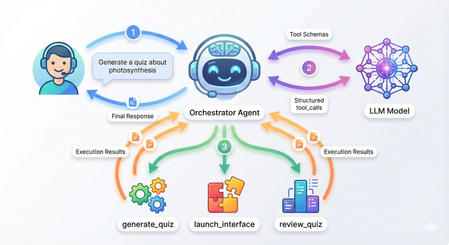
Advanced Function Calling and Multi-Agent Systems with Small Language Models in Foundry Local In our previous exploration of function calling with Small Language Models, we demonstrated how to enable local SLMs to interact with external tools using a text-parsing approach with regex patterns. While that method worked, it required manual extraction of function calls from the model's output; functional but fragile. Today, I'm excited to show you something far more powerful: Foundry Local now supports native OpenAI-compatible function calling with select models. This update transforms how we build agentic AI systems locally, making it remarkably straightforward to create sophisticated multi-agent architectures that rival cloud-based solutions. What once required careful prompt engineering and brittle parsing now works seamlessly through standardized API calls. We'll build a complete multi-agent quiz application that demonstrates both the elegance of modern function calling and the power of coordinated agent systems. The full source code is available in this GitHub repository, but rather than walking through every line of code, we'll focus on how the pieces work together and what you'll see when you run it. What's New: Native Function Calling in Foundry Local As we explored in our guide to running Phi-4 locally with Foundry Local, we ran powerful language models on our local machine. The latest version now support native function calling for models specifically trained with this capability. The key difference is architectural. In our weather assistant example, we manually parsed JSON strings from the model's text output using regex patterns and frankly speaking, meticulously testing and tweaking the system prompt for the umpteenth time 🙄. Now, when you provide tool definitions to supported models, they return structured tool_calls objects that you can directly execute. Currently, this native function calling capability is available for the Qwen 2.5 family of models in Foundry Local. For this tutorial, we're using the 7B variant, which strikes a great balance between capability and resource requirements. Quick Setup Getting started requires just a few steps. First, ensure you have Foundry Local installed. On Windows, use winget install Microsoft.FoundryLocal , and on macOS, use bash brew install microsoft/foundrylocal/foundrylocal You'll need version 0.8.117 or later. Install the Python dependencies in the requirements file, then start your model. The first run will download approximately 4GB: foundry model run qwen2.5-7b-instruct-cuda-gpu If you don't have a compatible GPU, use the CPU version instead, or you can specify any other Qwen 2.5 variant that suits your hardware. I have set a DEFAULT_MODEL_ALIAS variable you can modify to use different models in utils/foundry_client.py file. Keep this terminal window open. The model needs to stay running while you develop and test your application. Understanding the Architecture Before we dive into running the application, let's understand what we're building. Our quiz system follows a multi-agent architecture where specialized agents handle distinct responsibilities, coordinated by a central orchestrator. The flow works like this: when you ask the system to generate a quiz about photosynthesis, the orchestrator agent receives your message, understands your intent, and decides which tool to invoke. It doesn't try to generate the quiz itself, instead, it calls a tool that creates a specialist QuizGeneratorAgent focused solely on producing well-structured quiz questions. Then there's another agent, reviewAgent, that reviews the quiz with you. The project structure reflects this architecture: quiz_app/ ├── agents/ # Base agent + specialist agents ├── tools/ # Tool functions the orchestrator can call ├── utils/ # Foundry client connection ├── data/ ├── quizzes/ # Generated quiz JSON files │── responses/ # User response JSON files └── main.py # Application entry point The orchestrator coordinates three main tools: generate_new_quiz, launch_quiz_interface, and review_quiz_interface. Each tool either creates a specialist agent or launches an interactive interface (Gradio), handling the complexity so the orchestrator can focus on routing and coordination. How Native Function Calling Works When you initialize the orchestrator agent in main.py, you provide two things: tool schemas that describe your functions to the model, and a mapping of function names to actual Python functions. The schemas follow the OpenAI function calling specification, describing each tool's purpose, parameters, and when it should be used. Here's what happens when you send a message to the orchestrator: The agent calls the model with your message and the tool schemas. If the model determines a tool is needed, it returns a structured tool_calls attribute containing the function name and arguments as a proper object—not as text to be parsed. Your code executes the tool, creates a message with "role": "tool" containing the result, and sends everything back to the model. The model can then either call another tool or provide its final response. The critical insight is that the model itself controls this flow through a while loop in the base agent. Each iteration represents the model examining the current state, deciding whether it needs more information, and either proceeding with another tool call or providing its final answer. You're not manually orchestrating when tools get called; the model makes those decisions based on the conversation context. Seeing It In Action Let's walk through a complete session to see how these pieces work together. When you run python main.py, you'll see the application connect to Foundry Local and display a welcome banner: Now type a request like "Generate a 5 question quiz about photosynthesis." Watch what happens in your console: The orchestrator recognized your intent, selected the generate_new_quiz tool, and extracted the topic and number of questions from your natural language request. Behind the scenes, this tool instantiated a QuizGeneratorAgent with a focused system prompt designed specifically for creating quiz JSON. The agent used a low temperature setting to ensure consistent formatting and generated questions that were saved to the data/quizzes folder. This demonstrates the first layer of the multi-agent architecture: the orchestrator doesn't generate quizzes itself. It recognizes that this task requires specialized knowledge about quiz structure and delegates to an agent built specifically for that purpose. Now request to take the quiz by typing "Take the quiz." The orchestrator calls a different tool and Gradio server is launched. Click the link to open in a browser window displaying your quiz questions. This tool demonstrates how function calling can trigger complex interactions—it reads the quiz JSON, dynamically builds a user interface with radio buttons for each question, and handles the submission flow. After you answer the questions and click submit, the interface saves your responses to the data/responses folder and closes the Gradio server. The orchestrator reports completion: The system now has two JSON files: one containing the quiz questions with correct answers, and another containing your responses. This separation of concerns is important—the quiz generation phase doesn't need to know about response collection, and the response collection doesn't need to know how quizzes are created. Each component has a single, well-defined responsibility. Now request a review. The orchestrator calls the third tool: A new chat interface opens, and here's where the multi-agent architecture really shines. The ReviewAgent is instantiated with full context about both the quiz questions and your answers. Its system prompt includes a formatted view of each question, the correct answer, your answer, and whether you got it right. This means when the interface opens, you immediately see personalized feedback: The Multi-Agent Pattern Multi-agent architectures solve complex problems by coordinating specialized agents rather than building monolithic systems. This pattern is particularly powerful for local SLMs. A coordinator agent routes tasks to specialists, each optimized for narrow domains with focused system prompts and specific temperature settings. You can use a 1.7B model for structured data generation, a 7B model for conversations, and a 4B model for reasoning, all orchestrated by a lightweight coordinator. This is more efficient than requiring one massive model for everything. Foundry Local's native function calling makes this straightforward. The coordinator reliably invokes tools that instantiate specialists, with structured responses flowing back through proper tool messages. The model manages the coordination loop—deciding when it needs another specialist, when it has enough information, and when to provide a final answer. In our quiz application, the orchestrator routes user requests but never tries to be an expert in quiz generation, interface design, or tutoring. The QuizGeneratorAgent focuses solely on creating well-structured quiz JSON using constrained prompts and low temperature. The ReviewAgent handles open-ended educational dialogue with embedded quiz context and higher temperature for natural conversation. The tools abstract away file management, interface launching, and agent instantiation, the orchestrator just knows "this tool launches quizzes" without needing implementation details. This pattern scales effortlessly. If you wanted to add a new capability like study guides or flashcards, you could just easily create a new tool or specialists. The orchestrator gains these capabilities automatically by having the tool schemas you have defined without modifying core logic. This same pattern powers production systems with dozens of specialists handling retrieval, reasoning, execution, and monitoring, each excelling in its domain while the coordinator ensures seamless collaboration. Why This Matters The transition from text-parsing to native function calling enables a fundamentally different approach to building AI applications. With text parsing, you're constantly fighting against the unpredictability of natural language output. A model might decide to explain why it's calling a function before outputting the JSON, or it might format the JSON slightly differently than your regex expects, or it might wrap it in markdown code fences. Native function calling eliminates this entire class of problems. The model is trained to output tool calls as structured data, separate from its conversational responses. The multi-agent aspect builds on this foundation. Because function calling is reliable, you can confidently delegate to specialist agents knowing they'll integrate smoothly with the orchestrator. You can chain tool calls—the orchestrator might generate a quiz, then immediately launch the interface to take it, based on a single user request like "Create and give me a quiz about machine learning." The model handles this orchestration intelligently because the tool results flow back as structured data it can reason about. Running everything locally through Foundry Local adds another dimension of value and I am genuinely excited about this (hopefully, the phi models get this functionality soon). You can experiment freely, iterate quickly, and deploy solutions that run entirely on your infrastructure. For educational applications like our quiz system, this means students can interact with the AI tutor as much as they need without cost concerns. Getting Started With Your Own Multi-Agent System The complete code for this quiz application is available in the GitHub repository, and I encourage you to clone it and experiment. Try modifying the tool schemas to see how the orchestrator's behavior changes. Add a new specialist agent for a different task. Adjust the system prompts to see how agent personalities and capabilities shift. Think about the problems you're trying to solve. Could they benefit from having different specialists handling different aspects? A customer service system might have agents for order lookup, refund processing, and product recommendations. A research assistant might have agents for web search, document summarization, and citation formatting. A coding assistant might have agents for code generation, testing, and documentation. Start small, perhaps with two or three specialist agents for a specific domain. Watch how the orchestrator learns to route between them based on the tool descriptions you provide. You'll quickly see opportunities to add more specialists, refine the existing ones, and build increasingly sophisticated systems that leverage the unique strengths of each agent while presenting a unified, intelligent interface to your users. In the next entry, we will be deploying our quizz app which will mark the end of our journey in Foundry and SLMs these past few weeks. I hope you are as excited as I am! Thanks for reading.539Views0likes0Comments