foundry iq
3 TopicsBuilding ShadowQuest: A Multi-Agent RPG
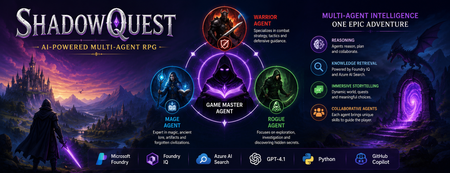
Artificial Intelligence is rapidly evolving beyond traditional chatbots. Today, developers are building intelligent systems where multiple AI agents collaborate, retrieve knowledge, and solve problems together. Microsoft's Agents League Hackathon provided the perfect opportunity to explore this new approach through the Reasoning Agents challenge. For this challenge, I built ShadowQuest, a fantasy role-playing game (RPG) powered by Microsoft Foundry, Foundry IQ, Azure AI Search, GPT-4.1, and GitHub Copilot. The project demonstrates how specialized AI agents can work together while using Retrieval-Augmented Generation (RAG) to deliver accurate and context-aware responses. About the Challenge Microsoft Agents League is a global developer challenge designed to encourage developers to build intelligent AI applications using Microsoft's latest AI technologies. Participants could choose from three tracks: Creative Apps, Reasoning Agents, and Enterprise Agents. I selected the Reasoning Agents track because I wanted to explore how multiple AI agents could collaborate instead of relying on a single large language model. Another important requirement for this year's challenge was integrating at least one Microsoft Intelligence Layer. For ShadowQuest, I chose Foundry IQ as the project's intelligence layer. The Idea Behind ShadowQuest Fantasy RPGs are built around storytelling, exploration, and collaboration between different characters. Every character usually has a unique role, whether it's a warrior protecting the team, a mage interpreting magical knowledge, or a rogue discovering hidden paths. I wanted to recreate this experience using AI. Instead of building one AI assistant responsible for everything, I designed a system where multiple specialized agents collaborate to create a richer and more immersive adventure. ShadowQuest is set in a fantasy world filled with magical artifacts, forgotten kingdoms, mysterious locations, and story-driven quests. Players can ask questions about the world, explore different locations, and learn about the game's lore through conversations with AI agents. Building the Multi-Agent Architecture The architecture follows a simple but scalable design. At the center of the system is the Game Master Agent, which acts as the orchestrator. Every player interaction starts with the Game Master. It receives the player's request, determines what information is needed, retrieves additional knowledge when required, and generates the final response. Supporting the Game Master are three specialized agents: Warrior Agent – Focuses on combat strategy and tactical decisions. Mage Agent – Provides magical knowledge, world lore, and information about ancient artifacts. Rogue Agent – Specializes in exploration, investigation, and discovering hidden information. Each agent has a clearly defined responsibility, making the system easier to understand, maintain, and extend in the future. Using Foundry IQ as the Knowledge Layer One of the most important parts of the project was integrating Foundry IQ. Instead of storing every piece of game information inside prompts, I created a dedicated knowledge base containing information about characters, magical artifacts, locations, quests, and the history of the ShadowQuest world. This approach separates knowledge from reasoning. Whenever a player asks a question, the Game Master Agent first retrieves relevant information from the knowledge base before generating a response. This ensures that answers remain consistent with the game's world while reducing hallucinations. Foundry IQ became the central source of truth for the entire project, making it easy to manage and expand the game world without constantly modifying prompts. Azure AI Search and Retrieval-Augmented Generation To enable intelligent retrieval, I connected Foundry IQ with Azure AI Search. The RPG documents were indexed, and vector embeddings were generated using Microsoft's embedding models. This enables semantic search, allowing the system to understand the meaning behind a player's question instead of relying only on keyword matching. For example, if a player asks about a magical relic without mentioning its exact name, Azure AI Search can still retrieve the correct information based on semantic similarity. The complete workflow looks like this: The player submits a question. The Game Master Agent receives the request. Foundry IQ queries Azure AI Search. Relevant documents are retrieved. GPT-4.1 generates a grounded response using the retrieved context. This Retrieval-Augmented Generation (RAG) approach significantly improves the quality and reliability of responses. Accelerating Development with GitHub Copilot GitHub Copilot played an important role throughout the development process. It helped generate Python classes, improve documentation, create helper functions, and speed up repetitive coding tasks. During the live demonstration, I also showed how Copilot could quickly generate a new Healer Agent, demonstrating how AI-assisted development makes it easier to extend a multi-agent application while maintaining a consistent architecture. Rather than replacing the developer, Copilot acted as an intelligent coding assistant, allowing me to focus more on architecture and design decisions. Demonstrating ShadowQuest During the Microsoft Agents League Reasoning Agents Battle, I demonstrated the Game Master Agent by asking questions about the ShadowQuest world, magical artifacts, and game lore. One of the most interesting parts of the demonstration was observing the retrieval process. Before generating a response, the Game Master Agent called the knowledge retrieval function through Foundry IQ. This confirmed that the system was retrieving relevant information from the indexed knowledge base rather than relying only on GPT-4.1's internal knowledge. This demonstrated how RAG can create more grounded, reliable, and context-aware AI experiences. Lessons Learned Building ShadowQuest taught me that designing multi-agent systems is as much about architecture as it is about AI models. Clearly defining responsibilities for each agent made the application easier to maintain and opened the door for future expansion. I also learned how valuable Retrieval-Augmented Generation can be for applications that depend on structured knowledge. Separating reasoning from knowledge allows AI systems to remain accurate while making it easier to update information over time. Finally, participating in the Microsoft Agents League was an incredible opportunity to experiment with Microsoft's latest AI technologies, learn from other developers, and share ideas with a global community passionate about agentic AI. Looking Ahead ShadowQuest is only the beginning. In future iterations, I plan to expand the project by introducing additional agents such as a Merchant Agent and Healer Agent, implementing persistent player memory, adding dynamic quest generation, improving combat mechanics, and enabling deeper collaboration between agents. These improvements will make the game world more immersive while continuing to explore the possibilities of agent-based AI systems. Conclusion ShadowQuest demonstrates how Microsoft Foundry, Foundry IQ, Azure AI Search, GPT-4.1, and GitHub Copilot can be combined to build intelligent multi-agent applications. More importantly, the project reinforced an important idea: the future of AI is not a single assistant performing every task, but a team of specialized agents collaborating with shared knowledge to solve increasingly complex problems. Participating in the Microsoft Agents League was an inspiring experience that allowed me to explore the next generation of AI development while building a project that combines storytelling, reasoning, and knowledge retrieval. I look forward to continuing this journey and discovering new ways to build intelligent applications using Microsoft's growing AI ecosystem.511Views1like0CommentsFoundry IQ: Give Your AI Agents a Knowledge Upgrade
If you’re learning to build AI agents, you’ve probably hit a familiar wall: your agent can generate text, but it doesn’t actually know anything about your data. It can’t look up your documents, search across your files, or pull facts from multiple sources to answer a real question. That’s the gap Foundry IQ fills. It gives your AI agents structured access to knowledge, so they can retrieve, reason over, and synthesize information from real data sources instead of relying on what’s baked into the model. Why Should You Care? As a student or early-career developer, understanding how AI systems work with external knowledge is one of the most valuable skills you can build right now. Retrieval-Augmented Generation (RAG), knowledge bases, and multi-source querying are at the core of every production AI application, from customer support bots to research assistants to enterprise copilots. Foundry IQ gives you a hands-on way to learn these patterns without having to build all the plumbing yourself. You define knowledge bases, connect data sources, and let your agents query them. The concepts you learn here transfer directly to real-world AI engineering roles. What is Foundry IQ? Foundry IQ is a service within Azure AI Foundry that lets you create knowledge bases, collections of connected data sources that your AI agents can query through a single endpoint. Instead of writing custom retrieval logic for every app you build, you: Define knowledge sources — connect documents, data stores, or web content (SharePoint, Azure Blob Storage, Azure AI Search, Fabric OneLake, and more). Organize them into a knowledge base — group multiple sources behind one queryable endpoint. Query from your agent — your AI agent calls the knowledge base to get the context it needs before generating a response. This approach means the knowledge layer is reusable. Build it once, and any agent or app in your project can tap into it. The IQ Series: A Three-Part Learning Path The IQ Series is a set of three weekly episodes that walk you through Foundry IQ from concept to code. Each episode includes a tech talk, visual doodle summaries, and a companion cookbook with sample code you can run yourself. 👉 Get started: https://aka.ms/iq-series Episode 1: Unlocking Knowledge for Your Agents (March 18, 2026) Start here. This episode introduces the core architecture of Foundry IQ and explains how AI agents interact with knowledge. You’ll learn what knowledge bases are, why they matter, and how the key components fit together. What you’ll learn: The difference between model knowledge and retrieved knowledge How Foundry IQ structures the retrieval layer The building blocks: knowledge sources, knowledge bases, and agent queries Episode 2: Building the Data Pipeline with Knowledge Sources (March 25, 2026) This episode goes deeper into knowledge sources, the connectors that bring data into Foundry IQ. You’ll see how different content types flow into the system and how to wire up sources from services you may already be using. What you’ll learn: How to connect sources like Azure Blob Storage, Azure AI Search, SharePoint, Fabric OneLake, and the web How content is ingested and indexed for retrieval Patterns for combining multiple source types Episode 3: Querying Multi-Source Knowledge Bases (April 1, 2026) The final episode shows you how to bring it all together. You’ll learn how agents query across multiple knowledge sources through a single knowledge base endpoint and how to synthesize answers from diverse data. What you’ll learn: How to query a knowledge base from your agent code How retrieval works across multiple connected sources Techniques for synthesizing information to answer complex questions Get Hands-On with the Cookbooks Every episode comes with a companion cookbook in the GitHub repo, complete with sample code you can clone, run, and modify. This is the fastest way to go from watching to building. 👉 Explore the repo: https://aka.ms/iq-series Inside you’ll find: Episode links — watch the tech talks and doodle recaps Cookbooks — step-by-step code samples for each episode Documentation links — official Foundry IQ docs and additional learning resources What to Build Next Once you’ve worked through the series, try applying what you’ve learned: Study assistant — connect your course materials as knowledge sources and build an agent that can answer questions across all your notes and readings. Project documentation bot — index your team’s project docs and READMEs into a knowledge base so everyone can query them naturally. Research synthesizer — connect multiple data sources (papers, web content, datasets) and build an agent that can cross-reference and summarize findings. Start Learning The IQ Series is designed to take you from zero to building knowledge-driven AI agents. Watch the episodes, run the cookbooks, and start experimenting with your own knowledge bases. 👉 https://aka.ms/iq-series623Views1like0CommentsFoundry IQ for Multi-Source AI Knowledge Bases
Pull from multiple sources at once, connect the dots automatically, and getvaccurate, context-rich answers without doing manual orchestration with Foundry IQ in Microsoft Foundry. Navigate complex, distributed data across Azure stores, SharePoint, OneLake, MCP servers, and even the web, all through a single knowledge base that handles query planning and iteration for you. Reuse the Azure AI Search assets you already have, build new knowledge bases with minimal setup, and control how much reasoning effort your agents apply. As you develop, you can rely on iterative retrieval only when it improves results, saving time, tokens, and development complexity. Pablo Castro, Azure AI Search CVP and Distinguished Engineer, joins Jeremy Chapman to share how to build smarter, more capable AI agents, with higher-quality grounded answers and less engineering overhead. Smart, accurate responses. Give your agents the ability to search across multiple sources automatically without extra development work. Check out Foundry IQ in Microsoft Foundry. Build AI agents fast. Organize your data, handle query planning, and orchestrate retrieval automatically. Get started using Foundry IQ knowledge bases. Save time and resources while keeping answers accurate. Foundry IQ decides when to iterate or exit, optimizing efficiency. Take a look. QUICK LINKS: 00:00 — Foundry IQ in Microsoft Foundry 01:02 — How it’s evolved 03:02 — Knowledge bases in Foundry IQ 04:37 — Azure AI Search and retrieval stack 05:51 — How it works 06:52 — Visualization tool demo 08:07 — Build a knowledge base 10:10 — Evaluating results 13:11 — Wrap up Link References To learn more check out https://aka.ms/FoundryIQ For more details on the evaluation metric discussed on this show, read our blog at https://aka.ms/kb-evals For more on Microsoft Foundry go to https://ai.azure.com/nextgen Unfamiliar with Microsoft Mechanics? As Microsoft’s official video series for IT, you can watch and share valuable content and demos of current and upcoming tech from the people who build it at Microsoft. Subscribe to our YouTube: https://www.youtube.com/c/MicrosoftMechanicsSeries Talk with other IT Pros, join us on the Microsoft Tech Community: https://techcommunity.microsoft.com/t5/microsoft-mechanics-blog/bg-p/MicrosoftMechanicsBlog Watch or listen from anywhere, subscribe to our podcast: https://microsoftmechanics.libsyn.com/podcast Keep getting this insider knowledge, join us on social: Follow us on Twitter: https://twitter.com/MSFTMechanics Share knowledge on LinkedIn: https://www.linkedin.com/company/microsoft-mechanics/ Enjoy us on Instagram: https://www.instagram.com/msftmechanics/ Loosen up with us on TikTok: https://www.tiktok.com/@msftmechanics Video Transcript: - If you research any topic, do you stop after one knowledge source? That’s how most AI will typically work today to generate responses. Instead, now with Foundry IQ in Microsoft Foundry, built-in AI powered query decomposition and orchestration make it easy for your agents to find and retrieve the right information across multiple sources, autonomously iterating as much as required to generate smarter and more relevant responses than previously possible. And the good news is, as a developer, this all just works out of the box. And joining me to unpack everything and also show a few demonstrations of how it works is Pablo Castro, distinguished engineer and also CVP. He’s also the architect of Azure AI Search. So welcome back to the show. - It’s great to be back. - And you’ve been at the forefront really for AI knowledge retrieval really since the beginning, where Azure AI Search is Microsoft’s state-of-the-art search engine for vector and hybrid retrieval, and this is really key to building out things like RAG-based agentic services and applications. So how have things evolved since then? - Things are changing really fast. Now, AI and agents in particular, are expected to navigate the reality of enterprise information. They need to pull data across multiple sources and connect the dots as they automate tasks. This data is all over the place, some in Azure stores, some in SharePoint, some is public data on the web, anywhere you can think of. Up until now, AI applications that needed to ground agents on external knowledge typically used as single index. If they needed to use multiple data sources, it was up to the developer to orchestrate them. With Foundry IQ and the underlying Azure AI Search retrieval stack, we tackled this whole problem. Let me show you. Here is a technician support agent that I built. It’s pointed at a knowledge base with information from different sources that we pull together in Foundry IQ. It provides our agent with everything it needs to know as it provides support to onsite technicians. Let’s try it. I’ll ask a really convoluted question, more of a stream of thought that someone might ask when working on a problem. I’ll paste in: “Equipment not working, CTL11 light is red, “maybe power supply problem? “Label on equipment says P4324. “The cord has another label UL 817. “Okay to replace the part?” From here, the agent will give the question to the knowledge base, and the knowledge base will figure out which knowledge sources to consult before coming back with a comprehensive answer. So how did it answer this particular question? Well, we can see it went across three different data sources. The functionality of the CTL11 indicator is from the machine manuals. We received them from different machine vendors, and we have them all stored in OneLake. Then, the company policy for repairs, which our company regularly edits, lives in SharePoint. And finally, the agent retrieved public information from the web to determine electrical standards. - And really, the secret sauce behind all of this is the knowledge base. So can you explain what that is and how that works? - So yeah, knowledge bases are first class artifacts in Foundry IQ. Think of a knowledge base as the encapsulation of an information domain, such as technical support in our example. A knowledge base comprises one or more data sources that can live anywhere. And it has its own AI models for retrieval orchestration against those sources. When a query comes in, a planning step is run. Here, the query is deconstructed. The AI model refers to the source description or retrieval instructions provided, and it connects the different parts of the query to the appropriate knowledge source. It then runs the queries, and it looks at the results. A fast, fine-tuned SLM then assesses whether we have enough information to exit or if we need more information and should iterate by running the planning step again. Once it has a high level of confidence in the response, it’ll return the results to the agent along with the source information for citations. Let’s open the knowledge base for our technician support agent. And at the bottom, you can see our three different knowledge sources. Again, machine specs pulls markdown files from OneLake with all the equipment manuals. And notice the source description which Foundry IQ uses during query planning. Policies points at our SharePoint site with our company repair policies. And here’s the web source for public information. And above, I’ve also provided retrieval instructions in natural language. Here, for example, I explicitly call out using web for electrical and industry standards. - And you’re in Microsoft Foundry, but you also mentioned that Azure AI Search and the retrieval stack are really the underpinnings for Foundry IQ. So, what if I already have some Azure AI Search running in my case? - Sure. Knowledge bases are actually AI search artifacts. You can still use standalone AI search and access these capabilities. Let me show you what it looks like in the Azure portal and in code. Here, I’m in my Azure AI Search service. We can see existing knowledge bases, and here’s the knowledge base we were using in Foundry IQ. Flipping to VS code, we have a new KnowledgeBaseRetrievalClient. And if you’ve used Azure AI Search before, this is similar to the existing search client but focused on the agentic retrieval functionality. Let me run the retrieve step. The retrieve method takes a set of queries or a list of messages from a conversation and returns a response along with references. And here are the results in detail, this time purely using the Azure AI Search API. If you’re already using Azure AI Search, you can create knowledge bases in your existing services and even reuse your existing indexes. Layering things this way lets us deliver the state-of-the-art retrieval quality that Azure AI Search is known for, combined with the power of knowledge bases and agentic retrieval. - Now that we understand some of the core concepts behind knowledge bases, how does it actually work then under the covers? - Well, unlike the classic RAG technique that we typically use one source with one index, we can use one or more indexes as well as remote sources. When you construct a knowledge base, passive data sources, such as files in OneLake or Azure Blob Storage are indexed, meaning that Azure Search creates vector and keyword indexes by ingesting and processing the data from the source. We also give you the option to create indexes for specific SharePoint sites that you define while propagating permissions and labels. On the other hand, data sources like the web or MCP servers are accessed remotely, and we support remote access mode for SharePoint too. In these cases, we’ll effectively use the index for the connected source for data for retrieval. Surrounding those knowledge sources, we have an agentic retrieval engine powered by an ensemble of models to run the end-to-end query process that is used to find information. I wrote a small visualization tool to show you what’s going on during the retrieval process. Let me show you. I’ll paste the same query we used before and just hit run. This uses the Azure AI Search knowledge base API directly to run retrieval and return both the results and details of each step. Now in the return result, we can see it did two iterations and issued 15 queries total across three knowledge sources. This is work a person would’ve had to do manually while researching. In this first iteration, we can see it broke the question apart into three aspects, equipment details, the meaning of the label, and the associated policy, and it ran those three as queries against a selected set of knowledge sources. Then, the retrieval engine assessed that some information was missing, so it iterated and issued a second round of searches to complete the picture. Finally, we can see a summary of how much effort we put in, in tokens, along with an answer synthesis step, where it provided a complete answer along with references. And at the bottom, we can see all the reference data used to produce the answer was also returned. This is all very powerful, because as a developer, you just need to create a knowledge base with the data sources you need, connect your agent to it, and Foundry IQ takes care of the rest. - So, how easy is it then to build a knowledge base out like this? - This is something we’ve worked really hard on to reduce the complexity. We built a powerful and simplified experience in Foundry. Starting in the Foundry portal, I’ll go to Build, then to Knowledge in the left nav and see all the knowledge bases I already created. Just to show you the options, I’ll create a new one. Here, you can choose from different knowledge sources. In this case, I’ll cancel out of this and create a new one from scratch. We’ll give it a name, say repairs, and choose a model that’s used for planning and synthesis and define the retrieval reasoning effort. This allows you to control the time and effort the system will put into information retrieval, from minimum where we just retrieve from all the sources without planning to higher levels of effort, where we’ll do multiple iterations assessing whether we got the right results. Next, I’ll set the output mode to answer synthesis, which tells the knowledge base to take the grounding information it’s collected and compose a consolidated answer. Then I can add the knowledge sources we created earlier, and for example, I’ll reduce the machine specs that contains the manuals that are in OneLake and our policies from SharePoint. If I want to create a new knowledge source, I can choose supported stores in this list. For example, if I choose blob storage, I just need to point at the storage account and container, and Foundry IQ will pull all the documents, the chunking, vectorization, and everything needed to make it ready to use. We’ll leave things as is for now. Instead, something really cool is how we also support MCP servers as knowledge sources. Let’s create a quick one. Let’s say we want to pull software issues from GitHub. All I need to do is point it to the GitHub MCP server address and set search_issues as the tool name. At this point, I’m all set, and I just need to save my changes. If data needs to be indexed for some of my knowledge sources, that will happen in the background, and indexes are continually updated with fresh information. - And to be clear, this is hiding a ton of complexity, but how do we know it’s actually working better than previous ways for retrieval? - Well, as usual, we’ve done a ton of work on evaluations. First, we measured whether the agentic approach is better than just searching for all the sources and combining the results. In this study, the grey lines represent the various data sets we used in this evaluation, and when using query planning and iterative search, we saw an average 36% gain in answer score as represented by this green line. We also tested how effective it is to combine multiple private knowledge sources and also a mix of private sources with web search where public data can fill in the gaps when internal information falls short. We first spread information across nine knowledge sources and measure the answer score, which landed at 90%, showing just how effective multi-source retrieval is. We then removed three of the nine sources, and as expected, the answer score dropped to about 50%. Then, we added a web knowledge source to compensate for where our six internal sources were lacking, which in this case was publicly available information, and that boosted results significantly. We achieved a 24-point increase for low-retrieval reasoning effort and 34 points for medium effort. Finally, we wanted to make sure we only iterate if it’ll make things better. Otherwise, we want to exit the agentic retrieval loop. Again, under the covers, Foundry IQ uses two models to check whether we should exit, a fine-tuned SLM to do a fast check with a high bar, and if there is doubt, then we’ll use a full LLM to reassess the situation. In this table, on the left, we can see the various data sets used in our evaluation along with the type of knowledge source we used. The fast check and the full check columns indicate the number of times as a percentage that each of the models decided that we should exit the agentic retrieval loop. We need to know if it was a good idea to actually exit. So the last column has the answer score you would get if you use the minimal retrieval left for setting, where there is no iteration or query planning. If this score is high, iteration isn’t needed, and if it’s low, iteration could have improved the answer score. You can see, for example, in the first row, the answer score is great without iteration. Both fast and full checks show a high percentage of exits. In each of these, we saved time and tokens. The middle three rows are cases where the fast check, the first to the full check, and the full check predicts that we should exit at reasonable high percentages, which is consistent with the relatively high answers scores for minimal effort. Finally, the last two rows show both models wanting to iterate again most of the time, consistent with the low answer score you would’ve seen without iteration. So as you saw, the exit assessment approach in Foundry IQ orchestration is effective, saving time and tokens while ensuring high quality results. - Foundry IQ then is great for connecting the dots then across scattered information while keeping your agents simple to build, and there’s no orchestration required. It’s all done for you. So, how can people try Foundry IQ for themselves right now? - It’s available now in public preview. You can check it out at aka.ms/FoundryIQ. - Thanks so much again for joining us today, Pablo, and thank you for watching. Be sure to subscribe to Microsoft Mechanics for more updates, and we’ll see you again soon.3.7KViews0likes0Comments