form
4 Topics
Access selecting specific date on a calendar
I'm pulling my hair out because everything I've found through my research says my VBA code should work, but it doesn't! Here's the story. I have a calendar (form) that shows events going on for each month. What I want is for a person to click on a specific day and have a pop-up form appear showing more details of the events for whatever day they clicked on. I used the below code, which mostly works... When I click on a date, the month and year will be correct, but not the day of the month. The day of the month is always today's day. For example, let's say I click on the day Feb. 2, 2024 and today's date is May 21, 2026. My pop-up form will show the events for Feb. 21, 2024. This is the code I have: Private Sub lblTue3_Click() Dim txtSelectDate As Date (probably don't need this) Dim iDayOfMonth As Integer Dim iMonth As Integer Dim iYear As Integer Dim dSelectDate as Date iDayOfMonth= Format(Me.txtSelectDate.Value, "d") iMonth = Format(Me.txtSelectDate, "mm") iYear = Format(Me.txtSelectDate, "yyyy") dSelectDate = CDate(iMonth & "/" & iDayOfMonth & "/" & iYear) DoCmd.OpenForm "frmThatContainsMyData", acNormal, , "[DateOnFormUsedForFilter]=#" & dSelectDate & "#", , acDialog Update: I think I figured out where the problem is. When the calendar form is loaded, that's where txtSelectDate is defined. However, I don't know how to define txtSelectDate to whatever date I click on in the calendar. It defaults to today's date when I load the form. When I change the month or year, those number change in the txtSelectDate box, but not the day. This is the code I currently have. (DisplayMonthName displays the month and year; don't think it's part of my issue) Private Sub Form_Load() Me.txtSelectDate = Date Call DisplayMonthName End Sub Any help is greatly appreciated!261Views1like11Comments
ACCESS Form does not show all records when Subform is present
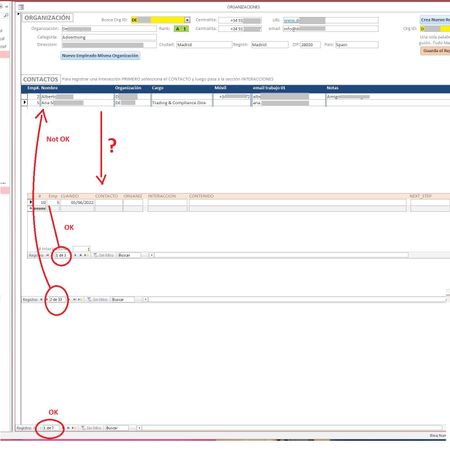
Hi All! I'm suffering a strange quirk with my Access forms/subforms. Whenever I set up a form / subform combo the form does not show all the records it should be showing. I have 3 tables. Table_1 holds the company data. When I select one ORGANIZATION (I have 7 right now) from the yellow dropdown ACCESS should populate the CONTACTS I have in said ORG and show them as a continuous subform (CONTACTOS). I get the list should nor be longer than whatever fits above the next subform (maybe 20+ at the moment?). But it's only showing 2 (out of a possible 33). The lower subform shows all Interactions (call, visit, email, etc.) I had with that person (presently 1) that I selected in the CONTACTOS subform.. Notice there are 33 records in CONCTACTOS, but ACCESS is only showing 2. If I scroll down I can see all 33 just not at the same time. If I remove the last subform or push the window up or down or pull the first form's background up or down the number of records shown grows or shrinks. Any ideas as to why it happens and how I can fix it? I'm sure I'm missing some parameter somewhere in properties but I haven't found it yet. Can I force ACCESS to show a certain number of records? Please help! Miguel2.9KViews0likes1Comment
Labels automatically resizing in form design - Access 2019
Hi, Not sure if it is just me not seeing a setting somewhere. In previous versions I cannot remember this happening but it is rather annoying. When in design mode of a form, if I change the text in a label, the label automatically resizes. Is there a global setting to turn this off? This is only relevant AFAIK to Access 2019, I use 2016 on desktop when in the office or using company laptop and do not have this issue. Basically my use is within a suite of database front ends I have developed, they all have the same type of form design so I can copy a form which does a similar function from one of the databases when building a new one to add into the suite. All my labels are nicely sized so everything is uniform, but when I type a different text into the label (e.g. change from Order Number to Employee Name) the label resizes itself and I have to then resize the label again so that it fulfils the requirement of my OCD. Added a couple of example images. In image 1 I have taken a form which is used to add employee skills, made a copy and now changing this to add in an absence. Changing the label text automatically resized the label meaning I have to then go manually resize it to what it was previously. Hope that is enough info. Sensible answers only please. I could write VBA or use Access 2016. I only require a response if there is a way to do this or not, and if possible how to prevent it from happening. Thanks in advance.4.4KViews0likes4Comments
Specific Form
Hello, I want to create a Form for data Entry but what I need special from this form is to get list from a specific query. Example: I made a Query 1 (Available Worker) from Table 1 (Workers) with specific criteria lead me to know who is eligible/available to work, then those beneficiaries of the Query 1 I want to create a data entry form for them in order to provide or fill the Working date and Time in/ out (Which is doesn't exist in the Query 1 or even the main table) then I want the result after the fill of each entry to move to Table 2. Please advise me.851Views0likes0Comments