flexible server
22 TopicsIgnite 2022 - Continued innovation with Azure Database for PostgreSQL flexible server
We are committed to making Azure Database for PostgreSQL flexible server the most advanced Postgres database service for migrating your open-source and commercial database workloads or building cloud native applications in Azure. Azure Database for PostgreSQL combines the fully managed community edition of Postgres database with the broadest Postgres extension support for existing or new application development. Flexible server is the top destination for Postgres workloads migrating and modernizing to Azure because of the cost optimization benefits, maximum control over your databases, and a simplified deployment experience.5.7KViews4likes1CommentAnnouncing Data API Builder (Preview) for PostgreSQL
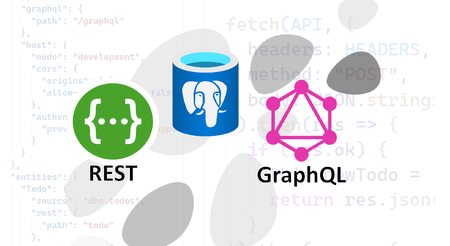
Data API Builder eliminates much of the complexity to build GraphQL API or REST APIs and provides secure access to your data when using traditional approaches that require significant custom code and extended development time. Today we are thrilled to announce public preview of Data API Builder.4.1KViews3likes0CommentsAnnouncing new security, maintenance and analytics features for PostgreSQL at Microsoft Build 2026
At Microsoft Build 2026, we’re announcing a major wave of PostgreSQL innovation across Azure. Alongside the public preview of Azure HorizonDB, we’re delivering a broad set of enhancements for our fully managed open-source PostgreSQL service: Azure Database for PostgreSQL flexible server. These updates span performance, analytics, security, operations, resilience and migration - helping you build faster, operate with more control, secure your workloads, and modernize with confidence. Here’s a quick tour of the top flexible server announcements at Build 2026. Feature Highlights pg_ivm Extension Defender Security assessments temporal_tables Extension Cross-tenant CMK Automatic Entra token refresh libraries New Powershell module: Az.PostgreSQLFlexibleServer More control over planned maintenance Pre-Upgrade validation checks New Built-in Grafana dashboards Chaos Studio supports Azure Database for PostgreSQL AI-assisted Oracle to PostgreSQL migration Migration Service for Azure Database for PostgreSQL improvements (EDB, AlloyDB) Performance, Scale & Analytics pg_ivm Extension Generally Available Materialized views are a useful way to optimize performance for queries that run regularly, but if underlying data becomes stale the result set needs to be recomputed. With the pg_ivm extension you can automatically maintain materialized views as the underlying data changes. This is particularly valuable for large datasets with small incremental changes that need real-time freshness, like dashboards, catalog analytics and SaaS usage reporting. We are pleased to announce the pg_ivm extension is now generally available in Azure Database for PostgreSQL. Learn more: pg_ivm. Security, Auditing & Identity Defender security assessments Preview Microsoft Defender Security Assessments for Azure Database for PostgreSQL enables continuous evaluation of your database security posture, helping identify vulnerabilities and misconfigurations across server and database configurations. Previously limited to reactive threat detection, in the latest preview release, Defender now provides proactive, risk-based insights through assessments tailored to PostgreSQL-specific best practices, delivering more relevant and actionable guidance. This helps you strengthen your security baseline, prioritize remediation, and align with best practices and compliance requirements. Learn more: https://aka.ms/Defender-Assessments-for-PG-Preview temporal_tables Extension Generally Available We’ve had many customer requests to support the temporal_tables extension, which provides built-in support for tracking and querying historical changes to data over time. Temporal tables are now generally available in Azure Database for PostgreSQL. With this extension enabled you can easily perform time-based queries, audit data changes, and maintain historical records without building custom tracking logic, simplifying application development and compliance scenarios. Learn more: temporal_tables Cross-tenant CMK Preview Azure Database for PostgreSQL now supports cross-tenant customer-managed keys (CMK) in public preview, allowing you to encrypt your data at rest using an Azure Key Vault key that resides in a separate Microsoft Entra tenant from the database service. This feature is designed for SaaS providers and enterprises that need to maintain strict separation of duties and ownership of encryption keys, enabling you to retain full control over key lifecycle management while PostgreSQL runs in a service provider’s tenant. Learn more: Data encryption at rest in Azure Database for PostgreSQL Automatic Entra token refresh libraries Preview We’re making it easier to use Entra ID authentication with Azure Database for PostgreSQL throughout the application stack by introducing new token refresh libraries for .NET, JavaScript, and Python. With Entra ID, access tokens are short-lived which can make managing their lifecycle complex in real-world applications. Developers need to be aware of token refresh and build additional handling around token expiration, connection retry, and session continuity. These new libraries remove that friction. By handling Entra token refresh seamlessly in the background, they allow applications to stay connected without interruption and with no custom logic required. The result is a simpler development experience and more resilient applications, especially for long-running or connection-heavy workloads. Across languages, the libraries provide a consistent and streamlined way to adopt secure, passwordless authentication, helping teams focus more on building their applications and less on managing authentication. Learn more: .NET, JavaScript, and Python. Operations, Maintenance & Monitoring New Powershell module: Az.PostgreSQLFlexibleServer Generally Available We’re excited to introduce the newly renamed Az.PostgreSQLFlexibleServer PowerShell module, delivering a streamlined experience for managing Azure Database for PostgreSQL with PowerShell. Building on the capabilities of the previous Az.PostgreSql module, the updated module aligns with the new features in the 2026-01-01 preview REST API. This module brings support for PostgreSQL 18, elastic clusters for scalable workloads and a range of enhancements designed to simplify management and improve performance. Whether you're provisioning new deployments or managing complex environments, this module ensures you can take full advantage of the latest platform capabilities directly from PowerShell. To learn more, visit our official documentation on PowerShell: Az.PostgreSql Module | Microsoft Learn More control over planned maintenance Generally Available We’ve seen many requests to provide more control when a maintenance update is applied to Azure Database for PostgreSQL. Sometimes when a critical workload is running you want to apply the maintenance when you’re ready. Announcing general availability this week, we’re building on the existing System and Custom maintenance window options and adding new self-service maintenance capabilities to the Azure portal. You can now reschedule upcoming maintenance updates for up to two weeks and apply maintenance on demand at a time that suits you. You can also view scheduled maintenance and review your server’s maintenance history after updates are complete. These options help you better align maintenance with your business schedules, reduce disruption during critical workload periods, and minimize the need for support-driven deferral requests. CLI and API support are coming soon. Learn more: https://aka.ms/azure-postgres-reschedule-maintenance Pre-Upgrade validation checks Preview Major version upgrades are critical for staying current with PostgreSQL features, security updates, and performance improvements, but you often discover blockers only after starting the upgrade workflow. Pre-Upgrade Validation Checks lets you validate upgrade readiness before initiating the actual upgrade by running Azure-specific upgrade checks and PostgreSQL pg_upgrade --check validations independently. The shift is simple: you can identify and fix upgrade blockers before the upgrade window begins. The feature surfaces actionable issues across configurations, extensions, dependencies, replication slots, event triggers, and other upgrade-sensitive objects. You can fix blockers, re-run validation until all checks pass, and proceed with the upgrade with greater predictability. Learn more: https://aka.ms/pg-flex-upgrade-checks New Built-in Grafana dashboards Generally Available Grafana dashboards are now built directly into the Azure portal for Azure Database for PostgreSQL - no setup, no extra cost, and no separate service to manage. You can open your PostgreSQL resource in the portal and immediately access prebuilt dashboards for key health and performance signals such as CPU, memory, storage, IOPS, connections, transactions, and availability. The key value is metrics + logs in one place. You can quickly correlate performance spikes with PostgreSQL logs, understand what changed, and troubleshoot faster using the familiar Grafana experience. Dashboards can also be customized, saved to your subscription, and shared across teams for ongoing operations. Learn more: https://aka.ms/azure-postgres-dashboards-grafana Resilience & Business Continuity Chaos Studio supports Azure Database for PostgreSQL Preview No matter how much you prepare, you only really know how good your database disaster recovery plan is when something breaks. With Chaos Studio support for Azure Database for PostgreSQL, you can simulate zone-down scenarios on PostgreSQL HA-enabled instances and validate the resilience of your mission-critical workloads. With Chaos Studio integration, you can proactively test failover behavior and gain confidence in how your applications respond to real-world zonal failures. This feature is currently available through a gated private preview. To get started, submit your subscription details using the form. Once reviewed, our team will enable the feature for your subscription, with guidance to help you begin testing. Getting started is simple: Create a Chaos Studio workspace via the Chaos Studio portal and configure your subscription, resource group, and region. Define the scope and assign the required managed identity and permissions. Review and verify your workspace setup. Browse available scenarios and select the PostgreSQL zone-down scenario. Configure the test (name, duration), then run it from My Library to begin validating failover behavior. With just a few steps, you’ll be able to simulate real-world failure conditions and gain confidence in your application’s resilience. To get started, please submit your details using this link: Private Preview Support for Chaos Studio Migration & Modernization AI-assisted Oracle to PostgreSQL migration Generally Available AI-assisted migration tooling has dramatically lowered the bar for moving between different databases and is changing the way people look at the return on investment for migration. The VS Code PostgreSQL extension comes with AI-Assisted migration tooling which converts Oracle schema and application code to Azure Database for PostgreSQL. This tooling uses GitHub Copilot, Microsoft Foundry, and custom Language Model tools to convert Oracle schema, database code and client applications into the PostgreSQL equivalents, and validates every change against a running flexible server instance. Learn more: Schema conversion, App conversion. Migration Service for Azure Database for PostgreSQL improvements (EDB, AlloyDB) Generally Available We’ve added AlloyDB and EDB Extended Server as new sources for migrating to PostgreSQL in the Azure Database for PostgreSQL Migration Service, with support for both online and offline migration support. Learn more: Migrate from AlloyDB, Migrate from EDB. Looking ahead That wraps up the Build 2026 announcements for Azure Database for PostgreSQL flexible server. There are also many great PostgreSQL technical sessions at Build this week, covering cloud-native app & AI development and migration. To find out more, here's a link to the Build session catalog for PostgreSQL sessions: https://aka.ms/Postgres-on-Azure_Build-2026. We'll continue to build out our roadmap over the coming months to deliver on your asks to improve the performance, security and stability of your PostgreSQL workloads. Check the Microsoft Blog for PostgreSQL for a regular monthly recap where we share the latest enhancements and product updates.1.5KViews2likes0CommentsBidirectional Replication with pglogical on Azure Database for PostgreSQL - a VNET guide
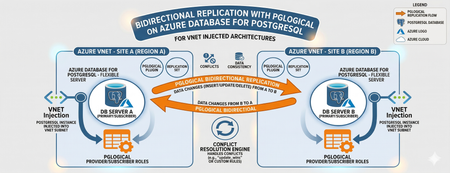
Editor’s Note: This article was written by Raunak Jhawar, a Chief Architect. Paula Berenguel and Guy Bowerman assisted with the final review, formatting and publication. Overview Bidirectional replication is one of the most requested topologies requiring writes in multiple locations, selective sync, geo-distributed active-active, or even accepting eventual consistency. This is a deep technical walkthrough for implementing bidirectional (active‑active) replication on private Azure Database for PostgreSQL Server using pglogical, with a strong emphasis on VNET‑injected architectures. It explains the underlying networking and execution model covering replication worker placement, DNS resolution paths, outbound connectivity, and conflict resolution mechanics to show why true private, server‑to‑server replication is only achievable with VNET injection and not with Private Endpoints. It also analyzes the operational and architectural trade‑offs needed to safely run geo distributed, multi write PostgreSQL workloads in production. This blog post focus on pglogical however, if you are looking for steps to implement it with logical replication or pros and cons of which approach, please refer to my definitive guid to bi-directional replication in Azure Database for PostgreSQL blog post Why this is important? This understanding prevents fundamental architectural mistakes (such as assuming Private Endpoints provide private outbound replication), reduces deployment failures caused by hidden networking constraints, and enables teams to design secure, compliant, low‑RPO active/active or migration architectures that behave predictably under real production conditions. It turns a commonly misunderstood problem into a repeatable, supportable design pattern rather than a trial‑and‑error exercise. Active-Active bidirectional replication between instances Architecture context This scenario targets a multi-region active-active write topology where both nodes are injected into the same Azure VNET (example - peered VNETs on Azure or even peered on-premises), both accept writes. Common use case: Geo distributed OLTP with regional write affinity. Step 1: Azure Infrastructure Prerequisites Both server instances must be deployed with VNET injection. This is a deploy time decision and you cannot migrate a publicly accessible instance (with or without private endpoint) to VNET injection post creation without rebuilding it. Each instance must live in a delegated subnet: Microsoft.DBforPostgreSQL/Servers. The subnet delegation is non-negotiable and prevents you from placing other resource types in the same subnet, so plan your address space accordingly. If nodes are in different VNETs, configure VNET peering before continuing along with private DNS integration. Ensure there are no overlapping address spaces amongst the peered networks. NSG rules must allow port 5432 between the two delegated subnets, both inbound and outbound. You may choose to narrow down the NSG rules to meet your organization requirements and policies to a specific source/target combination allow or deny list. Step 2: Server Parameter Configuration On both nodes, configure the following server parameters via the Azure Portal (Server Parameters blade) or Azure CLI. These cannot be set via ALTER SYSTEM SET commands. wal_level = logical -- This setting enables logical replication, which is required for pglogical to function. max_worker_processes = 16 -- This setting allows for more worker processes, which can help with replication performance. max_replication_slots = 10 -- This setting allows for more replication slots, which are needed for pglogical to manage replication connections. max_wal_senders = 10 -- This setting allows for more WAL sender processes, which are responsible for sending replication data to subscribers. track_commit_timestamp = on -- This setting allows pglogical to track commit timestamps, which can be useful for conflict resolution and monitoring replication lag. shared_preload_libraries = pglogical -- This setting loads the pglogical extension at server startup, which is necessary for it to function properly. azure.extensions = pglogical -- This setting allows the pglogical extension to be used in the Azure Postgres PaaS environment. Both nodes require a restart after shared_preload_libraries and wal_level changes. Note that max_worker_processes is shared across all background workers in the instance. Each pglogical subscription consumes workers. If you are running other extensions, account for their worker consumption here or you will hit startup failures for pglogical workers. Step 3: Extension and Node Initialization Create a dedicated replication user on both nodes. Do not use the admin account for replication. CREATE ROLE replication_user WITH LOGIN REPLICATION PASSWORD 'your_password'; GRANT USAGE ON SCHEMA public TO replication_user; GRANT SELECT ON ALL TABLES IN SCHEMA public TO replication_user; ALTER DEFAULT PRIVILEGES IN SCHEMA public GRANT SELECT ON TABLES TO replication_user; Log into Server A either via a VM in the specified VNET or Azure Bastion Host and run the following which creates the extension, a replication set and policies. CREATE EXTENSION IF NOT EXISTS pglogical; SELECT pglogical.create_node(node_name := 'node_a', dsn := 'host.fqdn-for-server-a port=5432 dbname=preferred-database user=replication_user password=<strong_password>'); -- Define the replication set for Server A, specifying which tables to replicate and the types of operations to include (inserts, updates, deletes). SELECT pglogical.create_replication_set(set_name := 'node_a_set', replicate_insert := true, replicate_update := true, replicate_delete := true, replicate_truncate := false); -- Add sales_aus_central table explicitly SELECT pglogical.replication_set_add_table(set_name := 'node_a_set', relation := 'public.sales_aus_central', synchronize_data := true); -- Add purchase_aus_central table explicitly SELECT pglogical.replication_set_add_table(set_name := 'node_a_set', relation := 'public.purchase_aus_central', synchronize_data := true); -- OR add all tables in the public schema SELECT pglogical.replication_set_add_all_tables('default', ARRAY['public']); -- This command adds all tables in the public schema to the default replication set. -- Now, repeat this on Server B using the same method above i.e. via a VM in the specified VNET or Azure Bastion Host CREATE EXTENSION IF NOT EXISTS pglogical; -- Define the replication set for Server B, specifying which tables to replicate and the types of operations to include (inserts, updates, deletes) SELECT pglogical.create_node(node_name := 'node_b', dsn := 'host-fqdn-for-server-b port=5432 dbname=preferred-database user=replication_user password=<strong_password>'); SELECT pglogical.create_replication_set( set_name := 'node_b_set', replicate_insert := true, replicate_update := true, replicate_delete := true, replicate_truncate := false); -- Add sales_aus_east table explicitly SELECT pglogical.replication_set_add_table( set_name := 'node_b_set', relation := 'public.sales_aus_east', synchronize_data := true); -- Add purchase_aus_east table explicitly SELECT pglogical.replication_set_add_table( set_name := 'node_b_set', relation := 'public.purchase_aus_east', synchronize_data := true); -- OR add all tables in the public schema SELECT pglogical.replication_set_add_all_tables('default', ARRAY['public']); -- This command adds all tables in the public schema to the default replication set. It is recommended that you confirm the DNS resolution on all server’s involved as part of the replication process. For a VNET injected scenarios – you must get back the private IP. As a sanity check, you can run the nslookup on the target server’s FQDN or even use the \conninfo command to see the connection details. One such example is here: Step 4: Configuring the subscribers SELECT pglogical.create_subscription ( -- Create a subscription on Server A to receive changes from Server B subscription_name := 'node_a_to_node_b', replication_sets := array['default'], synchronize_data := true, forward_origins := '{}', provider_dsn := 'host=fqdn-for-server-b port=5432 dbname=preferred-database user=replication_user password=<strong_password>'); -- Run this on Server B to subscribe to changes from Server A SELECT pglogical.create_subscription ( -- Create a subscription on Server B to receive changes from Server A subscription_name := 'node_b_to_node_a', replication_sets := array['default'], synchronize_data := true, forward_origins := '{}', provider_dsn := 'host=fqdn-for-server-a port=5432 dbname=preferred-database user=replication_user password=<strong_password>'); For most OLTP workloads, last_update_wins using the commit timestamp is the most practical choice. It requires track_commit_timestamp = on, which you must set as a server parameter. The FQDN must be used rather than using the direct private IP of the server itself. Bidirectional replication between server instances with private endpoints – does this work and will this make your server security posture weak? Where do pglogical workers run? With VNET injection, the server's network interface lives inside your delegated subnet which is a must do. The PostgreSQL process including all pglogical background workers starts connections from within your VNET (delegated subnet). The routing tables, NSGs, and peering apply to both inbound and outbound traffic from the server. With Private Endpoint, the architecture is fundamentally different: Private endpoint is a one-way private channel for your clients or applications to reach the server securely. It does not give the any of server’s internal processes access to your VNET for outbound connectivity. pglogical subscription workers trying to connect to another server are starting those connections from Microsoft's managed infrastructure and not from your VNET. What works? Scenario A: Client connectivity via private endpoint Here you have application servers or VMs in your VNET connecting to a server configured with a private endpoint, your app VM connects to 10.0.0.15 (the private endpoint NIC), traffic flows over Private Link to the server, and everything stays private. This is not server-to-server replication. Scenario B: Two servers, both with private endpoints Here both servers are in Microsoft's managed network. They can reach each other's public endpoints, but not each other's private endpoints (which are in customer VNETs). The only path for bidirectional replication worker connections is to enable public network access on both servers with firewall rules locked down to Azure service IP. Here you have private endpoints deployed alongside public access. Inside your VNET, SERVER A resolves to the private endpoint IP via the privatelink.postgres.database.azure.com private DNS zone. But the pglogical worker running in Microsoft's network does not have access to your private DNS zone and it resolves via public DNS, which returns the public IP. This means if you are using the public FQDN for replication, the resolution path is consistent from the server's perspective (always public DNS, always public IP using the allow access to Azure services flag as shown above). Your application clients in the VNET will still resolve to the private endpoint. If your requirement is genuinely private replication with no public endpoint exposure, VNET injection is the correct answer, and private endpoint cannot replicate that capability for pglogical. Conclusion The most compelling benefit in the VNET-injected topology is network isolation without sacrificing replication capability. You get the security posture of private connectivity i.e. no public endpoints, NSG controlled traffic, private DNS resolution all while keeping a live bidirectional data pipeline. This satisfies most enterprise compliance requirements around data transit encryption and network boundary control. The hub/spoke migration (specifically, on-premises or external cloud to Azure) scenarios are where this approach shines. The ability to run both systems in production simultaneously, with live bidirectional sync during the cutover window, reduces migration risk when compared to a hard cutover. From a DR perspective, bidirectional pglogical gives you an RPO measured in seconds (replication lag dependent) without the cost of synchronous replication. For workloads that can tolerate eventual consistency and have well-designed conflict avoidance this is a compelling alternative to synchronous streaming replication via read replicas, which are strictly unidirectional.626Views2likes0Comments