file system
15 TopicsWindows OS & The Registry
From dealing my many home and business Windows customers over the years with IT support fixing registry issues that unfortunately happen, it would be great if oneday Microsoft could rewrite or update the OS so that the registry could be done away with and each program settings etc needed for it was all Incorporated within the user data hidden folder for that app similar to how Mac OS and Amiga OS & Linux do it, so you never get the giant registry that can inevitably go wrong at some point which then sometimes can be a nightmare to fix for customers editing manually. Yes it would be a lot of work to redo and a change for developers writing apps, but in the long run would be far better if it could be done. I think it’s time Microsoft start looking at that.68Views0likes0Comments
Computer continuously crashing, different errors.
Previously imaged on windows 11 my computer would crash from time to time. Often when left along and not in active use. Tried playing a video to see if that would keep it up but it did not. After a while my computer stopped turning on going into a constant loop of the errors below. first 3 being blue screen and last being a pop up that would come up instead of a login screen. I tried to re image the computer but i continued to receive blue screen alerts. After looking up the alerts I saw it may be related to a RAM issue so I tested the RAM sticks 1 by 1, bought new RAM but still had the same issue. I brought it to a tech store which stated it seemed to be a problem with the ssd. i purchased a new SSD, installed windows 10 this time but still seem to be having issues with blue screen though not as often. Currently running into an issue where I've downloaded the below update, computer is pending restart but it never installs on updated. Seeking any help with this. 2025-10 Cumulative Update for Windows 10 Version 22H2 for x64-based Systems (KB5066791) Attempted_execute_of_noexecute_MEMORY IRQL_NOT_LESS_OR_EQUAL ntoskrnl.exer pop up: sign-in process initialization failure ; interactive sign-in process initialization has failed. please check the event log for details.217Views0likes1Comment
How I Turned My 14 GB USB into a Windows Multiboot and Setup Toolkit
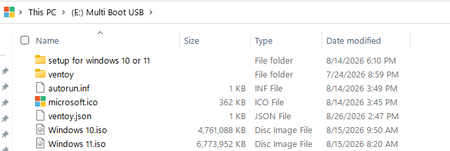
i everyone, I wanted to share my experience with my customized multi boot USB. I have a 14 GB USB flash drive. Before using a multiboot tool, I could normally keep only one bootable operating system on the USB at a time. Now, I can keep multiple ISO files on the same USB and choose the one I want to boot. What I have on my USB My USB currently contains: Windows 10 ISO Windows 11 ISO autorun.inf and a custom USB icon setup Windows setup/installation files Browser installers Original Windows 11 wallpapers Office setup/deployment files: Office 2024 ODT Office 365 ODT Office 2019 ODT A folder called Special Tools Special Tools folder I created a Special Tools folder for useful tools and scripts that I may need after installing Windows. It contains things such as: Driver backup tools/scripts System repair batch files Junk and temporary file cleanup scripts Rufus WinRAR installer 7-Zip installer Other useful Windows utilities The main purpose is to keep the tools I regularly need in one place, so I don't have to search for every basic utility after installing Windows. My USB setup The biggest advantage for me is that I can keep Windows 10 and Windows 11 on the same USB. When I boot my computer from the USB, a boot menu appears, allowing me to select the Windows ISO I want to use. I have also added a custom theme, so the boot menu has my own design instead of the default appearance. Overall, my 14 GB USB has become a combination of: Multiboot USB + Windows Installation Media + Setup Toolkit + Useful Utilities I built this setup mainly to keep my Windows installation files, tools, installers, wallpapers, and other useful resources together on one USB. I wanted to share a screenshot of my customized USB setup. I also forgot to mention one folder related to the multiboot setup. I customized the boot menu background according to my own design, so when the system starts, it displays my customized background instead of the default one.86Views0likes0Comments
DPS service
Hi, a { text-decoration: none; color: #464feb; } tr th, tr td { border: 1px solid #e6e6e6; } tr th { background-color: #f5f5f5; } I’m wondering whether I can intentionally create a failure scenario that the Diagnostic Policy Service (DPS) would be able to troubleshoot—perhaps something related to memory, power, USB, or audio. I’d like to verify whether DPS is actively detecting and troubleshooting these types of errors in Windows. Thank you so much in advance! Aisha220Views0likes1CommentStrange File Structure
Trying to clean up a USB drive and ran into something strange. D:\>dir "New folder" Volume in drive D is ESD-USB Volume Serial Number is A862-A0DD Directory of D:\New folder 01/12/2026 05:22 AM <DIR> . 01/12/2026 05:22 AM <DIR> .. 0 File(s) 0 bytes 2 Dir(s) 26,539,491,328 bytes free But I can't delete "New Folder". Then: D:\>dir "New folder" /q /r Volume in drive D is ESD-USB Volume Serial Number is A862-A0DD Directory of D:\New folder 01/12/2026 05:22 AM <DIR> \Everyone . 01/12/2026 05:22 AM <DIR> \Everyone .. 0 File(s) 0 bytes 2 Dir(s) 26,539,491,328 bytes free Seems to be hidden folders. D:\>cd "New folder" D:\New folder>dir Volume in drive D is ESD-USB Volume Serial Number is A862-A0DD Directory of D:\New folder 01/12/2026 05:22 AM <DIR> . 01/12/2026 05:22 AM <DIR> .. 0 File(s) 0 bytes 2 Dir(s) 26,539,491,328 bytes free D:\New folder>dir /q /r Volume in drive D is ESD-USB Volume Serial Number is A862-A0DD Directory of D:\New folder 01/12/2026 05:22 AM <DIR> \Everyone . 01/12/2026 05:22 AM <DIR> \Everyone .. 0 File(s) 0 bytes 2 Dir(s) 26,539,491,328 bytes free D:\New folder>dir \Everyone Volume in drive D is ESD-USB Volume Serial Number is A862-A0DD Directory of D:\ File Not Found D:\New folder>dir \Everyone /q /r Volume in drive D is ESD-USB Volume Serial Number is A862-A0DD Directory of D:\ File Not Found What is going on?143Views0likes1CommentFeature Request: More Cursor/Pointer Roles
We need a feature that makes us customize the cursor roles (below)! Because Linux has more cursor roles, we cannot customize them in Windows. Cursor Roles Suggested: No drop - arrow with a no sign overlay Column Resize - horizontal resize but for grid resizing Row Resize - vertical resize but for grid resizing Vertical text - I-beam rotated 90 degrees Grab - open hand Grabbing - closed hand Cell - bold plus sign Copy - arrow with a plus overlay Alias - arrow with an iron chain overlay Zoom In - magnifying glass with plus sign overlay Zoom Out - magnifying glass with minus sign overlay Tags/Keywords: pointer, cursor, mouse, customizable, custom112Views0likes0CommentsAllow developers to create their own user space
It would be wonderful if Microsoft and the windows team documented how developers could create their own userspace. The NT Kernel was designed for this, and it would allow better extensibility of the overall OS. It also would be a way to partial opensource Windows. You could license the kernel at a low price, and let others build the user space. This would be in the vain of the original WSL, but it would allow any developer skilled enough to bring enhancements to the system.114Views0likes0CommentsWindows Update, ESU, System Restore fail, fill C: drive
My C: drive on my laptop running Windows 10 Home has gone from about 20 GB free to 133 MB free after aborting Windows 11 installation, trying to sign up for ESU and trying several times to use System Restore to put things back the way they were. I'm hoping you can tell me where to look for the leftover files that are causing my C: drive to be so full. Here's roughly what I did, in order: I set Restore Points between the steps below. In Windows Update, chose to update from Windows 10 to Windows 11 24H2. After a lot of downloading, I got an error saying C: was full, that I should attach an external drive and remove about 5 GB from the disk. I tried for a while but realized that installing Windows 11 could fill my C: drive and make the computer useless. So I canceled the update. I read that ESU (which extends Windows 10 updates for a year) requires a Microsoft account to sign up. I only use local accounts because I'm often not on the Internet, and a Microsoft account requires me to be online. I created a Microsoft account with administrator privileges. From there, I ran Windows Update... but didn't see the option to join ESU. Then I went to the local adminstrator account and tried Windows Update again. I don't remember what happened, but I couldn't get ESU. The worst is that this changed my local admin account to a Microsoft account!! I tried System Restore to (I hoped) un-do the change to my local admin account, remove the Microsoft admin account, and un-do the files that were clogging my C: drive. But System Restore failed because there wasn't enough disk space. I tried earlier restore points, but for some reason they had been deleted. I started a chat with Microsoft support, then had to restart the chat after the first reboot during System Restore. The agents ran Disk Cleanup and also cleaned up various folders. That gave me about 3 GB free... not near the 20 GB I used to have. Luckily, the agent was able to restore my previous admin from a Microsoft account to a local account. What I think I need to know is what folders Windows Update, ESU, and System Restore use. I'm hoping I can go there, find the files changed yesterday afternoon / evening, and see that they take up nearly 20 GB... then I'd delete those files. For example, does ESU signup create C:\Windows\XYZ123? If you have any other suggestions, I'd sure appreciate them!118Views0likes0CommentsWindows Research Kernel Bring it Back!
I think it is time to revive the Windows Research Kernel! We need the community to be able to understand what is going on without letting everything out of the bag. The last version available was v1.2 which was based off of the kernel for Windows XP and Windows Server 2003 SP2. We need a modern release for development, education, and security research. Who is with me?977Views1like0Comments