feedback
189 TopicsCritical Edge Sync issue after Win11Pro reinstall – incomplete rehydration
A - ENGLISH VERSION Critical Edge Sync issue after Windows 11 Pro reinstall – incomplete rehydration, Device Info = 5, modules stuck Hello, I am experiencing a major issue with Microsoft Edge synchronization after a full reinstall of Windows 11 Pro. Despite multiple reinstalls, several days of waiting, and all possible local troubleshooting steps, Edge Sync remains incomplete, and none of my historical data is rehydrated. Below is the full context, timeline, symptoms, technical observations, and questions. 1) Full chronological context 1.1 – Full PC reset Clean Windows 11 Pro reinstall Sign‑in with Microsoft personal account Windows Insider Program activated (Beta channel) 1.2 – Edge Beta installed automatically Edge Beta was installed automatically without warning. I suspected it might be the cause of the incomplete sync. 1.3 – Leaving the Insider Program I left Insider only to try restoring full Edge synchronization. 1.4 – New Windows 11 Pro 25H2v2 reinstall Clean install Edge Stable installed Sync enabled Several days of waiting 1.5 – Result: sync still incomplete Even on Edge Stable, historical data never returns. 2) Symptoms 2.1 – Missing data No previous tab groups restored Incomplete history “Other devices” sessions missing Passwords visible in settings but not rehydrated No data from my previous Windows 11 PC 2.2 – Sync modules stuck In edge://sync-internals: Saved Tab Group: frozen for days Passwords: “Running” but no data rehydrated Sessions: incomplete Typed URLs / History: partial 2.3 – Device Info = 5 The cloud still lists 5 devices, including my previous Windows 11 installation. This indicates that historical data should be available. 2.4 – Last Synced active Sync is active, but missing data is never returned. 3) Technical diagnosis Everything points to a “consistent but incomplete” cloud profile state: Client sync works Server reports sync as healthy Historical data is never rehydrated Critical modules remain stuck Issue reproduces across multiple devices (Win10, Win11) This suggests a server‑side Edge Sync profile corruption, or a metadata divergence after: Insider → Stable channel change Windows reinstall Local profile deletion Edge Beta auto‑installation Microsoft account reconnection 4) Key question: Is Edge Beta limited in synchronization? I would like an official clarification: → Does Edge Beta restrict any sync modules? → Are Saved Tab Group, Sessions, or Passwords limited in Edge Beta? → Are there backend differences between Edge Stable and Edge Beta? If Edge Beta is not the cause, I will gladly re‑enable my Insider profile. I left Insider only to attempt restoring full sync. 5) Request I kindly request: → A backend analysis of my Edge Sync profile, to check: metadata integrity module states device list consistency possible corruption ability to rehydrate historical data I can provide: sync‑internals screenshots logs additional details multi‑device testing Thank you very much for your help. B - VERSION FRANÇAISE Problème critique de synchronisation Edge après réinstallation Windows 11 Pro – réhydratation incomplète, Device Info = 5, modules bloqués Bonjour, Je rencontre un problème majeur avec la synchronisation Microsoft Edge, apparu après une réinitialisation complète de mon PC Windows 11 Pro. Malgré plusieurs réinstallations, plusieurs jours d’attente, et toutes les procédures locales possibles, la synchronisation reste incomplète, et mes données antérieures ne sont jamais réhydratées. Je détaille ci‑dessous l’ensemble du contexte, les étapes, les symptômes, les observations techniques et les questions. 1) Contexte chronologique complet 1.1 – Réinitialisation complète du PC Réinstallation Windows 11 Pro “vierge” Connexion au compte Microsoft personnel Activation du programme Windows Insider (canal Bêta) 1.2 – Edge Bêta installé automatiquement Sans avertissement ni information, Edge Bêta a été installé automatiquement sur mon système Insider. Pensant que Edge Bêta pouvait être la cause d’une synchronisation incomplète, j’ai tenté de revenir à Edge Stable. 1.3 – Sortie du programme Insider J’ai quitté le programme Insider uniquement pour tenter de retrouver une synchronisation Edge stable et complète. 1.4 – Nouvelle réinstallation Windows 11 Pro 25H2v2 Installation propre Edge Stable installé automatiquement Synchronisation activée Plusieurs jours d’attente pour réhydratation 1.5 – Résultat : synchronisation toujours incomplète Même après retour à Edge Stable, les données antérieures ne reviennent pas. 2) Symptômes observés 2.1 – Données manquantes Aucun groupe d’onglets antérieur n’est restauré Historique incomplet Sessions “Autres appareils” très partielles Mots de passe visibles dans les paramètres mais non réhydratés dans l’interface Données provenant de mon ancien PC Windows 11 absentes 2.2 – Modules Edge Sync bloqués Dans edge://sync-internals : Saved Tab Group : valeur figée depuis plusieurs jours Passwords : module “Running” mais aucune donnée réhydratée Sessions : incomplètes Typed URLs / History : partiels 2.3 – Device Info = 5 Le cloud conserve encore les identifiants de 5 appareils : PC Windows 10 Smartphone PC Windows 11 actuel PC Windows 11 avant réinstallation PC Windows 11 Insider (Edge Bêta) Cela prouve que les données de l’ancien appareil devraient être disponibles, mais ne sont pas renvoyées au client. 2.4 – Last Synced actif La synchronisation est active, mais ne renvoie pas les données manquantes. 3) Diagnostic technique Tout indique un état “cohérent mais incomplet” du profil cloud Edge : Le client synchronise correctement Le serveur considère la synchronisation comme valide Mais les données historiques ne sont jamais renvoyées Les modules critiques (Saved Tab Group, Passwords, Sessions) restent bloqués Le problème est identique sur plusieurs appareils (Win10, Win11) Cela suggère une corruption du profil Edge Sync côté serveur, ou une divergence entre métadonnées locales et cloud après : changement de canal (Insider → Stable) réinstallation Windows suppression du profil local Edge Bêta imposé réactivation du compte Microsoft 4) Question cruciale : Edge Bêta est‑il bridé dans la synchronisation ? Je souhaite obtenir une réponse officielle : → Edge Bêta limite‑t‑il certaines fonctions de synchronisation ? → Certains modules (Saved Tab Group, Sessions, Passwords) sont‑ils restreints dans Edge Bêta ? → Existe‑t‑il des différences de backend entre Edge Stable et Edge Bêta ? Si Edge Bêta n’est pas en cause, je serai heureux de réactiver mon profil Insider. J’ai quitté Insider uniquement dans l’espoir de retrouver une synchronisation complète. 5) Demande Je sollicite : → Une analyse backend de mon profil de synchronisation Edge pour vérifier : l’intégrité des métadonnées l’état des modules la cohérence des appareils la présence ou non d’une corruption la possibilité de réhydrater les données historiques Je suis prêt à fournir : captures edge://sync-internals journaux détails supplémentaires tests sur plusieurs appareils Merci d’avance pour votre aide.548Views0likes5Comments
Why new design of MS Edge shows less items on the Workspaces selection list?
I have some 9 frequently used workspaces. When I want to open one of them only 6 are listed so I often must catch the narrow scrollbar to spot and select the right one. When trying to point to the scrollbar I often miss-click one of them. I'd prefer the list to be longer and the blank space between items smaller. Also it is very handy that icons there are respectively colored but it is just narrow lines. If the color appeared at a bigger surface it would be easier to spot the right one (like e.g. if one of the 3 sheets of the icon was filled). Mabye, making the list size parametrizable (6/12/24) or making the second line with tab count just optional (detailed/compact list layout) would solve this inconvenience. Thanks. (Sorry, my company blocked posting feedback from MS Edge directly. That's why I am asking here.)96Views0likes0Comments
Android MS Edge Autofill verification and android/PWA apps.
Hi guys, An issue I have with edge on android autofill is that when biometric checks are enabled for autofill and using non-edge or an installed PWA app, you are teleported from the PWA/android app to Microsoft edge and are not teleported back to the app being autofilled. This means that having biometric autofill checks and edge password manager as the primary autofill for android means that on some apps it is unfeasible to autofill as the log in request times out or resets after the app is no longer in view. This and the inability to save passkeys natively in the edge android browser is a big for drawback for me using edge password management over googles in built system. Happy Easter!67Views0likes0Comments
Edge rendering inside a container that cuts off pixels
Hello. In Microsoft Edge version 145.0.3800.58 (Official Build) (64-bit), web pages are displayed by default within a container with rounded corners and padding on all sides. This results in pixels being lost in height and width. It also means that CSS definitions with a min-width for common resolutions such as Full HD (1920px in width) or WQHD (2560px in width) do not apply. Many front-end frameworks rely on these pixel thresholds to dynamically adjust container sizes. I'm sorry to be so blunt, but as so often in the long, sad history of Microsoft web browsers, common web standards are once again being ignored. This time it's for a feature that no one really needs, but which once again causes extra work for many web developers. Ever since I started working in web development, back when the dreadful Microsoft Internet Explorer was still widely used, it has always been extremely labour-intensive to adjust websites for Microsoft browsers. This has caused a great deal of frustration over the decades, and there seems to be no end in sight. Integrating the Chromium engine into Edge was a promising first step. But perhaps Microsoft could also start respecting web standards outside of the engine? I'm sure that hundreds of millions of web developers would be grateful. I suppose hope dies last 😉63Views0likes0CommentsSuggestions For Edge From My Experience (Microsoft, Please Listen 🤞
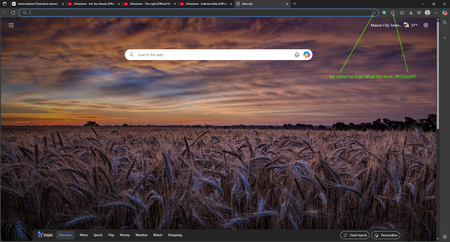
What's up, Microsoft Community! 👋 I literally don't remember how long ago it was when I posted asking on how to join the Edge Insider Program, but things have changed for me a little since then, & but my love for tech, & innovation remains, as it always will. So, without further ado, let's jump right into this post, since I have some suggested upgrades & changes I would like to see be made for the pc version of Edge, based on my experience with it in the last several years... And also, the post itself will be divided into 2 categories: Privacy, & Improvements. Instead of typing out the longest novel in recorded history about my relationship with Edge, I will simply sum it up: It's a great browser, & it most certainly rivals Chrome in a number of ways, & despite some of its current flaws, I do enjoy using it. But, there are some things I would like to see changed, which I will lay out for y'all. 👇 PRIVACY: Compared to the likes of Google Chrome, even though Microsoft still does collect a certain amount of data, in order to provide the Microsoft-based services to it's users, I personally tend to consider the privacy situation to be slightly better than Chrome, just not as invasive. Especially, given that there are literally settings you can actually toggle on or off in order to enhance your privacy. And I could have laid out some of the privacy enhancements I would like to see improved within, in a great amount of detail, but I'm not always the best at coming up with the right words to say at the right times. 🙄🤦♂️😂 So, I instead got the opinion of an AI chatbot I use more often, in order to brainstorm ideas for improving Edge's privacy. And you can see my full chat interaction in this recording, courtesy of this publicly accessible Google Drive link: https://drive.google.com/file/d/1HtPXsMtOv8l3GyiNMS1Wg_pnWdXPnN6U/view?usp=sharing (By the way, if any of you tend to agree with these improvements, be sure to like the post, or upvote, if that's even possible. 😉👍) IMPROVEMENTS: 1. In my own personal opinion, having a translator baked right into your browser is WAY better than nothing at all, even if it sucks. But, that leads me to an area where I feel like Microsoft might want to re-think their strategy: The Microsoft Translator is quite frankly, not that good at all compared to Google Translate, or even DeepL Translate- the latter of which I consider to be an "underdog" type of company compared to the bigger players out there, & they pride themselves on their quality translations, even though their list of supported languages is still expanding, as is their business, as we speak. (And I even confirmed this myself by testing the Microsoft Translator out on a few foreign websites I know of, & also by consulting with four different AI chatbots, & they all said that compared to its competition out there, it just isn't cutting the mustard, which is quite embarrassing.) However, I would like to pitch a wild idea to Microsoft: Why not just scrap the built-in translation, for DeepL, while showing them some love & support for their hard work, & commitment? 🤷♂️😏 2. For this part, I decided to combine two of the complaints I have into one, since they BOTH have to do with the appearance within the browser. And I know that this may or may not align with some people out there, but the point I'm highlighting is that this isn't what I prefer. These two complaints I have include: Not having the ability to hide the "Add this page to favorites", AND the "Extensions" buttons from the toolbar, which is right next to the address bar. (And you can see what I mean by viewing the included screenshot.) I do happen to recall that Microsoft used to have the option to hide the extension button itself from the toolbar, but for whatever reason(s), that isn't really a thing as of right now, & I even checked this within the settings, & by making sure that I have the latest browser version, which I do. Still, to say that I'm disappointed would be a gross understatement, to say the least, but I REALLY hope that Microsoft listens to this bit of feedback, & takes the right course of action, here... 🫤🥺🤞🙏 3. By now, I'm sure a good number of you, who happen to be tech-savvy, probably know that Microsoft Edge IS considered to be faster, & more resource efficient compared to Opera, or even Google Chrome, for instance. But, there is 1 browser which I use, & that I genuinely think Microsoft could take some serious inspiration from, & it's Brave. From what I have observed myself, & also going by other data online, there is no doubt about it that Brave is markedly more efficient compared to Edge. And it comes down to how Brave handles privacy within their browser, as a whole, but also from some architectural tweaks to the underlying Chromium code itself that makes Brave, quite frankly, noticeably better than Edge, in this case. (Now, before any of you bother to take up your lighted torches, pitchforks, & prepare to roast me, just hear me out that I'm not actually playing favorites, here. But, I do think there is room for improvement, on this front.) 4. One incredibly useful feature that I absolutely LOVE in modern day web browsers is being able to hover over my tabs, when needed, or in case I ever feel the need to get a quick check while I am multitasking. But, while the functionality within Edge is pretty decent, the accuracy isn't NEARLY as good as compared to what Opera uses, which in my opinion, somehow has the best implementation of this technology, however they pulled this off. (Seriously, folks. I'm not even joshing you, here. Try doing it within with Opera, Opera Air, or even Opera GX, for that matter, & I'm sure you will totally see what I mean.) Now, while I would never in my life, ask for one company to copy another's, or steal a patent, or whatever, this is another area where I think Edge can be improved in, so, I will keep my eyes & ears pealed for future releases down the line, or even if Microsoft DOES end up seeing my post, here. 5. And onto my final complaint- earlier on, I noticed that Edge did have the Secure Network in preview/beta, & while accessing foreign websites, or even watching movies online, it really came in handy for me. But now, it has been removed from the toolbar, & only the toggle for it exists in the settings. So, Microsoft, I hope you guys are working on refining this particular feature, & I hope you plan to bring it back soon. 🤞 Well, with all that being said, I hope this post gets noticed by y'all in the community, & that perhaps, it aligns with what others hope to see in future releases of Edge. If any of you happen to have any questions for me, or need additional details, feel free to drop me a line, or even comment on this post, & I will be happy to get back with you, & fill any of you in. Thanks in advance, everyone! 🙏🙇♂️😊319Views0likes0Comments
Microsoft Edge PDF Reader - signature validation warning for official signatures
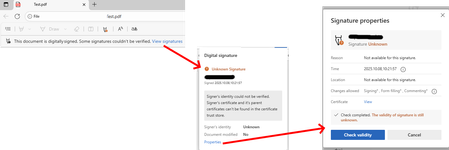
Since the last edge update we are running into the following issue, which triggers support tickets on our side. It seems that the edge internal PDF Reader now supports validation of digital PDF signatures. This new feature however is incomplete and causes a lot of confusion for edge users. "Official" signatures are labeled as "Unknown Signature" and "The validity of the signature is still unknown": "Official signatures" means qualified signatures from members of the EUTL - the European trust list as defined in ETSI TS 119 612 („Trusted Lists“): [...] the European Commission publishes a central list with links to the locations where the national trusted lists are published as notified by Member States. This central list, called the List Of Trusted Lists (LOTL), is available in both a human readable format and in a format suitable for automated (machine) processing XML. Parts of the edge PDF reader seems to come from *dobe itself which adds additional confusion since in their products (*dobe reader, acrobat etc) the signatures are correctly verified. They support this list for several years now (next to their own AATL list). I tried to find out whether this feature is 'work-in-progress' or it is a bug however the last published roadmap is quite old and doesn't give helpful information regarding this aspect. So my question is: Is full support of PDF signature validation including support of the EUTL planned and if so when?1.3KViews1like1Comment
Page translation feedback/issues
Whenever I use the translate option in the right-click menu or in the right side of the taskbar it will translate the page to the desired language (e.g. Eng). However, if that page has an active live chat (e.g. YouTube) and I want to type into it in English, my text will bug out and translate my half-finished words to random English words based on the word it thinks I'm typing. It seems to detect unfinished English words as words from other languages and incorrectly translates it accordingly and instantaneously. This makes it impossible to type. I don't want my comment in the chat section to be translated. I wish it waited to be able to detect I am correctly typing in my own language.489Views0likes0CommentsSS48: don't remove MacOS Mojave support on Edge, even if Google now announced to us that they will
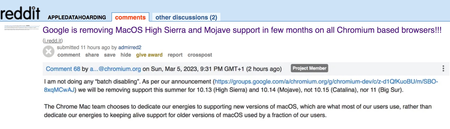
Suggestion (SS): 48 Classification: Browser Compatibility PRIORITY IN MY OPINION: 10 on a scale from 1 (low) to 10 (high) Few hours ago Senior Dev reported us the no interest of keeping MacOS Mojave support on Chrome. In 2 years they are removing the 2 best MacOS ever released, before Apple started to downgrade features in MacOS (and obviously adding some other too), especially related to all backup workflows, that now are more complex, but even to permissions and multiple other things. We reported the new downgrade for external drives implemented in MacOS 12/13 https://old.reddit.com/r/appledatahoarding/comments/11ikj38/next_macos_downgrade_available_with_monterey/, but this is not the point now. We explained already https://bugs.chromium.org/p/chromium/issues/detail?id=1413784&q=sierra%20chrome&can=1 why they should keep support for such MacOS, and later again https://bugs.chromium.org/p/chromium/issues/detail?id=1322548#c68 Now the point is: we are trying our best to revert such decision, like we wrote https://old.reddit.com/r/appledatahoarding/comments/11jufgo/google_chrome_support_will_end_in_few_months_for/, but it's important that other chromium based devs know about such problematic and evaluate to continue support, if this is technically possible. Remember that MacOS 10.14 is not like all other MacOS released by Apple, so removing such MacOS is not like removing Catalina, High Sierra etc. If there are question why MacOS Mojave support is so important, just write directly to us. We already experienced the direct consequence of removing MacOS on Chromium on all browsers and apps few months ago with Sierra. Please keep in mind that this is not just related to Chrome, but even Chromium based browsers, Mac Apps using Electron, and all other Mac Apps too (because if one is starting to remove support, especially big brands, the other will follow much easier*). So be open with your mind and don't write "i'm not using Chrome or Mojave, doesn't matter for me". There is the possibility that Google maybe know about some changes with Xcode, like we wrote https://old.reddit.com/r/appledatahoarding/comments/11jho7y/meanwhile_the_batch_deletion_of_other_2_macos_by/ but probably is not the case. If this is true, then the situation would be much worse, if now Apple really decides to remove multiple MacOS, like we previously reported with out https://old.reddit.com/r/appledatahoarding/comments/114o7zt/remember_2023_will_be_the_most_crucial_year_of/ *Keep in mind that almost 70%+ of all browsers available for MacOS (80+) are Chromium based. ------------ In case you will not doing that and Google will not keep support for Mojave, please provide directly link to download a browser version compatible with up to MacOS Sierra and one up to MacOS Mojave, instead of just download last version. Avoid auto update of the app too. So don't install new incompatible app automatically, which make no sense at all.2.3KViews0likes0CommentsAdding a Translator Widget to the Tools Section of the Sidebar
Feature Request The Tools section of the Sidebar has almost every widget one would need, even including a handy dictionary. However, it is missing at least one additional tool: the translator! It seems that the widgets inside the Tools section are the same ones displayed when you search for them with Bing, so adding the translator should be easy. The translator is a powerful tool and having it alongside these other tools is necessary! An Additional Thought (it may be related, but is really a separate idea) Depending on how the dictionary widget works, it might be a cool idea to be able to select a lookup language. If I have a word in another language and I want the definition, it would be convenient to just ask the dictionary for the definition of that word (and be able to tell the dictionary the language to which it belongs); as opposed to having to use the translator (which isn't included in the Tools section) to get the word in English, then going back to the dictionary to get the definition.2.3KViews0likes0CommentsLet us follow more creators in Edge, the current limit is too low
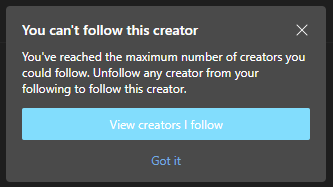
Edge 105 has a feature where it allows you to follow creators, so far that I tried it works for YouTube channels. I want to follow all of the YouTube channels I've subscribed to in Edge, but the current limit is too low, I have around 300 subscriptions. if I can follow all of them it will help me de-google a lot.1.3KViews0likes1Comment