fabric
155 TopicsLimited-Time Free DP-600 and DP-700 Partner Certification Offer | Terms and Conditions
Offer Terms and Conditions The DP-600 and DP-700 partner exam voucher offer is available to eligible participants as explained in the Rules and Restrictions below. Eligible participants can receive one free Microsoft Certification exam voucher that they can apply to the following exams only: DP-600 and DP-700. Rules and Restrictions: This offer expires June 30, 2025. This exam offer may be redeemed to take one (1) qualifying Microsoft Certification exam (as outlined below), delivered at an authorized Pearson Vue testing center or through a Pearson Vue online proctoring site by the expiration date on the voucher. This exam offer is exam-specific and only redeemable for the following exams: DP-600 - Fabric Analytics Engineer Associate DP-700 - Fabric Data Engineer Associate To be eligible to receive this exam offer you must: Be an employee of a Microsoft partner organization. Provide your partner org email address. Must be a member of the Fabric Partner Community Team channel. If you are not a member, you can join by completing the form at https://aka.ms/JoinFabricPartnerCommunity. You must submit your request via this Form. This offer is subject to availability and can be ended at any time. The Form submissions will be reviewed monthly and exam vouchers will be distributed the first Monday of each month, pending eligibility and availability. Exam vouchers, redemption details, and other communications related to this Offer will be distributed via email. You must use the exam voucher to book the exam by the last day of the month in which you receive the voucher. The exam must be taken before the expiration date on the voucher. This exam offer may only be redeemed once. This exam offer may not be redeemed or exchanged for cash, credit or refund. This exam offer is nontransferable and is void if you alter, revise or transfer it in any way. Any sale or transfer of this voucher code is expressly prohibited and constitutes fraud. Microsoft, Pearson VUE, and the VUE test centers are not responsible for lost or stolen voucher codes. Individuals that (a) fail to show up for their scheduled exam appointment, or (ii) cancel or reschedule their appointment to take an exam seventy-two hours or less from the scheduled time may forfeit their voucher code (voucher code cannot be used again). The fair market value of this exam voucher is $165 (USD). Taxes, if any, are the sole responsibility of the recipient. This offer is subject to availability and can be ended at any time. Prior to redeeming your free certification exam, government employees must check with their employers to ensure their participation is permitted, and in accordance with applicable with ethics and compliance policies and laws. This exam offer is not valid and void to applicants residing in Belarus, Cuba, Iran, North Korea, Russia, Syria, Region of Crimea, and where prohibited. For additional issues and questions, please contact fabricpartnersteam@microsoft.com.15KViews11likes21CommentsHack Together: The Microsoft Fabric Global AI Hack
Hack Together is a global online hackathon that runs from February 15th to March 4th, 2024. It’s open to anyone who wants to explore the possibilities of using Microsoft Fabric to develop AI applications, whether you are a beginner, advanced maker, admin or a professional developer – all are welcome! You can join solo or hack together as a team of up to 3 people. Are you ready to unleash your creativity and build amazing solutions with Microsoft Microsoft Fabric and AI? If so, join us for Hack Together: The Microsoft Fabric Global AI Hack, a virtual event where you can learn, experiment, and hack together with the new Copilot and AI features in Microsoft Fabric!9.3KViews1like0Comments
Introducing the new Get Data dialog in Excel for Windows
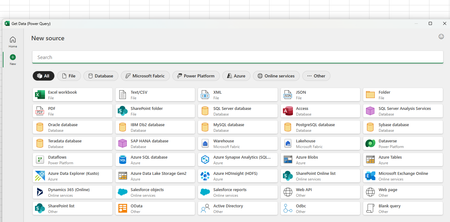
We are excited to announce a first step towards modernizing Power Query in Excel for Windows - a new way to connect to data that will make finding and using external data sources faster and more intuitive! The modern Get Data dialog gives you a clean, simple starting point for connecting to data. With built-in search and quick access to popular data sources, you can easily find the right source and start working on your data. How it works Select the Data tab on the ribbon, then select Get Data > Get Data (Preview) to open the new dialog. Browse through popular data sources on the Home tab or use the search bar to find a specific source. Select the New tab under the categories list on the left to browse through all available data sources. What it does When you open the modern Get Data dialog, you’ll be able to search for the connector you need or pick from recommended options—all in one clean view. When you select a source, Excel takes you straight into the familiar, current Power Query import flow and you’ll be able to see the same steps you know today. For more information, check out modern Get Data Dialog in Excel for Windows. Note: You can still import external data from the Get Data dropdown categories as well as from the new Get Data dialog. More to come The new dialog is the first step toward a modernized Power Query experience in Excel, paving the way for upcoming innovations like modern import flows and a modern Power Query editor. In addition, you’ll see more modules integrated into this dialog soon, making it easier than ever to discover, connect, and prepare your data. Availability This feature is gradually rolling out to M365 subscribers in Excel for Windows, with Version 2509 Build 16.0.19328.20000 or later. Feedback We’d love to hear about your experience with the modern Get Data dialog. Let us know: ✔️ Did the overall experience feel intuitive and helpful? ✔️ Which new additions would you like to see? Just click on the 🙂button in the upper right-hand side of the dialog to share your feedback. Your feedback helps us refine the experience and prioritize what’s next.7KViews5likes3Comments
Providing a unified healthcare analytics solution for the era of AI
This blog is part of a series that explores the recent announcement of the public preview of healthcare data solutions in Microsoft Fabric. Healthcare data solutions in Microsoft Fabric is a comprehensive, end-to-end analytics SaaS platform that allows you to ingest, store, and analyze healthcare data from a variety of sources, including electronic health records and picture archiving and communication systems. With this platform, you can unlock new insights and drive value from your healthcare data. 6.7KViews6likes0Comments
Timespan/duration values in KQL, Power Query and Power BI
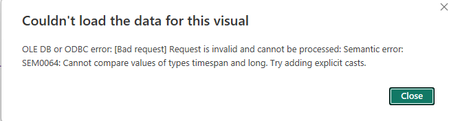
In many scenarios event durations are very important. They can be measured in days or in milliseconds and anything in between. In real time analytics it is especially important. In this article I'll describe how such values are treated in KQL and what happens to them when they are brought into Power Query and eventually to Power BI. Finally, I'll provide my recommendation for treating these values in Power BI.6.3KViews3likes0CommentsDiscover the Future of Data Engineering with Microsoft Fabric for Technical Students & Entrepreneurs
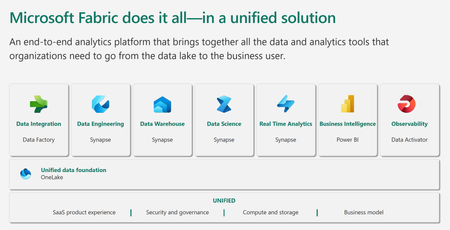
Microsoft Fabric is an all-in-one analytics solution for enterprises that covers everything from data movement to data science, Real-Time Analytics, and business intelligence. It offers a comprehensive suite of services, including data lake, data engineering, and data integration, all in one place. This makes it an ideal platform for technical students and entrepreneurial developers looking to streamline their data engineering and analytics workflows.6.2KViews4likes1CommentEmpowering the Next Generation with Microsoft Fabric - Join Us for Learn Together
Hello, tech enthusiasts! Today, we’re going to delve into an exciting topic that’s been making waves in the tech world - Microsoft Fabric and Learn Together. This innovative platform is designed to equip students and technical founders with the skills they need to navigate the modern data landscape.4.9KViews2likes3CommentsUsing .show queries to understand and optimize the KQL sent from PBI to Kusto
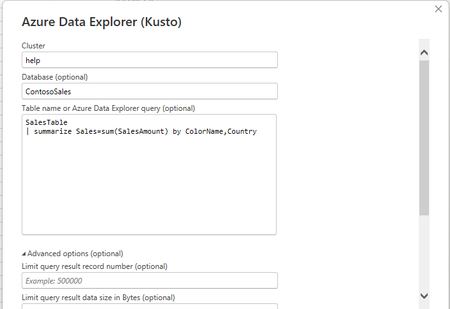
You use Kusto /ADX / KQL databases in Fabric with Power BI. You want to see the queries send to the backend from PBI and try to optimize the behavior. This article includes a query starting with the ".show queries" command that can help you identify the queries that need your attention4.4KViews2likes0Comments
In a Day (xIAD) Partner Events Program - Train the Trainer Events (DIAD/FAIAD/RTIAD/CDIAD)
We invite you to attend an upcoming Train the Trainer session for Microsoft Partners to learn more about the Microsoft In a Day (XIAD) Partner Events Programand how to lead workshops that empower customers to use and adopt Microsoft products. Our Train the Trainer events are designed to provide you with the knowledge and tools necessary to deliver successful Microsoft In a Day (XIAD) sessions. *Please note, participation is restricted to individuals representing a Microsoft Partner organization. You must register using your corporate email address that is associated with your Partner ID. Personal emails will not be approved. ✨ Why Attend? Expert Guidance: Learn from experienced trainers and get your questions answered. Comprehensive Resources: Access all the content and support you need to succeed. 📅 Upcoming Events: Dashboard in a Day This is a one-day, hands-on workshop for business analysts, covering the breadth of Power BI capabilities. February 19th, 2026 - Americas - CST time zone. Sign up at https://aka.ms/TTTSignUp Fabric Analyst in a Day This is an intermediate-level training designed for Power BI Data Analysts who have at least one year of experience on Power BI but are new to Microsoft Fabric. February 19th, 2026 - Americas - CST time zone. Sign up at https://aka.ms/TTTSignUp Real-Time Intelligence in a Day This is an intermediate-level training designed for Power BI developers looking to extract insights and visualize streaming and time sensitive data. February 19th, 2026 - Americas - CST time zone. Sign up at https://aka.ms/TTTSignUp Chat with your Data in a Day This is an intermediate-level training designed for Power BI data analysts and developers to help get their models chat-ready and unlock instant insights using natural language. Chat with Your Data in a Day - Americas - Jan 23 Chat with Your Data in a Day - APAC - Jan 28 Chat with Your Data in a Day - EMEA - Feb 17 Partner with us! Are you a Microsoft Partner interested in the opportunity to join the program and deliver Microsoft In a Day (XIAD) events? 🔍 Learn more about the program and review partner eligibility criteria: https://aka.ms/xiadpartneropportunity. 📧 Contact the XIAD Program team: xiadevents@microsoft.com 📤 Submit requests to deliver events: https://aka.ms/xIAD/PartnerEvents4.3KViews4likes3Comments