extensions
2 Topics
[Feature Request] Edge for Business-Extension Policy-blank minimum version breaks ExtensionSettings.
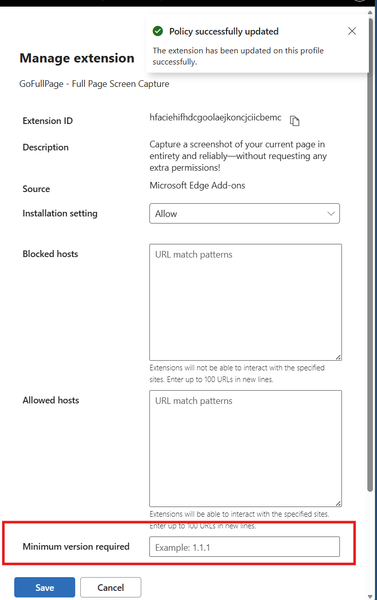
Hi, I have a Core Edge for Business policy, where I manage settings and extensions for majority of users in my company. I was adding an extension to it to Allow an extension being installed. By default when You choose extension from a store it is getting added to GUI with setting "Allow". After that when I edit entry for this addon and tried to add minimum version (8.6 in Edge store, while schema is #.#.#) I decided not to add it to not overcomplex settings. I have saved the settings. Few second later all my extensions were gone, some users reported same problems. Luckly I have quickly reverted the changes so policies did not update for everyone. Replication steps: Under Edge://policy I have identified that ExtensionSettings report Error: Error at ExtensionSettings.hfaciehifhdcgoolaejkoncjciicbemc.minimum_version_required: Schema validation error: Invalid value for string Json shows: "hfaciehifhdcgoolaejkoncjciicbemc": { "installation_mode": "allowed", "minimum_version_required": "", "override_update_url": false, "toolbar_state": "default_hidden" }, In GUI there is no clue about it, looks like not configured, when saving all goes "green". Extensions are getting uninstalled. Once reverted some extensions are back and require reconfiguration. I.e. Passsbolt asks for recovery key. Please if possible add a feature to validate such settings to not allow saving : "minimum_version_required": "" as in some cases in production it might be a nightmire ( Imagine reconfiguring ## addons times #### Users ).160Views0likes0Comments
Extension Sync with work profiles
Hello folks, i'm wondering how extension sync is implemented with work profiles? Assuming there are managed clients with GPOs to restrict the installable extensions. These policies affect all profiles on the client including the sync-enabled work profile. Imagine a user is signing-in into her M365 work profile from an unmanaged client (which at time of writing can not be prevented!), now she would be able to install any extension. These extensions would possibly have access to all websites she is able to access/logon with her work profile. I assume the additionally installed extensions would then also be synced but would be disabled on the managed client through the policies. Is my assumption correct? How to prevent users from accessing websites through the work profile on unmanaged clients with enterprise blocked extensions? Best regards Joe2.1KViews0likes3Comments