epm
4 Topics
Microsoft EPM – Random CMD / PowerShell / OpenConsole popups
Hello everyone, we are currently testing Microsoft Endpoint Privilege Management (EPM) and are seeing some unexpected behavior on several devices. Symptoms Users occasionally see random: CMD windows PowerShell windows OpenConsole windows The windows usually appear shortly after logon and disappear automatically after a short time. Some developers also reported issues related to: VS Code terminal integration Copilot terminal actions Windows Terminal WSL / Debian Additional observations However, we have also seen PowerShell popups on a user who is not currently part of the EPM pilot group Some affected devices still have Admin By Request installed Current EPM Configuration At the moment we only have an Elevation Settings Policy assigned with User Confirmed enabled. We currently do not have any custom elevation rules, file hash rules, publisher rules or automatic elevations configured. The issue appears in a configuration that is essentially limited to: EPM client installed Elevation Settings Policy assigned User Confirmed elevation workflow enabled This is one of the reasons why we are unsure whether the behavior is directly related to an EPM policy configuration or to an interaction between: EPM agent Windows Terminal / OpenConsole VS Code WSL Admin By Request Questions Has anyone experienced random CMD / PowerShell / OpenConsole windows after introducing EPM? Has anyone seen issues between EPM and: Windows Terminal OpenConsole.exe VS Code terminal WSL Has anyone run Admin By Request and Microsoft EPM on the same device and observed unexpected console windows? Are there any EPM-specific logs that provide detailed parent/child process relationships for these launches? Any ideas or similar experiences would be greatly appreciated. Thanks!265Views0likes3Comments
MMP-C Enrollment Failing
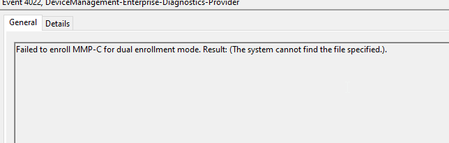
I discovered a few of our devices were running into an issue with EPM functioning properly because the devices were enrolled via MDM only enrollment. I've been following some posts to try to rectify that issue and was successful in enrolling of the devices the proper way. However, I'm now running into an issue where the device is failing to enroll in MMP-C with the following error even though the file enrollment exe exists: The scheduled task looks accurate for enrolling the device in MMP-C and I'm out of details on what to do for this. Please help!148Views0likes0Comments
Revoking elevated privileges in Endpoint Privilege Management
I found a thread from last year asking this question. When I revoke someone's elevated access in Intune Endpoint Privilege Management (removing them from the AD group linked to an Intune EPM policy) the "run with elevated access" option remains in the right click context menu. The post from last year said it can take hours for access to be removed but that the app was still in preview mode. This was over a year ago so I'm wondering if anyone from Microsoft or anyone can advise if this is now quicker or if there is a way to speed it up? We want to start a secondary proof of concept with multiple policies with different levels of access, but testing this would take so long if we're waiting 8+ hours each time we remove access. Thanks all838Views0likes2Comments
EPM Service Account Breaks User Context In Apps
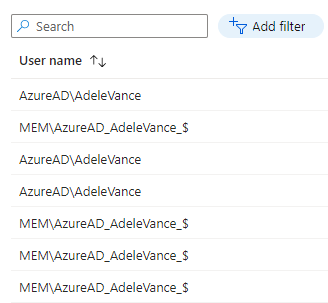
Hi, I am working with a customer who is wanting to make use of EPM for their developer team to run some applications with elevated permissions. They have noticed that when elevating certain applications with EPM that a service account is used (see MEM\AzureAD_AdeleVance_$ below), which therefore runs the app with a new user profile, removing things like user preferences, context and also breaks some apps that rely on domain permissions/credentials. From my testing, this service account only seems to be used by EPM when elevating already installed applications, not application installers. Is this by design and is there a possible workaround that avoids EPM using this service account?Solved1.9KViews1like5Comments