enterprise apps
1 TopicCopilot Managed Runtime is now generally available, with additional new preview features
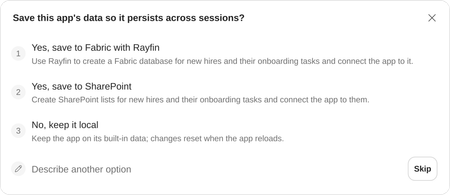
AI is making it easier to turn ideas into working apps in Copilot Cowork, Copilot Code, Copilot Studio and the dev tools you already use. Running those apps for work still requires security, governance and ongoing operations. In September we introduced Microsoft Copilot Managed Runtime in public preview to bring those requirements together. Today at Microsoft Ignite, we’re announcing that Microsoft Copilot Managed Runtime is generally available and beginning to roll out to tenants. Copilot Managed Runtime brings Microsoft-operated hosting together with identity, governed data access, and app lifecycle management, giving teams the foundation for turning the apps they create into managed apps they can use for enterprise work and IT can trust. Build in the tools that fit your team Makers can start in Copilot Code, Copilot Cowork, Copilot Studio, GitHub Copilot, VS Code or third-party development platforms and tools. Copilot Managed Runtime provides Microsoft-managed hosting and execution for published apps across these paths. That gives teams room to choose how they build, and open collaboration opportunities across products all while bringing their published apps onto a common operating foundation. “AI agents can now build many of the web apps enterprise teams need, and many organizations want those apps to run in their own environment. With Copilot Managed Runtime, apps built with Manus will run in an organization’s own Microsoft environment and automatically inherit existing security and compliance policies, giving teams the capability and speed of an AI agent with enterprise-grade control.” Tao Zhang, Co-founder and Chief Product Officer at Manus Microsoft operates the platform, hosting, scaling and availability are handled for you, with no cloud services to configure, so teams can focus on the app and the work it needs to do. Entra sign-in and sharing make it easier to put that app in colleagues’ hands. Governed connections give the app access to the organizational data and services it needs within the boundaries set by IT. The governance controls exist in the platform to allow IT to federate and scale development and operations, all guided by IT. Regardless of the entry point, Copilot or third-party tools, the code stays editable and Git-backed. This allows makers to keep iterating on the app, while the published app stays live, then promote changes when they're ready. Organizations using GitHub Enterprise can connect their own repositories, so apps follow the same branching, review and release practices as the rest of their software. Give IT one place to see and govern every app For apps on Copilot Managed Runtime, Entra identity, sharing and access sit alongside policy enforcement and audit logging. Organizational policies govern connector, data and endpoint access. These capabilities bring the operating requirements of an app into its managed foundation, so makers and IT can work from the same boundaries. App inventory and monitoring in Microsoft 365 admin center give administrators a central view of the apps teams have published. That visibility helps IT oversee apps created through different tools without organizing its inventory around each authoring experience. Makers retain flexibility in how they create, and administrators have a common place to see and manage those apps. Give apps a place for their own business records Moving onto our preview features, some apps also need to keep data of their own, such as the owners, dates and status updates behind a team’s launch tracker. A new frontier public preview of Microsoft Fabric integration adds an out-of-the-box option for persistent app storage and backend capabilities for those business records; this is in addition to existing connectivity with SharePoint and Dataverse. Teams can choose this data layer when an app needs it, alongside the hosting and execution provided by Copilot Managed Runtime. Now supporting agents and additional artifacts Create Copilot Studio agents and workflows locally Now in public preview, Copilot Managed Runtime dev tooling will allow users to build custom Copilot Studio agents and workflows locally, make modifications with their developer tool of choice and then publish to Copilot Studio using the CLI. This enables makers and developers using Copilot Studio to easily work with other members of their team, some who may be using the browser based UX or those working locally on their machine. Developers can continue using their developer tools and pushing changes directly from their machine, working together on a single source of truth integrated into their existing version control platforms such as GitHub. For organizations like Qualcomm, this approach brings together familiar developer workflows with new ways to build and manage agents: "What excites us about the CLI is bringing code-first development to Copilot Studio. For Qualcomm users and engineers, the combination of the CLI and coding agents offers a fast and natural way to build and test agents, while also supporting more mature ALM practices and complementing the Copilot Studio UI experience. Together, these approaches give teams the flexibility to build and manage agents in the way that works best for them” - Paulo Joaquim, IT Architect, Principal, Qualcomm Incorporated Get started with the CLI here: https://aka.ms/msagent-cli Create custom agents in code For makers and developers who want to author an agent directly in code, we’re introducing Code Agents in early-access preview (this will require signing up and being accepted). Coming soon, these custom agents are created and hosted on Copilot Managed Runtime, with a choice of model, orchestrator or harness within the preview’s supported scope. This lets teams reuse the AI stack, developer tools and workflows they already have, while Microsoft provides hosting, Microsoft Entra identity, channels, monitoring and lifecycle management. Customers and partners can sign up at aka.ms/cmrcodeagents-signup. From idea to the show floor Consider an event team creating a show-floor operations app in Copilot Cowork. In this illustrative scenario, an interactive 3D map shows booth readiness and open help requests. The team reviews and publishes the app for colleagues with Microsoft Entra identity access, governed connections, IT control and hosting all through Copilot Managed Runtime. The team chooses to use the new Fabric integration to store the app's records. A developer could clone the code locally with Git and improve it using their preferred tools while colleagues continue using the published app. For an agent project, the developer could edit Copilot Studio agent definitions locally, keep changes in source control and push the updated project back to Copilot Studio, keeping the agent and associated workflows together. These paths support collaboration across Copilot Code, Copilot Cowork, Copilot Studio and third-party tools as teams create, publish and maintain solutions. Start with the artifact your team needs today Start with a business process your team wants to improve. Consider who will use the artifact, what information it needs, and how your team will maintain it. Choose the authoring experience that fits the work, then use Copilot Managed Runtime to bring the result to your colleagues, with a foundation for building more connected solutions over time. Already have an app created and want to use it with your enterprise business? Then use Copilot Managed Runtime and check out the Copilot Managed Runtime CLI to get started: https://aka.ms/cmrrepo General availability makes Copilot Managed Runtime a foundation for the apps teams put to work. The new previews expand the options for local agent development and custom app data. Together, these steps give makers more ways to create useful tools, collaborate more than ever, all while keeping app and agent operations secured and governed for your enterprise.594Views0likes0Comments