energy
8 TopicsResource Guide: Making Physical AI Practical for Real‑World Industrial Operations
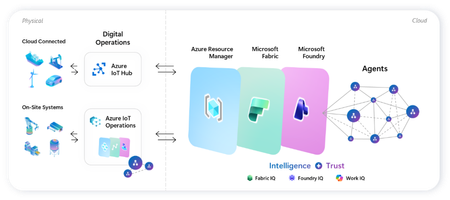
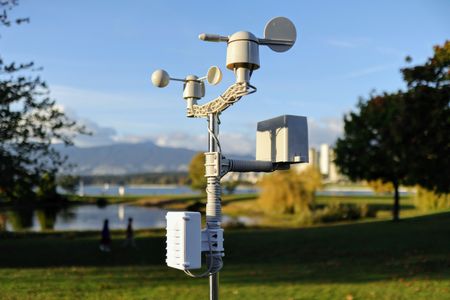
Microsoft’s adaptive cloud approach enables organizations to turn operational technology (OT) data into intelligent actions, autonomously, without requiring everything to live in the cloud by unifying cloud-to-edge management plane, data plane, and intelligence platform. At the center of this approach are key foundational technologies: Key Purpose Offering Direct-to-cloud device management + telemetry ingestion Azure IoT Hub Industrial connectivity + edge data plane Azure IoT Operations Unified analytics + real-time intelligence Microsoft Fabric On-device AI inferencing runtime Foundry Local Microsoft Azure IoT Gartner winner: Microsoft named a Leader in the 2025 Gartner® Magic Quadrant™ for Global Industrial IoT Platforms See it all come together Before diving into each component, watch this end-to-end demo showing how Azure IoT Operations, Azure IoT Hub, Microsoft Fabric, and Foundry Local work as one stack across the edge-to-cloud lifecycle - Making industrial AI practical for real-world operations with adaptive cloud. How these components work together Azure IoT Operations and Azure IoT Hub collect real-time data from operational assets and send semantically-ready, modeled data to Microsoft Fabric, where it's contextualized with enterprise data for downstream analytics. Microsoft Foundry extends to the edge through Foundry Local, so the same tooling used to deploy and manage AI models in the cloud applies to edge use cases. All of it integrates into Azure Resource Manager, bringing OT devices, assets, and edge AI models into the same management and security paradigm as every other Azure-managed resource. This blog walks through where to get started with each product capability: 1. Manage Cloud-Connected Devices and Telemetry with Azure IoT Hub Azure IoT Hub is a fully managed cloud service that enables secure bidirectional communication, device-to-cloud telemetry ingestion, cloud-to-device command execution, per-device authentication, remote management and more. Telemetry from IoT Hub can also be routed downstream into analytics platforms like Microsoft Fabric for visualization or AI modeling. Recommended Usage: Devices that utilize IoT Hub are distributed, stand-alone devices with fixed-functions. These devices typically do not require cloud-managed containerized workloads or cloud-managed proximal industrial protocol connectivity. Examples of appropriate device-to-cloud IoT Hub endpoint devices include water monitoring stations, vehicle telematics, distributed fluid level sensors, etc. Resources Current in-market services overview: IoT Hub: What is Azure IoT Hub? - Azure IoT Hub DPS: Overview of Azure IoT Hub Device Provisioning Service - Azure IoT Hub Device Provisioning Service ADU: Introduction to Device Update for Azure IoT Hub Building scalable solutions with Azure IoT platform: Best practices for large-scale IoT deployments - Azure IoT Hub Device Provisioning Service Scale Out an Azure IoT Hub-based Solution to Support Millions of Devices - Azure Architecture Center Azure IoT Hub scaling Try out our preview of new IoT Hub capabilities (integration with Azure Device Registry and Certificate Management) Learn more about these capabilities on our blog post: Azure IoT Hub + Azure Device Registry (Preview Refresh): Device Trust and Management at Fleet Scale… Integration with Azure Device Registry (preview): Integration with Azure Device Registry (preview) - Azure IoT Hub Microsoft-backed X.509 certificate management (preview): What is Microsoft-backed X.509 Certificate Management (Preview)? - Azure IoT Hub How to start with the preview: Deploy IoT Hub with ADR integration and certificate management (Preview) - Azure IoT Hub 2. Connect Industrial Assets with Azure IoT Operations Azure IoT Operations provides a unified data plane for the edge that runs on Azure Arc–enabled Kubernetes clusters and supports open industrial standards. It allows organizations to connect and capture equipment telemetry, normalize OT data locally, route hot-path signals to real-time analytics, securely manage layered industrial networks, and more. Edge‑processed data can then be sent upstream to Microsoft Fabric for AI‑driven analysis. Recommended Usage: Azure IoT Operations is intended to be the data plane for an adaptive cloud deployment extending the management, data, and AI capabilities of the Microsoft cloud to an on-prem device. This device binds to these cloud planes providing a platform for local data processing and intermittent connectivity. The target for these devices range from a small-gateway-style PC to a full data center. Azure IoT Operations endpoints enable cloud-managed containerized workloads and cloud-managed proximal industrial protocol connectivity. Examples of appropriate adaptive cloud and Azure IoT Operations endpoints include, on-robot computers, industrial machine controllers, retail store sensor/vision processing, and top-of-factory site infrastructure for line of business applications. Resources Azure IoT Operations Overview Azure IoT Operations Documentation Hub Releases · Azure/azure-iot-operations Quickstart: explore-iot-operations/quickstart at main · Azure-Samples/explore-iot-operations Latest release update: Open-source framework for scaling robotics from simulation to production on Azure + NVIDIA: microsoft/physical-ai-toolchain Demo video showcasing this in action: Making industrial AI practical for real-world operations with adaptive cloud How we built the demo: explore-iot-operations/quickstart at main · Azure-Samples/explore-iot-operations Edge-AI: microsoft/edge-ai: Production-ready Infrastructure as Code, applications, pluggable components, and… Latest Announcements & Blogs Making Physical AI Practical for Real-World Industrial Operations: Part 1 | Microsoft Community Hub Making Physical AI Practical for Real-World Industrial Operations: Part 2 | Microsoft Community Hub Introducing small form factor infrastructure: embed intelligence into physical systems Unlock Industrial Intelligence | Microsoft Hannover Messe 2026 From pilots to production: How Microsoft and partners are accelerating intelligent operations Partner Solutions How Mesh Systems Builds on Azure IoT Hub and Azure IoT Operations to Accelerate Industrial AI | Microsoft Community Hub Unlocking the Human Telemetry Layer for Safer Industrial Operations | Microsoft Community Hub Unlocking Smart Manufacturing: Siemens Industrial Edge Meets Azure IoT Operations Solving the Data Challenge for Manufacturers with Sight Machine & Azure IoT Operations | Microsoft Community Hub Microsoft and Rockwell Automation: Transforming Industrial AI Together | Microsoft Community Hub 3. Advanced Analytics with Microsoft Fabric Microsoft Fabric delivers a unified, end‑to‑end analytics platform that transforms streaming OT telemetry into real‑time insights and live dashboards. Fabric Operations Agents monitor industrial signals to recommend targeted actions, while Fabric IQ provides a shared semantic foundation that enables AI agents to reason over enterprise data with business context. Together, Fabric turns live industrial data into AI‑powered operational intelligence. Resources Get Started with Microsoft Fabric Learning Path Fabric Real-Time Intelligence documentation - Microsoft Fabric | Microsoft Learn Create and Configure Operations Agents - Microsoft Fabric | Microsoft Learn Fabric IQ documentation - Microsoft Fabric | Microsoft Learn 4.Run AI Models On‑Device with Foundry Local Foundry Local extends on‑device AI to Arc‑enabled Kubernetes edge clusters, providing a Microsoft‑validated inferencing layer for running AI models in industrial, disconnected or sovereign environments. Resources Foundry Local on Azure Local Documentation Participate in Foundry Local on Azure Local preview form Foundry Local on Azure Local: HELM deployment Demo Customer Stories Chevron: Chevron plans facilities of the future with Azure IoT Operations Husqvarna: Husqvarna Group Boosts Operational Efficiency with Azure Adaptive Cloud Ecopetrol: Azure IoT Operations and Azure IoT for energy help Ecopetrol optimize energy distribution while lowering operational costs P&G: Procter & Gamble cuts model deployment time up to 90% with Azure IoT Operations Toyota: Toyota Industries innovates its paint shop processes with Azure industrial AI and Azure IoT Hub1.2KViews2likes0CommentsUnlocking the Human Telemetry Layer for Safer Industrial Operations
What if we could track human health & safety conditions as precisely as we do with machines, and take immediate actions to protect our greatest asset, our people? Many industrial organizations still lack visibility into real-time human conditions, even as worker safety and operational risk remain major investment priorities. One of the most important operational signals has largely remained outside the industrial data estate: the human telemetry. VOORMI and Microsoft have joined forces to fill this gap in understanding real human conditions. Through the Mij™ platform, VOORMI brings human telemetry into Azure IoT, enabling enterprises to integrate worker conditions such as heat stress and fatigue into the same operational architecture already used for machines and industrial systems. VOORMI, SWNR’s performance apparel brand, is among the first to bring this technology into garments designed for real industrial field conditions. This integration brings their proprietary wearable technology directly into high-impact worker safety and field operations scenarios. The partnership helps establish a new telemetry layer for industrial operations, allowing human, machine, and environmental signals to converge and drive safer operations, real-time awareness, and adaptive AI workflows. Bringing the Human Signal into Industrial AI with Azure Industrial organizations increasingly recognize that many safety, productivity, and operational challenges occur at the intersection of people and machines. Workers operate in high-heat environments, hazardous conditions, remote sites, and physically demanding field scenarios where situational awareness matters in real time. Historically, worker telemetry has remained fragmented across proprietary wearable platforms and disconnected safety systems, creating governance and operational challenges for enterprise IT and OT teams. Mij™ is designed differently, integrating directly into customer-controlled Azure environments through Azure IoT Operations running at the edge or Azure IoT Hub in the cloud rather than introducing another isolated platform. Running intelligence at the edge enables virtual safety agents and operational workflows to execute closer to the worker, supporting low-latency responses, local interaction with OT systems, and operational resilience even in disconnected or bandwidth-constrained environments. This gives enterprises flexibility to support real-time worker safety responses at the edge while also enabling long-term analytics, reporting, and operational intelligence through Microsoft Fabric. Telemetry from garment-integrated sensors flows through edge gateways into Azure services including Azure IoT Operations, Azure Data Explorer, Azure Managed Grafana, and Microsoft Fabric. The result is a unified operational environment where worker telemetry can live beside machine, site, and environmental data under the customer’s existing identity, security, governance, and analytics model. The vision is simple and transformative: make human telemetry a trusted, first-class industrial data source. Azure Digital Operations as the Intelligence Layer The reference architecture demonstrates how Azure IoT Operations can serve as a scalable operational intelligence layer for worker safety and connected operations scenarios across manufacturing, energy, and field environments. Mij™-enabled garments broadcast Bluetooth Low Energy (BLE) telemetry that can be processed locally through edge gateways and routed into Azure IoT Operations using MQTT and dataflows. Data is then operationalized through Azure Data Explorer and visualized using Azure Managed Grafana dashboards for field operations, worker safety, fleet health, gateway monitoring, and operational readiness scenarios. Telemetry can also be made available to Foundry Local-hosted GenAI agents to support real-time, context aware safety guidance, such as prompting workers operating in high-heat conditions to hydrate or seek cooler environments. While Mij™-enabled garments are the initial implementation, the edge device-to-cloud architecture creates a broader onboarding point for additional wearable, sensor, and field telemetry scenarios over time. This allows enterprises to bring more human and operational signals into a unified Azure-native operational environment. The architecture also supports flexible ingestion patterns for environments where dedicated edge gateways are not practical. Using Microsoft Entra External ID, Azure Container Apps, and Azure IoT Hub, telemetry can securely flow into Azure services without exposing operational infrastructure credentials to client devices. This pattern aligns with the broader Azure adaptive cloud approach: enabling customers to run distributed edge-native services on Arc-enabled Kubernetes infrastructure while maintaining centralized security, governance, and analytics capabilities across the enterprise. Depending on customer architecture preferences, telemetry can be processed through Azure IoT Operations at the edge or ingested directly through Azure IoT Hub for cloud-first analytics and downstream processing in services such as Microsoft Fabric. Edge processing also enables real-time sensor fusion across worker telemetry, ambient environmental conditions, machine parameters, and site-level operational signals, supporting faster safety interventions and more context-aware operational decisions. This gives enterprises flexibility in how they balance edge processing, operational responsiveness, governance and privacy requirements. Enabling the Next Generation of Industrial Workflows The long-term opportunity extends well beyond visualization dashboards. As worker telemetry becomes part of the operational fabric, enterprises can begin building more adaptive and intelligent workflows across worker safety, field readiness, incident response, compliance, environmental monitoring, and industrial AI systems. Human telemetry can provide critical real-time context that complements machine and environmental signals enabling more responsive operations and eventually more autonomous decision-support experiences. By bringing human telemetry into enterprise AI and analytics workflows, organizations can build more adaptive operational systems that improve worker safety, situational awareness, and real-time decision making at scale. This partnership reflects a broader industry shift: industrial transformation is no longer only about connected machines. It is about connected operations where people, equipment, environments, and AI systems participate in a shared operational intelligence layer. With SWNR’s Mij™platform and Azure IoT Operations, Microsoft and VOORMI are helping unlock that future. Learn more: Mij™ product page: https://swnrtechnologies.com/pages/mij Learn more about Azure IoT Operations: Documentation & Getting Started See what’s new with Azure IoT Hub: Preview Documentation To get started with a pilot, contact: pilots@swnrtechnologies.com507Views1like0CommentsAdvancing Firmware Security: Fleet Visibility and New Capabilities in Firmware Analysis
When we announced general availability of firmware analysis enabled by Azure Arc last October, our goal was clear: help organizations gain deep visibility into the security of the firmware that powers their IoT, OT, and network devices. Since then, adoption has continued to grow as customers use firmware analysis to uncover vulnerabilities, inventory software components, and secure their software supply chain. Leading into the Hannover Messe (HMI) 2026 conference, we’re excited to share the next wave of firmware analysis capabilities, delivering enhancements that help customers connect firmware risk to real-world fleet impact, prioritize vulnerabilities more effectively, scale to larger and more complex firmware images, and expand security analysis for UEFI-based platforms. These updates are driven directly by customer feedback and by the rapidly evolving threat landscape facing embedded and edge devices. Connecting Firmware Risk to Your Deployed Fleet with Azure Device Registry (Preview) Securing connected devices doesn’t stop at identifying vulnerabilities in firmware—it requires understanding where those vulnerabilities exist in your deployed fleet and which devices are affected. We’re excited to announce a new preview integration between firmware analysis enabled by Azure Arc and Azure Device Registry, bringing fleet-level visibility of IoT and OT devices directly into the firmware analysis experience. This helps customers quickly understand how many devices and assets are running a given firmware image, and which ones may be exposed to known security issues. From firmware insights to fleet impact Firmware analysis helps customers uncover security risks hidden deep inside the firmware running IoT, OT, and network devices—risks such as known CVEs, outdated open-source components, weak cryptography, and insecure configurations. Until now, these insights were primarily scoped to the firmware image itself. With this new preview integration, firmware analysis now connects directly to Azure Device Registry, allowing customers to: See how many devices from IoT Hub integration with ADR (preview) and assets from Azure IoT Operations are associated with a specific analyzed firmware image Understand the real-world blast radius of vulnerabilities discovered in firmware Quickly identify which devices may require patching, mitigation, or isolation This preview bridges an important gap between security analysis and operational decision-making. What’s included in this preview With this release, we’re introducing new fleet-level context directly into the firmware analysis experience: A new Devices + Assets count column in the firmware analysis workspace showing how many Azure Device Registry devices and assets are running each analyzed firmware image A click-through experience that lets users view the list of affected devices and assets in Azure Device Registry Visibility spanning both: Devices connected via IoT Hub Assets managed through Azure IoT Operations This information is derived by correlating firmware metadata with device and asset inventory in Azure Device Registry, giving customers immediate insight into deployment exposure. Key use cases Identify vulnerable devices at scale: When critical CVEs are discovered in a firmware image, customers can immediately see how many deployed devices are impacted—without manually correlating spreadsheets, tools, or inventories. Prioritize remediation actions: With fleet visibility, teams can decide whether to patch devices, temporarily isolate affected devices from the network, or disable devices that pose unacceptable risk. Bridge security and operations teams: Security teams gain clear insight into where vulnerabilities exist, while operations teams can quickly act on specific devices and assets—all within the Azure portal. This integration is especially valuable in environments where downtime, safety, or regulatory compliance matter—such as manufacturing, energy, telecommunications, and critical infrastructure. Prioritizing Vulnerabilities with Enhanced CVE Metadata (Preview) The number of publicly disclosed vulnerabilities continues to rise year over year, making it increasingly difficult for security teams to determine which CVEs truly require urgent action. Simply knowing that a vulnerability exists is no longer enough—teams need context to prioritize remediation efforts. With this release, firmware analysis now provides richer metadata for each discovered CVE, helping customers focus on vulnerabilities that pose the greatest real-world risk. New CVE metadata includes: CISA Known Exploited Vulnerabilities (KEV) status – Indicates whether a CVE is listed in the CISA KEV catalog, signaling that the vulnerability is actively exploited in the wild. EPSS score (Exploit Prediction Scoring System) – A data-driven probability score that estimates the likelihood of a vulnerability being exploited in the next 30 days, complementing traditional severity metrics by focusing on exploitation likelihood rather than impact alone. Additional vulnerability context, including CVSS vectors and base scores, CWE classifications, and expanded metadata to support filtering and analysis. Together, these enhancements make it easier to triage findings, align remediation with risk, and communicate priorities across security, engineering, and product teams. Faster Performance for Large and Complex Firmware Images As firmware analysis adoption has grown, we’ve seen customers analyze increasingly large and complex firmware images—particularly in domains like networking equipment, where a single image can generate thousands of findings. To support these scenarios, we’ve made architectural enhancements to the service that significantly improve performance when working with large result sets. Key improvements include: Up to 90% reduction in load times of analysis results, especially for firmware images producing 10,000+ findings More responsive filtering and exploration of results These changes ensure that firmware analysis remains fast and usable at scale, even for complex network and infrastructure firmware images. Expanding UEFI Firmware Analysis (Preview) Modern devices increasingly rely on UEFI firmware as a foundational security boundary. In this release, we’re expanding our UEFI analysis capabilities to provide deeper visibility into UEFI executables and components. New UEFI-focused capabilities include: Detection of OpenSSL libraries and related CVEs within UEFI firmware Binary hardening analysis for UEFI executables, including detection of proper configuration of Data Execution Prevention (DEP) memory protection Continued support for discovering cryptographic material in UEFI images, including embedded certificates and keys This preview allows customers to evaluate the new capabilities, provide feedback, and help shape future enhancements in this area. Note: UEFI SBOM and binary analysis features are currently in preview and intended for evaluation and feedback. Bulk Export of Analysis Results for Supply Chain Collaboration We also recently released a highly requested feature that makes it easier to share firmware analysis results with partners and suppliers. Customers can now: Bulk download analysis results across one or more firmware images Export results as CSV files packaged into a ZIP archive This capability simplifies workflows such as sharing findings with device manufacturers or firmware suppliers, integrating results into downstream analysis or reporting pipelines, and supporting software supply chain security and compliance processes. Looking Ahead We’re excited about the progress we’ve made with this release and what it means for customers securing IoT, OT, and network devices. From connecting firmware risk to fleet-level impact with Azure Device Registry, to richer vulnerability prioritization, improved scalability, and deeper UEFI analysis—these enhancements reinforce firmware analysis as a critical tool for addressing some of the most challenging blind spots in modern infrastructure security. Firmware security is foundational to trustworthy systems—especially as edge devices continue to play a central role in industrial operations, networking, and data collection. If you’re already using firmware analysis and Azure Device Registry, the ADR integration preview will appear directly within the firmware analysis experience as it rolls out. We look forward to your feedback as we continue building secure, observable, and manageable digital operations with Azure. As always, we value your feedback, so please let us know what you think.397Views0likes0CommentsAnnouncing the Firmware Analysis Public Preview
Consider an organization with thousands of smart sensors, IoT/OT and network equipment deployed on factory floors. Most of these devices are running full operating systems, but unlike traditional IT endpoints which often run security agents, IoT/OT and network devices frequently function as “black boxes”: you have little visibility into what software they’re running, which patches are applied, or what vulnerabilities might exist within them. This is the challenge many organizations face with IoT/OT and networking equipment - when a critical vulnerability is disclosed, how do you know which devices are at risk? To help address this challenge, we are excited to announce the public preview of firmware analysis, a new capability available through Azure Arc. This extends the firmware analysis feature we introduced in Microsoft Defender for IoT, making it available to a broader range of customers and scenarios through Azure. Our goal is to provide deeper visibility into IoT/OT and network devices by analyzing the foundational software (firmware) they run. Firmware analysis will also help companies that build firmware for devices better meet emerging cybersecurity regulations on their products. In this post, we’ll explain how the service works, its key features, and how it helps secure the sensors and edge devices that feed data into AI-driven industrial transformation. Securing Edge Devices to Power AI-Driven Industrial Transformation In modern industrial environments, data is king. Organizations are embracing Industry 4.0 and AI-driven solutions to optimize operations, leveraging advanced analytics and machine learning. The path to AI-driven industrial transformation is fueled by data – and much of that data comes from sensors and smart devices at the edge of the network. These edge devices measure temperature, pressure, vibration, and dozens of other parameters on the factory floor or in remote sites, feeding streams of information to cloud platforms where AI models turn data into insights. In fact, sensors are the frontline data collectors in systems like predictive maintenance, continuously monitoring equipment and generating the raw data that powers AI predictions. However, if those edge devices, sensors, and networking equipment are not secure and become compromised, the quality and reliability of the data (and thus the AI insights) cannot be guaranteed. Vulnerable devices can also be used by attackers to establish a foothold in the network, allowing them to move laterally to compromise other critical systems. In an industrial setting this could mean safety hazards, unplanned downtime, or costly inefficiencies. This is why securing the smart devices and networking equipment at the foundation of your industrial IoT data pipeline is so critical to digital transformation initiatives. By using firmware analysis on the devices’ firmware before deployment (and regularly as firmware updates roll out), the manufacturer and plant operators gain visibility into the security posture of their environment. For example, they might discover that a particular device model’s firmware contains an outdated open-source library with a known critical vulnerability. With that insight, they can work with the vendor to get a patched firmware update before any exploit occurs in the field. Or the analysis might reveal a hard-coded passwords for maintenance account in the device; the ops team can then ensure those credentials are changed or the device is isolated in a network segment with additional monitoring. In short, firmware analysis provides actionable intelligence to fortify each link in the chain of devices that your industrial systems depend on. The result is a more secure, resilient data foundation for your AI-driven transformation efforts – leading to reliable insights and safer, smarter operations on the plant floor. Firmware analysis is also a key tool used by device builders – by analyzing device firmware images before they are delivered to customers, builders can make sure that new releases and firmware updates meet their and their customers’ security standards. Firmware analysis is a key component to address emerging cybersecurity regulations such as the EU Cyber Resilience Act and the U.S. Cyber Trust Mark. How Firmware Analysis Works and Key Features Firmware analysis takes a binary firmware image (the low-level software running on an IoT/OT and network device) and conducts an automated security analysis. You can upload an unencrypted, embedded Linux-based firmware image to the firmware analysis portal. The service unpacks the image, inspects its file system, and identifies potential hidden threat vectors – all without needing any agent on the device. Here are the main capabilities of the firmware analysis service: Identifying software components and vulnerabilities: The first thing the analysis does is produce an inventory of software components found inside the firmware, generating a Software Bill of Materials (SBOM). This inventory focuses especially on open-source packages used in the firmware. Using this SBOM, the service then scans for known vulnerabilities by checking the identified components against public Common Vulnerabilities and Exposures (CVEs) databases. This surfaces any known security flaws in the device’s software stack, allowing device manufacturers and operators to prioritize patches for those issues. Analyzing binaries for security hardening: Beyond known vulnerabilities, our firmware analysis examines how the firmware’s binaries were built and whether they follow security best practices. For example, it checks for protections like stack canaries, ASLR (Address Space Layout Randomization), and other compile-time defenses. This “binary hardening” assessment indicates how resistant the device’s software might be to exploitation. If the firmware lacks certain protections, it suggests the device could be easier to exploit and highlights a need for improved secure development practices by the manufacturer. In short, this feature acts as a gauge of the device’s overall security hygiene in its compiled code. Finding weak credentials and embedded secrets: Another critical aspect of the analysis is identifying hard-coded user accounts or credentials in the firmware. Hard-coded or default passwords are a well-known weakness in IoT devices – for instance, the Mirai botnet famously leveraged a list of over 60 factory-default usernames and passwords to hijack IoT devices for DDoS attacks. Firmware analysis will flag any built-in user accounts and the password hash algorithms used, so manufacturers can remove or strengthen them, and enterprise security teams can avoid deploying devices with known default credentials. Additionally, the firmware analysis looks for cryptographic materials embedded in the image. It will detect things like expired or self-signed TLS/SSL certificates, which could jeopardize secure communications from a device. It also searches for any public or private cryptographic keys left inside the firmware – secrets that, if found by adversaries, could grant unauthorized access to the device or associated cloud services. By uncovering these hidden secrets, the service helps eliminate serious risks that might otherwise go unnoticed in the device’s software. All these insights – from software inventory and CVEs to hardening checks and secret material detection – are provided in a detailed report for each firmware image you analyze. Firmware analysis provides deep insights, clear visibility, and actionable intelligence into your devices' security posture, enabling you to confidently operate your industrial environments in the era of AI-driven industrial transformation. Getting Started and What’s Next If you have IoT/OT and network devices in your environment, use firmware analysis to test just how secure your devices are. Getting started is easy: access firmware analysis public preview by searching on “firmware analysis” in the Azure portal, or access using this link. In the future, firmware analysis will be more tightly integrated into the Azure portal. Onboard your subscription to the preview and then upload firmware images for analysis - here is a step-by-step tutorial. The service currently supports embedded Linux-based images up to 1GB in size. In this preview phase, there is no cost to analyze your firmware – our goal is to gather feedback. We are excited to share this capability with you, as it provides a powerful new tool for securing IoT/OT and network devices at scale. By shedding light on the hidden risks in device firmware, firmware analysis helps you protect the very devices that enable your AI and digital transformation initiatives. Firmware is no longer just low-level code—it’s a high-stakes surface for attack, and one that demands visibility and control. Firmware analysis equips security teams, engineers, and plant operators with the intelligence needed to act decisively—before vulnerabilities become headlines, and before attackers get a foothold. Please give the firmware analysis preview a try and let us know what you think.4.1KViews5likes9Comments
Open all tabs from previous session but load only last used one
I'm used to work with a lot of tabs organized in several groups and I don't want to lose such tabs when I close and then reopen Edge. This is achievable through settings and I've no complains over it. However, when I open Edge, I expect only the last used tab to load, or at most the tabs from the last group I was using. It is absurd that all the 50+ tabs, splitted in 10+ groups, are loaded all at once, making the startup process very slow. I come from Firefox, where all the tabs from the previous session appears, but only the last used one actually loads. The other ones are loaded only once the user browse on them. The very existence of groups assumes an user is expected to keep a lot of tabs open but to work only with a very small subset of them at a given time. So it's absurd to waste resources, increase power consumption and reduce startup performances by loading all the tabs from the last session, even if most of them will probably not be used.301Views2likes2CommentsPartners accelerating industrial transformation with Azure IoT Operations
In the digital age, the essence of innovation lies not only in groundbreaking technology but also in the power of collaboration. At Microsoft, we have always recognized that our success is intertwined with the success of our partners. Our platform products, including the newly released Azure IoT Operations, are designed to be the foundation upon which our partners can build transformative solutions. These collaborations are more than just business arrangements; they are the bedrock of a thriving ecosystem that drives innovation, addresses customer needs, and propels industry standards forward. Partnerships enable us to extend our reach and impact far beyond what we could achieve alone. By combining our technological prowess with the domain expertise and creativity of our partners, we create a dynamic synergy that fosters groundbreaking advancements. This collaborative spirit is vital as we navigate the complexities of the Internet of Things (IoT) landscape, where diverse applications and specialized knowledge are paramount. Our partners bring unique perspectives and capabilities to the table, ensuring that Azure IoT Operations can cater to a broad spectrum of industries and use cases.3.6KViews4likes0Comments