educators
81 Topics
How do you structure a Power BI learning path for beginners?
I would structure a beginner Power BI learning path around the complete reporting workflow, starting with the data and gradually moving toward analysis and sharing. 1. Start with Power BI fundamentals Understand the difference between Power BI Desktop and the Power BI service, along with reports, visuals, semantic models, filters, and dashboards. 2. Learn how to connect to data Start with simple sources such as Excel and CSV files. Then explore other commonly used data sources as your confidence improves. 3. Build Power Query skills Learn how to clean and transform data before creating reports. Important topics include changing data types, removing duplicates, handling missing values, splitting columns, merging queries, and appending data. 4. Understand data modeling Learn how tables relate to each other and why a well-designed model matters. Focus on relationships, primary and foreign keys, fact and dimension tables, and basic model design. 5. Create basic reports Practice using charts, tables, cards, slicers, filters, and drill-through. Rather than concentrating only on visual design, try to build reports that answer specific business questions. 6. Introduce DAX gradually Once the data model is understood, start with simple measures using functions such as SUM, COUNT, DISTINCTCOUNT, and CALCULATE. More advanced DAX can be introduced after the fundamentals are comfortable. 7. Publish and manage reports Finally, learn how to publish reports to the Power BI service, work with workspaces, configure data refresh, and understand appropriate sharing and access options. A useful beginner project is a simple sales dashboard. Take an Excel dataset, clean it with Power Query, create a basic data model, write a few measures, build the report, and publish it. This gives beginners practical experience with the entire Power BI workflow. The main idea is to learn in the below order data preparation data modeling visualization DAX publishing This provides a stronger foundation than trying to learn advanced Power BI features immediately. From my perspective as a career and learning professional associated with Edoxi Kuwait, I find that beginners usually make better progress when they understand how each Power BI skill connects to an actual reporting task, rather than trying to learn all the available features at once.91Views0likes0Comments
Issues around our administratio email on school.onmiscrosoft.com
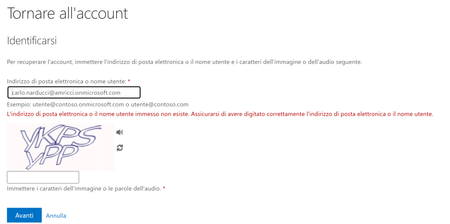
This page collects the issues (and related solutions/workarounds) linked to the administration account of the Microsoft 365 tenant http://school.onmicrosoft.com/. Context Tenant: my.name@myhttp://school.onmicrosoft.com/ Involved account: admin email address (specify which one, if needed) me and my administrator cannot access since jan 2026 Issues encountered Problem description Symptoms: my email amd my administrator email does not access the domani anymore Error message (if any): When it happens (frequency/time): no wayy to access other theachers have not this issue with the same domain Impact Who is blocked / which services are affected (Outlook, Teams, Entra ID, etc.) Urgency: Attempts already made [no way ] Password reset [ no way] Check MFA / sign-in methods [no way ] Try signing in from another browser / incognito [ ] Check Microsoft service status Next steps [ ] Collect screenshots and error codes see upper image [ ] Check sign-in logs (Entra ID) and any blocks (Conditional Access) [ ] Open a Microsoft support ticket (if needed) Notes / references Useful links: Last updated date:343Views0likes1CommentMicrosoft Mesh Education Licensing
Microsoft Education and Product Teams, I am writing to advocate for the inclusion of Microsoft Mesh (Immersive Spaces and Events) within the Microsoft 365 Education SKU family (A1, A3, and A5). Currently, Mesh is available across nearly every commercial license family, from Teams Essentials to E5 Enterprise, but is explicitly excluded from Education tenants. As documented in several Learn Q&A threads and service plan manifests, the MESH_IMMERSIVE_FOR_TEAMS service plan is simply not provisioned for EDU customers. The current state is one of silent exclusion, creating several critical hurdles: Pedagogical: Immersive technology is one of the most requested features for remote and hybrid learning to combat "Zoom fatigue" and increase student engagement. Education is a high-value use case for 3D immersion. Parity: Universities and K-12 institutions on A5 licenses pay for "top-tier" features but are denied the innovative tools available to a "Business Basic" user. If you are a small business on a basic plan, you have Mesh. If you are a world-class University on A5, you are blocked. This isn't a "procurable" add-on; it is a licensing eligibility wall. Implementation: Current Microsoft guidance suggests schools move to Business or Enterprise licensing to access Mesh. This is not a viable solution for institutions with thousands of users, complex compliance requirements, and student-data privacy frameworks built specifically around EDU SKUs. We aren’t asking for a discount; we are asking for eligibility. We urge the product team to: Add the Mesh Immersive service plan to the A3 and A5 EDU license entitlements. Provide a clear roadmap for when Education tenants can expect feature parity with Commercial tenants. Education should be the vanguard of immersive collaboration, not an afterthought. We would appreciate a formal update on when this licensing barrier will be removed.407Views2likes1Comment
📣 MSLE Office Hours — Português
Olá, 👋 Espero que estejam bem! Tem dúvidas sobre o Programa MSLE? Nós temos as respostas! Participe das nossas Office Hours do MSLE: um espaço para conectar, aprender e receber apoio personalizado. ✅ Tire suas dúvidas sobre o programa ✅ Explore recursos e boas práticas ✅ Conecte-se com outros educadores e com nossa equipe do MSLE Traga suas perguntas, ideias e curiosidades — estamos aqui para ajudar você a aproveitar ao máximo sua experiência com o MSLE! No horário indicado, favor realizar acesso ao link: Teams meeting.📣 MSLE Office Hours — Português
Olá, 👋 Espero que estejam bem! Tem dúvidas sobre o Programa MSLE? Nós temos as respostas! Participe das nossas Office Hours do MSLE: um espaço para conectar, aprender e receber apoio personalizado. ✅ Tire suas dúvidas sobre o programa ✅ Explore recursos e boas práticas ✅ Conecte-se com outros educadores e com nossa equipe do MSLE Traga suas perguntas, ideias e curiosidades — estamos aqui para ajudar você a aproveitar ao máximo sua experiência com o MSLE! No horário indicado, favor realizar acesso ao link: Teams meeting.📣 MSLE Onboarding Session — Português
Olá, 👋 Espero que estejam bem! ✨Participe da sessão de introdução ao programa MSLE para Educadores! Nesta sessão: ✅ Vamos explorar os benefícios e o alcance do programa ✅ Conhecer em detalhe os dois portais principais aos quais você terá acesso ✅ Esclarecer todas as suas dúvidas em um ambiente colaborativo Este é o seu primeiro passo rumo a uma experiência enriquecedora, onde conhecimento, inovação e comunidade se unem para impulsionar você ao próximo nível. No horário indicado, favor realizar acesso ao link: Teams meeting.Minecraft Education-Hour of AI- the First Night
Hello,I'm a Greek teacher of English (TESOL).Yesterday I tried the new Challenge, Hour of AI- the First Night. Playing with my student, I kind of "studied" the detailes of this world, and I would highly recommend it to language teachers,too, not only ITs or CSs. It can be used as part of reading,speaking, listening and writing skills development, as the core of a CLIL lesson and as general students' awareness raising of how we can use AI safely,ethically and to our benefit. Please note that safely,ethically and to our benefit aren't buzz or empty words,but have the whole issues that concern teachers ,parents and other members of society.Worth trying and taking seriously.670Views1like2Comments