edge insider
66 Topics
Disable Edge disabling unverified extensions
TL:DR How do I reenable unverified extensions for development, after disabling through "Disable unverified extensions in Developer Mode" notification? Switching to Beta or Dev insider channel didn't help. Hello, I wanna learn about browser extension development, which ofc requires Developer Mode being on. Because unverified extensions can be malicious, you can't make the "Turn off unverified extensions in Developer Mode" notification stop appearing, and so I chose to just let it have its way to leave me alone. Inconvenient mistake. Doing this disables any unverified extensions that I sideload (as the notification says), so I asked CoPilot for help. CoPilot said I could enable the extensions again using either the Edge Dev or Canary channel, so I tried the Beta and Dev channel. Beta with and Dev both with and without importing my data from the normal Edge browser, but neither did anything, since all unverified extensions are still disabled, even when I enable them in the "Manage extensions" page. Is there some way to actually turn off the security disabling, in the Insider channels (Beta, Dev and Canary)? I really want to continue learning about extension development, so it's a little inconvenient that the unverified extensions don't feel like being enabled ever again, even when they're my own.339Views0likes0Comments
The edge dev is not opening
From the previous update of 119.0.2116.0 my microsoft edge dev is not opening. I think the problem come after this update and now I have manually updated to the latest 120.0.2165.1 with the installer and the problem is still there. I have seen the task manager the msedge process starts and run for sometime then automatically get terminated. Please Show any fix.555Views0likes0Comments
Edge Insider won't open after Update, Repair doesn't fix the issue.
Edge Insider (119.0.2132.0) won't open after Update, Modify Repair doesn't fix the issue, neither does restarting. Small blue wheel for a brief second then nothing. No third party security software running, scanning the system comes up clean. Not sure where to go from here or how to further debug the issue. I have all my passwords stored in edge and don't want to lose those. If anyone can help it would be greatly appreciated. Thanks!1.2KViews0likes3Comments
Edge Canary When you create a new tab, two new tabs open
Microsoft Edge Canary version 117.0.1963.0 When you create a new tab, two new tabs open. As you click on the + sign on the top of the software, it will create two new tab. More information is included in the images below.1.4KViews2likes4CommentsMicrosoft Edge on Android (Canary, Dev and Beta) black screen
Hi fellows, I tried previews of next gen of Microsoft Edge for Android, but I can't navigate in any of the versions Canary, Dev or Beta, the screen is black, including flags page (see the screenshots). I'm using a samsung galaxy note phone, I would like to know if some of you are experiencing this and if they are any solution, becasuse I would like to try latest Edge on my phone. Thanks for your comments in advance.1.4KViews0likes2CommentsSugiero una nueva función: Modo conexión limitada
Seria genial un modo para usuarios que tienen conexión a internet de muy baja velocidad y usuarios que tienen limite de trafico ( conexión de uso medido / conexión sin tarifa plana / 4G) Este modo debería guardar todos los recursos posibles de la pagina web en la CACHÉ DEL DISCO para evitar tiempos de carga muy largos en conexiones de velocidad limitada y descargar la menor cantidad de datos posibles para ahorrar trafico y dinero (en conexiones de uso medido / conexión sin tarifa plana / 4G)668Views0likes0CommentsSugiero una nueva funcion: Modo noche en todas las páginas web (Forzado)
Me gustaría que Microsoft Edge tenga una opción nativa que permita forzar el modo noche en todas las paginas web que no tenga compatibilidad con modo oscuro. Es muy molesto ver paginas web con fondo normal (blanco) de noche: la pantalla ilumina mucho el ambiente, reduce la calidad del sueño, causa molestias en los ojos, fatiga ocular y dificulta la lectura aun de día Cambiar el fondo blanco por el negro #000000 o gris oscuro (eleccion del usuario). Cambiar las letras negras, grises o algún otro color oscuro a colores claros como el blanco #ffffff. Cambiar el color de los iconos oscuros a claros1KViews1like1CommentCollections button can now be hidden from the Edge toolbar
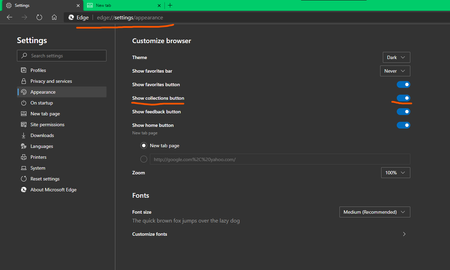
It was added in the previous Edge canary update but at the time of posting this, it's from Version 81.0.392.0 (Official build) canary (64-bit) still not available on Dev channel but should be added in the next major update for Dev. p.s this has been requested multiple times on the forum. previously the only option to hide it was to completely disable Collections feature using the flag.1.2KViews0likes0Comments