edge ai
4 TopicsMicrosoft Olive & Olive Recipes: A Practical Guide to Model Optimization for Real-World Deployment
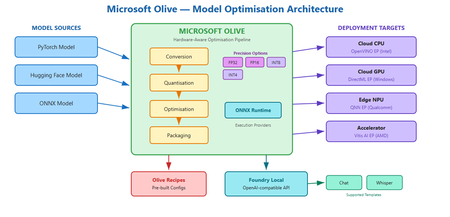
Why your model runs great on your laptop but fails in the real world You have trained a model. It scores well on your test set. It runs fine on your development machine with a beefy GPU. Then someone asks you to deploy it to a customer's edge device, a cloud endpoint with a latency budget, or a laptop with no discrete GPU at all. Suddenly the model is too large, too slow, or simply incompatible with the target runtime. You start searching for quantisation scripts, conversion tools, and hardware-specific compiler flags. Each target needs a different recipe, and the optimisation steps interact in ways that are hard to predict. This is the deployment gap. It is not a knowledge gap; it is a tooling gap. And it is exactly the problem that Microsoft Olive is designed to close. What is Olive? Olive is an easy-to-use, hardware-aware model optimisation toolchain that composes techniques across model compression, optimisation, and compilation. Rather than asking you to string together separate conversion scripts, quantisation utilities, and compiler passes by hand, Olive lets you describe what you have and what you need, then handles the pipeline. In practical terms, Olive takes a model source, such as a PyTorch model or an ONNX model (and other supported formats), plus a configuration that describes your production requirements and target hardware accelerator. It then runs the appropriate optimisation passes and produces a deployment-ready artefact. You can think of it as a build system for model optimisation: you declare the intent, and Olive figures out the steps. Official repo: github.com/microsoft/olive Documentation: microsoft.github.io/Olive Key advantages: why Olive matters for your workflow A. Optimise once, deploy across many targets One of the hardest parts of deploying models in production is that "production" is not one thing. Your model might need to run on a cloud GPU, an edge CPU, or a Windows device with an NPU. Each target has different memory constraints, instruction sets, and runtime expectations. Olive supports targeting CPU, GPU, and NPU through its optimisation workflow. This means a single toolchain can produce optimised artefacts for multiple deployment targets, expanding the number of platforms you can serve without maintaining separate optimisation scripts for each one. The conceptual workflow is straightforward: Olive can download, convert, quantise, and optimise a model using an auto-optimisation style approach where you specify the target device (cpu, gpu, or npu). This keeps the developer experience consistent even as the underlying optimisation strategy changes per target. B. ONNX as the portability layer If you have heard of ONNX but have not used it in anger, here is why it matters: ONNX gives your model a common representation that multiple runtimes understand. Instead of being locked to one framework's inference path, an ONNX model can run through ONNX Runtime and take advantage of whatever hardware is available. Olive supports ONNX conversion and optimisation, and can generate a deployment-ready model package along with sample inference code in languages like C#, C++, or Python. That package is not just the model weights; it includes the configuration and code needed to load and run the model on the target platform. For students and early-career engineers, this is a meaningful capability: you can train in PyTorch (the ecosystem you already know) and deploy through ONNX Runtime (the ecosystem your production environment needs). C. Hardware-specific acceleration and execution providers When Olive targets a specific device, it does not just convert the model format. It optimises for the execution provider (EP) that will actually run the model on that hardware. Execution providers are the bridge between the ONNX Runtime and the underlying accelerator. Olive can optimise for a range of execution providers, including: Vitis AI EP (AMD) – for AMD accelerator hardware OpenVINO EP (Intel) – for Intel CPUs, integrated GPUs, and VPUs QNN EP (Qualcomm) – for Qualcomm NPUs and SoCs DirectML EP (Windows) – for broad GPU support on Windows devices Why does EP targeting matter? Because the difference between a generic model and one optimised for a specific execution provider can be significant in terms of latency, throughput, and power efficiency. On battery-powered devices especially, the right EP optimisation can be the difference between a model that is practical and one that drains the battery in minutes. D. Quantisation and precision options Quantisation is one of the most powerful levers you have for making models smaller and faster. The core idea is reducing the numerical precision of model weights and activations: FP32 (32-bit floating point) – full precision, largest model size, highest fidelity FP16 (16-bit floating point) – roughly half the memory, usually minimal quality loss for most tasks INT8 (8-bit integer) – significant size and speed gains, moderate risk of quality degradation depending on the model INT4 (4-bit integer) – aggressive compression for the most constrained deployment scenarios Think of these as a spectrum. As you move from FP32 towards INT4, models get smaller and faster, but you trade away some numerical fidelity. The practical question is always: how much quality can I afford to lose for this use case? Practical heuristics for choosing precision: FP16 is often a safe default for GPU deployment. In practice, you might start here and only go lower if you need to. INT8 is a strong choice for CPU-based inference where memory and compute are constrained but accuracy requirements are still high (e.g., classification, embeddings, many NLP tasks). INT4 is worth exploring when you are deploying large language models to edge or consumer devices and need aggressive size reduction. Expect to validate quality carefully, as some tasks and model architectures tolerate INT4 better than others. Olive handles the mechanics of applying these quantisation passes as part of the optimisation pipeline, so you do not need to write custom quantisation scripts from scratch. Showcase: model conversion stories To make this concrete, here are three plausible optimisation scenarios that illustrate how Olive fits into real workflows. Story 1: PyTorch classification model → ONNX → quantised for cloud CPU inference Starting point: A PyTorch image classification model fine-tuned on a domain-specific dataset. Target hardware: Cloud CPU instances (no GPU budget for inference). Optimisation intent: Reduce latency and cost by quantising to INT8 whilst keeping accuracy within acceptable bounds. Output: An ONNX model optimised for CPU execution, packaged with configuration and sample inference code ready for deployment behind an API endpoint. Story 2: Hugging Face language model → optimised for edge NPU Starting point: A Hugging Face transformer model used for text summarisation. Target hardware: A laptop with an integrated NPU (e.g., a Qualcomm-based device). Optimisation intent: Shrink the model to INT4 to fit within NPU memory limits, and optimise for the QNN execution provider to leverage the neural processing unit. Output: A quantised ONNX model configured for QNN EP, with packaging that includes the model, runtime configuration, and sample code for local inference. Story 3: Same model, two targets – GPU vs. NPU Starting point: A single PyTorch generative model used for content drafting. Target hardware: (A) Cloud GPU for batch processing, (B) On-device NPU for interactive use. Optimisation intent: For GPU, optimise at FP16 for throughput. For NPU, quantise to INT4 for size and power efficiency. Output: Two separate optimised packages from the same source model, one targeting DirectML EP for GPU, one targeting QNN EP for NPU, each with appropriate precision, runtime configuration, and sample inference code. In each case, Olive handles the multi-step pipeline: conversion, optimisation passes, quantisation, and packaging. The developer's job is to define the target and validate the output quality. Introducing Olive Recipes If you are new to model optimisation, staring at a blank configuration file can be intimidating. That is where Olive Recipes comes in. The Olive Recipes repository complements Olive by providing recipes that demonstrate features and use cases. You can use them as a reference for optimising publicly available models or adapt them for your own proprietary models. The repository also includes a selection of ONNX-optimised models that you can study or use as starting points. Think of recipes as worked examples: each one shows a complete optimisation pipeline for a specific scenario, including the configuration, the target hardware, and the expected output. Instead of reinventing the pipeline from scratch, you can find a recipe close to your use case and modify it. For students especially, recipes are a fast way to learn what good optimisation configurations look like in practice. Taking it further: adding custom models to Foundry Local Once you have optimised a model with Olive, you may want to serve it locally for development, testing, or fully offline use. Foundry Local is a lightweight runtime that downloads, manages, and serves language models entirely on-device via an OpenAI-compatible API, with no cloud dependency and no API keys required. Important: Foundry Local only supports specific model templates. At present, these are the chat template (for conversational and text-generation models) and the whisper template (for speech-to-text models based on the Whisper architecture). If your model does not fit one of these two templates, it cannot currently be loaded into Foundry Local. Compiling a Hugging Face model for Foundry Local If your optimised model uses a supported architecture, you can compile it from Hugging Face for use with Foundry Local. The high-level process is: Choose a compatible Hugging Face model. The model must match one of Foundry Local's supported templates (chat or whisper). For chat models, this typically means decoder-only transformer architectures that support the standard chat format. Use Olive to convert and optimise. Olive handles the conversion from the Hugging Face source format into an ONNX-based, quantised artefact that Foundry Local can serve. This is where your Olive skills directly apply. Register the model with Foundry Local. Once compiled, you register the model so that Foundry Local's catalogue recognises it and can serve it through the local API. For the full step-by-step guide, including exact commands and configuration details, refer to the official documentation: How to compile Hugging Face models for Foundry Local. For a hands-on lab that walks through the complete workflow, see Foundry Local Lab, specifically Lab 10 which covers bringing custom models into Foundry Local. Why does this matter? The combination of Olive and Foundry Local gives you a complete local workflow: optimise your model with Olive, then serve it with Foundry Local for rapid iteration, privacy-sensitive workloads, or environments without internet connectivity. Because Foundry Local exposes an OpenAI-compatible API, your application code can switch between local and cloud inference with minimal changes. Keep in mind the template constraint. If you are planning to bring a custom model into Foundry Local, verify early that it fits the chat or whisper template. Attempting to load an unsupported architecture will not work, regardless of how well the model has been optimised. Contributing: how to get involved The Olive ecosystem is open source, and contributions are welcome. There are two main ways to contribute: A. Contributing recipes If you have built an optimisation pipeline that works well for a specific model, hardware target, or use case, consider contributing it as a recipe. Recipes are repeatable pipeline configurations that others can learn from and adapt. B. Sharing optimised model outputs and configurations If you have produced an optimised model that might be useful to others, sharing the optimisation configuration and methodology (and, where licensing permits, the model itself) helps the community build on proven approaches rather than starting from zero. Contribution checklist Reproducibility: Can someone else run your recipe or configuration and get comparable results? Licensing: Are the base model weights, datasets, and any dependencies properly licensed for sharing? Hardware target documented: Have you specified which device and execution provider the optimisation targets? Runtime documented: Have you noted the ONNX Runtime version and any EP-specific requirements? Quality validation: Have you included at least a basic accuracy or quality check for the optimised output? If you are a student or early-career developer, contributing a recipe is a great way to build portfolio evidence that you understand real deployment concerns, not just training. Try it yourself: a minimal workflow Here is a conceptual walkthrough of the optimisation workflow using Olive. The idea is to make the mental model concrete. For exact CLI flags and options, refer to the official Olive documentation. Choose a model source. Start with a PyTorch or Hugging Face model you want to optimise. This is your input. Choose a target device. Decide where the model will run: cpu , gpu , or npu . Choose an execution provider. Pick the EP that matches your hardware, for example DirectML for Windows GPU, QNN for Qualcomm NPU, or OpenVINO for Intel. Choose a precision. Select the quantisation level: fp16 , int8 , or int4 , based on your size, speed, and quality requirements. Run the optimisation. Olive will convert, quantise, optimise, and package the model for your target. The output is a deployment-ready artefact with model files, configuration, and sample inference code. A conceptual command might look like this: # Conceptual example – refer to official docs for exact syntax olive auto-opt --model-id my-model --device cpu --provider onnxruntime --precision int8 After optimisation, validate the output. Run your evaluation benchmark on the optimised model and compare quality, latency, and model size against the original. If INT8 drops quality below your threshold, try FP16. If the model is still too large for your device, explore INT4. Iteration is expected. Key takeaways Olive bridges training and deployment by providing a single, hardware-aware optimisation toolchain that handles conversion, quantisation, optimisation, and packaging. One source model, many targets: Olive lets you optimise the same model for CPU, GPU, and NPU, expanding your deployment reach without maintaining separate pipelines. ONNX is the portability layer that decouples your training framework from your inference runtime, and Olive leverages it to generate deployment-ready packages. Precision is a design choice: FP16, INT8, and INT4 each serve different deployment constraints. Start conservative, measure quality, and compress further only when needed. Olive Recipes are your starting point: Do not build optimisation pipelines from scratch when worked examples exist. Learn from recipes, adapt them, and contribute your own. Foundry Local extends the workflow: Once your model is optimised, Foundry Local can serve it on-device via a standard API, but only if it fits a supported template (chat or whisper). Resources Microsoft Olive – GitHub repository Olive documentation Olive Recipes – GitHub repository How to compile Hugging Face models for Foundry Local Foundry Local Lab – hands-on labs (see Lab 10 for custom models) Foundry Local documentation321Views0likes0CommentsPrivyDoc: Building a Zero-Data-Leak AI with Foundry Local & Microsoft's Agent Framework
Tired of choosing between powerful AI insights and sacrificing your data's privacy? PrivyDoc offers a groundbreaking solution. In this article, Microsoft MVP in AI, Shivam Goyal, introduces his innovative project that brings robust AI document analysis directly to your local machine, ensuring zero data ever leaves your device. Discover how PrivyDoc leverages two cutting-edge Microsoft technologies: Foundry Local: The secret sauce for 100% on-device AI processing, allowing advanced models to run securely without cloud dependency. Microsoft Agent Framework: The intelligent orchestrator that builds a sophisticated multi-agent pipeline, handling everything from text extraction and entity recognition to summarization and sentiment analysis. Learn about PrivyDoc's intuitive web UI, its multi-format support, and crucial features that make it perfect for sensitive industries like legal, healthcare, and finance. Say goodbye to privacy concerns and hello to AI-powered document intelligence without compromise.512Views3likes0CommentsTiny But Mighty: Unleashing the Power of Small Language Models 🚀
While Large Language Models (LLMs) like GPT-4 dominate headlines with their extensive capabilities, they often come at the cost of high computational requirements and complexity. For developers and organizations looking to implement AI solutions on edge devices or with limited resources, Small Language Models (SLMs) are emerging as a practical alternative. SLMs are not just "smaller" versions of their larger counterparts—they're designed to be faster, more efficient, and adaptable for specific tasks. With fewer parameters and lower computational needs, SLMs open the door to deploying AI on mobile devices, IoT systems, and edge environments without compromising performance. What You Stand to Learn 🧠 Introduction to Microsoft's AI Ecosystem Discover Microsoft's end-to-end AI development tools, from Azure AI Services to ONNX Runtime, enabling efficient and secure deployment of AI models across cloud and edge environments. The Advantages of SLMs over LLMs SLMs are game-changers for edge AI applications, providing faster training and inference times, reduced energy costs, and scalability across diverse devices. Hands-On with Phi-3 and ONNX Runtime Experience live demonstrations of SLMs in action with tools like Phi-3 and ONNX Runtime, showcasing how to fine-tune and deploy models on mobile devices, IoT, and hybrid cloud environments. Responsible AI Practices Understand how to safeguard your AI applications with Microsoft's Responsible AI toolkit, ensuring ethical and trustworthy deployments. Watch the Full Session 👨💻 📅 Date: December 12, 2024 ⏰ Time: 4 PM GMT | 5 PM CEST | 8 AM PT | 11 AM ET | 7 PM EAT A session packed with live demos, practical examples, and Q&A opportunities. Register NOW | Events | Microsoft Reactor Agenda 🔍 Introduction (5 min) A brief overview of the session and its focus on SLMs and LLMs. Microsoft AI Tooling (5 min) Explore the latest tools like Azure AI Services, Azure Machine Learning, and Responsible AI Tooling. How to Choose the Right Model (10 min) Key considerations such as performance, customizability, and ethical implications. Comparing SLMs vs LLMs (10 min) The strengths, weaknesses, and best use cases for both Small and Large Language Models. Deploying Models at the Edge (10 min) Insights into optimizing AI for mobile, IoT, and edge devices. Q&A Addressing participant questions about AI development and deployment.528Views2likes0Comments