durable functions
34 Topics
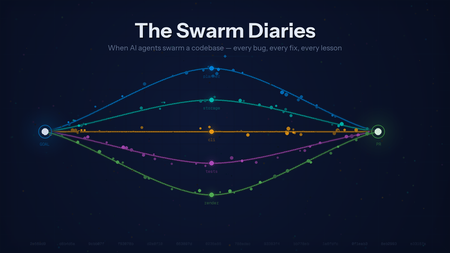
The Swarm Diaries: What Happens When You Let AI Agents Loose on a Codebase
The Idea Single-agent coding assistants are impressive, but they have a fundamental bottleneck: they think serially. Ask one to build a full CLI app with a database layer, a command parser, pretty output, and tests, and it’ll grind through each piece one by one. Industry benchmarks bear this out: AIMultiple’s 2026 agentic coding benchmark measured Claude Code CLI completing full-stack tasks in ~12 minutes on average, with other CLI agents ranging from 3 to 14 minutes depending on the tool. A three-week real-world test by Render.com found single-agent coding workflows taking 10–30 minutes for multi-file feature work. But these subtasks don’t depend on each other. A storage agent doesn’t need to wait for the CLI agent. A test writer doesn’t need to watch the renderer work. What if they all ran at the same time? The hypothesis was straightforward: a swarm of specialized agents should beat a single generalist on at least two of three pillars — speed, quality, or cost. The architecture looked clean on a whiteboard: The reality was messier. But first, let me explain the machinery that makes this possible. How It’s Wired: Brains and Hands The system runs on a brains-and-hands split. The brain is an Azure Durable Task Scheduler (DTS) orchestration — a deterministic workflow that decomposes the goal into a task DAG, fans agents out in parallel, merges their branches, and runs quality gates. If the worker crashes mid-run, DTS replays from the last checkpoint. No work lost. Simple LLM calls — the planner that decomposes the goal, the judge that scores the output — run as lightweight DTS activities. One call, no tools, cheap. The hands are Microsoft Agent Framework (MAF) agents, each running in its own Docker container. One sandbox per agent, each with its own git clone, filesystem, and toolset. When an agent’s LLM decides to edit a file or run a build, the call routes through middleware to that agent’s isolated container. No two agents ever touch the same workspace. These complex agents — coders, researchers, the integrator — run as DTS durable entities with full agentic loops and turn-level checkpointing. The split matters because LLM reasoning and code execution have completely different reliability profiles. The brain checkpoints and replays deterministically. The hands are ephemeral — if a container dies, spin up a new one and replay the agent’s last turn. This separation is what lets you run five agents in parallel without them stepping on each other’s git branches, build artifacts, or file handles. It’s also what made every bug I was about to encounter debuggable. When something broke, I always knew which side broke — the orchestration logic, or the agent behavior. That distinction saved me more hours than any other design decision. The First Run Produced Nothing After hours of vibe-coding the foundation — Pydantic models, skill prompts, a prompt builder, a context store, sixteen architectural decisions documented in ADRs — I wired up the seven-phase orchestration and hit go. All five agents returned empty responses. Every single one. The logs showed agents “running” but producing zero output. I stared at the code for an embarrassingly long time before I found it. The planner returned task IDs as integers — 1, 2, 3 . The sandbox provisioner stored them as string keys — "1", "2", "3" . When the orchestrator did sandbox_map.get(1) , it got None . No sandbox meant no middleware. The agents were literally talking to thin air — making LLM calls with no tools attached, like a carpenter showing up to a job site with no hammer. The fix was one line. The lesson was bigger: LLMs don’t respect type contracts. They’ll return an integer when you expect a string, a list when you expect a dict, and a confident hallucination when they have nothing to say. Every boundary between AI-generated data and deterministic systems needs defensive normalization. This would not be the last time I learned that lesson. The Seven-Minute Merge Once agents actually ran and produced code, a new problem emerged. I watched the logs on a run that took twenty-one minutes total. Four agents finished their work in about twelve minutes. The remaining seven minutes were the LLM integrator merging four branches — eight to thirty tool calls per merge, using the premium model, to do what git merge --no-edit does in five seconds. I was paying for a premium LLM to run git diff , read both sides of every file, and write a merged version. For branches that merged cleanly. With zero conflicts. The fix was obvious in retrospect: try git merge first. If it succeeds — great, five seconds, done. Only call the LLM integrator when there are actual conflicts to resolve. Merge time dropped from seven minutes to under thirty seconds. I felt a little silly for not doing this from the start. When Agents Build Different Apps The merge speedup felt like a win until I looked at what was actually being merged. The storage agent had built a JSON-file backend. The CLI agent had written its commands against SQLite. Both modules were well-written. They compiled individually. Together, nothing worked — the CLI tried to import a Storage class that didn’t exist in the JSON backend. This was the moment I realized the agents weren’t really a team. They were strangers who happened to be assigned to the same project, each interpreting the goal in their own way. The fix was the single most impactful change in the entire project: contract-first planning. Instead of just decomposing the goal into tasks, the planner now generates API contracts — function signatures, class shapes, data model definitions — and injects them into every agent’s prompt. “Here’s what the Storage class looks like. Here’s what Task looks like. Build against these interfaces.” Before contracts, three of six branches conflicted and the quality score was 28. After contracts, zero of four branches conflicted and the score hit 68. It turns out the plan isn’t just a plan. In a multi-agent system, the plan is the product. A brilliant plan with mediocre agents produces working code. A vague plan with brilliant agents produces beautiful components that don’t fit together. The Agent Who Lied PR #4 came back with what looked like a solid result. The test writer reported three test files with detailed coverage summaries. The JSON output was meticulous — file names, function names, which modules each test covered. Then I checked tool_call_count: 0 . The test writer hadn’t written a single file. It hadn’t even opened a file. It received zero tools — because the skill loader normalized test_writer to underscores while the tool registry used test-writer with hyphens. The lookup failed silently. The agent got no tools, couldn’t do any work, and did what LLMs do when they can’t fulfill a request but feel pressure to answer: it made something up. Confidently. This happened in three of our first four evaluation runs. I called them “phantom agents” — they showed up to work, clocked in, filed a report, and went home without lifting a finger. The fix had two parts. First, obviously, fix the hyphen/underscore normalization. Second, and more importantly: add a zero-tool-call guard. If an agent that should be writing files reports success with zero tool calls, don’t believe it. Nudge it and retry. The deeper lesson stuck with me: agents will never tell you they failed. They’ll report success with elaborate detail. You have to verify what they actually did, not what they said they did. The Integrator Who Took Shortcuts Even with contracts preventing mismatched architectures, merge conflicts still happened when multiple agents touched the same files. The LLM integrator’s job was to resolve these conflicts intelligently, preserving logic from both sides. Instead, facing a gnarly conflict in models.py , it ran: git restore --source=HEAD -- models.py One command. Silently destroyed one agent’s entire implementation — the Task class, the constants, the schema version — gone. The integrator committed the lobotomized file and reported “merge resolved successfully.” The downstream damage was immediate. storage.py imported symbols that no longer existed. The judge scored 43 out of 100. The fixer agent had to spend five minutes reconstructing the data model from scratch. But that wasn’t even the worst shortcut. On other runs, the integrator replaced conflicting code with: def add_task(desc, priority=0): pass # TODO: implement storage layer When an LLM is asked to resolve a hard conflict, it’ll sometimes pick the easiest valid output — delete everything and write a placeholder. Technically valid Python. Functionally a disaster. Fixing this required explicit prompt guardrails: Never run git restore --source=HEAD Never replace implementations with pass # TODO placeholders When two implementations conflict, keep the more complete one After resolving each file, read it back and verify the expected symbols still exist The lesson: LLMs optimize for the path of least resistance. Under pressure, “valid” and “useful” diverge sharply. Demolishing the House for a Leaky Faucet When the judge scored a run below 70, the original retry strategy was: start over. Re-plan. Re-provision five sandboxes. Re-run all agents. Re-merge. Re-judge. Seven minutes and a non-trivial cloud bill, all because one agent missed an import statement. This was absurd. Most failures weren’t catastrophic — they were close. A missing model field. A broken import. An unhandled error case. The code was 90% right. Starting from scratch was like tearing down a house because the bathroom faucet leaks. So I built the fixer agent: a premium-tier model that receives the judge’s specific complaints and makes surgical edits directly on the integrator’s branch. No new sandboxes, no new branches, no merge step. The first time it ran, the score jumped from 43 to 89.5. Three minutes instead of seven. And it solved the problem that actually existed, rather than hoping a second roll of the dice would land better. Of course, the fixer’s first implementation had its own bug — it ran in a new sandbox, created a new branch, and occasionally conflicted with the code it was trying to fix. The fix to the fixer: just edit in place on the integrator’s existing sandbox. No branch, no merge, no drama. How Others Parallelize (and Why We Went Distributed) Most multi-agent coding frameworks today parallelize by spawning agents as local processes on a single developer machine. Depending on the framework, there’s typically a lead agent or orchestrator that breaks the task down into subtasks, spins up new agents to handle each piece, and combines their work when they finish — often through parallel TMux sessions or subprocess pools sharing a local filesystem. It’s simple, it’s fast to set up, and for many tasks it works. But local parallelization hits a ceiling. All agents share one machine’s CPU, memory, and disk I/O. Five agents each running npm install or cargo build compete for the same 32 GB of RAM. There’s no true filesystem isolation — two agents can clobber the same file if the orchestrator doesn’t carefully sequence writes. Recovery from a crash means restarting the entire local process tree. And scaling from 3 agents to 10 means buying a bigger machine. Our swarm takes a different approach: fully distributed execution. Each agent runs in its own Docker container with its own filesystem, git clone, and compute allocation — provisioned on AKS, ACA, or any container host. Four agents get four independent resource pools. If one container dies, DTS replays that agent from its last checkpoint in a fresh container without affecting the others. Git branch-per-agent isolation means zero filesystem conflicts by design. The trade-off is overhead: container provisioning, network latency, and the merge step add wall-clock time that a local TMux setup avoids. On a small two-agent task, local parallelization on a fast laptop probably wins. But for tasks with 4+ agents doing real work — cloning repos, installing dependencies, running builds and tests — independent resource pools and crash isolation matter. Our benchmarks on a 4-agent helpdesk system showed the swarm completing in ~8 minutes with zero resource contention, producing 1,029 lines across 14 files with 4 clean branch merges. The Scorecard After all of this, did the swarm actually beat a single agent? I ran head-to-head benchmarks: same prompt, same model (GPT-5-nano), solo agent vs. swarm, scored by a Sonnet 4.6 judge on a four-criterion rubric. Two tasks — a simple URL shortener (Render.com’s benchmark prompt) and a complex helpdesk ticket system. All runs are public — you can review every line of generated code: Task Solo Agent PR Swarm PR URL Shortener PR #1 PR #2 Helpdesk System PR #3 PR #4 URL Shortener (Simple) Helpdesk System (Complex) Quality (rubric, /5) Solo 1.9 → Swarm 2.5 (+32%) Solo 2.3 → Swarm 2.95 (+28%) Speed Solo 2.5 min → Swarm 5.5 min (2.2×) Solo 1.75 min → Swarm ~8 min (~4.5×) Tokens 7.7K → 30K (3.9×) 11K → 39K (3.4×) The pattern held across both tasks: +28–32% quality improvement, at the cost of 2–4× more time and ~3.5× more tokens. On the complex task, the quality gains broadened — the swarm produced better code organization (3/5 vs 2/5), actually wrote tests (code:test ratio 0 → 0.15), and generated 5× more files with cleaner decomposition. On the simple task, the gap came entirely from security practices: environment variables, parameterized queries, and proper .gitignore rules that the solo agent skipped entirely. Industry benchmarks from AIMultiple and Render.com show single CLI agents averaging 10–15 minutes on comparable full-stack tasks. Our swarm runs in 5–12 minutes depending on parallelizability — but the real win is quality, not speed. Specialized agents with a narrow, well-defined scope tend to be more thorough: the solo agent skipped tests and security practices entirely, while the swarm's dedicated agents actually addressed them. Two out of three pillars — with a caveat the size of your task. On small, tightly-coupled problems, just use one good agent. On larger, parallelizable work with three or more independent modules? The swarm earns its keep. What I Actually Learned The Rules That Stuck Contract-first planning. Define interfaces before writing implementations. The plan isn’t just a guide — it’s the product. Deterministic before LLM. Try git merge before calling the LLM integrator. Run ruff check before asking an agent to debug. Use code when you can; use AI when you must. Validate actions, not claims. An agent that reports “merge resolved successfully” may have deleted everything. Check tool call counts. Read the actual diff. Trust nothing. Cheap recovery over expensive retries. A fixer agent that patches one file beats re-running five agents from scratch. The cost of failure should be proportional to the failure. Not every problem needs a swarm. If the task fits in one agent’s context window, adding four more just adds overhead. The sweet spot is 3+ genuinely independent modules. The Bigger Picture The biggest surprise? Building a multi-agent AI system is more about software engineering than AI engineering. The hard problems weren’t prompt design or model selection — they were contracts between components, isolation of concerns, idempotent operations, observability, and recovery strategies. Principles that have been around since the 1970s. The agents themselves are almost interchangeable. Swap GPT for Claude, change the temperature, fine-tune the system prompt — it barely matters if your orchestration is broken. What matters is how you decompose work, how you share context, how you merge results, and how you recover from failure. Get the engineering right, and the AI just works. Get it wrong, and no model on earth will save you. By the Numbers The codebase is ~7,400 lines of Python across 230 tests and 141 commits. Over 10+ evaluation runs, the swarm processed a combined ~200K+ tokens, merged 20+ branches, and resolved conflicts ranging from trivial (package.json version bumps) to gnarly (overlapping data models). It’s built on Azure Durable Task Scheduler, Microsoft Agent Framework, and containerized sandboxes that run anywhere Docker does — AKS, ACA, or a plain docker run on your laptop. And somewhere in those 141 commits is a one-line fix for an integer-vs-string bug that took me an embarrassingly long time to find. References Azure Durable Task Scheduler — Deterministic workflow orchestration with replay, checkpointing, and fan-out/fan-in patterns. Microsoft Agent Framework (MAF) — Python agent framework for tool-calling, middleware, and structured output. Azure Kubernetes Service (AKS) — Managed Kubernetes for running containerized agent workloads at scale. Azure Container Apps (ACA) — Serverless container platform for simpler deployments. Azure OpenAI Service — Hosts the GPT models used by planner, coder, and judge agents. Built with Azure DTS, Microsoft Agent Framework, and containerized sandboxes (Docker, AKS, ACA — your choice). And a lot of grep through log files.2.2KViews6likes0CommentsBuilding Durable and Deterministic Multi-Agent Orchestrations with Durable Execution
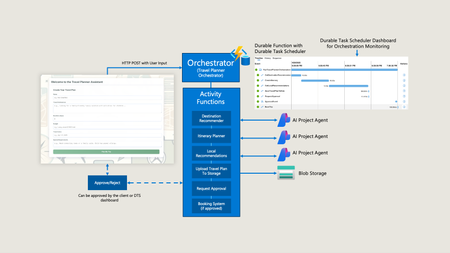
Durable Execution Durable Execution is a reliable approach to running code, designed to handle failures smoothly with automatic retries and state persistence. It is built on three core principles: Incremental Execution: Each operation runs independently and in order. State Persistence: The output of each step is durably saved to ensure progress is not lost. Fault Tolerance: If a step fails, the operation is retried from the last successful step, skipping previously completed steps. Durable Execution is particularly beneficial for scenarios requiring stateful chaining of operations, such as order-processing applications, data processing pipelines, ETL (extract, transform, load), and as we'll get into in this post, intelligent applications with AI agents. Durable execution simplifies the implementation of complex, long-running, stateful, and fault-tolerant application patterns. Technologies like Durable Functions provide a programming model that makes the implementation of these patterns straightforward. Some common stateful application patterns that require stateful chaining and are easily implemented with durable execution, like Durable Functions include: Durable Task Programming Model Before solutions like Azure Durable Functions, developers had to manually coordinate operations and maintain state using infrastructure like message queues and state stores, adding complexity to the code and increased the operational maintenance burden. Durable Functions streamlines this process by providing a programming model backed by a durable state store, enabling developers to define a series of steps to be executed in a specific order. This is called an orchestrator function. Activity functions within the orchestration function are the "steps," and the durable task runtime ensures each step is scheduled in order and executed on your compute of choice, with outputs persisted. Durable for Orchestrating Agents With the rapid advancements in AI, we are witnessing an increasing trend of scenarios that require orchestration, specifically when it comes to working with multiple AI agents within applications. These agents often work together to accomplish a larger task. Two emerging designs for these applications are deterministic agentic workflows and self-directed agentic workflows: Deterministic Agentic Workflows: Agents work together through a series of predefined steps to accomplish a larger task, leading to a deterministic result. A Deterministic Agentic Workflow orchestrates a series of predefined steps, each calling sub-agents to achieve a deterministic outcome. Self-Directed Agentic Workflows: Agents dynamically explore and determine the workflow plan as they proceed. Each approach fits different business scenarios and requirements. However, as we're learning, many scenarios benefit from deterministic outcomes, and durable execution truly shines in the deterministic agentic workflow pattern. It excels at providing efficient and reliable deterministic outcomes by following a predefined set path that maps to orchestration and activity functions. The programming model makes it extremely easy to call your agents independently and implement common agent app patterns, such as prompt chaining for function chaining and parallelization with fan-out/fan-in. For more on this, please reference this insightful blog post by my colleague Chris Gillum. Self-directed agentic workflows are advantageous for unpredictable, creative tasks where the agents can determine their plan during execution. However, this can be less efficient and lead to non-deterministic outcomes, which may cause undesirable results. When using durable execution for your agent orchestration, it enhances the resiliency of your agentic workflows. If any step fails, there’s no need to start from the beginning. Given that requests to LLMs can be expensive and may yield different outcomes, durable execution ensures that your orchestrations can recover right from their last success point. Let’s look at a specific example of where I used durable execution, specifically Azure Durable Functions to implement a multi-agent application that requires durability – The Travel Planner Assistant. The Travel Planner Assistant Travel planning inherently follows a structured sequence – selecting destinations, crafting itineraries, gathering local insights, and booking the trip. This makes it ideal for an agentic workflow with predefined steps, rather than a self-directed agentic workflow with exploration. The outcome must be deterministic – we want a complete travel itinerary and a fully booked trip. The application exposes a durable function that schedules a predefined agentic workflow (orchestration) to create a travel plan, which will then be used to book the trip. The orchestration interacts with specialized sub-agents for the first three steps. These include: Destination Recommender Agent: Provides global knowledge across thousands of locations. Itinerary Planner Agent: Creates a daily itinerary based on a deep understanding of the specific location’s logistics and seasonal considerations. Local Recommendations Agent: Offers popular attractions to visit. Orchestration Activity Function Calls - Sequential AI agent activities. Each activity is executed as a separate function with its own context. By using Durable Functions to coordinate these specialized agents, the travel planner agent creates a more accurate and comprehensive travel plan than a single generalist agent. Once the travel plan has been created, Durable Function orchestrations provide built-in support for human interaction, allowing human approval of the travel plan before proceeding to book the trip. This can be crucial in some scenario because, despite the advancements in agents and LLMs, there are still critical tasks that require human input. Relying solely on LLM decision-making without review for such important task can be risky, and human approval ensure accuracy and reliability. Seeking this approval can be a long-running operation that may encounter failures along the way. However, by leveraging Durable Functions, the application benefits from resiliency through built-in state persistence, ensuring the orchestration can resume in the event of a failure, such as downstream dependency outage or if the application restarts while waiting for approval. Demo Video emo Video Wrap up For orchestrating agents, I recommend using Durable Execution technologies like Azure Durable Functions, as they offer determinism, reliability, and efficiency. The programming model simplifies the orchestration of agents, ensuring predictable outcomes. It enhances the resiliency of agentic workflows, allowing them to recover seamlessly from their last successful point. To provide evidence of customers using Durable in real-world production applications, take a look at this Toyota case study where they are using Durable Functions for orchestrating their multi-agent application, exactly as outlined above. If you have any questions or thoughts about this, please feel free to comment below. I'd love to hear if you find this interesting or if you're already using durable execution in your agent applications.7.7KViews6likes0CommentsNew Storage Providers for Azure Durable Functions
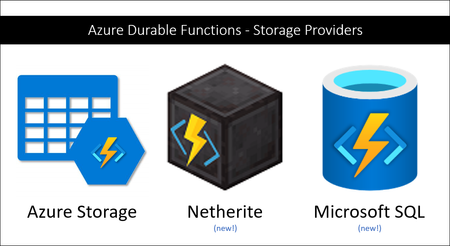
Azure Durable Functions now supports two new backend storage providers for storing durable runtime state, “Netherite” and Microsoft SQL Server (including full support for Azure SQL Database). These new storage options allow you to run at higher scale, with greater price-performance efficiency, and more portability compared to the default Azure Storage configuration. Any of these three storage providers can be configured without making any code changes to your existing apps.14KViews6likes1Comment
Performance Tuning and Scaling Optimization for Large-Scale Azure Workloads
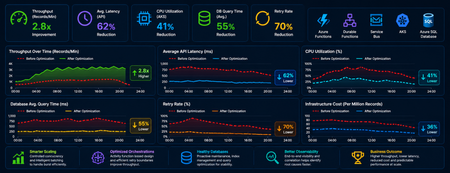
Summary As cloud-native systems scale, performance challenges rarely stem from a single bottleneck. Instead, they emerge from the interaction between compute, orchestration, and data layers under load. This article captures a practical optimization journey of a high-volume Azure-based workload and highlights how controlled scaling, improved orchestration design, and proactive database maintenance can significantly outperform brute-force scaling. Introduction Distributed systems are often designed with the assumption that scaling out will solve performance issues. However, for orchestration-heavy and database-intensive workloads, this approach can introduce more problems than it solves. In this scenario, the system processed millions of transactional records through Azure Functions, Durable Functions, messaging pipelines, APIs, and SQL databases. As the workload grew, the platform began experiencing: CPU and memory spikes Slower SQL queries Service Bus throttling Increased retries and execution delays What stood out was that these issues were not due to insufficient resources, but due to inefficient execution patterns at scale. The optimization effort therefore focused on controlling how the system scaled and executed, rather than simply increasing capacity. Understanding Workload Behavior A critical early step was identifying the nature of the workload—specifically, whether it was CPU-heavy or data-heavy. Rethinking Scaling: More Is Not Always Better One of the most important lessons was that scaling out aggressively can degrade performance. As more function instances processed messages in parallel: Database calls increased sharply API traffic surged Lock contention intensified Retry rates increased This created a cascading effect where retries amplified load, further slowing down the system. To address this, scaling was intentionally controlled using: Concurrency limits on function execution Batch-based processing instead of full parallel fan-out Small delays to smooth traffic spikes Chunking of large datasets into manageable units This shift from maximum parallelism to controlled throughput significantly improved system stability. Compute Optimization: CPU and Memory After stabilizing scaling behavior, the next step was optimizing compute usage. CPU Optimization CPU spikes were largely caused by excessive parallel execution and orchestration overhead. Improvements included: Breaking large workloads into smaller units Reducing unnecessary fan-outs of processes Limiting concurrent executions This resulted in more predictable CPU usage and improved execution consistency. Memory Optimization Memory pressure was primarily driven by large payloads and batch processing. Optimizations focused on: Processing data in smaller chunks Avoiding large in-memory payloads and memory leaks Reducing orchestration state size These changes improved system reliability and reduced execution failures under load. Scaling Approaches: Practical Trade-Offs Both vertical and horizontal scaling were used, but with careful consideration. Scale Up (Vertical Scaling) Quick to implement No architectural changes required Useful for immediate stabilization However, it had cost and scalability limits. Scale Out (Horizontal Scaling) Better suited for long-term scalability Enables workload distribution But without control, it can: Increase database contention Amplify retries Introduce instability Key Insight The most effective approach was not choosing one over the other but combining both with strict control over concurrency and execution patterns. Durable Functions: Orchestration Optimization Durable Functions were central to the system, making orchestration design a key factor in performance. Challenges Observed The initial design relied heavily on nested sub-orchestrators, which introduced: High orchestration overhead Increased replay and persistence operations Slower execution at scale Key Improvements Refactoring unnecessary sub-orchestrators into Activity Functions simplified execution and improved throughput. The benefits included: Reduced orchestration latency Faster execution cycles Lower infrastructure cost Note: However, sub-orchestrators remain the right choice when the design requires composing multiple dependent steps, managing scoped retry/error logic, or isolating orchestration history. The decision should be driven by the complexity and reuse requirements of each workflow segment and not applied as a blanket rule. Improved Retry Strategy Retry behavior was also optimized by redefining execution boundaries. Previously: One activity processed multiple records A single failure triggered a retry of the entire batch After optimization: One activity handled one logical unit of work This enabled: Granular retries Better failure isolation Reduced duplicate processing Database Hygiene: A Critical Foundation The database emerged as a major bottleneck due to fragmentation and stale statistics caused by continuous high-volume operations. Issues Identified Fragmented indexes Inefficient query plans Increased query execution time Optimization Approach A proactive maintenance strategy was implemented using scheduled jobs to: Update statistics regularly Rebuild indexes Maintain query performance consistency Controlled Database Load For heavy long-running workloads in multi-tenant architecture, execution of DB intensive process was intentionally run in singleton fashion at a tenant level to reduce contention. This approach: Prevented concurrent heavy operations Improved overall system stability Delivered more predictable throughput Observability: Finding the Real Problem A major challenge during optimization was distinguishing between symptoms and root causes. For example: Slow APIs were often caused by database contention High retries were triggered by upstream throttling Orchestration delays originated from downstream dependencies To address this, end-to-end observability was established using: Application-level tracing Load testing correlations Cross-service telemetry analysis This enabled accurate root cause identification and prevented misdirected optimization efforts. Key Takeaways Some key principles emerged from this optimization journey: Scaling more does not always mean performing better Controlled parallelism is more effective than unrestricted concurrency Orchestration design directly impacts system performance Database maintenance must be proactive Retry strategies should align with logical units of work Observability is essential for correct diagnosis Conclusion Performance tuning in distributed systems is less about adding resources and more about using them efficiently. By focusing on controlled scaling, simplifying orchestration, maintaining database health, and improving observability, the system achieved higher throughput, lower cost, and significantly improved stability. These lessons are broadly applicable to any Azure-based system handling large-scale, orchestration-heavy workloads and can help teams design more predictable and resilient architectures.817Views5likes0CommentsCloud-native at Build 2023
Cloud-native development is a paradigm that aims to deliver scalable, resilient, and adaptable applications that can run on any cloud platform. Microsoft's cloud-native products, such as Azure Kubernetes Service, Azure Functions, and Azure DevOps, provide the tools and services to help developers build, deploy, and manage cloud-native applications with ease.12KViews4likes0Comments
Preview of Durable Functions Extension v3.0.0
We have just released the preview of a new major version of the Durable Functions extension! There are two major changes introduced in this release, including upgrading to the latest version of the Azure Storage SDK (a breaking change for .NET in-process apps) and the introduction of a new partition manager.6.8KViews3likes0CommentsOpenAI Agent SDK Integration with Azure Durable Functions
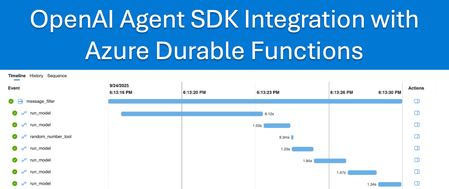
Picture this: Your agent authored with the OpenAI Agent SDK is halfway through analyzing 10,000 customer reviews when it hits a rate limit and dies. All that progress? Gone. Your multi-agent workflow that took 30 minutes to orchestrate? Back to square one because of a rate limit throttle. If you've deployed AI agents in production, you probably know this frustration first-hand. Today, we're announcing a solution that makes your agents reliable: OpenAI Agent SDK Integration with Azure Durable Functions. This integration provides automatic state persistence, enabling your agents to survive any failure and continue exactly where they stopped. No more lost progress, no more starting over, just reliable agents that work. The Challenge with AI Agents Building AI agents that work reliably in production environments has proven to be one of the most significant challenges in modern AI development. As agent sophistication increases with complex workflows involving multiple LLM calls, tool executions, and agent hand-offs, the likelihood of encountering failures increases. This creates a fundamental problem for production AI systems where reliability is essential. Common failure scenarios include: Rate Limiting: Agents halt mid-process when hitting API rate limits during LLM calls Network Timeouts: workflows terminate due to connectivity issues System Crashes: Multi-agent systems fail when individual components encounter errors State Loss: Complex workflows restart from the beginning after any interruption Traditional approaches force developers to choose between building complex retry logic with significant code changes or accepting unreliable agent behavior. Neither option is suitable for production-grade AI systems that businesses depend on and that’s why we’re introducing this integration. Key Benefits of the OpenAI Agent SDK Integration with Azure Durable Functions Our solution leverages durable execution value propositions to address these reliability challenges while preserving the familiar OpenAI Agents Python SDK developer experience. The integration enables agent invocations hosted on Azure Functions to run within durable orchestration contexts where both agent LLM calls and tool calls are executed as durable operations. This integration delivers significant advantages for production AI systems such as: Enhanced Agent Resilience- Built-in retry mechanisms for LLM calls and tool executions enable agents to automatically recover from failures and continue from their last successful step Multi-Agent Orchestration Reliability- Individual agent failures don't crash entire multi-agent workflows, and complex orchestrations maintain state across system restarts Built-in Observability- Monitor agent progress through the Durable Task Scheduler dashboard with enhanced debugging and detailed execution tracking (only applicable when using the Durable Task Scheduler as the Durable Function backend). Seamless Developer Experience- Keep using the OpenAI Agents SDK interface you already know with minimal code changes required to add reliability Distributed Compute and Scalability – Agent workflow automatically scale across multiple compute instances. Core Integration Components: These powerful capabilities are enabled through just a few simple additions to your AI application: durable_openai_agent_orchestrator: Decorator that enables durable execution for agent invocations run_sync: Uses an existing OpenAI Agents SDK API that executes your agent with built-in durability create_activity_tool: Wraps tool calls as durable activities with automatic retry capabilities State Persistence: Maintains agentic workflow state across failures and restarts Hello World Example Let's see how this works in practice. Here's what code written using the OpenAI Agent SDK looks like: import asyncio from agents import Agent, Runner async def main(): agent = Agent( name="Assistant", instructions="You only respond in haikus.", ) result = await Runner.run(agent, "Tell me about recursion in programming.") print(result.final_output) With our added durable integration, it becomes: from agents import Agent, Runner @app.orchestration_trigger(context_name="context") @app.durable_openai_agent_orchestrator # Runs the agent invocation in the context of a durable orchestration def hello_world(context): agent = Agent( name="Assistant", instructions="You only respond in haikus.", ) result = Runner.run_sync(agent, "Tell me about recursion in programming.") # Provides synchronous execution with built-in durability return result.final_output rable Task Scheduler dashboard showcasing the agent LLM call as a durable operation Notice how little actually changed. We added app.durable_openai_agent_orchestrator decorator but your core agent logic stays the same. The run_sync* method provides execution with built-in durability, enabling your agents to automatically recover from failures with minimal code changes. When using the Durable Task Scheduler as your Durable Functions backend, you gain access to a detailed monitoring dashboard that provides visibility into your agent executions. The dashboard displays detailed inputs and outputs for both LLM calls and tool invocations, along with clear success/failure indicators, making it straightforward to diagnose and troubleshoot any unexpected behavior in your agent processes. A note about 'run_sync' In Durable Functions, orchestrators don’t usually benefit from invoking code asynchronously because their role is to define the workflow—tracking state, scheduling activities, and so on—not to perform actual work. When you call an activity, the framework records the decision and suspends the orchestrator until the result is ready. For example, when you call run_sync, the deterministic part of the call completes almost instantly, and the LLM call activity is scheduled for asynchronous execution. Adding extra asynchronous code inside the orchestrator doesn’t improve performance; it only breaks determinism and complicates replay. Reliable Tool Invocation Example For agents requiring tool interactions, there are two implementation approaches. The first option uses the @function_tool decorator from the OpenAI Agent SDK, which executes directly within the context of the durable orchestration. When using this approach, your tool functions must follow durable functions orchestration deterministic constraints. Additionally, since these functions run within the orchestration itself, they may be replayed as part of normal operations, making cost-conscious implementation necessary. from agents import Agent, Runner, function_tool class Weather(BaseModel): city: str temperature_range: str conditions: str @function_tool def get_weather(city: str) -> Weather: """Get the current weather information for a specified city.""" print("[debug] get_weather called") return Weather( city=city, temperature_range="14-20C", conditions="Sunny with wind." ) @app.orchestration_trigger(context_name="context") @app.durable_openai_agent_orchestrator def tools(context): agent = Agent( name="Hello world", instructions="You are a helpful agent.", tools=[get_weather], ) result = Runner.run_sync(agent, input="What's the weather in Tokyo?") return result.final_output The second approach uses the create_activity_tool function, which is designed for non-deterministic code or scenarios where rerunning the tool is expensive (in terms of performance or cost). This approach executes the tool within the context of a durable orchestration activity, providing enhanced monitoring through the Durable Task Scheduler dashboard and ensuring that expensive operations are not unnecessarily repeated during orchestration replays. from agents import Agent, Runner, function_tool class Weather(BaseModel): city: str temperature_range: str conditions: str @app.orchestration_trigger(context_name="context") @app.durable_openai_agent_orchestrator def weather_expert(context): agent = Agent( name="Hello world", instructions="You are a helpful agent.", tools=[ context.create_activity_tool(get_weather) ], ) result = Runner.run_sync(agent, "What is the weather in Tokio?") return result.final_output @app.activity_trigger(input_name="city") async def get_weather(city: str) -> Weather: weather = Weather( city=city, temperature_range="14-20C", conditions="Sunny with wind." ) return weather Leveraging Durable Functions Stateful App Patterns Beyond basic durability of agents, this integration provides access to the full Durable Functions orchestration context, enabling developers to implement sophisticated stateful application patterns when needed, such as: External Event Handling: Use context.wait_for_external_event() for human approvals, external system callbacks, or time-based triggers Fan-out/Fan-in: Coordinate multiple tasks (including sub orchestrations invoking agents) in parallel. Long-running Workflows: Implement workflows that span hours, days, or weeks with persistent state Conditional Logic: Build dynamic agent workflows based on runtime decisions and external inputs Human Interaction and Approval Workflows Example For scenarios requiring human oversight, you can leverage the orchestration context to implement approval workflows: .durable_openai_agent_orchestrator def agent_with_approval(context): # Run initial agent analysis agent = Agent(name="DataAnalyzer", instructions="Analyze the provided dataset") initial_result = Runner.run_sync(agent, context.get_input()) # Wait for human approval before proceeding approval_event = context.wait_for_external_event("approval_received") if approval_event.get("approved"): # Continue with next phase final_agent = Agent(name="Reporter", instructions="Generate final report") final_result = Runner.run_sync(final_agent, initial_result.final_output) return final_result.final_output else: return "Workflow cancelled by user" This flexibility allows you to build sophisticated agentic applications that combine the power of AI agents with enterprise-grade workflow orchestration patterns, all while maintaining the familiar OpenAI Agents SDK experience. Get Started Today This article only scratches the surface of what's possible with the OpenAI Agent SDK integration for Durable Functions The combination of familiar OpenAI Agents SDK patterns with added reliability opens new possibilities for building sophisticated AI systems that can handle real-world production workloads. The integration is designed for a smooth onboarding experience. Begin by selecting one of your existing agents and applying the transformation patterns demonstrated above (often requiring just a few lines of code changes). Documentation: https://aka.ms/openai-agents-with-reliability-docs Sample Applications: https://aka.ms/openai-agents-with-reliability-samples2.1KViews2likes2CommentsAzure Functions – Build 2025
Azure Functions – Build 2025 update With Microsoft Build underway, the team is excited to provide an update on the latest releases in Azure Functions this year. Customers are leveraging Azure Functions to build AI solutions, thanks to its serverless capabilities that scale on demand and its native integration for processing real-time data. The newly launched capabilities enable the creation of AI and agentic applications with enhanced offerings, built-in security, and a pay-as-you-go model. Real-time retrieval augmented generation, making organizational data accessible through semantic search Native event driven tool function calling with the AI Foundry Agent service Hosted Model Context Protocol servers. Support for Flex consumption plans, including zone redundancy, increased regions, and larger instance sizes. Enhanced security for applications through managed identity and networking support across all Azure Functions plans. Durable Functions to develop deterministic agentic solutions, providing control over agent processes with built-in state management for automatic retries and complex orchestration patterns, including human approvals. Read more about using durable for agents in this blog. Azure Functions has made significant investments over the past couple of years to simplify the development of secure, scalable, and intelligent applications. Learn more about the scenarios and capabilities in the documentation. Building AI apps General availability announcements Azure Functions integration with Azure AI Foundry Agent Service Integrating Azure Functions with AI Foundry Agent service enables you to build intelligent, event-driven applications that are scalable, secure, and cost-efficient. Azure Functions act as custom tools that AI agents can call to execute business logic, access secure systems, or process data dynamically in response to events like HTTP requests or queue messages. This integration allows for modular AI workflows, where agents can reason through tasks and trigger specific functions as needed—ideal for scenarios like customer support, document processing, or automated insights—without the need to manage infrastructure. Learn more Public preview announcements Remote Model Context Protocol (MCP) Model Context Protocol (MCP) is a way for apps to provide capabilities and context to a large language model. A key feature of MCP is the ability to define tools that AI agents can leverage to accomplish whatever tasks they’ve been given. MCP servers can be run locally, but remote MCP servers are important for sharing tools that work at cloud scale. The preview of triggers and bindings allow you to build tools using remote MCP with server-sent events (SSE) with Azure Functions. Azure Functions lets you author focused, event-driven logic that scales automatically in response to demand. You just write code reflecting unique requirements of your tools, and Functions will take care of the rest. Learn more. Azure OpenAI Trigger and Bindings preview update The Azure OpenAI extension has been updated to support managed identity, the latest OpenAI SDK, support for Azure Cosmos DB for NoSQL as a vector store, and customer feedback improvements. Retrieval Augmented Generation (Bring your own data for semantic search) Data ingestion with Functions bindings. Automatic chunking and embeddings creation. Store embeddings in vector database including AI Search, Cosmos DB for MongoDB, Cosmos DB for NoSQL, and Azure Data Explorer. Binding that takes prompts, retrieves documents, sends to OpenAI LLM, and returns to user. Text completion for content summarization and creation Input binding that takes prompt and returns response from LLM. Chat assistants Input and output binding to chat with LLMs. Output binding to retrieve chat history from persisted storage. Skills trigger that is registered and called by LLM through natural language. Learn more. Flex consumption General availability announcements New regions for Azure Functions Flex consumption Beyond the already generally available regions, you can now create Flex Consumption apps in the following regions: Australia Southeast Brazil South Canada Central Central India Central US France Central Germany West Central Italy North Japan East Korea Central North Central US Norway East South Africa North South India Spain Central UAE North Uk West West Central US West Europe West US Pricing for each region will be available by July 1 st . To learn more, see View Currently Supported regions. Public preview announcements Azure Functions Flex Consumption now supports availability zones and 512 MB instances You can now enable availability zones for your Flex Consumption apps during create or post-create. You can also choose the 512 MB instance memory size. Availability zones are physically separate groups of datacenters within each Azure region. When one zone fails, services can fail over to one of the remaining zones. When availability zones are enabled, instances are distributed across availability zones for increased reliability. Availability zones preview is initially available in the following regions: Australia East Canada Central Central India East Asia Germany West Central Italy North Norway East South Africa North Sweden Central West US 3 UAE North UK South To learn more about availability zones, see reliability in Azure Functions Moreover, Azure Functions now allows you to choose 512 MB in addition to 2048 MB and 4096 MB as the memory instance size for your Flex Consumption apps. This enables you to further cost optimize your apps that require less resources, and allows your apps to scale out further within the default quota. To learn more about instance sizes, see Flex Consumption plan instance memory. Azure Functions on Azure Container Apps General availability announcements We are excited to introduce a new, streamlined method for running Azure Functions directly in Azure Container Apps (ACA). This powerful integration allows you to leverage the full features and capabilities of Azure Container Apps while benefiting from the simplicity of auto-scaling provided by Azure Functions For customers who want to deploy and manage their Azure Functions using the native capabilities of Azure Container Apps, we have recently released the ability to use Azure Functions on Azure Container Apps environment to deploy your multitype services to a cloud-native solution designed for centralized management and serverless scale. Azure Function’s host, runtime, extensions, and Azure Function apps can be developed and deployed as containers using familiar Functions tooling including Core Tools, AzCLI/Portal/code-to-cloud with GitHub actions and DevOps tasks into the Container Apps compute environment. This enables centralized networking, observability, and configuration boundaries for multitype application development when building microservices. Azure Functions on Azure Container Apps can be integrated with DAPR, scaled using KEDA and provisioned to a highly performant serverless plan. This allows you to maximize productivity with a serverless container service built for microservices, robust autoscaling, and fully managed infrastructure. Learn more. Triggers and Bindings General availability announcements Azure SQL trigger for Azure Functions You can now build application logic in azure function apps consumption plan that can scale apps to zero and up driven by the data from Azure SQL database. Azure SQL trigger for Azure Functions allows you to use nearly any SQL database enabled with change tracking to develop and scale event-driven applications using Azure Functions. Invoking an Azure Function from changes to an Azure SQL table is now possible through the Azure SQL trigger for Azure Functions in all plans for Azure Functions supported languages. Azure SQL trigger for Azure Functions enables you, with nearly any SQL database enabled with change tracking, to develop and scale event-driven applications using Azure Functions. The Azure SQL trigger is compatible with Azure SQL Database, Azure SQL Managed Instance, and SQL Server and can be developed with all Azure Functions supported languages for all plans. With input and output bindings for SQL already in GA, you can quickly write Azure Functions that read and write from your databases. Together with triggers and input/output bindings, the SQL extension for Azure Functions provides you improved efficiency with low-code/no-code database interactions and enables those who are looking to migrate their applications to Azure the ability to participate in modern architectures. Learn more. Bind to Blob Storage types from the Azure SDK for Python Azure Functions triggers and bindings enable you to easily integrate event and data sources with function applications. This feature enables you to use types from service SDKs and frameworks, providing more capability beyond what is currently offered. Specifically, SDK type bindings for Azure Storage Blob enable the following key scenarios: Downloading and uploading blobs of large sizes, reducing current memory limitations and GRPC limits. Improved performance by using blobs with Azure Functions To learn more, see SDK type bindings for Azure Blob Storage in Python Azure Functions support for HTTP streams in Python Azure Functions support for HTTP streams in Python is now GA. With this feature, customers can stream HTTP requests to and responses from their Function Apps, using function exposed FastAPI request and response APIs. Previously with HTTP requests, the amount of data that could be transmitted was limited at the SKU instance memory size. With HTTP streaming, large amounts of data can be processed with chunking. This feature enables new scenarios including processing large data streaming OpenAI responses and delivering dynamic content. You can leverage this feature for use cases where real time exchange and interaction between client and server over HTTP connections is needed. Additionally, FastAPI response types are supported with this feature. To learn more, see HTTP streams in Azure Functions using Python. Public preview announcements Bind to types in Azure Functions for Azure Service Bus, Azure Cosmos DB and Azure Event Hubs in Python Azure Functions triggers and bindings enable you to easily integrate event and data sources with function applications. This feature enables you to use types from service SDKs and frameworks, providing more capability beyond what is currently offered. Azure Service Bus: You can now interact with the ServiceBusReceivedMessage type from the SDK, offering more advanced functionality compared to the previous ServiceBusMessage type. To learn more, see SDK type bindings for Service Bus in Python. Azure Cosmos DB: SDK type bindings for Azure Cosmos DB enable the following key scenarios: Interacting with Cosmos DB instances seamlessly (databases, containers, and documents), reducing current memory limitations and GRPC limits. Improved performance by using Cosmos DB with Azure Functions To learn more, see SDK type bindings for Cosmos DB in Python. Azure Event Hubs: Azure Event Hubs SDK type bindings enable you to use types from service SDKs and frameworks, providing more capability beyond what is currently offered. To learn more, see SDK type bindings for Event Hubs in Python. SDK type bindings in Azure Functions for Azure Blob Storage in Java SDK type bindings for Azure Blob Storage enable the following key scenarios: Downloading and uploading blobs of large sizes, reducing current memory limitations and GRPC limits. Enabling advanced operations including partial reads, parallel uploads, and direct property manipulations. Improved performance by using blobs with Azure Functions To learn more, see SDK type bindings for Azure Blob Storage in Java. SDK type bindings for Azure Blob storage in Node.js The new SDK bindings capability in Azure Functions allows you to work directly with the Azure SDK types like BlobClient and ContainerClient instead of raw data when developing in JavaScript or TypeScript. This provides access to the SDK methods when working with blobs. You can learn more in the SDK type bindings for Azure Blob storage in the documentation. Language updates General availability announcements Python 3.12 You can now develop functions using Python 3.12 locally and deploy them to all Azure Functions plans. Python 3.12 builds on the performance enhancements that were first released with Python 3.11 and adds several performance and language readability features in the interpreter. You can now take advantage of these new features and enhancements when creating serverless applications on Azure Functions. Learn more. Azure Functions support for Java 21 LTS Azure Functions support for Java 21 is now generally available. You can now develop apps using Java 21 locally and deploy them to all Azure Functions plans on Linux and Windows. For more info: Updating your app to Java 21. Learn more about Java 21 More information about Azure Functions Supported Languages Durable Functions General availability announcements Durable functions v3 in Azure Functions Durable functions extension v3 in Azure Functions is now generally available. Major improvements in this new major version include improved cost efficiency for usage of Azure Storage v2 accounts and an upgrade to the latest Azure Storage SDKs, as well as the .NET Framework used by the extension. For more info: https://learn.microsoft.com/azure/azure-functions/durable/durable-functions-versions Public preview announcements Durable task scheduler Durable task scheduler is a new storage provider for Durable Functions. It is designed to address the challenges and gaps identified by our customers with existing bring-your-own storage options. Over the past few months, since the initial limited early access launch of the durable task scheduler, we’ve been working closely with our customers to understand their requirements and ensure they are fully supported in using durable task scheduler successfully. We’ve also strengthened the fundamentals by Expanding regional availability Finalizing APIs Ensuring high reliability, scalability and built-in security Adding support for all durable functions programming languages This is the preferred managed backend solution for customers who require high performance, enhanced monitoring of stateful orchestrations, or find managing bring-your-own storage accounts too cumbersome. It is the ideal choice for stateful functions (durable functions) in Azure Functions. Learn more. GitHub Copilot for Azure to develop your functions in VS Code With the GitHub Copilot for Azure extension, you can now generate complete Azure Functions code just by describing what you want — directly in VS Code. Using GitHub Copilot in agent mode, simply prompt it with your desired app logic, and it writes Functions code that follows Azure Functions’ best practices automatically. This means you don’t have to start from scratch — GitHub Copilot ensures your functions use the latest programming models, event-driven triggers, secure auth defaults, and recommended development patterns, so you can build scalable, production-ready apps faster and with confidence. Coming soon: Azure Functions deployment and infrastructure best practices, including Bicep generation, to streamline your entire Functions development lifecycle. Install GitHub Copilot for Azure to try it out today. Managed Identity support during application creation Azure Functions continues to invest in best practices to ensure customers can provide built-in security for their applications. Support for using managed identity is available for working with the required storage account used by Azure Functions as well as supported extensions. You can now configure managed identity directly in the portal when creating a function app to reduce the need for secrets. You can learn more about security in Azure Functions in the documentation. OpenTelemetry Support in Azure Functions Public Preview We're excited to announce significant improvements to OpenTelemetry support in Azure Functions, expanding on the limited preview announced last year. These enhancements deliver better observability, improved performance, and more detailed insights into your function executions, helping you diagnose issues faster and optimize your applications more effectively. These updates make it easier to monitor and troubleshoot your serverless apps with clearer, more relevant insights. To get started, enable OpenTelemetry in your function app and check out the latest documentation. We would love to hear feedback on these new capabilities and your overall experience with Functions so we can make sure we meet all your needs. You can click on the “Send us your feedback” button from the overview page of your function app. Thanks for all your feedback from the Azure Functions Team.7.6KViews2likes2CommentsAnnouncing Native Azure Functions Support in Azure Container Apps
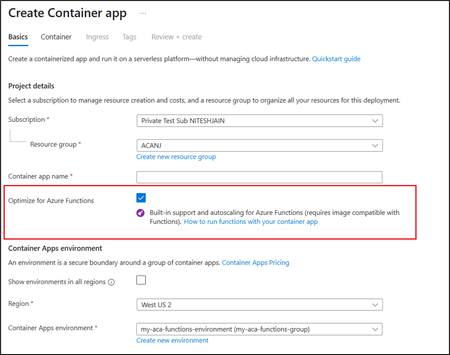
Azure Container Apps is introducing a new, streamlined method for running Azure Functions directly in Azure Container Apps (ACA). This integration allows you to leverage the full features and capabilities of Azure Container Apps while benefiting from the simplicity of auto-scaling provided by Azure Functions. With the new native hosting model, you can deploy Azure Functions directly onto Azure Container Apps using the Microsoft.App resource provider by setting “kind=functionapp” property on the container app resource. You can deploy Azure Functions using ARM templates, Bicep, Azure CLI, and the Azure portal. Get started today and explore the complete feature set of Azure Container Apps, including multi-revision management, easy authentication, metrics and alerting, health probes and many more. To learn more, visit: https://aka.ms/fnonacav29.1KViews2likes1Comment