dragon copilot
6 TopicsAI where and when you need it with Dragon Copilot's ability to focus
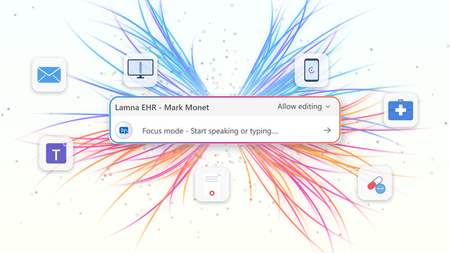
At HIMSS 2026, we showed that the most useful place to apply clinical intelligence is often not in a separate app or side window, but at the cursor, in the field where the clinician is already working. Our last post on this topic described the problem Dragon Copilot's focus capability is designed to solve: clinicians becoming data couriers, moving between windows, copying information from one system into another, and stitching together a day's work across multiple applications. That post looked ahead to what was coming. Now, it's here. What Dragon Copilot's focus capability does Dragon Copilot's focus capability brings AI directly into the text field where clinicians work, whether that's an EHR, a browser, Microsoft Word, SharePoint, or another desktop application. There is no separate application to launch and no workflow to rebuild. Simply place your cursor where you're working, select content if needed, and ask for help using natural language by voice or text. The focus capability works directly within the application you're already using, helping you stay in the flow of work. With focus, Dragon Copilot can: Read content from applications such as an EHR, browser, Microsoft Word, SharePoint, and other desktop applications. Answer questions about selected content and provide responses in context, using information from trusted sources and resources approved by the organization. Surface relevant information and insights without requiring manual searches, copying, or pasting. Generate, edit, and refine text directly where you're working. The experience is conversational and voice-first. Because the focus capability operates directly at the cursor, clinicians can take action without switching applications or rebuilding context. Questions are answered in context using information from the EHR and trusted sources, including resources approved by the organization. Focus in action The following examples illustrate how Dragon Copilot's focus capability helps clinicians read, answer, write, edit and surface information directly within their workflow. Journal and guideline Q&A Highlight a passage from a clinical guideline or journal article and ask: "Summarize the three key takeaways in patient-friendly language for the after-visit summary." The focus capability analyzes the selected content and generates a draft directly where you're working. Answer questions in context Clinicians often have the information they need in front of them but spend valuable time locating or interpreting it. Highlight relevant content and ask: "What does this recommendation mean for a patient with diabetes?" The focus capability reviews the selected information and delivers an answer within the workflow, without requiring clinicians to leave the application. The information is sourced from the EHR, a credible source such as MSD Manual, DailyMed, Medline Plus or from an organization’s internal source. Edit in place Select existing text and ask: "Convert this into a bulleted list." or "Summarize this HPI in two sentences." The focus capability reshapes the content directly where it already exists, helping clinicians refine documentation without disrupting their workflow. Surface relevant information Place your cursor inside a note and ask: "What's the patient's BMI?" The focus capability can retrieve relevant information available in context and return the answer inline, eliminating the need to navigate between screens, search for values, or perform calculations manually. Generate new content Need a referral letter, patient instruction, or summary? Simply ask. The focus capability can generate content directly within the destination field, helping clinicians create documentation where it belongs without copying and pasting between applications. Why this capability matters Bringing AI directly to the cursor is more than a convenience. It's what makes AI practical, visible, and actionable within everyday clinical workflows. Dragon Copilot's focus capability sits in a useful middle ground between ambient AI, which operates largely in the background, and traditional dictation, which requires clinicians to explicitly construct documentation themselves. Outputs are reviewable and editable before being finalized. Actions remain visible within the workflow, providing transparency and control. Clinicians can work without repeatedly navigating between applications or rebuilding context. Because the focus capability operates directly at the cursor, it creates an extensible foundation for future Dragon Copilot experiences and integrations from Microsoft and partners. When Dragon Copilot's focus capability brings AI directly to where clinicians are already working, copying, pasting, and window-switching fall away. Clinicians can access information, generate content, and take action without leaving their workflow, helping them spend less time managing technology and more time focused on patient care. Learn more about Dragon Copilot.Extend clinical workflows with Dragon Copilot AI Apps and Agents in Microsoft Marketplace
GA ANNOUNCEMENT Today, we're excited to announce the General Availability (GA) of Dragon Copilot AI Apps and Agents for physician workflows, a major milestone in building an open and trusted healthcare AI ecosystem. Healthcare organizations can now discover, build, deploy, and manage trusted AI-powered applications and agents that support specialized clinical and operational capabilities through Dragon Copilot. At the same time, partners can use self-service experiences to build, validate, certify, publish, and manage solutions that integrate directly into clinician workflows. Together, these capabilities bring healthcare organizations, clinicians, and partners onto a common platform designed to accelerate innovation while maintaining the trust, transparency, and governance required in healthcare. Why it matters to clinicians Clinicians need relevant insights delivered in the flow of care—not in another disconnected tool. Dragon Copilot AI Apps and Agents can surface specialized intelligence within existing workflows to support coding and documentation, medical decision-making, risk adjustment, prior authorization, diagnostic support, behavioral health screening, and preventive care. Dragon Copilot AI Apps and Agents for physicians provide capabilities for use cases such as: Coding and documentation optimization (Regard, RhythmX AI) Risk adjustment (RAAPID Inc) Prior authorization (Humata Health, Genzeon) Evidence-Based Hyper-Personalized Care Guidance (Atropos Health) Diagnostic support (Coming soon!) Cognitive & behavioral health screening (Canary Speech) Care Gaps & Preventive Health Reminders (Coming soon!) Clinician coaching (Whetstone Health) By bringing the right information into the physician’s existing workflow and using patient data from the EHR and the Dragon ambient context (audio, transcript and clinical note) to make insights more relevant, these capabilities can reduce context switching, streamline administrative work, and help physicians stay focused on patient care while maintaining clinical judgment and control workflows. Why it matters to healthcare organizations Healthcare organizations need a scalable way to expand the value of Dragon Copilot while maintaining enterprise governance. AI Apps and Agents provide access to a growing portfolio of specialized capabilities through a common platform, helping organizations increase return on their Dragon Copilot investment without adding fragmented solutions. Dragon Copilot AI Apps and Agents Helps increase ROI by extending Dragon Copilot across more clinical and operational use cases, seamlessly integrated into workflow Simplify solution discovery and purchase through Microsoft Marketplace Centralize deployment, policy, and lifecycle governance through the Dragon Admin Center Maintain clinician oversight and organizational standards for security, privacy, compliance, and responsible AI Reduce implementation burden with streamlined experiences that require minimal IT lift Build and deploy custom built apps/agents integrated with Dragon Copilot This creates a governed, scalable path to adopt new capabilities faster, making it easier to evaluate solutions, deploy them across teams, manage them consistently, and measure value without unnecessary operational complexity. Why it matters to partners Healthcare AI companies often have valuable, specialized capabilities but face significant complexity bringing them into clinical workflows and deploying them consistently across healthcare organizations. Dragon Copilot AI Apps and Agents give partners a standardized extensibility model for embedding their innovations where clinicians already work. Access ambient, patient and encounter context to deliver more relevant, timely experiences Integrate into the Dragon Copilot experience without building and maintaining bespoke workflow integrations for every customer Use self-service onboarding, technical validation, and applicable compliance certification to accelerate readiness Reach healthcare customers through Microsoft Marketplace and scale deployment through a trusted enterprise platform Build customer confidence with transparent solution information and consistent governance expectations By reducing the friction of workflow integration, distribution, and enterprise deployment, the platform helps partners focus on differentiated clinical value while expanding their reach at scale. Creating a trusted healthcare AI ecosystem Dragon Copilot connects specialized partner capabilities with clinical workflows through a trusted & scalable ecosystem. Streamlined self-service onboarding, package validation, compliance certification, and help partner innovations reach the market faster while giving healthcare organizations confidence to adopt and manage these AI solutions responsibly. “Healthcare moves at the speed of trust. You look at Microsoft and Dragon Copilot, we absolutely trust the combination of Microsoft and Dragon Copilot for industry leading innovation, highly trusted, responsible AI, and delivery at scale, and also the reach with the number of clinicians that Dragon Copilot has. And if you combine all these elements of innovation, your reach, track record, and the trust, that's a perfect recipe for partnership.” — Deepthi Bathina, CEO and Founder, GW RhythmX "I use Dragon Copilot in clinic every day. The extension program let me design, build, and implement the tool I wanted to make me a better clinician. It's never been this easy to be both the user and the builder." — Aaron Reinke, MD, Family Physician and Founder, Whetstone Health Explore the ecosystem For healthcare organizations – discover and deploy Explore how Dragon Copilot AI Apps and Agents on Microsoft Marketplace can deliver specialized AI solutions tailored to your clinical and operational needs through Dragon Copilot. Discover new capabilities, purchaseand deploytrusted solutions, and deliver more value to clinicians without disrupting existing workflows in Dragon Copilot, learn more here. For partners – build and publish Bring your differentiated expertise directly into Physician workflows by creating and publishing AI Apps and Agents that help healthcare organizations address high-value clinical and operational needs. Learn how to build and publish applications and agents Review our open-source code samples and start building today with Dragon Copilot’s extensibility framework and reach healthcare customers through Microsoft Marketplace. Publishyour Dragon offer on Microsoft on Marketplace Looking ahead Dragon Copilot is becoming a trusted destination for specialized healthcare AI—bringing partner innovation directly into familiar clinician workflows. As the ecosystem grows, we will expand support for Radiology and Nursing Apps and Agents, addressing the distinct role-based needs of multiple clinical personas. We will also evolve the end-user experience to be more adaptable, enabling chat-based experiences, richer interactivity, and new ways for clinicians to engage with partner capabilities in the flow of work. Streamlined self-service, transparent governance, and Marketplace distribution will help partners scale secure solutions while giving healthcare organizations confidence to adopt them. Together, we’re helping clinicians spend less time on administration and access the right intelligence at the right moment in care.

Clinical precision starts with more complete documentation
This blog is authored by Josh Waldo, Product Manager Every patient has a story, and that story deserves to be accurately reflected in the clinical documentation. Clinicians work hard to assess, diagnose, and care for patients, often while balancing complex cases, competing priorities, and limited time. While the diagnosis itself may be clear, the documentation does not always capture every detail that helps tell the full patient story. Important clinical information about severity, complexity, acuity, or related conditions may be discussed during the encounter but not fully reflected in the medical record. These details matter. Clinical documentation serves as the foundation for communication across care teams, supports quality reporting and care coordination, and provides an accurate record of the care delivered. Dragon Copilot helps clinicians create more complete documentation by identifying potential opportunities where additional specificity may be appropriate based on information already present within the encounter. This capability helps ensure that the documentation more fully reflects the clinician's assessment and the patient's clinical story. Rather than asking clinicians to remember every documentation requirement or revisit records after the encounter, Dragon Copilot can surface contextual suggestions that highlight where additional detail may strengthen the completeness of the note. For example, when documenting certain conditions, clinicians may receive suggestions that help capture additional clinically relevant details that were discussed during the visit and support a more complete description of the patient's condition. Importantly, these suggestions do not change a diagnosis, influence clinical decision-making, or replace clinician judgment. The clinician remains responsible for every diagnosis and every documentation decision. Dragon Copilot simply helps ensure that the documentation accurately reflects what the clinician already knows and has determined. Supporting better documentation without disrupting workflow Documentation quality should not require additional chart reviews, extensive research, or time-consuming follow-up work. Dragon Copilot is designed to fit naturally into existing clinical workflows, providing documentation support within the course of the encounter. By surfacing opportunities for greater specificity at the point of documentation, clinicians can address potential gaps in the moment rather than correcting them later. This may help reduce the need for downstream clarification requests from CDI and coding teams, saving time while improving the completeness of the medical record. Most importantly, clinicians remain in control. Suggestions are simply that suggestions. The clinician decides what is relevant, appropriate, and ultimately included in the note. Why more complete documentation matters Clinical documentation is used by many people beyond the author of the note. Physicians, nurses, specialists, care coordinators, coding professionals, quality teams, and healthcare organizations all rely on documentation to understand a patient's condition and the care that was provided. When documentation more fully reflects the clinician's assessment, it can support clearer communication across teams and a more consistent understanding of the patient's clinical status throughout the care journey. More complete documentation can also help organizations better reflect patient complexity, support quality initiatives, and reduce the administrative effort associated with documentation clarification and follow-up. For clinicians, that means less time spent revisiting notes and more confidence that the patient's story has been accurately captured in the record. AI that supports clinical expertise Dragon Copilot is built on a simple principle: AI should support clinical expertise, not replace it. Diagnosis specificity suggestions is built on a foundation of proven clinical AI innovation, informed by more than a decade of real-world healthcare experience. Drawing on years of clinician interactions and documentation insights, the feature is designed to surface meaningful opportunities for greater diagnostic specificity while fitting naturally into existing workflows. The technology does not diagnose patients, recommend treatments, or override clinical judgment. Instead, it acts as an intelligent assistant that helps clinicians identify opportunities to enhance documentation based on information already available during the encounter. By reducing some of the cognitive burden associated with documentation, Dragon Copilot allows clinicians to focus their attention where it matters most: caring for patients. Helping the right patient story reach the medical record Healthcare organizations continue to look for ways to improve documentation quality while reducing administrative burden. Achieving both goals requires technology that works alongside clinicians, helping them document care more efficiently without creating additional work. By helping clinicians capture greater detail within their existing workflows, Dragon Copilot supports more complete records, more accurate documentation, and a smoother documentation experience. Because better documentation is not about changing the diagnosis. It is about helping ensure that the right patient story is reflected in the medical record with greater clarity, completeness, and confidence. Learn more about Dragon Copilot.Modernizing radiology reporting—without disrupting care: A practical path to PowerScribe One
With growing imaging volumes, increasing complexity, and the rapid emergence of AI, healthcare organizations are reevaluating how their reporting environments support clinicians and strengthen operational performance. They are faced with how to modernize without interrupting the work that matters most. We developed our PowerScribe One solution and implementation approach with that reality in mind. In active production across a wide range of healthcare environments (including large integrated delivery networks, academic medical centers, independent radiology practices, and community hospitals), PowerScribe One reflects a solution that is both proven in practice and designed for what comes next. Over 250 organizations and 10,000+ radiologists use PowerScribe One to generate millions of reports each month. This scale is significant; it’s validation of what we bring through our solution and support. It reflects a system and team tested across diverse environments, integration landscapes, and operational models, performing reliably in real-world conditions. Combining the strength of our solutions with an experienced Microsoft team, we deliver a seamless implementation that minimizes disruption. Redefining the migration experience As I’ve worked with customers modernizing their reporting environments, I’ve noticed a consistent pattern of concern: how to modernize without disrupting the workflows teams rely on or the care they deliver. In my experience, even when a solution offers meaningful capabilities, customers still worry about the potential downsides of a prolonged migration. I understand that perspective. Many have worked with vendors who promise a “lift-and-shift” implementation but fall short of that expectation. Migrations can introduce real challenges, including downtime, retraining, and workflow disruption. Over time, we’ve seen that successful transformation is driven not only by the strength of the technology, but also by how effectively the transition is managed. With years of experience supporting PowerScribe environments, we’ve taken those insights and applied them to our approach. We defined what a successful PowerScribe One implementation looks like and developed a migration model designed to reduce risk while supporting adoption. Rather than viewing migration as a single milestone, PowerScribe One transitions are designed as a structured journey with clearly defined phases and timing: Discovery: Align on goals, workflows, and integration requirements Build: Preparing the technical and operational foundation Testing: Validating workflows end to end and addressing issues proactively Production: Supporting go-live with a focus on stability and adoption Each phase includes checkpoints and shared accountability to increase transparency and reduce uncertainty. Our Microsoft team works closely with our customers to build a project timeline that fits their needs while existing PowerScribe 360 workflows and content are leveraged, eliminating the need to rebuild from scratch. I’d also like to highlight at the center of this migration model is a parallel transition strategy. We enable PowerScribe 360 and PowerScribe One to operate side-by-side during our customer’s migration period. This approach provides organizations with the flexibility to: Introduce PowerScribe One to early adopters Validate workflows and integrations in a live environment Phase adoption across teams Maintain continuity throughout the transition In this measured approach, our customers can move forward with confidence, ensuring that systems, workflows, and teams are ready for successful adoption. The result is a model that is both repeatable and adaptable, capable of supporting organizations with varying levels of complexity. Our efforts to center our implementation process on the customer experience shows how migration work is not simply a technical capability proposition. This focus reflects our broader philosophy: transformation should be deliberate, not disruptive. From implementation to enablement Minimizing disruption doesn’t end with implementation. It extends into how teams are supported, trained, and enabled in their day-to-day workflows. Our focus on enablement is especially important in radiology, where even small workflow disruptions can have outsized impacts on productivity and the radiologist experience. With PowerScribe One, organizations not only gain access to a modern reporting solution but also support from teams with deep experience in radiology workflows, integrations, and large-scale deployments. With that in mind, I’ve seen firsthand how the healthcare landscape has radically changed over the last six years. Our customers tell us how workforce shifts in radiology means they are adapting their staffing models and workflows to include telework. With these changes in the workforce, organizations benefit from training and support models that are flexible, digital, and accessible remotely. We made live expert access (known to our customers as “drop-in help”) easily accessible through a simple QR code. It can be an ad hoc or scheduled engagement which ensures the offering aligns with a radiologist’s schedule. The feedback on this level of access we’ve received has been extremely positive and is resonating strongly with customers. I know that for any healthcare solution deployment to be successful, it requires a learning and support model that aligns with clinical schedules and operational realities. Modernizing radiology reporting is both a technical and operational effort with its success depending on advancing capability without disrupting clinical continuity. The transition to PowerScribe One shows this balance is achievable through phased adoption, low-disruption deployment, and strong user readiness. Organizations can modernize without affecting day-to-day care delivery with our structured approach, proven expertise and a focus on provider experience and patient outcomes. If you want to learn more about our approach or PowerScribe One, I’ll be at SIIM26, June 10-12, please stop by the Microsoft booth at 630-632. You can also discover how we partner with our customers why they decided to move to PowerScribe One by reading our Industry Blog.Dragon Copilot centralizes trusted medical content and relevant contextual information in-workflow
This blog is co-authored by Bert Hoorne, Principal Program Manager & Ksenya Kveler, Principle Medical Science Manager Dragon Copilot delivers medical intelligence from trusted sources directly within clinical workflows for healthcare organizations in one solution. We are pleased to announce that we are expanding those knowledge sources with additional best‑in‑class content providers and enabling broader access to your organization’s internal sources with Microsoft 365 Copilot integration. Access information from new credible medical content providers Dragon Copilot users will gain access to an additional robust collection of trusted clinical content from leading evidence-based resources. We are partnering with renowned publishers to bring you the best, most trusted content, safely and securely, within clinician’s workflows while helping to reduce the use of unauthorized AI tools and applications, commonly referred to, as “shadow AI.” Access content from Wolters Kluwer UpToDate We’ve partnered with Wolters Kluwer UpToDate to bring trusted, evidence-based clinical guidance directly into Dragon Copilot. Customers with an active Wolters Kluwer UpToDate license will be able to access UpToDate content in Dragon Copilot, within the context of their clinical workflows. This integration allows clinicians to ask both general questions and patient specific questions and receive answers grounded in UpToDate evidence, with clear references to supporting sources. Over time, it will also introduce contextual links to UpToDate concepts layered on top of Dragon Copilot–generated notes, further enhancing clinical insight at the point of care. “Clinicians need reliable guidance that supports fast, confident decision-making without disrupting care delivery. We are excited to partner with Microsoft to bring UpToDate’s gold standard evidence and expertise-based clinical insights to Dragon Copilot, helping clinicians quickly access, actionable answers that reduce cognitive burden and support better patient care.” Yaw Fellin, Senior Vice President and General Manager, UpToDate Clinical Decision Support and Provider Solutions Wolters Kluwer Health Here’s an example of UpToDate content embedded in the Dragon Copilot workflow: Obtain trusted clinical evidence with Elsevier ClinicalKey AI Elsevier’s ClinicalKey AI will be available in Dragon Copilot. This integration enables customers with an active Elsevier ClinicalKey AI license to surface trusted medical literature and clinical evidence directly within clinicians’ workflows. “Clinicians are navigating a complex and rapidly changing healthcare landscape and need solutions they can trust. The ClinicalKey AI extension for Dragon Copilot transforms how clinicians interact with trusted medical literature and clinical answers. The conversational interface makes evidence discovery faster and more intuitive.” Jukka Valimaki, SVP Clinical Solutions Elsevier Here’s an example of ClinicalKey AI content embedded in the Dragon Copilot workflow: Support clinical decisions with EBMcalc With the integration of EBMcalc medical calculators, Dragon Copilot enables clinicians to use evidence-based calculators directly within their workflows—applied in context to the patient they’re caring for. “Clinicians need trusted, evidence-based insights exactly at the point of care. By integrating EBMcalc’s rigorously curated clinical calculators and references into Dragon Copilot, we’re helping make high quality medical evidence more accessible, more actionable, and easier to use within everyday clinical workflows”. Louis Leff, MD, MACP, Founder and CEO EBMcalc Access independent evidence in Dragon Copilot with Wiley and Cochrane Wiley and Microsoft are partnering to bring scientific literature and clinical evidence directly into the healthcare workflow, starting with the Cochrane Library. Through this integration, customers with an active Cochrane Library AI license will be able to access Cochrane’s high-quality, independent evidence, systematic reviews, and clinical answers, to inform more reliable and efficient decision-making. This includes the Cochrane Database of Systematic Reviews (CDSR), the home of gold-standard evidence syntheses, widely used to inform clinical guidelines worldwide. "Working with Microsoft to bring the Cochrane Library into Dragon Copilot reflects a shared commitment to meeting researchers and clinicians where they are. Healthcare Institutions can now access independent, peer-reviewed evidence— right within their clinical workflow” Josh Jarrett, SVP & GM of AI Growth Wiley Access work context with Microsoft 365 Copilot in Dragon Copilot With the Microsoft 365 Copilot integration, Dragon Copilot enables clinicians to seamlessly access information from their emails, chats, OneDrive and SharePoint, within the flow of their clinical work. Clinicians can combine this information with additional questions and actions, all governed by existing organizational and user access controls. Use of this data within Dragon Copilot workflow remains fully at the user’s discretion. Here’s an example of content from an email surfaced by Microsoft 365 Copilot accessible through the Dragon Copilot workflow: Read more for a deeper dive on how Dragon Copilot enables work context access with Microsoft 365 Copilot integration. Safe web search Dragon Copilot safe web search delivers trusted, evidence linked answers when curated sources are unavailable—ensuring clinicians continue to receive timely support without disrupting their workflow. The goal of safe web search is to prevent broken workflows and eliminate unsafe external browsing. Clinicians remain within their clinical context, focused on the patient—without tab hopping or the risk of landing on unreliable or unverified websites. Safe web search eliminates “no response” dead ends by maintaining a seamless conversational experience in Dragon Copilot and reducing unanswered prompts. This capability is enabled by using verified, secure, and responsible mechanisms designed for safe clinical experiences. It enforces multilayer protection through evidence validation, provenance linked responses, content filtering, and regulated search with built in safeguards. Here’s an example of content from a safe web search in the Dragon Copilot workflow: Conclusion These advancements represent an important step forward in how Dragon Copilot delivers trusted medical intelligence - bringing together best‑in‑class clinical evidence, organizational knowledge, and safe web access in one governed, in‑workflow experience. We will continue to expand our partner ecosystem, deepen integrations with leading evidence providers, and evolve Dragon Copilot conversational extensibility to meet clinicians where they work.2.5KViews1like0CommentsBringing Organizational Knowledge into the Clinical Workflow
This blog is co-authored by Hadas Bitran, Partner GM, Health AI, Microsoft Health & Life Sciences Every day, clinicians spend valuable time looking for information that lives in different places. An email thread from a specialist colleague. A Microsoft Teams discussion about a complex case. Updated organizational processes buried in SharePoint or OneDrive. This information provides context that could be critical to their workflows or help inform their decisions. But that context is not part of their clinical workflow. The result? Clinicians are forced to break their clinical workflow, searching manually across organizational resources, and mentally combining scattered data points, all while a patient is waiting. This isn't a knowledge problem. It's a retrieval problem. And it's costing time, focus, cognitive burden and clinical confidence every single day. That's exactly the gap we're closing by bringing clinical intelligence and your organization's knowledge into one seamless, workflow-native experience. Clinical workflow, now with your organizational context Within Dragon Copilot, clinicians will be able to securely surface relevant information across Microsoft 365, without leaving the clinical workflow: Email: retrieve relevant information that was exchanged with patients, colleagues or from specialist correspondence, referral communications, or care coordination threads. find me the email from Dr. Ting that mentioned the latest research about this mutation. In this example, the chat functionality in Dragon Copilot uses the patient and encounter context to resolve the referenced mutation, then leverages Microsoft 365 Copilot behind the scenes to locate the email from Dr. Ting that mentions it. Microsoft Teams: surface information from Microsoft Teams chats that the clinician had with colleagues, discussions or group chat conversations. The patient is traveling to Florida. Identify dialysis centers near the patient’s destination based on information shared by Dr. Salomon in Microsoft Teams and provide practical travel guidelines I can share with the patient. In this example, Dragon Copilot uses trusted sources for travel guidelines and Microsoft 365 Copilot to retrieve relevant Microsoft Teams messages from Dr. Salomon, identifying nearby dialysis centers in Florida. SharePoint and OneDrive: access organizational knowledge on demand: HR policies, facility procedures, compliance guidelines, shift schedules, and more Who is on call for nephrology tonight and who is covering tomorrow morning? In this example, Dragon Copilot leverages Microsoft 365 Copilot behind the scenes to locate the most up‑to‑date Excel file with upcoming shift and coverage information from the hospital’s SharePoint, and surfaces the answer directly in the conversation, without disrupting the clinician’s workflow. With Microsoft 365 Copilot, work context is available directly inside Dragon Copilot, clinicians can choose if, and when to access their work information. Within Dragon Copilot, they can ask questions in natural language and receive the most relevant information, grounded in patient context, from trusted clinical sources and their Microsoft 365 data. One conversational flow. Full clinical and work context. No tab switching, no manual searching, no lost focus. Trusted by design, built for healthcare Security and privacy are built in from the ground up. Information is always accessed on behalf of the individual user, fully respecting existing Microsoft 365 identity and access management, compliance, and privacy controls, meaning clinicians see only what they're authorized to see, and that Dragon Copilot will only use their work context if the clinician consented to it. This also means no new security risks to manage, and no changes to how your organization governs access to information. For healthcare organizations where data sensitivity, regulatory compliance, and patient privacy are non-negotiable, this better-together experience is designed to meet that bar from day one. Join the Private Preview If you're a Dragon Copilot customer, and your organization is using Microsoft 365 Copilot, we invite you to be among the first to experience this new capability. Register now for early access to the private preview and play a role in shaping the future of clinical workflow intelligence. Register for private preview1.5KViews0likes0Comments