dotnet
42 Topics
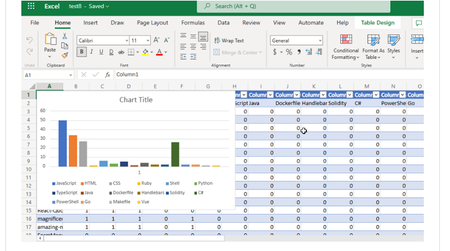
Visualizing Top GitHub Programming Languages in Excel with Microsoft Graph .NET SDK
Have you ever thought about going through all your GitHub Repositories, taking note of the languages used, aggregating them and visualizing it on Excel? Well, that is what this post is all about except you don’t have to do it manually in a mundane way.9.8KViews1like1CommentFrom Demo to Production: Building Microsoft Foundry Hosted Agents with .NET
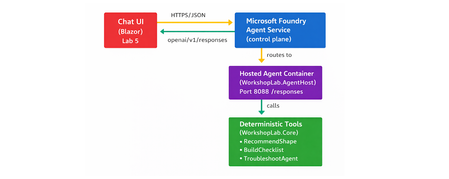
The Gap Between a Demo and a Production Agent Let's be honest. Getting an AI agent to work in a demo takes an afternoon. Getting it to work reliably in production, tested, containerised, deployed, observable, and maintainable by a team. is a different problem entirely. Most tutorials stop at the point where the agent prints a response in a terminal. They don't show you how to structure your code, cover your tools with tests, wire up CI, or deploy to a managed runtime with a proper lifecycle. That gap between prototype and production is where developer teams lose weeks. Microsoft Foundry Hosted Agents close that gap with a managed container runtime for your own custom agent code. And the Hosted Agents Workshop for .NET gives you a complete, copy-paste-friendly path through the entire journey. from local run to deployed agent to chat UI, in six structured labs using .NET 10. This post walks you through what the workshop delivers, what you will build, and why the patterns it teaches matter far beyond the workshop itself. What Is a Microsoft Foundry Hosted Agent? Microsoft Foundry supports two distinct agent types, and understanding the difference is the first decision you will make as an agent developer. Prompt agents are lightweight agents backed by a model deployment and a system prompt. No custom code required. Ideal for simple Q&A, summarisation, or chat scenarios where the model's built-in reasoning is sufficient. Hosted agents are container-based agents that run your own code .NET, Python, or any framework you choose inside Foundry's managed runtime. You control the logic, the tools, the data access, and the orchestration. When your scenario requires custom tool integrations, deterministic business logic, multi-step workflow orchestration, or private API access, a hosted agent is the right choice. The Foundry runtime handles the managed infrastructure; you own the code. For the official deployment reference, see Deploy a hosted agent to Foundry Agent Service on Microsoft Learn. What the Workshop Delivers The Hosted Agents Workshop for .NET is a beginner-friendly, hands-on workshop that takes you through the full development and deployment path for a real hosted agent. It is structured around a concrete scenario: a Hosted Agent Readiness Coach that helps delivery teams answer questions like: Should this use case start as a prompt agent or a hosted agent? What should a pilot launch checklist include? How should a team troubleshoot common early setup problems? The scenario is purposefully practical. It is not a toy chatbot. It is the kind of tool a real team would build and hand to other engineers, which means it needs to be testable, deployable, and extensible. The workshop covers: Local development and validation with .NET 10 Copilot-assisted coding with repo-specific instructions Deterministic tool implementation with xUnit test coverage CI pipeline validation with GitHub Actions Secure deployment to Azure Container Registry and Microsoft Foundry Chat UI integration using Blazor What You Will Build By the end of the workshop, you will have a code-based hosted agent that exposes an OpenAI Responses-compatible /responses endpoint on port 8088 . The agent is backed by three deterministic local tools, implemented in WorkshopLab.Core : RecommendImplementationShape — analyses a scenario and recommends hosted or prompt agent based on its requirements BuildLaunchChecklist — generates a pilot launch checklist for a given use case TroubleshootHostedAgent — returns structured troubleshooting guidance for common setup problems These tools are deterministic by design, no LLM call required to return a result. That choice makes them fast, predictable, and fully testable, which is the right architecture for business logic in a production agent. The end-to-end architecture looks like this: The Hands-On Journey: Lab by Lab The workshop follows a deliberate build → validate → ship progression. Each lab has a clear outcome. You do not move forward until the previous checkpoint passes. Lab 0 — Setup and Local Run Open the repo in VS Code or a GitHub Codespace, configure your Microsoft Foundry project endpoint and model deployment name, then run the agent locally. By the end of Lab 0, your agent is listening on http://localhost:8088/responses and responding to test requests. dotnet restore dotnet build dotnet run --project src/WorkshopLab.AgentHost Test it with a single PowerShell call: Invoke-RestMethod -Method Post ` -Uri "http://localhost:8088/responses" ` -ContentType "application/json" ` -Body '{"input":"Should we start with a hosted agent or a prompt agent?"}' Lab 0 instructions → Lab 1 — Copilot Customisation Configure repo-specific GitHub Copilot instructions so that Copilot understands the hosted-agent patterns used in this project. You will also add a Copilot review skill tailored to hosted agent code reviews. This step means every code suggestion you receive from Copilot is contextualised to the workshop scenario rather than giving generic .NET advice. Lab 1 instructions → Lab 2 — Tool Implementation Extend one of the deterministic tools in WorkshopLab.Core with a real feature change. The suggested change adds a stronger recommendation path to RecommendImplementationShape for scenarios that require all three hosted-agent strengths simultaneously. // In RecommendImplementationShape — add before the final return: if (requiresCode && requiresTools && requiresWorkflow) { return string.Join(Environment.NewLine, [ $"Recommended implementation: Hosted agent (full-stack)", $"Scenario goal: {goal}", "Why: the scenario requires custom code, external tool access, and " + "multi-step orchestration — all three hosted-agent strengths.", "Suggested next step: start with a code-based hosted agent, register " + "local tools for each integration, and add a workflow layer." ]); } You then write an xUnit test to cover it, run dotnet test , and validate the change against a live /responses call. This is the workshop's most important teaching moment: every tool change is covered by a test before it ships. Lab 2 instructions → Lab 3 — CI Validation Wire up a GitHub Actions workflow that builds the solution, runs the test suite, and validates that the agent container builds cleanly. No manual steps — if a change breaks the build or a test, CI catches it before any deployment happens. Lab 3 instructions → Lab 4 — Deployment to Microsoft Foundry Use the Azure Developer CLI ( azd ) to provision an Azure Container Registry, publish the agent image, and deploy the hosted agent to Microsoft Foundry. The workshop separates provisioning from deployment deliberately: azd owns the Azure resources; the Foundry control plane deployment is an explicit, intentional final step that depends on your real project endpoint and agent.yaml manifest values. Lab 4 instructions → Lab 5 — Chat UI Integration Connect a Blazor chat UI to the deployed hosted agent and validate end-to-end responses. By the end of Lab 5, you have a fully functioning agent accessible through a real UI, calling your deterministic tools via the Foundry control plane. Lab 5 instructions → Key Concepts to Take Away The workshop teaches concrete patterns that apply well beyond this specific scenario. Code-first agent design Prompt-only agents are fast to build but hard to test and reason about at scale. A hosted agent with code-backed tools gives you something you can unit test, refactor, and version-control like any other software. Deterministic tools and testability The workshop explicitly avoids LLM calls inside tool implementations. Deterministic tools return predictable outputs for a given input, which means you can write fast, reliable unit tests for them. This is the right pattern for business logic. Reserve LLM calls for the reasoning layer, not the execution layer. CI/CD for agent systems AI agents are software. They deserve the same build-test-deploy discipline as any other service. Lab 3 makes this concrete: you cannot ship without passing CI, and CI validates the container as well as the unit tests. Deployment separation The workshop's split between azd provisioning and Foundry control-plane deployment is not arbitrary. It reflects the real operational boundary: your Azure resources are long-lived infrastructure; your agent deployment is a lifecycle event tied to your project's specific endpoint and manifest. Keeping them separate reduces accidents and makes rollbacks easier. Observability and the validation mindset Every lab ends with an explicit checkpoint. The culture the workshop builds is: prove it works before moving on. That mindset is more valuable than any specific tool or command in the labs. Why Hosted Agents Are Worth the Investment The managed runtime in Microsoft Foundry removes the infrastructure overhead that makes custom agent deployment painful. You do not manage Kubernetes clusters, configure ingress rules, or handle TLS termination. Foundry handles the hosting; you handle the code. This matters most for teams making the transition from demo to production. A prompt agent is an afternoon's work. A hosted agent with proper CI, tested tools, and a deployment pipeline is a week's work done properly once, instead of several weeks of firefighting done poorly repeatedly. The Foundry agent lifecycle —> create, update, version, deploy —>also gives you the controls you need to manage agents in a real environment: staged rollouts, rollback capability, and clear separation between agent versions. For the full deployment guide, see Deploy a hosted agent to Foundry Agent Service. From Workshop to Real Project This workshop is not just a learning exercise. The repository structure, the tooling choices, and the CI/CD patterns are a reference implementation. The patterns you can lift directly into a production project include: The WorkshopLab.Core / WorkshopLab.AgentHost separation between business logic and agent hosting The agent.yaml manifest pattern for declarative Foundry deployment The GitHub Actions workflow structure for build, test, and container validation The azd + ACR pattern for image publishing without requiring Docker Desktop locally The Blazor chat UI as a starting point for internal tooling or developer-facing applications The scenario, a readiness coach for hosted agents. This is also something teams evaluating Microsoft Foundry will find genuinely useful. It answers exactly the questions that come up when onboarding a new team to the platform. Common Mistakes When Building Hosted Agents Having run workshops and spoken with developer teams building on Foundry, a few patterns come up repeatedly: Skipping local validation before containerising. Always validate the /responses endpoint locally first. Debugging inside a container is slower and harder than debugging locally. Putting business logic inside the LLM call. If the answer to a user query can be determined by code, use code. Reserve the model for reasoning, synthesis, and natural language output. Treating CI as optional. Agent code changes break things just like any other code change. If you do not have CI catching regressions, you will ship them. Conflating provisioning and deployment. Recreating Azure resources on every deploy is slow and error-prone. Provision once with azd ; deploy agent versions as needed through the Foundry control plane. Not having a rollback plan. The Foundry agent lifecycle supports versioning. Use it. Know how to roll back to a previous version before you deploy to production. Get Started The workshop is open source, beginner-friendly, and designed to be completed in a single day. You need a .NET 10 SDK, an Azure subscription, access to a Microsoft Foundry project, and a GitHub account. Clone the repository, follow the labs in order, and by the end you will have a production-ready reference implementation that your team can extend and adapt for real scenarios. Clone the workshop repository → Here is the quick start to prove the solution works locally before you begin the full lab sequence: git clone https://github.com/microsoft/Hosted_Agents_Workshop_dotNET.git cd Hosted_Agents_Workshop_dotNET # Set your Foundry project endpoint and model deployment $env:AZURE_AI_PROJECT_ENDPOINT = "https://<resource>.services.ai.azure.com/api/projects/<project>" $env:MODEL_DEPLOYMENT_NAME = "gpt-4.1-mini" # Build and run dotnet restore dotnet build dotnet run --project src/WorkshopLab.AgentHost Then send your first request: Invoke-RestMethod -Method Post ` -Uri "http://localhost:8088/responses" ` -ContentType "application/json" ` -Body '{"input":"Should we start with a hosted agent or a prompt agent?"}' When the agent answers as a Hosted Agent Readiness Coach, you are ready to begin the labs. Key Takeaways Hosted agents in Microsoft Foundry let you run custom .NET code in a managed container runtime — you own the logic, Foundry owns the infrastructure. Deterministic tools are the right pattern for business logic in production agents: fast, testable, and predictable. CI/CD is not optional for agent systems. Build it in from the start, not as an afterthought. Separate your provisioning ( azd ) from your deployment (Foundry control plane) — it reduces accidents and simplifies rollbacks. The workshop is a reference implementation, not just a tutorial. The patterns are production-grade and ready to adapt. References Hosted Agents Workshop for .NET — GitHub Repository Workshop Lab Guide Deploy a Hosted Agent to Foundry Agent Service — Microsoft Learn Microsoft Foundry Portal Azure Developer CLI (azd) — Microsoft Learn .NET 10 SDK Download650Views0likes0Comments
The .NET News daily newsletter for C# developers
Hi everyone! I'd like to invite you to my C# and Azure newsletter that I launched a little over a year ago: https://dotnetnews.co/ Its a labor of love project I use to help my fellow C# devs keep up on all the latest developer articles. We finally hit over 2,000 subscribers! Most importantly, If anyone has any ideas on how to make it better, I'd love to hear from you.311Views0likes0CommentsMemory leak from improper usage of Microsoft.Extensions.Configuration APIs in .NET on Windows
This particular problem is one I have come across several times here in support. Since my focus is on the web side of things I've only seen it in ASP.NET Core apps; however, the problem is not specific to ASP.NET Core and can occur in any .NET app. The issue can happen on .NET 6 and lower; however, it more readily manifests and is more apparent on .NET 7 and higher, due to the differences in how .NET manages the blocks of memory used for the GC heaps -- .NET 6 and below (and .NET Framework) use the larger, heap-specific segments, while .NET 7+ uses smaller, reusable regions. For extra reading about segments vs. regions, check out this post from Maoni Stephens, .NET GC Architect: https://devblogs.microsoft.com/dotnet/put-a-dpad-on-that-gc/ In addition, this particular leak appears to only occur on Windows, based on the relevant .NET source code, though it's worth skimming over if your app is hosted elsewhere just in case. Lastly, all the docs and source code links on this post are .NET 8-specific, as this is the minimum version of .NET that is in a supported state at the time of writing (not including ASP.NET Core 2.3 on .NET Framework). If your app is .NET 7 or older most of the concepts still apply and are accurate, and as far as I know everything is the same for .NET 9+. How You Might Spot This If your application is affected by this issue, you might notice one or more of the following symptoms: Gradual memory usage growth over time, even under consistent or light traffic If memory growth occurs over a long-enough period of time, it could lead to an OutOfMemoryException and performance degradation GC statistics showing a large amount of free memory in Gen2 that never seems to shrink Memory dumps containing a high number of pinned byte[] objects and FileSystemWatcher+AsyncReadState instances Most of these signs often appear well before the system runs out of memory, so early detection via monitoring tools and periodic dump analysis can help prevent user-facing impact. Since there are endless possibilities for what could cause memory leaks in an app, we'll dive right in to what this particular one looks like in a memory dump. The output commands will be from WinDbg with .NET's SOS extension, but the dotnet-dump CLI versions of the commands will also produce the same output. The dump output here is from an ASP.NET Core app running on .NET 8 on Windows+IIS. Investigation Let's start with the output of the SOS !gcheapstat command (I've slightly cleaned up the output here to make it more presentable, but it's close enough): 0:000> !gcheapstat Heap Gen0 Gen1 Gen2 LOH POH Heap0 40524872 38061216 485740568 0 0 Heap1 61045264 40133344 478243040 0 0 Heap2 15486520 39008632 479224200 0 53128 Heap3 49219288 35761584 478258096 0 0 Heap4 66295048 38873144 478597280 85776 81672 Heap5 15009984 40180176 488333256 0 1048 Heap6 42155696 38223640 470915848 0 8240 Heap7 90212936 38588136 479554176 98384 0 Total 379949608 308829872 3838866464 184160 144088 Free space: Heap Gen0 Gen1 Gen2 LOH POH Heap0 133544 32562168 454600200 0 0 SOH:86% Heap1 193888 34698976 446975904 0 0 SOH:83% Heap2 70128 33914136 447623832 0 0 SOH:90% Heap3 161296 30709896 446524992 0 0 SOH:84% Heap4 226584 33579616 447172344 32 0 SOH:82% Heap5 56168 34728256 456538104 0 0 SOH:90% Heap6 152896 33156456 440122928 0 0 SOH:85% Heap7 313336 33419096 447947832 32 0 SOH:79% Total 1307840 266768600 3587506136 64 0 Committed space: Heap Gen0 Gen1 Gen2 LOH POH Heap0 40570880 40505344 497610752 126976 4096 Heap1 61083648 40833024 489603072 4096 4096 Heap2 15536128 40177664 489631744 126976 69632 Heap3 49287168 36831232 490213376 4096 4096 Heap4 66326528 39550976 490278912 86016 135168 Heap5 15077376 41226240 500224000 4096 4096 Heap6 42209280 38801408 482791424 4096 69632 Heap7 90247168 39718912 489099264 102400 4096 Total 380338176 317644800 3929452544 458752 294912 Of the ~4GB committed space in Gen2, ~3.6 GB of that is free space. Output from the !eeheap -gc (from SOS) command shows all the regions (note they are smaller in size when comparing against pre-.NET 7 segments) as well as the total .NET GC heap size: (note: there are 8 heaps in this app, and all of them looked extremely similar, so for brevity I cut/removed heaps 1-7 and removed most of the entries in the middle, just know that Gen2 contained many more entries than Gen0 and Gen1): 0:000> !eeheap -gc ======================================== Number of GC Heaps: 8 ---------------------------------------- Heap 0 (0000026a598e5f80) Small object heap segment begin allocated committed allocated size committed size generation 0: 02aa6dd82d48 026b7bc00028 026b7bffffc8 026b7c000000 0x3fffa0 (4194208) 0x400000 (4194304) ... 02aa6dd86c88 026b91c00028 026b91eab088 026b91eb1000 0x2ab060 (2797664) 0x2b1000 (2822144) generation 1: 02aa6dd598c0 026a96000028 026a963f35c8 026a96400000 0x3f35a0 (4142496) 0x400000 (4194304) ... 02aa6dd82c90 026b7b800028 026b7ba962e0 026b7baa1000 0x2962b8 (2712248) 0x2a1000 (2756608) generation 2: 02aa6dd51af8 026a6a400028 026a6a7ebf20 026a6a800000 0x3ebef8 (4112120) 0x400000 (4194304) 02aa6dd51bb0 026a6a800028 026a6abef2e0 026a6ac00000 0x3ef2b8 (4125368) 0x400000 (4194304) [whole bunch of entries] 02aa6dd7f3c8 026b67c00028 026b67ff5f68 026b68000000 0x3f5f40 (4153152) 0x400000 (4194304) 02aa6dd7f818 026b69400028 026b697fa5b8 026b69800000 0x3fa590 (4171152) 0x400000 (4194304) NonGC heap segment begin allocated committed allocated size committed size 026a59072fb0 02aaef970008 02aaefa00f28 02aaefa10000 0x90f20 (593696) 0xa0000 (655360) Large object heap segment begin allocated committed allocated size committed size 02aa6dd52b80 026a70000028 026a70000028 026a7001f000 0x1f000 (126976) Pinned object heap segment begin allocated committed allocated size committed size 02aa6dd4ec40 026a5a000028 026a5a000028 026a5a001000 0x1000 (4096) ------------------------------ [cut] ------------------------------ GC Allocated Heap Size: Size: 0x10dec7650 (4528567888) bytes. GC Committed Heap Size: Size: 0x113e69000 (4628844544) bytes. The post width on this blogging platform, at the time of this writing, is not very good for wide, tabular data - so it might be easier to copy and paste that output above into a notepad so it's somewhat more understandable. In short, it shows there are a huge amount of Gen2 regions/segments that each have committed 0x400000 (4,194,304) bytes. This is the standard initial size of regions for the small object heap (SOH), as of this writing. Some of these might be slightly different in size due to various reasons, but overall it adds-up to a large amount of memory in Gen2. If we dump one of those regions/segments: 0:000> !dumpheap -segment 2aa6dd51af8 Address MT Size 026a6a400028 026a59a88160 129,240 Free 026a6a41f900 7ff9fa8e5d28 8,216 026a6a421918 7ff9fabcfdb8 40 026a6a421940 026a59a88160 92,552 Free 026a6a4382c8 7ff9fa8e5d28 8,216 026a6a43a2e0 7ff9fabcfdb8 40 026a6a43a308 026a59a88160 91,792 Free 026a6a450998 7ff9fa8e5d28 8,216 026a6a4529b0 7ff9fabcfdb8 40 026a6a4529d8 026a59a88160 75,648 Free 026a6a465158 7ff9fa8e5d28 8,216 026a6a467170 7ff9fabcfdb8 40 026a6a467198 026a59a88160 103,816 Free 026a6a480720 7ff9fa8e5d28 8,216 026a6a482738 7ff9fabcfdb8 40 026a6a482760 026a59a88160 117,904 Free 026a6a49f3f0 7ff9fa8e5d28 8,216 026a6a4a1408 7ff9fabcfdb8 40 026a6a4a1430 026a59a88160 92,504 Free 026a6a4b7d88 7ff9fa8e5d28 8,216 026a6a4b9da0 7ff9fabcfdb8 40 026a6a4b9dc8 026a59a88160 148,560 Free 026a6a4de218 7ff9fa8e5d28 8,216 026a6a4e0230 7ff9fabcfdb8 40 026a6a4e0258 026a59a88160 106,976 Free 026a6a4fa438 7ff9fa8e5d28 8,216 026a6a4fc450 7ff9fabcfdb8 40 026a6a4fc478 026a59a88160 79,408 Free 026a6a50faa8 7ff9fa8e5d28 8,216 026a6a511ac0 026a59a88160 161,488 Free 026a6a539190 7ff9fa8e5d28 8,216 026a6a53b1a8 7ff9fabcfdb8 40 026a6a53b1d0 026a59a88160 301,024 Free 026a6a5849b0 7ff9fa8e5d28 8,216 026a6a5869c8 026a59a88160 145,400 Free 026a6a5aa1c0 7ff9fa8e5d28 8,216 026a6a5ac1d8 7ff9fabcfdb8 40 026a6a5ac200 026a59a88160 99,216 Free 026a6a5c4590 7ff9fa8e5d28 8,216 026a6a5c65a8 7ff9fabcfdb8 40 026a6a5c65d0 026a59a88160 92,552 Free 026a6a5dcf58 7ff9fa8e5d28 8,216 026a6a5def70 7ff9fabcfdb8 40 026a6a5def98 026a59a88160 160,024 Free 026a6a6060b0 7ff9fa8e5d28 8,216 026a6a6080c8 7ff9fabcfdb8 40 026a6a6080f0 026a59a88160 92,544 Free 026a6a61ea70 7ff9fa8e5d28 8,216 026a6a620a88 7ff9fabcfdb8 40 026a6a620ab0 026a59a88160 81,576 Free 026a6a634958 7ff9fa8e5d28 8,216 026a6a636970 7ff9fabcfdb8 40 026a6a636998 026a59a88160 158,296 Free 026a6a65d3f0 7ff9fa8e5d28 8,216 026a6a65f408 7ff9fabcfdb8 40 026a6a65f430 026a59a88160 103,816 Free 026a6a6789b8 7ff9fa8e5d28 8,216 026a6a67a9d0 7ff9fabcfdb8 40 026a6a67a9f8 026a59a88160 89,176 Free 026a6a690650 7ff9fa8e5d28 8,216 026a6a692668 7ff9fabcfdb8 40 026a6a692690 026a59a88160 297,232 Free 026a6a6dafa0 7ff9fa8e5d28 8,216 026a6a6dcfb8 7ff9fabcfdb8 40 026a6a6dcfe0 026a59a88160 116,688 Free 026a6a6f97b0 7ff9fa8e5d28 8,216 026a6a6fb7c8 7ff9fabcfdb8 40 026a6a6fb7f0 026a59a88160 92,552 Free 026a6a712178 7ff9fa8e5d28 8,216 026a6a714190 7ff9fabcfdb8 40 026a6a7141b8 026a59a88160 149,184 Free 026a6a738878 7ff9fa8e5d28 8,216 026a6a73a890 7ff9fabcfdb8 40 026a6a73a8b8 026a59a88160 91,248 Free 026a6a750d28 7ff9fa8e5d28 8,216 026a6a752d40 7ff9fabcfdb8 40 026a6a752d68 026a59a88160 91,232 Free 026a6a7691c8 7ff9fa8e5d28 8,216 026a6a76b1e0 7ff9fabcfdb8 40 026a6a76b208 026a59a88160 92,544 Free 026a6a781b88 7ff9fa8e5d28 8,216 026a6a783ba0 7ff9fabcfdb8 40 026a6a783bc8 026a59a88160 170,760 Free 026a6a7ad6d0 7ff9fa8e5d28 8,216 026a6a7af6e8 7ff9fabcfdb8 40 026a6a7af710 026a59a88160 91,216 Free 026a6a7c5b60 7ff9fa8e5d28 8,216 026a6a7c7b78 7ff9fabcfdb8 40 026a6a7c7ba0 026a59a88160 140,096 Free 026a6a7e9ee0 7ff9fa8e5d28 8,216 026a6a7ebef8 7ff9fabcfdb8 40 Statistics: MT Count TotalSize Class Name 7ff9fabcfdb8 29 1,160 System.Threading.ThreadPoolBoundHandle 7ff9fa8e5d28 31 254,696 System.Byte[] 026a59a88160 31 3,856,264 Free Total 91 objects, 4,112,120 bytes Notice the majority of memory here is "Free" and the rest is mostly 8KB Byte[] objects. Why isn't the GC reclaiming or moving them? Well, those System.Byte[] objects are referenced and pinned: 0:000> !gcroot 026a6a7e9ee0 HandleTable: 0000026a5966a150 (strong handle) -> 026a930cba68 System.Threading.ThreadPoolBoundHandleOverlapped -> 026a930cb9e8 System.IO.FileSystemWatcher+AsyncReadState -> 026a6a7e9ee0 System.Byte[] 0000026a59669f10 (pinned handle) -> 026a6a7e9ee0 System.Byte[] Found 2 unique roots. As long as they are pinned, they won't be moved. Since between the pinned Byte[] objects is a bunch of free space, and this is Gen2, that free space is essentially unusable. Why is it unusable? Because allocations for the SOH are only made in Gen0. Thus, with all these regions and free memory being in Gen2, then they can't be used for allocations. Over time, as more and more of these Byte[] objects are allocated and pinned, more and more regions will continue getting promoted to Gen2 (assuming those objects are leaked and don't go away) and get essentially locked away. Also notice here the "System.IO.FileSystemWatcher+AsyncReadState" object that is referencing our pinned Byte[]. Here's another view of this problem - these are from a different set of dumps as the other data above, but it demonstrated the problem more visibly. This time I've focused the output on type names containing "FileSystemWatcher": First dump of the process: 0:000> !dumpheap -stat -type FileSystemWatcher Statistics: MT Count TotalSize Class Name 7fff3be68d20 1 24 System.IO.FileSystemWatcher+<>c 7fff3be363b8 2 48 System.IO.FileSystemWatcher+NormalizedFilterCollection 7fff3be36c98 2 48 System.IO.FileSystemWatcher+NormalizedFilterCollection+ImmutableStringList 7fff3be35600 2 240 System.IO.FileSystemWatcher 7fff3be623e8 9,569 229,656 System.WeakReference<System.IO.FileSystemWatcher> 7fff3be61718 9,569 612,416 System.IO.FileSystemWatcher+AsyncReadState Second dump taken a bit later: 0:000> !dumpheap -stat -type FileSystemWatcher Statistics: MT Count TotalSize Class Name 7fff3be68d20 1 24 System.IO.FileSystemWatcher+<>c 7fff3be363b8 2 48 System.IO.FileSystemWatcher+NormalizedFilterCollection 7fff3be36c98 2 48 System.IO.FileSystemWatcher+NormalizedFilterCollection+ImmutableStringList 7fff3be35600 2 240 System.IO.FileSystemWatcher 7fff3be623e8 18,037 432,888 System.WeakReference<System.IO.FileSystemWatcher> 7fff3be61718 18,037 1,154,368 System.IO.FileSystemWatcher+AsyncReadState The count and total size of these objects roughly doubled, but notice the total size of either is not particularly notable (<2MB for both in the second dump). Of course, the Byte[] associated with each one would add up, but with Byte[] being a very typical class used in .NET for various operations, it often does not stand out and is skipped over in !dumpheap output. Cause So where are those objects coming from? In all the cases I've seen so far, it's from code like this being present in a hot or somewhat frequently used code path: IConfiguration configuration = new ConfigurationBuilder() .AddJsonFile("appsettings.json", optional: true, reloadOnChange: true) .Build(); var someConfig = configuration["someConfig"]; The impact of this code will be greater the more often it is run. The problem is not apparent, but this is the trigger: reloadOnChange: true. By default, reloadOnChange==false, but it's specifically enabled in the code above. I think the reason for the specific usage of this code in apps is from the example for configuration files in the ASP.NET Core Configuration doc (though it's not specific to just the JSON provider, all the file-based provider examples show it): ASP.NET Core Configuration File Providers. The general .NET Configuration providers doc also shows something similar for all the file providers: .NET Configuration Providers. All of those, at the time of this writing, show reloadOnChange: true. This is really only meant to be used during app startup if a custom config file is being consumed that ASP.NET itself does not already consume automatically (assuming those defaults haven't been changed). Instead, as mentioned above, some folks have mistakenly used this code in something like a Controller action or middleware component to gain access to some needed config value, not knowing what it's doing under-the-hood (also not knowing that the config they typically sought was already loaded (and monitored) into the app's configuration system). Resolution First, you should understand whether or not you actually need to tell .NET to load the requested configuration file in the first place, as ASP.NET Core loads (and monitors) several for you already (again, assuming those defaults haven't been modified in your app). Normal .NET console apps also consume some standard configuration files if using the GenericHost implementation. Other app types may have their own set as well. The best solution is to access app config using the designed methods, such as through Dependency Injection. If it's determined the app needs to ingest and monitor a custom configuration file, add it once as early as possible (ideally during app startup), then only use retrieval methods later. These methods for ASP.NET Core are described here: Configuration in ASP.NET Core. Here is the general .NET configuration doc: Configuration in .NET. For a quick, short-term fix, or if your app absolutely must dynamically load a config file multiple times during normal app execution, then be sure to set reloadOnChange to false - that way the path for file monitoring is not taken. This is still inefficient and relatively slow (execution-wise) compared to using DI or the normal retrieval methods, however, because .NET will still have to open the file and parse it to provide what the app is asking for every time it's called. More Information What is the pathway here from reloadOnChange: true to the pinned buffer? Under-the-hood, when the config builder has its Build() called and when reloadOnChange==true, this triggers the configuration code to do some work with the goal of monitoring the specified file for changes. Specifically, this series of calls is made: The AllocateBuffer() call at the top is where the 8KB Byte[] buffer is allocated on the heap (in Gen0) - this is the same 8,216-byte object that is shown in the !dumpheap output earlier in this post. The StartRaisingEvents() call is the one that does much of the legwork here - it gets the buffer and leads down the path of getting it pinned. Here's a link to the latest .NET 8 (LTS, 8.0.16) code where this is done: https://github.com/dotnet/runtime/blob/v8.0.16/src/libraries/System.IO.FileSystem.Watcher/src/System/IO/FileSystemWatcher.Win32.cs#L52 Notice this particular method is in FileSystemWatcher.Win32.cs -- this is because Windows, Linux, and MacOS all handle file monitoring differently. On Windows, the actual Win32 API call that does the monitoring work is ReadDirectoryChangesW, which is called from here. Here's the signature for this function at the time of this writing: BOOL ReadDirectoryChangesW( [in] HANDLE hDirectory, [out] LPVOID lpBuffer, [in] DWORD nBufferLength, [in] BOOL bWatchSubtree, [in] DWORD dwNotifyFilter, [out, optional] LPDWORD lpBytesReturned, [in, out, optional] LPOVERLAPPED lpOverlapped, [in, optional] LPOVERLAPPED_COMPLETION_ROUTINE lpCompletionRoutine ); The buffer allocated in managed code is pinned and the address for it is passed as the lpBuffer parameter above. In short, Windows will populate the buffer with the requested change notifications when they happen, which is why .NET needs to pin it. Since MacOS and Linux do this differently, there is no pinned buffer needed. All of this happens each time IConfigurationBuilder.Build() is called when reloadOnChange==true. This means over time, more and more buffers will be created and pinned, eventually leading to heavy fragmentation of memory, as well as entire regions containing mostly free blocks that essentially go unused sitting in Gen2. This is not actually a new issue - it has existed for several years and popped up in various places. Here are some old GitHub issues describing it: https://github.com/aspnet/Configuration/issues/861 https://github.com/dotnet/extensions/issues/844 https://github.com/aspnet/Mvc/issues/7696 https://github.com/dotnet/extensions/issues/7864.4KViews3likes1CommentBuilding Real-Time Web Apps with SignalR, WebAssembly, and ASP.NET Core API
In this blog, we’ll explore how to build a real-time web application using three cutting-edge technologies: SignalR, WebAssembly, and ASP.NET Core API. SignalR simplifies the process of adding real-time web functionality, WebAssembly brings near-native performance to web apps, and ASP.NET Core API provides a robust and scalable backend. By combining these technologies, you can create web applications that are both highly responsive and performant.2.6KViews1like0CommentsTransforme o Desenvolvimento com .NET Aspire: Integração com JavaScript e Node.js
Desenvolver aplicações modernas e distribuídas nunca foi tão fácil! Com o .NET Aspire, você pode orquestrar diversos componentes, integrar tecnologias como JavaScript e Node.js, e garantir que tudo funcione perfeitamente na nuvem. Neste artigo, exploramos como essa poderosa ferramenta pode transformar seu fluxo de trabalho, simplificando a configuração e execução de aplicações complexas. E mais: confira exemplos práticos e uma demonstração do Chris Noring no último .NET Aspire Developers Day. Prepare-se para levar suas habilidades de desenvolvimento para o próximo nível!1.8KViews1like0CommentsApprendre .NET Aspire en français
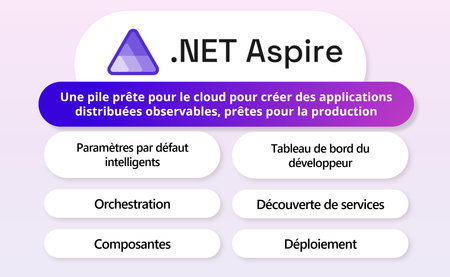
En mai dernier, durant Microsoft Build, .NET Aspire a été officiellement annoncé. Cette nouvelle pile prête pour le cloud et conçue pour .NET, visant à permettre aux développeurs de créer rapidement et facilement des applications natives cloud.1.7KViews2likes1Comment