dns
2 Topics
Static IP Issue with Windows Server 2022
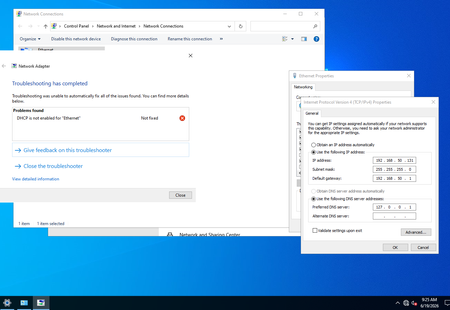
Hi Community, I installed my first Windows server to learn about the server and Active Directory. I installed Windows Server 2022. I configured a static IP and disabled IPv6. Then I installed Active Directory/DNS. After the reboot, the system is up, and I can access the internet and ping hosts. However, there is a world icon (No internet access) instead of a computer icon (internet access). In the static IP config, it replaced the DNS with 127.0.0.1, I know it'll use the local host as DNS. When I click on Network & Internet settings and Troubleshoot, I see an error 'DHCP is not enabled for "Ethernet"'. The only way it goes away is if I change the static to automatic. How can I fix this issue? Thanks, Also, I added forwarders such as 1.1.1.3 and 1.1.1.2 to DNS.372Views0likes2CommentsOdd Windows 2012 R2 DNS requests
So I have regular Cisco OpenDNS Umbrella rejections for malware-related DNS requests logged. From what I can tell these rejections are coming from our internal AD DNS Server. It has Umbrella DNS defined for DNS resolution of Internet-based domain names. When I look at the DNS audit logs, I don't see the initial Event ID 256 - LOOK_UP QUERY_RECEIVED for these rejections. If I did I would then see the internal source (i.e. - Source=x.x.x.x) and could investigate further. The first activity I see is always Event ID 260 - RECURSE_QUERY RECURSE_QUERY_OUT, which is the local AD DNS Server querying out to Umbrella to resolve the malicious QNAME's. Does this mean that the local AD DNS Server is the initial requestor? I've looked at the box in detail and don't see any strange processes running or anything else out of the ordinary when looking at the results of a netstat -abn command line result. So that's why I'm asking this here 🙂Solved3.8KViews0likes2Comments