delta
13 TopicsMGDC for SharePoint: Increased Changes in SizeInBytesWithVersions
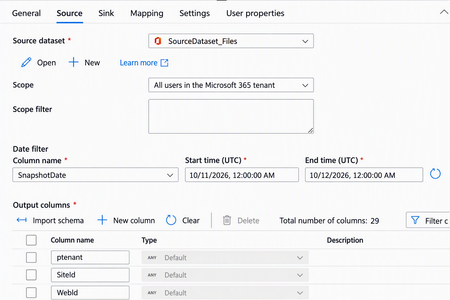
We noticed recently a change in behavior for the SizeInBytesWithVersions column in the SharePoint Files dataset exposed by Microsoft Graph Data Connect (MGDC). This column used to change only when there were changes to the file. It is now possible for this column to be changed when internal processes in the SharePoint infrastructure optimize the storage of file metadata, without a matching change in any other column exposed via the MGDC SharePoint Files dataset. This change is generally not a concern, but it could cause a larger number of SharePoint Files objects to show in MGDC as updated. This would in turn cause an increase in the size of deltas (a feature of MGDC where only changed objects are pulled) and a corresponding increase in cost for pulling SharePoint File deltas. If this becomes a concern, there is a simple workaround. In the copy task definition for the MGDC SharePoint Files dataset, in the Source tab, under the Output columns list, you can delete the SizeInBytesWithVersions column to filter it out of the results. This way, the deltas will see a corresponding reduction.MGDC for SharePoint: AadObjectId may sometimes be missing in User metadata (fixed)
We identified issues affecting specific Microsoft Graph Data Connect (MGDC) for SharePoint scenarios. In some cases, user identity records in the SharePoint Sharing and SharePoint Groups (SPGroups) datasets lacked the Entra ID object ID (formerly Azure Active Directory Object ID, or AadObjectId). As a result, the same user could appear differently across reports, causing discrepancies in reported user counts. We resolved the issue by improving the identity resolution. The Sharing and SPGroups datasets now use Entra ID identity information to retrieve the complete and accurate AadObjectId values. We also identified a scenario where a user was deleted from Entra Id but still showed in the dataset either with a stale or an empty value for AadObjectId. Going forward, those users will consistently show up with an empty AadObjectId. If you use the Sharing or SPGroups datasets, you may notice more accurate user information and changes in user counts compared with earlier reports. User objects may now include AadObjectId values where these did not show before and stale user objects will show up with empty values for AadObjectId. Delta datasets will also reflect these updated or removed objects as a result of this fix. This update is being rolled out in the next few weeks. It improves the accuracy and consistency of user identities in permissions datasets, giving customers greater confidence when reviewing which users have access to SharePoint and OneDrive content.MGDC for SharePoint: Richer data for read-locked and archived sites
We’re improving the Microsoft Graph Data Connect (MGDC) for SharePoint Sites dataset to provide more complete information for read-locked and archived sites. What’s changing Previously, read-locked and archived sites appeared as partial rows, with only a limited number of columns populated. With this update, these sites are fully populated with the same fields and level of detail as other sites in the dataset. What you’ll see in the data 1) Fully populated rows Standard fields that were previously empty for read-locked and archived sites will now contain their actual values. 2) A more accurate ReadLocked signal The ReadLocked field will now reflect the site’s actual lock state independently of its archival status: An archived site reports ReadLocked = false. A genuinely read-locked site reports ReadLocked = true. This makes it easier to distinguish archived sites from sites that are specifically read-locked. What’s not changing No schema changes: The structure of the MGDC SharePoint Sites dataset remains the same. No change in site coverage: The same sites continue to appear, so the row count remains unchanged. No change for normal sites: Sites that are neither archived nor read-locked continue to report the same values. This update only enriches rows that were previously partially populated. What to expect when the update is enabled The first snapshot after enablement will contain a one-time expected delta: Previously sparse rows will become fully populated. Archived sites will report their genuine lock state. For many archived sites, ReadLocked will change from true to false, because archival status will no longer mask the underlying lock state. If you are using MGDC for SharePoint Delta Datasets, note that the SharePoint Sites dataset will show a one-time increase in the Delta due to the changes described here. This will have no impact on other datasets. After this initial snapshot, subsequent snapshots will follow the updated behavior.MGDC for SharePoint FAQ: Dataset types and features
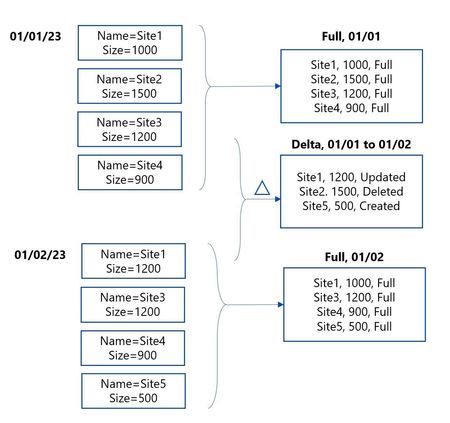
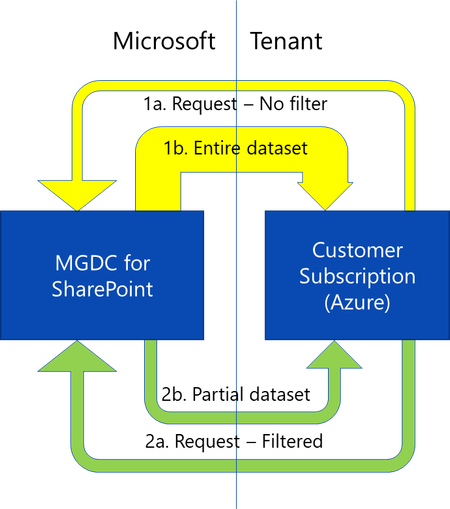
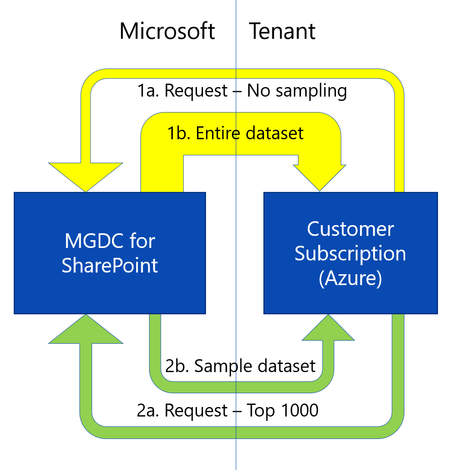
In this post, we’ll discuss the different types of datasets on Microsoft Graph Data Connect (MGDC) for SharePoint and which specific features apply to each one, including deltas, sampling and filtering. If you’re new to MGDC, get an overview at https://aka.ms/SharePointData.Understanding the Notebooks in the Oversharing Template v2 (Microsoft Fabric)
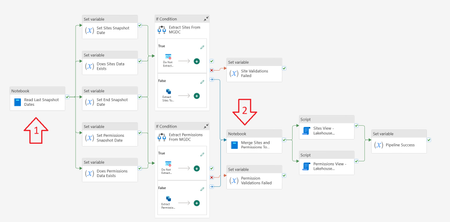
The Microsoft Graph Data Connect for SharePoint team published two notebooks used with Microsoft Fabric in the Information Oversharing v2 template. This blog explains what each code block inside these notebooks does. The goal was to help you understand what the notebooks do. Note that this document was written with help from Copilot, using simple prompts like “Analyze each section of this Jupyter notebook with PySpark and Scala code. Describe what each section does.” Notebook 1: Read Last Snapshot Dates This first notebook runs right as the pipeline starts. It checks the environment, verifies if the Sites and Permission tables exist in the Lakehouse, checks the last day data was gathered from MGDC and calculates the start and end date to use. It also cleans the staging tables and stores a few commands that are used in later steps. Section 0 – Set the Default Lakehouse for Notebook to Run %%configure { "defaultLakehouse": { "name": { "parameterName": "lakehouseName", "defaultValue": "defaultlakehousename" } } } This section uses the %%configure magic command to set a JSON configuration that defines a parameter (lakehouseName) with the default value "defaultlakehousename". This setting ensures that when the notebook is launched through a pipeline, it dynamically selects the target Lakehouse. Section 1 – Initialize Parameters import java.time.LocalDateTime import java.time.format.DateTimeFormatter import java.time.temporal.ChronoUnit import java.util.UUID import java.text.SimpleDateFormat import java.time.{LocalDate, LocalDateTime, Period} import java.time.format.DateTimeFormatter import java.time.temporal.ChronoUnit import java.util.Calendar import java.sql.Timestamp val runId = "00000000-0000-0000-0000-000000000000" val workspaceId = spark.conf.get("trident.workspace.id") val workspaceName = "LakeHouseTesting" val lakehouseId = spark.conf.get("trident.lakehouse.id") val lakehouseName = "IMAXDefault" val sitesStagingTableName = "Sites_Staging" val sitesFinalTableName = "Sites" val permissionsStagingTableName = "Permissions_Staging" val permissionsFinalTableName = "Permissions" val endTime = "2024-11-15T00:00:00Z" spark.conf.set("spark.sql.caseSensitive", true) This section imports various libraries for date/time handling and initializes key parameters for the ETL process. These include a run identifier (runId), workspace and Lakehouse information (with some values coming from Spark configuration), table names for staging and final datasets, and a fallback endTime. It also enforces case sensitivity in Spark SQL. Section 2 – Checking Required Final Tables Exist or Not val lakehouse = mssparkutils.lakehouse.get(lakehouseName) val lakehouseId = lakehouse.id val workspaceName = notebookutils.runtime.context("currentWorkspaceName") val permissionsStagingLocation = s"abfss://${workspaceName}@onelake.dfs.fabric.microsoft.com/${lakehouseName}.Lakehouse/Tables/${permissionsStagingTableName}" val sitesStagingLocation = s"abfss://${workspaceName}@onelake.dfs.fabric.microsoft.com/${lakehouseName}.Lakehouse/Tables/${sitesStagingTableName}" val sitesFinalLocation = s"abfss://${workspaceName}@onelake.dfs.fabric.microsoft.com/${lakehouseName}.Lakehouse/Tables/${sitesFinalTableName}" val permissionsFinalLocation = s"abfss://${workspaceName}@onelake.dfs.fabric.microsoft.com/${lakehouseName}.Lakehouse/Tables/${permissionsFinalTableName}" val tables = spark.catalog.listTables() val siteTableCount = tables.filter(col("name") === lit(sitesFinalTableName) and array_contains(col("namespace"), lakehouseName) ).count() val permissionsTableCount = tables.filter(col("name") === lit(permissionsFinalTableName) and array_contains(col("namespace"), lakehouseName)).count() val siteStagingTableCount = tables.filter(col("name") === lit(sitesStagingTableName) and array_contains(col("namespace"), lakehouseName) ).count() val permissionsStagingTableCount = tables.filter(col("name") === lit(permissionsStagingTableName) and array_contains(col("namespace"), lakehouseName)).count() This section retrieves the Lakehouse object and uses it to construct ABFS paths for both staging and final tables (for Sites and Permissions). It then checks for the existence of these tables by listing them in Spark’s catalog and filtering by name and namespace. Section 3 – Getting Snapshot Dates from Last Successful Extracts import org.apache.spark.sql.functions.{col, _} import org.apache.spark.sql.types._ import org.apache.spark.sql.{DataFrame, Row, SparkSession} import org.apache.spark.storage.StorageLevel val dtCurrentDateFormatt = DateTimeFormatter.ofPattern("yyyy-MM-dd HH:mm:ss.S") val dtRequiredtDateFormatt = DateTimeFormatter.ofPattern("yyyy-MM-dd'T'HH:mm:ss'Z'") var siteDataExists: Boolean = false var permissionsDataExists: Boolean = false val siteSnapshotDate = { if (siteTableCount == 1) { val dfSites = spark.sql(s"SELECT MAX(SnapshotDate) AS SnapshotDate FROM ${lakehouseName}.${sitesFinalTableName} ") val rowSites: Row = dfSites.select("SnapshotDate").head(1)(0) if (rowSites.get(0) == null) endTime else { siteDataExists = true println(s"Sites data Exists: ${siteDataExists}") LocalDateTime.parse(rowSites.get(0).toString(), dtCurrentDateFormatt) .format(dtRequiredtDateFormatt) } } else { endTime } } val permissionsSnapshotDate = { if (permissionsTableCount == 1) { val dfPermissions = spark.sql(s"SELECT MAX(SnapshotDate) AS SnapshotDate FROM ${lakehouseName}.${permissionsFinalTableName} ") val rowPermissions: Row = dfPermissions.select("SnapshotDate").head(1)(0) if (rowPermissions.get(0) == null) endTime else { permissionsDataExists = true println(s"Permissions data Exists: ${permissionsDataExists}") LocalDateTime.parse(rowPermissions.get(0).toString(), dtCurrentDateFormatt) .format(dtRequiredtDateFormatt) } } else { endTime } } This section queries the final tables to retrieve the latest SnapshotDate for both Sites and Permissions. It then reformats the date into an ISO-compliant format. If no snapshot date is found, it defaults to the predefined endTime, and two boolean flags (siteDataExists and permissionsDataExists) are toggled accordingly. Section 4 – Generate View Script for Sites val sitesView: String = s""" CREATE OR ALTER VIEW vw${sitesFinalTableName} AS SELECT *, [StorageQuotaFriendly] = (case when StorageQuota < 1048576 then concat(ceiling(StorageQuota / 1024.0), ' KB') when StorageQuota < 1073741824 then concat(ceiling(StorageQuota / 1048576.0), ' MB') when StorageQuota < 1099511627776 then concat(ceiling(StorageQuota / 1073741824.0), ' GB') when StorageQuota < 1125899906842624 then concat(ceiling(StorageQuota / 1099511627776.0), ' TB') else concat(ceiling(StorageQuota / 1125899906842624.0), ' PB') end ), [StorageUsedFriendly] = (case when StorageUsed < 1048576 then concat(ceiling(StorageUsed / 1024.0), ' KB') when StorageUsed < 1073741824 then concat(ceiling(StorageUsed / 1048576.0), ' MB') when StorageUsed < 1099511627776 then concat(ceiling(StorageUsed / 1073741824.0), ' GB') when StorageUsed < 1125899906842624 then concat(ceiling(StorageUsed / 1099511627776.0), ' TB') else concat(ceiling(StorageUsed / 1125899906842624.0), ' PB') end ) FROM ${sitesFinalTableName} """.stripMargin.replaceAll("[\n\r]"," ") println(sitesView) Here a SQL view (vwSites) is dynamically generated for the Sites final table. The view adds two computed columns (StorageQuotaFriendly and StorageUsedFriendly) that convert byte values into more digestible units such as KB, MB, GB, etc. This script will be stored and executed later. Section 5 – Generate View Script for Permissions val permissionsView: String = s""" CREATE OR ALTER VIEW vw${permissionsFinalTableName} AS SELECT *, ShareeDomain = CASE WHEN CHARINDEX('@', SharedWith_Email) > 0 AND CHARINDEX('.', SharedWith_Email) > 0 THEN SUBSTRING(SharedWith_Email,CHARINDEX('@', SharedWith_Email)+1,LEN(SharedWith_Email)) ELSE '' END, ShareeEMail = CASE WHEN CHARINDEX('@', SharedWith_Email) > 0 THEN SharedWith_Email ELSE '' END, PermissionsUniqueKey = CONCAT(SiteId,'_',RoleDefinition,'_',ScopeId,'_',COALESCE(LinkId,'00000000-0000-0000-0000-000000000000')), EEEUPermissionsCount = SUM(CASE WHEN SharedWith_Name LIKE 'Everyone except external users' THEN 1 ELSE NULL END ) OVER( PARTITION BY CONCAT(SiteId,'_',RoleDefinition,'_',ScopeId,'_',COALESCE(LinkId,'00000000-0000-0000-0000-000000000000'),SharedWith_Name) ), ExternalUserCount = SUM(CASE WHEN SharedWith_TypeV2 LIKE 'External' THEN 1 ELSE NULL END ) OVER( PARTITION BY CONCAT(SiteId,'_',RoleDefinition,'_',ScopeId,'_',COALESCE(LinkId,'00000000-0000-0000-0000-000000000000'),SharedWith_Name) ), B2BUserCount = SUM(CASE WHEN SharedWith_TypeV2 LIKE 'B2BUser' THEN 1 ELSE NULL END ) OVER( PARTITION BY CONCAT(SiteId,'_',RoleDefinition,'_',ScopeId,'_',COALESCE(LinkId,'00000000-0000-0000-0000-000000000000'),SharedWith_Name) ) FROM ${permissionsFinalTableName} """.stripMargin.replaceAll("[\n\r]"," ") println(permissionsView) This section builds a SQL view (vwPermissions) for the Permissions final table. It derives additional columns like ShareeDomain, ShareeEMail, and a composite key (PermissionsUniqueKey) while applying window functions to compute counts (e.g., for external or B2B users). This script will also be stored and executed later. Section 6 – Truncate the Staging Tables from Previous Runs if (siteStagingTableCount == 1) { spark.sql(s"DELETE FROM ${lakehouseName}.${sitesStagingTableName} ") println(s"Staging table deleted: ${lakehouseName}.${sitesStagingTableName}") } else { println(s"Staging table ${lakehouseName}.${sitesFinalTableName} not found") } if (permissionsStagingTableCount == 1) { spark.sql(s"DELETE FROM ${lakehouseName}.${permissionsStagingTableName} ") println(s"Staging table deleted: ${lakehouseName}.${permissionsStagingTableName}") } else { println(s"Staging table ${lakehouseName}.${permissionsStagingTableName} not found") } This section checks if the staging tables exist (by count) and, if found, issues a SQL DELETE command to remove existing data so that new data can be loaded. It prints messages indicating the action taken. Section 7 – Return Snapshot Dates Back to Pipeline import mssparkutils.notebook val returnData = s"""{\"LakehouseId\": \"${lakehouseId}\", \"SitesStagingTableName\": \"${sitesStagingTableName}\", \"SitesFinalTableName\": \"${sitesFinalTableName}\", \"SitesSnapshotDate\": \"${siteSnapshotDate}\", \"SitesDataExists\": ${siteDataExists}, \"SitesView\": \"${sitesView}\", \"PermissionsStagingTableName\": \"${permissionsStagingTableName}\", \"PermissionsFinalTableName\": \"${permissionsFinalTableName}\", \"PermissionsSnapshotDate\": \"${permissionsSnapshotDate}\", \"EndSnapshotDate\": \"${endTime}\", \"PermissionsDataExists\": ${permissionsDataExists}, \"PermissionsView\": \"${permissionsView}\"}""" println(returnData) mssparkutils.notebook.exit(returnData) This concluding section aggregates the key metadata—including Lakehouse information, table names, snapshot dates, existence flags, and the generated view scripts—into a JSON string. It then exits the notebook by returning that JSON to the pipeline. Notebook 2: Merge Sites and Permissions to Final Table This notebook runs after the Sites and Permissions data from MGDC has been collected successfully into the staging tables. If this is the first collection, it handles them as full datasets, storing the data directly in the final tables. If this is using MGDC for SharePoint delta datasets, it merges the new, updated or deleted objects from the staging tables into the final tables. Note: The word "Delta" here might refer to Delta Parquet (an efficient data storage format used by tables in a Microsoft Fabric Lakehouse) or to the MGDC for SharePoint Delta datasets (how MGDC can return only the objects that are new, updated or deleted between two dates). It can be a bit confusing, so be aware of the two interpretations of the word. Section 0 – Set the Default Lakehouse for Notebook to Run %%configure { "defaultLakehouse": { "name": { "parameterName": "lakehouseName", "defaultValue": "defaultlakehousename" } } } This section uses the same Lakehouse configuration as in Notebook 1. It sets the default Lakehouse through a parameter (lakehouseName) to support dynamic running of the notebook in different environments. Section 1 – Initialize Parameters import java.time.LocalDateTime import java.time.format.DateTimeFormatter import java.time.temporal.ChronoUnit import java.util.UUID import java.text.SimpleDateFormat import java.time.{LocalDate, LocalDateTime, Period} import java.time.format.DateTimeFormatter import java.time.temporal.ChronoUnit import java.util.Calendar val runId = "00000000-0000-0000-0000-000000000000" val workspaceId = spark.conf.get("trident.workspace.id") val workspaceName = "LakeHouseTesting" val lakehouseId = spark.conf.get("trident.lakehouse.id") val lakehouseName = spark.conf.get("trident.lakehouse.name") val sitesStagingTableName = "Sites_Staging" val sitesFinalTableName = "Sites" val permissionsStagingTableName = "Permissions_Staging" val permissionsFinalTableName = "Permissions" spark.conf.set("spark.sql.caseSensitive", true) This section is like Notebook 1’s Section 1 but here lakehouseName is retrieved from the configuration. It initializes variables needed for merging, such as run IDs, workspace/Lakehouse identifiers, and table names. Section 2 – Read Sites Dataset from Staging Table val lakehouse = mssparkutils.lakehouse.get(lakehouseName) val lakehouseId = lakehouse.id val workspaceName = notebookutils.runtime.context("currentWorkspaceName") println("Started reading Sites dataset") val sitesStagingLocation = s"abfss://${workspaceName}@onelake.dfs.fabric.microsoft.com/${lakehouseName}.Lakehouse/Tables/${sitesStagingTableName}" val dfSitesStaging = spark.read.format("delta").load(sitesStagingLocation) println("Completed reading Sites dataset") This section constructs the ABFS path for the Sites staging table and reads the dataset into a DataFrame using the Delta Parquet format. It includes print statements to track progress. Section 3 – Read Permissions Dataset from Staging Table println("Started reading Permissions dataset") val permissionsStagingLocation = s"abfss://${workspaceName}@onelake.dfs.fabric.microsoft.com/${lakehouseName}.Lakehouse/Tables/${permissionsStagingTableName}" val dfPermissionsStaging = spark.read.format("delta").load(permissionsStagingLocation) println("Completed reading Permissions dataset") This section performs the analogous operation for the Permissions staging table, loading the dataset into a DataFrame and providing console output for monitoring. Section 4 – Check Final Tables Exist or Not import io.delta.tables.DeltaTable val sitesFinalLocation = s"abfss://${workspaceName}@onelake.dfs.fabric.microsoft.com/${lakehouseName}.Lakehouse/Tables/${sitesFinalTableName}" val permissionsFinalLocation = s"abfss://${workspaceName}@onelake.dfs.fabric.microsoft.com/${lakehouseName}.Lakehouse/Tables/${permissionsFinalTableName}" val sitesFinalTableExists = DeltaTable.isDeltaTable(spark, sitesFinalLocation) if (!sitesFinalTableExists) { println("Final Sites table not exists. Creating final Sites table with schema only") dfSitesStaging.filter("1=2").write.format("delta").mode("overwrite").save(sitesFinalLocation) println("Final Sites table created") } else { println("Final Sites table exists already") } val permissionsFinalTableExists = DeltaTable.isDeltaTable(spark, permissionsFinalLocation) if (!permissionsFinalTableExists) { println("Final Permissions table not exists. Creating final Permissions table with schema only") dfPermissionsStaging.filter("1=2").write.format("delta").mode("overwrite").save(permissionsFinalLocation) println("Final Permissions table created") } else { println("Final Permissions table exists already") } This section checks whether the final tables for Sites and Permissions exist. If a table does not exist, it creates an empty table (schema only) from the staging DataFrame by filtering out data (filter("1=2")). Section 5 – Merge Sites Data from Staging Table to Final Table import io.delta.tables._ import org.apache.spark.sql.functions._ import org.apache.spark.sql.expressions.{Window, WindowSpec} import org.apache.spark.sql.functions.{coalesce, lit, sum, col, _} import org.apache.spark.sql.types.{StructField, _} import org.apache.spark.sql.{DataFrame, Row, SparkSession} import org.apache.spark.storage.StorageLevel val deltaTableSource = DeltaTable.forPath(spark, sitesStagingLocation) val deltaTableTarget = DeltaTable.forPath(spark, sitesFinalLocation) import spark.implicits._ val dfSource = deltaTableSource.toDF //Delete records that have Operation as Deleted println("Merging Sites dataset from current staging table") deltaTableTarget .as("target") .merge( dfSource.as("source"), "source.Id = target.Id") .whenMatched("source. Operation = 'Deleted'") .delete() .whenMatched("source.Operation != 'Deleted'") .updateAll() .whenNotMatched("source.Operation != 'Deleted'") .insertAll() .execute() println("Merging of Sites dataset completed") This section performs a Delta Lake merge (upsert) operation on the Sites data. The merge logic deletes matching records when the source’s Operation is 'Deleted', updates other matching records, and inserts new records that are not marked as 'Deleted'. Section 6 – Merge Permissions Data from Staging Table to Final Table import io.delta.tables._ import org.apache.spark.sql.functions._ import org.apache.spark.sql.expressions.{Window, WindowSpec} import org.apache.spark.sql.functions.{coalesce, lit, sum, col, _} import org.apache.spark.sql.types.{StructField, _} import org.apache.spark.sql.{DataFrame, Row, SparkSession} import org.apache.spark.storage.StorageLevel val deltaTablePermissionsSource = DeltaTable.forPath(spark, permissionsStagingLocation) val deltaTablePermissionsTarget = DeltaTable.forPath(spark, permissionsFinalLocation) import spark.implicits._ val dfPermissionsSource = deltaTablePermissionsSource.toDF //Delete records that have Operation as Deleted println("Merging Permissions dataset from current staging table") deltaTablePermissionsTarget .as("target") .merge( dfPermissionsSource.as("source"), """source.SiteId = target.SiteId and source.ScopeId = target.ScopeId and source.LinkId = target.LinkId and source.RoleDefinition = target.RoleDefinition and coalesce(source.SharedWith_Name,"") = coalesce(target.SharedWith_Name,"") and coalesce(source.SharedWith_TypeV2,"") = coalesce(target.SharedWith_TypeV2,"") and coalesce(source.SharedWith_Email,"") = coalesce(target.SharedWith_Email,"") and coalesce(source.SharedWith_AADObjectId,"") = coalesce(target.SharedWith_AADObjectId,"") """) .whenMatched("source. Operation = 'Deleted'") .delete() .whenMatched("source.Operation != 'Deleted'") .updateAll() .whenNotMatched("source.Operation != 'Deleted'") .insertAll() .execute() println("Merging of Permissions dataset completed") This section performs a merge operation on the Permissions data. The merge condition is more complex—comparing multiple columns (including handling nulls with coalesce) to identify matching records. The operation applies deletion for rows marked as 'Deleted', updates others, and inserts records where no match exists. Section 7 – Read and Display Sample TOP 10 Rows var sqlQuery = s"SELECT * FROM ${lakehouseName}.${sitesFinalTableName} order by SnapshotDate DESC LIMIT 10" val dfSitesAll = spark.sql(sqlQuery) display(dfSitesAll) sqlQuery = s"SELECT * FROM ${lakehouseName}.${permissionsFinalTableName} order by SnapshotDate DESC LIMIT 10" val dfPermissionsAll = spark.sql(sqlQuery) display(dfPermissionsAll) This final section executes SQL queries to retrieve and display the top 10 rows from both the Sites and Permissions final tables. The rows are ordered by SnapshotDate in descending order. This is typically used for sample or debugging purposes. Conclusion I hope this article helped you understand the notebooks included in the template. This might help you customize it later. These templates are intended as starting points for your work with many scenarios. Read more about MGDC for SharePoint at https://aka.ms/SharePointData.