defender
1 TopicSecure containers from code to runtime | Microsoft Defender
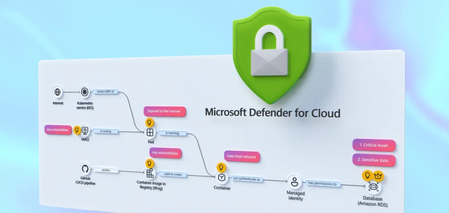
Correlate cross-cloud attacks into a single incident, catch runtime threats that image scanning misses, and block vulnerable images before they reach production. Investigate container hijacking, isolate compromised pods with Security Copilot-guided remediation, and close the loop from SOC to dev by pushing CVE fixes to GitHub and syncing resolution back to Defender. Matt McSpirit, Microsoft Azure expert, shares how to detect, investigate, and remediate container threats in one connected workflow. Expose container hijacking at runtime. Binary drift detection flags the moment a container runs anything outside its original image. Try it now. Detection to containment in one flow. Security Copilot in Defender generates your incident report, classifies the attack, and surfaces pod isolation as a guided remediation step. Check it out. Close the loop from SOC to dev. Create GitHub issues for vulnerable container dependencies, trigger Copilot’s fix as a Pull Request, and bring “resolved” status back to Defender the moment it merges. See how it works. QUICK LINKS: 00:00 — Secure containers in Microsoft Defender 01:02 — Cross-cloud incident 03:07- Runtime detection 04:10 — Investigate and build context 04:49 — Security Copilot incident report & containment 06:03 — Prevention 07:34 — Recommendations and take action 09:04 — Wrap up Link References Get started at https://aka.ms/DefenderCloudSecurity Unfamiliar with Microsoft Mechanics? As Microsoft’s official video series for IT, you can watch and share valuable content and demos of current and upcoming tech from the people who build it at Microsoft. Subscribe to our YouTube: https://www.youtube.com/c/MicrosoftMechanicsSeries Talk with other IT Pros, join us on the Microsoft Tech Community: https://techcommunity.microsoft.com/t5/microsoft-mechanics-blog/bg-p/MicrosoftMechanicsBlog Watch or listen from anywhere, subscribe to our podcast: https://microsoftmechanics.libsyn.com/podcast Keep getting this insider knowledge, join us on social: Follow us on Twitter: https://twitter.com/MSFTMechanics Share knowledge on LinkedIn: https://www.linkedin.com/company/microsoft-mechanics/ Enjoy us on Instagram: https://www.instagram.com/msftmechanics/ Loosen up with us on TikTok: https://www.tiktok.com/@msftmechanics Video Transcript: -Containers are the foundation for how modern business critical apps are built, running across Kubernetes environments and multiple clouds. These are high value targets for attackers, who are now using AI to accelerate ways to find and exploit vulnerabilities faster than humanly possible, from code to runtime. And it’s hard to respond effectively when security signals and responsibilities are fragmented across different teams and tools. The challenge isn’t just finding security issues, it’s understanding how they connect across the lifecycle from development to production. -So, rather than treating supply chain and runtime as separate problems, Microsoft Defender for Cloud brings them together into a single, unified model to catch issues early in code by identifying vulnerabilities and misconfigurations, prioritizing risk across clusters, workloads, and configurations, and detecting and responding to threats in your running containers in near real time, all while tracing them back to the source to put the right mitigations in place. So let me walk you through a multi-stage attack across a containerized environment to show this in action from the perspective of a SOC analyst. I’m in Microsoft Defender in the incidents view, filtered to container related incidents, and I can see four related to containers. -Let’s start with this one: a multi-stage incident involving multiple users. And notice this is already correlated into a single incident, not multiple alerts. You can see it’s flagged as high impact, with a critical asset label, and the crown icon in the incident graph showing asset criticality. On the left, is the attack story with alerts listed in chronological order, color-coded by severity. If we go back to the incident graph, container resources are in black, and related identities and services are in white. This is runtime threat detection correlated across layers. -In this case, Defender has detected 19 alerts for this incident in near-real time and stitched them into a single timeline. So, let’s walk through the attack. Here we can see the initial access signal was from a Kubernetes API request from a proxy IP address. Identity compromise and escalation then occurred with credentials accessed from a service principal. And finally, Defender for Cloud’s cross-cloud correlation surfaces lateral movement spanning environments, revealing a brute-force attack originating from an exposed Azure Kubernetes cluster targeting an AWS Relational Database service resource. -Back in the graph, you’ll notice a blue icon, this indicates there are related attack paths. And if we ungroup similar nodes, we see a user indicated by the blue icon, and we can pivot directly into the attack path view. Here’s where it gets interesting. This is where we connect runtime activity back to security posture and exposure. It’s concluded that the container is internet-exposed with high-severity vulnerabilities, and it’s using a managed identity to access a protected storage account. We’ll come back to this in a moment to see if we can fix the root cause. So, we can see this wasn’t just an isolated runtime event; there was a clear path from exposure to exploitation. -So let’s move on to the second incident in our queue. This is another multi-stage attack. This time focused on initial access and discovery across multiple endpoints. In the Incident Graph, we can see a number of containers were accessed. Then in the attack story, we can see they were hijacked to be used as Cryptocoin miners. Now, containers should be immutable, only running what was in the original image. But this alert shows the initial binary drift. This signals to Defender that the container is executing something it was never built to run. And if we review the activities for this alert, we can see a suspicious parent process, and a shim file being used to execute it. And if we move to the right in evidence, we can see all the details for the process, file, pod and cluster. This is where runtime detection becomes critical, because this activity isn’t visible through image scanning or posture alone. -From here, we can investigate and build full context around the attack. For that, let’s drill into our Kubernetes cluster and start hunting to take a look at the processes run, across both control plane and data plane signals. There are tables that log these events for querying, CloudProcessEvents for runtime activity and CloudAuditEvents for control plane actions. Let’s run a query in the audit events table to search for the creation of a cluster-admin role binding. This would grant full administrative access to the cluster. Here, we can see the role binding and associated subject. It confirms our assumption that the privilege escalation did happen. Next, we can leverage Security Copilot to transition from investigation to response using guided recommendations informed by the attack insights uncovered. Here, Copilot has already generated an incident report. -At the top, we have a summary of the attack from correlated signals. If we expand it, under Credential Access, we see compromised identity activity. Under Discovery, there are network scanning tools. Under Execution, we see confirmation that the container was modified to run crypto mining processes. And below that, the Triage section then lets you classify the incident as true positive, informational, or false positive with corresponding subcategories. I’ll choose a True Positive Multi-stage attack. And Copilot also suggests two remediation actions: terminate the pod to stop activity or isolate the pod to contain the threat. So let’s follow that guidance and isolate the pod. So I’ll close Copilot and return to our Incident graph, then ungroup similar nodes again. Now selecting the Pod, under Actions, I can isolate the Pod. I’ll add a reason. And then I just need to confirm. And just like that, we’ve moved from detection to investigation and containment in a single flow. -So far, we’ve focused on detecting, responding to active threats. But security doesn’t start at runtime. And this is where Defender for Cloud helps your DevOps teams harden your environment to prevent issues from reaching production in the first place. Using policies, you can put rules in place to prevent containers with issues from being deployed. So for that, in the Azure portal in Defender for Cloud, under Environment Settings, we’ll head over to our Security Rules. -Here, we’ve already created a handful of rules to deny or audit activities. For example, if I take a look at this one to block vulnerable deployments of AI applications, this rule is configured to automatically deny deployment of any image violating the policy. It’s scoped specifically to the namespace of our AI applications. In the Configurations tab, we can see that this rule is set to trigger when a container image contains a high or critical severity vulnerability, with any count higher than zero. With our policy in place, let’s test it out by attempting to deploy a container image that contains a few high-severity vulnerabilities. This is exactly what happens with supply chain attacks. For that, from Cloud Shell, I’ll run an AKS command first to get my credentials. -Now I can execute my command. I’ll paste in this Kube Control command to run an image, including its location and namespace details. And immediately, we can see that the run was denied, stating that the image contains 415 CVEs, and we allowed zero in our policy. So it’s blocked. What’s more, Defender for Cloud continuously scans what’s in your registries and running environments in near real time, surfacing the risks that matter and turning them into clear, actionable fixes. Next over in Recommendations, we can see findings identified by Defender for Cloud with several critical risks highlighted, related to the same incident that we saw earlier in the Defender portal. And these are its recommendations. -Let’s look at this one to update busybox. Looks like this version has 13 known vulnerabilities. And digging into the Remediation Insights tab, we can see more details across the development phases. The Take Action button tells us to assign an owner and to create a GitHub issue. I can create the GitHub issue from here. And if I head over to what our dev team would see in GitHub, you can see the details for the ticket, with deployment info, matching CVEs for this version, and below there, there are the remediation guidelines to mitigate the issue. From there, we can assign the issue to GitHub Copilot, and the GitHub Copilot Coding Agent will generate a draft Pull request fixing the CVEs for review. Once the pull request is actioned and complete and the version is updated, we can see that the CVEs were resolved. And finally as a developer, we can merge the pull request to get our app back into a healthy state. I’m going to return back to Microsoft Defender and our app recommendation, clicking on the GitHub issues shows that everything was resolved, and it sent the updated status back to Defender where your SOC lives. -So, that’s a hands-on look at how Microsoft Defender helps secure your container environments end to end. It doesn’t just detect security issues, it helps you to respond faster by connecting security signals across the entire lifecycle, from development through production. To learn more or get started, visit aka.ms/DefenderCloudSecurity. Be sure to subscribe to Microsoft Mechanics for the latest tech updates. And thanks for watching.374Views1like1Comment