dataplatform
2 TopicsUnderstanding Microsoft Entra ID Group Membership Caching and Azure SQL Authentication Timing
Contributor: hudajazmawi Executive Summary Organizations frequently use Microsoft Entra ID groups to manage access to Azure SQL databases. This approach simplifies administration, improves security, and supports just-in-time access models. In some scenarios, users may experience temporary authentication failures shortly after being granted access through a Microsoft Entra ID group. These failures can appear inconsistent, especially when access succeeds to one database while failing against another. Understanding how group membership caching works during authentication can help explain this behavior and reduce unnecessary troubleshooting efforts. This article explains a real-world scenario involving temporary authentication failures after group assignment, describes the underlying authentication behavior, and provides practical recommendations for validation and mitigation. Issue Description A user was granted access to Azure SQL through membership in a Microsoft Entra ID group. Shortly afterward, the user attempted to connect using Microsoft Entra authentication. The observed behavior was: Authentication to certain databases succeeded immediately. Authentication to other databases failed temporarily. The issue appeared shortly after the group membership was granted. Access eventually began working without any configuration changes. The behavior resolved after a period of time without additional intervention. At first glance, the results appeared inconsistent because some connection attempts were successful while others failed, even though the same user credentials and group assignments were being used. Technical Background Azure SQL supports Microsoft Entra authentication, allowing access to be granted through users, groups, and service principals managed within Microsoft Entra ID. When a user authenticates, Azure SQL must determine the user's effective permissions. For users who belong to many Microsoft Entra groups, membership information may be cached to improve authentication efficiency and reduce repeated directory lookups. Caching is a common design pattern used throughout distributed systems to improve performance, scalability, and reliability. However, because caches contain information retrieved at a specific point in time, there can be a temporary delay before recently changed security information becomes visible to all authentication requests. This behavior is particularly important to understand when organizations use: Just-in-time access workflows Privileged access management processes Temporary group assignments Automated access provisioning Frequent permission validation testing Root Cause The investigation determined that the authentication failures were caused by Microsoft Entra ID group membership caching. A login attempt occurred before the user was added to the required Microsoft Entra ID group. During that earlier authentication attempt, the user's group memberships were retrieved and cached. After the user was added to the required group, subsequent authentication attempts continued using the previously cached membership information until the cache expired. As a result, authentication requests temporarily evaluated permissions using outdated group membership data. Because the newly assigned group membership had not yet been reflected in the cached information, authentication failed even though access had already been granted. Once the cached membership information expired and fresh group membership data was retrieved, authentication succeeded without any additional configuration changes. Detailed Explanation To understand the behavior, consider the following simplified sequence: Step 1: Initial Authentication A user attempts to connect to Azure SQL before being added to the required Microsoft Entra ID group. During this process: The user's current group memberships are evaluated. Membership information is cached. The required access group is not yet present. Authentication behavior reflects the permissions available at that moment. Step 2: Group Membership Change The user is added to the appropriate Microsoft Entra ID group. From an administrative perspective, the access assignment has been completed successfully. However, any previously cached authentication information may still reflect the user's earlier membership state. Step 3: Immediate Retesting The user immediately attempts another connection. Although the directory now contains the new group membership, the authentication process may still reference cached membership information created before the change occurred. The result can be a temporary authentication failure. Step 4: Cache Expiration After the cached data expires or is refreshed, authentication retrieves updated membership information. The newly assigned group is now visible during authorization evaluation. At this point, authentication succeeds as expected. Why Some Databases May Behave Differently One of the most confusing aspects of these scenarios is that different databases may appear to behave differently even when they use identical group assignment models. This typically occurs because authentication state and cache usage can differ depending on the sequence and timing of connection attempts. For example: Database A may be accessed for the first time after the group assignment occurs. Database B may have received a connection attempt before the group assignment occurred. As a result: Database A may evaluate fresh membership information and allow access. Database B may continue referencing previously cached membership information until the cache expires. This can create the appearance of inconsistent behavior even though the system is operating as designed. Mitigation and Recommendations The following practices can help reduce the likelihood of encountering similar authentication timing scenarios. 1. Assign Access Before Testing Whenever possible, add users to the required Microsoft Entra ID groups before any authentication attempts are made against Azure SQL resources. This helps ensure that fresh membership information is used during the first authentication request. 2. Avoid Immediate Validation After Permission Changes If a user has recently been granted group-based access, consider allowing time for authentication cache refresh behavior before conducting validation testing. Immediate testing can sometimes produce results based on older membership information. 3. Plan for Temporary Authentication Delays Organizations implementing just-in-time access should account for the possibility of short propagation and cache refresh intervals when designing operational procedures. 4. Use DBCC FLUSHAUTHCACHE When Appropriate For controlled testing and validation scenarios, administrators may use: DBCC FLUSHAUTHCACHE; DBCC FLUSHAUTHCACHE; This command can help refresh authentication cache behavior during troubleshooting and validation activities. As with any administrative operation, testing should be performed according to organizational change-management procedures. 5. Capture Precise Timing Information When investigating authentication behavior, collecting exact timestamps is extremely valuable. Recommended data points include: Time the user was added to the Microsoft Entra ID group Time of each authentication attempt Database target of each connection attempt Time any cache refresh operation was performed Time authentication eventually succeeded Accurate timestamps help establish a clear correlation between group membership changes and authentication behavior. Validation Guidance If you need to verify whether group membership caching is influencing authentication results, consider the following approach: Record the exact time a user is added to the required Microsoft Entra ID group. Record the time of every authentication attempt. Identify whether any login attempts occurred before the group membership change. Observe whether successful authentication occurs after a period of time without configuration changes. Where appropriate, perform controlled tests using authentication cache refresh procedures. Compare authentication outcomes against the timeline of group membership updates. This structured approach often helps determine whether the observed behavior is related to authentication caching rather than a permission configuration issue. Key Takeaways Temporary authentication failures immediately after group-based access assignment do not necessarily indicate a configuration problem. Authentication behavior may be influenced by previously cached Microsoft Entra ID group membership information. Login attempts that occur before a group membership change can affect subsequent authentication behavior until cached data expires. Different databases may appear to behave differently if they are accessed at different points in the authentication timeline. Capturing precise timestamps significantly improves troubleshooting accuracy. Proper testing practices and awareness of cache behavior can reduce confusion and accelerate issue resolution. Closing Summary Microsoft Entra ID group-based authorization provides a powerful and scalable way to manage Azure SQL access. However, like many modern cloud authentication systems, caching is used to optimize performance and improve efficiency. When group memberships change immediately before authentication testing, temporary differences between cached and current membership information may lead to short-lived authentication failures. Understanding this behavior can help administrators accurately interpret results, design effective validation procedures, and avoid unnecessary troubleshooting. By assigning permissions before authentication attempts, allowing appropriate time for cache refresh behavior, and capturing precise timing information during investigations, organizations can more effectively manage Microsoft Entra-based access and streamline their operational workflows. As always, when troubleshooting authentication scenarios, focusing on the exact sequence and timing of events often provides the clearest path to identifying the underlying cause and validating a successful resolution. Further Reading To learn more about Microsoft Entra authentication and Azure SQL security, review the following Microsoft documentation: Microsoft Entra authentication for Azure SQL https://learn.microsoft.com/azure/azure-sql/database/authentication-aad-overview Explains how Microsoft Entra authentication works with Azure SQL and the benefits of group-based access management. DBCC FLUSHAUTHCACHE (Transact-SQL) https://learn.microsoft.com/sql/t-sql/database-console-commands/dbcc-flushauthcache-transact-sql Describes how to clear the database authentication cache and notes that it clears cached Microsoft Entra group membership data stored in the database.1.1KViews0likes0Comments🚀 Git-Driven Deployments for Microsoft Fabric Using GitHub Actions
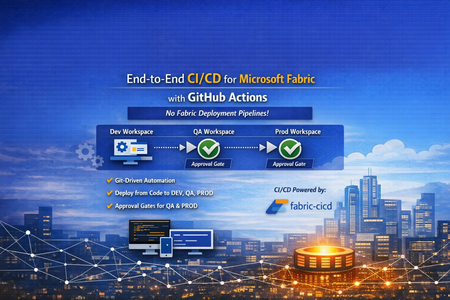
👋 Introduction If you've been working with Microsoft Fabric, you've likely faced this question: "How do we promote Fabric items from DEV → QA → PROD reliably, consistently, and with proper governance?" Many teams default to the built-in Fabric Deployment Pipelines — and they work great for simpler scenarios. But what happens when your enterprise demands: 🔒 Centralized governance across all platforms (infra, app, and data) 📜 Full audit trail of every change tied to a Git commit ✅ Approval gates with reviewer-based promotion 🔑 Per-environment service principal isolation 🧩 Alignment with your existing DevOps standards That's exactly the problem we set out to solve. In this post, I'll walk you through a production-ready, enterprise-grade CI/CD solution for Microsoft Fabric using the fabric-cicd Python library and GitHub Actions — with zero dependency on Fabric Deployment Pipelines. 🎯 What Problem Are We Solving? Traditional Fabric promotion workflows often look like this: Step Method Problem Build in DEV workspace Fabric Portal UI ✅ Works fine Promote to QA Fabric Deployment Pipeline or manual copy ⚠️ No Git traceability Promote to PROD Fabric Deployment Pipeline with approval ⚠️ Separate governance model from app/infra CI/CD Rollback 🤷 Manual recreation ❌ No deterministic rollback path Audit "Who clicked what, when?" ❌ Limited trail The Core Issue Fabric Deployment Pipelines introduce a parallel governance model that's disconnected from how your platform and application teams already work. You end up with: 🔀 Two different promotion systems (GitHub Actions for apps, Fabric Pipelines for data) 🕳️ Governance blind spots between the two 😰 Cultural friction ("Why do data teams have a different process?") Our Approach: Git as the Single Source of Truth 📖 ┌─────────────┐ push to main ┌─────────────┐ │ Developer │ ──────────────────▶ │ GitHub │ │ commits to │ │ Actions │ │ Git repo │ │ Workflow │ └─────────────┘ └──────┬──────┘ │ ┌─────────────────┼─────────────────┐ ▼ ▼ ▼ ┌──────────┐ ┌──────────┐ ┌──────────┐ │ 🟢 DEV │ │ 🟡 QA │ │ 🔴 PROD │ │ Auto │────▶│ Approval │────▶│ Approval │ │ Deploy │ │ Required │ │ Required │ └──────────┘ └──────────┘ └──────────┘ Every deployment originates from Git. Every promotion is traceable to a commit SHA. Every environment has its own approval gate. One pipeline model — across everything. 🏗️ Solution Architecture 📁 Repository Structure fabric-cicd-project/ │ ├── 📂 .github/ │ ├── 📂 workflows/ │ │ └── 📄 fabric-cicd.yml # GitHub Actions pipeline │ ├── 📄 CODEOWNERS # Review enforcement │ └── 📄 dependabot.yml # Automated dependency updates │ ├── 📂 config/ │ └── 📄 parameter.yml # Environment-specific parameterization │ ├── 📂 deploy/ │ ├── 📄 deploy_workspace.py # Main deployment entrypoint │ └── 📄 validate_repo.py # Pre-deployment validation │ ├── 📂 workspace/ # Fabric items (Git-integrated / PBIP) │ ├── 📄 .env.example # Environment variable template ├── 📄 .gitignore ├── 📄 ruff.toml # Python linting config ├── 📄 requirements.txt # Pinned dependencies ├── 📄 SECURITY.md # Vulnerability disclosure policy └── 📄 README.md 🔧 Key Components Component Purpose fabric-cicd Python library Deploys Fabric items from Git to workspaces (handles all Fabric API calls internally) deploy_workspace.py CLI entrypoint — authenticates, configures, deploys, logs parameter.yml Find-and-replace rules for environment-specific values (connections, lakehouse IDs, etc.) validate_repo.py Pre-flight checks — validates repo structure, parameter.yml presence, .platform files fabric-cicd.yml GitHub Actions workflow — orchestrates validate → DEV → QA → PROD ✨ Feature Deep Dive 1️⃣ Per-Environment Service Principal Isolation 🔐 Instead of a single shared service principal, each environment gets its own: DEV_TENANT_ID / DEV_CLIENT_ID / DEV_CLIENT_SECRET QA_TENANT_ID / QA_CLIENT_ID / QA_CLIENT_SECRET PROD_TENANT_ID / PROD_CLIENT_ID / PROD_CLIENT_SECRET Why this matters: 🛡️ Least-privilege access — the DEV SP can't touch PROD 🔍 Audit clarity — you know which identity deployed where 💥 Blast radius reduction — a compromised DEV secret doesn't affect PROD The deploy script automatically resolves the correct credentials based on TARGET_ENVIRONMENT, with fallback to shared FABRIC_* variables for simpler setups. 2️⃣ Environment-Specific Parameterization 🎛️ A single parameter.yml drives all environment differences: find_replace: - find: "DEV_Lakehouse" replace_with: DEV: "DEV_Lakehouse" QA: "QA_Lakehouse" PROD: "PROD_Lakehouse" - find: "dev-sql-server.database.windows.net" replace_with: DEV: "dev-sql-server.database.windows.net" QA: "qa-sql-server.database.windows.net" PROD: "prod-sql-server.database.windows.net" ✅ Same Git artifacts → different runtime bindings per environment ✅ No manual edits between promotions ✅ Easy to review in pull requests 3️⃣ Approval-Gated Promotions ✅ The GitHub Actions workflow uses GitHub Environments with reviewer requirements: Environment Trigger Approval 🟢 DEV Automatic on push to main None — deploys immediately 🟡 QA After successful DEV deploy ✅ Requires reviewer approval 🔴 PROD After successful QA deploy ✅ Requires reviewer approval Reviewers see a rich job summary in GitHub showing: 📌 Git commit SHA being deployed 🎯 Target workspace and environment 📦 Item types in scope ⏱️ Deployment duration ✅ / ❌ Final status 4️⃣ Pre-Deployment Validation 🔍 Before any deployment runs, a dedicated validate job checks: Check What It Does 📂 workspace exists Ensures Fabric items are present 📄 parameter.yml exists Ensures parameterization is configured 📄 .platform files present Validates Fabric Git integration metadata 🐍 ruff check deploy/ Lints Python code for syntax errors and bad imports If validation fails, no deployment runs — across any environment. 5️⃣ Full Git SHA Traceability 📜 Every deployment logs and surfaces the exact Git commit being deployed: Why this matters: 🔄 Rollback = git revert <sha> + push → pipeline redeploys previous state 🕵️ Audit = every PROD deployment tied to a specific commit, reviewer, and timestamp 🔀 Diff = git diff v1..v2 shows exactly what changed between deployments 6️⃣ Concurrency Control 🚦 concurrency: group: fabric-deploy-${{ github.ref }} cancel-in-progress: false Two rapid pushes to main won't cause parallel deployments fighting over the same workspace. The second run queues until the first completes. 7️⃣ Smart Path Filtering 🧠 paths-ignore: - "**.md" - "docs/**" - ".vscode/**" A README-only commit? A docs update? No deployment triggered. This saves runner minutes and avoids unnecessary approval requests for QA/PROD. 8️⃣ Retry Logic with Exponential Backoff 🔁 The deploy script wraps fabric-cicd calls with retry logic: Attempt 1 → fails (HTTP 429 rate limit) ⏳ Wait 5 seconds Attempt 2 → fails (HTTP 503 transient) ⏳ Wait 15 seconds Attempt 3 → succeeds ✅ Transient Fabric service issues don't break your pipeline — the deployment retries automatically. 9️⃣ Orphan Cleanup 🧹 Set CLEAN_ORPHANS=true and items that exist in the workspace but not in Git get removed: Workspace has: Notebook_A, Notebook_B, Notebook_C Git repo has: Notebook_A, Notebook_B → Notebook_C gets removed (orphan) This ensures your workspace exactly matches your Git state — no drift, no surprises. 🔟 Dependency Management with Dependabot 🤖 # .github/dependabot.yml updates: - package-ecosystem: "pip" schedule: interval: "weekly" - package-ecosystem: "github-actions" schedule: interval: "weekly" fabric-cicd, azure-identity, and GitHub Actions versions are automatically monitored. When updates are available, Dependabot opens a PR — keeping your pipeline secure and current. 1️⃣1️⃣ CODEOWNERS Enforcement 👥 # .github/CODEOWNERS /deploy/ @platform-team /config/ @platform-team /.github/workflows/ @platform-team Changes to deployment scripts, parameterization, or the workflow require review from the platform team. No one accidentally modifies the pipeline without oversight. 1️⃣2️⃣ Job Timeouts ⏱️ Job Timeout Validate 10 minutes Deploy (DEV/QA/PROD) 30 minutes A hung process won't burn 6 hours of runner time. It fails fast, alerts the team, and frees the runner. 1️⃣3️⃣ Security Policy 🛡️ A dedicated SECURITY.md provides: 📧 Responsible vulnerability disclosure process ⏰ 48-hour acknowledgement SLA 📋 Best practices for contributors (no secrets in code, least-privilege SPs, 90-day rotation) 🔄 The Complete Workflow Here's what happens end-to-end when a developer merges a PR: 1. 👨💻 Developer merges PR to main │ 2. 🔍 VALIDATE job runs │ ✅ Repo structure checks │ ✅ Python linting (ruff) │ ✅ parameter.yml validation │ 3. 🟢 DEPLOY-DEV job runs (automatic) │ 🔑 Authenticates with DEV SP │ 📦 Deploys all items to DEV workspace │ 📝 Logs commit SHA + summary │ 4. 🟡 DEPLOY-QA job waits for approval │ 👀 Reviewer checks job summary │ ✅ Reviewer approves │ 🔑 Authenticates with QA SP │ 📦 Deploys all items to QA workspace │ 5. 🔴 DEPLOY-PROD job waits for approval │ 👀 Reviewer checks job summary │ ✅ Reviewer approves │ 🔑 Authenticates with PROD SP │ 📦 Deploys all items to PROD workspace │ 6. 🎉 Done — all environments in sync with Git 🆚 Comparison: This Approach vs. Fabric Deployment Pipelines Capability Fabric Deployment Pipelines This Solution (fabric-cicd + GitHub Actions) Source of truth Workspace ✅ Git Promotion trigger UI click / API call ✅ Git push + approval Approval gates Fabric-native ✅ GitHub Environments (same as app teams) Audit trail Fabric activity log ✅ Git commits + GitHub Actions history Rollback Manual ✅ git revert + auto-redeploy Cross-platform governance Separate model ✅ Unified with infra/app CI/CD Parameterization Deployment rules ✅ parameter.yml (reviewable in PR) Secret management Fabric-managed ✅ GitHub Secrets + per-env SP isolation Drift detection Limited ✅ Orphan cleanup (CLEAN_ORPHANS=true) 🚀 Getting Started Prerequisites 3 Fabric workspaces (DEV, QA, PROD) Service principal(s) with Contributor role on each workspace GitHub repository with Actions enabled GitHub Environments configured (dev, qa, prod) Quick Setup # 1. Clone the repo git clone https://github.com/<your-org>/fabric-cicd-project.git # 2. Install dependencies pip install -r requirements.txt # 3. Copy and fill environment variables cp .env.example .env # 4. Run locally against DEV python deploy/deploy_workspace.py GitHub Actions Setup Create GitHub Environments: dev, qa (add reviewers), prod (add reviewers) Add secrets to each environment: DEV_TENANT_ID, DEV_CLIENT_ID, DEV_CLIENT_SECRET QA_TENANT_ID, QA_CLIENT_ID, QA_CLIENT_SECRET PROD_TENANT_ID, PROD_CLIENT_ID, PROD_CLIENT_SECRET DEV_WORKSPACE_ID, QA_WORKSPACE_ID, PROD_WORKSPACE_ID Push to main — the pipeline takes over! 🎉 💡 Lessons Learned After implementing this pattern across several engagements, here are the key takeaways: ✅ What Works Well Teams love the Git traceability once they experience a clean rollback Approval gates in GitHub feel natural to platform engineers Parameter.yml changes in PRs create great review conversations about environment differences Job summaries give reviewers confidence to approve without digging into logs ⚠️ Watch Out For Cultural resistance is the #1 blocker — invest in enablement, not just automation Fabric items with runtime state (data in lakehouses, refresh history) aren't captured in Git Secret rotation across 3+ environments needs process discipline (consider OIDC federated credentials) Run a "portal vs. pipeline" side-by-side demo early — it changes minds fast 🤝 For CSAs: Sharing This With Customers This solution is ideal for customers who: ☑️ Already use GitHub Actions for application or infrastructure CI/CD ☑️ Have governance requirements that demand Git-based audit trails ☑️ Operate multiple Fabric workspaces across environments ☑️ Want to standardize their promotion model across all workloads ☑️ Are moving from Power BI Premium to Fabric and want to modernize their DevOps practices 🗣️ Conversation Starters "How are you promoting Fabric items between environments today?" "Is your data team using the same CI/CD patterns as your app teams?" "If something goes wrong in production, how quickly can you roll back to the previous version?" 📚 Resources 📦 fabric-cicd on PyPI 📖 fabric-cicd Documentation 🐙 GitHub Actions Documentation 🏗️ Microsoft Fabric Git Integration 🌐Git Repository URL: vinod-soni-microsoft/FABRIC-CICD-PROJECT: Enterprise-grade CI/CD solution for Microsoft Fabric using fabric-cicd Python library and GitHub Actions. Git-driven deployments across DEV → QA → PROD with environment approval gates, per-environment service principal isolation, and parameterized promotion — no Fabric Deployment Pipelines required. 🏁 Conclusion The shift from UI-driven promotion to Git-driven CI/CD for Microsoft Fabric isn't just a technical upgrade — it's a governance and cultural alignment decision. By using fabric-cicd with GitHub Actions, you get: 📖 One source of truth (Git) 🔄 One promotion model (GitHub Actions) ✅ One approval process (GitHub Environments) 🔍 One audit trail (Git history + Actions logs) 🔐 One security model (GitHub Secrets + per-env SPs) No parallel governance. No hidden drift. No "who clicked what in the portal." Just Git, code, and confidence. 💪 Have questions or want to share your experience? Drop a comment below — I'd love to hear how your team is approaching Fabric CI/CD! 👇