databricks
4 Topics
Ingestion and replication: moving from detection in hours to detection in minutes.
It seems that currently, we only become aware of a problem once there is a visible impact on tracking or on the tables consumed by the business. In many cases, the root cause appears to occur much earlier—for instance, when a package or replication process stops running correctly, starts skipping steps, or begins to accumulate delays. Would it make sense to move toward earlier detection? I was thinking of something that periodically monitors data from `replication.package` and similar sources to identify anomalies before tracking alerts are triggered: Packages that haven't run in the last *N* minutes. Failed jobs. Recurring skips. Abnormal increases in the time between executions. Growing discrepancies between expected timestamps and actual processed timestamps. It could even evolve into an agent that not only alerts but also provides context: "Package X on server Y hasn't run for 35 minutes. The last execution failed, and the likely impact is on the BayCity tracking tables." My impression is that this could help us significantly reduce detection time, since we often end up investigating only after a delay of several hours has already built up. What do you think? Is there already a tool or monitoring system in place that addresses this need—one I might not be aware of? We are working with Azure Databricks; I was planning to implement this using an agent, but I need...177Views0likes0CommentsAnnouncing the new Databricks Job activity in ADF!
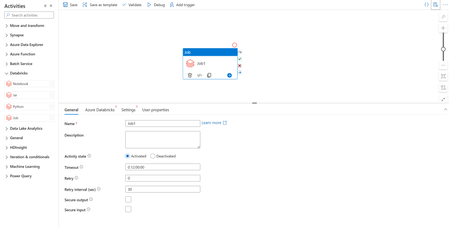
We’re excited to announce that Azure Data Factory now supports the orchestration of Databricks Jobs! Databrick Jobs allow you to schedule and orchestrate a task or multiple tasks in a workflow in your Databricks workspace. Since any operation in Databricks can be a task, this means you can now run anything in Databricks via ADF, such as serverless jobs, SQL tasks, Delta Live Tables, batch inferencing with model serving endpoints, or automatically publishing and refreshing semantic models in the Power BI service. And with this new update, you’ll be able to trigger these workflows from your Azure Data Factory pipelines. To make use of this new activity, you’ll find a new Databricks activity under the Databricks activity group called Job. Once you’ve added the Job activity (Preview) to your pipeline canvas, you can connect to your Databricks workspace and configure the settings to select your Databricks job, allowing you to run the Job from your pipeline. We also know that allowing parameterization in your pipelines is important as it allows you to create generic reusable pipeline models. ADF continues to provide support for these patterns and is excited to extend this capability to the new Databricks Job activity. Under the settings of your Job activity, you’ll also be able to configure and set parameters to send to your Databricks job, allowing maximum flexibility and power for your orchestration jobs. To learn more, read Azure Databricks activity - Microsoft Fabric | Microsoft Learn. Have any questions or feedback? Leave a comment below!6.2KViews1like2CommentsTrain your Model on Spark/Databricks, score it on ADX
Are you using Spark/Databricks to build Machine Learning models? Do you need to score new data that is streamed into Azure Data Explorer? If this is your scenario please read on! In this blog we show how to train an ML model on Azure Databricks, export it to ADX, and score new samples directly on ADX, in near real time, using inline Python code embedded in KQL query.6.6KViews2likes4Comments