data
17 TopicsBuild business case with Azure Migrate - Do More with Less (DMWL)
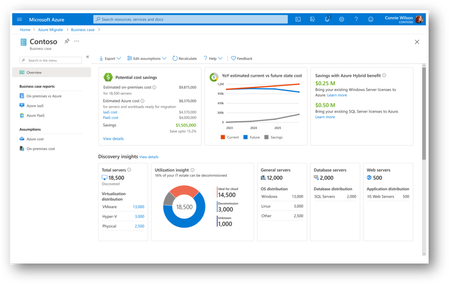
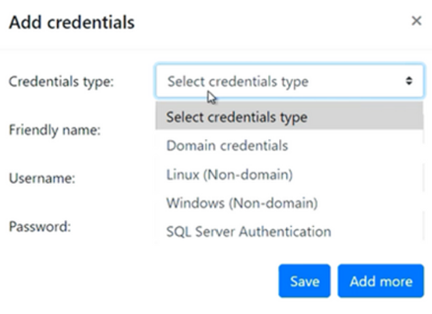
Justifying the move to cloud is a crucial decision for a business and it could be difficult to know where to start. To make an informed decision to move to cloud, customers are looking into all available migration strategies and associated costs. They are also looking for ways to build and validate such proposals to be able to decide quickly. With the current economic situation, it is becoming much more important to address cashflow challenges, add capacity and prevent security attacks while ensuring business continuity. Microsoft is committed to helping you navigate this journey with confidence and eliminate the guess work involved in the cost planning process with Azure Migrate’s new data driven business case capability. With this feature, you can conduct financial analysis with just a few clicks and create customized proposals, which can then be shared with decision makers for quick decisions. Azure Migrate Azure Migrate is Microsoft’s unified platform for migrating to and modernizing in Azure. It provides discovery, assessment, planning, migration, and modernization capabilities for various workloads on your premises. Azure Migrate allows you to run and manage your migration and modernization projects from a unified, secure portal. About Business Case Capability The Azure Migrate business case in preview helps you to understand the return on investment for migrating your servers, SQL Server deployments and ASP.NET web apps running in your datacenter to Azure. Till April 2023, this feature was available only for servers and workloads running in your VMware environment. To continuously keep supporting our customers accelerate their decision-making process to Azure, we have added some of the enhancements this month: You will also be able to build business cases on servers and workloads discovered from your Microsoft Hyper-V and Physical/ Bare-metal environments as well as IaaS services of other public clouds. If you are looking for a quick business case, without the need to deploy an appliance to collect your server inventory, you can now also use .csv-based import and build a quick business case. Learn more You can build business cases for SQL Server Always On Failover Cluster Instances and Always On Availability Groups. Learn more The business case can be created with just a few clicks and can help you understand how Azure can bring the most value to your business. It highlights: On-premises vs Azure total cost of ownership and year on year cashflow analysis. Resource utilization-based insights to identify servers and workloads that are ideal for cloud and right-sized recommendations in Azure. Azure Hybrid Benefits savings by bringing your existing Windows and SQL Server licenses to Azure Quick wins for migration and modernization including end of support Windows OS and SQL versions. Long term cost savings by moving from a capital expenditure model to an Operating expenditure model, by paying for only what you use. How to get started? Please refer to the steps below: If you have an existing Azure Migrate project: 1. The Business Case feature is already enabled on your existing Azure Migrate projects once the discovery from Azure Migrate appliance has been completed. If you already have a business case with VMware servers and workloads scoped in, you can recalculate the business case to scope in servers and workloads from Hyper-V or Physical environments. To create a new business case, simply click on ‘Build business case’ to get started: 2. Build a business case using minimal inputs 3. Review the Business Case reports including the Overview, on-premises vs Azure, Azure IaaS and Azure PaaS reports. You can also create different what-if scenarios by editing the assumptions that went into the calculations. 4. Get buy-ins from stakeholders and start your migration and modernization journey with confidence. If you are new to Azure Migrate: You will first need to set up an Azure Migrate project. Once you have created a project, you can choose to use one of the two discovery sources: 1. To use more accurate data insights collected via Azure Migrate appliance, you need to deploy and configure the Azure Migrate appliance. This appliance enables you to perform discovery from your datacenter. 2. To build a quick business case using existing server inventory available, you can import the server details via a .csv file Click here to learn more to understand the two discovery sources. After the discovery, you can build and review the business case reports. Create an Azure Migrate project from the Azure Portal, and download the Azure Migrate appliance or download the Azure Migrate template to import. Customers who already have an active Azure Migrate project can start using the feature directly. Based on your use case and chosen discovery source: Deploy a new Azure Migrate appliance for discovery . To enable you to discover your datacenter easily, the appliance lets you enter multiple credentials – Windows authentication (both Domain and non-Domain) and SQL Server authentication. The Azure Migrate appliance will automatically map each server to the appropriate credential when multiple credentials are specified. These credentials are encrypted and stored on the deployed appliance locally and are never sent to Microsoft. For import via .csv, you need to populate the template with the server inventory and import the .csv View the summary of the discovered IT estate from your Azure Migrate project and click on ‘Build business case’. You can view details of the discovered servers such as their configurations, software inventory (installed apps), dependencies, count of SQL instances and ASP.NET web apps etc. Click on 'Build business case' 5. Build a business case using minimal inputs 6. Review the Business Case reports including the Overview, on-premises vs Azure, Azure IaaS and Azure PaaS reports. You can also create different what-if scenarios by editing the assumptions that went into the calculations. 7. Get buy ins from stakeholders and start your migration and modernization journey with confidence. Learn more Check out our demo to see the preview in action. Check out this documentation for more details. Learn more about Azure Migrate. Get migration assistance from the Azure migration and modernization program (AMMP). AMMP is now a comprehensive program for all migration and modernization needs of our customers. Join AMMP today.
Migration planning of MySQL workloads using Azure Migrate
In our endeavor to increase coverage of OSS workloads in Azure Migrate, we are announcing discovery and modernization assessment of MySQL databases running on Windows and Linux servers. Customers previously had limited visibility into their MySQL workloads and often received generalized VM lift-and-shift recommendations. With this new capability, customers can now accurately identify their MySQL workloads and assess them for right-sizing into Azure Database for MySQL. MySQL workloads are a cornerstone of the LAMP stack, powering countless web applications with their reliability, performance, and ease of use. As businesses grow, the need for scalable and efficient database solutions becomes paramount. This is where Azure Database for MySQL comes into play. Migrating from on-premises to Azure Database for MySQL offers numerous benefits, including effortless scalability, cost efficiency, enhanced performance, robust security, high availability, and seamless integration with other Azure services. As a fully managed Database-as-a-Service (DBaaS), it simplifies database management, allowing businesses to focus on innovation and growth. What is Azure Migrate? Azure Migrate serves as a comprehensive hub designed to simplify the migration journey of on-premises infrastructure, including servers, databases, and web applications, to Azure Platform-as-a-Service (PaaS) and Infrastructure-as-a-Service (IaaS) targets at scale. It provides a unified platform with a suite of tools and features to help you identify the best migration path, assess Azure readiness, estimate the cost of hosting workloads on Azure, and execute the migration with minimal downtime and risk. Key features of the MySQL Discovery and Assessment in Azure Migrate The new MySQL Discovery and Assessment feature in Azure Migrate (Preview) introduces several powerful capabilities: Discover MySQL database instances: The tool allows you to discover MySQL instances within your environment efficiently. By identifying critical attributes of these instances, it lays the foundation for a thorough assessment and a strategic migration plan. Assessment for Azure readiness: The feature evaluates the readiness of your MySQL database instances to migrate to Azure Database for MySQL – Flexible Server. This assessment considers several factors, including compatibility and performance metrics, to ensure a smooth transition. SKU recommendations: Based on the discovered data, the tool recommends the optimal compute and storage configuration for hosting MySQL workloads on Azure Database for MySQL. Furthermore, it provides insights into the associated costs, enabling better financial planning. How to get started? To begin using the MySQL Discovery and Assessment feature in Azure Migrate, follow this five-step onboarding process: Create an Azure Migrate Project: Initiate your migration journey by setting up a project in the Azure portal. Configure the Azure Migrate Appliance: Use a Windows-based appliance to discover the inventory of servers and provide guest credentials for discovering the workloads and MySQL credentials to fetch database instances and their attributes. Review Discovered Inventory: Examine the detailed attributes of the discovered MySQL instances. Create an Assessment: Evaluate the readiness and get detailed recommendations for migration to Azure Database for MySQL. For a detailed step-by-step guidance check out the documentation for discovery and assessment tutorials. Documentation: Discover MySQL databases running in your datacenter Assess MySQL database instances for migration to Azure Database for MySQL Share your feedback! In summary, the MySQL Discovery and Assessment feature in Azure Migrate enables you to effortlessly discover, assess, and plan your MySQL database migrations to Azure. Try the feature out in public preview and fast-track your migration journey! If you have any queries, feedback or suggestions, please let us know by leaving a comment below or by directly contacting us at AskAzureDBforMySQL@service.microsoft.com. We are eager to hear your feedback and support you on your journey to Azure.What's new in Azure Migrate?
Introduction The journey to the cloud is an essential step for modern enterprises looking to leverage the benefits of scalability, flexibility, and cost-efficiency. A crucial part of this transformation is understanding the current state of your IT infrastructure, including workloads, applications, and their interdependencies. Often, organizations aim to set their migration goals based on the applications they want to move to the cloud, rather than focusing on individual servers or databases in isolation. I am thrilled to share that Azure Migrate is evolving to both simplify and enrich your cloud adoption journey. We are introducing new capabilities in Azure Migrate to help you achieve your goals. Introducing Application awareness in Azure Migrate [limited preview] A key step in any cloud transformation plan is a current state analysis of the entire IT estate covering workloads and applications, and relationships/ dependencies among them. I am excited to announce the limited preview of application aware experiences in Azure Migrate – across every phase of the migration journey. This allows you to gain insights into the total cost of ownership, identify suitable IaaS and PaaS targets, and receive tailored migration and modernization guidance. To get started with Azure Migrate, simply create an Azure Migrate project on Azure portal, and leverage Azure Migrate’s wide-ranging discovery capabilities, including the Azure Migrate appliance or importing inventory via RVTools to discover your environment. This allows you to explore inventory across Infra-Data-Web tiers and use the updated dependency analysis to identify application boundaries. As part of the application aware experiences, we are introducing the concept of tags within Azure Migrate. So once dependencies are identified, you can group the dependent workloads comprising an application via tags. Then, Azure Migrate can be used to create application-specific business cases to identify savings and ROI, assess ideal migration strategies, and get recommendations for Azure services, SKUs, resource costs, and migration/modernization tools. Further, as part of executing the migration and onboarding to Azure, customers can use the recommended tools to modernize via re-platform and refactor (out of band) techniques or use the integrated rehost migration experience to rehost to Azure VM. Complemented with a refreshed user experience As part of delivering application awareness and sustainability insights, Azure Migrate will also feature a refreshed user interface. The new experience is designed to help customers across every step of the migration journey – across Decide, Plan and Execute phases. The experience provides you with a new intuitive table of contents and overview page to allow easy navigation. You can explore discovered workloads and their relationships through effective search, sort, and seamless transition from Azure Migrate to other specialized migration tools, depending on your specific goals and requirements. Finally, you can quickly create and visualize different migration and modernization strategies side-by-side. Expanded support for workloads and platforms In addition to the capabilities described above, Azure Migrate continues to evolve to support capabilities provided by Azure for customers to evaluate and execute as part of their cloud adoption journey. As part of this effort, I am pleased to announce public preview of the following capabilities. These capabilities are available for customers, partners and sellers to try today! ROI/TCO of Azure Arc in Azure Migrate Business Case [public preview] We understand that customers are looking to understand the best path as they evaluate the cloud. This includes continuing to stay on-premises in their current environment while benefiting from Azure services such as Azure Arc. Knowing the varying needs of every customer and with the goal to meet customers where they are, we are introducing the envisioning of ROI for Azure Arc in Azure Migrate Business Case. This includes - Azure Migrate business case to help you compare the Total Cost of Ownership (TCO) for on-premises estates versus Azure, including year-on-year cash flow analysis. With this new capability, the Azure Migrate Business Case now includes the added value of Azure Arc for resources remaining on-premises during the customer’s migration journey. You can now visualize cost savings and other benefits of using Azure security and management tools via Azure Arc for your on-premises servers and see licensing benefits such as Extended Security Updates and SQL Pay-As-You-Go. In addition to visualizing the business case for Arc, customers can identify and at-scale onboard machines that are not yet Arc-enabled directly from the Azure Migrate portal. Additional details and step by step instructions can be found here. Support for migrations to Azure Stack HCI [public preview] Azure Stack HCI enables customers to run workloads in the private cloud or edge and offers an ideal platform for modernizing workloads with enhanced performance, scalability, simplified management, and cost efficiency. To support this modernization, we have introduced the ability to migrate virtual machines from Hyper-V and VMware environments to Azure Stack HCI using Azure Migrate: Server Migrations. Like Azure migrations, you can leverage Azure Migrate to discover virtual machines from VMware and Hyper-V environments at scale, without needing prior agent installation. After discovery, you can migrate virtual machines to Azure Stack HCI through an easy-to-use Azure Migrate portal experience, ensuring zero data loss and minimal downtime. This migration keeps data flow locally from on-premises to Azure Stack HCI. Learn more about this capability here. Expanded OSS Support in Azure Migrate [public preview] Azure Migrate has been diligently expanding its capabilities to better support customers using Linux. We are thrilled to highlight three significant updates that enhance your migration experience: Support for newer Linux Distributions [public preview] Azure Migrate now supports a range of newer Linux distributions, including Rocky Linux, Alma Linux, SLES 15, RHEL 9, and Ubuntu 22.04. This enhancement ensures a broader compatibility for Linux workloads, allowing you to migrate seamlessly, whether using agentless or agent-based migrations. Azure Hybrid Benefit (AHB) for Enterprise Linux [public preview] We've integrated Azure Hybrid Benefit (AHB) for Enterprise Linux (RHEL and SLES) into the migration process. Customers can visualize the savings from AHB directly in Azure Migrate business case assessments, maximizing their return on investment. To leverage AHB, you can directly enable the appropriate licenses for migrating Enterprise Linux machines within Azure Migrate. This integration eliminates the need for manual installation of the AHB extension post migrations, streamlining the migration workflow and ensuring compliance. Discovery and Assessment of MySQL Databases [public preview] In our endeavor to increase coverage of OSS workloads in Azure Migrate, we are announcing discovery and modernization assessment of MySQL databases running on Linux servers. Customers previously had limited visibility in their MySQL workloads and often received generalized VM lift-and-shift recommendations. With this new capability, you can now accurately identify the MySQL workloads and assess them for right-sizing into Azure Database for MySQL: Flexible Server. CSV Import powered discovery for SQL Servers [limited preview] We understand that deploying an appliance may not be the quickest way to generate migration assessments to enable planning. Further, many times customers can’t provide credentials for SQL Server instances, to allow Azure Migrate to capture relevant details and provide accurate readiness and right-sized recommendations. Hence, we are now adding the ability to import SQL Server details which can then be used to discover SQL Server instances and databases and generate accurate assessment reports. Use existing repositories such as SQL Server Dynamic Management Views, SCOM etc. to populate the CSV schema required to discover SQL Server. Interested in trying the limited preview experience? The capabilities described above are currently in limited preview. To take advantage of these capabilities for your environment, please share your interest here. Conclusion The enhancements in Azure Migrate underscore our commitment to providing comprehensive, user-friendly, and efficient migration solutions. Stay tuned for more updates and join us at Ignite 2024 for a detailed demo of these exciting new features. Curious to learn more? Here is a sneak peek of what we plan to announce at Ignite - https://youtu.be/aquRVLvau7cMigrate or modernize your applications using Azure Migrate
Introduction Moving to cloud is an essential step for enterprises looking to leverage the benefits of security, innovation (AI), scalability, flexibility, and cost-efficiency. To help unlock these benefits migration or modernization to Azure is critical for reasons such as colocation of IT assets. A crucial part of this transformation is understanding the current state of your IT infrastructure, including workloads, applications, and their interdependencies. Cloud migration is most effective when you can decide, plan and execute it holistically focusing on applications rather than focusing on individual servers or workloads in isolation. In our endeavour to both simplify and enrich your cloud adoption journey, we are evolving Application awareness in Azure Migrate that we introduced last year with features summarized below. Overview “The new design of Azure Migrate is much more intuitive, it allows us to group workloads into applications and track them throughout the migration journey. The Business Case Generator is a true game changer, providing insights that are ready for presentation at Leadership meetings. Azure Migrate continues to improve, making the execution of migration programs more seamless, faster, and secure. It has been an invaluable tool for our customers who are in the path of migrating to Azure” - Karthik Balachandran | Architect | EY Azure Migrate delivers a major evolution in cloud migration capabilities with application awareness. Here are key new features and why they matter: Multi-Server Dependency Mapping – Provides a holistic view of application topology, so you understand all server interactions before migrating. This reduces risk by ensuring no server is left behind and dependencies are respected during cloud transition. Software & Security Insights– Offers built-in intelligence on software inventory and vulnerabilities (e.g. highlighting outdated software and missing patches). This helps improve your environment’s security and stability as part of the migration journey, benefiting IT admins and security teams. Application definition & import– Allows you to treat applications as first-class citizens in Azure Migrate (not just tag groupings). You can create and manage app groupings easily, enabling a shift from managing individual workloads to managing whole applications in your migration project. Application migration or modernization RoI – Allows you to identify investments required in respective migration strategies as well as savings that would accrue as application are moved to Azure. Application Assessments– Delivers holistic migration plans per app, including recommended strategies (Rehost, Replatform, Refactor), target Azure services, sizing, cost estimates, and readiness checks. This empowers cloud architects to make informed decisions with an application-level focus. Code insight integration – GitHub Copilot assessment – Enables a developer-driven assessment loop by incorporating GitHub App Modernization Assessment reports. This tightens collaboration with dev teams and can dynamically adjust migration recommendations (e.g., flagging apps that need refactoring). CAST Highlight– Brings code-level analytics at scale into the migration plan. By importing CAST’s code scan results, you can identify technical debt and required code changes upfront, ensuring the recommended cloud approach truly fits the app’s codebase. Wave Planning with 1P Tool Integration– Provides a planning and execution framework to migrate in phases and launch the appropriate migration tools for each component seamlessly. This ensures end-to-end coverage – from migration scheduling to real-time execution – all within Azure Migrate. Capability deep dive Identify your applications using multi-server dependency mapping and subsequently define them One of the first steps in cloud migration planning is identifying application boundaries and dependencies. Azure Migrate’s new multi-server dependency mapping provides a rich visualization of how servers communicate with each other in your environment. This goes beyond the single-server dependency view of the past – now you can visualize an entire datacenter’s topology in one view. When you discover your on-premises environment, Azure Migrate’s agentless dependency analysis automatically begins mapping connections. It even measures connection strength, helping distinguish steady, critical communication from ephemeral connections. You can subsequently define applications, and assign metadata such as Name, type – Custom or Packaged (Commercial off the shelf), Criticality, Complexity (based on the number of dependencies), etc. Additionally, you can export your discovered inventory, assign application names in a spreadsheet, and import it back to quickly create many application grouping. You are free to refine or correct groupings, too. If during analysis you realize a server or workload was grouped incorrectly, simply update the application to add or remove that member (with no need to re-run discovery). Deleting an application grouping will not delete the underlying servers; it just removes the logical app wrapper, so you can reorganize safely as needed. Now, you can plan migrations by application units rather than individual workloads. This leads to more predictable outcomes (since all interdependent pieces move together), and it eliminates guesswork that used to come from manually correlating server relationships. Proactive Software and Security Insights Migration is not just about moving workloads – it’s an opportunity to remediate and improve what you have. The new Software and Security Insights surface critical information about your IT estate early on, so you can address potential issues before migration. Once your inventory is discovered, Azure Migrate now highlights: Software Insights:The portal flags certain software or OS components that might need attention or have cloud-friendly alternatives. For example, it might detect that some VMs run outdated middleware or unsupported OS versions. The tool provides recommendations for replacement or upgrade – e.g. suggesting you Repurchase a legacy product through Azure Marketplace or move to a SaaS solution for that functionality. This helps you plan modernization (repurchasing or upgrading software) as part of the migration project, rather than carrying technical debt to the cloud. Security Insights:Azure Migrate also integrates with security monitoring to detect vulnerabilities and missing updates in your servers. More importantly, it advises how to fix them: e.g. enabling Microsoft Defender for Cloud to address vulnerabilities, and using Azure Update Manager to apply pending updates. In essence, you get a mini security assessment alongside your inventory. These insights empower IT admins and security teams to tackle risks as part of migration planning. Rather than “lift-and-shift and then fix later,” you can remediate issues in parallel with migration, leading to a more secure and optimized environment on Azure. RoI for modernizing applications We are bringing in updates to Azure Migrate Business case to help ascertain the value you stand to gain by modernizing your applications – Custom or Packaged, as well as providing spend analysis across recommended migration strategies – Rehost, Replatform and Refactor. Holistic application assessments covering Infra-Data-Web tiers Application assessment builds on Azure Migrate’s existing server, database and webapp assessments, to give a migration game-plan for an entire application. It analyzes each component and then recommends An overall migration strategyamong Rehost, Replatform and Refactor, for the application under consideration. Migration readiness, and blockers that need to be addressed for respective strategy Target Azure Services and SKUs for workloads comprising the application Monthly cost estimates to run the application on Azure Migration tooling recommendations per workload comprising the application. Instead of piecemeal workload assessments, Cloud architects get a unified view per application – making it much easier to prioritize and plan. For example, you might discover that one application is an easy rehost (quick win), while another would clearly benefit from refactoring to eliminate costly components. Application assessments surface such insights with data, so stakeholders (including application owners and developers) can agree on a path forward with confidence. Ultimately, this leads to high-confidence migration plans and minimizes surprises during execution. Improve analysis with Code-Level Insights from Github Copilot assessment and CAST Most times, whether an application can be easily Replatformed or needs Refactoring depends on the application’s source code. Hence, we are bridging the gap between infrastructure and application development realities and are offering Integration with code analysis tools – GitHub Copilot assessment and CAST Highlight – to incorporate code-level insights into Azure Migrate’s recommendations. Talking about GitHub copilot – it is an indispensable tool for the application development. Developers can identify changes required in the code bases of their applications to make them ready for modernization to PaaS services such as AKS, App Service, etc. The cloud architect running Azure Migrate application assessment can request the application developers to ingest the code change insights from GitHub copilot assessment into Azure Migrate assessment. Once this report is ingested, you’ll see the Azure Migrate assessment refine its recommendations conclusively – such readiness, effort to make the code changes, migration strategy – depending upon whether the code changes are minimal or significant. Similarly, at-scale/ portfolio level code analysis performed using CAST Highlight, a prominent software intelligence platform, can be imported into Azure Migrate to improve the assessment recommendations. In practice, this means Azure Migrate will know if the code has, say, outdated libraries or many hard-coded dependencies that make cloud migration harder. Overall, the integration of code insights leads to more realistic migration plans and smoother hand-offs between cloud infrastructure teams and dev teams. Wave Planning and Integrated Migration Execution After discovering applications, assessing them, and incorporating any code insights, you’re ready to migrate or modernize – but large migrations often happen in phases. That’s where the new Wave Planning feature comes in. Wave planning in Azure Migrate helps you organize and sequence the actual migration execution in waves or batches, plan the migration activities and execute using integrated first party migration tools and track the end-to-end migrations; thereby providing a single place where different users – Cloud architects, developers, application owners, etc. can collaborate and coordinate through the migration journey. If your strategy for an application (or a particular server in the application) is Rehost (lift-and-shift to Azure VMs), Azure Migrate will use its built-in Server Migration capability. You can start the replication of that server to Azure right from the wave plan. If your strategy is Replatform or Refactor and involves migrating data, the wave plan can redirect you to Azure Database Migration Service (DMS). All these integrations mean you can coordinate multi-step migrations from one place. Wave planning is aware of various target strategies and helps orchestrate them, so cloud administrators don’t have to juggle separate tool interfaces for VMs vs. databases vs. web apps. As each part of a wave completes, Azure Migrate updates the wave status for Rehost scenarios and users can manually update the status’ for Refactor or Replatform scenarios where some steps may take out of band. Interested in trying the new feature set and experience? All the above features are available in Azure Migrate now (in preview as of 7 th November, 2025). Just create a new Azure Migrate project and you’ll be greeted with the new interface. From there, you can start defining applications and exploring these capabilities with your own data. About Azure Migrate Azure Migrate is Microsoft’s free platform for migrating and modernizing to Azure. It provides IT resource discovery, assessment, business case analysis, wave planning, migration, and modernization capabilities in a workload agnostic manner. You can run and monitor your migration/ modernization journey from a single, secure portal. Currently, Azure Migrate's application aware experience supports the discovery of following workloads: Windows Server, Linux Server, SQL Server, PostgreSQL, .NET webapp on IIS, and Java on Tomcat running on various platforms including, VMware, Microsoft, Bare-metal, AWS EC2, GCP CE, and Xen. Further, it supports assessments and wave planning for Azure VM, Azure VMware Solution (AVS), Azure SQL Managed Instance, Azure SQL Database, Azure Database for PostgreSQL Flexible Server, App Service Code, App Service Containers, and Azure Kubernetes Service. Last, it supports in-line Lift and Shift migration to Azure VM and Azure Local. Note: MySQL discovery and assessment is available in the classic experience onlyUnlock cost savings with utilization-based storage recommendations in Azure Migrate
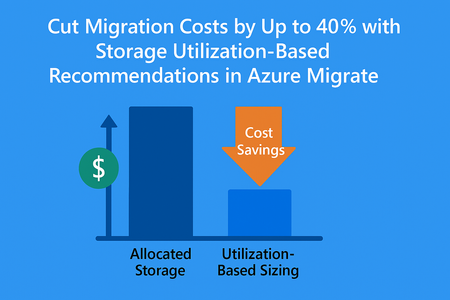
We’re thrilled to announce a game-changing enhancement in Azure Migrate. The storage utilization-based recommendations, a feature designed to help you right-size your storage workloads and maximize savings. By focusing on actual storage usage instead of allocated capacity, you can significantly reduce costs and accelerate their cloud journey. This feature brings a new level of precision to your migration planning and business case. Why This Matters In our analysis across thousands of on-premises environments, we observed a striking trend: nearly 40% of allocated storage is overprovisioned. This means customers are paying for capacity they don’t actually use. Traditional assessments often rely on allocated storage, leading to inflated cost estimates and suboptimal resource planning. What’s New Azure Migrate now honors actual storage utilization rather than allocated capacity when generating: Assessment recommendations for right-sizing your storage workloads. Business case calculations for accurate cost projections. This shift ensures: Lower migration cost projections: Pay for what you use, not what you’ve overprovisioned. Optimized cloud footprint: Reduce unnecessary storage allocation in Azure. Faster ROI: Build a business case that reflects true utilization, accelerating decision-making. Customer Impact By leveraging utilization-based insights, organizations can unlock significant savings and operate with greater efficiency. For example, if 40% of your storage is overprovisioned, this feature could cut your projected Azure storage costs dramatically, freeing up budget for innovation. How to Get Started Deploy an appliance in your on-premises environment. Build the business case or create an Azure Migrate Assessment for your on-premises workloads. Review the utilization-based recommendations in your assessment report or business case. Learn More Visit Azure Migrate documentation for detailed guidance and start optimizing your migration journey today.Introducing Azure Migrate Explore with AI Assistant
We're thrilled to announce the Public Preview of Azure Migrate Explore with an AI assistant! This exciting update enhances our existing Azure Migrate Explore (AME) utility, making migration assessments smarter, faster, and more impactful. What is Azure Migrate? Azure Migrate serves as a comprehensive hub designed to simplify the migration journey of on-premises infrastructure, including servers, databases, and web applications, to Azure Platform-as-a-Service (PaaS) and Infrastructure-as-a-Service (IaaS) targets at scale. It provides a unified platform with a suite of tools and features to help you identify the best migration path, assess Azure readiness, estimate the cost of hosting workloads on Azure, and execute the migration with minimal downtime and risk. Revolutionizing Executive Presentations Azure Migrate Explore already simplifies how organizations leverage Azure Migrate discovery and assessment data, turning it into polished executive presentations. The utility integrates seamlessly with Microsoft’s familiar tools like Power BI, Excel and PowerPoint, enabling easy customization and intuitive visualizations. What's New: The Power of AI Assistant With this upgrade, Azure Migrate Explore now incorporates an innovative AI Assistant, significantly boosting productivity and effectiveness for our sales force. This new capability, "Summarize with AI," leverages advanced natural language generation to craft concise and compelling summaries, helping sellers easily convey key insights and recommendations. Enhanced Capabilities with "Summarize with AI" The AI-generated summaries deliver tailored insights specific to each customer, including: Industry-specific analysis: Understand unique industry needs and compliance requirements, ensuring Azure meets customer-specific regulations and standards. Data center insights: Gain detailed location-based suggestions aligned with customer’s existing data centers. Cost optimization: Receive precise PaaS and IaaS cost estimates, coupled with practical savings options, empowering informed migration decisions. AI-driven opportunities: Uncover customized AI use-cases designed specifically for your customers' unique business challenges. Intuitive visual clarity: Easily interpret complex graphical representations generated by AME through concise, AI-driven explanations. Introducing Conversational Mode The new conversational mode transforms user interactions, making them more natural, intuitive, and efficient. Users can now seamlessly ask questions and receive immediate, context-aware responses from the AI assistant, enhancing understanding and accelerating decision-making. Enhance Your Sales Pitch With Azure Migrate Explore’s AI Assistant, sellers can now effortlessly deliver persuasive, customized presentations and summaries, driving faster customer commitment toward Azure migrations. Leverage this new intelligent capability today and take your migration conversations to the next level! Experience the power of Azure Migrate Explore with AI assistant in our Public Preview—where insights meet innovation! Check out the Github repository: Azure Migrate Explore Download and run the utility from: Azure Migrate Explore utility Documentation: Azure Migrate Explore documentation