data warehouse
40 Topics
How to use values from Data Source as parameter to other Data Source
I have two linked services: 1. A SQL database 2. A Rest API. I'm retrieving data from SQL to my Staging area incrementally. This is no problem. However, for retrieving information from the Rest API I need values from the records I just moved to the staging area. So let's say I get product data from SQL and the Rest API gives me additional info for these products from an external system. So I need to call the Rest API multiple times with as parameter each of the product ID's I've just imported. What is the most efficient way to this in ADF?. So in the way ADF was intended to be used. Thanks for any tips.693Views0likes0CommentsLightning fast query performance with Azure SQL Data Warehouse
Azure SQL Data Warehouse is a fast, flexible and secure analytics platform for enterprises of all sizes. Today we announced significant query performance improvements for Azure SQL Data Warehouse (SQL DW) customers enabled through enhancements in the distributed query execution layer. Analytics workload performance is determined by two major factors, I/O bandwidth to storage and repartitioning speed, also known as shuffle speed. In this previous blog post, we described how SQL DW caches relevant data to take advantage of NVMe based local storage. In this blog post, we will go under the hood of SQL DW, to see how the shuffling speed has improved. Read about it in the Azure blog.769Views0likes0CommentsAzure sets new performance benchmarks with SQL Data Warehouse
As the amount of data grows exponentially, the pressure to quickly harness it for insights to share across the organization also increases rapidly. As Microsoft continues to evolve our analytics portfolio, we are committed to delivering a data warehouse solution that provides a fast, flexible, and secure analytics platform in the cloud. Today we are excited to announce that Azure SQL Data Warehouse has set new performance benchmarks for cloud data warehousing by delivering at least 2x faster query performance compared to before. The key to this technical innovation is instant data movement, a capability that allows for extremely efficient movement between data warehouse compute nodes. At the heart of every distributed database system is the need to align two or more tables that are partitioned on a different key to produce a final or intermediate result set. Instant data movement in SQL Data Warehouse now accelerates this movement, resulting in faster query performance. You can learn more about how your query performance will improve from this blog. Read more about it in the Azure blog.693Views0likes0CommentsAzure HDInsight now supports Apache Spark 2.3
Apache Spark 2.3.0 is now available for production use on the managed big data service Azure HDInsight. Ranging from bug fixes (more than 1400 tickets were fixed in this release) to new experimental features, Apache Spark 2.3.0 brings advancements and polish to all areas of its unified data platform. Data engineers relying on Python UDFs get 10 times to a 100 times more speed, thanks to revamped object serialization between Spark runtime and Python. Data Scientist will be delighted by better integration of Deep Learning frameworks like TensorFlow with Spark Machine Learning pipelines. Business Analysts will find liberating availability of fast vectorized reader for ORC file format which finally makes interactive analytics in Spark practical over this popular columnar data format. Developers building real-time applications may be interested in experimenting with new Continuous Processing mode in Spark Structured Streaming which brings event processing latency to millisecond level. Read about it in the Azure blog.814Views0likes0CommentsMicrosoft Azure Data welcomes attendees to ACM SIGMOD/PODS 2018
Hello SIGMOD attendees! Welcome to Houston, and to what is shaping up to be a great conference. We wanted to take this opportunity to share with you some of the exciting work in data that’s going on in the Azure Data team at Microsoft, and to invite you to take a closer look. Microsoft has long been a leader in database management with SQL Server, recognized as the top DBMS by Gartner for the past three years in a row. The emergence of the cloud and edge as the new frontiers for computing, and thus data management, is an exciting direction—data is now dispersed within and beyond the enterprise, on-prem, on-cloud, and on edge devices, and we must enable intelligent analysis, transactions, and responsible governance for all data everywhere, from the moment it is created to the moment it is deleted, through the entire life-cycle of ingestion, updates, exploration, data prep, analysis, serving, and archival. Read more about it in the Azure blog.945Views0likes0CommentsAccelerate data warehouse modernization with Informatica Intelligent Cloud Services for Azure
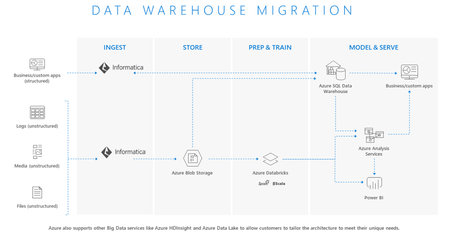
Today at the Informatica World, Scott Guthrie, EVP, Cloud + AI, along with Anil Chakravarthy, CEO of Informatica, announced the availability of Informatica Intelligent Cloud Services (IICS) for Azure. Microsoft has partnered with Informatica, a leader in Enterprise Data Management, to help our customers accelerate data warehouse modernization. This service is available as a free preview on Azure today. Informatica provides a discovery-driven approach to data warehouse migration. This approach simplifies the process of identifying and moving data into Azure SQL Data Warehouse (SQL DW), Microsoft’s petabyte scale, fully managed, globally available analytics platform. With the recently released SQL DW Compute Optimized Gen2 tier, you can enjoy 5x performance, 4x concurrency and 5x scale from previous generation. Read about it in the Azure blog.1.4KViews0likes0CommentsExtract management insights from SQL Data Warehouse with SQL Operations Studio
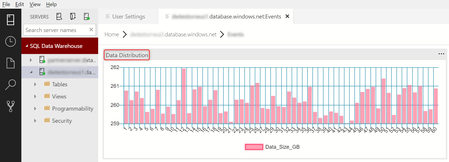
SQL Operations Studio can be leveraged with Azure SQL Data Warehouse (SQL DW) to create rich customizable dashboard widgets surfacing insights to your data warehouse. This unlocks key scenarios around managing and tuning your data warehouse to ensure it is optimized for consistent performance. Previously, developers had to manually and continuously execute complex DMV queries to extract insights from their data warehouse. This leads to a repetitious process when following development and tuning best practices with SQL DW. Now with SQL Operations Studio, customized insight widgets can be embedded directly within the query tool enabling you to seamlessly monitor and troubleshoot issues with your data warehouse. The following widgets can be generated by using the provided T-SQL monitoring scripts within SQL Operations Studio for common data warehouse insights. Read about it in the Azure blog.727Views0likes0CommentsAzure SQL Data Warehouse now supports automatic creation of statistics
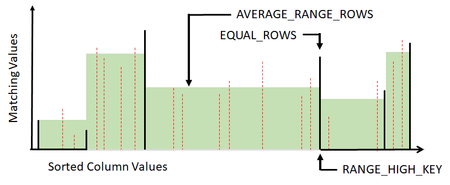
We are pleased to announce that Azure SQL Data Warehouse (Azure SQL DW) now supports automatic creation of column level statistics. Azure SQL DW is a fast, flexible, and secure analytics platform for the enterprise. Modern systems such as Azure SQL DW, rely on cost-based optimizers to generate quality execution plans for user queries. Even though Azure SQL DW implements a cost-based optimizer, the system relies on developers and administrators to create statistics objects manually. When all queries are known in advance, determining what statistics objects need to be created is an achievable task. However, when the system is faced with ad-hoc and random queries which is typical for the data warehousing workloads, system administrators may struggle to predict what statistics need to be created leading to potentially suboptimal query execution plans and longer query response times. One way to mitigate this problem is to create statistics objects on all the table columns in advance. However, that process comes with a penalty as statistics objects need to be maintained during table loading process, causing longer loading times. Read about it in the Azure blog.968Views1like0CommentsExplore SaaS analytics with Azure SQL Database, SQL Data Warehouse, Data Factory, and Power BI
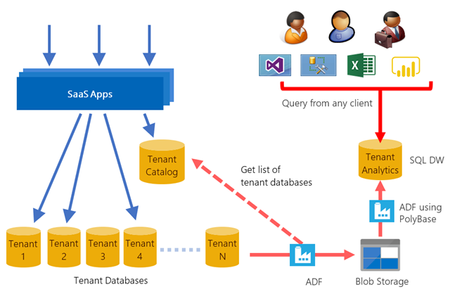
Continuing our series of tutorials on SaaS application patterns with SQL Database, we are delighted to announce an additional cross tenant analytics tutorial. This new tutorial shows how to extract and load tenant data into Azure SQL Data Warehouse (SQL DW) using Azure Data Factory (ADF) and then analyze it in Power BI. Read more about it in the Azure blog.1.5KViews0likes0CommentsAdaptive caching powers Azure SQL Data Warehouse performance gains
Today we made Azure SQL Data Warehouse (SQL DW) Compute Optimized Gen2 Tier generally available to our customers. Even though data and data sources grow exponentially, organizations continue to demand faster and faster insights. Azure SQL DW Compute Optimized Gen2 tier delivers on this need with major performance improvements made possible through adaptive caching. Analytics workload performance is typically determined by two major factors, I/O bandwidth to storage and repartitioning speed, also known as shuffle speed. This blog post looks under the hood of how Azure SQL DW exploits the latest hardware trends to improve effective I/O bandwidth available. Read about it in the Azure blog.773Views0likes0Comments