data platform
38 Topics
Building 3IQ Retail Assistant Demo – Part 1
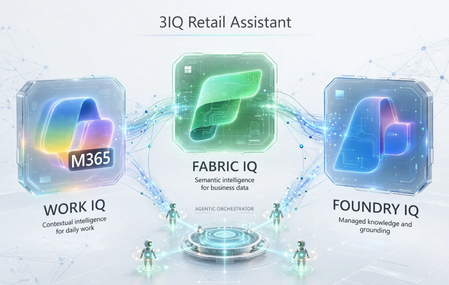
Introduction Recently I received a request from one of our GSI partners to demonstrate them 4IQs on a retail industry scenario. Unfortunately, Web IQ is still not in public preview. Hence, I promised them to come back with an example later with Web IQ. But even with the remaining Fabric IQ, Foundry IQ and Work IQ, the issue is finding the right set of data and then build a story around it to demonstrate an agentic solution addressing some practical real-life scenario. After doing some research with available data, I formulated a plan to prepare an assistant for customer reps to address incoming questions and requests from customers. This article describes how to build such an environment to demonstrate the capability of 3IQs together. First, we need an Azure subscription with option to provision Fabric capacity, need Foundry, M365, and Copilot Studio access. Once you have those, let’s move to set up our environment. Environment Set Up I have limited time in hand. So, I went ahead with existing templates to implement Foundry and surrounding services on Azure. I used this Bicep template: foundry-samples/infrastructure/infrastructure-setup-bicep/16-private-network-standard-agent-apim-setup at main · microsoft-foundry/foundry-samples. There are several other templates available on that page. You can choose any one of those based on your preference. This template puts all resources including Foundry behind private endpoints with no public internet access. You can add a jumpbox as a Bastion host to connect to all these services. Or time to time you can make those services public to complete your work. Setting up Fabric We will start with data layer which is Fabric. It is not provisioned yet. I provisioned a Fabric capacity with minimum size/SKU (F2) within the Resource Group generated by the Bicep template earlier. Fabric is an expensive service, especially the higher SKUs are. So, we need to be careful not spend too much and surpass our monthly Azure quota. Once provisioned, go to https://app.fabric.microsoft.com/ and create a Workspace using the same Fabric Capacity we provisioned earlier. Here “Fabric3IQ” is the name of my Fabric capacity. As the workspace is created now, let’s create a Lakehouse inside the Workspace and start loading data into the Lakehouse. But prior to that, let’s go to the Fabric capacity on Azure Portal and increase the size to a bigger SKU such as F64. We will load AdventureWorks sales data into the Lakehouse. There is a detail description here showing how to do it: Quickstart: Create Your First Graph in Microsoft Fabric - Microsoft Fabric | Microsoft Learn. Only follow the “Load Sample Data” section. One done, it should look like this: Now is the time to create our Ontology. People who are not familiar can find a guide in this tutorial: Tutorial Part 1: Create an Ontology - Microsoft Fabric | Microsoft Learn. We added each table from Lakehouse as entities and build relationship within those entities. Here is how it looks like now: Next is adding a Data Agent to the Fabric Workspace. Once added, now add a data source and select the Ontology you created earlier. Now, as your Data Agent is ready ask few complex questions like: “What are the top 5 categories sold?”, “Give me the seller's name who handled most orders in numbers and not in total sale amount?”, “List those customers who didn't purchase anything” and see the result. Once, satisfied, let’s pause the Fabric Capacity from Azure Portal and reduce the size of the capacity to F2. We will resume and rescale it once everything is ready.442Views0likes0Comments
Designing a Medallion Framework — A Decision Guide
Everyone draws the same picture: Bronze → Silver → Gold. Three boxes, three arrows. Done. What that picture hides is the dozen design decisions you have to make inside each box — and the ones you make at the boundaries between them. Get those right and onboarding the 200th table feels like onboarding the 2nd. Get them wrong and you’ll be rewriting the framework in 18 months. This post is a generic walkthrough of how to think about a medallion framework on Databricks (or any other platform): what each layer should own, where the responsibilities blur, and a few opinionated patterns I’ve found worth defending The classic template - Bronze → Silver → Gold. Three layers, broadly: Press enter or click to view image in full size This template is intentionally vague — and that’s the point. The same three labels can describe a framework for a 10-table marketing pipeline and a 2,000-table enterprise lakehouse. The differences are in how you tweak the template to match your project. This post walks through the questions that drive those tweaks. There isn’t a single right answer for any of them — only the answer that fits your project’s requirements. How to read this guide For each architectural choice, I’ll frame it as: The question — the requirement you need to clarify The options — the realistic ways to answer it When each option fits — what kind of project picks which option Use this to make your tradeoffs explicit. Document the answers in your design doc. They’ll inform a hundred downstream decisions. Question 1 — Do you need a Staging layer? A Staging (stg_*) layer is a transient zone that holds just the current run’s data before it lands in Bronze. Options: No staging. Source → Bronze directly. Staging as a transient table per object, overwritten every run. Staging as a checkpointed zone (e.g., Auto Loader checkpoints + raw files in a landing path). When to pick which: The decision usually comes down to failure isolation and incremental capture clarity. If both are non-issues, you can skip it. Question 2 — How “raw” should Bronze be? This is the single biggest tweak point in the medallion architecture. The textbook says “Bronze = raw bytes.” Real projects often deviate. Options: A. Strictly raw. Source schema preserved exactly. All columns as STRING. No casting, no trimming. B. Lightly cleaned. Strong typing, whitespace trimmed, null normalization (“”, “N/A” → NULL), audit columns added. Schema stable. C. Cleansed + minor enrichment. Above plus reference data lookups, basic standardization (e.g., country codes), key normalization. When to pick which: A useful rule of thumb: the more sources and consumers you have, the cleaner Bronze should be. The cost of not cleaning compounds with every notebook downstream. If you choose B or C, you’ve shifted some traditional Silver responsibilities into Bronze. That’s fine — just be explicit about it so Silver’s contract changes accordingly. Question 3 — What does Silver actually own? Silver is the most overloaded layer in any medallion framework. Decide upfront which of these responsibilities Silver owns vs. defers to other layers: How to decide what Silver owns: If Silver is the only layer business users query, give it more — including light history and aggregations. (Common in smaller projects.) If you have a strong Gold layer with multiple marts, keep Silver narrow: business entities only, current state. If you have multiple consuming teams with different needs, push everything consumer-specific to Gold and keep Silver as the shared canonical model. The clearest signal that Silver is overloaded: you have one Silver table per source table. Silver should be organized by business entity, not by source. If they line up 1:1, you’ve effectively built “Bronze with cleaning” and skipped Silver’s real value. Question 4 — Is Gold one zone or several? The default picture shows Gold as one box. In real projects it often splits. Options: Single Gold zone. Marts and history live together. Gold-Reporting + Gold-History. Reporting marts (denormalized, aggregated, fast) separated from historized snapshots (SCD2, point-in-time, append-mostly). Gold per consumer. Separate zones per business unit, dashboard family, or external API. The cost of splitting Gold is some duplication and more pipelines. The benefit is independent SLAs — your dashboard refresh isn’t held hostage by your audit history rebuild. Question 5 — Load patterns: FullLoad vs DeltaLoad vs CDC Per source table, decide the load pattern. This decision drives staging design, watermark management, and merge logic. It’s normal to mix patterns inside the same framework. The metadata-driven approach below makes this trivial — load pattern is just a column in your config table. Question 6 — How metadata-driven should the framework be? Options: Code-per-table. One notebook per ingestion. Simple, easy to reason about, scales poorly. Hybrid. Generic ingestion notebooks for common patterns, custom notebooks for exceptions. Fully metadata-driven. Generic notebooks for every layer, behavior driven entirely by metadata tables. When to pick which: A fully metadata-driven framework has higher upfront cost but flattens the per-table cost dramatically. The break-even point is usually around 30–50 tables. Question 7 — Orchestration shape How do you fan out work across tables? Options: Sequential. One table at a time. Simple, slow. Parallel pool. ThreadPoolExecutor or Databricks Workflows fan-out. Tables run concurrently, no inter-table dependencies. DAG. Dependency-aware execution. Required when tables depend on each other. Per-layer guidance: The decision driver is whether tables in that layer depend on each other. If they don’t, don’t pay the DAG complexity tax. Question 8 — Failure handling and retries Options to decide on: Retry scope. Per statement, per child notebook, per master run, none. Retry counts. Per layer? Per table? Per environment? Backoff. Fixed, linear, exponential. Failure semantics. Fail-fast (stop on first failure) or best-effort (continue and report at the end). When to pick which: A good default for most projects: process-level retry (master retries the failed child), exponential backoff, per-layer max retry count, fail-fast within a child. Question 9 — Observability: how much do you log? Decide what every run captures: Execution status, start/end timestamps, duration Row counts per activity (source read, staging write, target write) MERGE metrics (inserted, updated, deleted) Watermark used and watermark captured Retry attempts Error message (truncated) Options for storage: Logs in source-side metadata DB (e.g., Azure SQL). Easy to query with SQL, integrates with monitoring tools. Logs in a Delta table in the lakehouse. Native to Databricks, queryable with Spark. Logs in both. Source-side for ops dashboards, Delta for analytics on the pipeline itself. When to pick which: Whatever you pick, make count validation a first-class output. The moment counts mismatch, you want to know — not three reports later. Question 10 — Schema evolution policy The cheapest decision to defer and the most painful one to retrofit. Decide which changes are allowed automatically: Where to enforce: At Bronze ingestion — fail loudly if source schema changes in a disallowed way At Silver — handle by transformation; new Bronze columns don’t auto-flow to Silver At Gold — strict contracts; consumers depend on the shape The contract changes per layer reflects the audience. Bronze is forgiving (data engineers see issues); Gold is strict (consumers can’t tolerate surprises). Question 11 — Idempotency and replay Can you re-run yesterday’s load and get the same result? Options: Idempotent by run_id. Re-running the same run_id is a no-op or produces identical output. Idempotent by data. Re-running with the same source data produces identical output (regardless of run_id). Non-idempotent. Replays may produce different results (e.g., timestamps based on current_timestamp()). Recommendation: aim for data-idempotent in every layer. Concretely: Staging: overwrite-per-run → idempotent by construction. Bronze: keyed MERGE → idempotent. Silver: pure transformation of Bronze inputs → idempotent. Gold: pure transformation of Silver inputs → idempotent. If you can’t replay a layer cleanly, that’s a design bug worth fixing early. Question 12 — Environment topology How many environments? How do they differ? Common patterns: Dev / Test/ Stage / Prod, separate workspaces and data. Per-developer dev, shared Test/Stage, isolated Prod. What changes between environments (drive these from config): Source connection strings Target storage paths / catalog names Retry counts (often higher in prod) Parallelism (often lower in dev to save cost) Logging verbosity Data masking rules Keep code identical across environments. Differences live in environment-scoped config (dev.yml, test.yml, stage.yml, prod.yml) loaded at runtime. Putting it together — three example shapes The same framework, three different projects, three different shapes: Shape A — Small marketing analytics project 15 tables, single source, weekly batch No staging — source is reliable, volumes small Bronze: lightly cleaned — analysts query it directly Silver: full ownership including light history and aggregations (no separate Gold needed) Gold: optional, only for the executive dashboard Code-per-table, sequential orchestration, fail-fast, minimal logging Shape B — Mid-size enterprise data platform 80 tables, 5 source systems, daily batch with some hourly Staging as transient table for Delta Loads Bronze: lightly cleaned + audit columns Silver: business entities (Customer, Policy, Claim), DAG orchestration Gold: split into Reporting + History zones Hybrid metadata-driven (generic ingestion, custom transforms), per-layer retry, structured count logs Shape C — Large multi-tenant Lakehouse 500+ tables, 20+ source systems, mixed batch/streaming Staging zone with file-level checkpoints (Auto Loader) Bronze: strictly raw + a parallel Bronze-Curated layer for cleansed views Silver: shared canonical model, narrow scope Gold: per-consumer zones with independent SLAs Fully metadata-driven, DAG everywhere, multi-store logging, strict schema contracts Notice none of these are “wrong.” They’re calibrated to the project. A short checklist for your own framework Before writing code, write down your answers to: Do we need a Staging layer? Why? How clean is Bronze? What’s allowed and what’s not? What does Silver own? Where does it stop? Is Gold one zone or multiple? How are they divided? Which load patterns do we support? Per table or universal? How metadata-driven? Where do exceptions live? What’s the orchestration shape per layer? What’s our retry and failure policy per layer? What does every run log? Where? What’s our schema evolution policy per layer? Are all layer's data-idempotent? What changes per environment, and what stays the same? If you have an answer for each, you have a framework design. If you skip any, you have a framework that will surprise you in production. Closing thought The medallion architecture isn’t a prescription — it’s a vocabulary. Bronze, Silver, Gold give you words to describe responsibilities. The actual responsibilities are yours to assign, based on what your project actually needs. Tweak deliberately. Document your tweaks. And revisit them when the project’s requirements change — because they will.927Views1like0CommentsEnabling Agentic Data Governance with Hybrid Cloud Flexibility in Azure
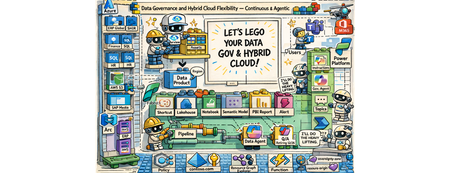
The “Why” Do you manage data in a complex multi-cloud environment? Are you struggling with data silos, evolving regulations, and the pressure to maintain control and compliance across on-prem and multiple clouds? Do you ever wish an intelligent assistant could help shoulder the load of data governance? If so, I can relate. Let me tell you a story that might sound familiar. Meet Mark (pictured above). He is a data governance officer at Contoso (a fictional but very representative enterprise). Mark’s day job is ensuring data governance and compliance across his company’s vast hybrid cloud estate – think around ~2 million data assets sprawled across 12+ datacenters on-premises and in different public clouds. Regulatory requirements are constantly shifting. Customer data is increasingly sensitive. Each department and region has its own way of doing things. Mark is fighting an uphill battle with data silos and disconnected cloud operations. He bounces between a patchwork of tools – spreadsheets, cloud consoles, governance portals – trying to answer basic questions: Where is our data? Who’s using it? Are we in compliance? Armed with an old desk calculator and a pile of paper-based reports (a perfect 1990s backdrop), he is dealing with the data around him that has exploded in volume and complexity. What if Mark had a single pane of glass. The glass that reflects and acts. It reflects your governance state and enforces compliance – a self-hydrating pane of glass accompanied by a conversational AI. And he’s not alone. We’re all living in a data overload era. Every day, organizations generate and ingest more information than ever before. Transistors and mainframes gave way to the internet boom of the ’90s, then an explosion of mobile devices in the 2000s, social media in the 2010s, and now widespread cloud computing – all funneling data into our systems at an exponential rate. On top of that, a new wave of AI and conversational interfaces has arrived here in the mid-2020s, making data more accessible but also increasing expectations for real-time insight. It’s no wonder modern IT leaders feel overwhelmed. But these challenges are also opportunities. The way I see it, the incredible growth of data and cloud capabilities means we have a chance to reimagine data governance. The fact that I’m writing about this right now is no coincidence. My customers are looking to resolve problems in this space. In my conversations with them, I hear the same needs: We want better governance, more visibility, streamlined oversight… and cherry on top, we want it in an “agentic” fashion. In other words, they want to delegate the grunt work to the platform toolset augmented by AI, so they can focus on higher-value tasks. The “What” That vision – agentic data governance with hybrid cloud flexibility – became the driver for this work. This is a modular solution, and you have these building block style components (cloud services, governance tools, AI agents), which you can snap them together into an intended solution. Think of it as a jumpstart kit for continuous data governance across multiple clouds, with autonomous (“agentic”) assistance baked in that you can leverage and build upon. It’s not the final, productized solution – more a vision of what’s possible. Contoso’s Requirements These are the high-level requirements from Contoso: Data governance across clouds under one roof A single pane of glass dashboard consolidating reporting on the 5 governance domains: o Visibility on data residency and lineage o PII (Personally Identifiable Information) must run on a CC (Confidential Compute) o Security software (Defender) compliance o Resource tagging compliance (foundational for a good governance posture) o OS updates compliance Ability to enforce compliance in an agentic manner with a human in the loop Agentic enforcement of compliance pertaining to residency and confidential compute Solution – The breakdown The solution is comprised of 8 modules addressing these requirements. These solution modules are: Foundational (Landing zones, Data Sources, Operational setup, Policies, etc.) Dashboard Hydration + Agentic Reporting – Residency Compliance Dashboard Hydration + Agentic Reporting – Confidential Compute for PII Compliance Dashboard Hydration + Agentic Reporting – MS Defender Compliance Dashboard Hydration + Agentic Reporting – Resource Tag Compliance Dashboard Hydration + Agentic Reporting – OS Updates/Patch Compliance Enforce Compliance via Copilot Agent - Residency Compliance Enforce Compliance via Copilot Agent – CC PII Compliance Solution – The architecture view These are the main technical components that make up the solution architecture: Data sources of all shapes and sizes on the left, governed by the native Azure or the Arc plane. Additional Azure services across the bottom layer for the foundational governance posture Microsoft Purview, in the top middle, as the unified data governance platform Microsoft Fabric, in the bottom middle, as the end-to-end ingestion and analytics platform Microsoft Power Platform, on the right, as the low code/no code business flow and the copilot agent experience Solution – The end user view So how does Mark see this solution as a data governance officer? He doesn’t see all the intricacies of the solution integration and the logic execution. He sees two things: A Power BI dashboard running on Microsoft Fabric with A compliance dashboard with an overall score in each of the five compliance domains alongside scores for each of the data products across these domains Additional reporting views for more granular reporting Fabric-based pipeline that hydrates the underlying semantic models from various sources to keep the reports fresh and current A Copilot agent (in Teams) for both: Reporting on all compliance domains Enforcing in-scope compliance across selected domains The agent takes care of it - queries Fabric’s semantic model, calls Azure Function endpoints, updates Purview glossary terms, applies Azure tags, and sends Teams notifications. The “How” – Residency Compliance Let’s pick a few modules to walk through how these solution modules work together to give a cohesive agentic governance experience to Mark. It’s Monday morning, and Mark logs into the Contoso governance portal with a cup of coffee in hand. Instead of a dozen browser tabs, he has two main tools opened: the Data Governance Dashboard and the Contoso Governance Copilot agent. To address some inquiries that came as an assigned action to him, he interacted with the agent. During this interaction, not only did he validate if there were any residency missing in the unified data governance platform (Purview), but he was also able to address a mismatch between Purview and Azure resource, based on the designed principles. Here is the snippet of the chat: Now, under the hood, several components have worked on behalf of the agent in performing this governance checking and applying the necessary course of action: Even before Mark's conversation with the agent, an ongoing hydration process keeps the Fabric Power BI dashboard up to date. Dashboard Hydration + Agentic Reporting – Residency Compliance A Fabric notebook runs the residency scorecard code block through a pipeline. It reads two Lakehouse tables containing latest residency information from Purview and the approved region list Then, the notebook gets a Microsoft Entra bearer token Once acquired, the notebook then calls an Azure Function endpoint This endpoint, then searches for the Azure resources associated with the data products in Purview using an Azure resource tag. The notebook then compares the declared Purview residency with the approved region list and the associated resource’s region The notebook then calculates the final 0 / 25 / 50 / 75 / 100 residency compliance score and a reason. For example: A data product without an associated Azure resource gets a 0, while a data product whose residency in Purview is an approved region by Contoso, and also matches with the associated Azure resource, gets a 100. It then writes the results to the relevant residency compliance Lakehouse tables The dedicated compliance table then feeds to the semantic model for reporting The compliance Power BI dashboard is hydrated Enforce Compliance via Copilot Agent - Residency Compliance With the dashboard data regularly updated, the agent follows this logic, the updated reporting data, and the actions at its disposal, during the earlier conversation with Mark : Mark initiates the conversation with the agent The agent calls a Power Automate flow This flow retrieves Purview’s residency information stored in the Fabric semantic model 5, 6, 7 and 8. When Mark asks to investigate further on a data product, the agent carries the conversation using a topic, which then leverages a flow, which uses a Power Automate custom connector to access an Azure Function endpoint. This endpoint then retrieves latest glossary (residency) information about the data product in question, from Purview, and provides a preview back to the user 10, 11, 12, and 13. If the update criteria are met, and if there is no conflict, and with Mark’s blessings, the topic then calls another flow to access the Functions Purview Update endpoint, and make the glossary (residency) update in Purview for that data product The “How” – Confidential Compute for PII Compliance Dashboard Hydration + Agentic Reporting – Confidential Compute for PII Compliance The following snippet shows how Mark addresses the compliance risk with a critical data product (application), S/4 HANA, and performed the necessary compliance actions, such as tagging the associated resources and notifying the data product owners via Teams channel. The following diagram shows the under-the-hood hydration flow for confidential compute compliance: Enforce Compliance via Copilot Agent – CC PII Compliance Finally, the diagram below shows how Mark’s conversation flows through the main solution components: Outcome Stepping back, what did we accomplish for Mark and Contoso? We turned an onslaught of governance challenges into an opportunity to modernize how data is managed. This gave Mark: Centralized Visibility into data assets across the landscape through Purview and a unified dashboard Proactive compliance enabled with automated checks - controlled with Purview exports and Fabric pipeline schedules And compliance enforcement using an agent Hybrid Cloud Consistency. By using Azure Arc and a foundational data plane management setup Reduced Operational overhead with agentic reporting and compliance Though the solution is comprised of wide variety of components/services, it is built from standard building blocks and is relatively simple to implement. In total, the solution combined around a dozen Azure services and over 40 distinct components (from Purview catalogs to data pipelines, to custom functions and flows). You can choose to implement some or all the compliance domains. Or, better yet, build upon and create new domains and pave new paths. Wrap-up I believe many enterprises could take a similar journey. If you’re facing these issues, consider this an invitation to think differently about data governance. Start with the pieces you already have – your own building blocks of cloud services and data – and imagine what you could build. Chances are that a lot of the heavy lifting can be orchestrated with today’s technology. And with the rise of AI copilots, the dream of agentic data governance – where your policies are continuously enforced by smart agents – is no longer science fiction. It’s here, right now, waiting for you to take it for a spin. Next steps Watch the video narrative on SAP on Azure YouTube channel: Build it with the GitHub Repository: https://github.com/moazmirza/data-sov-and-hyb-cloud Comments/questions: Here, or @ LinkedIn /moazmirza Solution Selfies Azure Policy Compliance - Foundational Governance Posture Purview Data Product Catalog and Data Lineage Purview Governance Metadata à Fabric Lakehouse Fabric Semantic Model Additional Fabric Power BI Dashboard Copilot Studio Topic Flow Azure Function Endpoints520Views0likes0CommentsHow Azure NetApp Files Object REST API powers Azure and ISV Data and AI services – on YOUR data
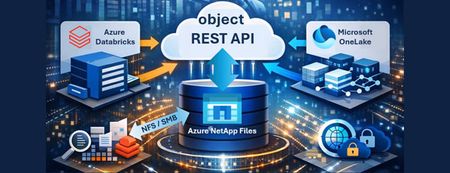
This article introduces the Azure NetApp Files Object REST API, a transformative solution for enterprises seeking seamless, real-time integration between their data and Azure's advanced analytics and AI services. By enabling direct, secure access to enterprise data—without costly transfers or duplication—the Object REST API accelerates innovation, streamlines workflows, and enhances operational efficiency. With S3-compatible object storage support, it empowers organizations to make faster, data-driven decisions while maintaining compliance and data security. Discover how this new capability unlocks business potential and drives a new era of productivity in the cloud.1.6KViews0likes0CommentsUnlocking Advanced Data Analytics & AI with Azure NetApp Files object REST API
Azure NetApp Files object REST API enables object access to enterprise file data stored on Azure NetApp Files, without copying, moving, or restructuring that data. This capability allows analytics and AI platforms that expect object storage to work directly against existing NFS based datasets, while preserving Azure NetApp Files’ performance, security, and governance characteristics.1.3KViews0likes0CommentsAccelerating HPC and EDA with Powerful Azure NetApp Files Enhancements
High-Performance Computing (HPC) and Electronic Design Automation (EDA) workloads demand uncompromising performance, scalability, and resilience. Whether you're managing petabyte-scale datasets or running compute intensive simulations, Azure NetApp Files delivers the agility and reliability needed to innovate without limits.1KViews1like0CommentsAzure Resiliency: Proactive Continuity with Agentic Experiences and Frontier Innovation
Introduction In today’s digital-first world, even brief downtime can disrupt revenue, reputation, and operations. Azure’s new resiliency capabilities empower organizations to anticipate and withstand disruptions—embedding continuity into every layer of their business. At Microsoft Ignite, we’re unveiling a new era of resiliency in Azure, powered by agentic experiences. The new Azure Copilot resiliency agent brings AI-driven workflows that proactively detect vulnerabilities, automate backups, and integrate cyber recovery for ransomware protection. IT teams can instantly assess risks and deploy solutions across infrastructure, data, and cyber recovery—making resiliency a living capability, not just a checklist. The Evolution from Azure Business Continuity Center to Resiliency in Azure Microsoft is excited to announce that the Azure Business Continuity Center (ABCC) is evolving into resiliency capabilities in Azure. This evolution expands its scope from traditional backup and disaster recovery to a holistic resiliency framework. This new experience is delivered directly in the Azure Portal, providing integrated dashboards, actionable recommendations, and one-click access to remediation—so teams can manage resiliency where they already operate. Learn more about this: Resiliency. To see the new experience, visit the Azure Portal. The Three Pillars of Resiliency Azure’s resiliency strategy is anchored in three foundational pillars, each designed to address a distinct dimension of operational continuity: Infrastructure Resiliency: Built-in redundancy and zonal/regional management keep workloads running during disruptions. The resiliency agent in Azure Copilot automates posture checks, risk detection, and remediation. Data Resiliency: Automated backup and disaster recovery meet RPO/RTO and compliance needs across Azure, on-premises, and hybrid. Cyber Recovery: Isolated recovery vaults, immutable backups, and AI-driven insights defend against ransomware and enable rapid restoration. With these foundational pillars in place, organizations can adopt a lifecycle approach to resiliency—ensuring continuity from day one and adapting as their needs evolve. The Lifecycle Approach: Start Resilient, Get Resilient, Stay Resilient While the pillars define what resiliency protects, the lifecycle stages in resiliency journey define how organizations implement and sustain it over time. For the full framework, see the prior blog; below we focus on what’s new and practical. The resiliency agent in Azure Copilot empowers organizations to embed resiliency at every stage of their cloud journey—making proactive continuity achievable from day one and sustainable over time. Start Resilient: With the new resiliency agent, teams can “Start Resilient” by leveraging guided experiences and automated posture assessments that help design resilient workloads before deployment. The agent surfaces architecture gaps, validates readiness, and recommends best practices—ensuring resiliency is built in from the outset, not bolted on later. Get Resilient: As organizations scale, the resiliency agent enables them to “Get Resilient” by providing estate-wide visibility, automated risk assessments, and configuration recommendations. AI-driven insights help identify blind spots, remediate risks, and accelerate the adoption of resilient-by-default architectures—so resiliency is actively achieved across all workloads, not just planned. Stay Resilient: To “Stay Resilient,” the resiliency agent delivers continuous validation, monitoring, and improvement. Automated failure simulations, real-time monitoring, and attestation reporting allow teams to proactively test recovery workflows and ensure readiness for evolving threats. One-click failover and ongoing posture checks help sustain compliance and operational continuity, making resiliency a living capability that adapts as your business and technology landscape changes Best Practices for Proactive Continuity in Resiliency To enable proactive continuity, organizations should: Architect for high availability across multiple availability zones and regions (prioritize Tier-0/1 workloads). Automate recovery with Azure Site Recovery and failover playbooks for orchestrated, rapid restoration. Leverage integrated zonal resiliency experiences to uncover blind spots and receive tailored recommendations. Continuously validate using Chaos Studio to simulate outages and test recovery workflows. Monitor SLAs, RPO/RTO, and posture metrics with Azure Monitor and Policy; iterate for ongoing improvement. Use the Azure Copilot resiliency agent for AI-driven posture assessments, remediation scripts, and cost analysis to streamline operations. Conclusion & Next Steps Resiliency capabilities in Azure unifies infrastructure, data, and cyber recovery while guiding organizations to start, get, and stay resilient. Teams adopting these capabilities see faster posture improvements, less manual effort, and continuous operational continuity. This marks a fundamental shift—from reactive recovery to proactive continuity. By embedding resiliency as a living capability, Azure empowers organizations to anticipate, withstand, and recover from disruptions, adapting to new threats and evolving business needs. Organizations adopting Resiliency in Azure see measurable impact: Accelerated posture improvement with AI-driven insights and actionable recommendations. Less manual effort through automation and integrated recovery workflows. Continuous operational continuity via ongoing validation and monitoring Ready to take the next step? Explore these resources and sessions: Resiliency in Azure (Portal) Resiliency in Azure (Learn Docs) Agents (preview) in Azure Copilot Resiliency Solutions Reliability Guides by Service Azure Essentials Azure Accelerate Ignite Announcement Key Ignite 2025 Sessions to Watch: Resilience by Design: Secure, Scalable, AI-Ready Cloud with Azure (BRK217) Resiliency & Recovery with Azure Backup and Site Recovery (BRK146) Architect Resilient Apps with Azure Backup and Reliability Features (BRK148) Architecting for Resiliency on Azure Infrastructure (BRK178) All sessions are available on demand—perfect for catching up or sharing with your team. Browse the full session catalog and start building resiliency by default today.1.5KViews5likes0CommentsBuilding AI Agents: Workflow-First vs. Code-First vs. Hybrid
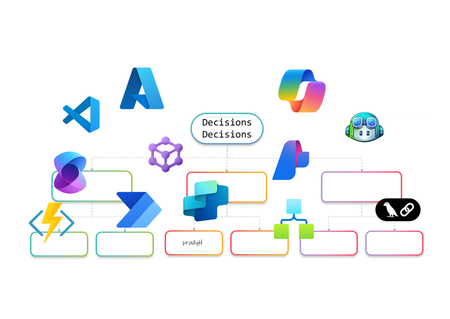
AI Agents are no longer just a developer’s playground. They’re becoming essential for enterprise automation, decision-making, and customer engagement. But how do you build them? Do you go workflow-first with drag-and-drop designers, code-first with SDKs, or adopt a hybrid approach that blends both worlds? In this article, I’ll walk you through the landscape of AI Agent design. We’ll look at workflow-first approaches with drag-and-drop designers, code-first approaches using SDKs, and hybrid models that combine both. The goal is to help you understand the options and choose the right path for your organization. Why AI Agents Need Orchestration Before diving into tools and approaches, let’s talk about why orchestration matters. AI Agents are not just single-purpose bots anymore. They often need to perform multi-step reasoning, interact with multiple systems, and adapt to dynamic workflows. Without orchestration, these agents can become siloed and fail to deliver real business value. Here’s what I’ve observed as the key drivers for orchestration: Complexity of Enterprise Workflows Modern business processes involve multiple applications, data sources, and decision points. AI Agents need a way to coordinate these steps seamlessly. Governance and Compliance Enterprises require control over how AI interacts with sensitive data and systems. Orchestration frameworks provide guardrails for security and compliance. Scalability and Maintainability A single agent might work fine for a proof of concept, but scaling to hundreds of workflows requires structured orchestration to avoid chaos. Integration with Existing Systems AI Agents rarely operate in isolation. They need to plug into ERP systems, CRMs, and custom apps. Orchestration ensures these integrations are reliable and repeatable. In short, orchestration is the backbone that turns AI Agents from clever prototypes into enterprise-ready solutions. Behind the Scenes I’ve always been a pro-code guy. I started my career on open-source coding in Unix and hardly touched the mouse. Then I discovered Visual Studio, and it completely changed my perspective. It showed me the power of a hybrid approach, the best of both worlds. That said, I won’t let my experience bias your ideas of what you’d like to build. This blog is about giving you the full picture so you can make the choice that works best for you. Workflow-First Approach Workflow-first platforms are more than visual designers and not just about drag-and-drop simplicity. They represent a design paradigm where orchestration logic is abstracted into declarative models rather than imperative code. These tools allow you to define agent behaviors, event triggers, and integration points visually, while the underlying engine handles state management, retries, and scaling. For architects, this means faster prototyping and governance baked into the platform. For developers, it offers extensibility through connectors and custom actions without sacrificing enterprise-grade reliability. Copilot Studio Building conversational agents becomes intuitive with a visual designer that maps prompts, actions, and connectors into structured flows. Copilot Studio makes this possible by integrating enterprise data and enabling agents to automate tasks and respond intelligently without deep coding. Building AI Agents using Copilot Studio Design conversation flows with adaptive prompts Integrate Microsoft Graph for contextual responses Add AI-driven actions using Copilot extensions Support multi-turn reasoning for complex queries Enable secure access to enterprise data sources Extend functionality through custom connectors Logic Apps Adaptive workflows and complex integrations are handled through a robust orchestration engine. Logic Apps introduces Agent Loop, allowing agents to reason iteratively, adapt workflows, and interact with multiple systems in real time. Building AI Agents using Logic Apps Implement Agent Loop for iterative reasoning Integrate Azure OpenAI for goal-driven decisions Access 1,400+ connectors for enterprise actions Support human-in-the-loop for critical approvals Enable multi-agent orchestration for complex tasks Provide observability and security for agent workflows Power Automate Multi-step workflows can be orchestrated across business applications using AI Builder models or external AI APIs. Power Automate enables agents to make decisions, process data, and trigger actions dynamically, all within a low-code environment. Building AI Agents using Power Automate Automate repetitive tasks with minimal effort Apply AI Builder for predictions and classification Call Azure OpenAI for natural language processing Integrate with hundreds of enterprise connectors Trigger workflows based on real-time events Combine flows with human approvals for compliance Azure AI Foundry Visual orchestration meets pro-code flexibility through Prompt Flow and Connected Agents, enabling multi-step reasoning flows while allowing developers to extend capabilities through SDKs. Azure AI Foundry is ideal for scenarios requiring both agility and deep customization. Building AI Agents using Azure AI Foundry Design reasoning flows visually with Prompt Flow Orchestrate multi-agent systems using Connected Agents Integrate with VS Code for advanced development Apply governance and deployment pipelines for production Use Azure OpenAI models for adaptive decision-making Monitor workflows with built-in observability tools Microsoft Agent Framework (Preview) I’ve been exploring Microsoft Agent Framework (MAF), an open-source foundation for building AI agents that can run anywhere. It integrates with Azure AI Foundry and Azure services, enabling multi-agent workflows, advanced memory services, and visual orchestration. With public preview live and GA coming soon, MAF is shaping how we deliver scalable, flexible agentic solutions. Enterprise-scale orchestration is achieved through graph-based workflows, human-in-the-loop approvals, and observability features. The Microsoft Agent Framework lays the foundation for multi-agent systems that are durable and compliant. Building AI Agents using Microsoft Agent Framework Coordinate multiple specialized agents in a graph Implement durable workflows with pause and resume Support human-in-the-loop for controlled autonomy Integrate with Azure AI Foundry for hosting and governance Enable observability through OpenTelemetry integration Provide SDK flexibility for custom orchestration patterns Visual-first platforms make building AI Agents feel less like coding marathons and more like creative design sessions. They’re perfect for those scenarios when you’d rather design than debug and still want the option to dive deeper when complexity calls. Pro-Code Approach Remember I told you how I started as a pro-code developer early in my career and later embraced a hybrid approach? I’ll try to stay neutral here as we explore the pro-code world. Pro-code frameworks offer integration with diverse ecosystems, multi-agent coordination, and fine-grained control over logic. While workflow-first and pro-code approaches both provide these capabilities, the difference lies in how they balance factors such as ease of development, ease of maintenance, time to deliver, monitoring capabilities, and other non-functional requirements. Choosing the right path often depends on which of these trade-offs matter most for your scenario. LangChain When I first explored LangChain, it felt like stepping into a developer’s playground for AI orchestration. I could stitch together prompts, tools, and APIs like building blocks, and I enjoyed the flexibility. It reminded me why pro-code approaches appeal to those who want full control over logic and integration with diverse ecosystems. Building AI Agents using LangChain Define custom chains for multi-step reasoning [it is called Lang“Chain”] Integrate external APIs and tools for dynamic actions Implement memory for context-aware conversations Support multi-agent collaboration through orchestration patterns Extend functionality with custom Python modules Deploy agents across cloud environments for scalability Semantic Kernel I’ve worked with Semantic Kernel when I needed more control over orchestration logic, and what stood out was its flexibility. It provides both .NET and Python SDKs, which makes it easy to combine natural language prompts with traditional programming logic. I found the planners and skills especially useful for breaking down goals into smaller steps, and connectors helped integrate external systems without reinventing the wheel. Building AI Agents using Semantic Kernel Create semantic functions for prompt-driven tasks Use planners for dynamic goal decomposition Integrate plugins for external system access Implement memory for persistent context across sessions Combine AI reasoning with deterministic code logic Enable observability and telemetry for enterprise monitoring Microsoft Agent Framework (Preview) Although I introduced MAF in the earlier section, its SDK-first design makes it relevant here as well for advanced orchestration and the pro-code nature… and so I’ll probably write this again in the Hybrid section. The Agent Framework is designed for developers who need full control over multi-agent orchestration. It provides a pro-code approach for defining agent behaviors, implementing advanced coordination patterns, and integrating enterprise-grade observability. Building AI Agents using Microsoft Agent Framework Define custom orchestration logic using SDK APIs Implement graph-based workflows for multi-agent coordination Extend agent capabilities with custom code modules Apply durable execution patterns with pause and resume Integrate OpenTelemetry for detailed monitoring and debugging Securely host and manage agents through Azure AI Foundry integration Hybrid Approach and decision framework I’ve always been a fan of both worlds, the flexibility of pro-code and the simplicity of workflow drag-and-drop style IDEs and GUIs. A hybrid approach is not about picking one over the other; it’s about balancing them. In practice, this to me means combining the speed and governance of workflow-first platforms with the extensibility and control of pro-code frameworks. Hybrid design shines when you need agility without sacrificing depth. For example, I can start with Copilot Studio to build a conversational agent using its visual designer. But if the scenario demands advanced logic or integration, I can call an Azure Function for custom processing, trigger a Logic Apps workflow for complex orchestration, or even invoke the Microsoft Agent Framework for multi-agent coordination. This flexibility delivers the best of both worlds, low-code for rapid development (remember RAD?) and pro-code for enterprise-grade customization with complex logic or integrations. Why go Hybrid Ø Balance speed and control: Rapid prototyping with workflow-first tools, deep customization with code. Ø Extend functionality: Call APIs, Azure Functions, or SDK-based frameworks from visual workflows. Ø Optimize for non-functional requirements: Address maintainability, monitoring, and scalability without compromising ease of development. Ø Enable interoperability: Combine connectors, plugins, and open standards for diverse ecosystems. Ø Support multi-agent orchestration: Integrate workflow-driven agents with pro-code agents for complex scenarios. The hybrid approach for building AI Agents is not just a technical choice but a design philosophy. When I need rapid prototyping or business automation, workflow-first is my choice. For multi-agent orchestration and deep customization, I go with code-first. Hybrid makes sense for regulated industries and large-scale deployments where flexibility and compliance are critical. The choice isn’t binary, it’s strategic. I’ve worked with both workflow-first tools like Copilot Studio, Power Automate, and Logic Apps, and pro-code frameworks such as LangChain, Semantic Kernel, and the Microsoft Agent Framework. Each approach has its strengths, and the decision often comes down to what matters most for your scenario. If rapid prototyping and business automation are priorities, workflow-first platforms make sense. When multi-agent orchestration, deep customization, and integration with diverse ecosystems are critical, pro-code frameworks give you the flexibility and control you need. Hybrid approaches bring both worlds together for regulated industries and large-scale deployments where governance, observability, and interoperability cannot be compromised. Understanding these trade-offs will help you create AI Agents that work so well, you’ll wonder if they’re secretly applying for your job! About the author Pradyumna (Prad) Harish is a Technology leader in the WW GSI Partner Organization at Microsoft. He has 26 years of experience in Product Engineering, Partner Development, Presales, and Delivery. Responsible for revenue growth through Cloud, AI, Cognitive Services, ML, Data & Analytics, Integration, DevOps, Open-Source Software, Enterprise Architecture, IoT, Digital strategies and other innovative areas for business generation and transformation; achieving revenue targets via extensive experience in managing global functions, global accounts, products, and solution architects across over 26 countries.12KViews4likes0CommentsHow Great Engineers Make Architectural Decisions — ADRs, Trade-offs, and an ATAM-Lite Checklist
Why Decision-Making Matters Without a shared framework, context fades and teams' re-debate old choices. ADRs solve that by recording the why behind design decisions — what problem we solved, what options we considered, and what trade-offs we accepted. A good ADR: Lives next to the code in your repo. Explains reasoning in plain language. Survives personnel changes and version history. Think of it as your team’s engineering memory. The Five Pillars of Trade-offs At Microsoft, we frame every major design discussion using the Azure Well-Architected pillars: Reliability – Will the system recover gracefully from failures? Performance Efficiency – Can it meet latency and throughput targets? Cost Optimization – Are we using resources efficiently? Security – Are we minimizing blast radius and exposure? Operational Excellence – Can we deploy, monitor, and fix quickly? No decision optimizes all five. Great engineers make conscious trade-offs — and document them. A Practical Decision Flow Step What to Do Output 1. Frame It Clarify the problem, constraints, and quality goals (SLOs, cost caps). Problem statement 2. List Options Identify 2-4 realistic approaches. Options list 3. Score Trade-offs Use a Decision Matrix to rate options (1–5) against pillars. Table of scores 4. ATAM-Lite Review List scenarios, identify sensitivity points (small changes with big impact) and risks. Risk notes 5. Record It as an ADR Capture everything in one markdown doc beside the code. ADR file Example: Adding a Read-Through Cache Decision: Add a Redis cache in front of Cosmos DB to reduce read latency. Context: Average P95 latency from DB is 80 ms; target is < 15 ms. Options: A) Query DB directly B) Add read-through cache using Redis Trade-offs Performance: + Massive improvement in read speed. Cost: + Fewer RU/s on Cosmos DB. Reliability: − Risk of stale data if cache invalidation fails. Operational: + Added complexity for monitoring and TTLs. Templates You Can Re-use ADR Template # ADR-001: Add Read-through Cache in Front of Cosmos DB Status: Accepted Date: 2025-10-21 Context: High read latency; P95 = 80ms, target <15ms Options: A) Direct DB reads B) Redis cache for hot keys ✅ Decision: Adopt Redis cache for performance and cost optimization. Consequences: - Improved read latency and reduced RU/s cost - Risk of data staleness during cache invalidation - Added operational complexity Links: PR#3421, Design Doc #204, Azure Monitor dashboard Decision Matrix Example Pillar Weight Option A Option B Notes Reliability 5 3 4 Redis clustering handles failover Performance 4 2 5 In-memory reads Cost 3 4 5 Reduced RU/s Security 4 4 4 Same auth posture Operational Excellence 3 4 3 More moving parts Weighted total = Σ(weight × score) → best overall score wins. Team Guidelines Create a /docs/adr folder in each repo. One ADR per significant change; supersede old ones instead of editing history. Link ADRs in design reviews and PRs. Revisit when constraints change (incidents, new SLOs, cost shifts). Publish insights as follow-up blogs to grow shared knowledge. Why It Works This practice connects the theory of trade-offs with Microsoft’s engineering culture of reliability and transparency. It improves onboarding, enables faster design reviews, and builds a traceable record of engineering evolution. Join the Conversation Have you tried ADRs or other decision frameworks in your projects? Share your experience in the comments or link to your own public templates — let’s make architectural reasoning part of our shared language.1.4KViews1like0CommentsValidating Scalable EDA Storage Performance: Azure NetApp Files and SPECstorage Solution 2020
Electronic Design Automation (EDA) workloads drive innovation across the semiconductor industry, demanding robust, scalable, and high-performance cloud solutions to accelerate time-to-market and maximize business outcomes. Azure NetApp Files empowers engineering teams to run complex simulations, manage vast datasets, and optimize workflows by delivering industry-leading performance, flexibility, and simplified deployment—eliminating the need for costly infrastructure overprovisioning or disruptive workflow changes. This leads to faster product development cycles, reduced risk of project delays, and the ability to capitalize on new opportunities in a highly competitive market. In a historic milestone, Microsoft has been independently validated Azure NetApp Files for EDA workloads through the publication of the SPECstorage® Solution 2020 EDA_BLENDED benchmark, providing objective proof of its readiness to meet the most demanding enterprise requirements, now and in the future.875Views0likes0Comments