cyber security
5 Topics
Serious problems in Ring0 kernel-mode modules and security in current versions of Windows
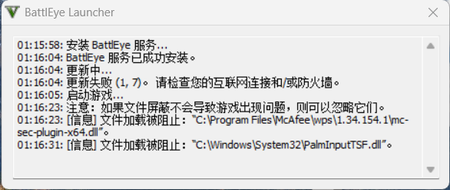
We all know that in the X86 architecture CPUs have four different levels: Ring0(kernel-level), Ring1, Ring2 and Ring3 (user-level). The users, even administrators can only access Ring3, and Microsoft designed the operating system this way to make the system more safe and stable. On the other hand, Microsoft uses signs and security options like "Memory Integrity" in "Core Isolation" in Windows Defender. Normal applications need to use kernel-mode modules to gain access to the kernel (.sys), and if these modules need to be loaded by the system, it should be signed or it will be blocked by Windows Defender or other antivirus software. But now I found a really serious problem in Microsoft's signing activities. BEDaisy.sys is the kernel-mode driver of BattlEye, an anti-cheat software, and it is signed by Microsoft. In BattlEye's EULA, it said that "BattlEye can prevent the cheaters from gaming on the servers which are protected by BattlEye. ", and to make it happen, BattlEye needs to create a service and install kernel-mode components. (Please remember that User Account Control window won't pop up if a service or trusted installer tries to install a kernel-mode driver. ) This EULA is really confusing because it makes the users think "BattlEye does this to protect me from being attacked by other cheaters. " and then accept the EULA and install BattlEye. However, after BattlEye is installed, it can't even block a simple attack from the other cheaters. The other cheaters can even force crash your game. On the contrary, BattlEye tries to block the modules from any other applications which it thinks they are suspicious from loading. It can even block the modules of the anti-cheat software, which makes the protections of the system reduce or even put the system at risk. There is another case. There is a user found his computer attacked by the malware. He was really confused because he had installed the anti-virus software on his system. After looking into his system carefully, he found out that his anti-virus software was down and was killed by mhyprot2.sys, another kernel-mode module of an anti-cheat software. And mhyprotect2.sys is also signed by Microsoft. https://www.trendmicro.com/en_us/research/22/h/ransomware-actor-abuses-genshin-impact-anti-cheat-driver-to-kill-antivirus.html The kernel-mode drivers from both of the cases are signed by Microsoft, and as they run in Ring0 kernel-level, the users have nothing to do to stop them. And as they are signed, most of the anti-cheat software will be less sensitive to them and will be much easier to let them run. . Besides, Windows is designed for everyone, not just for game players. Not all the users would like to sacrifice the security of the system just to play the games. . On the other hand, unlike the cyber security companies, the game companies usually care more about the game itself than the entire system. And they are not responsible for any damage caused by the anti-cheat software. The thing that I am most angry with is that Microsoft actually signed these kinds of kernel-mode modules, which means Microsoft allow these kinds of dangerous things to happen. In my opinion, it is the player's duty to obey the EULA of the games, but it is the game company's duty to do their anti-cheat jobs, and if you want to use the player's device to help you anti-cheat and even want to have Ring0 access, you need to warn the users and notify them. In BattlEye's case, there are three windows will pop up on the screen when you try to install them, but all of them said that BattlEye will minimize its authority and none of them said it needs to gain the authority to shut down other software or block their activities. . . And in total, it is the users who paid for the device and the operating system which they are using, but not the game companies. Taking fully control of the device without noticing the user is illegal. In the end, I really hope that Microsoft can raise the standard of signing a kernel-mode module. These kinds of issues can happen not only in anti-cheat software, but also in any other software, only the problem occurred this time is the anti-cheat software. To tell you the truth, I think Microsoft can only sign the Ring0 kernel-level drivers of the hardware drivers and the anti-virus software. The other applications can only run in Ring3 user-mode like Android. I know it could be hard to make it happen, so you can add whitelist function for the users don't care too much about security or even let them turn off the security options. You can kill the malware by mistake because if that happens, the user can restore them and whitelist them. But you can't miss a malware, because if that happens, the responsibility is usually the one that you can't take. And if the software in the whitelist damages the system, then it is not you Microsoft's responsibility. And for the game players, you can also add isolated gaming environment like Hyper-V, but especially for games, and any other software can't run in it to prevent cheating. Thank you.756Views0likes0CommentsUnlock Your Cybersecurity Potential: Explore the Security-101 Curriculum!
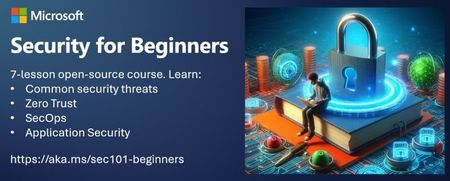
In our interconnected world, cybersecurity is no longer a luxury—it’s a necessity. Whether you’re a seasoned IT professional or a curious enthusiast, understanding the fundamentals of security is crucial. Today, I’m thrilled to introduce you to a treasure trove of knowledge: the Security-101repository. What Is Security-101? The Security-101 repository, hosted on GitHub, is your gateway to mastering cybersecurity essentials. Developed by experts at Microsoft, this curriculum is designed to be accessible, practical, and engaging. Why Should You Explore Security-101? Foundational Knowledge: Whether you’re new to the field or need a refresher, Security-101 covers the basics. From the CIA Triad (Confidentiality, Integrity, and Availability) to risk management, you’ll gain a solid understanding. Vendor-Agnostic Approach: No product pitches here! Security-101 focuses on principles rather than specific tools. It’s like learning to drive before choosing a car. Learn at Your Own Pace: Each lesson takes just 30-60 minutes. Perfect for busy professionals or those eager to improve during lunch breaks. Interactive Quizzes: Test your knowledge after each lesson. Reinforce what you’ve learned and track your progress. You can utilize the following study plan for mastering the cybersecurity concepts covered in the Security-101 repository or come up with a self-pace study plan. Week Topic Subtopics Activities Week 1 Foundations and Basics CIA triad (Confidentiality, Integrity, Availability) Risks vs. Threats Security control concepts Read lessons on Foundational concepts. Take quizzes. Week 2 Zero Trust Architecture Zero trust model IAM in Zero trust Networking in Zero Trust Explore zero trust principles. Review related materials. Week 3 Security Operations (SecOps) Security incident response Security monitoring Security automation Study SecOps Concepts Complete quizzes Week 4 Application Security (AppSec) Secure Coding practices Web application security Secure software development Dive into AppSec topics. Week 5 Data Security Data encryption Data classification Data loss Understand data security. Take quizzes. Call to Action: Explore Security-101 Today! Here’s how you can engage: Visit the repository: Head over to the Security-101 repository. Star and bookmark it—you’ll want to return! Start with Lesson 1: Begin with the first lesson. Whether you’re sipping coffee or waiting for a code build, invest that time in your growth. Share with Peers: Spread the word! Tell your colleagues, friends, and fellow tech enthusiasts. Let’s build a community of security-conscious learners. Conclusion Security isn’t an afterthought; it’s woven into every digital interaction. By exploring Security-101, you’re not just learning—you’re empowering yourself to protect data, systems, and people. Learning about Security is an essential step for anyone looking to protect their digital assets and navigate the complex landscape of cybersecurity. The course offered by Microsoft on GitHub is a comprehensive starting point that covers fundamental concepts such as the CIA triad, zero trust architecture, and various security practices. It’s vendor-agnostic, making the knowledge applicable across different platforms and technologies. By understanding the basics of cybersecurity, you can better assess risks, implement effective controls, and contribute to a safer online environment. Whether you’re a beginner or looking to refresh your knowledge, Security 101 equips you with the tools and understanding necessary to face modern security challenges. So, take the leap and start your cybersecurity learning journey today.2.7KViews2likes0CommentsHow AI Can Improve Threat Intelligence Gathering and Usage
Cybersecurity is one of the most pressing challenges in the digital age. Cyberattacks can cause significant damage to organizations and individuals, compromising their data, reputation, and operations. Threat intelligence can help organizations anticipate and defend against cyberattacks, as well as improve their security posture and resilience.4.3KViews1like1Comment