custom action
2 TopicsSharePoint 2016 - Custom Actions issue on multiple item select
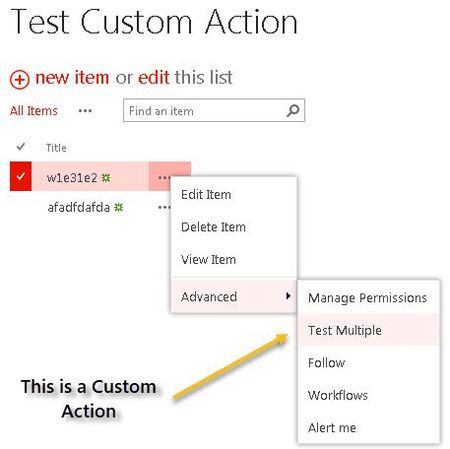
Hey Tech Community. We have identified an issue on couple SharePoint Server 2016 farms that I want to get confirmation from you. Issue: When a Custom Action is added to a SP2016 list, (regular or external list) - If you select 1 item, and look at the List item menu (.....), your custom action is visible. However, if you select multiple items, same custom action is not visible. Behavior is different on SharePoint Server 2013 where multiple item select properly shows the custom actions on the items. Please see screenshots below.1.6KViews1like2Comments
Custom Action on Addanapp.aspx not executing
Hey all, I've started to try and understand Scriptlink Custom Actions and as a bit of a test, I want to hide some elements on the addanapp.aspx page. Individually, I have managed to test each line of the elements in a Browser Developer Tools session and they hide as expected when executed individually. However, none of them are firing when I reference the following code from my Custom Action JS file. Am I missing something obvious? var jQuery = "https://ajax.aspnetcdn.com/ajax/jQuery/jquery-2.0.2.min.js"; // Is MDS enabled? if ("undefined" != typeof g_MinimalDownload && g_MinimalDownload && (window.location.pathname.toLowerCase()).endsWith("/_layouts/15/start.aspx") && "undefined" != typeof asyncDeltaManager) { // Register script for MDS if possible RegisterModuleInit("hideAddanApp.js", JavaScript_Embed); //MDS registration JavaScript_Embed(); //non MDS run } else { JavaScript_Embed(); } function JavaScript_Embed() { loadScript(jQuery, function () { $(document).ready(function () { SP.SOD.executeOrDelayUntilScriptLoaded(function () { SetStatusBar(message); }, 'sp.js'); // Customize the addanapp.aspx page if (IsOnPage("addanapp.aspx")) { //hide the search apps field and label $("#idStorefrontHeader").hide(); $("#idStorefrontListManageSorts").hide(); $("#idStorefrontListManageFilter").hide(); } }); }); } function SetStatusBar(message) { var strStatusID = SP.UI.Status.addStatus("Information : ", message, true); SP.UI.Status.setStatusPriColor(strStatusID, "yellow"); } function IsOnPage(pageName) { if (window.location.href.toLowerCase().indexOf(pageName.toLowerCase()) > -1) { return true; } else { return false; } }1.1KViews0likes1Comment