cosmosdb
11 Topics
Vector search finds candidates. Reranking decides what your RAG app reads
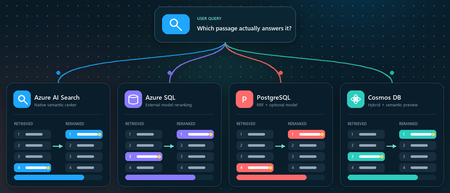
You ask a retrieval-augmented generation (RAG) application a question. Vector search returns ten passages that are clearly related to the topic. The passage that actually contains the answer, however, is ranked seventh, while the language model receives only the first five. Retrieval did not completely fail. It found the evidence, but ordered it below less useful context. Reranking addresses that gap between a passage that is semantically similar and a passage that is relevant to the user's specific question. This article demonstrates that pattern in four Azure services using the Stanford Question Answering Dataset (SQuAD). The goal is not to declare a winning service or publish a quality benchmark. It is to show where retrieval, rank fusion, and model-based reranking run in each architecture, and to illustrate how the position of a known source passage can change. What this demonstration establishes The examples show rank movement for three selected questions. They do not establish that one reranker or service is universally more accurate. A production decision requires a larger, representative query set and aggregate relevance, latency, and cost measurements. Get the full Python implementation: pauldj54/azure-vector-reranking-squad Retrieval and reranking are different stages A production search pipeline commonly uses two stages: Retrieve for recall. Fast retrieval narrows a large corpus to a bounded candidate set. It can use vector search, keyword search, or both. Rerank for precision. A more expensive model evaluates only those candidates against the original query and produces the final order. Reciprocal Rank Fusion (RRF) belongs between those two ideas. RRF is a model-free rank aggregation method that merges independent result lists, usually vector and keyword results. For a document d, a typical score is: RRF(d) = ∑ r ∈ R 1 k + rank r (d) Here, R is the set of ranked lists and k is commonly 60. RRF works with positions rather than raw scores, so it can combine signals such as cosine distance and BM25 without pretending their score scales are comparable. This gives a clearer three-part vocabulary: Stage Purpose Typical mechanism Retrieve Find broad candidate set Vector search, BM25, filters Fuse Combine independent rankings RRF Rerank Reassess query-document relevance Semantic ranker or cross-encoder RRF often improves hybrid retrieval when exact names, dates, identifiers, or terms matter. A learned reranker can then read the query and each candidate together, capturing interactions that separately generated embeddings can miss. The learned stage costs more, so it should operate on tens of candidates rather than the whole corpus. The following image describes the general process: Why use SQuAD for this demonstration? SQuAD 1.1 contains crowd-written questions over more than 500 Wikipedia articles. Its packaged splits contain 87,599 training rows and 10,570 validation rows. Each row includes a question, a context passage, and one or more answer spans inside that passage. That source-context mapping gives this demonstration a useful label: the context associated with a question is treated as its gold passage. We can then inspect whether each search stage moves that passage up or down. This is convenient, but it is not a perfect passage-ranking benchmark. SQuAD was designed for extractive question answering, and another passage in the corpus might also answer a question. The gold context is therefore a reproducible reference, not proof that every other passage is irrelevant. The results shown here use the 2,067 unique contexts in the SQuAD validation split and 1,536-dimensional embeddings. The repository default should be set to the same corpus size before treating the screenshots or rank transitions as directly reproducible. Three illustrative questions Question Expected answer Gold context According to game stats, which Super Bowl 50 quarterback had his worst year since his first NFL season? Peyton Manning 12, Super Bowl 50 What else did Tesla do for work at this time? Various electrical repair jobs 165, Nikola Tesla Who acts as laborer, paymaster, and design team for a renovation project? The property owner 1306, Construction Each notebook selects a seeded demonstration question when it runs. The three saved examples were collected across separate runs; the current notebooks do not execute all three questions in one pass. A benchmark harness should iterate over a fixed question list and save all stage results in one structured output. Capability boundaries at a glance Service Retrieval and Fusion Learned Reranking Boundary to Keep in Mind Azure AI Search Native keyword and vector retrieval with native RRF Built-in semantic ranker Semantic ranking only reorders the retrieved top 50 Azure SQL Database Exact vector retrieval in the current notebook External Cohere model invoked through native REST procedure SQL issues the HTTPS request; Foundry performs inference PostgreSQL Flexible Server pgvector plus hand-written SQL RRF over full-text search Optional external Cohere call from Python Retrieval primitives are native; this RRF query and Cohere path are application code Azure Cosmos DB for NoSQL Native vector search and native hybrid RRF SDK-integrated Semantic Reranker, currently preview Reranking is a separate inference call over at most 50 supplied documents Azure AI Search: native hybrid retrieval and semantic ranking How it works: Azure AI Search provides the most integrated pipeline in this demonstration. A hybrid query runs keyword and vector retrieval, combines the lists with RRF, and passes up to the top 50 results to the built-in semantic ranker. The semantic ranker assigns @search.rerankerScore values from 0 to 4 and can return extractive captions and answers. The semantic configuration identifies the fields that carry the meaning of each document: semantic_search = SemanticSearch( configurations=[ SemanticConfiguration( name=SEMANTIC_CONFIG, prioritized_fields=SemanticPrioritizedFields( title_field=SemanticField(field_name="title"), content_fields=[SemanticField(field_name="content")], ), ) ] ) This tells the semantic ranker which text fields to evaluate. The query then enables semantic ranking after hybrid retrieval: results = search_client.search( search_text=question, vector_queries=[vector_query], query_type="semantic", semantic_configuration_name=SEMANTIC_CONFIG, top=10, ) The important constraint is candidate recall. Semantic ranking does not search the corpus again. If the correct passage is absent from the hybrid top 50, the semantic stage cannot recover it. See 01_azure_ai_search_reranking.ipynb for the complete setup and query path. Test results for Azure AI Search These examples show that semantic reranking improves relevance selectively, not universally. It strongly helps the construction query, moving the correct passage from rank 4 to rank 1, but slightly degrades the Super Bowl and Tesla queries by one position. This reinforces that semantic ranking should be evaluated across a representative query set using aggregate metrics such as MRR or NDCG, rather than judged from a single result. Azure SQL Database: vector retrieval plus external Cohere reranking How it works. The Azure SQL notebook retrieves 20 candidates with exact cosine distance and sends their text to Cohere Rerank v4.0 Fast through sys.sp_invoke_external_rest_endpoint. The vector column and query vector must have the same dimensions. This repository uses 1,536-dimensional embeddings: SELECT TOP (@ candidate_count) context_id, title, content, 1 - VECTOR_DISTANCE( 'cosine', CAST(@ query_vector AS VECTOR(1536)), embedding ) AS similarity FROM dbo.documents ORDER BY similarity DESC; For reranking, we selected Cohere Rerank v4.0 Fast (Cohere-rerank-v4.0-fast), a fast version of Cohere’s fourth-generation relevance-ranking model. The model is deployed in Microsoft Foundry, where its Azure Direct inference endpoint is available in the deployment details within the Foundry portal. Azure SQL can call REST APIs directly using sp_invoke_external_rest_endpoint. Because Azure SQL allowlists Azure AI’s *.cognitiveservices.azure.com domain, we translate the equivalent Foundry endpoint from *.services.ai.azure.com while preserving the Cohere reranking route. from urllib.parse import urlsplit, urlunsplit def sql_compatible_endpoint(endpoint: str) -> str: """Convert an Azure Direct endpoint to Azure SQL's allowed hostname.""" parts = urlsplit(endpoint) if parts.hostname.endswith(".services.ai.azure.com"): resource = parts.hostname.removesuffix(".services.ai.azure.com") hostname = f"{resource}.cognitiveservices.azure.com" elif parts.hostname.endswith(".cognitiveservices.azure.com"): hostname = parts.hostname else: raise ValueError("Expected an Azure AI Services endpoint.") return urlunsplit( (parts.scheme, hostname, parts.path, parts.query, "") ) Then I defined a re-rank with cohere function, starting by loading the endpoint and setting the authentication: def rerank_with_cohere( cursor, question: str, candidates: list[dict], top_n: int = 10, ) -> list[dict]: """ Rerank candidate documents by calling Cohere through Azure SQL. Each candidate must contain a 'content' field. """ if not candidates: return [] sql_endpoint = sql_compatible_endpoint( os.environ["COHERE_RERANK_ENDPOINT"] ) model = os.environ["COHERE_RERANK_MODEL"] access_token = credential.get_token( "https://cognitiveservices.azure.com/.default" ).token headers = json.dumps({"Authorization": f"Bearer {access_token}"}) payload = json.dumps( { "model": model, "query": question, "documents": [row["content"] for row in candidates], "top_n": min(k, len(candidates)), }, ensure_ascii=False, ) cursor.execute( """ DECLARE @url NVARCHAR(4000) = CAST(? AS NVARCHAR(4000)); DECLARE @headers NVARCHAR(4000) = CAST(? AS NVARCHAR(4000)); DECLARE Payload NVARCHAR(MAX) = CAST(? AS NVARCHAR(MAX)); DECLARE Response NVARCHAR(MAX); DECLARE @status INT; EXEC @status = sys.sp_invoke_external_rest_endpoint @url = @url, @method = 'POST', @headers = @headers, Payload = Payload, @timeout = 60, @retry_count = 2, Response = Response OUTPUT; SELECT @status, Response; """, sql_endpoint, headers, payload, ) status, response_text = cursor.fetchone() if status != 0: raise RuntimeError(f"Reranker endpoint returned HTTP status {status}.") response = json.loads(response_text)["result"] You can see the complete implementation in the 02_azure_sql_reranking.ipynb notebook. Test results for Azure SQL Db Across the three sample questions, Cohere reranking consistently moved the correct SQuAD passage closer to the top: from rank 5 to 1 for the Super Bowl question, 3 to 2 for the Tesla question, and 8 to 1 for the construction question. These examples show how vector search provides a strong candidate set, while reranking applies deeper query-document relevance scoring to improve the final ordering. The results are illustrative rather than a complete quality benchmark, so broader evaluation across many queries is still recommended. Azure Database for PostgreSQL flexible server: pgvector, SQL RRF, and an optional model How it works: PostgreSQL makes the pipeline components explicit. The notebook uses pgvector for vector similarity, PostgreSQL full-text search for keyword retrieval, and SQL to implement RRF. Vector retrieval uses cosine distance: SELECT context_id, title, content, 1 - (embedding <= > % (query_vector) s:: vector) AS similarity FROM squad_docs ORDER BY embedding <= > % (query_vector) s:: vector LIMIT % (candidate_count) s; The hybrid query independently ranks vector and keyword hits, then combines positions rather than raw scores: SELECT d.context_id, COALESCE(1.0 / (60 + v.rank), 0) + COALESCE(1.0 / (60 + k.rank), 0) AS rrf_score FROM squad_docs AS d LEFT JOIN vector_hits AS v USING (context_id) LEFT JOIN keyword_hits AS k USING (context_id) WHERE v.context_id IS NOT NULL OR k.context_id IS NOT NULL ORDER BY rrf_score DESC; This is not a built-in PostgreSQL RRF operator. It is transparent, hand-written SQL over native retrieval primitives, which makes weighting and debugging flexible but leaves implementation and tuning with the application team. The notebook's optional learned stage sends the vector candidates from Python to a Foundry deployment of Cohere Rerank v4.0 Fast. This path was chosen because the tested Flexible Server azure_ai extension version expected the older serverless reranking endpoint contract. Microsoft documentation still describes azure_ai.rank() as a preview function whose default model is Cohere Rerank v3.5, even though that model retired on May 14, 2026. Treat this as a version-specific compatibility issue and verify current extension behavior before selecting an architecture. Azure HorizonDB is a different product path. Its AI Model Management feature can provision Cohere Rerank v4.0 Fast as default-reranker, but that management feature is currently a limited preview. It should not be described as a generally available Flexible Server capability. See 03_azure_postgres_reranking.ipynb for the full SQL and optional external model path. Test results for Azure SQL for PostgreSQL Flexible Server The tests show that PostgreSQL vector search provides a useful candidate set, SQL RRF can substantially improve results when keyword evidence is strong, and the Cohere semantic reranker is the most consistent overall: it moved the correct passage to rank 1 in two tests and from rank 3 to rank 2 in the Tesla test. RRF produced the biggest gain for the construction question, moving the correct passage from outside the vector top five to rank 1, but did not improve every query. The scores across stages are not directly comparable because cosine similarity, RRF score, and Cohere relevance use different scales. Azure Cosmos DB for NoSQL: hybrid search with built-in RRF How it works: Azure Cosmos DB for NoSQL supports native hybrid ranking with VectorDistance, FullTextScore, and RRF inside ORDER BY RANK: SELECT TOP K C.context_id, c.title, c.text FROM c ORDER BY RANK RRF( VectorDistance(c.vector, @query_vector), FullTextScore(c.text, @term1, @term2, @term3) ) The notebook extracts distinct terms from the question before building the full-text part of the query. That token selection is application logic and can materially affect the hybrid ranking, so production evaluation should test analyzers, languages, term extraction, and optional RRF weights. Cosmos DB Semantic Reranker is an SDK-integrated preview feature. The application first runs a query, serializes the resulting documents, and submits those documents with the user's context string: result = container.semantic_rerank( context=question, documents=documents, options={ "return_documents": False, "top_k": min(k, len(documents)), "sort": True, "document_type": "json", "target_paths": "title,text", }, ) The service accepts at most 50 documents per rerank call and returns relevance scores from 0 to 1, plus inference latency and token usage. It uses the Microsoft semantic ranking model also used by Azure AI Search. The reranking call requires Microsoft Entra authentication, the appropriate Semantic Reranker role, and an account-linked inference endpoint. The 04_azure_cosmosdb_reranking.ipynb in the shared repo contains and end-to-end implementation. Test results for Azure Cosmos Db The results show that vector search provides a strong baseline, while hybrid RRF and semantic reranking improve different queries in different ways. Hybrid RRF helps when exact keywords matter, moving the construction answer into the top results, while the semantic reranker delivers the strongest overall ordering, promoting the correct construction passage from hybrid rank 3 to rank 1 and improving the Super Bowl answer from rank 5 to rank 2. However, it does not always place the gold passage first, as seen in the Tesla example, confirming that reranking improves relevance but is query-dependent and should be evaluated across a larger test set. What the examples do and do not show The four services expose different ownership boundaries: • Azure AI Search owns hybrid fusion and learned semantic ranking inside the search service. • Azure SQL owns vector retrieval and outbound REST invocation in this example, while Foundry owns model inference. • PostgreSQL supplies vector and full-text primitives; the application owns the RRF SQL and optional Cohere call. • Cosmos DB provides native hybrid RRF and integrates a separate preview inference call through its SDK. Across three selected questions, the known source passage often moved substantially. That supports the practical value of testing a second-stage ranker. It does not prove that semantic reranking always improves top-1 accuracy, that RRF is universally beneficial, or that scores from different stages can be compared directly. Cosine similarity, RRF score, Azure AI Search reranker score, Cohere relevance, and Cosmos DB semantic relevance all have different definitions and scales. Compare rank positions and task-level metrics, not raw values across systems. Turn the demonstration into an evaluation For a production RAG system, convert the notebook pattern into a repeatable evaluation harness: Build a representative labeled query set from real user tasks. Freeze corpus, chunking, embedding model, dimensions, and candidate counts for each run. Record ranks after retrieval, fusion, and learned reranking. Measure Recall@k or Hit@k to verify that retrieval finds relevant evidence. Measure Mean Reciprocal Rank (MRR) when the position of the first relevant result matters. Use NDCG when judgments include multiple passages or graded relevance. Record latency percentiles, inference usage, request cost, and failure rates. Evaluate the generated answer separately for correctness, citation support, and refusal behavior. Also test the operational cases that a three-question demonstration cannot cover: empty keyword results, missing gold passages, long documents, multilingual text, filters, partial outages, token expiration, throttling, model retirement, and low-confidence scores. Practical guidance Retrieve broadly enough that the correct evidence can reach the learned stage. Use RRF when vector and keyword retrieval provide complementary signals. Rerank a bounded candidate set, commonly 20 to 50 passages, and measure the latency cost. Keep citations and source identifiers through every rank transformation. Version the corpus, embedding model, dimensions, query set, and reranker deployment. Do not hard-code assumptions about model endpoints or lifecycle dates. Verify current service documentation and the deployed extension or SDK version. Add thresholds or fallback behavior only after calibrating scores on your own data. Judge the full RAG chain. Better passage order is valuable only when it improves grounded answers for users. Vector search is built to find plausible candidates quickly. Rank fusion can reconcile retrieval signals, and a learned reranker can decide which candidates best address the question. The right architecture depends on where your data lives, which service boundaries you want to operate, and what your evaluation says about quality, latency, and cost. Resources Companion repository Azure AI Search semantic ranker Azure SQL VECTOR_DISTANCE Azure SQL sp_invoke_external_rest_endpoint Azure Database for PostgreSQL AI functions Microsoft Foundry model retirement schedule Azure Cosmos DB hybrid search Azure Cosmos DB Semantic Reranker SQuAD dataset card Dataset attribution Rajpurkar, P., Zhang, J., Lopyrev, K., and Liang, P. (2016). SQuAD: 100,000+ Questions for Machine Comprehension of Text. EMNLP 2016. SQuAD 1.1 is distributed under CC BY-SA 4.0.
Building a Scalable Contract Data Extraction Pipeline with Microsoft Foundry and Python
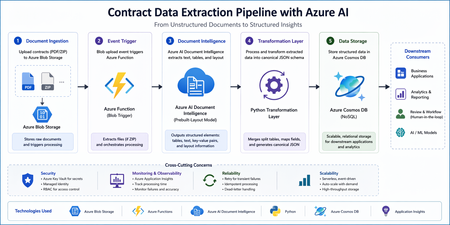
Architecture Overview Alt text: Architecture diagram showing Blob Storage triggering Azure Function, calling Document Intelligence, transforming data, and storing in Cosmos DB Flow: Upload contract files (PDF or ZIP) to Azure Blob Storage Azure Function triggers automatically on file upload Azure AI Document Intelligence extracts layout and tables A transformation layer converts output into a canonical JSON format Data is stored in Azure Cosmos DB Step 1: Trigger Processing with Azure Functions An Azure Function with a Blob trigger enables automatic processing when a file is uploaded. import logging import azure.functions as func import zipfile import io def main(myblob: func.InputStream): logging.info(f"Processing blob: {myblob.name}") if myblob.name.endswith(".zip"): with zipfile.ZipFile(io.BytesIO(myblob.read())) as z: for file_name in z.namelist(): logging.info(f"Extracting {file_name}") file_data = z.read(file_name) # Pass file_data to extraction step Best Practices Keep functions stateless and idempotent Handle retries for transient failures Store configuration in environment variables Step 2: Extract Layout Using Document Intelligence The prebuilt layout model helps extract tables, text, and structure from documents. from azure.ai.documentintelligence import DocumentIntelligenceClient from azure.core.credentials import AzureKeyCredential client = DocumentIntelligenceClient( endpoint="<your-endpoint>", credential=AzureKeyCredential("<your-key>") ) poller = client.begin_analyze_document( "prebuilt-layout", document=file_data ) result = poller.result() Output Includes Structured tables Paragraphs and text blocks Bounding regions for layout context Step 3: Handle Multi-Page Table Continuity Contract documents often contain tables split across multiple pages. These need to be merged to preserve data integrity. def merge_tables(tables): merged = [] current = None for table in tables: headers = [cell.content for cell in table.cells if cell.row_index == 0] if current and headers == current["headers"]: current["rows"].extend(extract_rows(table)) else: if current: merged.append(current) current = { "headers": headers, "rows": extract_rows(table) } if current: merged.append(current) return merged Key Considerations Match headers to detect continuation Preserve row order Avoid duplicate headers Step 4: Transform to a Canonical JSON Schema A consistent schema ensures compatibility across downstream systems. { "id": "contract_123", "documentType": "contract", "vendorName": "ABC Corp", "invoiceDate": "2023-05-05", "tables": [ { "name": "Line Items", "headers": ["Item", "Qty", "Price"], "rows": [ ["Service A", "2", "100"] ] } ], "metadata": { "sourceFile": "contract.pdf", "processedAt": "2026-04-22T10:00:00Z" } } Design Tips Keep schema flexible and extensible Include metadata for traceability Avoid excessive nesting Step 5: Persist Data in Cosmos DB Store the transformed data in a scalable NoSQL database. from azure.cosmos import CosmosClient client = CosmosClient("<cosmos-uri>", "<key>") database = client.get_database_client("contracts-db") container = database.get_container_client("documents") container.upsert_item(canonical_json) Best Practices Choose an appropriate partition key (for example, documentType or vendorName) Optimize indexing policies Monitor request units (RU) usage Observability and Monitoring To ensure reliability: Enable logging with Application Insights Track processing time and failures Monitor document extraction accuracy Security Considerations Store secrets securely using Azure Key Vault Use Managed Identity for service authentication Apply role-based access control (RBAC) to storage resources Conclusion This approach provides a scalable and maintainable solution for contract data extraction: Event-driven processing with Azure Functions Accurate extraction using Document Intelligence Clean transformation into a reusable schema Efficient storage with Cosmos DB This foundation can be extended with validation layers, review workflows, or analytics dashboards depending on your business requirements. Resources Contract data extraction – Document Intelligence: Foundry Tools | Microsoft Learn microsoft/content-processing-solution-accelerator: Programmatically extract data and apply schemas to unstructured documents across text-based and multi-modal content using Azure AI Foundry, Azure OpenAI, Azure AI Content Understanding, and Cosmos DB.If You're Building AI on Azure, ECS 2026 is Where You Need to Be
Let me be direct: there's a lot of noise in the conference calendar. Generic cloud events. Vendor showcases dressed up as technical content. Sessions that look great on paper but leave you with nothing you can actually ship on Monday. ECS 2026 isn't that. As someone who will be on stage at Cologne this May, I can tell you the European Collaboration Summit combined with the European AI & Cloud Summit and European Biz Apps Summit is one of the few events I've seen where engineers leave with real, production-applicable knowledge. Three days. Three summits. 3,000+ attendees. One of the largest Microsoft-focused events in Europe, and it keeps getting better. If you're building AI systems on Azure, designing cloud-native architectures, or trying to figure out how to take your AI experiments to production — this is where the conversation is happening. What ECS 2026 Actually Is ECS 2026 runs May 5–7 at Confex in Cologne, Germany. It brings together three co-located summits under one roof: European Collaboration Summit — Microsoft 365, Teams, Copilot, and governance European AI & Cloud Summit — Azure architecture, AI agents, cloud security, responsible AI European BizApps Summit — Power Platform, Microsoft Fabric, Dynamics For Azure engineers and AI developers, the European AI & Cloud Summit is your primary destination. But don't ignore the overlap, some of the most interesting AI conversations happen at the intersection of collaboration tooling and cloud infrastructure. The scale matters here: 3,000+ attendees, 100+ sessions, multiple deep-dive tracks, and a speaker lineup that includes Microsoft executives, Regional Directors, and MVPs who have built, broken, and rebuilt production systems. The Azure + AI Track - What's Actually On the Agenda The AI & Cloud Summit agenda is built around real technical depth. Not "intro to AI" content, actual architecture decisions, patterns that work, and lessons from things that didn't. Here's what you can expect: AI Agents and Agentic Systems This is where the energy is right now, and ECS is leaning in. Expect sessions covering how to design agent workflows, chain reasoning steps, handle memory and state, and integrate with Azure AI services. Marco Casalaina, VP of Products for Azure AI at Microsoft, is speaking if you want to understand the direction of the Azure AI platform from the people building it, this is a direct line. Azure Architecture at Scale Cloud-native patterns, microservices, containers, and the architectural decisions that determine whether your system holds up under real load. These sessions go beyond theory you'll hear from engineers who've shipped these designs at enterprise scale. Observability, DevOps, and Production AI Getting AI to production is harder than the demos suggest. Sessions here cover monitoring AI systems, integrating LLMs into CI/CD pipelines, and building the operational practices that keep AI in production reliable and governable. Cloud Security and Compliance Security isn't optional when you're putting AI in front of users or connecting it to enterprise data. Tracks cover identity, access patterns, responsible AI governance, and how to design systems that satisfy compliance requirements without becoming unmaintainable. Pre-Conference Deep Dives One underrated part of ECS: the pre-conference workshops. These are extended, hands-on sessions typically 3–6 hours that let you go deep on a single topic with an expert. Think of them as intensive short courses where you can actually work through the material, not just watch slides. If you're newer to a particular area of Azure AI, or you want to build fluency in a specific pattern before the main conference sessions, these are worth the early travel. The Speaker Quality Is Different Here The ECS speaker roster includes Microsoft executives, Microsoft MVPs, and Regional Directors, people who have real accountability for the products and patterns they're presenting. You'll hear from over 20 Microsoft speakers: Marco Casalaina — VP of Products, Azure AI at Microsoft Adam Harmetz — VP of Product at Microsoft, Enterprise Agent And dozens of MVPs and Regional Directors who are in the field every day, solving the same problems you are. These aren't keynote-only speakers — they're in the session rooms, at the hallway track, available for real conversations. The Hallway Track Is Not a Cliché I know "networking" sounds like a corporate afterthought. At ECS it genuinely isn't. When you put 3,000 practitioners, engineers, architects, DevOps leads, security specialists in one venue for three days, the conversations between sessions are often more valuable than the sessions themselves. You get candid answers to "how are you actually handling X in production?" that you won't find in documentation. The European Microsoft community is tight-knit and collaborative. ECS is where that community concentrates. Why This Matters Right Now We're in a period where AI development is moving fast but the engineering discipline around it is still maturing. Most teams are figuring out: How to move from AI prototype to production system How to instrument and observe AI behaviour reliably How to design agent systems that don't become unmaintainable How to satisfy security and compliance requirements in AI-integrated architectures ECS 2026 is one of the few places where you can get direct answers to these questions from people who've solved them — not theoretically, but in production, on Azure, in the last 12 months. If you go, you'll come back with practical patterns you can apply immediately. That's the bar I hold events to. ECS consistently clears it. Register and Explore the Agenda Register for ECS 2026: ecs.events Explore the AI & Cloud Summit agenda: cloudsummit.eu/en/agenda Dates: May 5–7, 2026 | Location: Confex, Cologne, Germany Early registration is worth it the pre-conference workshops fill up. And if you're coming, find me, I'll be the one talking too much about AI agents and Azure deployments. See you in Cologne.Hosted Containers and AI Agent Solutions
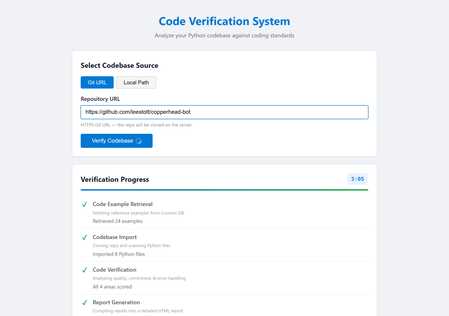
If you have built a proof-of-concept AI agent on your laptop and wondered how to turn it into something other people can actually use, you are not alone. The gap between a working prototype and a production-ready service is where most agent projects stall. Hosted containers close that gap faster than any other approach available today. This post walks through why containers and managed hosting platforms like Azure Container Apps are an ideal fit for multi-agent AI systems, what practical benefits they unlock, and how you can get started with minimal friction. The problem with "it works on my machine" Most AI agent projects begin the same way: a Python script, an API key, and a local terminal. That workflow is perfect for experimentation, but it creates a handful of problems the moment you try to share your work. First, your colleagues need the same Python version, the same dependencies, and the same environment variables. Second, long-running agent pipelines tie up your machine and compete with everything else you are doing. Third, there is no reliable URL anyone can visit to use the system, which means every demo involves a screen share or a recorded video. Containers solve all three problems in one step. A single Dockerfile captures the runtime, the dependencies, and the startup command. Once the image builds, it runs identically on any machine, any cloud, or any colleague's laptop. Why containers suit AI agents particularly well AI agents have characteristics that make them a better fit for containers than many traditional web applications. Long, unpredictable execution times A typical web request completes in milliseconds. An agent pipeline that retrieves context from a database, imports a codebase, runs four verification agents in sequence, and generates a report can take two to five minutes. Managed container platforms handle long-running requests gracefully, with configurable timeouts and automatic keep-alive, whereas many serverless platforms impose strict execution limits that agent workloads quickly exceed. Heavy, specialised dependencies Agent applications often depend on large packages: machine learning libraries, language model SDKs, database drivers, and Git tooling. A container image bundles all of these once at build time. There is no cold-start dependency resolution and no version conflict with other projects on the same server. Stateless by design Most agent pipelines are stateless. They receive a request, execute a sequence of steps, and return a result. This maps perfectly to the container model, where each instance handles requests independently and the platform can scale the number of instances up or down based on demand. Reproducible environments When an agent misbehaves in production, you need to reproduce the issue locally. With containers, the production environment and the local environment are the same image. There is no "works on my machine" ambiguity. A real example: multi-agent code verification To make this concrete, consider a system called Opustest, an open-source project that uses the Microsoft Agent Framework with Azure OpenAI to analyse Python codebases automatically. The system runs AI agents in a pipeline: A Code Example Retrieval Agent queries Azure Cosmos DB for curated examples of good and bad Python code, providing the quality standards for the review. A Codebase Import Agent reads all Python files from a Git repository cloned on the server. Four Verification Agents each score a different dimension of code quality (coding standards, functional correctness, known error handling, and unknown error handling) on a scale of 0 to 5. A Report Generation Agent compiles all scores and errors into an HTML report with fix prompts that can be exported and fed directly into a coding assistant. The entire pipeline is orchestrated by a FastAPI backend that streams progress updates to the browser via Server-Sent Events. Users paste a Git URL, watch each stage light up in real time, and receive a detailed report at the end. The app in action Landing page: the default Git URL mode, ready for a repository link. Local Path mode: toggling to analyse a codebase from a local directory. Repository URL entered: a GitHub repository ready for verification. Stage 1: the Code Example Retrieval Agent fetching standards from Cosmos DB. Stage 3: the four Verification Agents scoring the codebase. Stage 4: the Report Generation Agent compiling the final report. Verification complete: all stages finished with a success banner. Report detail: scores and the errors table with fix prompts. The Dockerfile The container definition for this system is remarkably simple: FROM python:3.12-slim RUN apt-get update && apt-get install -y --no-install-recommends git \ && rm -rf /var/lib/apt/lists/* WORKDIR /app COPY requirements.txt . RUN pip install --no-cache-dir -r requirements.txt COPY backend/ backend/ COPY frontend/ frontend/ RUN adduser --disabled-password --gecos "" appuser USER appuser EXPOSE 8000 CMD ["uvicorn", "backend.app:app", "--host", "0.0.0.0", "--port", "8000"] Twenty lines. That is all it takes to package a six-agent AI system with a web frontend, a FastAPI backend, Git support, and all Python dependencies into a portable, production-ready image. Notice the security detail: the container runs as a non-root user. This is a best practice that many tutorials skip, but it matters when you are deploying to a shared platform. From image to production in one command With the Azure Developer CLI ( azd ), deploying this container to Azure Container Apps takes a single command: azd up Behind the scenes, azd reads an azure.yaml file that declares the project structure, provisions the infrastructure defined in Bicep templates (a Container Apps environment, an Azure Container Registry, and a Cosmos DB account), builds the Docker image, pushes it to the registry, deploys it to the container app, and even seeds the database with sample data via a post-provision hook. The result is a publicly accessible URL serving the full agent system, with automatic HTTPS, built-in scaling, and zero infrastructure to manage manually. Microsoft Hosted Agents vs Azure Container Apps: choosing the right home Microsoft offers two distinct approaches for running AI agent workloads in the cloud. Understanding the difference is important when deciding how to host your solution. Microsoft Foundry Hosted Agent Service (Microsoft Foundry) Microsoft Foundry provides a fully managed agent hosting service. You define your agent's behaviour declaratively, upload it to the platform, and Foundry handles execution, scaling, and lifecycle management. This is an excellent choice when your agents fit within the platform's conventions: single-purpose agents that respond to prompts, use built-in tool integrations, and do not require custom server-side logic or a bespoke frontend. Key characteristics of hosted agents in Foundry: Fully managed execution. You do not provision or maintain any infrastructure. The platform runs your agent and handles scaling automatically. Declarative configuration. Agents are defined through configuration and prompt templates rather than custom application code. Built-in tool ecosystem. Foundry provides pre-built connections to Azure services, knowledge stores, and evaluation tooling. Opinionated runtime. The platform controls the execution environment, request handling, and networking. Azure Container Apps Azure Container Apps is a managed container hosting platform. You package your entire application (agents, backend, frontend, and all dependencies) into a Docker image and deploy it. The platform handles scaling, HTTPS, and infrastructure, but you retain full control over what runs inside the container. Key characteristics of Container Apps: Full application control. You own the runtime, the web framework, the agent orchestration logic, and the frontend. Custom networking. You can serve a web UI, expose REST APIs, stream Server-Sent Events, or run WebSocket connections. Arbitrary dependencies. Your container can include any system package, any Python library, and any tooling (like Git for cloning repositories). Portable. The same Docker image runs locally, in CI, and in production without modification. Why Opustest uses Container Apps Opustest requires capabilities that go beyond what a managed agent hosting platform provides: Requirement Hosted Agents (Foundry) Container Apps Custom web UI with real-time progress Not supported natively Full control via FastAPI and SSE Multi-agent orchestration pipeline Platform-managed, limited customisation Custom orchestrator with arbitrary logic Git repository cloning on the server Not available Install Git in the container image Server-Sent Events streaming Not supported Full HTTP control Custom HTML report generation Limited to platform outputs Generate and serve any content Export button for Copilot prompts Not available Custom frontend with JavaScript RAG retrieval from Cosmos DB Possible via built-in connectors Direct SDK access with full query control The core reason is straightforward: Opustest is not just a set of agents. It is a complete web application that happens to use agents as its processing engine. It needs a custom frontend, real-time streaming, server-side Git operations, and full control over how the agent pipeline executes. Container Apps provides all of this while still offering managed infrastructure, automatic scaling, and zero server maintenance. When to choose which Choose Microsoft Hosted Agents when your use case is primarily conversational or prompt-driven, when you want the fastest path to a working agent with minimal code, and when the built-in tool ecosystem covers your integration needs. Choose Azure Container Apps when you need a custom frontend, custom orchestration logic, real-time streaming, server-side processing beyond prompt-response patterns, or when your agent system is part of a larger application with its own web server and API surface. Both approaches use the same underlying AI models via Azure OpenAI. The difference is in how much control you need over the surrounding application. Five practical benefits of hosted containers for agents 1. Consistent deployments across environments Whether you are running the container locally with docker run , in a CI pipeline, or on Azure Container Apps, the behaviour is identical. Configuration differences are handled through environment variables, not code changes. This eliminates an entire category of "it works locally but breaks in production" bugs. 2. Scaling without re-architecture Azure Container Apps can scale from zero instances (paying nothing when idle) to multiple instances under load. Because agent pipelines are stateless, each request is routed to whichever instance is available. You do not need to redesign your application to handle concurrency; the platform does it for you. 3. Isolation between services If your agent system grows to include multiple services (perhaps a separate service for document processing or a background worker for batch analysis), each service gets its own container. They can be deployed, scaled, and updated independently. A bug in one service does not bring down the others. 4. Built-in observability Managed container platforms provide logging, metrics, and health checks out of the box. When an agent pipeline fails after three minutes of execution, you can inspect the container logs to see exactly which stage failed and why, without adding custom logging infrastructure. 5. Infrastructure as code The entire deployment can be defined in code. Bicep templates, Terraform configurations, or Pulumi programmes describe every resource. This means deployments are repeatable, reviewable, and version-controlled alongside your application code. No clicking through portals, no undocumented manual steps. Common concerns addressed "Containers add complexity" For a single-file script, this is a fair point. But the moment your agent system has more than one dependency, a Dockerfile is simpler to maintain than a set of installation instructions. It is also self-documenting: anyone reading the Dockerfile knows exactly what the system needs to run. "Serverless is simpler" Serverless functions are excellent for short, event-driven tasks. But agent pipelines that run for minutes, require persistent connections (like SSE streaming), and depend on large packages are a poor fit for most serverless platforms. Containers give you the operational simplicity of managed hosting without the execution constraints. "I do not want to learn Docker" A basic Dockerfile for a Python application is fewer than ten lines. The core concepts are straightforward: start from a base image, install dependencies, copy your code, and specify the startup command. The learning investment is small relative to the deployment problems it solves. "What about cost?" Azure Container Apps supports scale-to-zero, meaning you pay nothing when the application is idle. For development and demonstration purposes, this makes hosted containers extremely cost-effective. You only pay for the compute time your agents actually use. Getting started: a practical checklist If you are ready to containerise your own agent solution, here is a step-by-step approach. Step 1: Write a Dockerfile. Start from an official Python base image. Install system-level dependencies (like Git, if your agents clone repositories), then your Python packages, then your application code. Run as a non-root user. Step 2: Test locally. Build and run the image on your machine: docker build -t my-agent-app . docker run -p 8000:8000 --env-file .env my-agent-app If it works locally, it will work in the cloud. Step 3: Define your infrastructure. Use Bicep, Terraform, or the Azure Developer CLI to declare the resources you need: a container app, a container registry, and any backing services (databases, key vaults, AI endpoints). Step 4: Deploy. Push your image to the registry and deploy to the container platform. With azd , this is a single command. With CI/CD, it is a pipeline that runs on every push to your main branch. Step 5: Iterate. Change your agent code, rebuild the image, and redeploy. The cycle is fast because Docker layer caching means only changed layers are rebuilt. The broader picture The AI agent ecosystem is maturing rapidly. Frameworks like Microsoft Agent Framework, LangChain, Semantic Kernel, and AutoGen make it straightforward to build sophisticated multi-agent systems. But building is only half the challenge. The other half is running these systems reliably, securely, and at scale. Hosted containers offer the best balance of flexibility and operational simplicity for agent workloads. They do not impose the execution limits of serverless platforms. They do not require the operational overhead of managing virtual machines. They give you a portable, reproducible unit of deployment that works the same everywhere. If you have an agent prototype sitting on your laptop, the path to making it available to your team, your organisation, or the world is shorter than you think. Write a Dockerfile, define your infrastructure, run azd up , and share the URL. Your agents deserve a proper home. Hosted containers are that home. Resources Azure Container Apps documentation Microsoft Foundry Hosted Agents Azure Developer CLI (azd) Microsoft Agent Framework Docker getting started guide Opustest: AI-powered code verification (source code)1.1KViews0likes0Comments
How to Ensure Seamless Data Recovery and Deployment in Microsoft Azure
Overcoming Cosmos DB Backup and Restore Challenges with Azure Databricks The Challenge of Backing Up and Restoring Azure Cosmos DB One of the significant pain points when working with Azure Cosmos DB is the lack of instant, self-service backup restoration. While Cosmos DB is engineered for global scalability and high availability, its backup and recovery process introduces a crucial bottleneck for organizations that demand agility. Backups in Cosmos DB are created automatically, but restoring them isn’t a seamless, on-demand operation. Instead, it often involves lengthy procedures and sometimes requires intervention from Microsoft support, causing delays that can stretch from hours to even longer—depending on the size and complexity of your data. Downtime Risks: During the drawn-out restore process, your applications might face downtime or reduced performance, impacting end-users and business operations. Deployment Delays: The inability to rapidly roll back or restore data can turn even minor deployment hiccups into major headaches. Lack of Flexibility: Developers and DevOps teams miss the control of instant, self-service restores, limiting their ability to efficiently manage data recovery. Compliance Hurdles: Industries with strict regulatory requirements may struggle to meet recovery time objectives due to slow data restoration. Why Instant Restore Capabilities Matter As cloud-native environments thrive on speed and reliability, the ability to restore data instantly is more than a convenience—it’s essential for: Rapid recovery from accidental data loss or corruption. Enabling safe, confident deployments with a reliable rollback plan. Supporting dynamic test and staging environments using current data snapshots. Without instant restore, organizations face heightened risks and operational slowdowns, which can stifle innovation and erode customer trust. How Azure Databricks Offers a Solution Azure Databricks steps in as a powerful ally for teams looking to bypass these backup limitations. Combining the flexibility of Apache Spark with seamless Azure integration, Databricks allows you to automate data exports, transformations, and—most importantly—restoration workflows customized to your exact needs. Restoring Data Before Deployment: A Practical Approach Automated, Periodic Backups: Databricks notebooks can regularly export Cosmos DB collections into Azure Data Lake or Blob Storage, providing you with up-to-date data snapshots. On-Demand Restoration: When it’s time to deploy or test, Databricks can efficiently restore backup data into a separate Cosmos DB container, preserving production data and minimizing risk. Deployment Safety Net: With a fresh container ready, teams can proceed with confidence, knowing that any deployment misstep can be instantly rolled back—no more waiting for time-consuming support escalations. Seamless Automation: Databricks workflows can be integrated with CI/CD pipelines, customized for various environments, and scheduled or triggered as needed. A Sample Workflow Set up Databricks to regularly back up Cosmos DB data to Azure storage. Before deployment, launch a Databricks job to restore the latest backup into a separate Cosmos DB container. Test and verify the deployment using the restored container, ensuring maximum safety and the ability to roll back instantly if needed. Once deployment is confirmed, switch over or merge as appropriate, with minimal risk to production data. The Benefits at a Glance Minimal Downtime: Quick restoration helps avoid business disruptions during incidents or rollbacks. Operational Agility: Teams can move faster, knowing that data can be restored whenever needed. Enhanced Data Protection: Using separate containers ensures production data remains shielded from accidental changes. Efficiency Gains: Automated processes reduce manual workload and the need for direct intervention. Conclusion Azure Cosmos DB’s backup and restore limitations present real challenges for organizations seeking agility and reliability. By harnessing Azure Databricks to automate backups and enable rapid restoration into separate containers, teams can unlock a new level of safety and flexibility. This approach empowers organizations to recover quickly, deploy fearlessly, and keep innovation moving at cloud speed. Call to Action Want to simplify Azure Cosmos DB backup and restore and avoid long recovery times? 📌 Explore these resources to get started: Azure Databricks documentation | Microsoft Learn Using Databricks to Enrich Data in Cosmos DB on the Fly | by Rahul Gosavi | Medium Azure Cosmos DB Workshop - Load Data Into Cosmos DB with Azure Databricks Automating backups and on-demand restores with Azure Databricks can help you reduce downtime, deploy with confidence, and stay in control of your data.Serverless MCP Agent with LangChain.js v1 — Burgers, Tools, and Traces 🍔
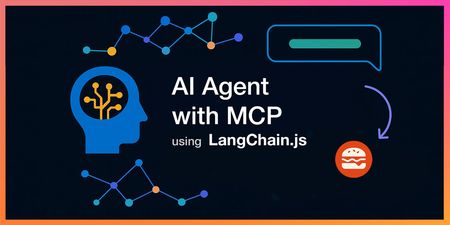
AI agents that can actually do stuff (not just chat) are the fun part nowadays, but wiring them cleanly into real APIs, keeping things observable, and shipping them to the cloud can get... messy. So we built a fresh end‑to‑end sample to show how to do it right with the brand new LangChain.js v1 and Model Context Protocol (MCP). In case you missed it, MCP is a recent open standard that makes it easy for LLM agents to consume tools and APIs, and LangChain.js, a great framework for building GenAI apps and agents, has first-class support for it. You can quickly get up speed with the MCP for Beginners course and AI Agents for Beginners course. This new sample gives you: A LangChain.js v1 agent that streams its result, along reasoning + tool steps An MCP server exposing real tools (burger menu + ordering) from a business API A web interface with authentication, sessions history, and a debug panel (for developers) A production-ready multi-service architecture Serverless deployment on Azure in one command ( azd up ) Yes, it’s a burger ordering system. Who doesn't like burgers? Grab your favorite beverage ☕, and let’s dive in for a quick tour! TL;DR key takeaways New sample: full-stack Node.js AI agent using LangChain.js v1 + MCP tools Architecture: web app → agent API → MCP server → burger API Runs locally with a single npm start , deploys with azd up Uses streaming (NDJSON) with intermediate tool + LLM steps surfaced to the UI Ready to fork, extend, and plug into your own domain / tools What will you learn here? What this sample is about and its high-level architecture What LangChain.js v1 brings to the table for agents How to deploy and run the sample How MCP tools can expose real-world APIs Reference links for everything we use GitHub repo LangChain.js docs Model Context Protocol Azure Developer CLI MCP Inspector Use case You want an AI assistant that can take a natural language request like “Order two spicy burgers and show me my pending orders” and: Understand intent (query menu, then place order) Call the right MCP tools in sequence, calling in turn the necessary APIs Stream progress (LLM tokens + tool steps) Return a clean final answer Swap “burgers” for “inventory”, “bookings”, “support tickets”, or “IoT devices” and you’ve got a reusable pattern! Sample overview Before we play a bit with the sample, let's have a look at the main services implemented here: Service Role Tech Agent Web App ( agent-webapp ) Chat UI + streaming + session history Azure Static Web Apps, Lit web components Agent API ( agent-api ) LangChain.js v1 agent orchestration + auth + history Azure Functions, Node.js Burger MCP Server ( burger-mcp ) Exposes burger API as tools over MCP (Streamable HTTP + SSE) Azure Functions, Express, MCP SDK Burger API ( burger-api ) Business logic: burgers, toppings, orders lifecycle Azure Functions, Cosmos DB Here's a simplified view of how they interact: There are also other supporting components like databases and storage not shown here for clarity. For this quickstart we'll only interact with the Agent Web App and the Burger MCP Server, as they are the main stars of the show here. LangChain.js v1 agent features The recent release of LangChain.js v1 is a huge milestone for the JavaScript AI community! It marks a significant shift from experimental tools to a production-ready framework. The new version doubles down on what’s needed to build robust AI applications, with a strong focus on agents. This includes first-class support for streaming not just the final output, but also intermediate steps like tool calls and agent reasoning. This makes building transparent and interactive agent experiences (like the one in this sample) much more straightforward. Quickstart Requirements GitHub account Azure account (free signup, or if you're a student, get free credits here) Azure Developer CLI Deploy and run the sample We'll use GitHub Codespaces for a quick zero-install setup here, but if you prefer to run it locally, check the README. Click on the following link or open it in a new tab to launch a Codespace: Create Codespace This will open a VS Code environment in your browser with the repo already cloned and all the tools installed and ready to go. Provision and deploy to Azure Open a terminal and run these commands: # Install dependencies npm install # Login to Azure azd auth login # Provision and deploy all resources azd up Follow the prompts to select your Azure subscription and region. If you're unsure of which one to pick, choose East US 2 . The deployment will take about 15 minutes the first time, to create all the necessary resources (Functions, Static Web Apps, Cosmos DB, AI Models). If you're curious about what happens under the hood, you can take a look at the main.bicep file in the infra folder, which defines the infrastructure as code for this sample. Test the MCP server While the deployment is running, you can run the MCP server and API locally (even in Codespaces) to see how it works. Open another terminal and run: npm start This will start all services locally, including the Burger API and the MCP server, which will be available at http://localhost:3000/mcp . This may take a few seconds, wait until you see this message in the terminal: 🚀 All services ready 🚀 When these services are running without Azure resources provisioned, they will use in-memory data instead of Cosmos DB so you can experiment freely with the API and MCP server, though the agent won't be functional as it requires a LLM resource. MCP tools The MCP server exposes the following tools, which the agent can use to interact with the burger ordering system: Tool Name Description get_burgers Get a list of all burgers in the menu get_burger_by_id Get a specific burger by its ID get_toppings Get a list of all toppings in the menu get_topping_by_id Get a specific topping by its ID get_topping_categories Get a list of all topping categories get_orders Get a list of all orders in the system get_order_by_id Get a specific order by its ID place_order Place a new order with burgers (requires userId , optional nickname ) delete_order_by_id Cancel an order if it has not yet been started (status must be pending , requires userId ) You can test these tools using the MCP Inspector. Open another terminal and run: npx -y @modelcontextprotocol/inspector Then open the URL printed in the terminal in your browser and connect using these settings: Transport: Streamable HTTP URL: http://localhost:3000/mcp Connection Type: Via Proxy (should be default) Click on Connect, then try listing the tools first, and run get_burgers tool to get the menu info. Test the Agent Web App After the deployment is completed, you can run the command npm run env to print the URLs of the deployed services. Open the Agent Web App URL in your browser (it should look like https://<your-web-app>.azurestaticapps.net ). You'll first be greeted by an authentication page, you can sign in either with your GitHub or Microsoft account and then you should be able to access the chat interface. From there, you can start asking any question or use one of the suggested prompts, for example try asking: Recommend me an extra spicy burger . As the agent processes your request, you'll see the response streaming in real-time, along with the intermediate steps and tool calls. Once the response is complete, you can also unfold the debug panel to see the full reasoning chain and the tools that were invoked: Tip: Our agent service also sends detailed tracing data using OpenTelemetry. You can explore these either in Azure Monitor for the deployed service, or locally using an OpenTelemetry collector. We'll cover this in more detail in a future post. Wrap it up Congratulations, you just finished spinning up a full-stack serverless AI agent using LangChain.js v1, MCP tools, and Azure’s serverless platform. Now it's your turn to dive in the code and extend it for your use cases! 😎 And don't forget to azd down once you're done to avoid any unwanted costs. Going further This was just a quick introduction to this sample, and you can expect more in-depth posts and tutorials soon. Since we're in the era of AI agents, we've also made sure that this sample can be explored and extended easily with code agents like GitHub Copilot. We even built a custom chat mode to help you discover and understand the codebase faster! Check out the Copilot setup guide in the repo to get started. You can quickly get up speed with the MCP for Beginners course and AI Agents for Beginners course. If you like this sample, don't forget to star the repo ⭐️! You can also join us in the Azure AI community Discord to chat and ask any questions. Happy coding and burger ordering! 🍔Strategic Solutions for Seamless Integration of Third-Party SaaS
Modern systems must be modular and interoperable by design. Integration is no longer a feature, it’s a requirement. Developers are expected to build architectures that connect easily with third-party platforms, but too often, core systems are designed in isolation. This disconnect creates friction for downstream teams and slows delivery. At Microsoft, SaaS platforms like SAP SuccessFactors and Eightfold support Talent Acquisition by handling functions such as requisition tracking, application workflows, and interview coordination. These tools help reduce costs and free up engineering focus for high-priority areas like Azure and AI. The real challenge is integrating them with internal systems such as Demand Planning, Offer Management, and Employee Central. This blog post outlines a strategy centered around two foundational components: an Integration and Orchestration Layer, and a Messaging Platform. Together, these enable real-time communication, consistent data models, and scalable integration. While Talent Acquisition is the use case here, the architectural patterns apply broadly across domains. Whether you're embedding AI pipelines, managing edge deployments, or building platform services, thoughtful integration needs to be built into the foundation, not bolted on later.Essential Microsoft Resources for MVPs & the Tech Community from the AI Tour
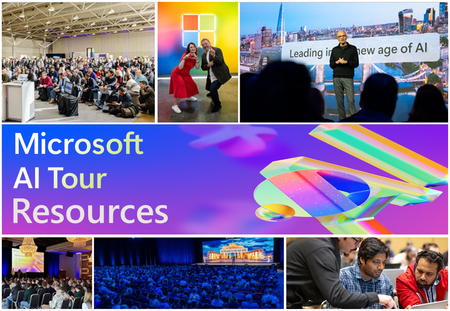
Unlock the power of Microsoft AI with redeliverable technical presentations, hands-on workshops, and open-source curriculum from the Microsoft AI Tour! Whether you’re a Microsoft MVP, Developer, or IT Professional, these expertly crafted resources empower you to teach, train, and lead AI adoption in your community. Explore top breakout sessions covering GitHub Copilot, Azure AI, Generative AI, and security best practices—designed to simplify AI integration and accelerate digital transformation. Dive into interactive workshops that provide real-world applications of AI technologies. Take it a step further with Microsoft’s Open-Source AI Curriculum, offering beginner-friendly courses on AI, Machine Learning, Data Science, Cybersecurity, and GitHub Copilot—perfect for upskilling teams and fostering innovation. Don’t just learn—lead. Access these resources, host impactful training sessions, and drive AI adoption in your organization. Start sharing today! Explore now: Microsoft AI Tour Resources.Essentials for building and modernizing AI apps on Azure
Building and modernizing AI applications is complex—but Azure Essentials simplifies the journey. With a structured, three-stage approach—Readiness and Foundation, Design and Govern, Manage and Optimize—it provides tools, best practices, and expert guidance to tackle key challenges like skilled resource gaps, modernization, and security. Discover how to streamline AI app development, enhance scalability, and achieve cost efficiency while driving business value. Ready to transform your AI journey? Explore the Azure Essentials Hub today.Build Intelligent Apps Code-First with Prompty and Azure AI
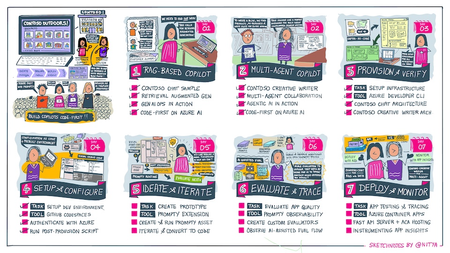
Want to build a custom copilot from scratch? Join us for Azure AI Week on the #30DaysOfIA as we go from prompt to production, building two different application scenarios, code-first with Prompty Assets on the Azure AI platform.3.6KViews2likes1Comment