cosmosdb
11 TopicsMicrosoft Build 2024: Essential Guide for AI Developers at Startups and Cloud-First Companies
Generative AI is advancing fast, with OpenAI’s GPT-4o leading the way. GPT-4o boasts improved multilingual understanding, faster responses, lower costs, and real-time processing of text, audio, and images. This boosts new Generative AI (GenAI) use cases. Explore cutting-edge solutions like models, frameworks, vector databases, and LLM observability platforms. Born-in-the-cloud companies are at the forefront of this AI revolution. Be part of the future at Microsoft Build 2024!Build Intelligent Apps Code-First with Prompty and Azure AI
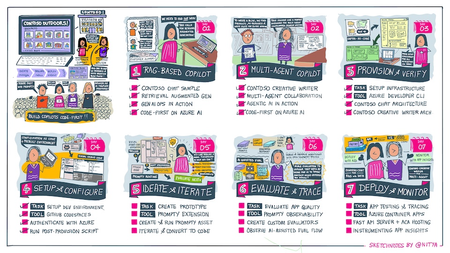
Want to build a custom copilot from scratch? Join us for Azure AI Week on the #30DaysOfIA as we go from prompt to production, building two different application scenarios, code-first with Prompty Assets on the Azure AI platform.3.5KViews2likes1CommentServerless MCP Agent with LangChain.js v1 — Burgers, Tools, and Traces 🍔
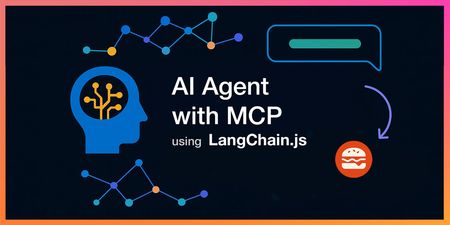
AI agents that can actually do stuff (not just chat) are the fun part nowadays, but wiring them cleanly into real APIs, keeping things observable, and shipping them to the cloud can get... messy. So we built a fresh end‑to‑end sample to show how to do it right with the brand new LangChain.js v1 and Model Context Protocol (MCP). In case you missed it, MCP is a recent open standard that makes it easy for LLM agents to consume tools and APIs, and LangChain.js, a great framework for building GenAI apps and agents, has first-class support for it. You can quickly get up speed with the MCP for Beginners course and AI Agents for Beginners course. This new sample gives you: A LangChain.js v1 agent that streams its result, along reasoning + tool steps An MCP server exposing real tools (burger menu + ordering) from a business API A web interface with authentication, sessions history, and a debug panel (for developers) A production-ready multi-service architecture Serverless deployment on Azure in one command ( azd up ) Yes, it’s a burger ordering system. Who doesn't like burgers? Grab your favorite beverage ☕, and let’s dive in for a quick tour! TL;DR key takeaways New sample: full-stack Node.js AI agent using LangChain.js v1 + MCP tools Architecture: web app → agent API → MCP server → burger API Runs locally with a single npm start , deploys with azd up Uses streaming (NDJSON) with intermediate tool + LLM steps surfaced to the UI Ready to fork, extend, and plug into your own domain / tools What will you learn here? What this sample is about and its high-level architecture What LangChain.js v1 brings to the table for agents How to deploy and run the sample How MCP tools can expose real-world APIs Reference links for everything we use GitHub repo LangChain.js docs Model Context Protocol Azure Developer CLI MCP Inspector Use case You want an AI assistant that can take a natural language request like “Order two spicy burgers and show me my pending orders” and: Understand intent (query menu, then place order) Call the right MCP tools in sequence, calling in turn the necessary APIs Stream progress (LLM tokens + tool steps) Return a clean final answer Swap “burgers” for “inventory”, “bookings”, “support tickets”, or “IoT devices” and you’ve got a reusable pattern! Sample overview Before we play a bit with the sample, let's have a look at the main services implemented here: Service Role Tech Agent Web App ( agent-webapp ) Chat UI + streaming + session history Azure Static Web Apps, Lit web components Agent API ( agent-api ) LangChain.js v1 agent orchestration + auth + history Azure Functions, Node.js Burger MCP Server ( burger-mcp ) Exposes burger API as tools over MCP (Streamable HTTP + SSE) Azure Functions, Express, MCP SDK Burger API ( burger-api ) Business logic: burgers, toppings, orders lifecycle Azure Functions, Cosmos DB Here's a simplified view of how they interact: There are also other supporting components like databases and storage not shown here for clarity. For this quickstart we'll only interact with the Agent Web App and the Burger MCP Server, as they are the main stars of the show here. LangChain.js v1 agent features The recent release of LangChain.js v1 is a huge milestone for the JavaScript AI community! It marks a significant shift from experimental tools to a production-ready framework. The new version doubles down on what’s needed to build robust AI applications, with a strong focus on agents. This includes first-class support for streaming not just the final output, but also intermediate steps like tool calls and agent reasoning. This makes building transparent and interactive agent experiences (like the one in this sample) much more straightforward. Quickstart Requirements GitHub account Azure account (free signup, or if you're a student, get free credits here) Azure Developer CLI Deploy and run the sample We'll use GitHub Codespaces for a quick zero-install setup here, but if you prefer to run it locally, check the README. Click on the following link or open it in a new tab to launch a Codespace: Create Codespace This will open a VS Code environment in your browser with the repo already cloned and all the tools installed and ready to go. Provision and deploy to Azure Open a terminal and run these commands: # Install dependencies npm install # Login to Azure azd auth login # Provision and deploy all resources azd up Follow the prompts to select your Azure subscription and region. If you're unsure of which one to pick, choose East US 2 . The deployment will take about 15 minutes the first time, to create all the necessary resources (Functions, Static Web Apps, Cosmos DB, AI Models). If you're curious about what happens under the hood, you can take a look at the main.bicep file in the infra folder, which defines the infrastructure as code for this sample. Test the MCP server While the deployment is running, you can run the MCP server and API locally (even in Codespaces) to see how it works. Open another terminal and run: npm start This will start all services locally, including the Burger API and the MCP server, which will be available at http://localhost:3000/mcp . This may take a few seconds, wait until you see this message in the terminal: 🚀 All services ready 🚀 When these services are running without Azure resources provisioned, they will use in-memory data instead of Cosmos DB so you can experiment freely with the API and MCP server, though the agent won't be functional as it requires a LLM resource. MCP tools The MCP server exposes the following tools, which the agent can use to interact with the burger ordering system: Tool Name Description get_burgers Get a list of all burgers in the menu get_burger_by_id Get a specific burger by its ID get_toppings Get a list of all toppings in the menu get_topping_by_id Get a specific topping by its ID get_topping_categories Get a list of all topping categories get_orders Get a list of all orders in the system get_order_by_id Get a specific order by its ID place_order Place a new order with burgers (requires userId , optional nickname ) delete_order_by_id Cancel an order if it has not yet been started (status must be pending , requires userId ) You can test these tools using the MCP Inspector. Open another terminal and run: npx -y @modelcontextprotocol/inspector Then open the URL printed in the terminal in your browser and connect using these settings: Transport: Streamable HTTP URL: http://localhost:3000/mcp Connection Type: Via Proxy (should be default) Click on Connect, then try listing the tools first, and run get_burgers tool to get the menu info. Test the Agent Web App After the deployment is completed, you can run the command npm run env to print the URLs of the deployed services. Open the Agent Web App URL in your browser (it should look like https://<your-web-app>.azurestaticapps.net ). You'll first be greeted by an authentication page, you can sign in either with your GitHub or Microsoft account and then you should be able to access the chat interface. From there, you can start asking any question or use one of the suggested prompts, for example try asking: Recommend me an extra spicy burger . As the agent processes your request, you'll see the response streaming in real-time, along with the intermediate steps and tool calls. Once the response is complete, you can also unfold the debug panel to see the full reasoning chain and the tools that were invoked: Tip: Our agent service also sends detailed tracing data using OpenTelemetry. You can explore these either in Azure Monitor for the deployed service, or locally using an OpenTelemetry collector. We'll cover this in more detail in a future post. Wrap it up Congratulations, you just finished spinning up a full-stack serverless AI agent using LangChain.js v1, MCP tools, and Azure’s serverless platform. Now it's your turn to dive in the code and extend it for your use cases! 😎 And don't forget to azd down once you're done to avoid any unwanted costs. Going further This was just a quick introduction to this sample, and you can expect more in-depth posts and tutorials soon. Since we're in the era of AI agents, we've also made sure that this sample can be explored and extended easily with code agents like GitHub Copilot. We even built a custom chat mode to help you discover and understand the codebase faster! Check out the Copilot setup guide in the repo to get started. You can quickly get up speed with the MCP for Beginners course and AI Agents for Beginners course. If you like this sample, don't forget to star the repo ⭐️! You can also join us in the Azure AI community Discord to chat and ask any questions. Happy coding and burger ordering! 🍔Essentials for building and modernizing AI apps on Azure
Building and modernizing AI applications is complex—but Azure Essentials simplifies the journey. With a structured, three-stage approach—Readiness and Foundation, Design and Govern, Manage and Optimize—it provides tools, best practices, and expert guidance to tackle key challenges like skilled resource gaps, modernization, and security. Discover how to streamline AI app development, enhance scalability, and achieve cost efficiency while driving business value. Ready to transform your AI journey? Explore the Azure Essentials Hub today.Essential Microsoft Resources for MVPs & the Tech Community from the AI Tour
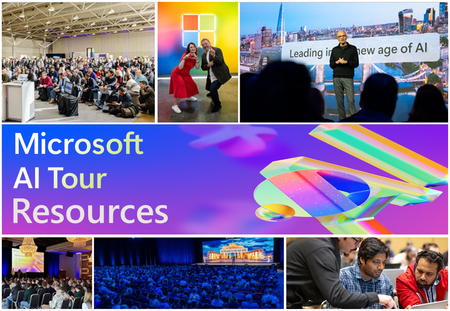
Unlock the power of Microsoft AI with redeliverable technical presentations, hands-on workshops, and open-source curriculum from the Microsoft AI Tour! Whether you’re a Microsoft MVP, Developer, or IT Professional, these expertly crafted resources empower you to teach, train, and lead AI adoption in your community. Explore top breakout sessions covering GitHub Copilot, Azure AI, Generative AI, and security best practices—designed to simplify AI integration and accelerate digital transformation. Dive into interactive workshops that provide real-world applications of AI technologies. Take it a step further with Microsoft’s Open-Source AI Curriculum, offering beginner-friendly courses on AI, Machine Learning, Data Science, Cybersecurity, and GitHub Copilot—perfect for upskilling teams and fostering innovation. Don’t just learn—lead. Access these resources, host impactful training sessions, and drive AI adoption in your organization. Start sharing today! Explore now: Microsoft AI Tour Resources.Hosted Containers and AI Agent Solutions
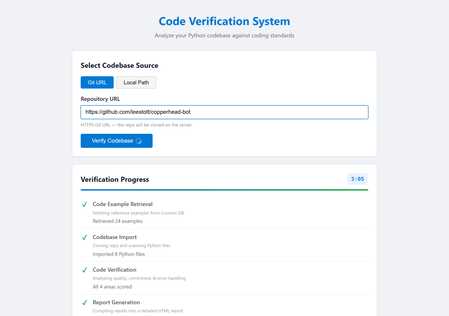
If you have built a proof-of-concept AI agent on your laptop and wondered how to turn it into something other people can actually use, you are not alone. The gap between a working prototype and a production-ready service is where most agent projects stall. Hosted containers close that gap faster than any other approach available today. This post walks through why containers and managed hosting platforms like Azure Container Apps are an ideal fit for multi-agent AI systems, what practical benefits they unlock, and how you can get started with minimal friction. The problem with "it works on my machine" Most AI agent projects begin the same way: a Python script, an API key, and a local terminal. That workflow is perfect for experimentation, but it creates a handful of problems the moment you try to share your work. First, your colleagues need the same Python version, the same dependencies, and the same environment variables. Second, long-running agent pipelines tie up your machine and compete with everything else you are doing. Third, there is no reliable URL anyone can visit to use the system, which means every demo involves a screen share or a recorded video. Containers solve all three problems in one step. A single Dockerfile captures the runtime, the dependencies, and the startup command. Once the image builds, it runs identically on any machine, any cloud, or any colleague's laptop. Why containers suit AI agents particularly well AI agents have characteristics that make them a better fit for containers than many traditional web applications. Long, unpredictable execution times A typical web request completes in milliseconds. An agent pipeline that retrieves context from a database, imports a codebase, runs four verification agents in sequence, and generates a report can take two to five minutes. Managed container platforms handle long-running requests gracefully, with configurable timeouts and automatic keep-alive, whereas many serverless platforms impose strict execution limits that agent workloads quickly exceed. Heavy, specialised dependencies Agent applications often depend on large packages: machine learning libraries, language model SDKs, database drivers, and Git tooling. A container image bundles all of these once at build time. There is no cold-start dependency resolution and no version conflict with other projects on the same server. Stateless by design Most agent pipelines are stateless. They receive a request, execute a sequence of steps, and return a result. This maps perfectly to the container model, where each instance handles requests independently and the platform can scale the number of instances up or down based on demand. Reproducible environments When an agent misbehaves in production, you need to reproduce the issue locally. With containers, the production environment and the local environment are the same image. There is no "works on my machine" ambiguity. A real example: multi-agent code verification To make this concrete, consider a system called Opustest, an open-source project that uses the Microsoft Agent Framework with Azure OpenAI to analyse Python codebases automatically. The system runs AI agents in a pipeline: A Code Example Retrieval Agent queries Azure Cosmos DB for curated examples of good and bad Python code, providing the quality standards for the review. A Codebase Import Agent reads all Python files from a Git repository cloned on the server. Four Verification Agents each score a different dimension of code quality (coding standards, functional correctness, known error handling, and unknown error handling) on a scale of 0 to 5. A Report Generation Agent compiles all scores and errors into an HTML report with fix prompts that can be exported and fed directly into a coding assistant. The entire pipeline is orchestrated by a FastAPI backend that streams progress updates to the browser via Server-Sent Events. Users paste a Git URL, watch each stage light up in real time, and receive a detailed report at the end. The app in action Landing page: the default Git URL mode, ready for a repository link. Local Path mode: toggling to analyse a codebase from a local directory. Repository URL entered: a GitHub repository ready for verification. Stage 1: the Code Example Retrieval Agent fetching standards from Cosmos DB. Stage 3: the four Verification Agents scoring the codebase. Stage 4: the Report Generation Agent compiling the final report. Verification complete: all stages finished with a success banner. Report detail: scores and the errors table with fix prompts. The Dockerfile The container definition for this system is remarkably simple: FROM python:3.12-slim RUN apt-get update && apt-get install -y --no-install-recommends git \ && rm -rf /var/lib/apt/lists/* WORKDIR /app COPY requirements.txt . RUN pip install --no-cache-dir -r requirements.txt COPY backend/ backend/ COPY frontend/ frontend/ RUN adduser --disabled-password --gecos "" appuser USER appuser EXPOSE 8000 CMD ["uvicorn", "backend.app:app", "--host", "0.0.0.0", "--port", "8000"] Twenty lines. That is all it takes to package a six-agent AI system with a web frontend, a FastAPI backend, Git support, and all Python dependencies into a portable, production-ready image. Notice the security detail: the container runs as a non-root user. This is a best practice that many tutorials skip, but it matters when you are deploying to a shared platform. From image to production in one command With the Azure Developer CLI ( azd ), deploying this container to Azure Container Apps takes a single command: azd up Behind the scenes, azd reads an azure.yaml file that declares the project structure, provisions the infrastructure defined in Bicep templates (a Container Apps environment, an Azure Container Registry, and a Cosmos DB account), builds the Docker image, pushes it to the registry, deploys it to the container app, and even seeds the database with sample data via a post-provision hook. The result is a publicly accessible URL serving the full agent system, with automatic HTTPS, built-in scaling, and zero infrastructure to manage manually. Microsoft Hosted Agents vs Azure Container Apps: choosing the right home Microsoft offers two distinct approaches for running AI agent workloads in the cloud. Understanding the difference is important when deciding how to host your solution. Microsoft Foundry Hosted Agent Service (Microsoft Foundry) Microsoft Foundry provides a fully managed agent hosting service. You define your agent's behaviour declaratively, upload it to the platform, and Foundry handles execution, scaling, and lifecycle management. This is an excellent choice when your agents fit within the platform's conventions: single-purpose agents that respond to prompts, use built-in tool integrations, and do not require custom server-side logic or a bespoke frontend. Key characteristics of hosted agents in Foundry: Fully managed execution. You do not provision or maintain any infrastructure. The platform runs your agent and handles scaling automatically. Declarative configuration. Agents are defined through configuration and prompt templates rather than custom application code. Built-in tool ecosystem. Foundry provides pre-built connections to Azure services, knowledge stores, and evaluation tooling. Opinionated runtime. The platform controls the execution environment, request handling, and networking. Azure Container Apps Azure Container Apps is a managed container hosting platform. You package your entire application (agents, backend, frontend, and all dependencies) into a Docker image and deploy it. The platform handles scaling, HTTPS, and infrastructure, but you retain full control over what runs inside the container. Key characteristics of Container Apps: Full application control. You own the runtime, the web framework, the agent orchestration logic, and the frontend. Custom networking. You can serve a web UI, expose REST APIs, stream Server-Sent Events, or run WebSocket connections. Arbitrary dependencies. Your container can include any system package, any Python library, and any tooling (like Git for cloning repositories). Portable. The same Docker image runs locally, in CI, and in production without modification. Why Opustest uses Container Apps Opustest requires capabilities that go beyond what a managed agent hosting platform provides: Requirement Hosted Agents (Foundry) Container Apps Custom web UI with real-time progress Not supported natively Full control via FastAPI and SSE Multi-agent orchestration pipeline Platform-managed, limited customisation Custom orchestrator with arbitrary logic Git repository cloning on the server Not available Install Git in the container image Server-Sent Events streaming Not supported Full HTTP control Custom HTML report generation Limited to platform outputs Generate and serve any content Export button for Copilot prompts Not available Custom frontend with JavaScript RAG retrieval from Cosmos DB Possible via built-in connectors Direct SDK access with full query control The core reason is straightforward: Opustest is not just a set of agents. It is a complete web application that happens to use agents as its processing engine. It needs a custom frontend, real-time streaming, server-side Git operations, and full control over how the agent pipeline executes. Container Apps provides all of this while still offering managed infrastructure, automatic scaling, and zero server maintenance. When to choose which Choose Microsoft Hosted Agents when your use case is primarily conversational or prompt-driven, when you want the fastest path to a working agent with minimal code, and when the built-in tool ecosystem covers your integration needs. Choose Azure Container Apps when you need a custom frontend, custom orchestration logic, real-time streaming, server-side processing beyond prompt-response patterns, or when your agent system is part of a larger application with its own web server and API surface. Both approaches use the same underlying AI models via Azure OpenAI. The difference is in how much control you need over the surrounding application. Five practical benefits of hosted containers for agents 1. Consistent deployments across environments Whether you are running the container locally with docker run , in a CI pipeline, or on Azure Container Apps, the behaviour is identical. Configuration differences are handled through environment variables, not code changes. This eliminates an entire category of "it works locally but breaks in production" bugs. 2. Scaling without re-architecture Azure Container Apps can scale from zero instances (paying nothing when idle) to multiple instances under load. Because agent pipelines are stateless, each request is routed to whichever instance is available. You do not need to redesign your application to handle concurrency; the platform does it for you. 3. Isolation between services If your agent system grows to include multiple services (perhaps a separate service for document processing or a background worker for batch analysis), each service gets its own container. They can be deployed, scaled, and updated independently. A bug in one service does not bring down the others. 4. Built-in observability Managed container platforms provide logging, metrics, and health checks out of the box. When an agent pipeline fails after three minutes of execution, you can inspect the container logs to see exactly which stage failed and why, without adding custom logging infrastructure. 5. Infrastructure as code The entire deployment can be defined in code. Bicep templates, Terraform configurations, or Pulumi programmes describe every resource. This means deployments are repeatable, reviewable, and version-controlled alongside your application code. No clicking through portals, no undocumented manual steps. Common concerns addressed "Containers add complexity" For a single-file script, this is a fair point. But the moment your agent system has more than one dependency, a Dockerfile is simpler to maintain than a set of installation instructions. It is also self-documenting: anyone reading the Dockerfile knows exactly what the system needs to run. "Serverless is simpler" Serverless functions are excellent for short, event-driven tasks. But agent pipelines that run for minutes, require persistent connections (like SSE streaming), and depend on large packages are a poor fit for most serverless platforms. Containers give you the operational simplicity of managed hosting without the execution constraints. "I do not want to learn Docker" A basic Dockerfile for a Python application is fewer than ten lines. The core concepts are straightforward: start from a base image, install dependencies, copy your code, and specify the startup command. The learning investment is small relative to the deployment problems it solves. "What about cost?" Azure Container Apps supports scale-to-zero, meaning you pay nothing when the application is idle. For development and demonstration purposes, this makes hosted containers extremely cost-effective. You only pay for the compute time your agents actually use. Getting started: a practical checklist If you are ready to containerise your own agent solution, here is a step-by-step approach. Step 1: Write a Dockerfile. Start from an official Python base image. Install system-level dependencies (like Git, if your agents clone repositories), then your Python packages, then your application code. Run as a non-root user. Step 2: Test locally. Build and run the image on your machine: docker build -t my-agent-app . docker run -p 8000:8000 --env-file .env my-agent-app If it works locally, it will work in the cloud. Step 3: Define your infrastructure. Use Bicep, Terraform, or the Azure Developer CLI to declare the resources you need: a container app, a container registry, and any backing services (databases, key vaults, AI endpoints). Step 4: Deploy. Push your image to the registry and deploy to the container platform. With azd , this is a single command. With CI/CD, it is a pipeline that runs on every push to your main branch. Step 5: Iterate. Change your agent code, rebuild the image, and redeploy. The cycle is fast because Docker layer caching means only changed layers are rebuilt. The broader picture The AI agent ecosystem is maturing rapidly. Frameworks like Microsoft Agent Framework, LangChain, Semantic Kernel, and AutoGen make it straightforward to build sophisticated multi-agent systems. But building is only half the challenge. The other half is running these systems reliably, securely, and at scale. Hosted containers offer the best balance of flexibility and operational simplicity for agent workloads. They do not impose the execution limits of serverless platforms. They do not require the operational overhead of managing virtual machines. They give you a portable, reproducible unit of deployment that works the same everywhere. If you have an agent prototype sitting on your laptop, the path to making it available to your team, your organisation, or the world is shorter than you think. Write a Dockerfile, define your infrastructure, run azd up , and share the URL. Your agents deserve a proper home. Hosted containers are that home. Resources Azure Container Apps documentation Microsoft Foundry Hosted Agents Azure Developer CLI (azd) Microsoft Agent Framework Docker getting started guide Opustest: AI-powered code verification (source code)Strategic Solutions for Seamless Integration of Third-Party SaaS
Modern systems must be modular and interoperable by design. Integration is no longer a feature, it’s a requirement. Developers are expected to build architectures that connect easily with third-party platforms, but too often, core systems are designed in isolation. This disconnect creates friction for downstream teams and slows delivery. At Microsoft, SaaS platforms like SAP SuccessFactors and Eightfold support Talent Acquisition by handling functions such as requisition tracking, application workflows, and interview coordination. These tools help reduce costs and free up engineering focus for high-priority areas like Azure and AI. The real challenge is integrating them with internal systems such as Demand Planning, Offer Management, and Employee Central. This blog post outlines a strategy centered around two foundational components: an Integration and Orchestration Layer, and a Messaging Platform. Together, these enable real-time communication, consistent data models, and scalable integration. While Talent Acquisition is the use case here, the architectural patterns apply broadly across domains. Whether you're embedding AI pipelines, managing edge deployments, or building platform services, thoughtful integration needs to be built into the foundation, not bolted on later.If You're Building AI on Azure, ECS 2026 is Where You Need to Be
Let me be direct: there's a lot of noise in the conference calendar. Generic cloud events. Vendor showcases dressed up as technical content. Sessions that look great on paper but leave you with nothing you can actually ship on Monday. ECS 2026 isn't that. As someone who will be on stage at Cologne this May, I can tell you the European Collaboration Summit combined with the European AI & Cloud Summit and European Biz Apps Summit is one of the few events I've seen where engineers leave with real, production-applicable knowledge. Three days. Three summits. 3,000+ attendees. One of the largest Microsoft-focused events in Europe, and it keeps getting better. If you're building AI systems on Azure, designing cloud-native architectures, or trying to figure out how to take your AI experiments to production — this is where the conversation is happening. What ECS 2026 Actually Is ECS 2026 runs May 5–7 at Confex in Cologne, Germany. It brings together three co-located summits under one roof: European Collaboration Summit — Microsoft 365, Teams, Copilot, and governance European AI & Cloud Summit — Azure architecture, AI agents, cloud security, responsible AI European BizApps Summit — Power Platform, Microsoft Fabric, Dynamics For Azure engineers and AI developers, the European AI & Cloud Summit is your primary destination. But don't ignore the overlap, some of the most interesting AI conversations happen at the intersection of collaboration tooling and cloud infrastructure. The scale matters here: 3,000+ attendees, 100+ sessions, multiple deep-dive tracks, and a speaker lineup that includes Microsoft executives, Regional Directors, and MVPs who have built, broken, and rebuilt production systems. The Azure + AI Track - What's Actually On the Agenda The AI & Cloud Summit agenda is built around real technical depth. Not "intro to AI" content, actual architecture decisions, patterns that work, and lessons from things that didn't. Here's what you can expect: AI Agents and Agentic Systems This is where the energy is right now, and ECS is leaning in. Expect sessions covering how to design agent workflows, chain reasoning steps, handle memory and state, and integrate with Azure AI services. Marco Casalaina, VP of Products for Azure AI at Microsoft, is speaking if you want to understand the direction of the Azure AI platform from the people building it, this is a direct line. Azure Architecture at Scale Cloud-native patterns, microservices, containers, and the architectural decisions that determine whether your system holds up under real load. These sessions go beyond theory you'll hear from engineers who've shipped these designs at enterprise scale. Observability, DevOps, and Production AI Getting AI to production is harder than the demos suggest. Sessions here cover monitoring AI systems, integrating LLMs into CI/CD pipelines, and building the operational practices that keep AI in production reliable and governable. Cloud Security and Compliance Security isn't optional when you're putting AI in front of users or connecting it to enterprise data. Tracks cover identity, access patterns, responsible AI governance, and how to design systems that satisfy compliance requirements without becoming unmaintainable. Pre-Conference Deep Dives One underrated part of ECS: the pre-conference workshops. These are extended, hands-on sessions typically 3–6 hours that let you go deep on a single topic with an expert. Think of them as intensive short courses where you can actually work through the material, not just watch slides. If you're newer to a particular area of Azure AI, or you want to build fluency in a specific pattern before the main conference sessions, these are worth the early travel. The Speaker Quality Is Different Here The ECS speaker roster includes Microsoft executives, Microsoft MVPs, and Regional Directors, people who have real accountability for the products and patterns they're presenting. You'll hear from over 20 Microsoft speakers: Marco Casalaina — VP of Products, Azure AI at Microsoft Adam Harmetz — VP of Product at Microsoft, Enterprise Agent And dozens of MVPs and Regional Directors who are in the field every day, solving the same problems you are. These aren't keynote-only speakers — they're in the session rooms, at the hallway track, available for real conversations. The Hallway Track Is Not a Cliché I know "networking" sounds like a corporate afterthought. At ECS it genuinely isn't. When you put 3,000 practitioners, engineers, architects, DevOps leads, security specialists in one venue for three days, the conversations between sessions are often more valuable than the sessions themselves. You get candid answers to "how are you actually handling X in production?" that you won't find in documentation. The European Microsoft community is tight-knit and collaborative. ECS is where that community concentrates. Why This Matters Right Now We're in a period where AI development is moving fast but the engineering discipline around it is still maturing. Most teams are figuring out: How to move from AI prototype to production system How to instrument and observe AI behaviour reliably How to design agent systems that don't become unmaintainable How to satisfy security and compliance requirements in AI-integrated architectures ECS 2026 is one of the few places where you can get direct answers to these questions from people who've solved them — not theoretically, but in production, on Azure, in the last 12 months. If you go, you'll come back with practical patterns you can apply immediately. That's the bar I hold events to. ECS consistently clears it. Register and Explore the Agenda Register for ECS 2026: ecs.events Explore the AI & Cloud Summit agenda: cloudsummit.eu/en/agenda Dates: May 5–7, 2026 | Location: Confex, Cologne, Germany Early registration is worth it the pre-conference workshops fill up. And if you're coming, find me, I'll be the one talking too much about AI agents and Azure deployments. See you in Cologne.
How to Ensure Seamless Data Recovery and Deployment in Microsoft Azure
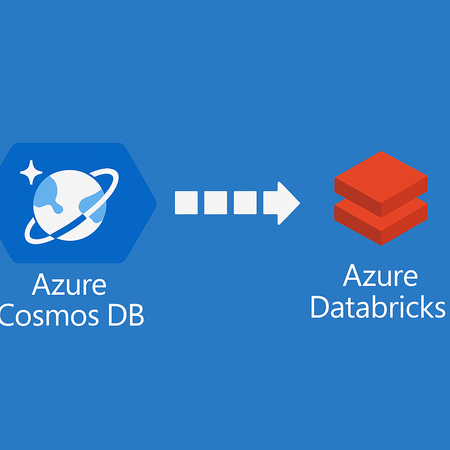
Overcoming Cosmos DB Backup and Restore Challenges with Azure Databricks The Challenge of Backing Up and Restoring Azure Cosmos DB One of the significant pain points when working with Azure Cosmos DB is the lack of instant, self-service backup restoration. While Cosmos DB is engineered for global scalability and high availability, its backup and recovery process introduces a crucial bottleneck for organizations that demand agility. Backups in Cosmos DB are created automatically, but restoring them isn’t a seamless, on-demand operation. Instead, it often involves lengthy procedures and sometimes requires intervention from Microsoft support, causing delays that can stretch from hours to even longer—depending on the size and complexity of your data. Downtime Risks: During the drawn-out restore process, your applications might face downtime or reduced performance, impacting end-users and business operations. Deployment Delays: The inability to rapidly roll back or restore data can turn even minor deployment hiccups into major headaches. Lack of Flexibility: Developers and DevOps teams miss the control of instant, self-service restores, limiting their ability to efficiently manage data recovery. Compliance Hurdles: Industries with strict regulatory requirements may struggle to meet recovery time objectives due to slow data restoration. Why Instant Restore Capabilities Matter As cloud-native environments thrive on speed and reliability, the ability to restore data instantly is more than a convenience—it’s essential for: Rapid recovery from accidental data loss or corruption. Enabling safe, confident deployments with a reliable rollback plan. Supporting dynamic test and staging environments using current data snapshots. Without instant restore, organizations face heightened risks and operational slowdowns, which can stifle innovation and erode customer trust. How Azure Databricks Offers a Solution Azure Databricks steps in as a powerful ally for teams looking to bypass these backup limitations. Combining the flexibility of Apache Spark with seamless Azure integration, Databricks allows you to automate data exports, transformations, and—most importantly—restoration workflows customized to your exact needs. Restoring Data Before Deployment: A Practical Approach Automated, Periodic Backups: Databricks notebooks can regularly export Cosmos DB collections into Azure Data Lake or Blob Storage, providing you with up-to-date data snapshots. On-Demand Restoration: When it’s time to deploy or test, Databricks can efficiently restore backup data into a separate Cosmos DB container, preserving production data and minimizing risk. Deployment Safety Net: With a fresh container ready, teams can proceed with confidence, knowing that any deployment misstep can be instantly rolled back—no more waiting for time-consuming support escalations. Seamless Automation: Databricks workflows can be integrated with CI/CD pipelines, customized for various environments, and scheduled or triggered as needed. A Sample Workflow Set up Databricks to regularly back up Cosmos DB data to Azure storage. Before deployment, launch a Databricks job to restore the latest backup into a separate Cosmos DB container. Test and verify the deployment using the restored container, ensuring maximum safety and the ability to roll back instantly if needed. Once deployment is confirmed, switch over or merge as appropriate, with minimal risk to production data. The Benefits at a Glance Minimal Downtime: Quick restoration helps avoid business disruptions during incidents or rollbacks. Operational Agility: Teams can move faster, knowing that data can be restored whenever needed. Enhanced Data Protection: Using separate containers ensures production data remains shielded from accidental changes. Efficiency Gains: Automated processes reduce manual workload and the need for direct intervention. Conclusion Azure Cosmos DB’s backup and restore limitations present real challenges for organizations seeking agility and reliability. By harnessing Azure Databricks to automate backups and enable rapid restoration into separate containers, teams can unlock a new level of safety and flexibility. This approach empowers organizations to recover quickly, deploy fearlessly, and keep innovation moving at cloud speed. Call to Action Want to simplify Azure Cosmos DB backup and restore and avoid long recovery times? 📌 Explore these resources to get started: Azure Databricks documentation | Microsoft Learn Using Databricks to Enrich Data in Cosmos DB on the Fly | by Rahul Gosavi | Medium Azure Cosmos DB Workshop - Load Data Into Cosmos DB with Azure Databricks Automating backups and on-demand restores with Azure Databricks can help you reduce downtime, deploy with confidence, and stay in control of your data.
Building a Scalable Contract Data Extraction Pipeline with Microsoft Foundry and Python
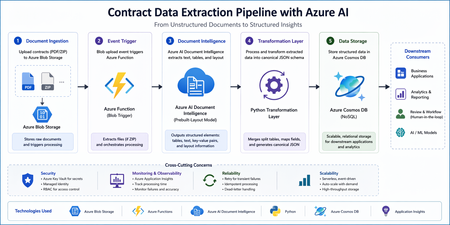
Architecture Overview Alt text: Architecture diagram showing Blob Storage triggering Azure Function, calling Document Intelligence, transforming data, and storing in Cosmos DB Flow: Upload contract files (PDF or ZIP) to Azure Blob Storage Azure Function triggers automatically on file upload Azure AI Document Intelligence extracts layout and tables A transformation layer converts output into a canonical JSON format Data is stored in Azure Cosmos DB Step 1: Trigger Processing with Azure Functions An Azure Function with a Blob trigger enables automatic processing when a file is uploaded. import logging import azure.functions as func import zipfile import io def main(myblob: func.InputStream): logging.info(f"Processing blob: {myblob.name}") if myblob.name.endswith(".zip"): with zipfile.ZipFile(io.BytesIO(myblob.read())) as z: for file_name in z.namelist(): logging.info(f"Extracting {file_name}") file_data = z.read(file_name) # Pass file_data to extraction step Best Practices Keep functions stateless and idempotent Handle retries for transient failures Store configuration in environment variables Step 2: Extract Layout Using Document Intelligence The prebuilt layout model helps extract tables, text, and structure from documents. from azure.ai.documentintelligence import DocumentIntelligenceClient from azure.core.credentials import AzureKeyCredential client = DocumentIntelligenceClient( endpoint="<your-endpoint>", credential=AzureKeyCredential("<your-key>") ) poller = client.begin_analyze_document( "prebuilt-layout", document=file_data ) result = poller.result() Output Includes Structured tables Paragraphs and text blocks Bounding regions for layout context Step 3: Handle Multi-Page Table Continuity Contract documents often contain tables split across multiple pages. These need to be merged to preserve data integrity. def merge_tables(tables): merged = [] current = None for table in tables: headers = [cell.content for cell in table.cells if cell.row_index == 0] if current and headers == current["headers"]: current["rows"].extend(extract_rows(table)) else: if current: merged.append(current) current = { "headers": headers, "rows": extract_rows(table) } if current: merged.append(current) return merged Key Considerations Match headers to detect continuation Preserve row order Avoid duplicate headers Step 4: Transform to a Canonical JSON Schema A consistent schema ensures compatibility across downstream systems. { "id": "contract_123", "documentType": "contract", "vendorName": "ABC Corp", "invoiceDate": "2023-05-05", "tables": [ { "name": "Line Items", "headers": ["Item", "Qty", "Price"], "rows": [ ["Service A", "2", "100"] ] } ], "metadata": { "sourceFile": "contract.pdf", "processedAt": "2026-04-22T10:00:00Z" } } Design Tips Keep schema flexible and extensible Include metadata for traceability Avoid excessive nesting Step 5: Persist Data in Cosmos DB Store the transformed data in a scalable NoSQL database. from azure.cosmos import CosmosClient client = CosmosClient("<cosmos-uri>", "<key>") database = client.get_database_client("contracts-db") container = database.get_container_client("documents") container.upsert_item(canonical_json) Best Practices Choose an appropriate partition key (for example, documentType or vendorName) Optimize indexing policies Monitor request units (RU) usage Observability and Monitoring To ensure reliability: Enable logging with Application Insights Track processing time and failures Monitor document extraction accuracy Security Considerations Store secrets securely using Azure Key Vault Use Managed Identity for service authentication Apply role-based access control (RBAC) to storage resources Conclusion This approach provides a scalable and maintainable solution for contract data extraction: Event-driven processing with Azure Functions Accurate extraction using Document Intelligence Clean transformation into a reusable schema Efficient storage with Cosmos DB This foundation can be extended with validation layers, review workflows, or analytics dashboards depending on your business requirements. Resources Contract data extraction – Document Intelligence: Foundry Tools | Microsoft Learn microsoft/content-processing-solution-accelerator: Programmatically extract data and apply schemas to unstructured documents across text-based and multi-modal content using Azure AI Foundry, Azure OpenAI, Azure AI Content Understanding, and Cosmos DB.