copilot app
2 TopicsToken Limit Exceeded? What's Actually Going On and What to Do About It ?
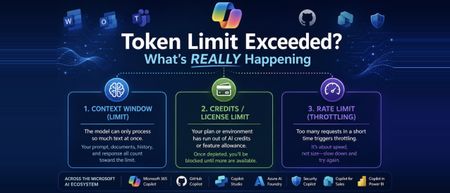
Hi All, Based on some recent experience across the organisation with token limit issues, I wanted to put my thoughts down and actually dig into what's happening under the hood, rather than just chalking it up to "we need a bigger plan." If you work anywhere near the Microsoft ecosystem these days, you're probably touching more AI tools than you realize. Copilot in Word and Excel, GitHub Copilot while you code, Copilot Studio if you're building agents, maybe Security Copilot or Copilot for Sales depending on your role, and increasingly Azure AI Foundry if your team is building anything custom. I work across a good chunk of this stack day to day, and at some point, almost everyone runs into the same wall: "Token limit exceeded." "You've reached your usage limit." "Upgrade to continue." The first instinct is usually to assume you did something wrong wrote too much, uploaded too big a file, or just need a fatter subscription. Sometimes that's the actual story. But honestly, often, that error message is standing in for three completely different problems that all happen to look identical from the outside. One is about how much text a model can physically process at once. One is about your license or credits running dry. And one has nothing to do with size at all it's just about how fast you're sending requests. Once you know which of these three, you're dealing with, the fix becomes obvious. Until then, "upgrade your plan" feels like the only lever you've got even when it isn't. This post walks through what a token is, why Microsoft's various Copilots each handle this differently, and what habits genuinely cut down on these interruptions instead of just throwing money at the problem. Part 1: So What Is a Token, Really? A token isn't a word, and it isn't a character it's somewhere in between. It's the small chunk of text a model's tokenizer breaks your input into before it can do anything with it. Take a word like "unbelievable." A tokenizer might split it into three pieces something like "un," "believ," and "able." Short, everyday words usually come out as a single token. But code, technical jargon, acronyms, and non-English text tend to fragment into a lot more tokens than you'd guess just by looking at the word count. This is why every AI tool has a ceiling on how much it can handle in one go, and that ceiling isn't measured in words or characters it's measured in tokens. Your prompt, any documents or emails it pulls in as context, the back-and-forth history of your conversation, and the response itself all draw from the same pool. Once that pool runs dry, something has to give: the tool truncates, rejects the request outright, or quietly summarizes older context to make room. The part that trips people up: token count doesn't map cleanly to word count. A short, dense paragraph full of code or acronyms can eat up more tokens than a much longer plain-English message. Part 2: Three Different Limits, One Confusing Error Message This isn't always obvious upfront, even to a lot of admins managing these tools: "token limit exceeded" is really a stand-in phrase for three separate limits, and they don't behave the same way. This isn't unique to Microsoft either every major AI platform bundles these same three things behind similarly vague error messages. Microsoft's stack just makes a good case study because so many of us touch multiple pieces of it in the same week. The context window is the ceiling on how much text a specific model can process in a single request everything from your prompt to retrieved documents to chat history. This is tied to the model itself, not your subscription. Swap from one model to another inside the same tool, and this ceiling can move without you doing anything differently. Your license, credits, or feature allowance is a completely separate thing. This is what Microsoft 365 Copilot plans track through AI credits and feature limits, and it's what Copilot Studio measures through Copilot credits at the environment level. A single action summarizing an inbox, generating an agent response, running an analysis deducts from this pool regardless of how small your actual prompt felt. Run out, and you get blocked, even if you're nowhere near any context window limit. The rate limit is about speed, not size. Copilot Studio, for instance, enforces quotas measured in requests per minute or per hour to keep the system stable under load. Send messages too quickly, which happens easily with automations, flows, or bots, and you can get throttled even with a tiny prompt and plenty of credits left. The reason this matters: a plan upgrade only ever fixes the second one. If you're actually running into the model's context window or getting rate-limited, paying for a bigger license won't change anything, and that mismatch is exactly where most of the frustration comes from. Part 3: How This Plays Out Across the Microsoft AI Stack The Microsoft ecosystem isn't one AI tool wearing different outfits it's genuinely several different systems, each handling tokens and limits in its own way. Here's a tour of the ones people run into most. Microsoft 365 Copilot (the one living inside Word, Excel, Outlook, Teams) doesn't work off a single published token number the way a developer tool would. Instead, it dynamically pulls together your prompt, recent chat history, and relevant snippets retrieved from Microsoft Graph your files, emails, and messages and quietly summarizes or drops older material to stay within bounds. Where this usually breaks isn't the context window at all; it's the AI credit and feature-limit system running out, often without much warning until you're mid-task. GitHub Copilot Chat is more like a traditional developer tool. It has a fixed, published token window tied to whichever model you've selected, and that limit applies consistently whether you're in the browser, VS Code, or the CLI. The failure mode here is usually a long conversation or a big multi-file context quietly creeping past that ceiling. Copilot Studio, where a lot of custom agent-building happens, runs on Copilot credits per interaction, plus its own requests-per-minute and requests-per-hour quotas at the environment level. If you're grounding an agent in SharePoint content, there's also a separate file-size ceiling to watch content over a certain size can get silently excluded from generative answers depending on your tenant's licensing. Azure AI Foundry (recently renamed to Microsoft Foundry, in case you've seen both names floating around) is where this gets more directly in your control. If your team is building custom applications on top of Azure OpenAI or other models in the Foundry catalog, which now includes everything from GPT to Phi to Claude to Llama, you're working with explicit, published context windows per model, and you're billed per token rather than per credit. It's a different mental model entirely: less "you hit a wall," more "you're paying by the word, so design accordingly." Security Copilot, if your org uses it for threat analysis and incident response, runs on its own capacity model pooled compute units at the tenant level rather than a simple per-user cap. It's easy to assume this behaves like M365 Copilot license limits; it doesn't. Copilot for Sales, embedded in Outlook and Teams for CRM-connected work, and Copilot in Power BI, which now goes beyond generating summaries to actually helping build and refine semantic models, both draw from their own feature-specific allowances layered on top of whatever base Microsoft 365 or Power Platform license you're on. And then there's the multi-model wrinkle that trips up teams the most: because tools like Copilot Studio and GitHub Copilot let you choose between GPT-based models, Claude, and others, the exact same prompt can have a different effective context window and a different token cost purely based on which model handled it that day. This is a big, underrated reason behind the "it worked fine yesterday, why not now" complaint. Part 4: What Actually Helps ? Some of this is genuinely outside your control, but a fair amount isn't. If you're just using these tools day to day, the single biggest habit shift is not letting conversations run forever. Long threads in Copilot Chat or Copilot Studio keep accumulating history, and that history eats into the same budget as whatever you're asking right now. Starting fresh periodically costs you nothing and buys back a lot of headroom. Large documents are worth splitting up before you feed them in, especially for SharePoint-grounded agents, where oversized files can get quietly excluded rather than cleanly rejected you won't necessarily know it happened unless you're looking for it. And it's worth resisting the urge to default to the heaviest, most capable model for every single task. Lighter models are usually faster, cheaper, and often sit under a more generous limit than the flagship ones, and most everyday tasks genuinely don't need the biggest model available. Before you go asking IT for a license upgrade, it's worth a quick sanity check on which limit you actually hit. If it's a rate limit, waiting a minute and retrying usually solves it outright. If it's a context window problem, trimming your prompt or starting a new session fixes it. An upgrade only helps if you've genuinely run out of credits or feature allowance, and that's worth confirming before you file the request. If you're on the building side Copilot Studio agents, Foundry applications, anything with RAG-style grounding a couple of things pay off quickly. Keep an eye on credit or token consumption proactively rather than discovering it's gone when the agent goes down mid-conversation. Be deliberate about what goes into system prompts and orchestration instructions, since those draw from the same budget as the end user's actual message, often invisibly to whoever's chatting with the agent. And spend real time getting chunk size right for knowledge sources too large and you're burning budget on irrelevant context, too small and the agent loses the thread. Part 5: Quick Checklist Before You Escalate Is this actually a context window problem -prompt, history, and attachments too big for the model in use? Have you genuinely run out of credits or feature allowance on your plan? Could this be a rate limit -too many requests too fast, especially from a flow or automation? Did the underlying model change since last time, quietly shifting the effective window? For Studio or Foundry work, is this a tenant or environment-level limit rather than something tied to you personally? Closing Thoughts Tokenization is one of those things that stays completely invisible right up until it isn't. Across a stack as sprawling as Microsoft's M365 Copilot, GitHub Copilot, Copilot Studio, Foundry, Security Copilot, and everything layered on top "token limit exceeded" almost never means one single thing. It means you've hit one of three very different walls, and each one needs a different response. If your team builds or maintains any of these tools, this is genuinely worth putting in front of people early. Most of the "why did this break" tickets in this space aren't about tokens at all. They're about nobody knowing which limit actually got hit, or where in this increasingly large ecosystem it happened. I'm curious how this shows up for others has your team standardized on one model across these tools, or are you juggling several depending on the task? I'd love to hear what patterns you've run into. Cheers, and happy reading. - By Surya Vennapusa, MCT1.2KViews2likes2CommentsGitHub Copilot App Canvas Is a Runtime
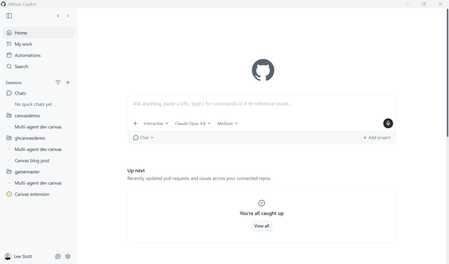
There is a quiet shift happening in how we build software with AI. We are moving from writing static code to orchestrating living systems where developers and AI agents co-create, observe, and evolve a solution in real time. This post is a working theory of what GitHub Copilot App Canvas is actually for, grounded in a real, runnable demo you can clone today: leestott/agent-runtime-canvas. The Agent Runtime canvas open beside the chat — control bar, activity spotlight, requirement & constraints, and the live agent roster. The headline claim, which the rest of this post defends with code: Traditional UIs are for using software. Canvas is for shaping software while it runs. 1. The misconception worth getting out of the way The first instinct most engineers have when they see Canvas is to build a UI with it a dashboard, a DevOps board, an admin panel. That is the wrong mental model, and it leads to disappointment. A Kanban board rendered in Canvas is just a worse version of a tool that already exists. Canvas is not where your users live. It is where your system becomes visible to you and to the AI while you are still figuring it out. The distinction matters: You don't build Canvas instead of your UI. You use Canvas to figure out, test, and evolve the UI and the system before and during building it. Canvas solves problems your final UI should never try to solve in a visible way agent coordination, intermediate state, test validation, failure propagation. These are observability concerns, not end-user features. Canvas is intended for test validation and the implementation of agent-driven solutions not for shipping a production control panel. A useful analogy: Figma is Human-to-Human one person designs a static artifact for another person to read. Canvas is Human-to-AI-to-System a shared surface where a human, an AI agent, and a running system all act on the same live model. Figma shows you a picture of the software. Canvas is a runtime where things actually execute. 2. The positioning, stated plainly Here is the thesis the demo is built to prove: Canvas redefines software development by shifting from writing static code to orchestrating living systems, where developers and AI co-create, observe, and evolve solutions in real time. Instead of building UIs for users, we build interactive environments for agents — turning debugging, testing, and execution into a continuous, visual feedback loop that accelerates innovation and brings ideas to production faster than ever. Read that again with the demo in mind, because the demo is not a slide, it is a working Copilot CLI extension that renders exactly this loop. 3. What we built: the Agent Runtime canvas agent-runtime-canvas is a GitHub Copilot CLI canvas extension called Agent Runtime. It turns Canvas into a runtime observability and control plane for a multi-agent software system that is being designed, tested, and evolved in real time. The canvas renders a single living SystemModel that both humans and the AI agent edit at the same time. The agent drives it through five canvas actions; the human drives it through panel controls. Every change streams to the iframe over Server-Sent Events (SSE), so the system visibly evolves through interaction. The seven panels: a system you can watch think Panel What it makes observable Requirement & constraints The feature under design plus editable policies and constraints Agents Active agents, their responsibilities, and live state (idle / working / done / error / blocked) Task Flow The dependency graph of tasks across agents, with live status Artifacts The intermediate outputs each task emits Validation Test cases, pass/fail, expected vs. actual, and the reasoning behind each verdict Live State The shared memory objects the agents read and write — directly human-editable Timeline A change-over-time log, including before→after state diffs None of these are things you would put in front of an end user. All of them are things you desperately want to see while you and an AI are co-designing an agentic system. The five agent actions The AI co-creates and evolves the system by calling five actions, declared in the canvas extension: Action Effect decompose_system Break a requirement into collaborating agents + a task-flow graph execute_workflow Coordinate agents to advance tasks ( step / run / pause / resume / reset ) validate_output Run evaluation tests, return structured pass/fail + reasoning update_system_design Modify architecture/logic: requirement, constraints, agents, tasks track_state Persist/update a shared state object, recording the diff on the timeline The critical detail is that human controls and agent actions funnel through the exact same store. There is no separate "AI view" and "human view" — one model, two kinds of participant. 4. How it actually works (the parts that matter) The extension is deliberately small and dependency-free. It uses only Node's built-in modules plus github/copilot-sdk , which the CLI auto-resolves. Three files do the work: .github/extensions/agent-runtime/ extension.mjs # wiring: loopback HTTP server, SSE, /control, 5 canvas actions store.mjs # durable SystemModel + execution engine + validation ui.mjs # iframe renderer (system view, validation, state, timeline) One shared model, broadcast on every mutation The heart of the demo is the SystemStore . It is an EventEmitter : every mutation bumps a version, appends a timeline entry, persists to disk, and broadcasts a fresh snapshot to all connected panels. This is the single line that makes "humans and AI edit the same live system" true rather than aspirational: // store.mjs — every change is versioned, logged, persisted, and broadcast. _commit(eventType, summary, detail) { this.model.version += 1; this.model.updatedAt = now(); if (eventType) { this.model.timeline.unshift({ id: uid("ev"), ts: now(), type: eventType, summary, detail: detail || null, }); this.model.timeline = this.model.timeline.slice(0, 200); } this._queueSave(); // best-effort JSON persistence under ~/.copilot this.emit("change", this.model); // fan out to every SSE client return this.model; } The agent action and the human button hit the same method In extension.mjs , the canvas action handler and the iframe's /control POST both call store.execute(...) . That symmetry is the whole point — neither the human nor the AI is privileged: // extension.mjs — a human control POST maps onto the same store method // the AI agent calls through the execute_workflow canvas action. function applyControl(store, body) { switch (body.action) { case "execute": return store.execute(body.mode || "step", body); case "validate": return store.validate(body.tests); case "decompose":return store.decompose(body.requirement, body); case "inject_failure": return store.injectFailure(body.taskKey); case "edit_state": return store.editState(body.key, body.value); // ...requirement, constraints, clear_failures, update_design } } Execution you can watch one task at a time The engine advances the task graph through a visible begin→dwell→finish lifecycle so the active agent is always observable. A ready task is one whose dependencies are all done : // store.mjs — the scheduler only starts a task when its deps are satisfied. _readyTask() { return this.model.tasks.find( (t) => t.status === "pending" && t.deps.every((d) => { const dep = this.model.tasks.find((x) => x.id === d); return dep && dep.status === "done"; }), ); } When a task finishes, its agent emits an artifact and writes to shared state; when a dependency fails, the engine walks the graph to a fixpoint and marks every downstream task blocked . That is failure propagation you can see — exactly the kind of thing a production UI would (correctly) hide, and exactly the kind of thing you need exposed while designing the system. Validation as a first-class, re-runnable citizen The default evaluation suite asserts properties of the running system, not of static code — every test returns an expected value, an actual value, and a human -readable reason: // store.mjs — tests assert properties of the live system model. _defaultTests() { const t = (name, target, assertion) => ({ id: uid("test"), name, target, assertion }); return [ t("All tasks reach a terminal state", "tasks", "no_pending"), t("No tasks failed", "tasks", "none_failed"), t("Every completed task emitted an artifact", "artifacts", "artifact_per_done"), t("Design state populated before build", "state", "design_before_build"), t("Decision recorded by Reviewer", "state", "has_decision"), ]; } This is the "continuous, visual feedback loop" from the thesis, made concrete: decompose → execute → validate → redesign → re-validate, with the Timeline recording every before→after transition. 5. Run it yourself You need a GitHub Copilot CLI / app with canvas support (the canvas-renderer capability) and this repo opened as your workspace. There is no npm install the SDK is auto-resolved and the extension uses only built-in Node modules. Clone and open the workspace. git clone https://github.com/leestott/agent-runtime-canvas.git cd agent-runtime-canvas The extension auto-discovers from .github/extensions/agent-runtime/ . Open the canvas with a requirement. Ask Copilot: Open the Agent Runtime canvas with the requirement "Add CSV export to the reports page". Walk the loop. Decompose into five agents and a six-task graph, press Run ▶, watch the spotlight track the active agent, press Run tests ✓ for 5/5 green, then Inject failure ⚡ to watch downstream tasks go blocked and validation drop to 4/5 — and recover. State persists per documentId under ~/.copilot/extensions/agent-runtime/artifacts/ , so a reload resumes exactly where you left off. The companion demoscript.md in the repo gives you a tight, timed walkthrough. 6. Why this is an observability story Once you accept that Canvas is a runtime rather than a UI, the most compelling use case becomes observability of agentic systems. Agentic software is notoriously hard to debug: the interesting behavior lives in intermediate state, coordination order, and the moments where one agent's failure cascades into another's. A production UI is designed to hide all of that. A Canvas is designed to surface it, temporarily, while you are shaping the system — and then get out of the way. This reframes Canvas alongside the broader Microsoft and GitHub agent tooling story. As teams adopt the GitHub Copilot SDK and patterns like the open Model Context Protocol to wire agents into real systems, the gap is rarely "can the agent act?" it is "can a human see what the agent did, judge it, and steer it?" Canvas is a candidate answer to that second question. When you take agents toward production on Azure with services like Microsoft Foundry, the same instinct applies: build the evaluation and observability loop first, and let it shape the system before you commit a single end-user pixel. 7. The open question: why can't Canvas be multi-user? There is an obvious next frontier, and it is worth stating as an honest open question rather than a finished feature. Everything that makes Canvas valuable also makes it a natural collaborative surface: It is a shared space. It is visual. It is collaborative. Multiple participants — human and AI — interact with the same surface. If Figma earned its place by making Human-to-Human design multiplayer, the provocative question is whether a project- or repo-scoped Canvas can make Human-to-AI-to-System development multiplayer too: several engineers and several agents shaping one running system on one surface. The demo here is single-user by design, but its architecture — one shared store, versioned, broadcast to every subscriber — is already the shape you would need. That is a genuine research direction, and worth experimenting with as licensing and access broaden. 8. Honest limitations In the spirit of building credibility rather than hype: This is a demonstration. The decomposition, artifacts, and state are synthesized to make the runtime loop legible — it models an agentic system rather than running arbitrary production agents. It is single-user and single-machine. The loopback HTTP server and per-document store are local by design; multi-user is an aspiration, not a shipped capability. Access is gated. Canvas support requires a Copilot CLI/app build with the canvas-renderer capability. Licensing and preview access are the biggest practical blockers to wider experimentation today. Persistence is best-effort. State is written to a local JSON artifact; treat it as demo durability, not a database. Key takeaways Don't build a UI in Canvas. Use Canvas to shape, test, and evolve a system — and the UI — while it runs. Traditional UIs are for using software; Canvas is for shaping software while it runs. Canvas is Human-to-AI-to-System, a runtime where things execute — not a static design surface. Its strongest use case is observability and validation of agentic systems: surface the intermediate state your production UI should hide. The shared-model architecture — one versioned store broadcast to every participant — is what makes human + AI co-editing real, and what hints at a multi-user future. Next steps Clone and run the demo: github.com/leestott/agent-runtime-canvas. Read the extension source under .github/extensions/agent-runtime/ — start with store.mjs . Explore the building blocks: the GitHub Copilot SDK, the Model Context Protocol, and Microsoft Foundry for taking agentic systems toward production. Try the multi-user thought experiment: fork the store, add a second subscriber, and ask what changes when two humans and two agents share one surface.341Views1like0Comments