copilot adoption
2 TopicsCustomer spotlight: Capgemini is turning comms and conversations into AI-ready knowledge
As organizations invest in Microsoft 365 Copilot and AI, many are asking the same question: What knowledge will AI actually use? For Capgemini, the answer isn't buried in documents alone. It's found in leadership conversations, employee communities, company events, and knowledge shared every day across the organization. Through Viva Engage, Capgemini is creating a living knowledge layer that helps employees connect with leaders, learn from one another, and build the organizational context that makes AI more useful. Moving beyond broadcast communications Capgemini's goal is simple: meet employees where they already work. Rather than adding more destinations and channels, the company is focused on creating a connected experience across Teams, Viva Connections, and Viva Engage that makes it easier for employees to find information, participate in conversations, and learn from their peers. For Jeanette Vikbacka Castaing, Global Internal Communications at Capgemini, communities are ultimately about helping people connect, learn, and share expertise. Speaking at Microsoft 365 Community Conference, she described the value of bringing together people who are "passionate about engagement, communications, and products" and creating opportunities to learn, grow, and exchange ideas. Creating the signals Copilot needs One of the central themes of Microsoft's "Engage Everywhere" session was that AI adoption is not simply a technology challenge. It is a communications and knowledge challenge. Copilot relies on organizational context to generate grounded responses. That context comes from everyday interactions between employees, experts, and leaders. Communities capture peer learning. Leadership dialogue provides direction and context. Events create shared moments. Conversations preserve institutional knowledge. At Capgemini, these signals are being created at scale through several key use cases: Executive leadership communications Corporate events Employee challenges and campaigns AI-focused communities Ongoing employee conversations and knowledge sharing Making leaders visible—and discoverable Leadership visibility became one of Capgemini's key priorities over the past year. What began as an experiment encouraging leaders to post directly evolved into a measurable communications strategy. "We have really seen now an increase of the views every time a leader posts directly in our all staff community," Jeanette explained. "It's very clear that people want to hear from the leaders. We can see that in the data." Beyond reach, the goal is trust. By making leaders more approachable and accessible through conversation, Capgemini is creating stronger connections between leadership and employees. "When you're approachable, you also build trust," Jeanette shared. These leadership conversations become more than communications content. They become organizational knowledge that employees can discover later and that AI can reference when surfacing relevant information. Turning events into lasting knowledge Capgemini has also embraced events as a way to create connection and generate knowledge before, during, and after a live moment. Instead of treating events as standalone broadcasts, conversations continue around the event experience. Employees ask questions, share perspectives, and contribute ideas that remain available to the broader organization. Microsoft's vision for Engage events follows the same principle: event conversations create content that can remain discoverable and continue delivering value beyond the live session itself. The multiplier effect of conversation Perhaps the most compelling insight from Capgemini's story is what the team calls the “Multiplier Effect of Conversations” For example: A post creates a conversation. A conversation creates connections. Connections inspire action. Actions drive outcomes. For communicators, this represents a shift in how success is measured. The value of a post is no longer limited to impressions or views. The real value comes from the expertise surfaced, questions answered, relationships built, and knowledge created throughout the conversation lifecycle. As communications strategies evolve, measurement becomes increasingly important. Capgemini has seen this effect firsthand through employee challenges tied to company sponsorships such as the Ryder Cup, America's Cup, and Tour de France. Previously these campaigns relied heavily on email. Today they are powered by conversations in Viva Engage. According to Jeanette, the difference has been "night and day." Employees immediately start commenting, tagging colleagues, sharing excitement, and encouraging others to participate. "We really build momentum," she said. "It's kind of a snowball effect.” Perhaps most importantly, the conversations continue long after the original campaign. Past contest winners often return to encourage future participants, creating a self-sustaining cycle of engagement and peer advocacy. Capgemini's journey reflects a growing need among communicators to understand not only whether content was delivered, but whether it generated participation, engagement, and meaningful outcomes. The goal is helping communicators measure not just reach, but influence. Measuring More Than Reach Capgemini's approach to communications is increasingly data-driven. Whether evaluating leadership visibility, participation in AI communities, or employee engagement with company-wide campaigns, the team looks beyond simple message delivery. "People want to hear from the leaders. We can see that in the data," Jeanette explained when describing the growth of leadership communications. The same focus applies to Copilot communities. Capgemini tracks how employees engage, ask questions, and help one another. Jeanette noted that even large, open communities remain productive because employees arrive with a specific purpose: learn, ask questions, and share knowledge. "You ask a question, you get an answer," she said. "It's really peer-to-peer connection at its best." For communicators, these interactions represent something more valuable than traditional engagement metrics. They are signals of learning, expertise sharing, and organizational knowledge creation—the same signals that help employees today and help Copilot deliver more relevant answers tomorrow. Building an AI-ready culture The most important lesson from Capgemini's story is that successful AI adoption starts with people. Communities give employees a place to learn together. Experts can share knowledge. Leaders can provide clarity. Questions become answers. Conversations become institutional memory. Over time, those interactions create the organizational context that helps Copilot deliver more relevant, grounded responses. One of the fastest-growing examples is AI itself. Capgemini has built multiple communities dedicated to Copilot, including a broad Copilot Chat community, a community for licensed Copilot users, and a separate space for certified Copilot champions. According to Jeanette, each has a different purpose and audience, but all are performing well and generating strong participation. "The reach is just amazing. We measure, of course," she explained. Start, test and, and learn Asked what advice she would give communicators just beginning their journey, Jeanette's answer was straightforward: "Test, test and learn." There is no single formula for building communities or driving engagement. What works depends on the audience, culture, and goals. "Failure is also progress," she said. "Test and see what works and build from there." That mindset reflects Capgemini's broader approach to AI readiness. Create opportunities for people to connect. Encourage leaders to participate. Build communities where expertise can be shared openly. Measure what matters. Over time, every conversation contributes to something bigger: a living body of organizational knowledge that helps both employees and AI work smarter together. For communicators, the opportunity is clear: every conversation is more than a moment of engagement. It is a chance to create knowledge, build trust, and help the organization become more ready for AI. So, the question becomes: what conversations are you creating today that your employees, and AI, will need tomorrow?419Views0likes0CommentsMicrosoft Copilot Academy now available to all Microsoft 365 users
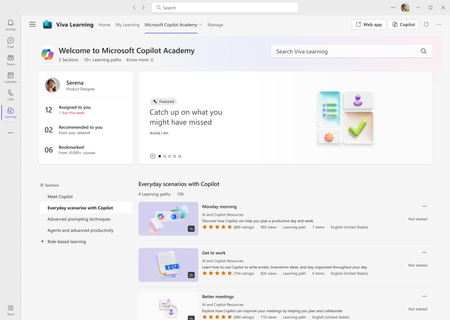
We are pleased to announce that all Microsoft 365 users can now access Microsoft Copilot Academy to improve their AI and Copilot skills. This academy – curated by Microsoft experts – provides a comprehensive, structured learning experience designed to help users master the use of Copilot through hands-on learning activities and experiences. Click here to learn more about what Copilot Academy includes. Last year, we announced the academy was available to all Microsoft 365 Copilot users. We have now lifted the Copilot license requirement, giving immediate access to any user with a Microsoft 365 license. No additional registration or administrative action is required to start using Copilot Academy. Please see appendix 1 for an updated table that lists the licenses that grant access to Copilot Academy. Use Copilot Academy to train users before assigning Copilot licenses The new licensing structure for Copilot Academy unlocks a new scenario for administrators – ensuring users commit to Copilot training through the academy before receiving a Copilot license. Administrators can now use Copilot Academy as a tool to teach users how to leverage Copilot before a license has been assigned. This allows users to see the value of Copilot and learn how it can maximize their productivity throughout the workday. Upskilling before receiving a license encourages faster time-to-value with Copilot and helps identify workstreams where Copilot will have the greatest impact. View of Microsoft Copilot Academy. The academy is accessed through the Academies tab on the menu bar. Microsoft 365 users can access the Copilot Academy by navigating to the Academies tab in Viva Learning and selecting Microsoft Copilot Academy or accessing the academy link directly at https://aka.ms/copilotacademy. Additionally, the AI & Copilot Resources provider options help users easily browse or filter Copilot Academy content. Users can browse Copilot Academy materials on the Viva Learning homepage or filter searches with the Provider filter option. Admin experience All learning administrators can configure the visibility of Microsoft Copilot Academy – this includes Knowledge Admins, Knowledge Managers, and users with administrator access provided by feature access management. The tenant-wide default for Copilot Academy access is set to everyone but can be changed to Microsoft 365 Copilot Licensed Users – restricting the academy to only those with the Copilot license. Administrators can control the content provider that powers Copilot Academy through a dedicated provider called AI & Copilot Resources, accessible in the Admin tab in Viva Learning under Manage Providers. This will now appear alongside other default learning providers like Microsoft Learn, Microsoft 365 Training, and LinkedIn Learning. The AI & Copilot Resources provider can be added or deleted in the Manage Providers tab, and provider permissions can be managed in the Manage Permissions tab under the Admin menu. Additionally, the AI & Copilot Resources provider can be disabled, which will disable all learning paths within Copilot Academy. For an in-depth feature breakdown, click here to review the complete documentation on Microsoft Learn. Administrators can manage permissions for the– AI & Copilot Resources content provider powering the Microsoft Copilot Academy. Looking ahead Upcoming functionality the team is currently working on to enhance the Microsoft Copilot Academy includes: Support for custom group access to Copilot Academy – this would enable administrators to provide access to the academy through security groups Notification settings – administrators will have the option to configure (and disable if desired) the default monthly notifications. Appendix 1: Users with any of the licenses below can now access Copilot Academy Microsoft 365 A3 for faculty Office 365 A1 for faculty Microsoft 365 A5 for faculty Office 365 A3 for faculty Microsoft 365 Business Basic Office 365 A5 for faculty Microsoft 365 Business Premium Office 365 E1 Microsoft 365 Business Standard Office 365 E3 Microsoft 365 E3 Office 365 E5 Microsoft 365 E5 Office 365 F2 Microsoft 365 F1 Office 365 F3 Microsoft 365 F3 Microsoft Viva Suite for faculty Microsoft Viva Suite Microsoft Viva Suite with Glint for faculty Microsoft Viva Suite with Glint Microsoft 365 Copilot Microsoft Viva Learning7.8KViews1like3Comments