content delivery network
15 TopicsIntroducing Azure Front Door edge actions - Bringing secure, programmable logic to the edge
Modern web applications are expected to feel instant, secure, and personalized, no matter where users connect from or what device they use. Delivering that experience requires more than moving static content closer to users. It increasingly depends on making smart decisions at the edge, from validating requests and selecting the right origin to personalizing responses and stopping suspicious traffic before it reaches the backend. Because of this, over the last decade, compute resources for web applications have steadily moved closer to users. What began with content caching at the edge quickly evolved into dynamic routing, security enforcement, and intelligent application traffic management. Today, enterprises expect even more: programmable compute at the edge! Developers and platform teams want the flexibility to run lightweight logic at the edge without giving up the scale, security, and operational confidence they expect from Azure. Azure Front Door through its rulesets offers a robust, declarative framework for applying common traffic management and security policies, such as redirects, header manipulation, and conditional routing. They are optimized for scenarios where behavior can be defined statically and evaluated efficiently at scale. As customer workloads become more dynamic, and application logic increasingly moves closer to the user, additional capabilities are often required beyond declarative configuration. Meet Azure Front Door edge actions, now in public preview We are excited to announce Azure Front Door edge actions which represent Microsoft’s next step in this evolution. With edge actions, customers can execute custom logic directly at Microsoft’s global edge, enabling new classes of real-time personalization, security, and resiliency scenarios, without pushing complexity back to origins! Edge actions allow customers to author lightweight JavaScript functions that execute as part of Azure Front Door request processing. In the current public preview, edge actions are invoked during the client request phase and are attached to Azure Front Door routes through rulesets. This tight integration means edge actions work seamlessly with existing Azure Front Door capabilities, including Web Application Firewall (WAF), caching, and routing - while extending them with programmable logic. Customers can incrementally adopt edge actions without re-architecting their applications or delivery pipelines. What can you build with edge actions today Edge actions in public preview are optimized for lightweight, latency-sensitive scenarios that benefit from immediate decision-making. Common use cases include: A/B experimentation and canary rollouts: Evaluate request context at the edge and route users to different application experiences or releases without adding origin-side decision logic. Request and response header manipulation: Add, remove, or transform headers to support security controls, experimentation, routing, and application modernization patterns. Request rejection: Stop unwanted, malformed, or unauthorized requests before they consume origin resources. Dynamic origin selection: Choose the best origin based on request attributes, health signals, geography, device type, or business logic. URL rewrite and redirect: Adapt paths or redirect users at the edge to simplify migrations, campaign launches, localization, and application routing. Authentication and authorization scenarios: Validate tokens or request attributes close to the user, helping protect applications before traffic reaches backend services. Please refer to Azure/EdgeActionsSamples to start building edge actions today. Designed for industry leading security-first edge compute Running customer-defined code at the edge introduces unique security challenges. Edge environments now process untrusted user code at massive scales, making strong isolation non-negotiable for Azure. Enter Hyperlight: Microsoft’s foundation for secure execution. With Hyperlight, each edge action code runs in its own lightweight, hardware-backed micro-VM - like a secure apartment, isolated from neighbors. Unlike traditional virtual machines, Hyperlight micro‑VMs are extremely lightweight and do not have a general-purpose guest operating system. Because of their small footprint, they provide a much more reduced attack surface with a hardware-backed isolation boundary between every instance of customer code, the host infrastructure, and other tenants. This model allows Azure Front Door to combine the safety properties of hardware virtualization with the performance characteristics required for edge compute. Customer code is isolated by design to reduce blast radius to a single instance, helping protect both the platform and neighboring workloads. How edge actions fit into the request path When a client request reaches Azure Front Door, it follows Azure Front Door’s standard routing pipeline. The request is first evaluated against any configured WAF policies and routing rules. If a rule is configured to invoke an edge action, execution is handed off to the edge actions runtime (Hyperlight) at the edge POP. At execution time, Azure Front Door provides the edge action with a constrained, immutable context that includes request metadata, server variables, origin health information, and geo or device signals. The edge action can then modify the request, generate a response, or influence routing decisions, all within strict execution and resource limits designed to preserve platform stability. Ship safely with versions and execution filters Edge actions are built for operational confidence. Each edge action supports multiple versions of code, and customers can control which version executes using execution filters. This enables header-based routing, canary deployments, and A/B testing scenarios without downtime. Teams can gradually introduce new logic, validate behavior with real traffic, and roll back instantly if needed, bringing modern DevOps practices directly to the edge. Observe and operate with confidence Edge actions integrate with Azure’s existing observability stack. Customers can emit logs from their edge action code and correlate execution results with Azure Front Door access and routing logs. This unified view simplifies troubleshooting and provides visibility into edge execution behavior in production environments. Pricing Please refer to the pricing document for details regarding Edge actions pricing, including applicable billing meters and usage-based charges on invocations and execution time. What’s next for edge actions The public preview of edge actions represents the foundation of a broader roadmap. Over time, Microsoft plans to expand invocation points, capabilities, and integrations - while continuing to prioritize security, performance, and operational simplicity. Stay tuned for scenarios like response invocations, image/video optimizations, and edge inferencing during general availability. By combining programmable edge logic with Hyperlight-based isolation, Azure Front Door edge actions mark a significant milestone in Microsoft’s edge strategy - enabling customers to build faster, safer, and more adaptive applications on a global scale. Start building with Azure Front Door edge actions today! Explore the documentation and bring your complex edge scenarios to life.3.5KViews3likes0CommentsAzure Front Door: Resiliency Series – Part 2: Faster recovery (RTO)
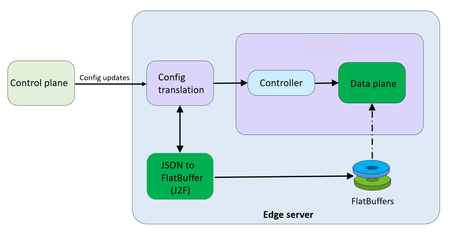
Abhishek Tiwari, Vice President of Engineering, Azure Networking Amit Srivastava, Partner Director of PM, Azure Networking Varun Chawla, Partner Director of Engineering, Azure Networking Karthik Uthaman, Principal Engineer, Azure Networking In Part 1 of this blog series, we outlined our four‑pillar strategy for resiliency in Azure Front Door: configuration resiliency, data plane resiliency, tenant isolation, and accelerated Recovery Time Objective (RTO). Together, these pillars help Azure Front Door remain continuously available and resilient at global scale. Part 1 focused on the first two pillars: configuration and data plane resiliency. Our goal is to make configuration propagation safer, so incompatible changes never escape pre‑production environments. We discussed how incompatible configurations are blocked early, and how data plane resiliency ensures the system continues serving traffic from a last‑known‑good (LKG) configuration even if a bad change manages to propagate. We also introduced ‘Food Taster’, a dedicated sacrificial process running in each edge server’s data plane, that pretests every configuration change in isolation, before it ever reaches the live data plane. In this post, we turn to the recovery pillar. We describe how we have made key enhancements to the Azure Front Door recovery path so the system can return to full operation in a predictable and bounded timeframe. For a global service like Azure Front Door, serving hundreds of thousands of tenants across 210+ edge sites worldwide, we set an explicit target: to be able to recover any edge site – or all edge sites – within approximately 10 minutes, even in worst‑case scenarios. In typical data plane crash scenarios, we expect recovery in under a second. Repair status The first blog post in this series mentioned the two Azure Front Door incidents from October 2025 – learn more by watching our Azure Incident Retrospective session recordings for the October 9 th incident and/or the October 29 th incident. Before diving into our platform investments for improving our Recovery Time Objectives (RTO), we wanted to provide a quick update on the overall repair items from these incidents. We are pleased to report that the work on configuration propagation and data plane resiliency is now complete and fully deployed across the platform (in the table below, “Completed” means broadly deployed in production). With this, we have reduced configuration propagation latency from ~45 minutes to ~20 minutes. We anticipate reducing this even further – to ~15 minutes by the end of April 2026, while ensuring that platform stability remains our top priority. Learning category Goal Repairs Status Safe customer configuration deployment Incompatible configuration never propagates beyond ‘EUAP or canary regions’ Control plane and data plane defect fixes Forced synchronous configuration processing Additional stages with extended bake time Early detection of crash state Completed Data plane resiliency Configuration processing cannot impact data plane availability Manage data-plane lifecycle to prevent outages caused by configuration-processing defects. Completed Isolated work-process in every data plane server to process and load the configuration. Completed 100% Azure Front Door resiliency posture for Microsoft internal services Microsoft operates an isolated, independent Active/Active fleet with automatic failover for critical Azure services Phase 1: Onboarded critical services batch impacted on Oct 29 th outage running on a day old configuration Completed Phase 2: Automation & hardening of operations, auto-failover and self-management of Azure Front Door onboarding for additional services March 2026 Recovery improvements Data plane crash recovery in under 10 minutes Data plane boot-up time optimized via local cache (~1 hour) Completed Accelerate recovery time < 10 minutes April 2026 Tenant isolation No configuration or traffic regression can impact other tenants Micro cellular Azure Front Door with ingress layered shards June 2026 Why recovery at edge scale is deceptively hard To understand why recovery took as long as it did, it helps to first understand how the Azure Front Door data plane processes configuration. Azure Front Door operates in 210+ edge sites with multiple servers per site. The data plane of each edge server hosts multiple processes. A master process orchestrates the lifecycle of multiple worker processes, that serve customer traffic. A separate configuration translator process runs alongside the data plane processes, and is responsible for converting customer configuration bundles from the control plane into optimized binary FlatBuffer files. This translation step, covering hundreds of thousands of tenants, represents hours of cumulative computation. A per edge server cache is kept locally at each server level – to enable a fast recovery of the data plane, if needed. Once the configuration translator process produces these FlatBuffer files, each worker processes them independently and memory-maps them for zero-copy access. Configuration updates flow through a two-phase commit: new FlatBuffers are first loaded into a staging area and validated, then atomically swapped into production maps. In-flight requests continue using the old configuration, until the last request referencing them completes. The data process recovery is designed to be resilient to different failure modes. A failure or crash at the worker process level has a typical recovery time of less than one second. Since each server has multiple such worker processes which serve customer traffic, this type of crash has no impact on the data plane. In the case of a master process crash, the system automatically tries to recover using the local cache. When the local cache is reused, the system is able to recover quickly – in approximately 60 minutes – since most of the configurations in the cache were already loaded into the data plane before the crash. However, in certain cases if the cache becomes unavailable or must be invalidated because of corruption, the recovery time increases significantly. During the October 29 th incident, a data plane crash triggered a complete recovery sequence that took approximately 4.5 hours. This was not because restarting a process is slow, it is because a defect in the recovery process invalidated the local cache, which meant that “restart” meant rebuilding everything from scratch. The configuration translator process then had to re-fetch and re-translate every one of the hundreds of thousands of customer configurations, before workers could memory-map them and begin serving traffic. This experience has crystallized three fundamental learnings related to our recovery path: Expensive rework: A subset of crashes discarded all previously translated FlatBuffer artifacts, forcing the configuration translator process to repeat hours of conversion work that had already been validated and stored. High restart costs: Every worker on every node had to wait for the configuration translator process to complete the full translation, before it could memory-map any configuration and begin serving requests. Unbounded recovery time: Recovery time grew linearly with total tenant footprint rather than with active traffic, creating a ‘scale penalty’ as more tenants onboarded to the system. Separately and together, the insight was clear: recovery must stop being proportional to the total configuration size. Persisting ‘validated configurations’ across restarts One of the key recovery improvements was strengthening how validated customer configurations are cached and reused across failures, rather than rebuilding configuration states from scratch during recovery. Azure Front Door already cached customer configurations on host‑mounted storage prior to the October incident. The platform enhancements post outage focused on making the local configuration cache resilient to crashes, partial failures, and bad tenant inputs. Our goal was to ensure that recovery behavior is dominated by serving traffic safely, not by reconstructing configuration state. This led us to two explicit design goals… Design goals No category of crash should invalidate the configuration cache: Configuration cache invalidation must never be the default response to failures. Whether the failure is a worker crash, master crash, data plane restart, or coordinated recovery action, previously validated customer configurations should remain usable—unless there is a proven reason to discard it. Bad tenant configuration must not poison the entire cache: A single faulty or incompatible tenant configuration should result in targeted eviction of that tenant’s configuration only—not wholesale cache invalidation across all tenants. Platform enhancements Previously, customer configurations persisted to host‑mounted storage, but certain failure paths treated the cache as unsafe and invalidated it entirely. In those cases, recovery implicitly meant reloading and reprocessing configuration for hundreds of thousands of tenants before traffic could resume, even though the vast majority of cached data was still valid. We changed the recovery model to avoid invalidating customer configurations, with strict scoping around when and how cached entries are discarded: Cached configurations are no longer invalidated based on crash type. Failures are assumed to be orthogonal to configuration correctness unless explicitly proven otherwise. Cache eviction is granular and tenant‑scoped. If a cached configuration fails validation or load checks, only that tenant’s configuration is discarded and reloaded. All other tenant configurations remain available. This ensures that recovery does not regress into a fleet‑wide rebuild due to localized or unrelated faults. Safety and correctness Durability is paired with strong correctness controls, to prevent unsafe configurations from being served: Per‑tenant validation on load: Each cached tenant configuration is validated during the ‘load and verification’ phase, before being promoted for traffic serving. Therefore, failures are contained to that tenant. Targeted re‑translation: When validation fails, only the affected tenant’s configuration is reloaded or reprocessed. Therefore, the cache for other tenants is left untouched. Operational escape hatch: Operators retain the ability to explicitly instruct a clean rebuild of the configuration cache (with proper authorization), preserving control without compromising the default fast‑recovery path. Resulting behavior With these changes, recovery behavior now aligns with real‑world traffic patterns - configuration defects impact tenants locally and predictably, rather than globally. The system now prefers isolated tenant impact, and continued service using last-known-good over aggressive invalidation, both of which are critical for predictable recovery at the scale of Azure Front Door. Making recovery scale with active traffic, not total tenants Reusing configuration cache solves the problem of rebuilding configuration in its entirety, but even with a warm cache, the original startup path had a second bottleneck: eagerly loading a large volume of tenant configurations into memory before serving any traffic. At our scale, memory-mapping, parsing hundreds of thousands of FlatBuffers, constructing internal lookup maps, adding Transport Layer Security (TLS) certificates and configuration blocks for each tenant, collectively added almost an hour to startup time. This was the case even when a majority of those tenants had no active traffic at that moment. We addressed this by fundamentally changing when configuration is loaded into workers. Rather than eagerly loading most of the tenants at startup across all edge locations, Azure Front Door now uses an Machine Learning (ML)-optimized lazy loading model. In the new architecture, instead of loading a large number of tenant configurations, we only load a small subset of tenants that are known to be historically active in a given site, we call this the “warm tenants” list. The warm tenants list per edge site is created through a sophisticated traffic analysis pipeline that leverages ML. However, loading the warm tenants is not good enough, because when a request arrives and we don’t have the configuration in memory, we need to know two things. Firstly, is this a request from a real Azure Front Door tenant – and, if it is, where can I find the configuration? To answer these questions, each worker maintains a hostmap that tracks the state of each tenant’s configuration. This hostmap is constructed during startup, as we process each tenant configuration – if the tenant is in the warm list, we will process and load their configuration fully; if not, then we will just add an entry into the hostmap where all their domain names are mapped to the configuration path location. When a request arrives for one of these tenants, the worker loads and validates that tenant’s configuration on demand, and immediately begins serving traffic. This allows a node to start serving its busiest tenants within a few minutes of startup, while additional tenants are loaded incrementally only when traffic actually arrives—allowing the system to progressively absorb cold tenants as demand increases. The effect on recovery is transformative. Instead of recovery time scaling with the total number of tenants configured on a server, it scales with the number of tenants actively receiving traffic. In practice, even at our busiest edge sites, the active tenant set is a small fraction of the total. Just as importantly, this modified form of lazy loading provides a natural failure isolation boundary. Most Edge sites won’t ever load a faulty configuration of an inactive tenant. When a request for an inactive tenant with an incompatible configuration arrives, impact is contained to a single worker. The configuration load architecture now prefers serving as many customers as quickly as possible, rather than waiting until everything is ready before serving anyone. The above changes are slated to complete in April 2026 and will bring our RTO from the current ~1 hour to under 10 minutes – for complete recovery from a worst case scenario. Continuous validation through Game Days A critical element of our recovery confidence comes from GameDay fault-injection testing. We don’t simply design recovery mechanisms and assume they work—we break the system deliberately and observe how it responds. Since late 2025, we have conducted recurring GameDay drills that simulate the exact failure scenarios we are defending against: Food Taster crash scenarios: Injecting deliberately faulty tenant configurations, to verify that they are caught and isolated with zero impact on live traffic. In our January 2026 GameDay, the Food Taster process crashed as expected, the system halted the update within approximately 5 seconds, and no customer traffic was affected. Master process crash scenarios: Triggering master process crashes across test environments to verify that workers continue serving traffic, that the Local Config Shield engages within 10 seconds, and that the coordinated recovery tool restores full operation within the expected timeframe. Multi-region failure drills: Simulating simultaneous failures across multiple regions to validate that global Config Shield mechanisms engage correctly, and that recovery procedures scale without requiring manual per-region intervention. Fallback test drills for critical Azure services running behind Azure Front Door: In our February 2026 GameDay, we simulated the complete unavailability of Azure Front Door, and successfully validated failover for critical Azure services with no impact to traffic. These drills have both surfaced corner cases and built operational confidence. They have transformed recovery from a theoretical plan into tested, repeatable muscle memory. As we noted in an internal communication to our team: “Game day testing is a deliberate shift from assuming resilience to actively proving it—turning reliability into an observed and repeatable outcome.” Closing Part 1 of this series emphasized preventing unsafe configurations from reaching the data plane, and data plane resiliency in case an incompatible configuration reaches production. This post has shown that prevention alone is not enough—when failures do occur, recovery must be fast, predictable, and bounded. By ensuring that the FlatBuffer cache is never invalidated, by loading only active tenants, and by building safe coordinated recovery tooling, we have transformed failure handling from a fleet-wide crisis into a controlled operation. These recovery investments work in concert with the prevention mechanisms described in Part 1. Together, they ensure that the path from incident detection to full service restoration is measured in minutes, with customer traffic protected at every step. In the next post of this series, we will cover the third pillar of our resiliency strategy: tenant isolation—how micro-cellular architecture and ingress-layered sharding can reduce the blast radius of any failure to a small subset, ensuring that one customer’s configuration or traffic anomaly never becomes everyone’s problem. We deeply value our customers’ trust in Azure Front Door. We are committed to transparently sharing our progress on these resiliency investments, and to exceed expectations for safety, reliability, and operational readiness.2.9KViews5likes0CommentsAzure Front Door: Implementing lessons learned following October outages
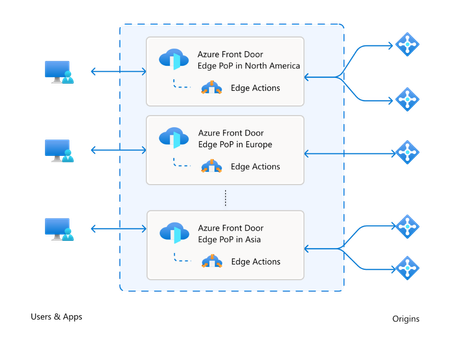
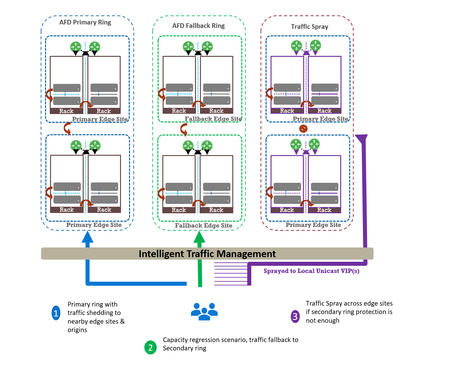
Abhishek Tiwari, Vice President of Engineering, Azure Networking Amit Srivastava, Principal PM Manager, Azure Networking Varun Chawla, Partner Director of Engineering Link to Part 2 - Azure Front Door Resiliency Series Link to Part 3 - Azure Front Door Resiliency Series Introduction Azure Front Door is Microsoft's advanced edge delivery platform encompassing Content Delivery Network (CDN), global security and traffic distribution into a single unified offering. By using Microsoft's extensive global edge network, Azure Front Door ensures efficient content delivery and advanced security through 210+ global and local points of presence (PoPs) strategically positioned closely to both end users and applications. As the central global entry point from the internet onto customer applications, we power mission critical customer applications as well as many of Microsoft’s internal services. We have a highly distributed resilient architecture, which protects against failures at the server, rack, site and even at the regional level. This resiliency is achieved by the use of our intelligent traffic management layer which monitors failures and load balances traffic at server, rack or edge sites level within the primary ring, supplemented by a secondary-fallback ring which accepts traffic in case of primary traffic overflow or broad regional failures. We also deploy a traffic shield as a terminal safety net to ensure that in the event of a managed or unmanaged edge site going offline, end user traffic continues to flow to the next available edge site. Like any large-scale CDN, we deploy each customer configuration across a globally distributed edge fleet, densely shared with thousands of other tenants. While this architecture enables global scale, it carries the risk that certain incompatible configurations, if not contained, can propagate broadly and quickly which can result in a large blast radius of impact. Here we describe how the two recent service incidents impacting Azure Front Door have reinforced the need to accelerate ongoing investments in hardening our resiliency, and tenant isolation strategy to mitigate likelihood and the scale of impact from this class of risk. October incidents: recap and key learnings Azure Front Door experienced two service incidents; on October 9 th and October 29 th , both with customer-impacting service degradation. On October 9 th : A manual cleanup of stuck tenant metadata bypassed our configuration protection layer, allowing incompatible metadata to propagate beyond our canary edge sites. This metadata was created on October 7 th , from a control-plane defect triggered by a customer configuration change. While the protection system initially blocked the propagation, the manual override operation bypassed our safeguards. This incompatible configuration reached the next stage and activated a latent data-plane defect in a subset of edge sites, causing availability impact primarily across Europe (~6%) and Africa (~16%). You can learn more about this issue in detail at https://aka.ms/AIR/QNBQ-5W8 On October 29 th : A different sequence of configuration changes across two control-plane versions produced incompatible metadata. Because the failure mode in the data-plane was asynchronous, the health checks validations embedded in our protection systems were all passed during the rollout. The incompatible customer configuration metadata successfully propagated globally through a staged rollout and also updated the “last known good” (LKG) snapshot. Following this global rollout, the asynchronous process in data-plane exposed another defect which caused crashes. This impacted connectivity and DNS resolutions for all applications onboarded to our platform. Extended recovery time amplified impact on customer applications and Microsoft services. You can learn more about this issue in detail at https://aka.ms/AIR/YKYN-BWZ We took away a number of clear and actionable lessons from these incidents, which are applicable not just to our service, but to any multi-tenant, high-density, globally distributed system. Configuration resiliency – Valid configuration updates should propagate safely, consistently, and predictably across our global edge, while ensuring that incompatible or erroneous configuration never propagate beyond canary environments. Data plane resiliency - Additionally, configuration processing in the data plane must not cause availability impact to any customer. Tenant isolation – Traditional isolation techniques such as hardware partitioning and virtualization are impractical at edge sites. This requires innovative sharding techniques to ensure single tenant-level isolation – a must-have to reduce potential blast radius. Accelerated and automated recovery time objective (RTO) – System should be able to automatically revert to last known good configuration in an acceptable RTO. In case of a service like Azure Front Door, we deem ~10 mins to be a practical RTO for our hundreds of thousands of customers at every edge site. Post outage, given the severity of impact which allowed an incompatible configuration to propagate globally, we made the difficult decision to temporarily block configuration changes in order to expedite rollout of additional safeguards. Between October 29 th to November 5 th , we prioritized and deployed immediate hardening steps before opening up the configuration change. We are confident that the system is stable, and we are continuing to invest in additional safeguards to further strengthen the platform's resiliency. Learning category Goal Repairs Status Safe customer configuration deployment Incompatible configuration never propagates beyond Canary · Control plane and data plane defect fixes · Forced synchronous configuration processing · Additional stages with extended bake time · Early detection of crash state Completed Data plane resiliency Configuration processing cannot impact data plane availability Manage data-plane lifecycle to prevent outages caused by configuration-processing defects. Completed Isolated work-process in every data plane server to process and load the configuration. January 2026 100% Azure Front Door resiliency posture for Microsoft internal services Microsoft operates an isolated, independent Active/Active fleet with automatic failover for critical Azure services Phase 1: Onboarded critical services batch impacted on Oct 29 th outage running on a day old configuration Completed Phase 2: Automation & hardening of operations, auto-failover and self-management of Azure Front Door onboarding for additional services March 2026 Recovery improvements Data plane crash recovery in under 10 minutes Data plane boot-up time optimized via local cache (~1 hour) Completed Accelerate recovery time < 10 minutes March 2026 Tenant isolation No configuration or traffic regression can impact other tenants Micro cellular Azure Front Door with ingress layered shards June 2026 This blog is the first in a multi-part series on Azure Front Door resiliency. In this blog, we will focus on configuration resiliency—how we are making the configuration pipeline safer and more robust. Subsequent blogs will cover tenant isolation and recovery improvements. How our configuration propagation works Azure Front Door configuration changes can be broadly classified into three distinct categories. Service code & data – these include all aspects of Azure Front Door service like management plane, control plane, data plane, configuration propagation system. Azure Front Door follows a safe deployment practice (SDP) process to roll out newer versions of management, control or data plane over a period of approximately 2-3 weeks. This ensures that any regression in software does not have a global impact. However, latent bugs that escape pre-validation and SDP rollout can remain undetected until a specific combination of customer traffic patterns or configuration changes trigger the issue. Web Application Firewall (WAF) & L7 DDoS platform data – These datasets are used by Azure Front Door to deliver security and load-balancing capabilities. Examples include GeoIP data, malicious attack signatures, and IP reputation signatures. Updates to these datasets occur daily through multiple SDP stages with an extended bake time of over 12 hours to minimize the risk of global impact during rollout. This dataset is shared across all customers and the platform, and it is validated immediately since it does not depend on variations in customer traffic or configuration steps. Customer configuration data – Examples of these are any customer configuration change—whether a routing rule update, backend pool modification, WAF rule change, or security policy change. Due to the nature of these changes, it is expected across the edge delivery / CDN industry to propagate these changes globally in 5-10 mins. Both outages stemmed from issues within this category. All configuration changes, including customer configuration data, are processed through a multi-stage pipeline designed to ensure correctness before global rollout across Azure Front Door’s 200+ edge locations. At a high level, Azure Front Door’s configuration propagation system has two distinct components - Control plane – Accepts customer API/portal changes (create/update/delete for profiles, routes, WAF policies, origins, etc.) and translates them into internal configuration metadata which the data plane can understand. Data plane – Globally distributed edge servers that terminate client traffic, apply routing/WAF logic, and proxy to origins using the configuration produced by the control plane. Between these two halves sits a multi-stage configuration rollout pipeline with a dedicated protection system (known as ConfigShield): Changes flow through multiple stages (pre-canary, canary, expanding waves to production) rather than going global at once. Each stage is health-gated: the data plane must remain within strict error and latency thresholds before proceeding. Each stage’s health check also rechecks previous stage’s health for any regressions. A successfully completed rollout updates a last known good (LKG) snapshot used for automated rollback. Historically, rollout targeted global completion in roughly 5–10 minutes, in line with industry standards. Customer configuration processing in Azure Front Door data plane stack Customer configuration changes in Azure Front Door traverse multiple layers—from the control plane through the deployment system—before being converted into FlatBuffers at each Azure Front Door node. These FlatBuffers are then loaded by the Azure Front Door data plane stack, which runs as Kubernetes pods on every node. FlatBuffer Composition: Each FlatBuffer references several sub-resources such as WAF and Rules Engine schematic files, SSL certificate objects, and URL signing secrets. Data plane architecture: o Master process: Accepts configuration changes (memory-mapped files with references) and manages the lifecycle of worker processes. o Workers: L7 proxy processes that serve customer traffic using the applied configuration. Processing flow for each configuration update: Load and apply in master: The transformed configuration is loaded and applied in the master process. Cleanup of unused references occurs synchronously except for certain categories à October 9 outage occurred during this step due to a crash triggered by incompatible metadata. Apply to workers: Configuration is applied to all worker processes without memory overhead (FlatBuffers are memory-mapped). Serve traffic: Workers start consuming new FlatBuffers for new requests; in-flight requests continue using old buffers. Old buffers are queued for cleanup post-completion. Feedback to deployment service: Positive feedback signals readiness for rollout.Cleanup: FlatBuffers are freed asynchronously by the master process after all workers load updates à October 29 outage occurred during this step due to a latent bug in reference counting logic. The October incidents showed we needed to strengthen key aspects of configuration validation, propagation safeguards, and runtime behavior. During the Azure Front Door incident on October 9 th , that protection system worked as intended but was later bypassed by our engineering team during a manual cleanup operation. During this Azure Front Door incident on October 29 th , the incompatible customer configuration metadata progressed through the protection system, before the delayed asynchronous processing task resulted in the crash. Configuration propagation safeguards Based on learnings from the incidents, we are implementing a comprehensive set of configuration resiliency improvements. These changes aim to guarantee that any sequence of configuration changes cannot trigger instability in the data plane, and to ensure quicker recovery in the event of anomalies. Strengthening configuration generation safety This improvement pivots on a ‘shift-left’ strategy where we want to ensure that we catch regression early before they propagate to production. It also includes fixing the latent defects which were the proximate cause of the outage. Fixing outage specific defects - We have fixed the control-plane defects that could generate incompatible tenant metadata under specific operation sequences. We have also remediated the associated data-plane defects. Stronger cross-version validation - We are expanding our test and validation suite to account for changes across multiple control plane build versions. This is expected to be fully completed by February 2026. Fuzz testing - Automated fuzzing and testing of metadata generation contract between the control plane and the data plane. This allows us to generate an expanded set of invalid/unexpected configuration combinations which might not be achievable by traditional test cases alone. This is expected to be fully completed by February 2026. Preventing incompatible configurations from being propagated This segment of the resiliency strategy strives to ensure that a potentially dangerous configuration change never propagates beyond canary stage. Protection system is “always-on” - Enhancements to operational procedures and tooling prevent bypass in all scenarios (including internal cleanup/maintenance), and any cleanup must flow through the same guarded stages and health checks as standard configuration changes. This is completed. Making rollout behavior more predictable and conservative - Configuration processing in the data plane is now fully synchronous. Every data plane issue due to incompatible meta data can be detected withing 10 seconds at every stage. This is completed. Enhancement to deployment pipeline - Additional stages during roll-out and extended bake time between stages serve as an additional safeguard during configuration propagation. This is completed. Recovery tool improvements now make it easier to revert to any previous version of LKG with a single click. This is completed. These changes significantly improve system safety. Post-outage we have increased the configuration propagation time to approximately 45 minutes. We are working towards reducing configuration propagation time closer to pre-incident levels once additional safeguards covered in the Data plane resiliency section below are completed by mid-January, 2026. Data plane resiliency The data plane recovery was the toughest part of recovery efforts during the October incidents. We must ensure fast recovery as well as resilience to configuration processing related issues for the data plane. To address this, we implemented changes that decouple the data plane from incompatible configuration changes. With these enhancements, the data plane continues operating on the last known good configuration—even if the configuration pipeline safeguards fail to protect as intended. Decoupling data plane from configuration changes Each server’s data plane consists of a master process which accepts configuration changes and manages lifecycle of multiple worker processes which serve customer traffic. One of the critical reasons for the prolonged outage in October was that due to latent defects in the data plane, when presented with a bad configuration the master process crashed. The master is a critical command-and-control process and when it crashes it takes down the entire data plane, in that node. Recovery of the master process involves reloading hundreds of thousands of configurations from scratch and took approximately 4.5 hours. We have since made changes to the system to ensure that even in the event of the master process crash due to any reason - including incompatible configuration data being presented - the workers remain healthy and able to serve traffic. During such an event, the workers would not be able to accept new configuration changes but will continue to serve customer traffic using the last known good configuration. This work is completed. Introducing Food Taster: strengthening config propagation resiliency In our efforts to further strengthen Azure Front Door’s configuration propagation system, we are introducing an additional configuration safeguard known internally as Food Taster which protects the master and worker processes from any configuration change related incidents, thereby ensuring data plane resiliency. The principle is simple: every data-plane server will have a redundant and isolated process – the Food Taster – whose only job is to ingest and process new configuration metadata first and then pass validated configuration changes to active data plane. This redundant worker does not accept any customer traffic. All configuration processing in this Food Taster is fully synchronous. That means we do all parsing, validation, and any expensive or risky work up front, and we do not move on until the Food Taster has either proven the configuration is safe or rejected it. Only when the Food Taster successfully loads the configuration and returns “Config OK” does the master process proceed to load the same config and then instruct the worker processes to do the same. If anything goes wrong in the Food Taster, the failure is contained to that isolated worker; the master and traffic-serving workers never see that invalid configuration. We expect this safeguard to reach production globally in January 2026 timeframe. Introduction of this component will also allow us to return closer to pre-incident level of configuration propagation while ensuring data plane safety. Closing This is the first in a series of planned blogs on Azure Front Door resiliency enhancements. We are continuously improving platform safety and reliability and will transparently share updates through this series. Upcoming posts will cover advancements in tenant isolation and improvements to recovery time objectives (RTO). We deeply value our customers’ trust in Azure Front Door. The October incidents reinforced how critical configuration resiliency is, and we are committed to exceeding industry expectations for safety, reliability, and transparency. By hardening our configuration pipeline, strengthening safety gates, and reinforcing isolation boundaries, we’re making Azure Front Door even more resilient so your applications can be too.19KViews25likes15Comments
How can I convert an website on Microsoft to IOS?
Hello everyone, Hope you all are doing good, I am Jeck. I have a website which I design and developed on my apple machine and basically made on IOS. Now, I want to change my website to Microsoft, my website is on https://www.bestelectricsmoker2021.com/ Can you guide me porperly or suggest me anyone who can work for me and extend my bussiness on Micosoft. Thank you Have a good day!714Views0likes1Comment
Delivering web applications over IPv6
The IPv4 address space pool has been exhausted for some time now, meaning there is no new public address space available for allocation from Internet Registries. The internet continues to run on IPv4 through technical measures such as Network Address Translation (NAT) and Carrier Grade NAT, and reallocation of address space through IPv4 address space trading. IPv6 will ultimately be the dominant network protocol on the internet, as IPv4 life-support mechanisms used by network operators, hosting providers and ISPs will eventually reach the limits of their scalability. Mobile networks are already changing to IPv6-only APNs; reachability of IPv4-only destinations from these mobile network is through 6-4 NAT gateways, which sometimes causes problems. Client uptake of IPv6 is progressing steadily. Google reports 49% of clients connecting to its services over IPv6 globally, with France leading at 80%. IPv6 client access measured by Google: Meanwhile, countries around the world are requiring IPv6 reachability for public web services. Examples are the United States, European Union member states among which the Netherlands and Norway, and India, and Japan. IPv6 adoption per country measured by Google: Entities needing to comply with these mandates are looking at Azure's networking capabilities for solutions. Azure supports IPv6 for both private and public networking, and capabilities have developed and expanded over time. This article discusses strategies to build and deploy IPv6-enabled public, internet-facing applications that are reachable from IPv6(-only) clients. Azure Networking IPv6 capabilities Azure's private networking capabilities center on Virtual Networks (VNETs) and the components that are deployed within. Azure VNETs are IPv4/IPv6 dual stack capable: a VNET must always have IPv4 address space allocated, and can also have IPv6 address space. Virtual machines in a dual stack VNET will have both an IPv4 and an IPv6 address from the VNET range, and can be behind IPv6 capable External- and Internal Load Balancers. VNETs can be connected through VNET peering, which effectively turns the peered VNETs into a single routing domain. It is now possible to peer only the IPv6 address spaces of VNETs, so that the IPv4 space assigned to VNETs can overlap and communication across the peering is over IPv6. The same is true for connectivity to on-premise over ExpressRoute: the Private Peering can be enabled for IPv6 only, so that VNETs in Azure do not have to have unique IPv4 address space assigned, which may be in short supply in an enterprise. Not all internal networking components are IPv6 capable yet. Most notable exceptions are VPN Gateway, Azure Firewall and Virtual WAN; IPv6 compatibility is on the roadmap for these services, but target availability dates have not been communicated. But now let's focus on Azure's externally facing, public, network services. Azure is ready to let customers publish their web applications over IPv6. IPv6 capable externally facing network services include: - Azure Front Door - Application Gateway - External Load Balancer - Public IP addresses and Public IP address prefixes - Azure DNS - Azure DDOS Protection - Traffic Manager - App Service (IPv6 support is in public preview) IPv6 Application Delivery IPv6 Application Delivery refers to the architectures and services that enable your web application to be accessible via IPv6. The goal is to provide an IPv6 address and connectivity for clients, while often continuing to run your application on IPv4 internally. Key benefits of adopting IPv6 in Azure include: ✅ Expanded Client Reach: IPv4-only websites risk being unreachable to IPv6-only networks. By enabling IPv6, you expand your reach into growing mobile and IoT markets that use IPv6 by default. Governments and enterprises increasingly mandate IPv6 support for public-facing services. ✅Address Abundance & No NAT: IPv6 provides a virtually unlimited address pool, mitigating IPv4 exhaustion concerns. This abundance means each service can have its own public IPv6 address, often removing the need for complex NAT schemes. End-to-end addressing can simplify connectivity and troubleshooting. ✅ Dual-Stack Compatibility: Azure supports dual-stack deployments where services listen on both IPv4 and IPv6. This allows a single application instance or endpoint to serve both types of clients seamlessly. Dual-stack ensures you don’t lose any existing IPv4 users while adding IPv6 capability. ✅Performance and Future Services: Some networks and clients might experience better performance over IPv6. Also, being IPv6-ready prepares your architecture for future Azure features and services as IPv6 integration deepens across the platform. General steps to enable IPv6 connectivity for a web application in Azure are: Plan and Enable IPv6 Addressing in Azure: Define an IPv6 address space in your Azure Virtual Network. Azure allows adding IPv6 address space to existing VNETs, making them dual-stack. A /56 segment for the VNET is recommended, /64 segment for subnets are required (Azure requires /64 subnets). If you have existing infrastructure, you might need to create new subnets or migrate resources, especially since older Application Gateway v1 instances cannot simply be “upgraded” to dual-stack. Deploy or Update Frontend Services with IPv6: Choose a suitable Azure service (Application Gateway, External / Global Load Balancer, etc.) and configure it with a public IPv6 address on the frontend. This usually means selecting *Dual Stack* configuration so the service gets both an IPv4 and IPv6 public IP. For instance, when creating an Application Gateway v2, you would specify IP address type: DualStack (IPv4 & IPv6). Azure Front Door by default provides dual-stack capabilities with its global endpoints. Configure Backends and Routing: Usually your backend servers or services will remain on IPv4. At the time of writing this in October 2025, Azure Application Gateway does not support IPv6 for backend pool addresses. This is fine because the frontend terminates the IPv6 network connection from the client, and the backend initiates an IPv4 connection to the backend pool or origin. Ensure that your load balancing rules, listener configurations, and health probes are all set up to route traffic to these backends. Both IPv4 and IPv6 frontend listeners can share the same backend pool. Azure Front Door does support IPv6 origins. Update DNS Records: Publish a DNS AAAA record for your application’s host name, pointing to the new IPv6 address. This step is critical so that IPv6-only clients can discover the IPv6 address of your service. If your service also has an IPv4 address, you will have both A (IPv4) and AAAA (IPv6) records for the same host name. DNS will thus allow clients of either IP family to connect. (In multi-region scenarios using Traffic Manager or Front Door, DNS configuration might be handled through those services as discussed later). Test IPv6 Connectivity: Once set up, test from an IPv6-enabled network or use online tools to ensure the site is reachable via IPv6. Azure’s services like Application Gateway and Front Door will handle the dual-stack routing, but it’s good to verify that content loads on an IPv6-only connection and that SSL certificates, etc., work over IPv6 as they do for IPv4. Next, we explore specific Azure services and architectures for IPv6 web delivery in detail. External Load Balancer - single region Azure External Load Balancer (also known as Public Load Balancer) can be deployed in a single region to provide IPv6 access to applications running on virtual machines or VM scale sets. External Load Balancer acts as a Layer 4 entry point for IPv6 traffic, distributing connections across backend instances. This scenario is ideal when you have stateless applications or services that do not require Layer 7 features like SSL termination or path-based routing. Key IPv6 Features of External Load Balancer: - Dual-Stack Frontend: Standard Load Balancer supports both IPv4 and IPv6 frontends simultaneously. When configured as dual-stack, the load balancer gets two public IP addresses – one IPv4 and one IPv6 – and can distribute traffic from both IP families to the same backend pool. - Zone-Redundant by Default: Standard Load Balancer is zone-redundant by default, providing high availability across Azure Availability Zones within a region without additional configuration. - IPv6 Frontend Availability: IPv6 support in Standard Load Balancer is available in all Azure regions. Basic Load Balancer does not support IPv6, so you must use Standard SKU. - IPv6 Backend Pool Support: While the frontend accepts IPv6 traffic, the load balancer will not translate IPv6 to IPv4. Backend pool members (VMs) must have private IPv6 addresses. You will need to add private IPv6 addressing to your existing VM IPv4-only infrastructure. This is in contrast to Application Gateway, discussed below, which will terminate inbound IPv6 network sessions and connect to the backend-end over IPv4. - Protocol Support: Supports TCP and UDP load balancing over IPv6, making it suitable for web applications and APIs, but also for non-web TCP- or UDP-based services accessed by IPv6-only clients. To set up an IPv6-capable External Load Balancer in one region, follow this high-level process: Enable IPv6 on the Virtual Network: Ensure the VNET where your backend VMs reside has an IPv6 address space. Add a dual-stack address space to the VNET (e.g., add an IPv6 space like 2001:db8:1234::/56 to complement your existing IPv4 space). Configure subnets that are dual-stack, containing both IPv4 and IPv6 prefixes (/64 for IPv6). Create Standard Load Balancer with IPv6 Frontend: In the Azure Portal, create a new Standard Load Balancer. During creation, configure the frontend IP with both IPv4 and IPv6 public IP addresses. Create or select existing Standard SKU public IP resources – one for IPv4 and one for IPv6. Configure Backend Pool: Add your virtual machines or VM scale set instances to the backend pool. Note that your backend instances will need to have private IPv6 addresses, in addition to IPv4 addresses, to receive inbound IPv6 traffic via the load balancer. Set Up Load Balancing Rules: Create load balancing rules that map frontend ports to backend ports. For web applications, typically map port 80 (HTTP) and 443 (HTTPS) from both the IPv4 and IPv6 frontends to the corresponding backend ports. Configure health probes to ensure only healthy instances receive traffic. Configure Network Security Groups: Ensure an NSG is present on the backend VM's subnet, allowing inbound traffic from the internet to the port(s) of the web application. Inbound traffic is "secure by default" meaning that inbound connectivity from internet is blocked unless there is an NSG present that explicitly allows it. DNS Configuration: Create DNS records for your application: an A record pointing to the IPv4 address and an AAAA record pointing to the IPv6 address of the load balancer frontend. Outcome: In this single-region scenario, IPv6-only clients will resolve your application's hostname to an IPv6 address and connect to the External Load Balancer over IPv6. Example: Consider a web application running on a VM (or a VM scale set) behind an External Load Balancer in Sweden Central. The VM runs the Azure Region and Client IP Viewer containerized application exposed on port 80, which displays the region the VM is deployed in and the calling client's IP address. The load balancer's front-end IPv6 address has a DNS name of ipv6webapp-elb-swedencentral.swedencentral.cloudapp.azure.com. When called from a client with an IPv6 address, the application shows its region and the client's address. Limitations & Considerations: - Standard SKU Required: Basic Load Balancer does not support IPv6. You must use Standard Load Balancer. - Layer 4 Only: Unlike Application Gateway, External Load Balancer operates at Layer 4 (transport layer). It cannot perform SSL termination, cookie-based session affinity, or path-based routing. If you need these features, consider Application Gateway instead. - Dual stack IPv4/IPv6 Backend required: Backend pool members must have private IPv6 addresses to receive inbound IPv6 traffic via the load balancer. The load balancer does not translate between the IPv6 frontend and an IPv4 backend. - Outbound Connectivity: If your backend VMs need outbound internet access over IPv6, you need to configure an IPv6 outbound rule. Global Load Balancer - multi-region Azure Global Load Balancer (aka Cross-Region Load Balancer) provides a cloud-native global network load balancing solution for distributing traffic across multiple Azure regions. Unlike DNS-based solutions, Global Load Balancer uses anycast IP addressing to automatically route clients to the nearest healthy regional deployment through Microsoft's global network. Key Features of Global Load Balancer: - Static Anycast Global IP: Global Load Balancer provides a single static public IP address (both IPv4 and IPv6 supported) that is advertised from all Microsoft WAN edge nodes globally. This anycast address ensures clients always connect to the nearest available Microsoft edge node without requiring DNS resolution. - Geo-Proximity Routing: The geo-proximity load-balancing algorithm minimizes latency by directing traffic to the nearest region where the backend is deployed. Unlike DNS-based routing, there's no DNS lookup delay - clients connect directly to the anycast IP and are immediately routed to the best region. - Layer 4 Pass-Through: Global Load Balancer operates as a Layer 4 pass-through network load balancer, preserving the original client IP address (including IPv6 addresses) for backend applications to use in their logic. - Regional Redundancy: If one region fails, traffic is automatically routed to the next closest healthy regional load balancer within seconds, providing instant global failover without DNS propagation delays. Architecture Overview: Global Load Balancer sits in front of multiple regional Standard Load Balancers, each deployed in different Azure regions. Each regional load balancer serves a local deployment of your application with IPv6 frontends. The global load balancer provides a single anycast IP address that clients worldwide can use to access your application, with automatic routing to the nearest healthy region. Multi-Region Deployment Steps: Deploy Regional Load Balancers: Create Standard External Load Balancers in multiple Azure regions (e.g. Sweden Central, East US2). Configure each with dual-stack frontends (IPv4 and IPv6 public IPs) and connect them to regional VM deployments or VM scale sets running your application. Configure Global Frontend IP address: Create a Global tier public IPv6 address for the frontend, in one of the supported Global Load Balancer home regions . This becomes your application's global anycast address. Create Global Load Balancer: Deploy the Global Load Balancer in the same home region. The home region is where the global load balancer resource is deployed - it doesn't affect traffic routing. Add Regional Backends: Configure the backend pool of the Global Load Balancer to include your regional Standard Load Balancers. Each regional load balancer becomes an endpoint in the global backend pool. The global load balancer automatically monitors the health of each regional endpoint. Set Up Load Balancing Rules: Create load balancing rules mapping frontend ports to backend ports. For web applications, typically map port 80 (HTTP) and 443 (HTTPS). The backend port on the global load balancer must match the frontend port of the regional load balancers. Configure Health Probes: Global Load Balancer automatically monitors the health of regional load balancers every 5 seconds. If a regional load balancer's availability drops to 0, it is automatically removed from rotation, and traffic is redirected to other healthy regions. DNS Configuration: Create DNS records pointing to the global load balancer's anycast IP addresses. Create both A (IPv4) and AAAA (IPv6) records for your application's hostname pointing to the global load balancer's static IPs. Outcome: IPv6 clients connecting to your application's hostname will resolve to the global load balancer's anycast IPv6 address. When they connect to this address, the Microsoft global network infrastructure automatically routes their connection to the nearest participating Azure region. The regional load balancer then distributes the traffic across local backend instances. If that region becomes unavailable, subsequent connections are automatically routed to the next nearest healthy region. Example: Our web application, which displays the region it is in, and the calling client's IP address, now runs on VMs behind External Load Balancers in Sweden Central and East US2. The External Load Balancer's front-ends are in the backend pool of a Global Load Balancer, which has a Global tier front-end IPv6 address. The front-end has an FQDN of `ipv6webapp-glb.eastus2.cloudapp.azure.com` (the region designation `eastus2` in the FQDN refers to the Global Load Balancer's "home region", into which the Global tier public IP must be deployed). When called from a client in Europe, Global Load Balancer directs the request to the instance deployed in Sweden Central. When called from a client in the US, Global Load Balancer directs the request to the instance deployed in US East 2. Features: - Client IP Preservation: The original IPv6 client address is preserved and available to backend applications, enabling IP-based logic and compliance requirements. - Floating IP Support: Configure floating IP at the global level for advanced networking scenarios requiring direct server return or high availability clustering. - Instant Scaling: Add or remove regional deployments behind the global endpoint without service interruption, enabling dynamic scaling for traffic events. - Multiple Protocol Support: Supports both TCP and UDP traffic distribution across regions, suitable for various application types beyond web services. Limitations & Considerations: - Home Region Requirement: Global Load Balancer can only be deployed in specific home regions, though this doesn't affect traffic routing performance. - Public Frontend Only: Global Load Balancer currently supports only public frontends - internal/private global load balancing is not available. - Standard Load Balancer Backends: Backend pool can only contain Standard Load Balancers, not Basic Load Balancers or other resource types. - Same IP Version Requirement: NAT64 translation isn't supported - frontend and backend must use the same IP version (IPv4 or IPv6). - Port Consistency: Backend port on global load balancer must match the frontend port of regional load balancers for proper traffic flow. - Health Probe Dependencies: Regional load balancers must have proper health probes configured for the global load balancer to accurately assess regional health. Comparison with DNS-Based Solutions: Unlike Traffic Manager or other DNS-based global load balancing solutions, Global Load Balancer provides: - Instant Failover: No DNS TTL delays - failover happens within seconds at the network level. - True Anycast: Single IP address that works globally without client-side DNS resolution. - Consistent Performance: Geo-proximity routing through Microsoft's backbone network ensures optimal paths. - Simplified Management: No DNS record management or TTL considerations. This architecture delivers global high availability and optimal performance for IPv6 applications through anycast routing, making it a good solution for latency-sensitive applications requiring worldwide accessibility with near-instant regional failover. Application Gateway - single region Azure Application Gateway can be deployed in a single region to provide IPv6 access to applications in that region. Application Gateway acts as the entry point for IPv6 traffic, terminating HTTP/S from IPv6 clients and forwarding to backend servers over IPv4. This scenario works well when your web application is served from one Azure region and you want to enable IPv6 connectivity for it. Key IPv6 Features of Application Gateway (v2 SKU): - Dual-Stack Frontend: Application Gateway v2 supports both [IPv4 and IPv6 frontends](https://learn.microsoft.com/en-us/azure/application-gateway/application-gateway-faq). When configured as dual-stack, the gateway gets two IP addresses – one IPv4 and one IPv6 – and can listen on both. (IPv6-only is not supported; IPv4 is always paired). IPv6 support requires Application Gateway v2, v1 does not support IPv6. - No IPv6 on Backends: The backend pool must use IPv4 addresses. IPv6 addresses for backend servers are currently not supported. This means your web servers can remain on IPv4 internal addresses, simplifying adoption because you only enable IPv6 on the frontend. - WAF Support: The Application Gateway Web Application Firewall (WAF) will inspect IPv6 client traffic just as it does IPv4. Single Region Deployment Steps: To set up an IPv6-capable Application Gateway in one region, consider the following high-level process: Enable IPv6 on the Virtual Network: Ensure the region’s VNET where the Application Gateway will reside has an IPv6 address space. Configure a subnet for the Application Gateway that is dual-stack (contains both an IPv4 subnet prefix and an IPv6 /64 prefix). Deploy Application Gateway (v2) with Dual Stack Frontend: Create a new Application Gateway using the Standard_v2 or WAF_v2 SKU. Populate Backend Pool: Ensure your backend pool (the target application servers or service) contains (DNS names pointing to) IPv4 addresses of your actual web servers. IPv6 addresses are not supported for backends. Configure Listeners and Rules: Set up listeners on the Application Gateway for your site. When creating an HTTP(S) listener, you choose which frontend IP to use – you would create one listener for IPv4 address and one for IPv6. Both listeners can use the same domain name (hostname) and the same underlying routing rule to your backend pool. Testing and DNS: After the gateway is deployed and configured, note the IPv6 address of the frontend (you can find it in the Gateway’s overview or in the associated Public IP resource). Update your application’s DNS records: create an AAAA record pointing to this IPv6 address (and update the A record to point to the IPv4 if it changed). With DNS in place, test the application by accessing it from an IPv6-enabled client or tool. Outcome: In this single-region scenario, IPv6-only clients will resolve your website’s hostname to an IPv6 address and connect to the Application Gateway over IPv6. The Application Gateway then handles the traffic and forwards it to your application over IPv4 internally. From the user perspective, the service now appears natively on IPv6. Importantly, this does not require any changes to the web servers, which can continue using IPv4. Application Gateway will include the source IPv6 address in an X-Forwarded-For header, so that the backend application has visibility of the originating client's address. Example: Our web application, which displays the region it is deployed in and the calling client's IP address, now runs on a VM behind Application Gateway in Sweden Central. The front-end has an FQDN of `ipv6webapp-appgw-swedencentral.swedencentral.cloudapp.azure.com`. Application Gateway terminates the IPv6 connection from the client and proxies the traffic to the application over IPv4. The client's IPv6 address is passed in the X-Forwarded-For header, which is read and displayed by the application. Calling the application's API endpoint at `/api/region` shows additional detail, including the IPv4 address of the Application Gateway instance that initiates the connection to the backend, and the original client IPv6 address (with the source port number appended) preserved in the X-Forwarded-For header. { "region": "SwedenCentral", "clientIp": "2001:1c04:3404:9500:fd9b:58f4:1fb2:db21:60769", "xForwardedFor": "2001:1c04:3404:9500:fd9b:58f4:1fb2:db21:60769", "remoteAddress": "::ffff:10.1.0.4", "isPrivateIP": false, "expressIp": "2001:1c04:3404:9500:fd9b:58f4:1fb2:db21:60769", "connectionInfo": { "remoteAddress": "::ffff:10.1.0.4", "remoteFamily": "IPv6", "localAddress": "::ffff:10.1.1.68", "localPort": 80 }, "allHeaders": { "x-forwarded-for": "2001:1c04:3404:9500:fd9b:58f4:1fb2:db21:60769" }, "deploymentAdvice": "Public IP detected successfully" } Limitations & Considerations: - Application Gateway v1 SKUs are not supported for IPv6. If you have an older deployment on v1, you’ll need to migrate to v2. - IPv6-only Application Gateway is not allowed. You must have IPv4 alongside IPv6 (the service must be dual-stack). This is usually fine, as dual-stack ensures all clients are covered. - No IPv6 backend addresses: The backend pool must have IPv4 addresses. - Management and Monitoring: Application Gateway logs traffic from IPv6 clients to Log Analytics (the client IP field will show IPv6 addresses). - Security: Azure’s infrastructure provides basic DDoS protection for IPv6 endpoints just as for IPv4. However, it is highly recommended to deploy Azure DDoS Protection Standard: this provides enhanced mitigation tailored to your specific deployment. Consider using the Web Application Firewall function for protection against application layer attacks. Application Gateway - multi-region Mission-critical web applications should be deploy in multiple Azure regions, achieving higher availability and lower latency for users worldwide. In a multi-region scenario, you need a mechanism to direct IPv6 client traffic to the “nearest” or healthiest region. Azure Application Gateway by itself is a regional service, so to use it in multiple regions, we use Azure Traffic Manager for global DNS load balancing, or use Azure Front Door (covered in the next section) as an alternative. This section focuses on the Traffic Manager + Application Gateway approach to multi-region IPv6 delivery. Azure Traffic Manager is a DNS-based load balancer that can distribute traffic across endpoints in different regions. It works by responding to DNS queries with the appropriate endpoint FQDN or IP, based on the routing method (Performance, Priority, Geographic) configured. Traffic Manager is agnostic to the IP version: it either returns CNAMEs, or AAAA records for IPv6 endpoints and A records for IPv4. This makes it suitable for routing IPv6 traffic globally. Architecture Overview: Each region has its own dual-stack Application Gateway. Traffic Manager is configured with an endpoint entry for each region’s gateway. The application’s FQDN is now a domain name hosted by Traffic Manager such as ipv6webapp.traffimanager.net, or a CNAME that ultimately points to it. DNS resolution will go through Traffic Manager, which decides which regional gateway’s FQDN to return. The client then connects directly to that Application Gateway’s IPv6 address, as follows: 1. DNS query: Client asks for ipv6webapp.trafficmanager.net, which is hosted in a Traffic Manager profile. 2. Traffic Manager decision: Traffic Manager sees an incoming DNS request and chooses the best endpoint (say, Sweden Central) based on routing rules (e.g., geographic proximity or lowest latency). 3. Traffic Manager response: Traffic Manager returns the FQDN of the Sweden Central Application Gateway to the client. 4. DNS Resolution: The client resolves regional FQDN and receives a AAAA response containing the IPv6 address. 5. Client connects: The client’s browser connects to the West Europe App Gateway IPv6 address directly. The HTTP/S session is established via IPv6 to that regional gateway, which then handles the request. 6. Failover: If that region becomes unavailable, Traffic Manager’s health checks will detect it and subsequent DNS queries will be answered with the FQDN of the secondary region’s gateway. Deployment Steps for Multi-Region with Traffic Manager: Set up Dual-Stack Application Gateways in each region: Similar to the single-region case, deploy an Azure Application Gateway v2 in each desired region (e.g., one in North America, one in Europe). Configure the web application in each region, these should be parallel deployments serving the same content. Configure a Traffic Manager Profile: In Azure Traffic Manager, create a profile and choose a routing method (such as Performance for nearest region routing, or Priority for primary/backup failover). Add endpoints for each region. Since our endpoints are Azure services with IPs, we can either use Azure endpoints (if the Application Gateways have Azure-provided DNS names) or External endpoints using the IP addresses. The simplest way is to use the Public IP resource of each Application Gateway as an Azure endpoint – ensure each App Gateway’s public IP has a DNS label (so it has a FQDN). Traffic Manager will detect those and also be aware of their IPs. Alternatively, use the IPv6 address as an External endpoint directly. Traffic Manager allows IPv6 addresses and will return AAAA records for them. DNS Setup: Traffic Manager profiles have a FQDN (like ipv6webapp.trafficmanager.net). You can either use that as your service’s CNAME, or you can configure your custom domain to CNAME to the Traffic Manager profile. Health Probing: Traffic Manager continuously checks the health of endpoints. When endpoints are Azure App Gateways, it uses HTTP/S probes to a specified URI path, to each gateway’s address. Make sure each App Gateway has a listener on the probing endpoint (e.g., a health check page) and that health probes are enabled. Testing Failover and Distribution: Test the setup by querying DNS from different geographical locations (to see if you get the nearest region’s IP). Also simulate a region down (stop the App Gateway or backend) and observe if Traffic Manager directs traffic to the other region. Because DNS TTLs are involved, failover isn’t instant but typically within a couple of minutes depending on TTL and probe interval. Considerations in this Architecture: - Latency vs Failover: Traffic Manager as a DNS load balancer directs users at connect time, but once a client has an answer (IP address), it keeps sending to that address until the DNS record TTL expires and it re-resolves. This is fine for most web apps. Ensure the TTL in the Traffic Manager profile is not too high (the default is 30 seconds). - IPv6 DNS and Connectivity: Confirm that each region’s IPv6 address is correctly configured and reachable globally. Azure’s public IPv6 addresses are globally routable. Traffic Manager itself is a global service and fully supports IPv6 in its decision-making. - Cost: Using multiple Application Gateways and Traffic Manager incurs costs for each component (App Gateway is per hour + capacity unit, Traffic Manager per million DNS queries). This is a trade-off for high availability. - Alternative: Azure Front Door: Azure Front Door is an alternative to the Traffic Manager + Application Gateway combination. Front Door can automatically handle global routing and failover at layer 7 without DNS-based limitations, offering potentially faster failover. Azure Front Door is discussed in the next section. In summary, a multi-region IPv6 web delivery with Application Gateways uses Traffic Manager for global DNS load balancing. Traffic Manager will seamlessly return IPv6 addresses for IPv6 clients, ensuring that no matter where an IPv6-only client is, they get pointed to the nearest available regional deployment of your app. This design achieves global resiliency (withstand a regional outage) and low latency access, leveraging IPv6 connectivity on each regional endpoint. Example: The global FQDN of our application is now ipv6webapp.trafficmanager.net and clients will use this FQDN to access the application regardless of their geographical location. Traffic Manager will return the FQDN of one of the regional deployments, `ipv6webapp-appgw-swedencentral.swedencentral.cloudapp.azure.com` or `ipv6webappr2-appgw-eastus2.eastus2.cloudapp.azure.com` depending on the routing method configured, the health state of the regional endpoints and the client's location. Then the client resolves the regional FQDN through its local DNS server and connects to the regional instance of the application. DNS resolution from a client in Europe: Resolve-DnsName ipv6webapp.trafficmanager.net Name Type TTL Section NameHost ---- ---- --- ------- -------- ipv6webapp.trafficmanager.net CNAME 59 Answer ipv6webapp-appgw-swedencentral.swedencentral.cloudapp.azure.com Name : ipv6webapp-appgw-swedencentral.swedencentral.cloudapp.azure.com QueryType : AAAA TTL : 10 Section : Answer IP6Address : 2603:1020:1001:25::168 And from a client in the US: Resolve-DnsName ipv6webapp.trafficmanager.net Name Type TTL Section NameHost ---- ---- --- ------- -------- ipv6webapp.trafficmanager.net CNAME 60 Answer ipv6webappr2-appgw-eastus2.eastus2.cloudapp.azure.com Name : ipv6webappr2-appgw-eastus2.eastus2.cloudapp.azure.com QueryType : AAAA TTL : 10 Section : Answer IP6Address : 2603:1030:403:17::5b0 Azure Front Door Azure Front Door is an application delivery network with built-in CDN, SSL offload, WAF, and routing capabilities. It provides a single, unified frontend distributed across Microsoft’s edge network. Azure Front Door natively supports IPv6 connectivity. For applications that have users worldwide, Front Door offers advantages: - Global Anycast Endpoint: Provides anycast IPv4 and IPv6 addresses, advertised out of all edge locations, with automatic A and AAAA DNS record support. - IPv4 and IPv6 origin support: Azure Front Door supports both IPv4 and IPv6 origins (i.e. backends), both within Azure and externally (i.e. accessible over the internet). - Simplified DNS: Custom domains can be mapped using CNAME records. - Layer-7 Routing: Supports path-based routing and automatic backend health detection. - Edge Security: Includes DDoS protection and optional WAF integration. Front Door enables "cross-IP version" scenario's: a client can connect to the Front Door front-end over IPv6, and then Front Door can connect to an IPv4 origin. Conversely, an IPv4-only client can retrieve content from an IPv6 backend via Front Door. Front Door preserves the client's source IP address in the X-Forwarded-For header. Note: Front Door provides managed IPv6 addresses that are not customer-owned resources. Custom domains should use CNAME records pointing to the Front Door hostname rather than direct IP address references. Private Link Integration Azure Front Door Premium introduces Private Link integration, enabling secure, private connectivity between Front Door and backend resources, without exposing them to the public internet. When Private Link is enabled, Azure Front Door establishes a private endpoint within a Microsoft-managed virtual network. This endpoint acts as a secure bridge between Front Door’s global edge network and your origin resources, such as Azure App Service, Azure Storage, Application Gateway, or workloads behind an internal load balancer. Traffic from end users still enters through Front Door’s globally distributed POPs, benefiting from features like SSL offload, caching, and WAF protection. However, instead of routing to your origin over public, internet-facing, endpoints, Front Door uses the private Microsoft backbone to reach the private endpoint. This ensures that all traffic between Front Door and your origin remains isolated from external networks. The private endpoint connection requires approval from the origin resource owner, adding an extra layer of control. Once approved, the origin can restrict public access entirely, enforcing that all traffic flows through Private Link. Private Link integration brings following benefits: - Enhanced Security: By removing public exposure of backend services, Private Link significantly reduces the risk of DDoS attacks, data exfiltration, and unauthorized access. - Compliance and Governance: Many regulatory frameworks mandate private connectivity for sensitive workloads. Private Link helps meet these requirements without sacrificing global availability. - Performance and Reliability: Traffic between Front Door and your origin travels over Microsoft’s high-speed backbone network, delivering low latency and consistent performance compared to public internet paths. - Defense in Depth: Combined with Web Application Firewall (WAF), TLS encryption, and DDoS protection, Private Link strengthens your security posture across multiple layers. - Isolation and Control: Resource owners maintain control over connection approvals, ensuring that only authorized Front Door profiles can access the origin. - Integration with Hybrid Architectures: For scenarios involving AKS clusters, custom APIs, or workloads behind internal load balancers, Private Link enables secure connectivity without requiring public IPs or complex VPN setups. Private Link transforms Azure Front Door from a global entry point into a fully private delivery mechanism for your applications, aligning with modern security principles and enterprise compliance needs. Example: Our application is now placed behind Azure Front Door. We are combining a public backend endpoint and Private Link integration, to show both in action in a single example. The Sweden Central origin endpoint is the public IPv6 endpoint of the regional External Load Balancers and the origin in US East 2 is connected via Private Link integration The global FQDN `ipv6webapp-d4f4euhnb8fge4ce.b01.azurefd.net` and clients will use this FQDN to access the application regardless of their geographical location. The FQDN resolves to Front Door's global anycast address, and the internet will route client requests to the nearest Microsoft edge from this address is advertised. Front Door will then transparently route the request to the nearest origin deployment in Azure. Although public endpoints are used in this example, that traffic will be route over the Microsoft network. From a client in Europe: Calling the application's api endpoint on `ipv6webapp-d4f4euhnb8fge4ce.b01.azurefd.net/api/region` shows some more detail. { "region": "SwedenCentral", "clientIp": "2001:1c04:3404:9500:fd9b:58f4:1fb2:db21", "xForwardedFor": "2001:1c04:3404:9500:fd9b:58f4:1fb2:db21", "remoteAddress": "2a01:111:2053:d801:0:afd:ad4:1b28", "isPrivateIP": false, "expressIp": "2001:1c04:3404:9500:fd9b:58f4:1fb2:db21", "connectionInfo": { "remoteAddress": "2a01:111:2053:d801:0:afd:ad4:1b28", "remoteFamily": "IPv6", "localAddress": "2001:db8:1:1::4", "localPort": 80 }, "allHeaders": { "x-forwarded-for": "2001:1c04:3404:9500:fd9b:58f4:1fb2:db21", "x-azure-clientip": "2001:1c04:3404:9500:fd9b:58f4:1fb2:db21" }, "deploymentAdvice": "Public IP detected successfully" } "remoteAddress": "2a01:111:2053:d801:0:afd:ad4:1b28" is the address from which Front Door sources its request to the origin. From a client in the US: The detailed view shows that the IP address calling the backend instance now is local VNET address. Private Link sources traffic coming in from a local address taken from the VNET it is in. The original client IP address is again preserved in the X-Forwarded-For header. { "region": "eastus2", "clientIp": "2603:1030:501:23::68:55658", "xForwardedFor": "2603:1030:501:23::68:55658", "remoteAddress": "::ffff:10.2.1.5", "isPrivateIP": false, "expressIp": "2603:1030:501:23::68:55658", "connectionInfo": { "remoteAddress": "::ffff:10.2.1.5", "remoteFamily": "IPv6", "localAddress": "::ffff:10.2.2.68", "localPort": 80 }, "allHeaders": { "x-forwarded-for": "2603:1030:501:23::68:55658" }, "deploymentAdvice": "Public IP detected successfully" } Conclusion IPv6 adoption for web applications is no longer optional. It is essential as public IPv4 address space is depleted, mobile networks increasingly use IPv6 only and governments mandate IPv6 reachability for public services. Azure's comprehensive dual-stack networking capabilities provide a clear path forward, enabling organizations to leverage IPv6 externally without sacrificing IPv4 compatibility or requiring complete infrastructure overhauls. Azure's externally facing services — including Application Gateway, External Load Balancer, Global Load Balancer, and Front Door — support IPv6 frontends, while Application Gateway and Front Door maintain IPv4 backend connectivity. This architecture allows applications to remain unchanged while instantly becoming accessible to IPv6-only clients. For single-region deployments, Application Gateway offers layer-7 features like SSL termination and WAF protection. External Load Balancer provides high-performance layer-4 distribution. Multi-region scenarios benefit from Traffic Manager's DNS-based routing combined with regional Application Gateways, or the superior performance and failover capabilities of Global Load Balancer's anycast addressing. Azure Front Door provides global IPv6 delivery with edge optimization, built-in security, and seamless failover across Microsoft's network. Private Link integration allows secure global IPv6 distribution while maintaining backend isolation. The transition to IPv6 application delivery on Azure is straightforward: enable dual-stack addressing on virtual networks, configure IPv6 frontends on load balancing services, and update DNS records. With Application Gateway or Front Door, backend applications require no modifications. These Azure services handle the IPv4-to-IPv6 translation seamlessly. This approach ensures both immediate IPv6 accessibility and long-term architectural flexibility as IPv6 adoption accelerates globally.1.2KViews1like0Comments
Can only remote into azure vm from DC
Hi all, I have set up a site to site connection from on prem to azure and I can remote in via the main dc on prem but not any other server or ping from any other server to the azure. Why can I only remote into the azure VM from the server that has Routing and remote access? Any ideas on how I can fix this?976Views0likes2CommentsAzure Networking Portfolio Consolidation
Overview Over the past decade, Azure Networking has expanded rapidly, bringing incredible tools and capabilities to help customers build, connect, and secure their cloud infrastructure. But we've also heard strong feedback: with over 40 different products, it hasn't always been easy to navigate and find the right solution. The complexity often led to confusion, slower onboarding, and missed capabilities. That's why we're excited to introduce a more focused, streamlined, and intuitive experience across Azure.com, the Azure portal, and our documentation pivoting around four core networking scenarios: Network foundations: Network foundations provide the core connectivity for your resources, using Virtual Network, Private Link, and DNS to build the foundation for your Azure network. Try it with this link: Network foundations Hybrid connectivity: Hybrid connectivity securely connects on-premises, private, and public cloud environments, enabling seamless integration, global availability, and end-to-end visibility, presenting major opportunities as organizations advance their cloud transformation. Try it with this link: Hybrid connectivity Load balancing and content delivery: Load balancing and content delivery helps you choose the right option to ensure your applications are fast, reliable, and tailored to your business needs. Try it with this link: Load balancing and content delivery Network security: Securing your environment is just as essential as building and connecting it. The Network Security hub brings together Azure Firewall, DDoS Protection, and Web Application Firewall (WAF) to provide a centralized, unified approach to cloud protection. With unified controls, it helps you manage security more efficiently and strengthen your security posture. Try it with this link: Network security This new structure makes it easier to discover the right networking services and get started with just a few clicks so you can focus more on building, and less on searching. What you’ll notice: Clearer starting points: Azure Networking is now organized around four core scenarios and twelve essential services, reflecting the most common customer needs. Additional services are presented within the context of these scenarios, helping you stay focused and find the right solution without feeling overwhelmed. Simplified choices: We’ve merged overlapping or closely related services to reduce redundancy. That means fewer, more meaningful options that are easier to evaluate and act on. Sunsetting outdated services: To reduce clutter and improve clarity, we’re sunsetting underused offerings such as white-label CDN services and China CDN. These capabilities have been rolled into newer, more robust services, so you can focus on what’s current and supported. What this means for you Faster decision-making: With clearer guidance and fewer overlapping products, it's easier to discover what you need and move forward confidently. More productive sales conversations: With this simplified approach, you’ll get more focused recommendations and less confusion among sellers. Better product experience: This update makes the Azure Networking portfolio more cohesive and consistent, helping you get started quickly, stay aligned with best practices, and unlock more value from day one. The portfolio consolidation initiative is a strategic effort to simplify and enhance the Azure Networking portfolio, ensuring better alignment with customer needs and industry best practices. By focusing on top-line services, combining related products, and retiring outdated offerings, Azure Networking aims to provide a more cohesive and efficient product experience. Azure.com Before: Our original Solution page on Azure.com was disorganized and static, displaying a small portion of services in no discernable order. After: The revised solution page is now dynamic, allowing customers to click deeper into each networking and network security category, displaying the top line services, simplifying the customer experience. Azure Portal Before: With over 40 networking services available, we know it can feel overwhelming to figure out what’s right for you and where to get started. After: To make it easier, we've introduced four streamlined networking hubs each built around a specific scenario to help you quickly identify the services that match your needs. Each offers an overview to set the stage, key services to help you get started, guidance to support decision-making, and a streamlined left-hand navigation for easy access to all services and features. Documentation For documentation, we looked at our current assets as well as created new assets that aligned with the changes in the portal experience. Like Azure.com, we found the old experiences were disorganized and not well aligned. We updated our assets to focus on our top-line networking services, and to call out the pillars. Our belief is these changes will allow our customers to more easily find the relevant and important information they need for their Azure infrastructure. Azure Network Hub Before the updates, we had a hub page organized around different categories and not well laid out. In the updated hub page, we provided relevant links for top-line services within all of the Azure networking scenarios, as well as a section linking to each scenario's hub page. Scenario Hub pages We added scenario hub pages for each of the scenarios. This provides our customers with a central hub for information about the top-line services for each scenario and how to get started. Also, we included common scenarios and use cases for each scenario, along with references for deeper learning across the Azure Architecture Center, Well Architected Framework, and Cloud Adoption Framework libraries. Scenario Overview articles We created new overview articles for each scenario. These articles were designed to provide customers with an introduction to the services included in each scenario, guidance on choosing the right solutions, and an introduction to the new portal experience. Here's the Load balancing and content delivery overview: Documentation links Azure Networking hub page: Azure networking documentation | Microsoft Learn Scenario Hub pages: Azure load balancing and content delivery | Microsoft Learn Azure network foundation documentation | Microsoft Learn Azure hybrid connectivity documentation | Microsoft Learn Azure network security documentation | Microsoft Learn Scenario Overview pages What is load balancing and content delivery? | Microsoft Learn Azure Network Foundation Services Overview | Microsoft Learn What is hybrid connectivity? | Microsoft Learn What is Azure network security? | Microsoft Lea Improving user experience is a journey and in coming months we plan to do more on this. Watch out for more blogs over the next few months for further improvements.3.2KViews4likes0Comments
Accelerate designing, troubleshooting & securing your network with Gen-AI powered tools, now GA.
We are thrilled to announce the general availability of Azure Networking skills in Copilot, an extension of Copilot in Azure and Security Copilot designed to enhance cloud networking experience. Azure Networking Copilot is set to transform how organizations design, operate, and optimize their Azure Network by providing contextualized responses tailored to networking-specific scenarios and using your network topology.1.9KViews1like1CommentUnmasking DDoS Attacks (Part 1/3)
In today’s always-online world, we take uninterrupted access to websites, apps, and digital services for granted. But lurking in the background is a cyber threat that can grind everything to a halt in an instant: DDoS attacks. These attacks don’t sneak in to steal data or plant malware—they’re all about chaos and disruption, flooding servers with so much traffic that they crash, slow down, or completely shut off. Over the years, DDoS attacks have evolved from annoying nuisances to full-blown cyber weapons, capable of hitting massive scales—some even reaching terabit-level traffic. Companies have lost millions of dollars due to downtime, and even governments and critical infrastructure have been targeted. Whether you’re a CTO, a business owner, a security pro, or just someone who loves tech, understanding these attacks is key to stopping them before they cause real damage. That’s where this blog series comes in. We’ll be breaking down everything you need to know about DDoS attacks—how they work, real-world examples, the latest prevention strategies, and even how you can leverage Azure services to detect and defend against them. This will be a three-part series, covering: 🔹Unmasking DDoS Attacks (Part 1): Understanding the Fundamentals and the Attacker’s Playbook What exactly is a DDoS attack, and how does an attacker plan and execute one? In this post, we’ll cover the fundamentals of DDoS attacks, explore the attacker’s perspective, and break down how an attack is crafted and launched. We’ll also discuss the different categories of DDoS attacks and how attackers choose which strategy to use. 🔹 Unmasking DDoS Attacks (Part 2): Analyzing Known Attack Patterns & Lessons from History DDoS attacks come in many forms, but what are the most common and dangerous attack patterns? In this deep dive, we’ll explore real-world DDoS attack patterns, categorize them based on their impact, and analyze some of the largest and most disruptive DDoS attacks in history. By learning from past attacks, we can better understand how DDoS threats evolve and what security teams can do to prepare. 🔹 Unmasking DDoS Attacks (Part 3): Detection, Mitigation, and the Future of DDoS Defense How do you detect a DDoS attack before it causes damage, and what are the best strategies to mitigate one? In this final post, we’ll explore detection techniques, proactive defense strategies, and real-time mitigation approaches. We’ll also discuss future trends in DDoS attacks and evolving defense mechanisms, ensuring that businesses stay ahead of the ever-changing threat landscape. So, without further ado, let’s jump right into Part 1 and start unraveling the world of DDoS attacks. What is a DDoS Attack? A Denial-of-Service (DoS) attack is like an internet traffic jam, but on purpose. It’s when attackers flood a website or online service with so much junk traffic that it slows down, crashes, or becomes completely unreachable for real users. Back in the early days of the internet, pulling off a DoS attack was relatively simple. Servers were smaller, and a single computer (or maybe a handful) could send enough malicious requests to take down a website. But as technology advanced and cloud computing took over, that approach stopped being effective. Today’s online services run on massive, distributed cloud networks, making them way more resilient. So, what did attackers do? They leveled up. Instead of relying on just one machine, they started using hundreds, thousands, or even millions—all spread out across the internet. These attacks became "distributed", with waves of traffic coming from multiple sources at once. And that’s how DDoS (Distributed Denial-of-Service) attacks were born. Instead of a single attacker, imagine a botnet—an army of compromised devices (anything from hacked computers to unsecured IoT gadgets)—all working together to flood a target with traffic. The result? Even the most powerful servers can struggle to stay online. In short, a DDoS attack is just a bigger, badder version of a DoS attack, built for the modern internet. And with cloud computing making things harder to take down, attackers have only gotten more creative in their methods. An Evolving Threat Landscape As recently reported by Microsoft: “DDoS attacks are happening more frequently and on a larger scale than ever before. In fact, the world has seen almost a 300 percent increase in these types of attacks year over year, and it’s only expected to get worse [link]". Orchestrating large-scale DDoS botnets attacks are inexpensive for attackers and are often powered by leveraging compromised devices (i.e., security cameras, home routers, cable modems, IoT devices, etc.). Within the last 6 months alone, our competitors have reported the following: June 2023: Waves of L7 attacks on various Microsoft properties March 2023: Akamai – 900 Gbps DDoS Attack Feb 2023: Cloudflare mitigates record-breaking 71 million request-per-second DDoS attack August 2022: How Google Cloud blocked the largest Layer 7 DDoS attack at 46 million rps Graphs below are F5 labs report. Figure 1 Recent trends indicate that Technology sector is one of the most targeted segments along with Finance and Government Figure 2 Attacks are evolving & a large % of attacks are upgrading to Application DDoS or a multi-vector attack As the DDoS attacks gets bigger and more sophisticated, we need to take a defense-in-depth approach, to protect our customers in every step of the way. Azure services like Azure Front Door, Azure WAF and Azure DDoS are all working on various strategies to counter these emerging DDoS attack patterns. We will cover more on how to effectively use these services to protect your services hosted on Azure in part-3. Understanding DDoS Attacks: The Attacker's Perspective There can be many motivations behind a DDoS attack, ranging from simple mischief to financial gain, political activism, or even cyber warfare. But launching a successful DDoS attack isn’t just about flooding a website with traffic—it requires careful planning, multiple test runs, and a deep understanding of how the target’s infrastructure operates. So, what does it actually mean to bring down a service? It means pushing one or more critical resources past their breaking point—until the system grinds to a halt, becomes unresponsive, or outright collapses under the pressure. Whether it’s choking the network, exhausting compute power, or overloading application processes, the goal is simple: make the service so overwhelmed that legitimate users can’t access it at all. Resources Targeted During an Attack Network Capacity (Bandwidth and Infrastructure): The most common resource targeted in a DDoS attack, the goal is to consume all available network capacity, thereby preventing legitimate requests from getting through. This includes overwhelming routers, switches, and firewalls with excessive traffic, causing them to fail. Processing Power: By inundating a server with more requests than it can process, an attacker can cause it to slow down or even crash, denying service to legitimate users. Memory: Attackers might attempt to exhaust the server's memory capacity, causing degradation in service or outright failure. Disk Space and I/O Operations: An attacker could aim to consume the server's storage capacity or overwhelm its disk I/O operations, resulting in slowed system performance or denial of service. Connection-based Resources: In this type of attack, the resources that manage connections, such as sockets, ports, file descriptors, and connection tables in networking devices, are targeted. Overwhelming these resources can cause a disruption of service for legitimate users. Application Functionality: Specific functions of a web application can be targeted to cause a denial of service. For instance, if a web application has a particularly resource-intensive operation, an attacker may repeatedly request this operation to exhaust the server's resources. DNS Servers: A DNS server can be targeted to disrupt the resolution of domain names to IP addresses, effectively making the web services inaccessible to users. Zero-Day Vulnerabilities: Attackers often exploit unknown or zero-day vulnerabilities in applications or the network infrastructure as part of their attack strategy. Since these vulnerabilities are not yet known to the vendor, no patch is available, making them an attractive target for attackers. CDN Cache Bypass – HTTP flood attack bypasses the web application caching system that helps manage server load. Crafting The Attack Plan Most modern services no longer run on a single machine in someone’s basement—they are hosted on cloud providers with auto-scaling capabilities and vast network capacity. While this makes them more resilient, it does not make them invulnerable. Auto-scaling has its limits, and cloud networks are shared among millions of customers, meaning attackers can still find ways to overwhelm them. When planning a DDoS attack, attackers first analyze the target’s infrastructure to identify potential weaknesses. They then select an attack strategy designed to exploit those weak points as efficiently as possible. Different DDoS attack types target different resources and have unique characteristics. Broadly, these attack strategies can be categorized into three main types: Volumetric Attacks For volumetric attacks, the attacker’s goal is to saturate the target’s system resources by generating a high volume of traffic. To weaponize this attack, attackers usually employ botnets or compromised systems or even use other cloud providers (paid or fraudulently) to generate a large volume of traffic. The traffic is directed towards the target's network, making it difficult for legitimate traffic to reach the services. Examples: SYN Flood, UDP Flood, ICMP Flood, DNS Flood, HTTP Flood. Amplification Attacks Amplification attacks are a cunning tactic where attackers seek to maximize the impact of their actions without expending significant resources. Through crafty exploitation of vulnerabilities or features in systems, such as using reflection-based methods or taking advantage of application-level weaknesses, they make small queries or requests that produce disproportionately large responses or resource consumption on the target's side. Examples: DNS Amplification, NTP Amplification, Memcached Reflection Low and Slow Attacks Non-volumetric exhaustion attacks focus on depleting specific resources within a system or network rather than inundating it with sheer volume of traffic. By exploiting inherent limitations or design aspects, these attacks selectively target elements such as connection tables, CPU, or memory, leading to resource exhaustion without the need for high volume of traffic, making this a very attractive strategy for attackers. Attacks, such as Slowloris and RUDY, subtly deplete server resources like connections or CPU by mimicking legitimate traffic, making them difficult to detect. Examples: Slowloris, R-U-Dead-Yet? (RUDY). Vulnerability-Based Attacks Instead of relying on sheer traffic volume, these attacks exploit known vulnerabilities in software or services. The goal isn’t just to overwhelm resources but to crash, freeze, or destabilize a system by taking advantage of flaws in how it processes certain inputs. This type of attack is arguably the hardest to craft because it requires deep knowledge of the technology stack a service is running on. Attackers must painstakingly research software versions, configurations, and known vulnerabilities, then carefully craft malicious “poison pill” requests designed to trigger a failure. It’s a game of trial and error, often requiring multiple test runs before finding a request that successfully brings down the system. It’s also one of the most difficult attacks to defend against. Unlike volumetric attacks, which flood a service with traffic that security tools can detect, a vulnerability-based attack can cause a software crash so severe that it prevents the system from even generating logs or attack traffic metrics. Without visibility into what happened, detection and mitigation become incredibly challenging. Examples: Apache Killer, Log4Shell Executing The Attack Now that an attacker has finalized their attack strategy and identified which resource(s) to exhaust, they still need a way to execute the attack. They need the right tools and infrastructure to generate the overwhelming force required to bring a target down. Attackers have multiple options depending on their technical skills, resources, and objectives: Booters & Stressers – Renting attack power from popular botnets. Amplification attacks – Leveraging publicly available services (like DNS or NTP servers) to amplify attack traffic. Cloud abuse – Hijacking cloud VMs or misusing free-tier compute resources to generate attacks. But when it comes to executing large-scale, persistent, and devastating DDoS attacks, one method stands above the rest: botnets. Botnets: The Powerhouse Behind Modern DDoS Attacks A botnet is a network of compromised devices—computers, IoT gadgets, cloud servers, and even smartphones—all controlled by an attacker. These infected devices (known as bots or zombies) remain unnoticed by their owners while quietly waiting for attack commands. Botnets revolutionized DDoS attacks, making them: Massive in scale – Some botnets include millions of infected devices, generating terabits of attack traffic. Hard to block – Since the traffic comes from real, infected machines, it’s difficult to filter out malicious requests. Resilient – Even if some bots are shut down, the remaining network continues the attack. But how do attackers build, control, and launch a botnet-driven DDoS attack? The secret lies in Command and Control (C2) systems. How a Botnet Works: Inside the Attacker’s Playbook Infecting Devices: Building the Army Attackers spread malware through phishing emails, malicious downloads, unsecured APIs, or IoT vulnerabilities. Once infected, a device becomes a bot, silently connecting to the botnet's network. IoT devices (smart cameras, routers, smart TVs) are especially vulnerable due to poor security. Command & Control (C2) – The Brain of the Botnet A botnet needs a Command & Control (C2) server, which acts as its central command center. The attacker sends instructions through the C2 server, telling bots when, where, and how to attack. Types of C2 models: Centralized C2 – A single server controls all bots (easier to attack but simpler to manage). Peer-to-Peer (P2P) C2 – Bots communicate among themselves, making takedowns much harder. Fast Flux C2 – C2 infrastructure constantly changes IP addresses to avoid detection. Launching the Attack: Overwhelming the Target When the attacker gives the signal, the botnet unleashes the attack. Bots flood the target with traffic, connection requests, or amplification exploits. Since the traffic comes from thousands of real, infected devices, distinguishing attackers from normal users is extremely difficult. Botnets use encryption, proxy networks, and C2 obfuscation to stay online. Some botnets use hijacked cloud servers to further hide their origins. Famous Botnets & Their Impact Mirai (2016) – One of the most infamous botnets, Mirai infected IoT devices to launch a 1.2 Tbps DDoS attack, taking down Dyn DNS and causing major outages across Twitter, Netflix, and Reddit. Mozi (2020-Present) – A peer-to-peer botnet with millions of IoT bots worldwide. Meris (2021) – Hit 2.5 million RPS (requests per second), setting records for application-layer attacks. Botnets have transformed DDoS attacks, making them larger, harder to stop, and widely available on the dark web. With billions of internet-connected devices, botnets are only growing in size and sophistication. We will cover strategies on botnet detection and mitigations employed by Azure Front Door and Azure WAF services against such large DDoS attacks. Wrapping Up Part-1 With that, we’ve come to the end of Part 1 of our Unmasking DDoS Attacks series. To summarize, we’ve covered: ✅ The fundamentals of DDoS attacks—what they are and why they’re dangerous. ✅ The different categories of DDoS attacks—understanding how they overwhelm resources. ✅ The attacker’s perspective—how DDoS attacks are planned, strategized, and executed. ✅ The role of botnets—why they are the most powerful tool for large-scale attacks. This foundational knowledge is critical to understanding the bigger picture of DDoS threats—but there’s still more to uncover. Stay tuned for Part 2, where we’ll dive deeper into well-known DDoS attack patterns, examine some of the biggest DDoS incidents in history, and explore what lessons we can learn from past attacks to better prepare for the future. See you in Part 2!1.1KViews2likes0CommentsIssue with Azure VM Conditional Access for Office 365 and Dynamic Public IP Detection
Hi all, I have a VM in Azure where I need to allow an account with MFA to bypass the requirement on this specific server when using Office 365. I've tried to achieve this using Conditional Access by excluding locations, specifically the IP range of my Azure environment. Although I’ve disconnected any public IPs from this server, the Conditional Access policy still isn’t working as intended. The issue seems to be that it continues to detect a public IP, which changes frequently, making it impossible to exclude. What am I doing wrong?2KViews0likes5Comments