container apps
5 Topics
Central pki
Has anyone implemented a centralised PKI where the Root CA is stored in Azure Key Vault and workloads can automatically obtain the Root CA when they are deployed, as well as receive updated versions when the Root CA needs to be rotated or renewed? I’m looking to implement a centralised PKI for an Azure hub-and-spoke architecture, where workloads across the spokes can automatically obtain and trust the Root CA. The workloads could include VMs, AKS, containers, App Services and Azure Functions. I’m aware that Azure Machine Configuration can be used to deploy certificates to VMs, but this is specific to VMs. What is the recommended approach for distributing the Root CA to the other Azure workload types using a consistent and automated mechanism? Ideally, I’d like the solution to be fully automated, so that new workloads receive the current Root CA during deployment and existing workloads automatically receive updated versions whenever the Root CA is rotated or renewed. I will be deploying the root ca in a key vault via terraform a project for the root ca only to update whenever is needed and then each resources to be able to get the latest root ca. Has anyone implemented something similar, or could you provide guidance on the recommended architecture and distribution mechanism?8Views0likes0CommentsRunning multimedia AI models on Container Apps with Serverless GPU (A100 & T4)
A video format is available for watching. Prerequisites - An Azure account with sufficient permissions to create resources. - Terraform installed on your local machine. Infrastructure Provisioning Clone the Github repository and navigate to the project directory. Initialize Terraform and apply the configuration to provision the necessary Azure resources, including a resource group, virtual network, log analytics workspace, container app environment, storage account, and container app for downloading models. terraform init terraform apply --auto-approve The following resources will be created: ComfyUI Deployment The ComfyUI application is deployed as a containerized workload on Azure Container Apps. The deployment includes a job that downloads the necessary models for ComfyUI to function properly. The aca_job_download_models.tf file defines a job that runs a container with the necessary commands to download the models for ComfyUI. The job is configured to run on Consumption worksload profile and has a timeout of 1200 seconds. The download-models-comfyui.sh script contains the commands to download the models from Hugging Face and save them to the appropriate directory in the ComfyUI application. Monitoring and Analytics The Azure Log Analytics workspace is set up to collect logs and metrics from the container app environment. You can use Azure Monitor to view and analyze the logs and metrics for your ComfyUI deployment. To view the properties and the usage of the GPU behind Container Apps, the command nvidia-smi is helpful. Start using ComfyUI Now that ComfyUI is provisioned, accessible on the FQDN exposed by Container Apps and the models are downloaded, you can run the Text to Image workflow in ComfyUI. You can also change the parameters as needed like the prompt. When ready, click the Run blue button at the top right to start generating the image. It will take some time depending on the size of the image and the complexity of the prompt. Then you should see the generated image in the output node. Using ComfyUI for Text to Video To use ComfyUI for Text to Video generation, you can select a Text to Video template from the Workflows section. Choose Wan 2.2 Text to Video as an example. This will open the workflow to generate a video based on a text input. Important Notes The storage account key is required to create the storage link in your Container Apps environment. Container Apps does not support identity-based access to Azure file shares. For that it is mandatory to disable Secure Transfer at the Storage Account (more details). Because of an issue with the Terraform provider, it won't create the Serverless GPU (A100 & T4) workload profiles. You will need to create them manually in the Azure Portal after running terraform apply. Azure File Shares supports both SMB and NFS. Container Apps also supports both. To mount NFS Azure Files, you must use a Container Apps environment with a custom VNet. The Storage account must be configured to allow access from the VNet either using Service Endpoint or Private Endpoint (more details) The NFS protocol can only be used from a machine inside of a virtual network, that is why we use a Private Endpoint. 🔍 SMB vs NFS — What’s the Difference? SMB (Server Message Block) and NFS (Network File System) are two protocols used to provide shared file storage over a network. They serve similar purposes but have different strengths, performance characteristics, and typical use cases. NFS is native for Linux. Consumption profile details Profile names vCPU range Memory range GPU type Regions Consumption 0.25 - 4 0.5 - 8 GB N.A All supported regions Consumption-GPU-NC8as-T4 0.25 - 8 0.5 - 56 GB NVIDIA T4 To see a full list of available regions, see serverless GPU supported regions Consumption-GPU-NC24-A100 0.25 - 24 0.5 – 220 GiB NVIDIA A100 In Serverless GPU profiles, the GPU cost is in addition to the active usage vCPU and RAM prices for your Container App. You pay for the entire GPU cost, even if your Container App only uses a fraction of the GPU's resources. But, for CPU and Memory, you only pay for the resources your Container App actually reserves. To reduce cost, it is very important to right-size the vCPU and Memory for your Container App when using Serverless GPU profiles. You can use Azure Monitor to track the actual resource usage of your Container App and adjust the vCPU and Memory accordingly. To get the supported profiles for a specific region, you can use the Azure CLI command: az containerapp env workload-profile list-supported --location swedencentral -o table # Location Name # ------------- ------------------------- # swedencentral D4 # swedencentral D8 # swedencentral D16 # swedencentral D32 # swedencentral E4 # swedencentral E8 # swedencentral E16 # swedencentral E32 # swedencentral Consumption # swedencentral Flex # swedencentral Consumption-GPU-NC24-A100 # swedencentral Consumption-GPU-NC8as-T4 Here is the vCPU, Memory and GPU consumption for the NC A100 v4 and NC T4 v3 Serverless GPU profiles with ComfyUI when running typical workloads. You can notice that ComfyUI doesn't consume the entire compute power in terms of vCPU and Memory. That is why in Terraform, it is specified that the resource request is less than what the VM offers. That allows to reduce the cost. Disclaimer The sample scripts are not supported under any Microsoft standard support program or service. The sample scripts are provided AS IS without warranty of any kind. Microsoft further disclaims all implied warranties including, without limitation, any implied warranties of merchantability or of fitness for a particular purpose. The entire risk arising out of the use or performance of the sample scripts and documentation remains with you. In no event shall Microsoft, its authors, or anyone else involved in the creation, production, or delivery of the scripts be liable for any damages whatsoever (including, without limitation, damages for loss of business profits, business interruption, loss of business information, or other pecuniary loss) arising out of the use of or inability to use the sample scripts or documentation, even if Microsoft has been advised of the possibility of such damages.

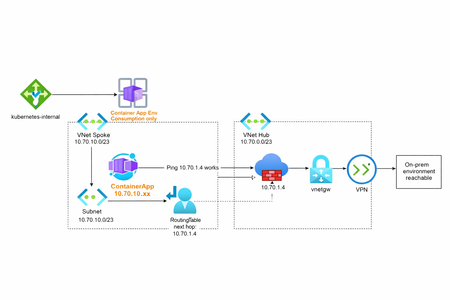
Container Apps Environment Networking (Consumption)
AI workloads are no longer just about models, they’re about how those models connect. On Azure, many teams are running inference APIs, background processors, and event-driven AI components on Azure Container Apps Environments (CAE). CAE fits AI workloads well: it scales fast, scales to zero, and removes Kubernetes overhead. But once AI services need to securely reach private data sources, on-prem systems, vector databases, or external AI services, networking becomes the real design challenge. I’ve written a short, practical deep dive on how Consumption-based vs Workload-profile Container Environments behave from a networking perspective, what works, what doesn’t, and why it matters for modern AI platforms. 👉 Read the full article here: https://vakhsha.com/blog.html?post=blog-06283Views0likes1CommentSemantic Kernel: Develop your AI Integrated Web App on Azure and .NET 8.0
How to create a Smart Career Advice and Job Search Engine with Semantic Kernel The concept The Rise of Semantic Kernel Semantic Kernel, an open-source development kit, has taken the .NET community by storm. With support for C#, Python, and Java, it seamlessly integrates with dotnet services and applications. But what makes it truly remarkable? Let’s dive into the details. A Perfect Match: Semantic Kernel and .NET Picture this: you’re building a web app, and you want to infuse it with AI magic. Enter Semantic Kernel. It’s like the secret sauce that binds your dotnet services and AI capabilities into a harmonious blend. Whether you’re a seasoned developer or just dipping your toes into AI waters, Semantic Kernel simplifies the process. As part of the Semantic Kernel community, I’ve witnessed its evolution firsthand. The collaborative spirit, the shared knowledge—it’s electrifying! We’re not just building software; we’re shaping the future of AI-driven web applications. The Web App Our initial plan was simple: create a job recommendations engine. But Semantic Kernel had other ideas. It took us on an exhilarating ride. Now, our web application not only suggests career paths but also taps into third-party APIs to fetch relevant job listings. And that’s not all—it even crafts personalized skilling plans and preps candidates for interviews. Talk about exceeding expectations! Build Since i have already created the repository on GitHub i don’t think it is critical to re post Terraform files here. We are building our main Infrastructure with Terraform and also invoke an Azure Cli script to automate the Container Image build and push. We will have these resources at the end: Before deployment make sure to assign the Service Principal with the role “RBAC Administrator” and narrow down the assignments to AcrPull, AcrPush, so you can create a User Assigned Managed Identity with these roles. Since we are building and pushing the Container Images with local-exec and Az Cli scripts within Terraform you will notice some explicit dependencies, for us to make sure everything builds in order. It is really amazing the fact that we can build all the Infra including the Apps with Terraform ! Architecture Upon completion you will have a functioning React Web App with the ASP NET Core webapi, utilizing Semantic Kernel and an external Job Listings API, to get advice, find Jobs and get a Skilling Plan for a specific recommended role! The following is a reference Architecture. Aside the Private Endpoints the same deployment is available in GitHub. Kernel SDK The SDK provides a simple yet powerful array of commands to configure and “set” the Semantic Kernel characteristics. Let’s the first endpoint, where users ask for recommended career paths: [HttpPost("get-recommendations")] public async Task<IActionResult> GetRecommendations([FromBody] UserInput userInput) { _logger.LogInformation("Received user input: {Skills}, {Interests}, {Experience}", userInput.Skills, userInput.Interests, userInput.Experience); var query = $"I have the following skills: {userInput.Skills}. " + $"My interests are: {userInput.Interests}. " + $"My experience includes: {userInput.Experience}. " + "Based on this information, what career paths would you recommend for me?"; var history = new ChatHistory(); history.AddUserMessage(query); ChatMessageContent? result = await _chatCompletionService.GetChatMessageContentAsync(history); if (result == null) { _logger.LogError("Received null result from the chat completion service."); return StatusCode(500, "Error processing your request."); } string content = result.Content; _logger.LogInformation("Received content: {Content}", content); var recommendations = ParseRecommendations(content); _logger.LogInformation("Returning recommendations: {Count}", recommendations.Count); return Ok(new { recommendations }); The actual data flow is depicted below, and we can see the Interaction with the local Endpoints and the external endpoint as well. The user provides Skills, Interests, Experience and Level of current position and the API sends the Payload to Semantic kernel with a constructed prompt asking for positions recommendations. The recommendations return with clickable buttons, one to find relevant positions from LinkedIn listings using the external API, and another to ask again the Semantic Kernel for skill up advice! The UI experience : Recommendations: Skill Up Plan: Job Listings: The Project can be extended to a point of automation and AI Integration where users can upload their CVs and ask the Semantic Kernel to provide feedback as well as apply for a specific position! As we discussed earlier some additional optimizations are good to have, like the Private Endpoints, Azure Front Door and/or Azure Firewall, but the point is to see Semantic Kernel in action with it’s amazing capabilities especially when used within the .NET SDK. Important Note: This could have been a one shot deployment but we cannot add the custom domain with Terraform ( unless we use Azure DNS) and the Cors Settings. So we have to add these details for our Solution to function properly! Once the Terraform completes, add the Custom Domains to both Container Apps. The advantage here is that we will know the Frontend and Backend FQDNs, since we decide the Domain name, and the React Environment Value is preconfigured with the backend URL. Same for the Backend, we have set as Environment Value for the ALLOWED_ORIGINS, the frontend URL. So we can just go to Custom Domain on each App, and add the domain names after selecting the Certificate which will be already there, since we have uploaded it via Terraform! Lessons Learned This was a real adventure and i want to share with you important lessons learned and hopefully save you some time and effort. Prepare ahead with a Certificate. I was having problems from the get go with ASP NET refusing to build on Containers until i integrated the certificate. The local development works fine without it. Cross Origin is very important, do not underestimate it ! Configure it correctly and in this example i went directly to Custom Domains, so i can have better overall control. This solution worked both on Azure Web Apps and Azure Container Apps. The Git Hub repo has the Container Apps solution but you can go with Web Apps. Finally don’t waste you time to go with Dapr. React does not ‘react’ well with the Dapr Client and my lesson learned here is that Dapr is made for same framework invocation or you are going to need a middleware. Since we cannot create the Custom Domain with Terraform there are solutions we can use, like using AzApi, We utilized a small portion of what really Semantic Kernel can do and i stopped when i realized that this project will never end if i continue pursuing ideas ! It is much better to have it on GiHub and probably we can come back and add some more features ! Conclusion In this journey through the intersection of technology and career guidance, we’ve explored the powerful capabilities of Azure Container Apps and the transformative potential of Semantic Kernel, Microsoft’s open-source development kit. By seamlessly integrating AI into .NET applications, Semantic Kernel has not only simplified the development process but also opened new doors for innovation in career advice. Our adventure began with a simple idea—creating a job recommendations engine. However, with the help of Semantic Kernel, this idea evolved into a sophisticated web application that goes beyond recommendations. It connects to third-party APIs, crafts personalized skilling plans, and prepares candidates for interviews, demonstrating the true power of AI-driven solutions. By leveraging Terraform for infrastructure management and Azure CLI for automating container builds, we successfully deployed a robust architecture that includes a React Web App, ASP.NET Core web API, and integrated AI services. This project highlights the ease and efficiency of building and deploying cloud-based applications with modern tools. The code is available in GitHub for you to explore, contribute and extend as mush as you want to ! Git Hub Repo: Semantic Kernel - Career Advice Links\References Intro to Semantic Kernel Understanding the kernel Chat completion Deep dive into Semantic Kernel Azure Container Apps documentation1.3KViews0likes0Comments