community management
17 TopicsFrom Leadership Engagement, Town Halls to Communities: Put Viva Engage to Work at Comms Camp
The best way to learn Viva Engage is not by watching someone else publish another perfectly prepared demo post. It is by starting with a real communications challenge. Maybe you are planning a leadership campaign and want employees to do more than simply read an update. Perhaps you are trying to build a community with a clear purpose, improve an AMA, make a town hall part of an ongoing conversation, or understand what employee questions are telling you. Bring that challenge to Comms Camp, a free, hands-on workshop coming to: Seattle, Washington Sydney and Melbourne, Australia Houston, Texas Mexico City, Mexico More locations in the new year! Comms Camp is designed for corporate communications teams and the IT, adoption, employee experience, and community partners who support them. Participants will use Viva Engage, Microsoft 365 Copilot, and practical agent patterns to turn real communications scenarios into reusable plans and workflows. Start with the outcome, not the feature Viva Engage can support leader visibility, employee conversation, community building, campaigns, events, and knowledge sharing. But successful communications programs rarely begin with a list of product features. They begin with questions: Who needs to understand or do something differently? What does meaningful participation look like? Which leader, community, or conversation can create trust? What should happen after employees respond? Which signals will tell us whether the communication worked? Where can AI help without replacing the communicator’s judgment? At Comms Camp, you will start with those questions and use Viva Engage as part of a practical communications plan. What you will work through The workshop takes participants through a complete communications scenario, from the original ask to activation and measurement. Choose your challenge and bring a scenario or select a sample. Define your audience, intended outcome, risks, and the action you want employees to take. Design the Viva Engage activation Determine how Viva Engage, Copilot and other Microsoft products can support the communication. Depending on your scenario, that could include: A leader or executive communication A community activation A campaign moment An AMA or event An employee prompt designed to encourage useful participation A follow-up plan that keeps the conversation moving Turn conversations into signals Publishing is not the finish line. Employee questions, comments, reactions, and event inputs can provide important context about what people understand, what remains unclear, and what should happen next. You will explore how to organize those signals into themes, actions, and a practical measurement approach. Share what you built Participants will share their developing playbooks, learn from one another, and get feedback they can apply when they return to their organizations. Explore Copilot and agent workflows Identify where AI could save time or improve consistency across planning, drafting, summarizing, and follow-up. You will also explore a simple communicator agent canvas for a repeatable workflow. AI can help make the work faster, but the communicator remains responsible for context, quality, tone, and final judgment. Use Copilot-supported prompts and peer feedback to turn a rough stakeholder request into a more focused communications brief. What you will take home Comms Camp is designed to create reusable outputs, not just inspiration. Depending on your chosen scenario, you can leave with: A strategic communications brief A Viva Engage activation plan Copilot prompts and workflows A leader communication, event, AMA, campaign, or community plan A communicator agent canvas A signal and measurement plan A reusable communications playbook You will also leave with ideas from other communicators who are navigating many of the same challenges, including channel complexity, leader visibility, responsible AI adoption, employee participation, and demonstrating impact. Who should attend? Comms Camp is intended for: Corporate and employee communications professionals Leader and executive communications teams Viva Engage community managers Change and adoption professionals Employee experience leaders IT partners supporting communications and communities Organizations may send multiple participants, and communications and technology partners are encouraged to attend together. Participants should have access to Microsoft 365 and Viva Engage. Microsoft 365 Copilot access is recommended. Register for Comms Camp The workshop is free, and registration is required. Explore the Comms Camp experience: https://adoption.microsoft.com/comms-camp Seattle/Redmond, Washington October 12–13, 2026 Register: https://aka.ms/CommsCamp/Joinus Melbourne, Australia October 20, 2026 Register: https://aka.ms/CommsCamp/Mel Sydney, Australia October 21, 2026 Register: https://aka.ms/CommsCamp/Syn Houston, Texas December 8, 2026 Register: https://aka.ms/CommsCamp/Houston Mexico City, Mexico December 10, 2026 Register: https://aka.ms/CommsCamp/MexCity Comms Camp is planned as a multi-city experience. Visit the Comms Camp site to learn when more locations are announced. Tell us where you want us to bring camp next! Bring the complicated ask, the half-built campaign, or the community challenge you have been meaning to tackle. We will help you turn it into something you can use. Learn. Share. Build.350Views1like0CommentsRecording Available: Starting Point - First 30 days with Viva Engage
If your organization already works in Microsoft Teams, Viva Engage can feel like one more place to post. Engage gives leaders, communicators, community managers, and employees a place for conversations that need broader visibility, participation, and reuse across the organization. That is the focus of Starting Point: First 30 Days with Viva Engage, a practical webinar for customers who are new to Engage or bringing Engage communities into the flow of work in Teams. TLDR... Teams and Engage do different jobs. Teams is where known groups coordinate work. Engage is where broader communities connect, ask questions, learn, and build knowledge over time. Leaders create early momentum. A leader post, a clear question, visible replies, and a close-the-loop follow-up can make Engage feel active from the start. Communities need purpose before scale. Start with a few places people can understand, not a long list of spaces they have to decode. Roles work differently in Engage. Leaders, delegates, corporate communicators, community admins, and community experts shape reach, moderation, trust, and reusable knowledge. The first 30 days are about habits. Teach people when to use Engage, why to come back, and what happens when they participate. Need some more details? Check out the Communities in Microsoft Teams playbook – Microsoft Adoption! Slides at attached at the bottom of this blog! What if we already use Teams? Teams helps people work with the people they already know. Engage helps people discover leaders, experts, communities, and conversations across the organization. That difference matters when a message or conversation needs to live beyond a chat, meeting, or project channel. A Teams chat can move fast, but it is easy for context to disappear. A meeting can create alignment, but the discussion often ends when the call ends. A channel can organize a workstream, but it may not be the best home for broad employee participation or long-running community knowledge. Engage fills a different gap: visible conversation at organizational scale. In the webinar, we will talk through when to use: Use this When the goal is Teams chat or channel Coordinate work with a known group Teams meeting Align people live and make decisions together Viva Engage community Build participation, Q&A, knowledge sharing, culture, support, or adoption around a shared purpose Leader storyline Help a leader or expert communicate personally and invite visible dialogue Outlook Send targeted, formal, or confidential messages What is different about an Engage community? An Engage community is not just a bigger Teams channel. A channel organizes work. A community builds participation around a purpose. That purpose might be employee Q&A, Copilot adoption, a frontline community, a leadership conversation, an employee resource group, or a support space where answers should be easy to find later. The best starting point is not, "How many communities can we launch?" It is, "Which few communities will help employees know where to go, what to ask, and why to return?" For the first 30 days, start small: Define your company-wide or All Company space. Identify a few official communities with clear owners. Seed useful conversations before inviting everyone in. Make it obvious what belongs in Engage versus Teams or Outlook. Review what people respond to, then adjust. How should leaders show up? Leader involvement is one of the fastest ways to make Engage feel useful, but leaders do not need a full communications campaign to begin. A simple 30-day pattern works: Week Leader action Week 1 Post a welcome message that explains why Engage matters and what employees can expect Week 2 Ask one specific question and respond to comments Week 3 Host an AMA, office hours thread, or lightweight discussion Week 4 Close the loop by sharing what they heard and what happens next This is where Engage is different from email. Leaders get reach, because the message can travel beyond a distribution list. They get dialogue, because employees can react, comment, and learn from each other. They get insight, because analytics and responses show what landed and where follow-up is needed. Trust is the outcome. Reach, dialogue, and insight are the operating model. Which Engage roles should we understand first? If you are coming from Teams, Engage roles may look unfamiliar because they do more than manage access. In Teams, owners and members usually define who can enter and manage a workspace. In Engage, roles also shape communication, leadership presence, moderation, community health, and trusted knowledge. Role Why it matters Leader Communicates visibly, invites dialogue, and uses insight to understand what landed Delegate or delegate manager Helps leaders stay present without making every post a burden Corporate communicator Plans announcements, campaigns, targeting, and measurement across audiences Community admin Manages purpose, membership, settings, moderation, and engagement rhythm Community expert Helps mark useful answers and make knowledge easier to trust and reuse The webinar will not turn this into an admin deep dive. We will focus on what each role helps customers do differently in Engage. We have lots of resources for admins to dive in deep about roles and how to set them up. First 30-day launch path... The first 30 days are not about launching everything. They are about teaching the right habits. The goal is not a perfect launch. The goal is a launch people can understand, join, and return to. We will walk through a practical launch path: Timing Focus Week 1 Set ownership, choose starter communities, clarify guardrails, and prepare leaders Week 2 Launch with a leader post, useful prompts, seeded questions, and clear participation guidance Week 3 Create momentum through Q&A, polls, recognition, AMAs, and featured answers Week 4 Review analytics, identify what worked, close the loop, and choose the next community or campaign Learn more before or after the webinar Use these Microsoft resources to go deeper: Introducing Microsoft Viva Engage Viva Engage help and learning Viva Engage adoption center Viva Engage admin center overview Get started with Microsoft 365 Copilot in Viva Engage Communities in Microsoft Teams playbook Join the customer community! Bring a real launch question, a community you are thinking about creating, or a leadership scenario you want to get right. We will help you connect what you already know to what makes employee conversations and communities work. The best Engage launch is not the one with the most communities. It is the one where people know where to go, why to participate, and what happens next. FAQ Should every Teams channel become an Engage community? No. Create an Engage community when the conversation needs broader participation, discovery, or long-term knowledge value. Keep project coordination and team-specific work in Teams. What should we launch first in Viva Engage? Start with a clear company-wide space, a few official communities with named owners, and one practical use case that gives employees a reason to participate. How often do leaders need to post? Leaders do not need to post constantly. A useful first-month pattern is one welcome post, one specific question, one visible discussion or AMA, and one close-the-loop follow-up. What should we measure after the first month? Look at reach, reactions, comments, unanswered questions, active communities, leader engagement, and the themes people raise. The point is to learn what employees respond to and what you should adjust next.210Views0likes0CommentsPlanning for Communities in Teams: What Admins and Communicators Should Do Next
Imagine if employees could spend less time sorting through messages and more time engaging with what actually matters, whether it’s a leadership update, a company announcement, or an important change…all in one place where they can understand, react, and respond. Communities are becoming a more visible part of Teams, making now the right time for admins and communicators to align on readiness, governance, and content. This 3-step post helps you plan your rollout: How to get ready How to reset All Company How to address concerns about noise as adoption grows You’ll also learn the key decisions admins and corporate communications teams should make to ensure Communities add clarity, not noise as adoption increases. And in case you missed it, the Teams blog covers what’s new and why it matters. (If you haven’t read the announcement yet, start here: Introducing communities in Teams: Unifying company communication and connection) What’s changing... and what’s not What’s new: Communities are easier to discover and access in Teams Visibility of posts and announcements increases What’s not changing: Governance is still in your control Communities still follow your existing structure and purpose The opportunity isn’t to rebuild everything, it’s to refine what already works. Start from where you are We recognize that not every customer is starting from the same place. For organizations already using Viva Engage, Communities in Teams is less about reinventing your strategy and more about extending it into the flow of everyday work. Communities are now easier to find and engage with inside Teams, raising the stakes for clarity, governance, and content design. As access becomes simpler and participation grows, it’s important to have your policies, onboarding, and launch plan in place. "Bringing our Viva Engage communities into Teams was an instant win for our organization. By standardizing on a single pane of glass, inside of Teams, we've made it easier and more enjoyable for staff to communicate with other, using a trusted tool that requires no additional enablement overhead. Cognizant has over 350,000 employees - and managing communities at scale requires us to leverage Viva Engage - by now having those live inside of Teams, we get the best of both worlds: the ability to participate in communities with 30k+ employees while still maintaining the notification and organization we've come to depend upon inside of ad-hoc Teams groups and more traditional Teams channels. This further reinforced the idea that Viva Engage Communities are where work gets done - they aren't an optional location for employees - and staying on top of groups and communities together helps make us better at supporting our clients! Best of all - we like to say we "drink our own champagne" here at Cognizant - we can now go to those clients and use our story to show them how an integrated Teams/Viva environment can drive positive business outcomes and enhanced employee experiences." Reed Wiedower, Cognizant, Innovation and Enablement Leader If you are new to Viva Engage, or have not used it strategically in some time, start by defining a few high-value communities, setting clear governance, and giving employees simple guidance on where to go, what to expect, and how to engage. Start by understanding where your organization is today: What governance looks like the next 30 days: Revisit All Company and determine if its purpose or usage should change. Define “official communities” strategy. Start with a small set (e.g., employee news, leadership updates, IT help, communities of practice), seed them with content, and actively promote them. Establish a naming convention to support discovery as Communities become visible in Teams. Define governance and moderation: who creates communities, who can post announcements, and how moderation works. Communicate these changes to community admins and encourage them to activate or refresh key communities. Not using Viva Engage yet? Start here. If you’re unsure where to start, start small: define the purpose, set expectations, and publish a simple guide for employees on how to follow, post, and manage notifications. With a few well-run communities in place, you’ll have the proof, and the playbook, to expand with confidence. Once you’ve defined your starting point and aligned on governance, the next critical step is resetting how your most visible community, All Company, should be used. If you need more guidance or a starting point, check out the Communities in Teams Playbook! Reset All Company for the Teams experience As Communities become more visible in Teams, All Company becomes even more important. This is the moment to reset its purpose: one place for company-wide updates that matter to everyone. For Admins (IT / Network Admins): Set the guardrails Your role isn’t just to enable Communities, it’s to prevent noise before it starts. Start here: Limit who can post (e.g., Corp Comms + delegated leadership voices) Document what qualifies as a post vs. what belongs elsewhere Define when announcements should be used (not every post needs one) For Corporate Comms: Reset how you use All Company Think of All Company as your broadcast + engagement layer inside Teams. Use it for: Leadership narratives and context (not just links) Major moments that need visibility and dialogue Posts that invite reaction, questions, and discussion Decide: What qualifies as a new post vs. a reply Who moderates, and when to step in Expected cadence (not every update = an announcement) Write for Teams behavior: Lead with “what this means” (not just “what’s new”) Keep posts scannable (short, clear, structured) Use announcements sparingly—overuse reduces trust Once All Company is clearly defined, look for follow-on communities (like Copilot Adoption Community) where more targeted conversations can happen. Address concerns about noise early As Communities expand in Teams, one concern comes up quickly: Will this create more noise? Done right, the answer is no. Start with this mindset: more posts ≠ more value. Engagement doesn’t mean more content. It means more relevant content, in the right place. If everything is posted everywhere, or if everything is an announcement employees will tune out. Admins: Control where content shows up Next Steps: Ensure communities are purpose-driven (not duplicates of the same topic) Guide teams to use the right community for the right audience Review the Governance of the network and Watch session: Mastering admin and governance in Viva Engage for community management, moderation capabilities and more. Review moderation and theme moderation in Viva Engage Corporate Comms: Be intentional with reach More visibility is powerful, but only when used carefully. Clarity reduces noise more than volume control ever will. Reminders: Use announcements for high-signal moments only Reserve broad reach for content that applies to most employees Let smaller or targeted communities carry more specific conversations The goal is trust, not volume As Communities become easier to access in Teams, the priority is making them feel useful, intentional, and worth employees’ attention. Done well, Communities don’t add noise, they make important communication easier to find, easier to understand, and easier to trust. Continue the journey Join Us live via Start Strong Webinar Deep Dive with the Engage Masterclass Series Modern Employee and Corp Comms Resources Click Through Demo Join our customer community! PS. Want access now? Communities in Teams is available now for Engage customers who opt into public preview, with no migration required. All existing community content, permissions, and governance settings carry over automatically. Review the network and tenant requirements to ensure your network meets the criteria. Make sure the engage experiences in Teams toggle is on for your tenant. Opt-in to the public preview through Teams. Learn more about the full experience for communities in Teams.1.3KViews2likes1Comment
Sensitivity Labels Are Coming to Viva Engage Communities Here's What You Need to Know
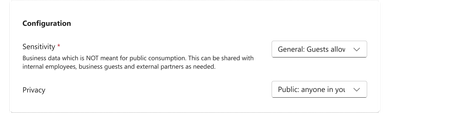
If you've seen MC1250283 in your Message Center and have questions, you're not alone. In the past few weeks we've heard from customers across industries — financial services, manufacturing, healthcare, government — all asking variations of the same questions. This post is our attempt to answer them all in one place. You can find out more via this article Sensitivity labels in Viva Engage. | Microsoft Learn What's changing Starting March 31, 2026 sensitivity labels will be available in Viva Engage community creation. When someone creates a new community, they'll see a sensitivity label picker, the same kind of label selector that already exists in Microsoft Teams and SharePoint. This is Engage joining the rest of Microsoft 365. Sensitivity labels for groups and sites have been supported in Teams, SharePoint, and M365 Groups for years. Engage communities, which are built on top of M365 Groups and SharePoint sites, are now part of that ecosystem. How it works Labels come from Purview, not Engage. There is no new admin setting in the Viva Engage admin center to turn this on or off. Your sensitivity labels are configured and published in Microsoft Purview, and those settings now apply to Engage communities the same way they apply to Teams and SharePoint. Labels are synced across all three surfaces. An Engage community's sensitivity label is shared with its linked M365 Group and SharePoint site. When a label is applied to one, it synchronizes across all three. This means your label governance is consistent — not fragmented. Existing communities are not automatically labeled. Communities created before this rollout will remain in an unlabeled state. They won't have a label auto-assigned. Admins can apply labels to existing communities in bulk using existing PowerShell scripts against the linked M365 Groups or SharePoint sites, no new tooling is needed. Applying a label via those surfaces will trigger the sync to Engage. Labeling can be mandatory or optional. Whether users must pick a label when creating a community is controlled by your Purview label policy. In the label policy publishing flow, under "Groups and sites > Settings," there's a checkbox to make site labeling mandatory. If you check it, users will be required to select a label when creating a community. If you don't, the label picker appears but community creation is still allowed without a selection. Default labels are set in Purview. If mandatory labeling is enabled and a user hasn't picked a label, the creation flow pre-populates a default. That default is determined by your label policy settings in Purview — Purview suggests the lowest-priority label with the right scope, but you can configure a different one. On Day 1, before an Engage-specific default is configured, the existing site default label (if set) will pre-populate. Community admins and owners can change labels after creation. This isn't locked to tenant admins. Community admins and owners will be able to update the label via community settings in Viva Engage or through the M365 admin center group listings. ttings. Programmatic community creation still works. If you create communities via the Graph API's /community endpoint, the label won't be set through that call — there's no Graph API support for setting labels directly on communities in this release. However, after creation, you can apply the label via PowerShell targeting the linked M365 Group or SharePoint site, which will sync to Engage. Your existing automation flows won't break; they just need a label-setting step added if you need one. The governance tension we've heard The most substantive concern we've received, and it's a legitimate one, comes from organizations that have configured their Purview label policies to enforce private-only labels for groups and sites. These organizations allowed public Engage communities precisely because Engage wasn't subject to sensitivity label governance. When Engage joins that ecosystem, their Purview policy will apply — and if their policy only permits private-supporting labels, new Engage communities will only be creatable as private communities. We want to be direct about this: Purview sensitivity label policies are tenant-wide and can't be scoped to individual workloads. There is no way to say "apply this policy to Teams and SharePoint but not Engage." Engage communities are built on M365 Groups and SharePoint sites, and they share the same label scope in order to stay in sync. If your organization has strict private-only governance and you need to continue creating public Engage communities, the practical path is: Create a public-supporting sensitivity label (e.g., "General - Internal Communications") Publish it to admins only — not your entire user base — so it doesn't accidentally appear in Teams or SharePoint creation flows for end users Apply this label to Engage communities via the admin center or PowerShell scripts Optionally, publish the label to your entire user base and use automated scripts to monitor Groups and Sites for misuse of that public label and correct them This is a workaround, not an ideal solution. We've heard the feedback clearly: Engage's use case — broad internal communication and knowledge sharing, is fundamentally different from SharePoint or Teams collaboration, and a one-size-fits-all label scope creates real tension. We're tracking this as a design consideration and have raised it with the Purview team. If you want to formally register this feedback, submit a Design Change Request (DCR) with your Microsoft Account team asking for per-workload label scoping support. What sensitivity labels do NOT change Community discoverability. All Engage communities remain discoverable to all users regardless of sensitivity label. Labels don't create "hidden" communities. A private community is visible in search — users just can't read the content without being a member. What users can see in search. Search results are governed by access control lists (ACLs), not sensitivity labels. Users will only see content they have permission to access. Your custom label taxonomy. Labels like "Confidential" or "Highly Confidential" are defined by your organization in Purview. There's no universal label structure — your configuration is yours. Frequently asked questions Can I test this in a staging tenant before it hits production? This rolls out to production tenants starting March 31. There isn't a separate staging path for this feature. We recommend using this window before rollout to review your Purview label policies, identify any communities where label assignment may create issues, and prepare admin and end user documentation. What happens if we have no sensitivity labels configured in Purview at all? If you don't use sensitivity labels for groups and sites, this change will have no impact. Community creation will support the privacy picker as it always has. Will this affect Copilot? Yes, and this is worth thinking through. Verified answers and content in private communities are scoped to members of that community. If your governance pushes more communities to private, that content becomes less accessible to Copilot for org-wide knowledge retrieval. If broad knowledge sharing is a goal, this is a factor to weigh in your label policy decisions. Will there be any visual change for end users? Users creating communities will see a sensitivity label dropdown in the creation flow. If your organization has labels published to users, they'll be able to select from those labels. If mandatory labeling is not enabled, they can leave it blank. If a community has a label, it will be visible in the community header. What to do before March 31 Review your Purview label policies. Specifically check whether you have mandatory labeling enabled for groups and sites, and what default label is configured. This will determine what your users see in community creation. Check for existing communities with label mismatches. If your linked Groups or SharePoint sites already have labels applied, confirm that those labels are ones that make sense for public community use. Prepare your community admins. Let them know the label picker is coming and what they should (or shouldn't) select. Prepare end user guidance if needed. For most organizations this will be low-friction. But if you have a complex label taxonomy or strict governance, proactive communication helps.930Views0likes0CommentsMonday Masterclass Season 2 – Week 4 Designing Events Employees Remember
Great events don’t just deliver information — they create moments people remember, return to, and build on. In Week 4 of the Viva Engage Monday Masterclass Season 2, we wrapped up the series by focusing on how to design events that drive participation, trust, and momentum before, during, and after the moment. This session brought together product insights, customer examples, and practical guidance to help communicators and community leaders turn events into ongoing engagement engines. If you’ve ever hosted an event that felt successful in the moment — but fizzled right after —or if you had questions on how to drive engagement beyond the event... this session was for you. Why host events in Viva Engage? Instead of treating events as one-off calendar invites, hosting them in Viva Engage creates a single, continuous experience. When you host events within a community, you target the audience for the event and discovery happens across your network. Before the event: Build awareness and anticipation with announcements, pinned posts, and seeded questions. During the event: Centralize participation through questions, discussions, reactions, and upvotes — all in one place. After the event: Keep the conversation alive with recordings, recaps, followups, and searchable knowledge people can return to. This approach helps events support broader goals like leadership visibility, culture building, learning, and community connection — not just attendance. Event formats that fit your goals The session walked through how different event formats support different outcomes, including: Broadcasts Ideal for large, one-to-many moments like town halls or major announcements. Meetings Better suited for learning sessions, office hours, and interactive discussions. Inperson or textonly events Flexible options that still keep the conversation anchored in Engage. Choosing the right format isn’t about feature checklists — it’s about optimizing for the experience you want attendees to have. Before, during, after: designing the full event lifecycle The session emphasized thinking about events as a connected journey, not a single time slot. Before the event Promote early with clear value and calls to action Share teaser posts tied to key themes Seed conversation with openended questions During the event Guide participation clearly Use moderation and upvotes intentionally Keep conversation focused in the event feed After the event Share recordings and highlights Publish a recap that’s skimmable and actionable Continue answering questions and extending the discussion This is where events shift from “done” to durable. Customer spotlight: turning events into learning rhythms We also highlighted how customers are using Viva Engage events to create repeatable learning moments, not just onetime sessions — from biweekly Copilot learning hours to office hours that build steady adoption momentum. The common thread: Events work best when they’re part of a rhythm, not a reaction. Keep learning with the Viva Engage Masterclass This session capped off Season 2 of the Viva Engage Monday Masterclass, which covered: Week 1: Beyond the basics – roles, moderation, and community configuration https://adoption.microsoft.com/en-us/customer-hub/monday-masterclass-your-guide-to-the-viva-engage-essentials/session-7/ Week 2: AI-powered engagement in Viva Engage https://adoption.microsoft.com/en-us/customer-hub/monday-masterclass-your-guide-to-the-viva-engage-essentials/session-8/ Week 3: Campaigns and storytelling https://adoption.microsoft.com/en-us/customer-hub/monday-masterclass-your-guide-to-the-viva-engage-essentials/session-9/ Week 4: Designing events employees remember All session slides and recordings can be found here Broadcast and meetings require Microsoft Teams, available as part of the suite or as a standalone. Learn more: Licensing updates extend access to advanced capabilities in Microsoft Teams and Microsoft Places | Microsoft Community Hub"415Views2likes0Comments🤘Join us for the annual Viva Engage Festival, hosted by Swoop Analytics! 🤘
We are thrilled to invite you to the annual Viva Engage Festival, a celebration of our incredible journey together hosted by Swoop! This year's event promises to be bigger and better, featuring inspiring customer stories from the start of adoption to successful launches, engaging leadership sessions, and an exclusive product leadership Q&A. ✨ Why You Can't Miss This Event✨ Customer Stories: Hear firsthand experiences from other customers about their journey with Viva Engage, from initial adoption to successful implementation. Leadership Engagement: Connect with our product leaders and gain insights into the future of Viva Engage. Product Leadership Q&A: Get your questions answered by our product leaders in Ask me Anything interactive sessions. Check out the full agenda here. Networking Opportunities: Meet and network with other customers and industry experts. Recorded Sessions: All sessions will be recorded and shared afterwards, so you won't miss a thing! Here's a look back at the past sessions! 📅 Date: Wednesday, December 4, 2024 🔗 Register Here🔗 APAC EMEA AMER Don't miss out on joining this FREE event hosted by Swoop Analytics that celebrates our customer community, and the amazing progress we've made together. We look forward to seeing you there! The Swoop Benchmarking study is now available. Download it here! The report is also loaded with real-life case study examples so you can learn from the best!257Views0likes0Comments
Viva Engage / Yammer Festival Recap 2022
In December 2022, we partnered with SWOOP Analytics to host our 2022 Viva Engage Yammer Community Festival . We curated and designed this event with and for our customers and for you to learn from each other. We’ve broken them up into a few themes, listen to a few or all of them and get ready to take notes!6.1KViews1like0Comments