cloud
135 TopicsComo começar e crescer no mercado de tecnologia
A #JornadaTech é uma maratona de mentorias online do Microsoft Reactor São Paulo, sobre carreira na tecnologia, em que você poderá aprender mais sobre as áreas de Cloud, Segurança, Programação e Dados. Neste artigo, você encontrará algumas dicas e recursos para começar e crescer na carreira de tecnologia.14KViews6likes10CommentsMicrosoft Learn AI Skills Challenge
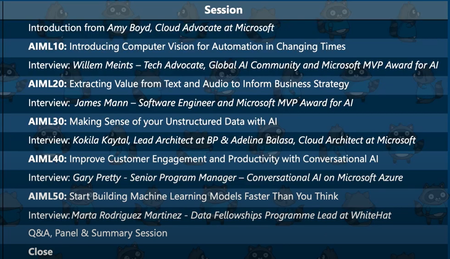
Join Microsoft's AI Skills Challenge 2023 to enhance your technical expertise in Artificial Intelligence. Register now to access exclusive resources, hands-on labs, and interactive learning sessions. Boost your knowledge in generative AI, machine learning, cognitive services, natural language processing, and computer vision to stay ahead in the ever-evolving world of AI.36KViews5likes6CommentsDevelopers Guide to AI
Artificial Intelligence (AI) is driving innovative solutions across all industries, but with machine learning (ML) applying a paradigm change to how we approach building products, we are all exploring how to expand our skill sets and enhance our applications.6.7KViews3likes1CommentAzure Charts Visualize your cloud learning journey
Azure Charts is a web based application which allows you to see what the Azure consists of and how it evolves. Additionally, to help you learn Azure in a focused way and stay up-to-date in your knowledge, there is a suite of interactive charts introduced recently which you can find under the Learning menu in the navigation bar. The learning menus utilize the Microsoft Learn Catalog API8.9KViews3likes5CommentsIntegrating Microsoft Foundry with OpenClaw: Step by Step Model Configuration
Step 1: Deploying Models on Microsoft Foundry Let us kick things off in the Azure portal. To get our OpenClaw agent thinking like a genius, we need to deploy our models in Microsoft Foundry. For this guide, we are going to focus on deploying gpt-5.2-codex on Microsoft Foundry with OpenClaw. Navigate to your AI Hub, head over to the model catalog, choose the model you wish to use with OpenClaw and hit deploy. Once your deployment is successful, head to the endpoints section. Important: Grab your Endpoint URL and your API Keys right now and save them in a secure note. We will need these exact values to connect OpenClaw in a few minutes. Step 2: Installing and Initializing OpenClaw Next up, we need to get OpenClaw running on your machine. Open up your terminal and run the official installation script: curl -fsSL https://openclaw.ai/install.sh | bash The wizard will walk you through a few prompts. Here is exactly how to answer them to link up with our Azure setup: First Page (Model Selection): Choose "Skip for now". Second Page (Provider): Select azure-openai-responses. Model Selection: Select gpt-5.2-codex , For now only the models listed (hosted on Microsoft Foundry) in the picture below are available to be used with OpenClaw. Follow the rest of the standard prompts to finish the initial setup. Step 3: Editing the OpenClaw Configuration File Now for the fun part. We need to manually configure OpenClaw to talk to Microsoft Foundry. Open your configuration file located at ~/.openclaw/openclaw.json in your favorite text editor. Replace the contents of the models and agents sections with the following code block: { "models": { "providers": { "azure-openai-responses": { "baseUrl": "https://<YOUR_RESOURCE_NAME>.openai.azure.com/openai/v1", "apiKey": "<YOUR_AZURE_OPENAI_API_KEY>", "api": "openai-responses", "authHeader": false, "headers": { "api-key": "<YOUR_AZURE_OPENAI_API_KEY>" }, "models": [ { "id": "gpt-5.2-codex", "name": "GPT-5.2-Codex (Azure)", "reasoning": true, "input": ["text", "image"], "cost": { "input": 0, "output": 0, "cacheRead": 0, "cacheWrite": 0 }, "contextWindow": 400000, "maxTokens": 16384, "compat": { "supportsStore": false } }, { "id": "gpt-5.2", "name": "GPT-5.2 (Azure)", "reasoning": false, "input": ["text", "image"], "cost": { "input": 0, "output": 0, "cacheRead": 0, "cacheWrite": 0 }, "contextWindow": 272000, "maxTokens": 16384, "compat": { "supportsStore": false } } ] } } }, "agents": { "defaults": { "model": { "primary": "azure-openai-responses/gpt-5.2-codex" }, "models": { "azure-openai-responses/gpt-5.2-codex": {} }, "workspace": "/home/<USERNAME>/.openclaw/workspace", "compaction": { "mode": "safeguard" }, "maxConcurrent": 4, "subagents": { "maxConcurrent": 8 } } } } You will notice a few placeholders in that JSON. Here is exactly what you need to swap out: Placeholder Variable What It Is Where to Find It <YOUR_RESOURCE_NAME> The unique name of your Azure OpenAI resource. Found in your Azure Portal under the Azure OpenAI resource overview. <YOUR_AZURE_OPENAI_API_KEY> The secret key required to authenticate your requests. Found in Microsoft Foundry under your project endpoints or Azure Portal keys section. <USERNAME> Your local computer's user profile name. Open your terminal and type whoami to find this. Step 4: Restart the Gateway After saving the configuration file, you must restart the OpenClaw gateway for the new Foundry settings to take effect. Run this simple command: openclaw gateway restart Configuration Notes & Deep Dive If you are curious about why we configured the JSON that way, here is a quick breakdown of the technical details. Authentication Differences Azure OpenAI uses the api-key HTTP header for authentication. This is entirely different from the standard OpenAI Authorization: Bearer header. Our configuration file addresses this in two ways: Setting "authHeader": false completely disables the default Bearer header. Adding "headers": { "api-key": "<key>" } forces OpenClaw to send the API key via Azure's native header format. Important Note: Your API key must appear in both the apiKey field AND the headers.api-key field within the JSON for this to work correctly. The Base URL Azure OpenAI's v1-compatible endpoint follows this specific format: https://<your_resource_name>.openai.azure.com/openai/v1 The beautiful thing about this v1 endpoint is that it is largely compatible with the standard OpenAI API and does not require you to manually pass an api-version query parameter. Model Compatibility Settings "compat": { "supportsStore": false } disables the store parameter since Azure OpenAI does not currently support it. "reasoning": true enables the thinking mode for GPT-5.2-Codex. This supports low, medium, high, and xhigh levels. "reasoning": false is set for GPT-5.2 because it is a standard, non-reasoning model. Model Specifications & Cost Tracking If you want OpenClaw to accurately track your token usage costs, you can update the cost fields from 0 to the current Azure pricing. Here are the specs and costs for the models we just deployed: Model Specifications Model Context Window Max Output Tokens Image Input Reasoning gpt-5.2-codex 400,000 tokens 16,384 tokens Yes Yes gpt-5.2 272,000 tokens 16,384 tokens Yes No Current Cost (Adjust in JSON) Model Input (per 1M tokens) Output (per 1M tokens) Cached Input (per 1M tokens) gpt-5.2-codex $1.75 $14.00 $0.175 gpt-5.2 $2.00 $8.00 $0.50 Conclusion: And there you have it! You have successfully bridged the gap between the enterprise-grade infrastructure of Microsoft Foundry and the local autonomy of OpenClaw. By following these steps, you are not just running a chatbot; you are running a sophisticated agent capable of reasoning, coding, and executing tasks with the full power of GPT-5.2-codex behind it. The combination of Azure's reliability and OpenClaw's flexibility opens up a world of possibilities. Whether you are building an automated devops assistant, a research agent, or just exploring the bleeding edge of AI, you now have a robust foundation to build upon. Now it is time to let your agent loose on some real tasks. Go forth, experiment with different system prompts, and see what you can build. If you run into any interesting edge cases or come up with a unique configuration, let me know in the comments below. Happy coding!12KViews2likes2CommentsAI Career Navigator — Empowering Job Seekers with Azure OpenAI
AI Career Navigator is more than just a project — it’s a mission to make career growth accessible, intelligent, and human. Powered by Azure OpenAI, it transforms uncertainty into direction and effort into achievement. Author: Aryan Jaiswal — Gold Microsoft Learn Student Ambassador Reviewer: Julia Muiruri (Microsoft)706Views2likes0CommentsMicrosoft Student Summit 2022 - World Wide Event Oct
Connect, learn, get inspired, and innovate! A one day virtual event where you can connect with your local Microsoft student developer community, build new tech skills, apply them in fun challenges and activities, and get inspired to innovate! Register NowMicrosoft Reactor | Microsoft Developer4.1KViews2likes0CommentsBuilding an Auditable Security Layer for Agentic AI
Most agent failures do not look like breaches. They look like a normal chat, a normal answer, and a normal tool call. Until the next morning, when a single question collapses the whole story: who authorized that action. You think you deployed an agent. In reality, you deployed an unbounded automation pipeline that happens to speak English. I’m Hazem Ali — Microsoft AI MVP, Distinguished AI & ML Architect, Founder & CEO at Skytells. For over 20 years, I’ve built secure, scalable enterprise AI across cloud and edge, with a focus on agent security and sovereign, governed AI architectures. My work on these systems is widely referenced by practitioners across multiple regions. Hazem Ali honored to receive an official speaker invitation under the patronage of H.H. Sheikh Dr. Sultan bin Muhammad Al Qasimi, Member of the UAE Supreme Council and Ruler of Sharjah, to speak at the Sharjah International Conference on Linguistic Intelligence (SICLI), organized by the American University of Sharjah (AUS) and the Emirates Scholar Center for Research and Studies. This piece is a collaboration with Hammad Atta a Practice Lead – AI Security & Cloud Strategy and Dr. Yasir Mehmood , Dr Muhammad Zeeshan Baig, Dr. Muhammad Aatif, Dr. MUHAMMAD AZIZ UL HAQ. We align on one core idea: agent security is not about making the model behave. It is about building enforceable boundaries around the model and proving every privileged step. This article is meant to sit next to my earlier Tech Community piece, Zero-Trust Agent Architecture: How To Actually Secure Your Agents, and go one level deeper into the mechanics you can implement on Azure today. Let me break it down. The Principle: The model is not your boundary Let me break it down in the way I’d explain it in a design review. A boundary is something that still holds when the component on the other side is adversarial, confused, or simply wrong. An LLM is none of those reliably. In an agent, the model is not just a generator. It becomes a planner and scheduler. It decides when to retrieve, which tool to call, how to shape arguments, and when to loop. That means your real attack surface is not “bad output.” It is the control-flow graph the model is allowed to traverse. So if your “security” lives inside the prompt, you are putting policy in the same token stream the attacker can influence. That is not a boundary. That is a suggestion. The only stable design is to treat the model like an untrusted proposer and the runtime like the verifier. Here is the chain I use. Each gate is external to the model and survives manipulation. Context Gate: Everything that enters the model is treated as executable influence, not “text.” Capability Gate: Tools are invoked as constrained capabilities, not free-form function calls. Evidence Gate: Every privileged step produces a verifiable artifact, not a story. Retrieval Control Plane: What the agent can see is governed by labels and identity, not prompt etiquette. Detection Layer: Drift and probing become alerts, not surprises. Now the rare part, the part most people miss: the boundary is not “block or allow.” The boundary is stateful. Once the runtime sees a suspicious signal, the entire session must transition into a degraded capability state, and every downstream gate must enforce that state. 1. Treat context as executable influence, and preserve provenance If you do RAG, your documents are not “supporting info.” They are an input channel. That makes the biggest prompt-injection risk not the user. It is your documents. Microsoft’s Prompt Shields covers user prompt attacks (scanned at the user input intervention point) and document attacks (scanned at the user input and tool response intervention points). When enabled, each request returns annotation results with detected and filtered values that your runtime can translate into a policy decision: block, degrade, or allow. Provenance Collapse. Most teams concatenate prompt + policy + retrieved chunks into one blob. The moment you do that, you lose the one thing you need for a defensible boundary: you can no longer reliably tell which tokens came from where. That is how “context” becomes “authority.” For indirect/document attacks, Microsoft guidance recommends delimiting context documents inside the prompt using """<documents> ... </documents>""" to improve indirect attack detection. That delimiter is not formatting. It is a provenance marker that improves indirect attack detection through Prompt Shields. Minimal, practical pattern: // Provenance-preserving prompt construction for indirect/document attack detection function buildPrompt(system: string, user: string, retrievedDocs: string[]): string { const docs = retrievedDocs.map((d) => `- ${d}`).join("\n"); return [ system, "", `User: ${user}`, "", `""" <documents>\n${docs}\n</documents> """`, ].join("\n"); } Then treat Prompt Shields output as a session security event, not a banner: type RiskState = "NORMAL" | "SUSPECT" | "BLOCK"; type FilterPolicy = "BLOCK_ON_FILTERED" | "DEGRADE_ON_FILTERED"; function computeRiskState( shields: { detected: boolean; filtered?: boolean }, labels: string[], policy: FilterPolicy = "DEGRADE_ON_FILTERED", ): RiskState { // detected => hard stop if (shields.detected) return "BLOCK"; // filtered is an annotation signal: block or degrade by policy if (shields.filtered) { return policy === "BLOCK_ON_FILTERED" ? "BLOCK" : "SUSPECT"; } // example: sensitivity-based degradation independent of shield hits const sensitive = labels.some((l) => ["Confidential", "HighlyConfidential", "Regulated"].includes(l), ); return sensitive ? "SUSPECT" : "NORMAL"; } When the signal is clear, you block and log. When it is suspicious, you do not warn. You downgrade authority. QSAF Alignment: Prompt Injection Protection (Domain 1): QSAF-PI-001 (static pattern blacklist), QSAF-PI-002 (dynamic LLM analysis), QSAF-PI-003 (semantic embedding comparison) All addressed by Prompt Shields and provenance marking. Context Manipulation (Domain 2): QSAF-RC-004 (context drift), QSAF-RC-007 (nested prompt injection) – mitigated by stateful risk calculation. 2. Tools are capabilities with constraints, not functions When the model proposes a tool call, your runtime should re-derive what is allowed from identity plus risk state, then enforce it at the gateway. type ToolRequest = { tool: string; args: unknown; }; type Capabilities = { allowWrite: boolean; allowedTools: Set<string>; }; function deriveCapabilities(risk: RiskState, roles: string[]): Capabilities { const baseAllowed = new Set(["search_kb", "get_profile", "summarize"]); const isAdmin = roles.includes("Admin"); if (risk === "SUSPECT") { return { allowWrite: false, allowedTools: baseAllowed }; } if (risk === "BLOCK") { return { allowWrite: false, allowedTools: new Set() }; } // NORMAL const tools = new Set([ ...baseAllowed, ...(isAdmin ? ["update_record", "issue_refund"] : []), ]); return { allowWrite: isAdmin, allowedTools: tools }; } function authorizeTool(req: ToolRequest, caps: Capabilities): void { if (!caps.allowedTools.has(req.tool)) throw new Error("ToolNotAllowed"); if (!caps.allowWrite && req.tool.startsWith("update_")) { throw new Error("WriteDenied"); } } The model can ask. It cannot grant itself permission. QSAF Alignment: Plugin Abuse Monitoring (Domain 3): QSAF-PL-001 (whitelist enforcement), QSAF-PL-003 (restrict sensitive plugins), QSAF-PL-006 (rate‑limiting) – implemented via capability derivation and gateway policies. Behavioral Anomaly Detection (Domain 5): QSAF-BA-006 (plugin execution pattern deviance) – detected by comparing actual calls against derived capabilities. The Integrity Gate: Hash-chain the authority, not the output Let me add the part that makes investigations clean. Most teams treat integrity like an audit log problem. That is not enough. Logs explain. Integrity proves. The hard truth is that agent authority is assembled out of pieces: the system instruction, the user prompt, retrieved chunks, risk annotations, and finally the tool intent. If you do not bind those pieces together cryptographically, an incident review becomes a story-telling session. This is why QSAF has an entire domain for payload integrity and signing, including prompt hash signing, nonce or replay protection, and a hash chain lineage that tracks how a session evolved. Here is how you can map that into the runtime verifies. You build a canonical “authority envelope” for every privileged hop, compute a digest, and then: link it to the previous hop (hash chain) include a nonce (replay control) sign the digest with Azure Key Vault (Key Vault signs digests, it does not hash your content for you) import crypto from "crypto"; type AuthorityEnvelope = { sessionId: string; turnId: number; policyVersion: string; // provenance-preserved components systemHash: string; userHash: string; documentsHash: string; // hash of structured retrieved chunks (not just rendered text) shields: { detected: boolean; filtered: boolean; }; riskState: "NORMAL" | "SUSPECT" | "BLOCK"; // proposed action (if any) tool?: { name: string; argsHash: string; }; // anti-replay + lineage nonce: string; prevDigest?: string; ts: string; }; function sha256(bytes: string): string { return crypto.createHash("sha256").update(bytes).digest("hex"); } // Canonicalization matters. JSON.stringify is OK if you control key order. // For cross-language, use RFC 8785 (JCS) canonical JSON. function canonicalJson(x: unknown): string { return JSON.stringify(x); } function buildEnvelope( input: Omit<AuthorityEnvelope, "nonce" | "ts">, ): AuthorityEnvelope { return { ...input, nonce: crypto.randomUUID(), ts: new Date().toISOString(), }; } function digestEnvelope(env: AuthorityEnvelope): string { return sha256(canonicalJson(env)); } Then you call Key Vault to sign that digest (REST sign), and optionally verify later (REST verify). The rare failure mode this blocks is subtle: authority splicing. Without a hash chain, it is possible for the runtime to correctly validate a tool call, but later be unable to prove which retrieved chunk, which Prompt Shields result, and which policy version were in force when that call was authorized. With the chain, every privileged hop becomes tamper-evident. This is the point: Prompt Shields tells you “this looks dangerous.” Document delimiters preserve provenance. The integrity gate makes the runtime able to say, later, with evidence: “This is exactly what I accepted as authority.” QSAF Alignment: Payload Integrity & Signing (Domain 6): QSAF-PY-001 (prompt hash signing), QSAF-PY-005 (nonce/replay control), QSAF-PY-006 (hash chain lineage) – directly implemented via the envelope and chaining. Tools must sit behind a wall that can say “no” Tool calls are where language becomes authority. If an agent can call APIs that mutate state, your security story is not about the response text. It is about whether the tool call is allowed under explicit policy. This is exactly where Azure API Management belongs: as the tool gateway that enforces authentication and authorization before any tool request reaches your backend. The validate-jwt policy is the canonical enforcement mechanism for validating JWTs at the gateway. The design goal is simple: The model can request a tool call. The gateway decides if it is permitted. A capability token approach keeps it clean: <!-- APIM inbound policy sketch --> <validate-jwt header-name="Authorization" failed-validation-httpcode="401"> <required-claims> <claim name="scp"> <value>tools.read</value> </claim> </required-claims> </validate-jwt> The claim name (scp, roles, or custom claims) depends on your token issuer; the point is enforcing authorization at the gateway, not inside model text. Now you can enforce “read-only mode” by issuing tokens that simply do not carry write scopes. The model can try to call a write tool. It still gets denied by policy. Evidence is not logs. Evidence is a signed chain. Logs help you debug. Evidence helps you prove. So you hash the session envelope and the tool intent, then sign the digest using Azure Key Vault Keys. Key Vault sign creates a signature from a digest, and verify verifies a signature against a digest. Key Vault does not hash your content for you. Hash locally, then sign the digest.), and Key Vault documentation is explicit that signing is sign-hash, not “sign arbitrary content.” You hash locally, then ask Key Vault to sign the hash. import crypto from "crypto"; const sha256 = (x: unknown): string => crypto.createHash("sha256").update(JSON.stringify(x)).digest("hex"); type IntentEnvelope = { sessionId: string; userId: string; promptHash: string; documentsHash: string; tool: string; argsHash: string; nonce: string; ts: string; policyVersion: string; }; function buildIntent( sessionId: string, userId: string, prompt: string, docs: unknown, tool: string, args: unknown, policyVersion: string, ): IntentEnvelope { return { sessionId, userId, promptHash: sha256(prompt), documentsHash: sha256(docs), tool, argsHash: sha256(args), nonce: crypto.randomUUID(), ts: new Date().toISOString(), policyVersion, }; } Once you do this, your system stops “explaining.” It starts proving. Govern what the agent can see, not only what it can say RAG without governance eventually becomes a data exposure feature. This is why I treat retrieval as a governed operation. Microsoft Purview sensitivity labels give you a practical way to classify content and build retrieval rules on top of that classification. Microsoft documents creating and configuring sensitivity labels in Purview. The pattern is simple: Label the corpus. Filter retrieval by label and identity policy. Log label distribution per completion. Alert when a low-privilege identity retrieves high-sensitivity labels. This is how you keep sovereignty real. Not in a slide deck. In the retrieval path. Operate it like a security system: posture and detection Inline gates reduce risk. They do not eliminate it. Systems drift. People add tools. Policies get loosened. Attacks evolve. Microsoft Defender for Cloud’s Defender CSPM plan includes AI security posture management for generative AI apps and AI agents (Preview), including discovery/inventory of AI agents deployed with Azure AI Foundry. Then you use Microsoft Sentinel to turn your telemetry into incidents, with scheduled analytics rules. Your detections should match the gates you built: Repeated Prompt Shields detections from the same identity or session. Tool-call spikes after a suspicious document signal. APIM denials for write endpoints from sessions in read-only mode. High-sensitivity label retrieval by identities that should never touch that tier. QSAF Alignment: Behavioral Anomaly Detection (Domain 5): QSAF-BA-001 (session entropy), QSAF-BA-004 (repeated intent mutation), QSAF-BA-007 (unified risk score) – detected via Sentinel rules. Cross‑Environment Defense (Domain 9): QSAF-CE-006 (coordinated alert response) – using Sentinel incidents and playbooks. Where the reference checklist fits, quietly Behind the scenes, we use a control checklist lens to ensure we cover prompt/context attacks, tool misuse, integrity, governance, and operational monitoring. The point is not to rename Microsoft features into framework terms. The point is to make the system enforceable and auditable using Azure-native gates. Closing Zero trust for agents is not a slogan. It is a build. Prompt Shields gives you a front gate for both user prompt attacks and document attacks, with clear annotations like detected and filtered. API Management gives you a tool boundary that can say “no” regardless of what the model tries, using validate-jwt. Signed intent gives you evidence, using Key Vault’s sign-hash semantics. Purview labels give you governed retrieval. Sentinel and Defender give you an operating model, not wishful thinking. If you want the conceptual spine and the architectural principles that frame this pipeline, start with my earlier Tech Community pieces, then come back here and implement the gates. Thanks for reading — Hazem Ali609Views1like0Comments