cloud security best practices
27 Topics
Building Cost-Aware Azure Infrastructure Pipelines: Estimate Costs Before You Deploy
The Problem: Cost Is a Blind Spot in IaC Reviews Code reviews for Bicep or Terraform templates typically focus on correctness, security, and compliance. But cost is rarely part of the review process because: Developers don't have easy access to pricing data at review time Azure pricing depends on region, tier, reservation status, and more There's no built-in "cost diff" in any IaC tool This means cost regressions slip through the same way bugs do when there are no tests. iac-review-gap Architecture Overview Here's the pipeline we'll build: architecture-overview Step 1: Use Bicep What-If to Detect Changes Azure's what-if deployment mode shows you exactly what resources will be created, modified, or deleted — without actually deploying anything. az deployment group what-if --resource-group rg-myapp-prod --template-file main.bicep --parameters main.bicepparam --result-format ResourceIdOnly --out json > what-if-output.json The JSON output contains a changes array where each entry has: resourceId — the full ARM resource ID changeType — one of Create, Modify, Delete, NoChange, Deploy before and after — the full resource properties for modifications This is the foundation: the what-if output tells us what is changing, and we can use that to look up what it costs. what-if-cli-output Step 2: Map Resources to Pricing with the Retail Prices API The Azure Retail Prices API is a free, unauthenticated REST API that returns pay-as-you-go pricing for any Azure service. Here's a Python script that takes a VM SKU and region and returns the monthly cost: import requests def get_vm_price(sku_name: str, region: str = "eastus") -> float | None: """Query the Azure Retail Prices API for a Linux VM's pay-as-you-go hourly rate.""" api_url = "https://prices.azure.com/api/retail/prices" odata_filter = ( f"armRegionName eq '{region}' " f"and armSkuName eq '{sku_name}' " f"and priceType eq 'Consumption' " f"and serviceName eq 'Virtual Machines' " f"and contains(meterName, 'Spot') eq false " f"and contains(productName, 'Windows') eq false" ) response = requests.get(api_url, params={"$filter": odata_filter}) response.raise_for_status() items = response.json().get("Items", []) if not items: return None hourly_rate = items[0]["retailPrice"] monthly_estimate = hourly_rate * 730 # avg hours per month return round(monthly_estimate, 2) # Example usage before_cost = get_vm_price("Standard_D4s_v5") # e.g., $140.16/mo after_cost = get_vm_price("Standard_D8s_v5") # e.g., $280.32/mo delta = after_cost - before_cost # +$140.16/mo You can extend this pattern for other resource types — App Service Plans, Azure SQL databases, managed disks, etc. — by adjusting the serviceName and meterName filters. Step 3: Build the GitHub Actions Workflow Here's a complete GitHub Actions workflow that ties it all together: name: Cost Estimate on PR on: pull_request: paths: - "infra/**" permissions: id-token: write # For Azure OIDC login contents: read pull-requests: write # To post comments jobs: cost-estimate: runs-on: ubuntu-latest steps: - name: Checkout code uses: actions/checkout@v4 - name: Azure Login (OIDC) uses: azure/login@v2 with: client-id: ${{ secrets.AZURE_CLIENT_ID }} tenant-id: ${{ secrets.AZURE_TENANT_ID }} subscription-id: ${{ secrets.AZURE_SUBSCRIPTION_ID }} - name: Run Bicep What-If run: | az deployment group what-if \ --resource-group ${{ vars.RESOURCE_GROUP }} \ --template-file infra/main.bicep \ --parameters infra/main.bicepparam \ --out json > what-if-output.json - name: Setup Python uses: actions/setup-python@v5 with: python-version: "3.12" - name: Install dependencies run: pip install requests - name: Estimate cost delta id: cost run: | python infra/scripts/estimate_costs.py \ --what-if-file what-if-output.json \ --output-format github >> "$GITHUB_OUTPUT" - name: Comment on PR uses: marocchino/sticky-pull-request-comment@v2 with: header: cost-estimate message: | ## 💰 Infrastructure Cost Estimate | Resource | Change | Before ($/mo) | After ($/mo) | Delta | |----------|--------|---------------|--------------|-------| ${{ steps.cost.outputs.table_rows }} **Estimated monthly impact: ${{ steps.cost.outputs.total_delta }}** _Prices are pay-as-you-go estimates from the Azure Retail Prices API. Actual costs may vary with reservations, savings plans, or hybrid benefit._ - name: Gate on budget threshold if: ${{ steps.cost.outputs.delta_value > 500 }} run: | echo "::error::Monthly cost increase exceeds $500 threshold. Requires finance team approval." exit 1 Step 4: The Cost Estimation Script Here's the core of infra/scripts/estimate_costs.py that parses the what-if output and queries prices: #!/usr/bin/env python3 """Parse Bicep what-if output and estimate cost deltas using Azure Retail Prices API.""" import json import argparse import requests PRICE_API = "https://prices.azure.com/api/retail/prices" # Map ARM resource types to Retail API service names RESOURCE_TYPE_MAP = { "Microsoft.Compute/virtualMachines": "Virtual Machines", "Microsoft.Compute/disks": "Storage", "Microsoft.Web/serverfarms": "Azure App Service", "Microsoft.Sql/servers/databases": "SQL Database", } def get_price(service_name: str, sku: str, region: str) -> float: """Query Azure Retail Prices API and return monthly cost estimate.""" odata_filter = ( f"armRegionName eq '{region}' " f"and armSkuName eq '{sku}' " f"and priceType eq 'Consumption' " f"and serviceName eq '{service_name}'" ) resp = requests.get(PRICE_API, params={"$filter": odata_filter}) resp.raise_for_status() items = resp.json().get("Items", []) if not items: return 0.0 return items[0]["retailPrice"] * 730 def parse_what_if(filepath: str) -> list[dict]: """Extract resource changes from what-if JSON output.""" with open(filepath) as f: data = json.load(f) results = [] for change in data.get("changes", []): change_type = change.get("changeType", "") resource_type = change.get("resourceId", "").split("/providers/")[-1].split("/")[0:2] resource_type_str = "/".join(resource_type) if len(resource_type) == 2 else "" if resource_type_str not in RESOURCE_TYPE_MAP: continue before_sku = (change.get("before") or {}).get("sku", {}).get("name", "") after_sku = (change.get("after") or {}).get("sku", {}).get("name", "") region = (change.get("after") or change.get("before") or {}).get("location", "eastus") service = RESOURCE_TYPE_MAP[resource_type_str] before_price = get_price(service, before_sku, region) if before_sku else 0.0 after_price = get_price(service, after_sku, region) if after_sku else 0.0 results.append({ "resource": change.get("resourceId", "").split("/")[-1], "change_type": change_type, "before": round(before_price, 2), "after": round(after_price, 2), "delta": round(after_price - before_price, 2), }) return results def main(): parser = argparse.ArgumentParser() parser.add_argument("--what-if-file", required=True) parser.add_argument("--output-format", default="text", choices=["text", "github"]) args = parser.parse_args() changes = parse_what_if(args.what_if_file) total_delta = sum(c["delta"] for c in changes) if args.output_format == "github": rows = [] for c in changes: sign = "+" if c["delta"] >= 0 else "" rows.append( f"| {c['resource']} | {c['change_type']} " f"| ${c['before']:.2f} | ${c['after']:.2f} " f"| {sign}${c['delta']:.2f} |" ) print(f"table_rows={'chr(10)'.join(rows)}") sign = "+" if total_delta >= 0 else "" print(f"total_delta={sign}${total_delta:.2f}/mo") print(f"delta_value={total_delta}") else: for c in changes: print(f"{c['resource']}: {c['change_type']} " f"${c['before']:.2f} → ${c['after']:.2f} " f"(Δ ${c['delta']:+.2f})") print(f"\nTotal monthly delta: ${total_delta:+.2f}") if __name__ == "__main__": main() What the Developer Experience Looks Like Once this pipeline is in place, every PR that touches infrastructure files gets an automatic cost comment: Resource Change Before ($/mo) After ($/mo) Delta vm-api-prod Modify $140.16 $280.32 +$140.16 disk-data-01 Create $0.00 $73.22 +$73.22 plan-webapp NoChange $69.35 $69.35 +$0.00 Estimated monthly impact: +$213.38/mo If the delta exceeds a configurable threshold (e.g., $500/mo), the pipeline fails and requires explicit approval — just like a failing test. Extending This Further Here are some ways to take this pipeline to the next level: Support Azure Savings Plans and Reservations — Query the Prices API with priceType eq 'Reservation' and show both pay-as-you-go and committed pricing Track cost trends over time — Store estimates in Azure Table Storage or a database and build a dashboard showing cost trajectory per environment Add Slack/Teams notifications — Alert the team channel when a PR exceeds the threshold Tag-based cost allocation — Parse resource tags from Bicep to attribute costs to teams or projects Multi-environment estimates — Run the pipeline against dev, staging, and prod parameter files to show total organizational impact Key Takeaways Azure's What-If API gives you a deployment preview without making changes — use it as the foundation for any pre-deployment validation The Azure Retail Prices API is free, requires no authentication, and returns granular pricing data you can query programmatically Cost gates in CI/CD treat budget overruns the same way you treat test failures — as merge blockers that require explicit action Shift cost left — just like security and testing, catching cost issues at PR time is 10x cheaper than catching them on the monthly bill Infrastructure cost is infrastructure quality. By integrating cost estimation into your pull request workflow, you give every developer on the team visibility into the financial impact of their changes — before a single resource is deployed.1.2KViews5likes1CommentModernizing Terraform Pipelines on Azure: OIDC Federation for GitHub Actions and Azure DevOps
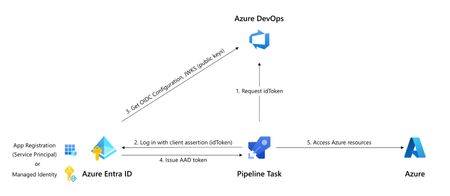
The secret nobody wants to rotate Most Terraform-on-Azure pipelines we see still authenticate the same way they did three years ago. A long-lived ARM_CLIENT_SECRET sitting in GitHub Actions or Azure DevOps, set once, copied around, and rotated only when something breaks. It's the most ignored credential in the cloud, and statistically the most likely one to leak. A developer screenshots a variable group. A pipeline log echoes a value. A fork inherits a secret. Or the secret simply expires on a Friday evening and takes production deployments with it. Workload Identity Federation (WIF) makes this whole class of problem go away. The pipeline mints a short-lived token at runtime, exchanges it for an Azure access token via Microsoft Entra, and never touches a secret. GitHub Actions has supported it since 2021. Azure DevOps service connections went GA with WIF in February 2024. The azurerm Terraform provider has supported it since v3.7. This post walks through the pattern end-to-end, for both GitHub Actions and Azure DevOps, the way I've rolled it out across multiple customer estates. How the exchange actually works Before any YAML, it helps to picture what's happening: The CI system (GitHub or ADO) signs a short-lived JWT describing exactly what's running- which repo, which branch, which environment, which service connection. The pipeline sends that JWT to Microsoft Entra ID. Entra checks it against a federated identity credential you've configured on a managed identity or app registration. The iss, sub, and aud claims must match case-sensitively. If it matches, Entra returns an Azure access token valid for the duration of the job. Terraform uses it. The job ends. The token expires. Nothing persists. The token is bound to a specific subject like repo:contoso/platform:environment:prod or sc://contoso/platform/azure-prod. It can't be reused from another repo, branch, or pipeline. Recommended Architecture A few choices that usually hold up in production: Decision Choice Identity type User-assigned managed identity (UAMI), not app registration Identity granularity One UAMI per environment (not per pipeline) Trust scope Pinned to the environment claim, not the branch RBAC scope Resource group, not subscription Remote state OIDC + use_azuread_auth = true, shared key access disabled Why UAMIs? They live in your subscription, don't need Application Administrator rights to manage, and follow the lifecycle of the resource group they belong to. Why one per environment? Pipeline-per-identity explodes into hundreds of identities. Environment-per-identity maps cleanly to deployment scopes. Part 1 - GitHub Actions Step 1: Create the identity and federate it Two commands per environment. That's it. az identity create -g rg-platform-identity -n id-tf-prod -l eastus az identity federated-credential create \ --name github-prod \ --identity-name id-tf-prod \ --resource-group rg-platform-identity \ --issuer https://token.actions.githubusercontent.com \ --subject repo:contoso/platform:environment:prod \ --audiences api://AzureADTokenExchange Repeat for nonprod. No secret is created anywhere. Step 2: Wire it up in GitHub In repo Settings → Environments, create nonprod and prod. On prod, add required reviewers and a branch rule restricting deployments to main. Then add three environment variables (not secrets - these aren't sensitive): AZURE_CLIENT_ID, AZURE_TENANT_ID, AZURE_SUBSCRIPTION_ID. The workflow itself stays small: permissions: id-token: write contents: read jobs: apply: runs-on: ubuntu-latest environment: prod env: ARM_USE_OIDC: "true" ARM_CLIENT_ID: ${{ vars.AZURE_CLIENT_ID }} ARM_TENANT_ID: ${{ vars.AZURE_TENANT_ID }} ARM_SUBSCRIPTION_ID: ${{ vars.AZURE_SUBSCRIPTION_ID }} steps: - uses: actions/checkout@v4 - uses: hashicorp/setup-terraform@v3 - run: terraform init && terraform apply -auto-approve Three things make this secure: id-token: write is the only elevated permission, and it doesn't grant write access to anything in GitHub, it just lets the runner mint a JWT. The environment: line picks the right AZURE_CLIENT_ID and drives the sub claim. The federation refuses anything else. No azure/login step is needed for Terraform. The azurerm provider reads GitHub's OIDC environment variables automatically. Part 2 - Azure DevOps The model is identical. The mechanics are different. ADO offers two creation paths for a WIF service connection: automatic (it creates an app registration for you) and manual (you bring your own UAMI). For platform teams, manual + UAMI is almost always the better choice to ensure identity lives where governance lives. The flow is a small dance between the two portals: In Azure DevOps, create a new ARM service connection → choose Workload Identity Federation (manual) → fill in your UAMI's client ID, tenant ID, and subscription. Save as draft. ADO shows you an issuer URL and a subject identifier. In Azure, on the UAMI, add a federated credential using the values ADO showed you. The subject looks like sc://contoso/platform/azure-prod. Back in ADO, click Verify and save. In the pipeline, the service connection only "activates" if a task in the job loads it. The simplest way is the AzureCLI@2 task: - task: AzureCLI@2 inputs: azureSubscription: azure-prod # the WIF service connection scriptType: bash scriptLocation: inlineScript inlineScript: | terraform init && terraform apply -auto-approve env: ARM_USE_OIDC: "true" ARM_CLIENT_ID: $(AZURE_CLIENT_ID) ARM_TENANT_ID: $(AZURE_TENANT_ID) ARM_SUBSCRIPTION_ID: $(AZURE_SUBSCRIPTION_ID) ARM_ADO_PIPELINE_SERVICE_CONNECTION_ID: $(SERVICE_CONNECTION_ID) SYSTEM_ACCESSTOKEN: $(System.AccessToken) SYSTEM_OIDCREQUESTURI: $(System.OidcRequestUri) For teams converting dozens of legacy connections, the Azure DevOps team published a PowerShell helper that walks every ARM service connection in a project and converts them in place. There's a 7-day rollback window on each connection, which makes the migration genuinely low-risk. Don't forget the state file The Terraform state is your real blast radius. With OIDC, it's almost free to lock it down too. The same UAMI can read and write blob data without the storage account key: backend "azurerm" { resource_group_name = "rg-tfstate" storage_account_name = "sttfstateprodeastus" container_name = "platform-prod" key = "platform.tfstate" use_oidc = true use_azuread_auth = true } Grant the UAMI Storage Blob Data Contributor on the container (not the account), disable shared key access on the storage account, and you've removed the last secret in the pipeline. RBAC and break-glass Federation removes a credential, not a privilege. A few habits worth keeping: Scope role assignments to resource groups, not subscriptions. The whole point of federation is that scoping is now trivially easy. Use Role Based Access Control Administrator instead of User Access Administrator if your Terraform creates role assignments. It's a more recent, narrower role. Have a documented break-glass. If GitHub or ADO has a token-service incident, you still need a path to ship a hotfix. A single hardware-key-protected emergency app registration in a separate identity boundary works well, audited monthly. Monitor sign-ins. Every federated exchange shows up in Entra sign-in logs as a service principal sign-in. Pipe these to Sentinel and alert on anomalies like sign-ins outside expected hours, or from IPs outside GitHub's published ranges. The errors you will hit (and what they really mean) Symptom What it actually is AADSTS70021: No matching federated identity record found Case-sensitive mismatch in iss, sub, or aud. Almost always a trailing slash or a capitalised character AADSTS700016: Application not found in directory Wrong client ID or tenant. Not a federation problem 403 on a resource even though token exchange worked Federation is fine. Your RBAC isn't. Check the exact scope Unable to determine OIDC token (ADO) No task in the job loaded the service connection. Add an AzureCLI@2 step Works on main, fails on tags You pinned sub to a branch ref. Add a second federated credential for tags, or move to environment-based scoping Migrating without a maintenance window You almost never get to do this on a greenfield repo. The order that has worked for me on legacy estates: Create the new UAMI alongside the old service principal, with the same role assignments. Federate one canary pipeline. Verify it deploys equivalently. Cut over pipelines in waves, lowest-risk environment first. Once a full release cycle passes cleanly, disable the old SP's secret. Wait another cycle. Then delete the SP entirely. Add a CI gate that fails any new pipeline introducing ARM_CLIENT_SECRET. The old and new auth methods coexist on the same subscription throughout. There's no hard cutover and no maintenance window, just a steady drift toward zero secrets. Wrapping up If you do nothing else after reading this, do one thing: search your CI variable groups for ARM_CLIENT_SECRET. Every result is an outage or a breach waiting to happen. Federation is one of those rare changes that's both more secure and less work to operate. Once you've set it up, you stop thinking about credential rotation, secret expiry, and quarterly access reviews for service principals. The pipeline simply runs, and the audit trail is in Entra where it belongs. That's a good trade.1.7KViews17likes10Comments
Building Secure AI Platforms in Banking Using Azure Enterprise Architecture
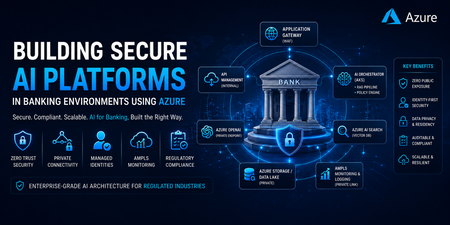
1. Introduction: AI in Banking Is Not Just a Model Problem Modern banking institutions are no longer asking “Can we use AI?” The real question is: “Can we use AI without violating regulatory, security, and data residency constraints?” Unlike public AI applications, banking systems must ensure: No public internet exposure Strict identity-based access control End-to-end auditability Data residency compliance Fully controlled inference pipelines 👉 In enterprise environments, AI success is driven by secure infrastructure—not just model accuracy. 2. Core Design Principle: Controlled Intelligence System Every AI request must follow a security-enforced execution pipeline: User Request ↓ Secure Edge (Application Gateway + WAF) ↓ API Governance Layer (API Management - Internal Mode) ↓ AI Orchestration Layer (AKS / App Services) ↓ Retrieval + Policy Layer (RAG + Guardrails) ↓ Private AI Services (Azure OpenAI) ↓ Observability Layer (AMPLS) ↓ Final Response Key Insight: This is not just an architecture—it is a controlled and auditable execution model. 3. Azure Enterprise AI Architecture (Production-Ready Pattern) A real-world architecture used in banking environments: 4. Private Connectivity Model (Critical for Compliance) Key components: Private Endpoints → Secure PaaS isolation Private DNS Zones → Controlled name resolution VNet Integration → Internal service communication Azure Firewall → Traffic inspection and control ⚠️ Common Production Failure: AKS pods fail to resolve Azure OpenAI private endpoint Root cause: Missing Private DNS links Incorrect VNet configuration 👉 This is one of the most frequent failures in enterprise AI deployments. “Debugging Private Endpoint Failures” Include: nslookup behavior in AKS DNS zone linking check VNet integration validation UDR / Firewall inspection 5. Identity-First Security Model (No Secrets Architecture) Modern banking architectures eliminate static credentials entirely. Authentication Flow: AKS Workload → Managed Identity → Azure AD → Azure Services Key Principle: 👉 Identity is the new security perimeter. Benefits: No API keys or secrets Simplified access management RBAC-based governance Fully auditable access 6. Secure AI Inference Pipeline A production AI request flow: def process_request(user_request): # 1. Authenticate user via Azure AD identity = authenticate_aad(user_request.token) if not identity or not identity.is_valid: return "ACCESS_DENIED" # 2. Enforce rate limiting per identity if not rate_limit(identity): return "RATE_LIMIT_EXCEEDED" # 3. Apply prompt security guardrails (injection protection) safe_prompt = apply_prompt_guardrails(user_request.prompt) # 4. Content safety filtering (PII / harmful content detection) if not content_filter(safe_prompt): return "CONTENT_BLOCKED" # 5. Retrieve secure RAG context context = retrieve_rag_context( query=safe_prompt, secure_mode=True ) # 6. Build final prompt final_prompt = merge_prompt_and_context(safe_prompt, context) # 7. Call Azure OpenAI with circuit breaker protection response = circuit_breaker( lambda: call_openai( prompt=final_prompt, identity=ManagedIdentity() ) ) # 8. Validate and sanitize model output validated_output = sanitize(response) # 9. Log everything for audit + compliance (AMPLS / SIEM) log_to_ampls( identity=identity, request=user_request, response=validated_output ) return validated_output Security controls include: Prompt injection filtering Context grounding (RAG) Output sanitization Full audit logging 7. RAG Architecture: Enterprise AI Backbone User Query → Embedding Model → Azure AI Search (Vector Store) → Context Retrieval → Azure OpenAI → Final Response Why RAG is preferred in banking: No model retraining required Controlled data exposure Easier compliance validation Real-time knowledge updates In banking systems, retrieval is not just about relevance—it is about controlled disclosure of sensitive context 8. Observability with AMPLS (A Critical Yet Overlooked Layer) AI telemetry flows through: Azure Services → Private Link → AMPLS → Log Analytics / App Insights Why this matters: Logs may contain: Sensitive financial data PII Prompt inputs 👉 AMPLS ensures telemetry remains private and compliant. 9. Regulatory Mapping: Banking Requirements to Azure Capabilities Requirement Azure Implementation No public exposure Private Endpoints Identity-based security Azure AD + Managed Identity Audit compliance Log Analytics + AMPLS Data protection Customer-Managed Keys (CMK) Network isolation VNet + Firewall Access governance RBAC + PIM 10. Real-World Production Challenges Common failure points in enterprise AI systems: DNS Misconfiguration – Private endpoints fail resolution Latency Chains – Excessive service hops OpenAI Rate Limits – High enterprise load Identity Propagation Issues – Cross-subscription failures Observability Gaps – Missing distributed tracing 11. Enterprise Architecture Best Practices Design with zero-trust principles Treat AI as a distributed system, not a single component Centralize governance using API Management Never expose AI services publicly Use identity everywhere—no secrets Separate: Control Plane (governance) Data Plane (inference execution) 12. Azure Service Mapping (Quick Reference) Layer Azure Services Edge Security Application Gateway (WAF) API Layer API Management Compute AKS / App Services AI Services Azure OpenAI Retrieval Azure AI Search Data Azure Storage / SQL Identity Azure AD + Managed Identity Networking Private Link + VNet Observability AMPLS + Log Analytics 13. Common Failure Patterns Issue Root Cause AI endpoint unreachable DNS / Private endpoint misconfig Data leakage risk Missing prompt filtering High latency Over-layered architecture Unauthorized access Identity misconfiguration Poor response quality Weak RAG implementation 14. Final Thought In enterprise banking AI systems: Models are replaceable. Architecture is not. The real challenge is designing a system where AI is: Secure Controlled Observable Fully compliant554Views0likes0Comments
Deploying Azure Redis Enterprise with Geo-Replication Using Terraform
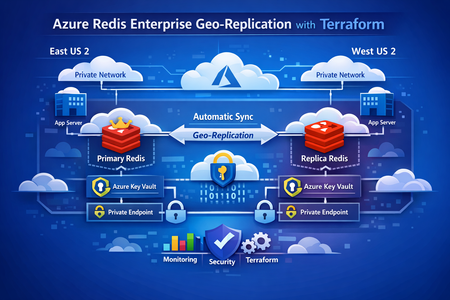
This post walks through a production‑proven pattern for running stateful services across Azure regions using Terraform. We’ll cover a primary–replica Redis architecture, regional isolation with Key Vault and networking, and a clean Terraform parameterization strategy that scales from development to production without duplication. Why Multi‑Region State Is Hard Running applications globally is easy when everything is stateless—if something fails, you redeploy. But stateful services tell a different story. Caches, message brokers, and data stores can’t be treated as disposable. They hold business‑critical data, and downtime or inconsistency quickly becomes customer‑visible. In real‑world systems, common requirements include: Low‑latency reads from multiple regions Automatic recovery when a region becomes unavailable Predictable data consistency Repeatable infrastructure from dev through production Manually configuring this per region doesn’t scale. Drift sets in. Failover is unclear. Backups get forgotten. That’s where Terraform + Azure Managed Redis geo‑replication shines. Github Link : https://github.com/vsakash5/Managed-redis.git High‑Level Architecture We use a primary–replica Redis Enterprise model: Primary Redis Single write endpoint Highly available inside its region Source of truth Replica Redis Read‑only Asynchronously synced from primary Can be promoted during disaster recovery Each region is fully isolated: Separate subnets Separate Key Vaults Private Endpoints only (no public exposure) This prevents shared failure domains and allows each region to operate independently if needed. The Terraform Design Principle Instead of maintaining separate Terraform stacks per region, the key idea is: One reusable module, one tfvars file per environment, multiple regions inside it. The module is written once. Regional differences are supplied via parameter suffixes like: _replica _secondary _tertiary This keeps logic centralized and environments consistent. Core Parameter Layers 1. Environment Identity (Shared) Terraform environment = "dev" # dev | staging | prod context_prefix = "app" Show more lines These values are reused everywhere—names, tags, and identifiers. 2. Primary Region Terraform location = "eastus2" resource_group_name = "rg-app-dev-primary" Show more lines 3. Replica Region Terraform location_replica = "uksouth" resource_group_name_replica = "rg-app-dev-replica" The symmetry is intentional. Terraform can now apply the same module twice without branching logic. Regional Isolation: Networking and Secrets Why isolation matters Geo‑replication copies data, not dependencies. If both Redis instances depend on: the same subnet the same Key Vault then a failure in one region can cascade into the other. Networking (One Subnet per Region) Benefits: Independent NSGs Independent routing Independent capacity planning Key Vault (One per Region) Why this matters: Redis credentials are not replicated Each region stores its own secrets A Key Vault outage doesn’t take both regions down Redis Configuration Primary Redis (Writes Enabled) The geo‑replication group name must match. That’s the logical binding Azure uses to link instances. Private Endpoint‑Only Access No Redis instance is exposed publicly. Each region uses: A private endpoint A workload subnet Internal DNS resolution This means: No public IPs No inbound attack surface Traffic stays on the Azure backbone Linking Primary and Replica Terraform explicitly defines the relationship: Terraform managed_redis_geo_replication_config = { primary_to_replica = { primary_redis_key = "primary" replica_keys = ["replica"] } } Terraform ensures: Primary is created first Replica is deployed second Geo‑replication is established last Environment Scaling: Dev → Staging → Prod The infrastructure pattern never changes. Only values do. Environment Group Name Dev dev-grp Staging stg-grp Prod prod-grp This is how you avoid “snowflake” environments. Disaster Recovery Strategy If the primary region fails: Applications fail over to the replica read endpoint Terraform configuration is updated to: Remove geo‑replication Promote replica config to primary Traffic is fully restored Once the original region recovers, roles can be re‑established cleanly. No click‑ops. No guesswork. Key Lessons Learned 1. Naming is Infrastructure Predictable names enable automation, discovery, and auditing. 2. Key Vault Isolation Beats Availability A shared Key Vault is a shared outage. 3. Parameterization Beats Copy‑Paste Fix once → benefit everywhere. 4. Geo‑Replication Is a Contract Matching replication group names is non‑negotiable. 5. The tfvars File Is the Source of Truth If it’s not in Terraform, it’s not real. Final Thoughts Running stateful services in multiple regions doesn’t require magic— it requires discipline: Isolate aggressively Parameterize consistently Automate everything Test failure often With this approach, adding a new region becomes configuration—not redesign. That’s how infrastructure scales.228Views1like0CommentsEnterprise UAMI Design in Azure: Trust Boundaries and Blast Radius
As organizations move toward secretless authentication models in Azure, Managed Identity has become the preferred approach for enabling secure communication between services. User Assigned Managed Identity (UAMI) in particular offers flexibility that allows identity reuse across multiple compute resources such as: Azure App Service Azure Function Apps Virtual Machines Azure Kubernetes Service While this flexibility is beneficial from an operational perspective, it also introduces architectural considerations that are often overlooked during initial implementation. In enterprise environments where shared infrastructure patterns are common, the way UAMI is designed and assigned can directly influence the effective trust boundary of the deployment. Understanding Identity Scope in Azure Unlike System Assigned Managed Identity, a UAMI exists independently of the compute resource lifecycle and can be attached to multiple services across: Resource Groups Subscriptions Environments This capability allows a single identity to be reused across development, testing, or production services when required. However, identity reuse across multiple logical environments can expand the operational trust boundary of that identity. Any permission granted to the identity is implicitly inherited by all services to which the identity is attached. From an architectural standpoint, this creates a shared authentication surface across isolated deployment environments. High-Level Architecture: Shared Identity Pattern In many enterprise Azure deployments, it is common to observe patterns where: A single UAMI is assigned to multiple App Services The same identity is reused across automation workloads Identities are provisioned centrally and attached dynamically While this simplifies management and avoids identity sprawl, it may also introduce unintended privilege propagation across services. For example: In this architecture: Multiple App Services across environments share the same managed identity. Each compute instance requests an access token from Microsoft Entra ID using Azure Instance Metadata Service (IMDS). The issued token is then used to authenticate against downstream platform services such as: Azure SQL Database Azure Key Vault Azure Storage Because RBAC permissions are assigned to the shared identity rather than the compute instance itself, the effective authentication boundary becomes identity‑scoped instead of environment‑scoped. As a result, any compromised lower‑tier environment such as DEV may obtain an access token capable of accessing production‑level resources if those permissions are assigned to the shared identity. This expands the operational trust boundary across environments and increases the potential blast radius in the event of identity misuse. Blast Radius Considerations Blast radius refers to the potential impact scope of a security or configuration compromise. When a shared UAMI is used across multiple services, the following conditions may increase the blast radius: Design Pattern Potential Risk Single UAMI across environments Cross‑environment access Subscription‑wide RBAC assignment Broad privilege scope Identity used for automation pipelines Lateral movement Shared identity across teams Ownership ambiguity Because Managed Identity authentication relies on Azure Instance Metadata Service (IMDS), any compromised compute resource with access to IMDS may request an access token using the attached identity. This token can then be used to authenticate with downstream Azure services for which the identity has RBAC permissions. Enterprise Design Recommendations: Environment‑Isolated Identity Model To reduce identity blast radius in enterprise deployments, the following architectural principles may be considered: Environment‑Scoped Identity Provision separate UAMIs per environment: UAMI‑DEV UAMI‑UAT UAMI‑PROD Avoid reusing the same identity across isolated lifecycle stages. Resource‑Level RBAC Assignment Prefer assigning RBAC permissions at: Resource Resource Group instead of Subscription scope wherever feasible. Identity Ownership Model Ensure ownership clarity for identities assigned across shared workloads. Identity lifecycle should be aligned with: Application ownership Service ownership Deployment boundary Least Privilege Assignment Assign roles such as: Key Vault Secrets User Storage Blob Data Reader instead of broader roles such as: Contributor Owner Recommended High‑Level Architecture In this architecture: Each App Service instance is attached to an environment‑specific managed identity. RBAC assignments are scoped at the resource or resource group level. Microsoft Entra ID issues tokens independently for each identity. Trust boundaries remain aligned with deployment environments. A compromised DEV compute instance can only obtain a token associated with UAMI‑DEV. Because UAMI‑DEV does not have RBAC permissions for production resources, lateral access to PROD dependencies is prevented. Blast Radius Containment: This design significantly reduces the potential blast radius by ensuring that: Identity compromise remains environment‑scoped. Token issuance does not grant unintended cross‑environment privileges. RBAC permissions align with application ownership boundaries. Authentication trust boundaries match deployment lifecycle boundaries. Conclusion User Assigned Managed Identity offers significant advantages for secretless authentication in Azure environments. However, architectural considerations related to identity reuse and scope of assignment must be evaluated carefully in enterprise deployments. By aligning identity design with trust boundaries and minimizing the blast radius through scoped RBAC and environment isolation, organizations can implement Managed Identity in a way that balances operational efficiency with security governance.409Views1like0Comments
Private DNS and Hub–Spoke Networking for Enterprise AI Workloads on Azure
Introduction As organizations deploy enterprise AI platforms on Azure, security requirements increasingly drive the adoption of private-first architectures. Private networking only Centralized firewalls or NVAs Hub–and–spoke virtual network architectures Private Endpoints for all PaaS services While these patterns are well understood individually, their interaction often exposes hidden failure modes, particularly around DNS and name resolution. During a recent production deployment of a private, enterprise-grade AI workload on Azure, several issues surfaced that initially appeared to be platform or service instability. Closer analysis revealed the real cause: gaps in network and DNS design. This post shares a real-world technical walkthrough of the problem, root causes, resolution steps, and key lessons that now form a reusable blueprint for running AI workloads reliably in private Azure environments. Problem Statement The platform was deployed with the following characteristics: Hub and spoke network topology Custom DNS servers running in the hub Firewall / NVA enforcing strict egress controls AI, data, and platform services exposed through Private Endpoints Azure Container Apps using internal load balancer mode Centralized monitoring, secrets, and identity services Despite successful infrastructure deployment, the environment exhibited non-deterministic production issues, including: Container Apps intermittently failing to start or scale AI platform endpoints becoming unreachable from workload subnets Authentication and secret access failures DNS resolution working in some environments but failing in others Terraform deployments stalling or failing unexpectedly Because the symptoms varied across subnets and environments, root cause identification was initially non-trivial. Root Cause Analysis After end-to-end isolation, the issue was not AI services, authentication, or application logic. The core problem was DNS resolution in a private Azure environment. 1. Custom DNS servers were not Azure-aware The hub DNS servers correctly resolved: Corporate domains On‑premises records However, they could not resolve Azure platform names or Private Endpoint FQDNs by default. Azure relies on an internal recursive resolver (168.63.129.16) that must be explicitly integrated when using custom DNS. 2. Missing conditional forwarders for private DNS zones Many Azure services depend on service-specific private DNS zones, such as: privatelink.cognitiveservices.azure.com privatelink.openai.azure.com privatelink.vaultcore.azure.net privatelink.search.windows.net privatelink.blob.core.windows.net Without conditional forwarders pointing to Azure’s internal DNS, queries either: Failed silently, or Resolved to public endpoints that were blocked by firewall rules 3. Container Apps internal DNS requirements were overlooked When Azure Container Apps are deployed with: internal_load_balancer_enabled = true Azure does not automatically create supporting DNS records. The environment generates: A default domain .internal subdomains for internal FQDNs Without explicitly creating: A private DNS zone matching the default domain *, @, and *.internal wildcard records internal service-to-service communication fails. 4. Private DNS zones were not consistently linked Even when DNS zones existed, they were: Spread across multiple subscriptions Linked to some VNets but not others Missing links to DNS server VNets or shared services VNets As a result, name resolution succeeded in one subnet and failed in another, depending on the lookup path. Resolution No application changes were required. Stability was achieved entirely through architectural corrections. ✅ Step 1: Make custom DNS Azure-aware On all custom DNS servers (or NVAs acting as DNS proxies): Configure conditional forwarders for all Azure private DNS zones Forward those queries to: 168.63.129.16 This IP is Azure’s internal recursive resolver and is mandatory for Private Endpoint resolution. ✅ Step 2: Centralize and link private DNS zones A centralized private DNS model was adopted: All private DNS zones hosted in a shared subscription Linked to: Hub VNet All spoke VNets DNS server VNet Any operational or virtual desktop VNets This ensured consistent resolution regardless of workload location. ✅ Step 3: Explicitly handle Container Apps DNS For Container Apps using internal ingress: Create a private DNS zone matching the environment’s default domain Add: * wildcard record @ apex record *.internal wildcard record Point all records to the Container Apps Environment static IP Add a conditional forwarder for the default domain if using custom DNS This step alone resolved multiple internal connectivity issues. ✅ Step 4: Align routing, NSGs, and service tags Firewall, NSG, and route table rules were aligned to: Allow DNS traffic (TCP/UDP 53) Allow Azure service tags such as: AzureCloud CognitiveServices AzureActiveDirectory Storage AzureMonitor Ensure certain subnets (e.g., Container Apps, Application Gateway) retained direct internet access where required by Azure platform services Key Learnings 1. DNS is a Tier‑0 dependency for AI platforms Many AI “service issues” are DNS failures in disguise. DNS must be treated as foundational platform infrastructure. 2. Private Endpoints require Azure DNS integration If you use: Custom DNS ✅ Private Endpoints ✅ Then forwarding to 168.63.129.16 is non‑negotiable. 3. Container Apps internal ingress has hidden DNS requirements Internal Container Apps environments will not function correctly without manually created DNS zones and .internal records. 4. Centralized DNS prevents environment drift Decentralized or subscription-local DNS zones lead to fragile, inconsistent environments. Centralization improves reliability and operability. 5. Validate networking first, then the platform Before escalating issues to service teams: Validate DNS resolution Verify routing Check Private Endpoint connectivity In many cases, the perceived “platform issue” disappears. Quick Production Validation Checklist Before go-live, always validate: ✅ Private FQDNs resolve to private IPs from all required VNets ✅ UDR/NSG rules allow required Azure service traffic ✅ Managed identities can access all dependent resources ✅ AI portal user workflows succeed (evaluations, agents, etc.) ✅ terraform plan shows only intended changes Conclusion Running private, enterprise-grade AI workloads on Azure is absolutely achievable—but it requires intentional DNS and networking design. By: Making custom DNS Azure-aware Centralizing private DNS zones Explicitly handling Container Apps DNS Aligning routing and firewall rules an unstable environment was transformed into a repeatable, production-ready platform pattern. If you are building AI solutions on Azure with Private Endpoints and hub–spoke networking, getting DNS right early will save weeks of troubleshooting later.982Views2likes0Comments
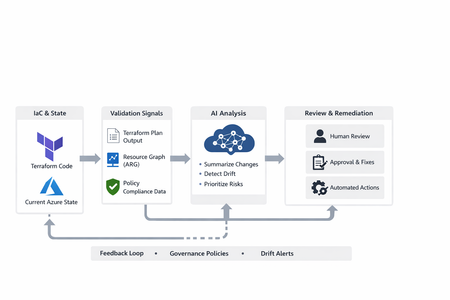
AI‑Assisted Azure Infrastructure Validation and Drift Detection
Why Traditional Drift Detection Isn’t Enough Most teams already rely on: Terraform plan reviews Azure Policy compliance dashboards Azure Resource Graph queries Manual scripts and audits The problem isn’t missing data—it’s interpretation at scale. Validation outputs are: Verbose and noisy Spread across multiple tools Difficult to prioritize Dependent on human context This is where AI as an assistive layer adds value. Where AI Fits (And Where It Does Not) AI should not: Auto‑approve infrastructure changes Apply remediation directly Replace Terraform, Policy, or RBAC AI should: Summarize large outputs Highlight risky or unexpected changes Detect drift patterns Assist human decision‑making The goal is decision support, not autonomous enforcement. Shift‑Left Terraform: Catch Issues Early AI‑assisted validation works best when combined with shift‑left practices—detecting problems before infrastructure is deployed. Shift‑left moves failure detection: From production → pipelines From pipelines → pull requests From pull requests → developer machines Step‑by‑Step: Shift‑Left Terraform Lifecycle Code Commit ↓ Local Validation ↓ Static Analysis & Security ↓ Terraform Plan Review ↓ Drift Gate ↓ Approval ↓ Apply Step 1: Local Terraform Validation Start at the developer workstation. terraform init terraform validate Step 2: PR‑Level Static Validation Run automated checks on pull requests: terraform fmt Linting (TFLint) IaC security scanning (tfsec, Checkov, etc.) This enforces standards before merge—and reduces review friction. Step 3: Generate a Deterministic Terraform Plan Separate planning from execution. terraform plan -out=tfplan This gives full visibility with zero impact to Azure. Step 4: AI‑Assisted Terraform Plan Review Large Terraform plans are accurate—but exhausting to review. GitHub Copilot can summarize the impact. Example Copilot prompt: Summarize this Terraform plan: 1) Security, network, or identity-impacting changes 2) Potential downtime risks 3) Unexpected changes outside standard modules Provide a concise approval-ready summary. Step 5: Drift‑Only Detection Gate (Critical Shift‑Left Control) Before applying changes, confirm Terraform state still matches Azure. terraform plan -refresh-only -detailed-exitcode Exit codes: 0 → No drift 2 → Drift detected 1 → Error This gate catches: Manual Portal edits Emergency fixes not back‑ported to IaC External automation interference Step 6: Human Approval (Governance Intact) Shift‑left doesn’t remove humans. Approvals validate: Terraform plan Drift results AI summaries Policy implications This keeps governance strong without slowing delivery. Step 7: Apply Exactly What Was Reviewed terraform apply tfplan No re‑calculation. No surprises. No uncontrolled changes. Azure Resource Graph: Drift in the Real World Terraform shows intended state. Azure Resource Graph shows actual state at scale. Who Changed What? (Change Analysis) resourcechanges | extend changeTime = todatetime(properties.changeAttributes.timestamp) | extend targetResourceId = tostring(properties.targetResourceId) | extend changeType = tostring(properties.changeType) | extend changedBy = tostring(properties.changeAttributes.changedBy) | extend clientType = tostring(properties.changeAttributes.clientType) | extend operation = tostring(properties.changeAttributes.operation) | where changeTime > ago(7d) | project changeTime, targetResourceId, changeType, changedBy, clientType, operation | sort by changeTime desc This reveals: Portal vs automation changes Actor identity Operation type AI can then flag suspicious patterns instead of manual scanning. Detecting Tag Drift ResourceContainers | where type =~ 'microsoft.resources/subscriptions/resourcegroups' | where isnull(tags['Owner']) or isempty(tostring(tags['Owner'])) | project subscriptionId, resourceGroup=name, location, tags Tag drift is often the earliest sign of governance decay. Azure Policy: From Compliance to Action Azure Policy tells you what’s non‑compliant—but not what to fix first. PolicyResources | where type =~ 'Microsoft.PolicyInsights/PolicyStates' | extend complianceState = tostring(properties.complianceState) | extend policyAssignmentName = tostring(properties.policyAssignmentName) | summarize count() by policyAssignmentName, complianceState AI helps here by grouping violations, ranking risk, and suggesting remediation paths. A Reusable Azure Infrastructure Prompt Library Instead of ad‑hoc prompting, teams can standardize infra‑specific Copilot prompts. Terraform Plan Review Summarize this Terraform plan: - High-risk changes - Downtime risks - Unexpected modifications Drift Interpretation Analyze this terraform plan -refresh-only output. Explain drift cause and recommend revert, backport, or accept. Resource Graph Drift Triage Group these Azure resource changes by actor and clientType. Highlight suspicious patterns and suggest guardrails. Policy Compliance Prioritization Group policy violations by root cause. Rank by risk and suggest remediation approaches. Key Takeaways Drift is inevitable; unmanaged drift is optional Shift‑left Terraform reduces risk before Azure is touched AI excels at analysis, not enforcement Terraform, KQL, Policy, and AI work best together Governance becomes clearer—not weaker AI doesn’t replace infrastructure engineers. It helps them think faster and safer—earlier.790Views0likes0CommentsGuardrails for Generative AI: Securing Developer Workflows
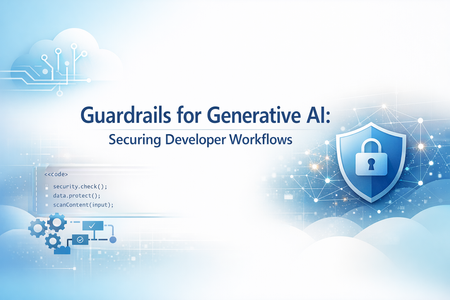
Generative AI is revolutionizing software development that accelerates delivery but introduces compliance and security risks if unchecked. Tools like GitHub Copilot empower developers to write code faster, automate repetitive tasks, and even generate tests and documentation. But speed without safeguards introduces risk. Unchecked AI‑assisted development can lead to security vulnerabilities, data leakage, compliance violations, and ethical concerns. In regulated or enterprise environments, this risk multiplies rapidly as AI scales across teams. The solution? Guardrails—a structured approach to ensure AI-assisted development remains secure, responsible, and enterprise-ready. In this blog, we explore how to embed responsible AI guardrails directly into developer workflows using: Azure AI Content Safety GitHub Copilot enterprise controls Copilot Studio governance Azure AI Foundry CI/CD and ALM integration The goal: maximize developer productivity without compromising trust, security, or compliance. Key Points: Why Guardrails Matter: AI-generated code may include insecure patterns or violate organizational policies. Azure AI Content Safety: Provides APIs to detect harmful or sensitive content in prompts and outputs, ensuring compliance with ethical and legal standards. Copilot Studio Governance: Enables environment strategies, Data Loss Prevention (DLP), and role-based access to control how AI agents interact with enterprise data. Azure AI Foundry: Acts as the control plane for Generative AI turning Responsible AI from policy into operational reality. Integration with GitHub Workflows: Guardrails can be enforced in IDE, Copilot Chat, and CI/CD pipelines using GitHub Actions for automated checks. Outcome: Developers maintain productivity while ensuring secure, compliant, and auditable AI-assisted development. Why Guardrails Are Non-Negotiable AI‑generated code and prompts can unintentionally introduce: Security flaws — injection vulnerabilities, unsafe defaults, insecure patterns Compliance risks — exposure of PII, secrets, or regulated data Policy violations — copyrighted content, restricted logic, or non‑compliant libraries Harmful or biased outputs — especially in user‑facing or regulated scenarios Without guardrails, organizations risk shipping insecure code, violating governance policies, and losing customer trust. Guardrails enable teams to move fast—without breaking trust. The Three Pillars of AI Guardrails Enterprise‑grade AI guardrails operate across three core layers of the developer experience. These pillars are centrally governed and enforced through Azure AI Foundry, which provides lifecycle, evaluation, and observability controls across all three. 1. GitHub Copilot Controls (Developer‑First Safety) GitHub Copilot goes beyond autocomplete and includes built‑in safety mechanisms designed for enterprise use: Duplicate Detection: Filters code that closely matches public repositories. Custom Instructions: Enhance coding standards via .github/copilot-instructions.md. Copilot Chat: Provides contextual help for debugging and secure coding practices. Pro Tip: Use Copilot Enterprise controls to enforce consistent policies across repositories and teams. 2. Azure AI Content Safety (Prompt & Output Protection) This service adds a critical protection layer across prompts and AI outputs: Prompt Injection Detection: Blocks malicious attempts to override instructions or manipulate model behaviour. Groundedness Checks: Ensures outputs align with trusted sources and expected context. Protected Material Detection: Flags copyrighted or sensitive content. Custom Categories: Tailor filters for industry-specific or regulatory requirements. Example: A financial services app can block outputs containing PII or regulatory violations using custom safety categories. 3. Copilot Studio Governance (Enterprise‑Scale Control) For organizations building custom copilots, governance is non‑negotiable. Copilot Studio enables: Data Loss Prevention (DLP): Prevent sensitive data leaks from flowing through risky connectors or channels. Role-Based Access (RBAC): Control who can create, test, approve, deploy and publish copilots. Environment Strategy: Separate dev, test, and production environments. Testing Kits: Validate prompts, responses, and behavior before production rollout. Why it matters: Governance ensures copilots scale safely across teams and geographies without compromising compliance. Azure AI Foundry: The Platform That Operationalizes the Three Pillars While the three pillars define where guardrails are applied, Azure AI Foundry defines how they are governed, evaluated, and enforced at scale. Azure AI Foundry acts as the control plane for Generative AI—turning Responsible AI from policy into operational reality. What Azure AI Foundry Adds Centralized Guardrail Enforcement: Define guardrails once and apply them consistently across: Models, Agents, Tool calls and Outputs. Guardrails specify: Risk types (PII, prompt injection, protected material) Intervention points (input, tool call, tool response, output) Enforcement actions (annotate or block) Built‑In Evaluation & Red‑Teaming: Azure AI Foundry embeds continuous evaluation into the GenAIOps lifecycle: Pre‑deployment testing for safety, groundedness, and task adherence Adversarial testing to detect jailbreaks and misuse Post‑deployment monitoring using built‑in and custom evaluators Guardrails are measured and validated, not assumed. Observability & Auditability: Foundry integrates with Azure Monitor and Application Insights to provide: Token usage and cost visibility Latency and error tracking Safety and quality signals Trace‑level debugging for agent actions Every interaction is logged, traceable, and auditable—supporting compliance reviews and incident investigations. Identity‑First Security for AI Agents: Each AI agent operates as a first‑class identity backed by Microsoft Entra ID: No secrets embedded in prompts or code Least‑privilege access via Azure RBAC Full auditability and revocation Policy‑Driven Platform Governance: Azure AI Foundry aligns with the Azure Cloud Adoption Framework, enabling: Azure Policy enforcement for approved models and regions Cost and quota controls Integration with Microsoft Purview for compliance tracking How to Implement Guardrails in Developer Workflows Shift-Left Security Embed guardrails directly into the IDE using GitHub Copilot and Azure AI Content Safety APIs—catch issues early, when they’re cheapest to fix. Automate Compliance in CI/CD Integrate automated checks into GitHub Actions to enforce policies at pull‑request and build stages. Monitor Continuously Use Azure AI Foundry and governance dashboards to track usage, violations, and policy drift. Educate Developers Conduct readiness sessions and share best practices so developers understand why guardrails exist—not just how they’re enforced. Implementing DLP Policies in Copilot Studio Access Power Platform Admin Center Navigate to Power Platform Admin Centre Ensure you have Tenant Admin or Environment Admin role Create a DLP Policy Go to Data Policies → New Policy. Define data groups: Business (trusted connectors) Non-business Blocked (e.g., HTTP, social channels) Configure Enforcement for Copilot Studio Enable DLP enforcement for copilots using PowerShell Set-PowerVirtualAgentsDlpEnforcement ` -TenantId <tenant-id> ` -Mode Enabled Modes: Disabled (default, no enforcement) SoftEnabled (blocks updates) Enabled (full enforcement) Apply Policy to Environments Choose scope: All environments, specific environments, or exclude certain environments. Block channels (e.g., Direct Line, Teams, Omnichannel) and connectors that pose risk. Validate & Monitor Use Microsoft Purview audit logs for compliance tracking. Configure user-friendly DLP error messages with admin contact and “Learn More” links for makers. Implementing ALM Workflows in Copilot Studio Environment Strategy Use Managed Environments for structured development. Separate Dev, Test, and Prod clearly. Assign roles for makers and approvers. Application Lifecycle Management (ALM) Configure solution-aware agents for packaging and deployment. Use Power Platform pipelines for automated movement across environments. Govern Publishing Require admin approval before publishing copilots to organizational catalog. Enforce role-based access and connector governance. Integrate Compliance Controls Apply Microsoft Purview sensitivity labels and enforce retention policies. Monitor telemetry and usage analytics for policy alignment. Key Takeaways Guardrails are essential for safe, compliant AI‑assisted development. Combine GitHub Copilot productivity with Azure AI Content Safety for robust protection. Govern agents and data using Copilot Studio. Azure AI Foundry operationalizes Responsible AI across the full GenAIOps lifecycle. Responsible AI is not a blocker—it’s an enabler of scale, trust, and long‑term innovation.2.4KViews0likes0CommentsProactive Resiliency in Azure for Specialized Workload i.e. Citrix VDI on Azure Design Framework.
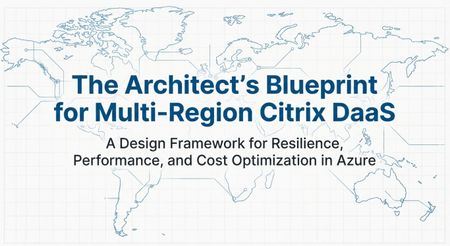
In this post, I’ll share my perspective on designing cloud architectures for near-zero downtime. We’ll explore how adopting multi-region strategies and other best practices can dramatically improve reliability. The discussion will be technically and architecturally driven covering key decisions around network architecture, data replication, user experience continuity, and cost management but also touch on the business angle of why this matters. The goal is to inform and inspire you to strengthen your own systems, and guide you toward concrete actions such as engaging with Microsoft Cloud Solution Architects (CSAs), submitting workloads for resiliency reviews, and embracing multi-region design patterns. Resilience as a Shared Responsibility One fundamental truth in cloud architecture is that ensuring uptime is a shared responsibility between the cloud provider and you, the customer. Microsoft is responsible for the reliability of the cloud in other words, we build and operate Azure’s core infrastructure to be highly available. This includes the physical datacenters, network backbone, power/cooling, and built-in platform features for redundancy. We also provide a rich toolkit of resiliency features (think availability sets, Availability Zones, geo-redundant storage, service failover capabilities, backup services, etc.) that you can leverage to increase the reliability of your workloads. However, the reliability in the cloud of your specific applications and data is up to you. You control your application architecture, deployment topology, data replication, and failover strategies. If you run everything in a single region with no backups or fallbacks, even Azure’s rock-solid foundation can’t save you from an outage. On the other hand, if you architect smartly (using multiple regions, zones, and Azure resiliency features properly), you can achieve end-to-end high availability even through major platform incidents. In short: Microsoft ensures the cloud itself is resilient, but you must design resilience into your workload. It’s a true partnership one where both sides play a critical role in delivering robust, continuous services to end-users. I emphasize this because it sets the mindset: proactive resiliency is something we do with our customers. As you’ll see, Microsoft has programs and people (like CSAs) dedicated to helping you succeed in this shared model. Six Layers of Resilient Cloud Architecture for Citrix VDI workloads To systematically approach multi-region resiliency, it helps to break the problem down into layers. In my work, I arrived at a six-layer decision framework for designing resilient architectures. This was originally developed for a global Citrix DaaS deployment on Azure (hence some VDI flavor in the examples), but the principles apply broadly to cloud solutions. The layers ensure we cover everything from the ground-up network connectivity to the operational model for failover. 1. Network Fabric (the global backbone) Establish high-performance, low-latency links between regions. Preferred: Use Global VNet Peering for simplified any-to-any connectivity with minimal latency over Microsoft’s backbone (ideal for point-to-point replication traffic), rather than a more complex Azure Virtual WAN unless your topology demands it. 2. Storage Foundation (the bedrock ) In any distributed computing environment, storage is the "heaviest" component. Moving compute (VDAs) is instantaneous; moving data (profiles, user layers) is governed by bandwidth and the speed of light. The success of a multi-region DaaS deployment hinges on the performance and synchronization of the underlying storage subsystem. Use storage that can handle cross-region workload needs, especially for user data or state. In case of Citrix Daas, preferred approach is Azure NetApp Files (ANF) for consistent sub-millisecond latency and high throughput. ANF provides enterprise-grade performance (critical during “login storms” or peak I/O) and features like Cool Access tiering to optimize cost, outperforming standard Azure Files for this scenario. 3. User Profile & State (solving data gravity) Enable active-active availability of user data or application state across regions. Solution: FSLogix Cloud Cache (in a VDI context) or similar distributed caching/replication tech, which allows simultaneous read/write of profile data in multiple regions. In our case, Cloud Cache insulates the user session from WAN latency by writing to a local cache and asynchronously replicating to the secondary region, overcoming the challenge of traditional file locking. The principle extends to databases or state stores: use geo-replication or distributed databases to avoid any single-region state. 4. Access & Ingress (the intelligent front door) Ensure users/customers connect to the right region and can fail over seamlessly. Preferred: Deploy a global traffic management solution under your control e.g. customer-managed NetScaler (Citrix ADC) with Global Server Load Balancing (GSLB) to direct users to the nearest available datacenter. In our design, NetScaler’s GSLB uses DNS-based geo-routing and supports Local Host Cache for Citrix, meaning even if the cloud control plane (Citrix Cloud) is unreachable, users can still connect to their desktop apps. The general point: use Azure Front Door, Traffic Manager, or third-party equivalents to steer traffic, and avoid any solution that introduces a new single point of failure in the authentication or gateway path. 5. Master Image (ensuring global consistency) : If you rely on VM images or similar artifacts, replicate them globally. Use: Azure Compute Gallery (ACG) to manage and distribute images across regions. In our case, we maintain a single “golden” image for virtual desktops: it’s built once, then the Compute Gallery replicates it from West Europe to East US (and any other region) automatically. This ensures that when we scale out or recover in Region B, we’re launching the exact same app versions and OS as Region A. Consistency here prevents failover from causing functionality regressions. 6. Operations & Cost (smart economics at scale) Run an efficient DR strategy you want readiness without paying 2x all the time. Approach: Warm Standby with autoscaling. That means the secondary region isn’t serving full traffic during normal operations (some resources can be scaled down or even deallocated), but it can scale up rapidly when needed. For our scenario, we leverage Citrix Autoscale to keep the DR site in a minimal state only a small buffer of machines is powered on, just enough to handle a sudden failover until load-based scaling brings up the rest. This “active/passive” model (or hot-warm rather than hot-hot) strikes a balance: you pay only for what you use, yet you can meet your RTO (Recovery Time Objective) because resources spin up automatically on trigger. In cloud-native terms, you might use Azure Automation or scale sets to similar effect. The key is to avoid having an idle full duplicate environment incurring full costs 24/7, while still being prepared. Each of these layers corresponds to critical architectural choices that determine your overall resiliency. Neglect any one layer, and that’s where Murphy’s Law will strike next. For example, you might perfectly replicate your data across regions, but if you forgot about network connectivity, a regional hub outage could still cut off access. Or you have every system duplicated, but if users can’t be rerouted to the backup region in time, the benefit is lost. The six-layer framework helps make sure we cover all bases. Notably, these design best practices align very closely with Azure’s Well-Architected Framework (especially the Reliability pillar), and they’re exactly the kind of prescriptive guidance we provide through programs like the Proactive Resiliency Initiative. In fact, the PRI playbook essentially prioritizes these same steps for customers: First, harden the network foundation e.g. ensure ExpressRoute gateways are zone-redundant and circuits are “multi-homed” in at least two locations (so no single datacenter failure breaks connectivity). Next, address in-region resiliency – make sure critical workloads are distributed across Availability Zones and not vulnerable to a single zone outage. (As an aside: Microsoft’s internal data shows a huge payoff here; when we configured our top Azure services for zonal resilience, we saw a 68% reduction in platform outages that lead to support incidents!) Then, enable multi-region continuity (BCDR) – for those tier-0 and tier-1 workloads, set up cross-regional failover so even a region-wide disruption won’t take you down. Multi-region is described as the complement to (not a substitute for) zonal design: it’s about surviving the “black swan” of a region-level event, and also about supporting geo-distributed users and future growth. In other words, if you follow the six-layer approach, you’re doing exactly what our structured resiliency programs recommend.482Views1like0CommentsMastering Azure Queries: Skip Token and Batching for Scale
Let's be honest. As a cloud engineer or DevOps professional managing a large Azure environment, running even a simple resource inventory query can feel like drinking from a firehose. You hit API limits, face slow performance, and struggle to get the complete picture of your estate—all because the data volume is overwhelming. But it doesn't have to be this way! This blog is your practical, hands-on guide to mastering two essential techniques for handling massive data volumes in Azure: using PowerShell and Azure Resource Graph (ARG): Skip Token (for full data retrieval) and Batching (for blazing-fast performance). 📋 TABLE OF CONTENTS 🚀 GETTING STARTED │ ├─ Prerequisites: PowerShell 7+ & Az.ResourceGraph Module └─ Introduction: Why Standard Queries Fail at Scale 📖 CORE CONCEPTS │ ├─ 📑 Skip Token: The Data Completeness Tool │ ├─ What is a Skip Token? │ ├─ The Bookmark Analogy │ ├─ PowerShell Implementation │ └─ 💻 Code Example: Pagination Loop │ └─ ⚡ Batching: The Performance Booster ├─ What is Batching? ├─ Performance Benefits ├─ Batching vs. Pagination ├─ Parallel Processing in PowerShell └─ 💻 Code Example: Concurrent Queries 🔍 DEEP DIVE │ ├─ Skip Token: Generic vs. Azure-Specific └─ Azure Resource Graph (ARG) at Scale ├─ ARG Overview ├─ Why ARG Needs These Techniques └─ 💻 Combined Example: Skip Token + Batching ✅ BEST PRACTICES │ ├─ When to Use Each Technique └─ Quick Reference Guide 📚 RESOURCES └─ Official Documentation & References Prerequisites Component Requirement / Details Command / Reference PowerShell Version The batching examples use ForEach-Object -Parallel, which requires PowerShell 7.0 or later. Check version: $PSVersionTable.PSVersion Install PowerShell 7+: Install PowerShell on Windows, Linux, and macOS Azure PowerShell Module Az.ResourceGraph module must be installed. Install module: Install-Module -Name Az.ResourceGraph -Scope CurrentUser Introduction: Why Standard Queries Don't Work at Scale When you query a service designed for big environments, like Azure Resource Graph, you face two limits: Result Limits (Pagination): APIs won't send you millions of records at once. They cap the result size (often 1,000 items) and stop. Efficiency Limits (Throttling): Sending a huge number of individual requests is slow and can cause the API to temporarily block you (throttling). Skip Token helps you solve the first limit by making sure you retrieve all results. Batching solves the second by grouping your requests to improve performance. Understanding Skip Token: The Continuation Pointer What is a Skip Token? A Skip Token (or continuation token) is a unique string value returned by an Azure API when a query result exceeds the maximum limit for a single response. Think of the Skip Token as a “bookmark” that tells Azure where your last page ended — so you can pick up exactly where you left off in the next API call. Instead of getting cut off after 1,000 records, the API gives you the first 1,000 results plus the Skip Token. You use this token in the next request to get the next page of data. This process is called pagination. Skip Token in Practice with PowerShell To get the complete dataset, you must use a loop that repeatedly calls the API, providing the token each time until the token is no longer returned. PowerShell Example: Using Skip Token to Loop Pages # Define the query $Query = "Resources | project name, type, location" $PageSize = 1000 $AllResults = @() $SkipToken = $null # Initialize the token Write-Host "Starting ARG query..." do { Write-Host "Fetching next page. (Token check: $($SkipToken -ne $null))" # 1. Execute the query, using the -SkipToken parameter $ResultPage = Search-AzGraph -Query $Query -First $PageSize -SkipToken $SkipToken # 2. Add the current page results to the main array $AllResults += $ResultPage # 3. Get the token for the next page, if it exists $SkipToken = $ResultPage.SkipToken Write-Host " -> Items in this page: $($ResultPage.Count). Total retrieved: $($AllResults.Count)" } while ($SkipToken -ne $null) # Loop as long as a Skip Token is returned Write-Host "Query finished. Total resources found: $($AllResults.Count)" This do-while loop is the reliable way to ensure you retrieve every item in a large result set. Understanding Batching: Grouping Requests What is Batching? Batching means taking several independent requests and combining them into a single API call. Instead of making N separate network requests for N pieces of data, you make one request containing all N sub-requests. Batching is primarily used for performance. It improves efficiency by: Reducing Overhead: Fewer separate network connections are needed. Lowering Throttling Risk: Fewer overall API calls are made, which helps you stay under rate limits. Feature Batching Pagination (Skip Token) Goal Improve efficiency/speed. Retrieve all data completely. Input Multiple different queries. Single query, continuing from a marker. Result One response with results for all grouped queries. Partial results with a token for the next step. Note: While Azure Resource Graph's REST API supports batch requests, the PowerShell Search-AzGraph cmdlet does not expose a -Batch parameter. Instead, we achieve batching by using PowerShell's ForEach-Object -Parallel (PowerShell 7+) to run multiple queries simultaneously. Batching in Practice with PowerShell Using parallel processing in PowerShell, you can efficiently execute multiple distinct Kusto queries targeting different scopes (like subscriptions) simultaneously. Method 5 Subscriptions 20 Subscriptions Sequential ~50 seconds ~200 seconds Parallel (ThrottleLimit 5) ~15 seconds ~45 seconds PowerShell Example: Running Multiple Queries in Parallel # Define multiple queries to run together $BatchQueries = @( @{ Query = "Resources | where type =~ 'Microsoft.Compute/virtualMachines'" Subscriptions = @("SUB_A") # Query 1 Scope }, @{ Query = "Resources | where type =~ 'Microsoft.Network/publicIPAddresses'" Subscriptions = @("SUB_B", "SUB_C") # Query 2 Scope } ) Write-Host "Executing batch of $($BatchQueries.Count) queries in parallel..." # Execute queries in parallel (true batching) $BatchResults = $BatchQueries | ForEach-Object -Parallel { $QueryConfig = $_ $Query = $QueryConfig.Query $Subs = $QueryConfig.Subscriptions Write-Host "[Batch Worker] Starting query: $($Query.Substring(0, [Math]::Min(50, $Query.Length)))..." -ForegroundColor Cyan $QueryResults = @() # Process each subscription in this query's scope foreach ($SubId in $Subs) { $SkipToken = $null do { $Params = @{ Query = $Query Subscription = $SubId First = 1000 } if ($SkipToken) { $Params['SkipToken'] = $SkipToken } $Result = Search-AzGraph @Params if ($Result) { $QueryResults += $Result } $SkipToken = $Result.SkipToken } while ($SkipToken) } Write-Host " [Batch Worker] ✅ Query completed - Retrieved $($QueryResults.Count) resources" -ForegroundColor Green # Return results with metadata [PSCustomObject]@{ Query = $Query Subscriptions = $Subs Data = $QueryResults Count = $QueryResults.Count } } -ThrottleLimit 5 Write-Host "`nBatch complete. Reviewing results..." # The results are returned in the same order as the input array $VMCount = $BatchResults[0].Data.Count $IPCount = $BatchResults[1].Data.Count Write-Host "Query 1 (VMs) returned: $VMCount results." Write-Host "Query 2 (IPs) returned: $IPCount results." # Optional: Display detailed results Write-Host "`n--- Detailed Results ---" for ($i = 0; $i -lt $BatchResults.Count; $i++) { $Result = $BatchResults[$i] Write-Host "`nQuery $($i + 1):" Write-Host " Query: $($Result.Query)" Write-Host " Subscriptions: $($Result.Subscriptions -join ', ')" Write-Host " Total Resources: $($Result.Count)" if ($Result.Data.Count -gt 0) { Write-Host " Sample (first 3):" $Result.Data | Select-Object -First 3 | Format-Table -AutoSize } } Azure Resource Graph (ARG) and Scale Azure Resource Graph (ARG) is a service built for querying resource properties quickly across a large number of Azure subscriptions using the Kusto Query Language (KQL). Because ARG is designed for large scale, it fully supports Skip Token and Batching: Skip Token: ARG automatically generates and returns the token when a query exceeds its result limit (e.g., 1,000 records). Batching: ARG's REST API provides a batch endpoint for sending up to ten queries in a single request. In PowerShell, we achieve similar performance benefits using ForEach-Object -Parallel to process multiple queries concurrently. Combined Example: Batching and Skip Token Together This script shows how to use Batching to start a query across multiple subscriptions and then use Skip Token within the loop to ensure every subscription's data is fully retrieved. $SubscriptionIDs = @("SUB_A") $KQLQuery = "Resources | project id, name, type, subscriptionId" Write-Host "Starting BATCHED query across $($SubscriptionIDs.Count) subscription(s)..." Write-Host "Using parallel processing for true batching...`n" # Process subscriptions in parallel (batching) $AllResults = $SubscriptionIDs | ForEach-Object -Parallel { $SubId = $_ $Query = $using:KQLQuery $SubResults = @() Write-Host "[Batch Worker] Processing Subscription: $SubId" -ForegroundColor Cyan $SkipToken = $null $PageCount = 0 do { $PageCount++ # Build parameters $Params = @{ Query = $Query Subscription = $SubId First = 1000 } if ($SkipToken) { $Params['SkipToken'] = $SkipToken } # Execute query $Result = Search-AzGraph @Params if ($Result) { $SubResults += $Result Write-Host " [Batch Worker] Sub: $SubId - Page $PageCount - Retrieved $($Result.Count) resources" -ForegroundColor Yellow } $SkipToken = $Result.SkipToken } while ($SkipToken) Write-Host " [Batch Worker] ✅ Completed $SubId - Total: $($SubResults.Count) resources" -ForegroundColor Green # Return results from this subscription $SubResults } -ThrottleLimit 5 # Process up to 5 subscriptions simultaneously Write-Host "`n--- Batch Processing Finished ---" Write-Host "Final total resource count: $($AllResults.Count)" # Optional: Display sample results if ($AllResults.Count -gt 0) { Write-Host "`nFirst 5 resources:" $AllResults | Select-Object -First 5 | Format-Table -AutoSize } Technique Use When... Common Mistake Actionable Advice Skip Token You must retrieve all data items, expecting more than 1,000 results. Forgetting to check for the token; you only get partial data. Always use a do-while loop to guarantee you get the complete set. Batching You need to run several separate queries (max 10 in ARG) efficiently. Putting too many queries in the batch, causing the request to fail. Group up to 10 logical queries or subscriptions into one fast request. By combining Skip Token for data completeness and Batching for efficiency, you can confidently query massive Azure estates without hitting limits or missing data. These two techniques — when used together — turn Azure Resource Graph from a “good tool” into a scalable discovery engine for your entire cloud footprint. Summary: Skip Token and Batching in Azure Resource Graph Goal: Efficiently query massive Azure environments using PowerShell and Azure Resource Graph (ARG). 1. Skip Token (The Data Completeness Tool) Concept What it Does Why it Matters PowerShell Use Skip Token A marker returned by Azure APIs when results hit the 1,000-item limit. It points to the next page of data. Ensures you retrieve all records, avoiding incomplete data (pagination). Use a do-while loop with the -SkipToken parameter in Search-AzGraph until the token is no longer returned. 2. Batching (The Performance Booster) Concept What it Does Why it Matters PowerShell Use Batching Processes multiple independent queries simultaneously using parallel execution. Drastically improves query speed by reducing overall execution time and helps avoid API throttling. Use ForEach-Object -Parallel (PowerShell 7+) with -ThrottleLimit to control concurrent queries. For PowerShell 5.1, use Start-Job with background jobs. 3. Best Practice: Combine Them For maximum efficiency, combine Batching and Skip Token. Use batching to run queries across multiple subscriptions simultaneously and use the Skip Token logic within the loop to ensure every single subscription's data is fully paginated and retrieved. Result: Fast, complete, and reliable data collection across your large Azure estate. AI/ML Use Cases Powered by ARG Optimizations: Machine Learning Pipelines: Cost forecasting and capacity planning models require historical resource data—SkipToken pagination enables efficient extraction of millions of records for training without hitting API limits. Scenario: Cost forecasting models predict next month's Azure spend by analyzing historical resource usage. For example, training a model to forecast VM costs requires pulling 12 months of resource data (CPU usage, memory, SKU changes) across all subscriptions. SkipToken pagination enables extracting millions of these records efficiently without hitting API limits—a single query might return 500K+ VM records that need to be fed into Azure ML for training. Anomaly Detection: Security teams use Azure ML to monitor suspicious configurations—parallel queries across subscriptions enable real-time threat detection with low latency. Scenario: Security teams deploy models to catch unusual activity, like someone suddenly creating 50 VMs in an unusual region or changing network security rules at 3 AM. Parallel queries across all subscriptions let these detections systems scan your entire Azure environment in seconds rather than minutes, enabling real-time alerts when threats emerge. RAG Systems: Converting resource metadata to embeddings for semantic search requires processing entire inventories—pagination and batching become mandatory for handling large-scale embedding generation. Scenario: Imagine asking "Which SQL databases are using premium storage but have low IOPS?" A RAG system converts all your Azure resources into searchable embeddings (vector representations), then uses AI to understand your question and find relevant resources semantically. Building this requires processing your entire Azure inventory—potentially lots of resources—where pagination and batching become mandatory to generate embeddings without overwhelming the OpenAI API. References: Azure Resource Graph documentation Search-AzGraph PowerShell reference854Views1like2Comments