chatgpt5.3
1 TopicProvePresent: Ending Proxy Attendance with Azure Serverless & Azure OpenAI
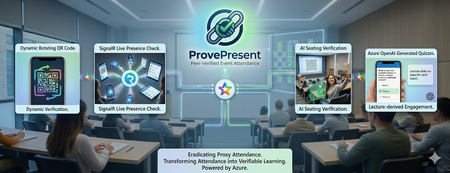
Problem Most schools use a smart‑card‑based attendance system where students tap their cards on a reader. However, this method is unreliable because students can give their cards to friends or simply tap and leave immediately. Teachers cannot accurately assess real student performance—whether high‑performing students are genuinely attending class or whether poor performance is due to actual absence. Another issue is that even if students are physically present in a lecture, teachers still cannot tell whether they are paying attention to the projector or actually learning. The current workaround is for teachers to override the attendance record by calling each student one by one, which is time‑consuming in large lectures and adds little educational value. It is also only a one‑time check, meaning students can still leave the lecture room immediately afterwards. Another issue is that we have many out‑of‑school activities such as site visit, and the school needs to ensure everyone’s presence promptly in each check point. This kind of problem isn’t unique to schools. It’s a common challenge for event organizers, where verifying attendee presence is essential but often slow, causing long queues. Organizers usually rely on a few mobile scanners to check in attendees one by one. Solution ProvePresent is an AI tool designed to verify attendance and create real‑time challenges for participants, ensuring that attendance records are authentic and that attendees remain focused on the presentation. It uses OTP login with school email. Check-in and Check-out With a Real‑time QR Code The code refreshes every 25 seconds, and the presenter can display it on the projector for everyone to scan when checking in at the beginning and checking out at the end of the session. However, this alone cannot prevent someone from capturing the code and sending it to others who are not in the room, or from using two devices to help someone else scan for attendance—even if geolocation checks are enabled. We will explain this next. This check‑in and check‑out process is highly scalable, and no one needs to queue while waiting for someone to scan their QR code! Organizers can set geolocation restrictions to prevent anyone from checking in remotely in a simple manner. Keep Attendee Alive with Signalr The SignalR live connection allows the presenter to create real‑time challenges for attendees, helping to verify their presence and ensure they are genuinely focused on the presentation. AI Powered Live Quiz The presenter shares their presentation screen, and two Microsoft Foundry agents with Azure OpenAI Chatgpt 5.3 —ImageAnalysisAgent, which extracts key information from the shared screen, and QuizQuestionGenerator, which generates simple questions based on the current slide—work together to create challenges. The question is broadcast to all online attendees, who must answer within 20 seconds. This feature keeps attendees on the webpage and prevents them from doing anything unrelated to the presentation. Detailed report can be downloaded for further analysis. Attendee Photo Capture Request all online students to capture and upload photos of their venue view. The system will analyze the images to estimate seating positions using Microsoft Foundry agents with Azure OpenAI ChatGPT 5.3 PositionEstimationAgent and complete an image challenge. When the presenter clicks Capture Attendee Photos, all online attendees are prompted to take a photo and upload it to blob storage. The PositionEstimationAgent then analyzes the image to estimate their seating location, which can provide insights into student performance. Analysis Notes: Analyzed 13 students in 2 overlapping batches. Batch 1: The venue is a computer lab with the projector screen at the front center, whiteboards on the left, and cabinets on the right. Relative depth was estimated mainly from screen size and number of monitor rows visible ahead. Column estimates were inferred from screen angle and side-room features, with lower confidence for the rotated side-view image. Batch 2: These six photos appear to come from the same computer lab with the projector at the front center. Relative depth was estimated mainly from projector size and number of visible desk/monitor rows ahead. Left-right placement was inferred from projector skew and side-wall visibility. Within this batch, 240124734 and 240167285 seem closest to the front, 240286514 and 240158424 are slightly farther back, 240293498 is farther back again, and 240160364 appears furthest. Pass around the QR code attendance sheet Traditionally, the attendance sheet is circulated for attendees to sign, but this method is unreliable because no one monitors the signing process, allowing one attendee to sign for someone who is absent. It is also slow and not scalable for large groups. The QR Code attendance sheet functions as a chain. The presenter randomly distributes a short‑lived, one‑time QR code—representing a virtual attendance sheet—to any number of attendees, just like handing out multiple physical sheets. Each attendee must find another participant to scan their code to record attendance, continuing the chain until the final group of attendees. The presenter then verifies the last group’s presence. The first chain is a dead chain because that student left the venue and cannot find another student to scan his QR code. The second chain contains 20 student attendance records. It also provides useful insights into their friendship and seating patterns. Architecture This project is built using Vibe Coding, so we will not share highly technical details in this post. If you'd like to learn more, leave a comment, and we will write another blog to cover the specifics. GitHub Repo https://github.com/wongcyrus/ProvePresent Conclusion ProvePresent demonstrates how Azure serverless technology and Azure OpenAI can work together to solve a long‑standing problem in education: verifying genuine student presence and engagement. By combining real‑time QR code verification, SignalR‑powered live interactions, AI‑generated quizzes, and intelligent photo‑based seating analysis, we created a system where “being present” is no longer just a checkbox—it becomes a verifiable, interactive, and meaningful part of the learning experience. Instead of relying on outdated smart‑card systems or manual roll calls, educators gain a dynamic tool that keeps students attentive, provides insight into classroom behavior, and produces useful analytics for improving teaching outcomes. Students, in turn, benefit from an engaging, modern attendance experience that aligns with how digital‑native learners expect classes to operate. This is only the beginning. With Microsoft Foundry agents and the flexibility of Azure Functions, there are many opportunities to extend ProvePresent further—richer analytics, smarter engagement models, and seamless integration with LMS platforms. If there’s interest, we’re happy to share more technical details, architectural deep dives, and future roadmap ideas in a follow‑up post. Thank you for the contribution of Microsoft Student Ambassadors Hong Kong Institute of Information Technology (HKIIT) Wong Wing Ho, CHAN Sham Jayson, Pang Ho Shum, and Chan Ka Chun. They are major in Higher Diploma in Cloud and Data Centre Administration. About the Author Cyrus Wong is the senior lecturer of Hong Kong Institute of Information Technology (HKIIT) @ IVE(Lee Wai Lee).and he focuses on teaching public Cloud technologies. He is a passionate advocate for the adoption of cloud technology across various media and events. With his extensive knowledge and expertise, he has earned prestigious recognitions such as AWS Builder Center, Microsoft MVP- Microsoft Foundry, and Google Developer Expert for Google Cloud Platform & AI.71Views0likes0Comments