cdc
10 TopicsPart 2: Safely Cleaning Orphaned Records in Change Tracking Side Tables
Applies to: Azure SQL Database (Change Tracking enabled) Recap (Part 1) In Part 1, we covered how to detect “orphaned” records in Change Tracking (CT) side tables — rows whose sys_change_xdes_id no longer has a matching transaction entry in the commit table (sys.syscommittab). This situation often leads to unexpected CT growth and “stuck cleanup” symptoms because the mapping data required for normal cleanup is missing. Part 1 link: Identifying Orphaned Records in Change Tracking Side Tables (Read‑Only Health Check) Why Part 2 is needed A common “root pattern” we see in the field is: Side-table cleanup attempts to delete expired metadata Some side-table deletions fail (locks/timeouts/errors) Commit-table cleanup proceeds anyway (or a custom workflow deletes from commit table without validating side-table deletes) Remaining side-table rows now reference xdes_id values that no longer exist in sys.syscommittab → orphans Microsoft Learn also emphasizes that syscommittab cleanup depends on side-table cleanup — commit-table cleanup should happen only after side tables are cleaned. This Part 2 script focuses on removing orphaned rows from side tables (and does not touch sys.syscommittab), so cleanup logic can stabilize again. Important prerequisites & constraints (read this first) 1) Internal table access on Azure SQL Database In Azure SQL Database, customers may not be able to access certain internal CT artifacts directly (even when attempting DAC-style workflows). In the related case discussions, internal testing noted that self‑service cleanup against internal tables can be infeasible. 2) CHECKPOINT note (why it’s in the script) sys.dm_tran_commit_table exposes commit-table data and is backed by sys.syscommittab. Microsoft Learn notes that read-only users may not see live changes until a CHECKPOINT occurs. That’s why your script includes the optional CHECKPOINT comment before reading commit-table state. 3) Supported guidance vs. custom remediation Microsoft Learn provides official troubleshooting/mitigation guidance for CT cleanup issues (including checking dbo.MSChange_tracking_history, assessing stale rows, and using sp_flush_commit_table_on_demand for commit-table cleanup). Your script is a targeted remediation pattern for a specific failure mode (orphaned side-table rows). Use it carefully, test first, and follow organizational approval processes. What this script does (high-level) T-SQL script is essentially Part 1 detection + optional targeted delete generation: Compute the “safe cleanup point” from CT retention (wall-clock → CSN) using sp_changetracking_time_to_csn — the same concept used in Part 1. Enumerate CT side tables via sys.internal_tables where internal_type = 209 (CT side tables). For each side table, identify candidate orphaned transaction IDs (sys_change_xdes_id) that: are older than a computed boundary (@minXdesId derived from sys.dm_tran_commit_table), and have no matching xdes_id in sys.syscommittab at/before the cleanup point Print orphan counts per side table using RAISERROR … WITH NOWAIT (operator-friendly, streaming output). Safety cross-check: abort if any “orphan” unexpectedly exists in sys.syscommittab (defensive sanity gate) Generate a DELETE statement for the current side table (execution is commented out) The script (Part 2) — “detect + generate delete” Below is T-SQL script. I kept the delete step disabled by default, so it remains safe to share. (You can enable execution only after approvals/testing.) -- use <[DBName]> -- switch to the right database -- run checkpoint first to ensure all in-memory commit table data is persisted to disk (syscommittab) -- checkpoint SET NOCOUNT ON -- find the invalid clean version based on configured retention DECLARE time DATETIME, @csn BIGINT = 0, @minCleanupPoint BIGINT = 0 DECLARE @retention_period INT, @retention_period_units NVARCHAR(10) SELECT @retention_period = retention_period, @retention_period_units = retention_period_units FROM sys.change_tracking_databases where database_id = DB_ID() SELECT time = CASE WHEN @retention_period_units = 1 then DATEADD(minute, (-1 * @retention_period), GETUTCDATE()) WHEN @retention_period_units = 2 then DATEADD(hour, (-1 * @retention_period), GETUTCDATE()) ELSE DATEADD(day, (-1 * @retention_period), GETUTCDATE()) END EXEC sp_changetracking_time_to_csn time = time, @csn = @csn OUTPUT SELECT @minCleanupPoint = @csn SELECT @minCleanupPoint as minCsn -- 688118 -- iterate over all the change tracking side tables DECLARE @sideTable SYSNAME; DECLARE ct_cursor CURSOR FAST_FORWARD FOR SELECT name FROM sys.internal_tables WHERE internal_type = 209; -- internal_type = 209 is for change tracking side tables OPEN ct_cursor; FETCH NEXT FROM ct_cursor INTO @sideTable; WHILE @@FETCH_STATUS = 0 BEGIN -- find the minimum expired xdes id declare @minXdesId BIGINT SELECT @minXdesId = min(xdes_id) FROM sys.dm_tran_commit_table where commit_ts <= @minCleanupPoint -- SELECT @minXdesId as minXdes -- create temp table for storing orphaned xdes id DROP TABLE IF EXISTS #OrphanedXdes; CREATE TABLE #OrphanedXdes ( sys_change_xdes_id BIGINT NOT NULL ); DECLARE @sql NVARCHAR(MAX); SET @sql = N' INSERT INTO #OrphanedXdes(sys_change_xdes_id) SELECT ct.sys_change_xdes_id FROM sys.' + QUOTENAME(@sideTable) + N' AS ct WHERE ct.sys_change_xdes_id < @minXdesId AND NOT EXISTS ( SELECT 1 FROM sys.syscommittab AS s WHERE s.xdes_id = ct.sys_change_xdes_id AND s.commit_ts <= @minCleanupPoint );'; EXEC sys.sp_executesql @sql, N'@minXdesId BIGINT, @minCleanupPoint BIGINT', @minXdesId = @minXdesId, @minCleanupPoint = @minCleanupPoint; DECLARE @orphanedIdsCount BIGINT; SET @sql = N' SELECT @cnt = COUNT_BIG(sys_change_xdes_id) FROM #OrphanedXdes; '; EXEC sys.sp_executesql @sql, N'@cnt BIGINT OUTPUT', @cnt = @orphanedIdsCount OUTPUT; -- Raise error if any orphaned xdes exists IF (@orphanedIdsCount > 0) BEGIN DECLARE @msg NVARCHAR(4000) = @sideTable + N' : ' + CONVERT(NVARCHAR(30), @orphanedIdsCount); RAISERROR (@msg, 16, 1) WITH NOWAIT; DECLARE @newLine NVARCHAR(10) = CHAR(13) + CHAR(10) PRINT (@newLine) END -- Cross-check that no xdes should exist in syscommittab -- !!!IMPORTANT!!! RAISE an error and stop the cleanup if it does SET @sql = N' DECLARE @nonMatchingXdesCount BIGINT; SELECT @nonMatchingXdesCount = COUNT_BIG(*) FROM #OrphanedXdes AS ct WHERE EXISTS ( SELECT 1 FROM sys.syscommittab AS s WHERE s.xdes_id = ct.sys_change_xdes_id ); -- SELECT @nonMatchingXdesCount as nonMatchingXdesCount IF (COALESCE(@nonMatchingXdesCount, 0) > 0) BEGIN TRY DECLARE @msg NVARCHAR(1024); SET @msg = N''Cleanup aborted: orphan cross-check failed for side table [' + @sideTable + N'].''; RAISERROR(@msg, 16, 1) WITH NOWAIT; RETURN; END TRY BEGIN CATCH THROW; END CATCH '; EXEC sys.sp_executesql @sql; IF (@orphanedIdsCount > 0) BEGIN -- Prepare the query to delete the orphaned rows from the side table SET @sql = N'DELETE ct FROM sys.' + @sideTable + N' ct WHERE EXISTS (SELECT 1 FROM #OrphanedXdes AS o WHERE o.sys_change_xdes_id = ct.sys_change_xdes_id);'; SELECT @sql -- validate the delete query is correctly generated -- Sample delete statement: DELETE ct FROM sys.change_tracking_1221579390 ct WHERE EXISTS (SELECT 1 FROM #OrphanedXdes AS o WHERE o.sys_change_xdes_id = ct.sys_change_xdes_id); -- NOTE: Uncomment the below query to execute the delete statement and remove the orphaned records -- EXEC sys.sp_executesql @sql; END DROP TABLE IF EXISTS #OrphanedXdes; FETCH NEXT FROM ct_cursor INTO @sideTable; END CLOSE ct_cursor; DEALLOCATE ct_cursor; SET NOCOUNT OFF Why the “cross-check abort” is a good idea Notice the safety gate: You first define orphans as those not existing in sys.syscommittab (for the cleanup horizon). Then you re-check: “If any of these appear in syscommittab, abort.” This prevents an accidental delete if: the cleanup horizon math is wrong, the environment has unexpected visibility differences, or the temp-table contents are not what you expect. That defensive posture aligns well with the general principle documented in Microsoft Learn: commit-table cleanup should only occur after side-table cleanup, and troubleshooting should be data-driven and cautious. How to interpret the output If you see no RAISERROR lines, the script did not find orphaned rows under the defined criteria. If you see: change_tracking_<id> : <count> that indicates <count> orphaned transaction references in that CT side table. This is the same style used in Part 1 for long-running, streaming progress. Next steps (recommended order) Confirm CT configuration (retention + AUTO_CLEANUP status) using official guidance. Run Part 1 / Part 2 detection to quantify scope (which side tables, how many). If you need to remediate: Prefer supported mitigations where possible (for example, disable/enable CT on a table to purge tracking metadata for that table is listed as a “quickest remedy” in Microsoft Learn for certain cleanup lock conflict scenarios). If table-level disable/enable isn’t acceptable, use an approval-driven approach for targeted cleanup. Closing Orphaned CT side-table records are one of those “silent growth” conditions that can be easy to miss until storage or CHANGETABLE performance becomes painful. Part 1 helps you spot the issue early; Part 2 helps you prepare a safe, targeted cleanup workflow — with explicit safety gates and a delete step that remains disabled by default. References Identifying Orphaned Records in Change Tracking Side Tables (Read‑Only Health Check) Troubleshoot change tracking auto cleanup issues sys.dm_tran_commit_table (Change Tracking)281Views0likes0CommentsCannot enable Change Data Capture (CDC) on Azure SQL Database: Msg 22830 + Error 40529 (SUSER_SNAME)
Issue While enabling CDC at the database level on Azure SQL Database using: EXEC sys.sp_cdc_enable_db; GO the operation fails. Error The customer observed the following failure when running sys.sp_cdc_enable_db: Msg 22830: Could not update the metadata that indicates the database is enabled for Change Data Capture. Failure occurred when executing drop user cdc Error 40529: "Built-in function 'SUSER_SNAME' in impersonation context is not supported in this version of SQL Server." What we checked (quick validation) Before applying any changes, we confirmed CDC wasn’t partially enabled and no CDC artifacts were created: -- Is CDC enabled for this database? SELECT name, is_cdc_enabled FROM sys.databases WHERE name = DB_NAME(); -- Does CDC schema exist? SELECT name FROM sys.schemas WHERE name = 'cdc'; -- Does CDC user exist? SELECT name FROM sys.database_principals WHERE name = 'cdc'; These checks were used during troubleshooting in the SR. (Also note: Microsoft Learn documents that enabling CDC creates the cdc schema/user and requires exclusive use of that schema/user.) Cause In this case, the failure aligned with a known Azure SQL Database CDC scenario: enabling CDC can fail if there is an active database-level trigger that calls SUSER_SNAME(). To identify active database-level triggers, we used: SELECT name, object_id FROM sys.triggers WHERE parent_class_desc = 'DATABASE' AND is_disabled = 0; Resolution / Workaround The customer resolved the issue by: Identifying the active database-level trigger. Disabling the trigger temporarily. Enabling CDC at the database level and then enabling CDC on the required tables. Re-enabling the trigger after CDC was successfully enabled. Post-resolution verification After enabling CDC, you can validate the state using: -- Confirm CDC enabled at DB level SELECT name, is_cdc_enabled FROM sys.databases WHERE name = DB_NAME(); And for table-level tracking, Microsoft Learn recommends checking the is_tracked_by_cdc column in sys.tables. Notes / Requirements To enable CDC for Azure SQL Database, db_owner is required. Azure SQL Database uses a CDC scheduler (instead of SQL Server Agent jobs) for capture/cleanup.256Views0likes0CommentsPerformance Tuning for CDC: Managing Replication Lag in Azure Database for PostgreSQL with Debezium
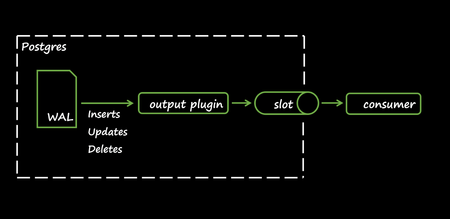
Written By: Shashikant Shakya, Ashutosh Bapat, and Guangnan Shi The Problem Picture this: your CDC pipeline is running smoothly, streaming changes from PostgreSQL to Kafka. Then, a bulk update hits millions of rows. Suddenly, Kafka queues pile up, downstream systems lag; dashboards go stale. Why does replication lag spike during heavy operations? And what can you do about it? Why This Matters Change Data Capture (CDC) powers real-time integrations, pushing row-level changes from OLTP systems into event streams, data lakes, caches, and microservices. Debezium is a leading open-source CDC engine for PostgreSQL, and many teams successfully run Debezium against Azure Database for PostgreSQL to keep downstream systems synchronized. However, during large DML operations (bulk updates, deletes) or schema changes (DDL), replication lag can occur because: Debezium consumes WAL slower than the database produces it Kafka throughput dips Consumers fall behind This article explains why lag happens, grounded in logical decoding internals, and shows how to diagnose it quickly and what to tune across the database, Azure, and connector layers to keep pipelines healthy under heavy load. CDC Basics CDC streams incremental changes (INSERT/UPDATE/DELETE) from your source database to downstream systems in near real-time. In PostgreSQL, CDC is typically implemented using logical decoding and logical replication: PostgreSQL records every change in the Write-Ahead Log (WAL) WALSender reads WAL and decodes it into change events The pgoutput extension formats those changes, while Debezium subscribes and publishes them to Kafka topics Benefits of CDC: Low latency Lower source overhead than periodic full extracts Preserves transactional ordering for consumers The Internals: Why Lag Happens Replication lag during heavy operations isn’t random, it’s rooted in how PostgreSQL handles logical decoding. To understand why, let’s look at the components that process changes and what happens when they hit resource limits. Logical Decoding & ReorderBuffer Logical decoding reconstructs transaction-level changes so they can be delivered in commit order. The core component enabling this is the ReorderBuffer. What ReorderBuffer does: Reads WAL and groups changes per transaction, keeping them in memory until commit If memory exceeds logical_decoding_work_mem , PostgreSQL spills decoded changes to disk in per-slot spill files On commit, it reads back spilled data and emits changes to the client (via pgoutput → Debezium) Disk Spill Mechanics (Deep Dive) When a transaction is too large for memory: PostgreSQL writes decoded changes to spill files under pg_replslot/<slot_name>/ Wait events like ReorderBufferWrite and ReorderBufferRead dominate during heavy load Spills to disk increase latency because disk I/O is far slower than memory access Analogy: Think of ReorderBuffer as a warehouse staging floor: Small shipments move quickly in memory A huge shipment forces workers to move boxes offsite (spill-to-disk), then bring them back later, slowing everything down Why Multiple Slots Amplify the Impact The WAL is shared by all slots Each slot decodes the entire WAL stream because filtering happens after decoding Result: A single large transaction affects every slot, multiplying replication lag Recommendation: Minimize the number of slots/connectors Remember: logical_decoding_work_mem applies per slot, not globally Impact Snapshot: Scenario Spill Size I/O Impact 1 Slot 1 GB 1× I/O 5 Slots 1 GB × 5 5× I/O Lifecycle: WAL → ReorderBuffer → Memory → Spill to Disk → Read Back → Send to Client How to Detect Spills and Lag Detection should be quick and repeatable. Start by confirming slot activity and LSN distance (how far producers are ahead of consumers), then check walsender wait events to see if decoding is stalling, and finally inspect per-slot spill metrics to quantify memory overflow to disk. 1. Active slots and lag Use this to measure how far each logical slot is behind the current WAL. A large lsn_distance indicates backlog. If restart_lsn is far behind, the server must retain more WAL on disk, increasing storage pressure. SELECT slot_name, active_pid, confirmed_flush_lsn, restart_lsn, pg_current_wal_lsn(), pg_size_pretty((pg_current_wal_lsn() - confirmed_flush_lsn)) AS lsn_distance FROM pg_replication_slots; Interpretation: Focus on slots with the largest lsn_distance . If active_pid is NULL, the slot isn’t currently consuming; investigate connector health or connectivity. 2. Wait events for walsender Check whether the WAL sender backends are stalled on decoding or I/O. ReorderBuffer-related waits typically point to spill-to-disk conditions or slow downstream consumption. SELECT pid, backend_type, application_name, wait_event FROM pg_stat_activity WHERE backend_type = 'walsender' ORDER BY backend_start; Interpretation: Frequent ReorderBufferWrite / ReorderBufferRead suggests large transactions are spilling. 3. Spill stats Quantify how often and how much each slot spills from memory to disk. Rising spill_bytes and spill_count during heavy DML are strong signals to increase logical_decoding_work_mem , reduce transaction size, or tune connector throughput. SELECT slot_name, spill_txns, spill_count, pg_size_pretty(spill_bytes) AS spill_bytes, total_txns, pg_size_pretty(total_bytes) AS total_bytes, stats_reset FROM pg_stat_replication_slots; Interpretation: Compare spill_bytes across slots; if many slots spill simultaneously, aggregate I/O multiplies. Consider reducing the number of active slots or batching large DML. Fixing the Lag: Practical Strategies Once you’ve identified replication lag and its root causes, the next step is mitigation. Solutions span across the database configuration, Azure infrastructure, and the Debezium connector layer. These strategies aim to reduce I/O overhead, optimize memory usage, and ensure smooth data flow under heavy workloads. Database & Azure Layer At the database and infrastructure level, focus on reducing unnecessary overhead and ensuring resources are scaled for peak demand. Here’s what you can do: Avoid REPLICA IDENTITY FULL : prefer PRIMARY KEY; or add a unique index and set REPLICA IDENTITY USING INDEX Use appropriately scaled IO-capable storage / right SKU for higher IOPS Right-size logical_decoding_work_mem considering multiple slots Break up large DML: batch updates/deletes (10k–50k rows/commit) Schedule/throttle maintenance: stagger VACUUM/REINDEX/DDL Network placement: use Private Endpoint and co-locate Debezium/Kafka within the same region/VNet Debezium Connector Layer Connector-level tuning ensures that Debezium can keep pace with PostgreSQL WAL generation and Kafka throughput. Key adjustments include: Tune throughput & buffering: increase max.batch.size , max.queue.size , reduce poll.interval.ms Offset flush tuning: reduce offset.flush.interval.ms Heartbeats: introduce heartbeat events to detect staleness and prevent WAL buildup Conclusion Managing replication lag in Azure Database for PostgreSQL with Debezium isn’t just about tweaking parameters; it’s about understanding logical decoding internals, anticipating workload patterns, and applying proactive strategies across the entire solution. Key Takeaways: Monitor early, act fast: Use diagnostic queries to track lag, wait events, and spill activity Minimize complexity: Fewer replication slots and well-tuned connectors reduce redundant work Plan for scale: Batch large DML operations, right-size memory settings Leverage Azure capabilities: Optimize IOPS tiers, network placement for predictable performance By combining these best practices with continuous monitoring and operational discipline, you can keep your CDC pipelines healthy, even under heavy load, while ensuring downstream systems stay in sync with minimal latency. Further Reading Azure Database for PostgreSQL Flexible Server Overview PostgreSQL Logical Replication Debezium PostgreSQL Connector1.5KViews2likes0Comments
Impact of CDC on SQL Server
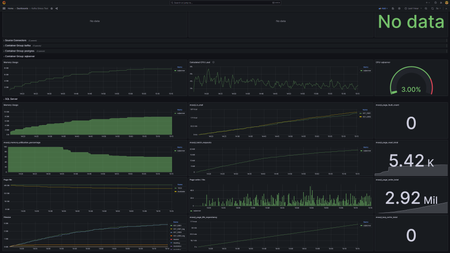
Hi, We are testing performance impact of CDC on SQL Server. There are two identical databases (KST_S001, KST_002) on SQL Server 2017 which is running in linux container. They both have CDC enabled for 180 tables and a data generator that is doing mostly updates on these tables. The data generators are doing around 300k DML operations per minute on each database (600k total). The configuration of CDC jobs is kept default (500 transactions, 5s polling interval for capture job, I think three days retention period on cleaning job) The host machine is Azure Standard_E8-4as_v4: 4 vCPU, 64 GB RAM, 12800 IOPS, 128GB SSD. After 1 hour of running the setup with CDC enabled, the average time of 1000 updates is 73ms. With CDC disabled the average time of 1000 updates after 1 hour is 15ms. I've attached two grafana screenshots showing the difference in metrics when the CDC is disabled versus enabled on these databases. We are trying to understand the underlying mechanism that is contributing to the impact visible from the metrics. Why is memory consumption so much higher? Why do DML operations take longer with CDC enabled? CDC disabled: CDC enabled: Thanks for answers and suggestions. Peter15KViews2likes2CommentsLesson Learned #352: Could not update the metadata that indicates database enabling CDC.
Today, we got a error message while trying to enable cdc for a database using the sqladmin user. Our customer got the error message: Msg 22830, Level 16, State 1, Procedure sys.sp_cdc_enable_db_internal, Line 283 [Batch Start Line 0] Could not update the metadata that indicates database XYZ is enabled for Change Data Capture. The failure occurred when executing the command 'SetCDCTracked(Value = 1)'. The error returned was 33171: 'Only active directory users can impersonate other active directory users.'. Use the action and error to determine the cause of the failure and resubmit the request.9.8KViews0likes0CommentsCapture Changed Data From your Cosmos DB analytical store (Preview)
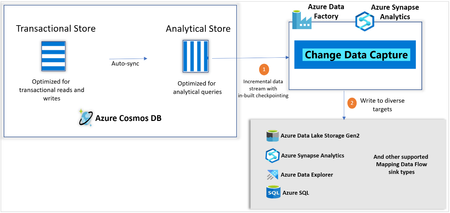
Making it super-easy to create efficient and fast ETL processing the cloud, Azure Data Factory has invested heavily in change data capture features. Today, we are super-excited to announce that Azure Cosmos DB analytics store now supports Change Data Capture (CDC), for Azure Cosmos DB API for NoSQL, and Azure Cosmos DB API for Mongo DB in public preview!8.4KViews2likes1Comment