c#
8 TopicsScaling Write Throughput in Azure Database for MySQL Using Application-Level Sharding
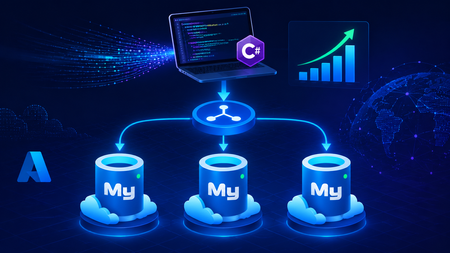
This blog post walks through scaling write throughput in Azure Database for MySQL using application level sharding. It starts with the why behind sharding and then builds a complete C# implementation that spreads writes across three Azure Database for MySQL Flexible Servers. Why Shard in the First Place? This post focuses specifically on scaling write throughput. A well-tuned single primary node can take you remarkably far, and techniques such as indexing strategies, write batching, redo log optimization, and vertical compute scaling each deliver real, lasting value. For many workloads, these optimizations are all you will ever need. That said, as write volume continues to grow, a single primary eventually approaches its practical capacity, and at that point the most durable way to keep scaling is to distribute the write workload across multiple primary instances. This architecture is what we call sharding. When you reach this inflection point, there are two primary patterns for managing multiple write nodes: Proxy or Middleware Layer Sharding: A sharding aware proxy sits between the application and a pool of Azure Database for MySQL instances, routing queries based on a shard key. While this abstracts the underlying topology from the application layer, it introduces an additional, complex component to operate, secure, scale, and patch. Application Layer Sharding: The application itself resolves the destination shard key and determines which of the N Azure Database for MySQL instances should receive a write before ever opening a database connection. Each backend target remains a completely standard, independent Azure Database for MySQL instance. This post explores the second approach. The core appeal of application layer sharding is architectural simplicity: it introduces zero infrastructure overhead and eliminates an extra network hop. Every shard behaves exactly like a standalone instance, meaning your existing backup, restore, monitoring pipelines, and the Azure portal function seamlessly without modification. The explicit tradeoff is that you forgo cross shard joins and distributed transactions in exchange for absolute predictability and control over data access patterns. The Plan We will build a small order management service that distributes its data across three Azure Database for MySQL instances that already exist. The application, written in C# on .NET 8, owns the partitioning logic. The premise: the three servers are already provisioned, the firewalls are configured, the network paths are established, and each server has its own administrative credentials. We are not provisioning infrastructure in this post. we are writing the application code that consumes it. mysql-shard-0.mysql.database.azure.com user: shard0_admin pwd: <secret-0> mysql-shard-1.mysql.database.azure.com user: shard1_admin pwd: <secret-1> mysql-shard-2.mysql.database.azure.com user: shard2_admin pwd: <secret-2> Each server hosts an identical appdb database with the same schema: CREATE TABLE users ( user_id BIGINT NOT NULL PRIMARY KEY, email VARCHAR(255) NOT NULL, created_at DATETIME NOT NULL DEFAULT CURRENT_TIMESTAMP, UNIQUE KEY uq_email (email) ); CREATE TABLE orders ( order_id BIGINT NOT NULL PRIMARY KEY, user_id BIGINT NOT NULL, amount_cents INT NOT NULL, created_at DATETIME NOT NULL DEFAULT CURRENT_TIMESTAMP, KEY ix_user (user_id) ); Two design decisions in this schema warrant explanation: No AUTO_INCREMENT for user_id or order_id. Two shards would otherwise generate the same value 42 independently. Instead, we assign identifiers in the application, using a scheme such as Snowflake, ULID, or UUIDv7. orders carries user_id, and we route by it. This is the single most important rule of sharding: choose a shard key that keeps related data colocated, so that the common queries remain on a single shard. A note on UNIQUE KEY uq_email. A unique index enforces uniqueness only within a single physical shard. Because we route by user_id, two users with different IDs and the same email may land on different shards, and both inserts will succeed. If you require globally unique emails, two options exist: (a) maintain a separate email → user_id lookup table on a single "directory" server and write to it first within an idempotent flow, or (b) shard the users table by a hash of email instead. We retain user_id routing throughout this post because it is the correct choice for orders, and we treat per shard email uniqueness as a best effort guard rather than a hard global invariant. How the Partitioning Works The naive approach to sharding is shard = hash(key) % N. This works until you need to add a fourth server, at which point roughly 75% of your data must move. In any system of meaningful size, that is prohibitively expensive. The established solution is virtual buckets. You hash the key into a large, fixed bucket space (here, 1024), then map buckets to physical shards. When you add capacity, you relocate only buckets; you never rehash the entire dataset. In production, the bucket_to_shard_map typically resides in a system such as Azure App Configuration or etcd, so that you can rebalance without redeploying. For this post, we keep it as an in-memory array seeded at startup, which is straightforward to replace later. The Project ShardingDemo/ ├── ShardingDemo.csproj ├── appsettings.json ├── Models.cs ├── ShardRouter.cs ├── UserRepository.cs └── Program.cs ShardingDemo.csproj <Project Sdk="Microsoft.NET.Sdk"> <PropertyGroup> <OutputType>Exe</OutputType> <TargetFramework>net8.0</TargetFramework> <Nullable>enable</Nullable> <ImplicitUsings>enable</ImplicitUsings> </PropertyGroup> <ItemGroup> <PackageReference Include="MySqlConnector" Version="2.6.0" /> <PackageReference Include="Microsoft.Extensions.Hosting" Version="8.0.0" /> <PackageReference Include="Microsoft.Extensions.Configuration.Binder" Version="8.0.0" /> </ItemGroup> <ItemGroup> <Content Include="appsettings.json" CopyToOutputDirectory="PreserveNewest" /> </ItemGroup> </Project> appsettings.json Shards is an ordered list, and a shard's position in the array is its logical ID. { "Shards": [ { "Host": "mysql-shard-0.mysql.database.azure.com", "Database": "appdb", "User": "shard0_admin", "Password": "REPLACE_ME_0" }, { "Host": "mysql-shard-1.mysql.database.azure.com", "Database": "appdb", "User": "shard1_admin", "Password": "REPLACE_ME_1" }, { "Host": "mysql-shard-2.mysql.database.azure.com", "Database": "appdb", "User": "shard2_admin", "Password": "REPLACE_ME_2" } ] } Models.cs namespace ShardingDemo; public sealed record User(long UserId, string Email, DateTime CreatedAt); public sealed record Order(long OrderId, long UserId, int AmountCents, DateTime CreatedAt); public sealed class ShardConfig { public required string Host { get; init; } public required string Database { get; init; } public required string User { get; init; } public required string Password { get; init; } } ShardRouter.cs using System.Security.Cryptography; using System.Text; using MySqlConnector; namespace ShardingDemo; public sealed class Shard : IAsyncDisposable { public int Id { get; } public MySqlDataSource DataSource { get; } public Shard(int id, ShardConfig cfg) { Id = id; var csb = new MySqlConnectionStringBuilder { Server = cfg.Host, Port = 3306, Database = cfg.Database, UserID = cfg.User, Password = cfg.Password, SslMode = MySqlSslMode.Required, Pooling = true, MinimumPoolSize = 2, MaximumPoolSize = 100, ConnectionTimeout = 10, DefaultCommandTimeout = 30, }; DataSource = new MySqlDataSourceBuilder(csb.ConnectionString).Build(); } public ValueTask DisposeAsync() => DataSource.DisposeAsync(); } public sealed class ShardRouter : IAsyncDisposable { private const int VirtualBuckets = 1024; private readonly IReadOnlyList<Shard> _shards; private readonly int[] _bucketToShardId; public ShardRouter(IEnumerable<ShardConfig> configs) { _shards = configs.Select((c, i) => new Shard(i, c)).ToList(); // Even distribution. Replace with a map loaded from your control plane for live rebalancing. _bucketToShardId = new int[VirtualBuckets]; for (int i = 0; i < VirtualBuckets; i++) _bucketToShardId[i] = i % _shards.Count; } public IReadOnlyList<Shard> AllShards => _shards; private static int BucketFor(long shardKey) { byte[] hash = MD5.HashData(Encoding.ASCII.GetBytes(shardKey.ToString())); // Use the first byte pair as an unsigned value, then map it into the bucket space. int value = (hash[0] << 8) | hash[1]; return value % VirtualBuckets; } public Shard ShardForKey(long shardKey) { int bucket = BucketFor(shardKey); return _shards[_bucketToShardId[bucket]]; } public async ValueTask DisposeAsync() { foreach (var s in _shards) await s.DisposeAsync(); } } UserRepository.cs Observe that every per user method calls ShardForKey(userId), even when inserting an order. This is the colocation rule at work. An order and its owning user always reside on the same shard, so queries for a single user only ever reach one shard. Only the cross-shard aggregate (TotalRevenueCentsAsync) must fan out. using MySqlConnector; namespace ShardingDemo; public sealed class UserRepository { private readonly ShardRouter _router; public UserRepository(ShardRouter router) { _router = router; } public async Task CreateUserAsync(long userId, string email, CancellationToken ct = default) { var shard = _router.ShardForKey(userId); await using var conn = await shard.DataSource.OpenConnectionAsync(ct); await using var cmd = conn.CreateCommand(); cmd.CommandText = "INSERT INTO users (user_id, email) VALUES (@id, Email)"; cmd.Parameters.AddWithValue("@id", userId); cmd.Parameters.AddWithValue("@email", email); await cmd.ExecuteNonQueryAsync(ct); } public async Task<User?> GetUserAsync(long userId, CancellationToken ct = default) { var shard = _router.ShardForKey(userId); await using var conn = await shard.DataSource.OpenConnectionAsync(ct); await using var cmd = conn.CreateCommand(); cmd.CommandText = "SELECT user_id, email, created_at FROM users WHERE user_id = ID"; cmd.Parameters.AddWithValue("@id", userId); await using var reader = await cmd.ExecuteReaderAsync(ct); if (!await reader.ReadAsync(ct)) return null; return new User(reader.GetInt64(0), reader.GetString(1), reader.GetDateTime(2)); } public async Task AddOrderAsync(long orderId, long userId, int amountCents, CancellationToken ct = default) { // Routed by user_id, so orders colocate with their owning user. var shard = _router.ShardForKey(userId); await using var conn = await shard.DataSource.OpenConnectionAsync(ct); await using var cmd = conn.CreateCommand(); cmd.CommandText = """ INSERT INTO orders (order_id, user_id, amount_cents) VALUES (@oid, @uid, amt) """; cmd.Parameters.AddWithValue("@oid", orderId); cmd.Parameters.AddWithValue("@uid", userId); cmd.Parameters.AddWithValue("@amt", amountCents); await cmd.ExecuteNonQueryAsync(ct); } public async Task<IReadOnlyList<Order>> GetOrdersForUserAsync(long userId, CancellationToken ct = default) { var shard = _router.ShardForKey(userId); await using var conn = await shard.DataSource.OpenConnectionAsync(ct); await using var cmd = conn.CreateCommand(); cmd.CommandText = """ SELECT order_id, user_id, amount_cents, created_at FROM orders WHERE user_id = @uid """; cmd.Parameters.AddWithValue("@uid", userId); var list = new List<Order>(); await using var reader = await cmd.ExecuteReaderAsync(ct); while (await reader.ReadAsync(ct)) { list.Add(new Order( reader.GetInt64(0), reader.GetInt64(1), reader.GetInt32(2), reader.GetDateTime(3))); } return list; } /// <summary>Cross shard fanout.</summary> public async Task<long> TotalRevenueCentsAsync(CancellationToken ct = default) { var tasks = _router.AllShards.Select(async shard => { await using var conn = await shard.DataSource.OpenConnectionAsync(ct); await using var cmd = conn.CreateCommand(); cmd.CommandText = "SELECT COALESCE(SUM(amount_cents), 0) FROM orders"; var result = await cmd.ExecuteScalarAsync(ct); return Convert.ToInt64(result); }); var perShard = await Task.WhenAll(tasks); return perShard.Sum(); } } Program.cs using Microsoft.Extensions.Configuration; using Microsoft.Extensions.DependencyInjection; using Microsoft.Extensions.Hosting; using ShardingDemo; var builder = Host.CreateApplicationBuilder(args); // Bind Shards:[] from appsettings.json (override with user-secrets / env vars / Key Vault) var shardConfigs = builder.Configuration .GetSection("Shards") .Get<List<ShardConfig>>() ?? throw new InvalidOperationException("No 'Shards' section configured."); if (shardConfigs.Count == 0) throw new InvalidOperationException("At least one shard must be configured."); builder.Services.AddSingleton(_ => new ShardRouter(shardConfigs)); builder.Services.AddSingleton<UserRepository>(); using var host = builder.Build(); var repo = host.Services.GetRequiredService<UserRepository>(); var router = host.Services.GetRequiredService<ShardRouter>(); (long Id, string Email)[] users = { (1001, "ada@example.com"), (2002, "linus@example.com"), (3003, "grace@example.com"), (4004, "alan@example.com"), }; foreach (var (id, email) in users) { await repo.CreateUserAsync(id, email); Console.WriteLine($"user {id} -> shard {router.ShardForKey(id).Id}"); } await repo.AddOrderAsync(orderId: 9001, userId: 1001, amountCents: 4999); await repo.AddOrderAsync(orderId: 9002, userId: 1001, amountCents: 1299); await repo.AddOrderAsync(orderId: 9003, userId: 2002, amountCents: 8800); Console.WriteLine($"\nAda: {await repo.GetUserAsync(1001)}"); Console.WriteLine($"Ada's orders: {(await repo.GetOrdersForUserAsync(1001)).Count}"); Console.WriteLine($"\nTotal revenue across 3 shards: " + $"${await repo.TotalRevenueCentsAsync() / 100m:F2}"); await router.DisposeAsync(); Tracing One Request End to End Consider GetOrdersForUserAsync(1001): ShardForKey(1001) → MD5("1001") → first two bytes as a number → % 1024 → a bucket in the range 0..1023. bucket % 3 → a physical shard → for example mysql-shard-2.mysql.database.azure.com. The MySqlDataSource provides a pooled, TLS encrypted connection authenticated as shard2_admin. The query runs against shard 2's local ix_user index, with no fan out and at single server speed. Every call with userId = 1001, whether GetUser, AddOrder, or GetOrdersForUser, lands on the same shard. That is why orders JOIN users ON orders.user_id = users.user_id WHERE user_id = 1001 executes within a single shard, with no cross-shard traffic. Conclusion The essential point is this. Once a single primary can no longer absorb your write load, sharding becomes a durable answer, and implementing it at the application layer keeps every part of the system explicit and comprehensible. When write volume or dataset size outgrows a single primary, application layer sharding provides several benefits. N independent Azure Database for MySQL instances, each absorbing 1/N of the write traffic. Queries by user that remain on a single shard and behave like an ordinary, modestly sized database. A bucket map approach that allows you to add a fourth, fifth, or Nth shard later by relocating slices of data rather than rehashing the entire dataset. A failure of one shard that affects 1/N of your users rather than all of them. These benefits come at a genuine cost. You must generate identifiers in the application, global uniqueness requires a secondary lookup table, and aggregate queries fan out across shards. A cross shard write, one that must atomically update data on two different shards, can no longer rely on a single database transaction. Instead it needs an orchestrated sequence of local transactions, where each step carries a compensating action that undoes its effect if a later step fails. None of these are insurmountable. They are simply responsibilities you now assume. Sharding is a deliberate step to take only once a single primary has genuinely exhausted its write headroom. When you reach that point, the implementation in this post is a representative blueprint. Stay Connected We welcome your feedback and invite you to share your experiences or suggestions at AskAzureDBforMySQL@service.microsoft.com Thank you for choosing Azure Database for MySQL!304Views2likes0Comments
C# MIP SDK v1.17.x - AccessViolationException on creation of MIPContext in 64-bit console app
I first logged this on https://stackoverflow.com/questions/79746967/accessviolationexception-when-creating-mipcontext-after-upgrade-to-v1-17 and the responses there have indicated I should raise with Microsoft a a likely bug, but I don't see a clear route to reporting other than here so any response would be appreciated, even if just to direct me to the appropriate reporting location. I've built a simple console app that demonstrates this issue that I'm happy to provide but we're seeing an issue with the 1.17.x version of the C# MIP SDK where an AccessViolationException is being thrown when trying to create an MIP context object. This is for a .Net Framework 4.8 console app built in 64-bit configuration, deployed to a Windows Server 2016 with the latest VC++ redistributable (14.44.35211) installed (both x86 and x64 versions), though we've seen the same on Windows Server 2019 and 2022. When the same app is built in 32-bit and deployed to the same environment the exception doesn't occur. The following code is what I've used to repro the issue: MIP.Initialize(MipComponent.File); var appInfo = new ApplicationInfo { ApplicationId = string.Empty, ApplicationName = string.Empty, ApplicationVersion = string.Empty }; var diagnosticConfiguration = new DiagnosticConfiguration { IsMinimalTelemetryEnabled = true }; var mipConfiguration = new MipConfiguration(appInfo, "mip_data", LogLevel.Info, false, CacheStorageType.InMemory) { DiagnosticOverride = diagnosticConfiguration }; //Expect BadInputException here due to empty properties of appInfo //When built as part of a 64-bit console app this causes AccessViolationException instead MIP.CreateMipContext(mipConfiguration); The AccessViolationException crashes the console app, with the following logged in the Windows Event Log: Framework Version: v4.0.30319 Description: The process was terminated due to an unhandled exception. Exception Info: System.AccessViolationException at Microsoft.InformationProtection.Internal.SdkWrapperPINVOKE.MipContext_Create__SWIG_1(System.Runtime.InteropServices.HandleRef) at Microsoft.InformationProtection.Internal.MipContext.Create(Microsoft.InformationProtection.Internal.MipConfiguration) at Microsoft.InformationProtection.Utils.MIPHelper.CreateMipContext(Microsoft.InformationProtection.MipConfiguration) The issue doesn't occur with the latest 1.16 version (1.16.149) of the SDK but does appear to be in all versions of the 1.17 release. Library: C# MIP SDK v1.17.x Target App: .Net Framework 4.8 console app Deployed OS: Windows Server 2016, 2019 and 2022 (With .Net Framework 4.8 and latest VC++ redist installed)460Views0likes1Comment.NET 10 and Memory: Less Heap, Smarter GC, Faster Apps
As Microsoft steps into the Ignite 2025 era of “AI-first everything” across Azure, Foundry, and cloud-native workloads, .NET quietly got its own big upgrade: .NET 10, a new long-term support (LTS) release and the official successor to .NET 9, supported for three years. The release was celebrated at .NET Conf 2025 in November, where Microsoft shipped .NET 10 alongside Visual Studio 2026 and highlighted performance, memory efficiency and cloud-readiness as core pillars of the platform. A few days later at Microsoft Ignite 2025 in San Francisco, the story zoomed out: AI agents, Azure-hosted workloads, and App Service / Functions all moved forward with first-class .NET 10 support, positioning this runtime as the default foundation for modern cloud and AI solutions. I’m Hazem Ali, a Microsoft MVP, Principal AI & ML Engineer / Architect, and Founder & CEO of Skytells. In this article, I’ll walk through what .NET 10 actually changes in memory, heap, and stack behavior—and why that matters if you’re building high-throughput APIs, AI agents, or cloud-native services in the post-Ignite world. At a high level, .NET 10 does three big things for memory: Allocates more objects on the stack instead of the heap. Teaches the JIT to understand more “hidden” allocations (delegates, spans, small arrays). Leans on a smarter GC mode (DATAS) that adapts heap size to your app instead of your machine. Let’s unpack that in plain language. 1. Heap vs Stack in 60 Seconds Quick mental model: Stack Used for short-lived data. Allocation is extremely fast — often just advancing a pointer. Memory is released automatically when the function returns. Very cache-friendly due to tight, contiguous layout. Heap Used for long-lived or shared objects. Allocation is slower and requires runtime management. Objects are tracked by the garbage collector (GC) in managed runtimes. Creating too many short-lived objects on the heap increases GC pressure, which can lead to pauses and more cache misses. So any time the runtime can say: “This object definitely dies when this method returns” …it can put it on the stack instead, and the GC never has to care. .NET 10’s main memory trick is expanding how often it can safely do that. 2. From Heap to Stack: .NET 10 Gets Serious About Escape Analysis The JIT in .NET 10 spends more effort answering one question: “Does this object escape the current method?” If the answer is “no”, it can be stack-allocated. This is called escape analysis, and .NET 10 pushes it much further than .NET 9. 2.1 Delegates and Lambdas That Don’t Leak Consider this simple closure: int SumTwice(int y) { Func<int, int=""> addY = x => x + y; return DoubleResult(addY, y); static int DoubleResult(Func<int, int=""> f, int v) => f(v) * 2; }</int,></int,> The C# compiler turns that into: A hidden closure class with a field y . A delegate object pointing at a method on that closure. In .NET 9, both of these lived on the heap. In .NET 10, if the JIT can inline DoubleResult and prove the delegate never escapes the method, the delegate object is stack-allocated instead. Benchmarks in the official performance blog show: ~3× faster for this pattern ~70% fewer bytes allocated (only the closure remains on the heap) You don’t change the code; the JIT just stops paying the “lambda tax” as often. 2.2 Small Arrays of Value Types on the Stack .NET 10 adds the ability to stack-allocate small, fixed-size arrays of value types (that don’t hold GC references) when they clearly don’t outlive the method. Example from the official docs: static void Sum() { int[] numbers = { 1, 2, 3 }; int sum = 0; for (int i = 0; i < numbers.Length; i++) sum += numbers[i]; Console.WriteLine(sum); } The runtime article explicitly states that numbers is now stack-allocated in this scenario, because: The size is known at compile time ( int[3] ). The array never escapes the method. Result: no heap allocation for that small buffer, and one less thing for the GC to track. 2.3 Small Arrays of Reference Types Historically, arrays of reference types ( string[] , object[] , etc.) have always been heap allocations in .NET, and this remains true in .NET 10. The GC must track the references stored in these arrays, which makes stack allocation impossible. However, .NET 10 significantly reduces the cost of using small ref-type arrays by improving escape analysis around the patterns that create and consume them. While the array itself still lives on the heap, many of the associated allocations that previously accompanied these patterns can now be eliminated entirely. Example: static void Print() { string[] words = { "Hello", "World!" }; foreach (var s in words) Console.WriteLine(s); } In .NET 9, using a small string[] like this typically incurred extra hidden allocations (iterator objects, closure artifacts, helper frames). In .NET 10, if the JIT can prove the code is fully local and non-escaping: Iterator-related allocations can be removed, Delegate and closure helpers may be stack-allocated or optimized away, The only remaining heap object is the array itself — with no additional GC noise. A similar pattern appears in the performance blog’s benchmark: [Benchmark] public void Test() { Process(new string[] { "a", "b", "c" }); static void Process(string[] inputs) { foreach (string input in inputs) Use(input); static void Use(string s) { } } } On .NET 10, this benchmark shows zero additional heap allocations beyond the array itself, because the runtime eliminates the iterator and closure allocations that .NET 9 would create. The array still resides on the heap, but the overall memory footprint effectively drops to zero for the surrounding pattern. 2.4 Structs, Spans, and “Hidden” References .NET 10’s improved escape analysis can recognize when neither the struct nor its referenced array escapes, enabling the runtime to eliminate unnecessary heap allocations around the pattern. From the runtime docs: struct GCStruct { public int[] arr; } public static int Main() { int[] x = new int[10]; GCStruct y = new GCStruct() { arr = x }; return y.arr[0]; } In .NET 9, x is treated as escaping (through y ) and lives on the heap. In .NET 10, the JIT understands that neither y nor x escapes, so it can stack-allocate the array and associated data. This also benefits types like Span (which is just a struct with a reference and a length) and unlocks more cases where spans and small arrays become stack-only, not heap noise. 3. DATAS: The GC That Adapts to Your App Size On the GC side, the key concept is DATAS – Dynamic Adaptation To Application Sizes. Introduced as an opt-in mode in .NET 8. Enabled by default in .NET 9. By the time you land on .NET 10 LTS, DATAS is the default GC behavior for most apps, with more tuning and guidance from the GC team. 3.1 What DATAS Actually Does Official docs describe DATAS as a GC mode that: Adapts the heap size to the app’s memory requirements, Keeps the heap size roughly proportional to the live (long-lived) data size, Shrinks when the workload gets lighter and grows when it gets heavier. That’s different from classic Server GC, which: Assumes your process “owns” the machine, Grows the heap aggressively if there’s memory available, May end up with very different heap sizes depending on hardware. DATAS is especially targeted at bursty workloads and containerized apps where memory actually costs money and you might have many processes on the same node. 3.2 How You Control It From the GC configuration docs: DATAS can be toggled via: Environment variable: DOTNET_GCDynamicAdaptationMode=1 → enable DOTNET_GCDynamicAdaptationMode=0 → disable runtimeconfig.json : "System.GC.DynamicAdaptationMode": 1 or 0 MSBuild property: 1 But again: starting with .NET 9, it’s on by default, so in .NET 10 you typically only touch this if you have a very specific perf profile where DATAS isn’t a good fit. 4. What This Means for Your Apps Putting it together: You get fewer “silly” allocations for free .NET 10’s runtime now: Stack-allocates more delegates, closures, spans, and small arrays when they don’t escape. Reduces the abstraction penalty of idiomatic C# (LINQ, foreach , lambdas, etc.), so you don’t have to micro-optimize everything yourself. The GC behaves more like “pay for what you really use” With DATAS: Your heap won’t balloon just because you moved your app to a bigger SKU. Memory usage tracks live data instead of “whatever the machine has spare”. You still keep control when needed If you have: A latency-critical, always-hot service on a big dedicated machine, Or you’ve benchmarked and found DATAS not ideal for a specific scenario, …you can still flip DOTNET_GCDynamicAdaptationMode off and go back to classic Server GC semantics. 5. TL;DR for Busy Teams If you’re scanning this on a Friday: Upgrading from .NET 8 → 10 LTS gives you: Tuned DATAS GC as the default, Better JIT escape analysis, Stack-allocation of more small arrays and delegates. You don’t need to rewrite your code to benefit; just recompile and deploy. For critical services, benchmark with and without DATAS (toggle via DOTNET_GCDynamicAdaptationMode ) and pick what fits your SLOs. That’s the memory game-changer in .NET 10: the runtime quietly moves more stuff off the heap, while the GC learns to grow and shrink based on your real live data, not just the machine it’s sitting on.3.1KViews1like1CommentIntroducing AzureImageSDK — A Unified .NET SDK for Azure Image Generation And Captioning
Hello 👋 I'm excited to share something I've been working on — AzureImageSDK — a modern, open-source .NET SDK that brings together Azure AI Foundry's image models (like Stable Image Ultra, Stable Image Core), along with Azure Vision and content moderation APIs and Image Utilities, all in one clean, extensible library. While working with Azure’s image services, I kept hitting the same wall: Each model had its own input structure, parameters, and output format — and there was no unified, async-friendly SDK to handle image generation, visual analysis, and moderation under one roof. So... I built one. AzureImageSDK wraps Azure's powerful image capabilities into a single, async-first C# interface that makes it dead simple to: 🎨 Inferencing Image Models 🧠 Analyze visual content (Image to text) 🚦 Image Utilities — with just a few lines of code. It's fully open-source, designed for extensibility, and ready to support new models the moment they launch. 🔗 GitHub Repo: https://github.com/DrHazemAli/AzureImageSDK Also, I've posted the release announcement on the Azure AI Foundry's GitHub Discussions 👉🏻 feel free to join the conversation there too. The SDK is available on NuGet too. Would love to hear your thoughts, use cases, or feedback!261Views1like0CommentsIntroducing AzureSoraSDK: A Community C# SDK for Azure OpenAI Sora Video Generation
Hello everyone! I’m excited to share the first community release of AzureSoraSDK, a fully-featured .NET 6+ class library that makes it incredibly easy to generate AI-driven videos using Azure’s OpenAI Sora model and even improve your prompts on the fly. 🔗 Repository: https://github.com/DrHazemAli/AzureSoraSDK658Views0likes2Comments
Setting up Code Coverage data in Azure DevOps Pipeline, C# .NET 9
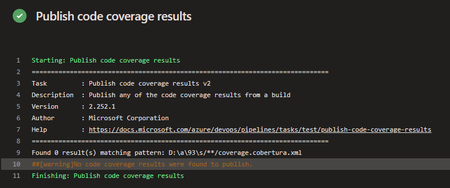
Hello everyone, I would like some assistance with my Azure DevOps pipeline. I am trying to set up Tasks in my Azure DevOps pipeline to collect Code Coverage results, after running UTs using the VsTest Task, to then have a Powershell Task in the Pipeline write to a SQL db the contents of those metrics. The main issue I am encountering is actually finding the published results after the UTs successfully run. I have set up Tasks to publish the results, then find them & then insert, but the publish doesn't seem to actually publish to the directory I specify, or if it does publish, I cannot see where to. Here are the Tasks I currently have set-up. Task to run UTs: steps: - task: VSTest@2 displayName: 'VsTest - testAssemblies' inputs: testAssemblyVer2: | **\$(BuildConfiguration)\*\*test*.dll !**\obj\** runSettingsFile: '$/B3API/Main/B3API.Tests/codecoverage.runsettings' runInParallel: true runTestsInIsolation: false codeCoverageEnabled: true platform: '$(BuildPlatform)' configuration: '$(BuildConfiguration)' failOnMinTestsNotRun: true codecoverage.runsettings file: <?xml version="1.0" encoding="utf-8"?> <RunSettings> <DataCollectionRunSettings> <DataCollectors> <DataCollector friendlyName="Code Coverage"> <Configuration> <Format>cobertura</Format> </Configuration> </DataCollector> </DataCollectors> </DataCollectionRunSettings> </RunSettings> Task to publish results: steps: - task: PublishCodeCoverageResults@2 displayName: 'Publish code coverage results' inputs: summaryFileLocation: '$(System.DefaultWorkingDirectory)/**/coverage.cobertura.xml' pathToSources: '$(System.DefaultWorkingDirectory)/**/coverage' Task to find published file & store into variable: steps: - powershell: | $coverageFile = "$(System.DefaultWorkingDirectory)/**/coverage.cobertura.xml" [xml]$coverageData = Get-Content $coverageFile $coveragePercentage = $coverageData.coverage.@line-rate # Store the coverage data in a variable Write-Host "##vso[task.setvariable variable=coveragePercentage]$coveragePercentage" displayName: 'Store Coverage in variable' The main issue it the Task to publish, it does not publish the results, I think it is due to not finding them in the first place. Thank you for taking the time to read my post, any help would be greatly appreciated, thanks!604Views0likes3Comments
Pet project on SQL Server 2022 platform
Hello, world! I would like to share my pet project on SQL Server 2022 platform. I have created a DWH solution that includes many MS's best practices and interesting features such us: ETL process with data cleansing and MDM that easy expand Documentation CI/CD Functional ETL test Ready analytical templates Time intelligence New & returning customers Cluster customers based on spending volume Product ABC classification Basket analysis Events in progress https://dev.azure.com/zinykov/NorthwindBI Unfortunately in SQL Server 2025 will be no DQS & MDS...150Views0likes0CommentsFire-and-Forget Methods in C# — Best Practices & Pitfalls
When building modern applications, there are often situations where you want to perform tasks in the background without holding up the main flow of your application. This is where “fire-and-forget” methods come into play. In C#, a fire-and-forget method allows you to run a task without awaiting its completion. A common use case is sending a confirmation email after creating a user, but this also brings some limitations, particularly when dealing with scoped services. In this blog, we’ll walk through an example and explain why scoped services, like database contexts or HTTP clients, cannot be accessed in fire-and-forget methods. Why Fire-and-Forget? Fire-and-forget is useful in situations where you don’t need the result of an operation immediately, and it can happen in the background, for example: Sending emails Logging Notification sending Here’s a common scenario where fire-and-forget comes in handy: sending a welcome email after a user is created in the system. public async Task<ServiceResponse<User?>> AddUser(User user) { var response = new ServiceResponse<User?>(); try { // User creation logic (password hashing, saving to DB, etc.) _context.Users.Add(user); await _context.SaveChangesAsync(); // Fire-and-forget task to send an email _ = Task.Run(() => SendUserCreationMail(user)); response.Data = user; response.Message = user.FirstName + " added successfully"; } catch (Exception ex) { // Error handling } return response; } The method SendUserCreationMail sends an email after a user is created, ensuring that the main user creation logic isn’t blocked by the email-sending process. private async Task SendUserCreationMail(int id) { // This will throw an exception be _context is an scoped service var user = await _context.Users.FindAsync(id); var applicationUrl = "https://blogs.shahriyarali.com" string body = $@" <body> <p>Dear {user.FirstName},</p> <p>A new user has been created in the system:</p> <p>Username: {user.Username}</p> <p>Email: {user.Email}</p> <p>Welcome to the system! Please use the provided username and email to log in. You can access the system by clicking on the following link:</p> <p><a href='{applicationUrl}'>{applicationUrl}</a></p> <p>Best regards,</p> <p>Code With Shahri</p> </body>"; var mailParameters = new MailParameters { Subject = $"New User Created - {user.Username}", Body = body, UserEmails = new List<UserEmail> { new() { Name = user.FirstName, Email = user.Email } } }; await _mailSender.SendEmail(mailParameters); } In the code above, the SendUserCreationMail method is executed using Task.Run(). Since it's a fire-and-forget task, we don’t await it, allowing the user creation process to complete without waiting for the email to be sent. The Problem with Scoped Services A major pitfall with fire-and-forget tasks is that you cannot reliably access scoped services (such as DbContext or ILogger) within the task. This is because fire-and-forget tasks continue to run after the HTTP request has been completed, and by that point, scoped services will be disposed of. For example, if _mailSender was scoped services, they could be disposed of before the SendUserCreationMail task completes, leading to exceptions. Why Can’t We Access Scoped Services? Scoped services have a lifecycle tied to the HTTP request in web applications. Once the request ends, these services are disposed of, meaning they are no longer available in any background task that wasn’t awaited within the request lifecycle. In the example above, since the fire-and-forget email sending isn’t awaited, attempting to use scoped services will throw an ObjectDisposedException. To safely access scoped services in a fire-and-forget method, you can leverage IServiceScopeFactory to manually create a service scope, ensuring that the services are available for the task. private async Task SendUserCreationMail(int id) { // Create a service scope. using var scope = _serviceScopeFactory.CreateScope(); var _context = scope.ServiceProvider.GetRequiredService<DataContext>(); var user = await _context.Users.FindAsync(id); var applicationUrl = "https://blogs.shahriyarali.com" string body = $@" <body> <p>Dear {user.FirstName},</p> <p>A new user has been created in the system:</p> <p>Username: {user.Username}</p> <p>Email: {user.Email}</p> <p>Welcome to the system! Please use the provided username and email to log in. You can access the system by clicking on the following link:</p> <p><a href='{applicationUrl}'>{applicationUrl}</a></p> <p>Best regards,</p> <p>Code With Shahri</p> </body>"; var mailParameters = new MailParameters { Subject = $"New User Created - {user.Username}", Body = body, UserEmails = new List<UserEmail> { new() { Name = user.FirstName, Email = user.Email } } }; await _mailSender.SendEmail(mailParameters); } Conclusion Fire-and-forget methods in C# are useful for executing background tasks without blocking the main application flow, but they come with their own set of challenges, particularly when working with scoped services. By leveraging techniques like IServiceScopeFactory, you can safely access scoped services in fire-and-forget tasks without risking lifecycle management issues. Whether you're sending emails, logging, or processing notifications, ensuring proper resource management is crucial to prevent errors like ObjectDisposedException. Always weigh the pros and cons of fire-and-forget and consider alternative approaches like background services or message queuing for more robust solutions in larger systems. To explore more on this topic, you can check out the following resources on Microsoft Learn: Task.Run Method Task asynchronous programming model19KViews2likes2Comments