building with copilot
34 TopicsHow to Become a Microsoft Security Copilot Ninja: The Complete Level 400 Training
Learn how to become a Microsoft Security Copilot (Copilot) Ninja! This blog will walk you through the resources you'll need to master and make best use of Microsoft's Security Copilot product!177KViews29likes23CommentsMicrosoft Copilot for Security is now generally available
We are excited to share Copilot for Security is now available for purchase and customers can get started by provisioning capacity to run all Copilot workloads, both for standalone and for those embedded in our security products beginning with Microsoft Defender XDR.Extending Microsoft Copilot for Security Capabilities with Azure Function Apps
Azure Function Apps offer a convenient way to execute functions in a server-less environment. They allow users to write functions in C#, Java, JavaScript, PowerShell, Python and Typescript which can then be called using several trigger options. One of the most common triggers is the HTTP trigger allowing functions to be called like a REST API. This article shows how to build a Copilot for Security API plugin that calls an Azure Function App.10KViews2likes0CommentsMicrosoft Copilot for Security Attains ISO 27001, 27017, and 27018 Certifications
We are thrilled to announce that Microsoft Copilot for Security, the first Generative Artificial Intelligence (GAI) security solution, has earned the prestigious ISO 27001, 27017, and 27018 certifications. Copilot for Security streamlines compliance endeavors by meeting rigorous regulatory standards.Exploring Copilot for Security to Automate Incident Triage
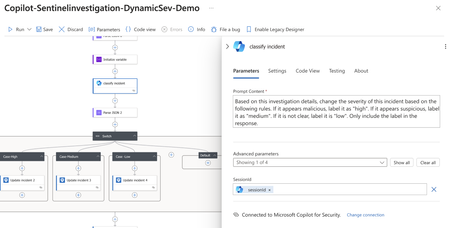
In this blog post, we explore how Copilot for Security enhances security operations through automation. We highlight two main features: Promptbooks, which are sequences of prompts designed for specific tasks, and the LogicApp Connector, which integrates Copilot into existing workflows. The post details a practical example using Microsoft Sentinel, where these tools are applied to triage a security incident efficiently. We describe setting up a playbook in Sentinel, using the Copilot for Security connector to analyze and classify incidents, and how this process aids in faster, more informed decision-making. This demonstration reflects broader trends in security operations, emphasizing the role of generative AI in refining incident response and enhancing overall SOC functionality.Agentic security your way: Build your own Security Copilot agents
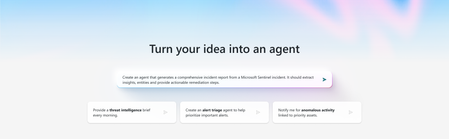
Microsoft Security Copilot is redefining how security and IT teams operate. Today at Microsoft Secure, we’re unveiling powerful updates that put genAI and agent-driven automation at the center of modern defense. In a world where threats move faster than ever, alerts pile up, and resources stay tight, Security Copilot delivers the competitive edge: contextual intelligence, a growing network of agents, and the flexibility to build your own. The announcements focus on three key areas: building your own Security Copilot agents for tailored workflows, expanding the agent ecosystem with new Microsoft and partner solutions, and improving agent quality and performance. These updates build on the agents first introduced in March while giving security and IT teams more flexibility and control. This is the blueprint for the next era of agentic defense, and it starts now. Build your own Security Copilot agents, your way While we already offer a growing catalog of ready-to-use agents built by Microsoft and partners, we know that no two environments are alike. That’s why Security Copilot empowers you to create custom agents your way for tailored workflows – whether you're an analyst with limited coding experience or a developer using your favorite platform – you can build agents that fit your needs. Build agents in the Security Copilot portal Users can now build agents with a simplified, no-code interface in the standalone Security Copilot experience. Simply describe the task or workflow in natural language, and Copilot automatically generates the agent code. You can edit components, add any additional tools, including Sentinel MCP tools from our rich tool catalog, test the agent, optimize its instructions, and publish directly to your tenant. Create dynamic, ready-to-use agents in minutes – without writing any code. Build agents in a preferred MCP server-enabled development environment For teams with experienced developers, you can also use natural language and vibe-coding to build agents in a preferred MCP server-enabled coding platform, such as VS Code using GitHub Copilot. By enabling the Sentinel MCP server, developers can access MCP tools to build, refine, and deploy custom agents directly within their workspace. This approach gives full control over code, tools, and deployment while keeping the process within familiar development platforms. These options empower both technical and non-technical teams to rapidly create, test, and deploy custom Security Copilot agents. Organizations can automate workflows faster, design agents to their unique needs, and improve security and IT operations across the board. Discover new Security Copilot agents Since Security Copilot agents were first introduced in March, we have delivered more than a dozen Microsoft and partner-developed agents that help organizations tackle real challenges in security and IT operations. Analysts using the Conditional Access Optimization Agent in Microsoft Entra have been able to quickly uncover policy gaps, closing an average of 26 gaps per customer in just one month, with 73% of early adopters acting on at least one recommendation. The Phishing Triage Agent in Microsoft Defender has allowed analysts to shift from reactive sifting to proactive resolution, reducing triage time by up to 78%. Read how St Lukes University saves nearly 200 hours monthly in phishing alert triage and creating incident reports in minutes instead of hours. The Phishing Triage Agent is a game changer. It’s saving us nearly 200 hours monthly by autonomously handling and closing thousands of false positive alerts. - Krista Arndt, ACISO, St. Luke’s University Health Network We’re continuing to build on this momentum with new agents designed to address additional security and IT scenarios. The new Access Review Agent in Microsoft Entra tackles a common challenge: reduce access review fatigue and approving access without review. It analyzes ongoing reviews, flags anomalies or unusual access patterns, and delivers actionable guidance in a conversational interface. Reviewers can approve, revoke, or request more details right in Microsoft Teams, helping them focus on the riskiest access, make faster decisions, and strengthen compliance. With innovations like this, we’re not just reducing fatigue—we’re redefining how access governance is done, setting the standard for security agents that adapt to the way people work. Learn more about the Access Review Agent here. And, with the growing range of agentic use cases, the new Microsoft Security Store is your one-stop shop to discover, purchase, and deploy Security Copilot agents built by Microsoft and trusted partners. Find solutions aligned for SOC, IT, privacy, compliance, and governance teams, all in one place. By uniting discovery, deployment, and publishing in a single experience, Security Store powers a thriving ecosystem that gives your team a unique advantage: access to an ever-expanding range of agent capabilities that evolve as fast as the challenges they face. In addition to helping customers find the right solutions, Security Store also enables partners to bring their innovations to market. Partners can build and publish Security Copilot agents and SaaS solutions to grow their business and reach new customers. Today, we are announcing 30 new partner-built agents as well as 50 partner SaaS solutions in the Security Store. The launch of 30 new partner-built agents brings forward solutions like: A Forensic Agent by glueckkanja AG delivers deep-dive analysis of Defender XDR incidents to accelerate investigations, while their Privileged Admin Watchdog Agent helps enforce zero standing privilege principles by getting rid of persistent admin identities. These innovations, along with their other 6 agents in the Security Store today, demonstrate how glueckkanja AG is empowering organizations to tackle a wide range of security and IT challenges. 3 agents from adaQuest focused on automating investigation and response to focus security teams on what matters. A Ransomware Kill Chain Investigator Agent by adaQuest automates ransomware triage, an Entity Guard Investigator Agent by adaQuest investigates Defender incidents, and an Admin Guard Insight Agent analyzes administrative activity, detects anomalies, evaluates risk exposure and compliance, offering actionable insights to improve administrative security posture. An Identity Workload ID Agent by Invoke empowers identity administrators and security teams to manage and secure Workload Identities in Microsoft Entra, helping to reduce risk, strengthen compliance, provide more control over identity sprawl. To learn more about all new partner-built agents as well as partner SaaS offerings, read the blog or head to the Microsoft Security Store. Smarter, faster Security Copilot agents High-quality LLM instructions are critical to agent performance, yet manually fine-tuning them is time-consuming and error-prone. We’re excited to introduce tools that help improve custom-built agent quality and performance, starting with autotune instruction optimization. Autotune eliminates the need for manual tuning by automatically analyzing and refining agent instructions for optimal performance. Simply enable autotune during testing and submit, then receive a detailed results report with suggested prompt changes boost your agent’s AI quality score quickly and effortlessly. This optimization not only delivers better outcomes faster, but it also ensures that every agent in our ecosystem is always evolving - making them smarter, sharper, and more effective over time. But instructions are only part of the picture. To truly empower agents, context and data is key. By combining rich security signals from Microsoft Sentinel with advanced AI reasoning, Microsoft is setting a new standard for what agents can achieve—resolving incidents faster, optimizing workflows, and delivering deeper, more actionable insight. Security Copilot leverages a unified foundation of structured, graph, and semantic data from Sentinel to give agents the context they need to connect the dots across your environment. This deep integration transforms what AI can do, enabling agents to reason, adapt, and act with precision at machine speed. Read the Sentinel graph announcement here. Get Started Today With Security Copilot, the power of AI is now in your hands. Deploy ready-to-use agents from Microsoft and partners, or design custom agents built for your environment and workflows. These agents accelerate decision-making, surface critical insights, and let teams focus on strategic security work - turning complexity into clarity and speed. Explore Security Store today to experience how agentic automation is reshaping security operations and unlocking the full potential of your team. Learn more about how to create your own agents. Deep dive into these innovations at Microsoft Secure on Sept. 30, Oct. 1 or on demand. Then, join us at Microsoft Ignite, Nov, 17–21 in San Francisco, CA or online—for more innovations, hands-on labs, and expert connections.6.5KViews1like0CommentsAutomating Phishing Email Triage with Microsoft Security Copilot
This blog details automating phishing email triage using Azure Logic Apps, Azure Function Apps, and Microsoft Security Copilot. Deployable in under 10 minutes, this solution primarily analyzes email intent without relying on traditional indicators of compromise, accurately classifying benign/junk, suspicious, and phishing emails. Benefits include reducing manual workload, improved threat detection, and (optional) integration seamlessly with Microsoft Sentinel – enabling analysts to see Security Copilot analysis within the incident itself. Designed for flexibility and control, this Logic App is a customizable solution that can be self-deployed from GitHub. It helps automate phishing response at scale without requiring deep coding expertise, making it ideal for teams that prefer a more configurable approach and want to tailor workflows to their environment. The solution streamlines response and significantly reduces manual effort. Access the full solution on the Security Copilot Github: GitHub - UserReportedPhishing Solution. For teams looking for a more sophisticated, fully integrated experience, the Security Alert Triage Agent (previously named Phishing Triage Agent) represents the next generation of phishing response. Natively embedded in Microsoft Defender, the agent autonomously triages phishing incidents with minimal setup. It uses advanced LLM-based reasoning to resolve false alarms, enabling analysts to stay focused on real threats. The agent offers step-by-step decision transparency and continuously learns from user feedback. Read the official announcement here. Note: The Phishing Triage Agent has since been expanded and is now called the Security Alert Triage Agent. Learn more at aka.ms/SATA Introduction: Phishing Challenges Continue to Evolve Phishing continues to evolve in both scale and sophistication, but a growing challenge for defenders isn't just stopping phishing, it’s scaling response. Thanks to tools like Outlook’s "Report Phishing" button and increased user awareness, organizations are now flooded with user-reported emails, many of which are ambiguous or benign. This has created a paradox: better detection by users has overwhelmed SOC teams, turning email triage into a manual, rotational task dreaded for its repetitiveness and time cost, often taking over 25 minutes per email to review. Our solution addresses that problem, by automating the triage of user-reported phishing through AI-driven intent analysis. It's not built to replace your secure email gateways or Microsoft Defender for Office 365; those tools have already done their job. This system assumes the email: Slipped past existing filters, Was suspicious enough for a user to escalate, Lacks typical IOCs like malicious domains or attachments. As a former attacker, I spent years crafting high-quality phishing emails to penetrate the defenses of major banks. Effective phishing doesn't rely on obvious IOCs like malicious domains, URLs, or attachments… the infrastructure often appears clean. The danger lies in the intent. This is where Security Copilot’s LLM-based reasoning is critical, analyzing structure, context, tone, and seasonal pretexts to determine whether an email is phishing, suspicious, spam, or legitimate. What makes this novel is that it's the first solution built specifically for the “last mile” of phishing defense, where human suspicion meets automation, and intent is the only signal left to analyze. It transforms noisy inboxes into structured intelligence and empowers analysts to focus only on what truly matters. Solution Overview: How the Logic App Solution Works (and Why It's Different) Core Components: Azure Logic Apps: Orchestrates the entire workflow, from ingestion to analysis, and 100% customizable. Azure Function Apps: Parses and normalizes email data for efficient AI consumption. Microsoft Security Copilot: Performs sophisticated AI-based phishing analysis by understanding email intent and tactics, rather than relying exclusively on predefined malicious indicators. Key Benefits: Rapid Analysis: Processes phishing alerts and, in minutes, delivers comprehensive reports that empower analysts to make faster, more informed triage decisions – compared to manual reviews that can take up to 30 minutes. And, unlike analysts, Security Copilot requires zero sleep! AI-driven Insights: LLM-based analysis is leveraged to generate clear explanations of classifications by assessing behavioral and contextual signals like urgency, seasonal threats, Business Email Compromise (BEC), subtle language clues, and otherwise sophisticated techniques. Most importantly, it identifies benign emails, which are often the bulk of reported emails. Detailed, Actionable Reports: Generates clear, human-readable HTML reports summarizing threats and recommendations for analyst review. Robust Attachment Parsing: Automatically examines attachments like PDFs and Excel documents for malicious content or contextual inconsistencies. Integrated with Microsoft Sentinel: Optional integration with Sentinel ensures central incident tracking and comprehensive threat management. Analysis is attached directly to the incident, saving analysts more time. Customization: Add, move, or replace any element of the Logic App or prompt to fit your specific workflows. Deployment Guide: Quick, Secure, and Reliable Setup The solution provides Azure Resource Manager (ARM) templates for rapid deployment: Prerequisites: Azure Subscription with Contributor access to a resource group. Microsoft Security Copilot enabled. Dedicated Office 365 shared mailbox (e.g., phishing@yourdomain.com) with Mailbox.Read.Shared permissions. (Optional) Microsoft Sentinel workspace. Refer to the up to date deployment instructions on the Security Copilot GitHub page. Technical Architecture & Workflow: The automated workflow operates as follows: Email Ingestion: Monitors the shared mailbox via Office 365 connector. Triggers on new email arrivals every 3 minutes. Assumes that the reported email has arrived as an attachment to a "carrier" email. Determine if the Email Came from Defender/Sentinel: If the email came from Defender, it would have a prepended subject of “Phishing”, if not, it takes the “False” branch. Change as necessary. Initial Email Processing: Exports raw email content from the shared mailbox. Determines if .msg or .eml attachments are in binary format and converts if necessary. Email Parsing via Azure Function App: Extracts data from email content and attachments (URLs, sender info, email body, etc.) and returns a JSON structure. Prepares clean JSON data for AI analysis. This step is required to "prep" the data for LLM analysis due to token limits. Click on the “Parse Email” block to see the output of the Function App for any troubleshooting. You'll also notice a number of JSON keys that are not used but provided for flexibility. Security Copilot Advanced AI Reasoning: Analyzes email content using a comprehensive prompt that evaluates behavioral and seasonal patterns, BEC indicators, attachment context, and social engineering signals. Scores cumulative risk based on structured heuristics without relying solely on known malicious indicators. Returns validated JSON output (some customers are parsing this JSON and performing other action). This is where you would customize the prompt, should you need to add some of your own organizational situations if the Logic App needs to be tuned: JSON Normalization & Error Handling: A “normalization” Azure Function ensures output matches the expected JSON schema. Sometimes LLMs will stray from a strict output structure, this aims to solve that problem. If you add or remove anything from the Parse Email code that alters the structure of the JSON, this and the next block will need to be updated to match your new structure. Detailed HTML Reporting: Generates a detailed HTML report summarizing AI findings, indicators, and recommended actions. Reports are emailed directly to SOC team distribution lists or ticketing systems. Optional Sentinel Integration: Adds the reasoning & output from Security Copilot directly to the incident comments. This is the ideal location for output since the analyst is already in the security.microsoft.com portal. It waits up to 15 minutes for logs to appear, in situations where the user reports before an incident is created. The solution works pretty well out of the box but may require some tuning, give it a test. Here are some examples of the type of Security Copilot reasoning. Benign email detection: Example of phishing email detection: More sophisticated phishing with subtle clues: Enhanced Technical Details & Clarifications Attachment Processing: When multiple email attachments are detected, the Logic App processes each binary-format email sequentially. If PDF or Excel attachments are detected, they are parsed for content and are evaluated appropriately for content and intent. Security Copilot Reliability: The Security Copilot Logic App API call uses an extensive retry policy (10 retries at 10-minute intervals) to ensure reliable AI analysis despite intermittent service latency. If you run out of SCUs in an hour, it will pause until they are refreshed and continue. Sentinel Integration Reliability: Acknowledges inherent Sentinel logging delays (up to 15 minutes). Implements retry logic and explicit manual alerting for unmatched incidents, if the analysis runs before the incident is created. Security Best Practices: Compare the Function & Logic App to your company security policies to ensure compliance. Credentials, API keys, and sensitive details utilize Azure Managed Identities or secure API connections. No secrets are stored in plaintext. Azure Function Apps perform only safe parsing operations; attachments and content are never executed or opened insecurely. Be sure to check out how the Microsoft Defender for Office team is improving detection capabilities as well Microsoft Defender for Office 365's Language AI for Phish: Enhancing Email Security | Microsoft Community Hub.