bec
14 Topics
Build custom email security reports and dashboards with workbooks in Microsoft Sentinel
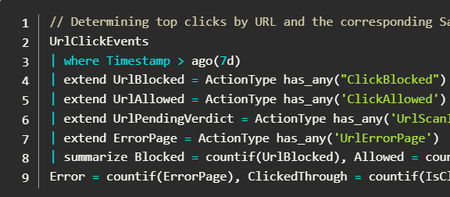
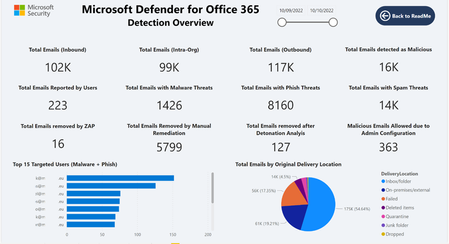
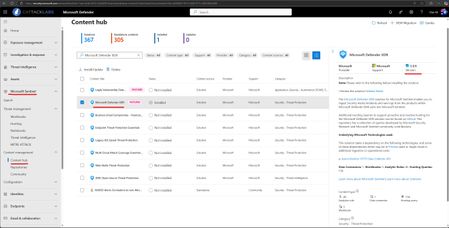
Security teams in both small and large organizations track key metrics to make critical security decisions and identify meaningful trends in their organizations. Defender for Office 365 has rich, built-in reporting capabilities that provide insights into your security posture to support these needs. However, sometimes security teams require custom reporting solutions to create dedicated views, combine multiple data sources, and get additional insights to meet their needs. We previously shared an example of how you can leverage Power BI and the Microsoft Defender XDR Advanced Hunting APIs to build a custom dashboard and shared a template that you can customize and extend. In this blog, we will showcase how you can use workbooks in Microsoft Sentinel to build a custom dashboard for Defender for Office 365. We will also share an example workbook that is now available and can be customized based on your organization’s needs. Why use workbooks in Microsoft Sentinel? There are many potential benefits to using workbooks if you already use Microsoft Sentinel and already stream the hunting data tables for Defender for Office 365: You can choose to store data for a longer period of time via configuring longer retention for tables you use for your workbooks. For example you can store Defender for Office 365 EmailEvents table data for 1 year and build visuals over longer period of time. You can customize your visuals easily based on your organization’s needs. You can configure auto-refresh for the workbook to keep the data shown up to date. You can access ready to use workbook templates and customize them if it's needed. Getting started After you connect your data sources to Microsoft Sentinel, you can visualize and monitor the data using workbooks in Microsoft Sentinel. Ensure that Microsoft Defender XDR is installed in your Microsoft Sentinel instance, so you can use Defender for Office 365 data with a few simple steps. Detection and other Defender for Office 365 insights are already available as raw data in the Microsoft Defender XDR advanced hunting tables: EmailEvents - contains information about all emails EmailAttachmentInfo - contains information about attachments in emails EmailUrlInfo - contains information about URLs in emails EmailPostDeliveryEvents – contains information about Zero-hour auto purge (ZAP) or Manual remediation events UrlClickEvents - contains information about Safe Links clicks from email messages, Microsoft Teams, and Office 365 apps in supported desktop, mobile, and web apps. CloudAppEvents – CloudAppEvents can be used to visualize user reported Phish emails and Admin submissions with Defender for Office 365. The Microsoft Defender XDR solution in Microsoft Sentinel provides a connector to stream the above data continuously into Microsoft Sentinel. Microsoft Sentinel then allows you to create custom workbooks across your data or use existing workbook templates available with packaged solutions or as standalone content from the content hub. How to access the workbook template We are excited to share a new workbook template for Defender for Office 365 detection and data visualization, which is available in the Microsoft Sentinel Content hub. The workbook is part of the Microsoft Defender XDR solution. If you are already using our solution, this update is now available for you. If you are installing the Microsoft Defender XDR solution for the first time, this workbook will be available automatically after installation. After the Microsoft Defender XDR solution is installed (or updated to the latest available version), simply navigate to the Workbooks area in Microsoft Sentinel and on the Templates tab select Microsoft Defender for Office 365 Detection and Insights. Using the “View Template” action loads the workbook. What insights are available in the template? The template has the following sections with each section deep diving into various areas of email security, providing details and insights to security team members: Detection overview Email - Malware Detections Email - Phish Detections Email - Spam Detections Email - Business Compromise Detections (BEC) Email - Sender Authentication based Detections URL Detections and Clicks Email - Top Users/Senders Email - Detection Overrides False Negative/Positive Submissions File - Malware Detections (SharePoint, Teams and OneDrive) Post Delivery Detections and Admin Actions Email - Malware Detections Email - Business Compromise Detections (BEC) Email - Sender Authentication based Detections URL Detections and Clicks False Negative/Positive Submissions File - Malware Detections (SharePoint, Teams and OneDrive) Post Delivery Detections and Admin Actions Can I customize the workbook? Yes, absolutely. Based on the email attributes in the Advanced Hunting schema, you can define more functions and visuals as needed. For example, you can use the DetectionMethods field to analyse detections caught by capabilities like Spoof detections, Safe Attachment, and detection for emails containing URLs extracted from QR codes. You can also bring other data sources into Microsoft Sentinel as tables and use them when creating visuals in the workbook. This sample workbook is a powerful showcase for how you can use the Defender for Office 365 raw detection data to visualize email security detection insights directly in Microsoft Sentinel. It enables organizations to easily create customized dashboards that can help them analyse, track their threat landscape, and respond quickly—based on unique requirements. Do you have questions or feedback about Microsoft Defender for Office 365? Engage with the community and Microsoft experts in the Defender for Office 365 forum. More information Integrate Microsoft Defender XDR with Microsoft Sentinel. Learn more about Microsoft Sentinel workbooks. Microsoft Defender for Office 365 Detection Details Report – Updated Power BI template for Microsoft Sentinel and Log Analytics Learn more about Microsoft Defender XDR.
Attack Simulation Training: Using machine learning to drive more effective simulations
Attack Simulation Training (AST) is an advanced tool that helps security teams improve their performance. It allows teams to run intelligent simulations and consume actionable insights, which can then be used to remediate risks and change behavior. With the addition of intelligent features like predicted compromise rate, and payload recommendations, we look to improve the payload efficacy, and increase the overall quality of simulations within an organization.You may be right after all! Disputing Submission Responses in Microsoft Defender for Office 365
Introduction As a Microsoft MVP (Most Valuable Professional) specializing in SIEM, XDR, and Cloud Security, I have witnessed the rapid evolution of cybersecurity technologies, especially those designed to protect organizations from sophisticated threats targeting email and collaboration tools. Microsoft Defender for Office 365 introduced an LLM-based engine to help better classify phishing emails that, these days, are mostly written using AI anyways about a year ago. Today, I'm excited to spotlight a new place AI has been inserted into a workflow to make it better…a feature that elevates the transparency and responsiveness of threat management: the ability to dispute a submission response directly within Microsoft Defender for Office 365. Understanding the Challenge While the automated and human-driven analyses are robust in Defender for Office 365, there are occasions where the response—be it a verdict of "benign" or "malicious"— doesn’t fully align with the security team's context or threat intelligence. If you are a Microsoft 365 organization with Exchange Online mailboxes, you’re probably familiar with how admins can use the Submissions page in the Microsoft Defender portal to submit messages, URLs, and attachments to Microsoft for analysis. As a recent enhancement, now all the admin submissions use LLM based response for better explainability. In the past, disputing such verdicts required separate support channels, using Community support, or manual email processes, often delaying resolution and impacting the speed of cyber operations. Introducing the Dispute Submission Response Feature With the new dispute submission response feature, Microsoft Defender for Office 365 bridges a critical gap in the incident response workflow. Now, when a security analyst or administrator receives a verdict on a submitted item, they have the option to dispute the response directly within the Microsoft 365 Defender portal. This feature streamlines feedback, allowing teams to quickly flag disagreements and provide additional context for review at the speed of operations. How It Works Upon submission of a suspicious item, Microsoft Defender for Office 365 provides a response indicating its assessment—malicious, benign, or other categorizations. If the security team disagrees with the verdict, they can select the "Dispute" option and submit their rationale, including supporting evidence and threat intelligence. The disputed case is escalated directly to Microsoft’s threat research team for further review, and the team is notified of progress and outcomes. This direct feedback loop not only empowers security teams to advocate for their organization's unique context, but also enables Microsoft to continually refine detection algorithms and verdict accuracy based on real-world input, because security is a team sport. Benefits for Security Operations Faster Resolution: Streamlined dispute submission eliminates the need for external support tickets and escalations, reducing turnaround time for critical cases. Greater Transparency: The feature fosters a collaborative relationship between customers and Microsoft, ensuring that verdicts are not final judgments but points in an ongoing dialogue. Continuous Improvement: Feedback from disputes enhances Microsoft’s threat intelligence and improves detection for all Defender for Office 365 users. Empowerment: Security teams gain a stronger voice in the protection of their environment, reinforcing trust in automated defenses. MVP Insights: Real-World Impact Having worked with global enterprises, I’ve seen how nuanced and context-specific threats can be. Sometimes, what appears benign to one organization may be a targeted attack for another, a slight modification to a URL may catch one email, but not others, as slight changes are made as billions of emails are sent. We are only as good as the consortium. The ability to dispute submission responses creates a vital safety net, ensuring that security teams are not forced to accept verdicts that could expose them to risk. It’s a welcome step toward adaptive, user-driven security operations. Conclusion The dispute submission response feature in Microsoft Defender for Office 365 is one of the most exciting features for me, because it focuses on enabling organizations striving for agility and accuracy in threat management. By enabling direct, contextual feedback, Microsoft empowers security teams to play an active role in shaping their defenses. As an MVP, I encourage all users to leverage this feature, provide detailed feedback, and help drive the future of secure collaboration in the cloud. You may be right after all. _________ This blog has been generously and expertly authored by Microsoft Security MVP, Mona Ghadiri with support of the Microsoft Defender for Office 365 product team. Mona Ghadiri Microsoft Security MVP Learn More and Meet the Author 1) December 16th Ask the Experts Webinar: Microsoft Defender for Office 365 | Ask the Experts: Tips and Tricks (REGISTER HERE) DECEMBER 16, 8 AM US Pacific You’ve watched the latest Microsoft Defender for Office 365 best practices videos and read the blog posts by the esteemed Microsoft Most Valuable Professionals (MVPs). Now bring your toughest questions or unique situations straight to the experts. In this interactive panel discussion, Microsoft MVPs will answer your real-world scenarios, clarify best practices, and highlight practical tips surfaced in the recent series. We’ll kick off with a who’s who and recent blog/video series recap, then dedicate most of the time to your questions across migration, SOC optimization, fine-tuning configuration, Teams protection, and even Microsoft community engagement. Come ready with your questions (or pre-submit here) for the expert Security MVPs on camera, or the Microsoft Defender for Office 365 product team in the chat! REGISTER NOW for 12/16. 2) Additional MVP Tips and Tricks Blogs and Videos in this Four-Part Series: 1. Microsoft Defender for Office 365: Migration & Onboarding by Purav Desai 2. Safeguarding Microsoft Teams with Microsoft Defender for Office 365 by Pierre Thoor 3. (This blog post) You may be right after all! Disputing Submission Responses in Microsoft Defender for Office 365 by Mona Ghadiri 4. Microsoft Defender for Office 365: Fine-Tuning | Real-world Defender for Office 365 tuning that closes real attack paths by Joe Stocker Learn and Engage with the Microsoft Security Community Log in and follow this Microsoft Defender for Office 365 blog and follow/post in the Microsoft Defender for Office 365 discussion space. Follow = Click the heart in the upper right when you're logged in 🤍 Learn more about the Microsoft MVP Program. Join the Microsoft Security Community and be notified of upcoming events, product feedback surveys, and more. Get early access to Microsoft Security products and provide feedback to engineers by joining the Microsoft Customer Connection Community. Join the Microsoft Security Community LinkedInIntroducing the Microsoft Defender for Office 365 ICES vendor ecosystem
In today's digital landscape, the need for comprehensive security measures is more critical than ever, as email continues to be a primary vector for cyberattacks such as phishing and malware. To address this, Microsoft Defender for Office 365 leverages the extensive scale of Microsoft's threat intelligence, which processes trillions of signals daily. By integrating Large Language Models (LLMs) and advanced Natural Language Processing, Defender for Office 365 empowers organizations with AI-driven threat detection, behavioral analytics, and automated responses thus proactively identifying and neutralizing risks before they reach end users. This collaborative defense approach reinforces the principle that security is a team sport, requiring shared intelligence and coordinated action across the ecosystem. We recognize in today’s dynamic cyber threat landscape, defense-in-depth strategy has become a vital approach not only for Microsoft customers but also across the broader Secure Email Gateway (SEG) market. Organizations are increasingly adopting layered security solutions to comply with regulatory requirements, enhanced detection, and ensure robust protection. To address this, we’re announcing the Microsoft Defender for Office 365 ICES Vendor Ecosystem — a unified framework that enables seamless integration with trusted third-party vendors. This ecosystem is designed to eliminate integration friction and deliver: Broader detection coverage through vendor diversity Transparency across Microsoft Defender for Office 365 and partner detections Streamlined SOC workflows through consistent policy enforcement and shared investigation tools Stronger compliance alignment with layered security mandates This partner ecosystem is about creating a cohesive defense fabric that enhances SOC efficiency with Microsoft Defender for Office 365 as the foundation. The ecosystem also provides flexibility, scalability, and preparedness for the complexities of contemporary enterprise security. With this in mind, we are pleased to announce that our trusted ICES security vendors, Darktrace and KnowBe4, have become the first launch partners within our ecosystem. They offer customers a seamless and collaborative defense framework where each solution enhances the strengths of the others. We welcome additional partners soon as we continue to expand this integrated ecosystem. “Our integration with Microsoft gives security teams the tools they need to act faster and more precisely to detect and respond to threats,” said Jill Popelka, CEO of Darktrace. “Together, we’re strengthening defenses where it matters most to our customers —at the inbox.” “I’m incredibly excited at the opportunity afforded by this partnership with Microsoft and the deeper integrations it enables. Leveraging this integration allows us to use our vast quorum of data around email security and human risk in a way that provides the most comprehensive layered security approach available to the market. A complementary defense strategy is mandatory and this integration with Microsoft M365 furthers that vision by combining our capabilities to create comprehensive defense strategies that address the full spectrum of modern cyber threats.” noted Greg Kras, Chief Product Officer @ KnowBe4 Unified Quarantine The core strength of this new ecosystem is the seamless integration between Defender for Office 365 and its ICES partners, through the Unified Quarantine feature. Managing quarantined messages from multiple solutions can often be complex and inefficient. Unified Quarantine streamlines the process by consolidating quarantined items identified by both Defender for Office 365 and third-party (3P) solutions into a single, unified interface, enhancing customer ease and visibility. Administrators can efficiently review, release, or remediate messages through this unified interface, irrespective of the provider that identified the threat. This approach not only optimizes time management but also guarantees uniform policy enforcement and facilitates transparency on detections, resulting in improved operational efficiency and a more coherent user experience. As part of the Unified Quarantine, security admins can also see which provider quarantined the message. Transparency and Insight Across Solutions In environments with multiple email security solutions, transparency is crucial to understanding each vendor's detections. Microsoft Defender for Office 365 offers a unified dashboard that clearly distinguishes between threats stopped by Defender and those identified by third-party solutions, ensuring transparent and fair attribution of protection value. This dashboard provides security teams with a comprehensive view of how each solution contributes to protection, helping to identify overlapping coverage and areas of unique value. This clarity supports more informed decision-making around threat trends, policy optimization, and vendor strategy fostering stronger collaboration between internal teams and external partners. Deeper SOC Investigation Capabilities: Threat Explorer, Advanced Hunting, and Email Entity Page Modern defenders need tools for rapid investigation, root cause analysis, and tactical response. The Defender for Office 365 ecosystem unifies investigative workflows across partner solutions. Within Threat Explorer, security analysts can seamlessly pivot between messages actioned by Microsoft Defender for Office 365 and those flagged by integrated partners. The side-by-side display of verdicts and actions enables quick correlation and pattern recognition. Advanced Hunting brings even greater depth, allowing analysts to craft queries that span both Microsoft Defender for Office 365S and 3P data sources. This holistic view accelerates threat hunting and helps organizations surface novel attack techniques or gaps in coverage. EmailEvents | where Timestamp > ago(7d) //List emails caught by a Third-party solution | where DetectionMethods contains "Thirdparty" | project NetworkMessageId, RecipientEmailAddress, ThreatTypes, DetectionMethods, AdditionalFields, LatestDeliveryLocation On the Email Entity Page, every message surfaces a complete action history, including which product took action and what verdict was assigned. This granular visibility demystifies complex incidents and builds confidence in the layered defense model. Summary As the threat landscape continues to evolve, so must our defenses. While organizations embrace defense-in-depth, fragmented integrations may lead to unintended consequences such as diminished detection capabilities, overlapping controls, and SOC inefficiencies. With the Defender for Office 365 ICES vendor ecosystem, Microsoft is setting a new standard for collaborative, integrated security platforms. By combining proven protection, seamless partnerships, and unified visibility, organizations can embrace defense-in-depth without complexity or compromise. Whether combating phishing, malware, or the next generation of email-borne threats, customers benefit from a defense-in-depth strategy built for agility and efficiency. With hands-off enablement, unified experiences, and unmatched transparency, the Defender for Office 365 ecosystem empowers every organization to stay one step ahead—today and tomorrow. Learn More To learn more about the Microsoft Defender for Office 365 ICES Vendor Ecosystem, please visit https://learn.microsoft.com/defender-office-365/mdo-ices-vendor-ecosystem.