backup center
4 Topics
KB5124010、KB5101684 File History still has issues schedule
Hello everyone, I am sharing the latest updates regarding the persistent File History issue following the recent Windows update rollout (updating from KB5124010 / KB5120249 to KB5127648 / KB5126657). File History timestamp sync bug still broken in KB5124010 - Anyone else? | Microsoft Community Hub Yesterday, I shared detailed tech logs and steps with Mayank Parmar (Editor-in-Chief at Windows Latest). He agreed that this is a major issue and emailed back confirming he’s contacting Microsoft engineers and dev teams to pass this regression on for investigation. This is my feedback hub report: https://aka.ms/AA13uda1 https://aka.ms/AA13vtv3 https://aka.ms/AA13n22w https://aka.ms/AA13ucfz https://aka.ms/AA13urx3 https://aka.ms/AA13ukxv Please click to view, verify, and provide feedback. You may also review the document history. Following the update from Windows 11 KB5124010/Windows 10 KB5120249 to Windows 11 KB5127648/Windows 10 KB5126657, the backup drive can be located and executed within File History; however, the last backup date of the files remains unchanged. If you are encountering the same issue, please submit your feedback here. You may also ask other users to confirm if they are experiencing this behavior and request that they add their feedback to my Feedback Hub submission. We greatly appreciate any insights or relevant diagnostic logs provided by affected users to help us aggregate data for the engineering team.12Views0likes0CommentsProtecting Your Data: How to Back up a Virtual Machine in Azure
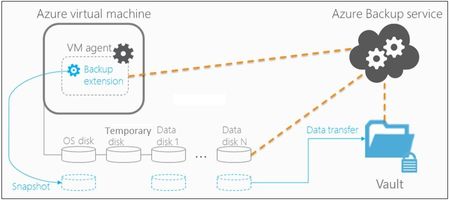
Backing up a virtual machine (VM) in Azure is a critical step in protecting your data. By following the steps outlined in this blog post, you can ensure that your virtual machine is regularly backed up and your data is protected. Nonprofits can use this feature to safeguard their critical data and ensure that they can continue to serve their mission even in the face of a disaster.7.7KViews4likes0CommentsAzure Backup: Best Practices for Secure Data Protection and Restoration
Azure Backup is a powerful and flexible backup solution that can help protect your critical data and applications in a scalable and cost-effective way and can be easily integrated with other Azure services for a comprehensive data protection strategy.12KViews3likes0Comments